
Unity3D学习笔记(十):Physics类和射线
using System.Collections;

using System.Collections.Generic;

using UnityEngine;

public class ForceTest : MonoBehaviour {

    public float forceFactor = ;

    private Rigidbody rigid;

    private float mouse_x;

    // Use this for initialization

    void Start () {

        //力需要一个目标,只有非运动学刚体才会收到力的影响

        rigid = GetComponent<Rigidbody>();

        //力的单位1牛顿,质量0.1KG

        //ForceMode是枚举,

        //rigid.AddForce(Vector3.forward,ForceMode.Impulse);

        //rigid.AddForceAtPosition(Vector3.forward,new Vector3(1,1,1));

        //rigid.AddTorque(Vector3.up);

        //最大旋转速度,限制物体旋转速度,可以修改

        rigid.maxAngularVelocity = ;

    }

    // Update is called once per frame

    void Update () {

        //练习:Dota2的选人面板,人物可以拖拽旋转,速度越来越快,反向拖动,转速大幅降低

        //按下鼠标左键拖动才会接收值

        if (Input.GetMouseButton())

        {

            mouse_x = Input.GetAxis("Mouse X");

        }

        else

        {

            mouse_x = ;

        }

        rigid.AddTorque(Vector3.up * -mouse_x * forceFactor, ForceMode.Force);

        //鼠标当前帧的位置可以获取,和上一帧相减,可以得到一个旋转的偏移量

        //Input.mousePosition

    }

}

ForceMode是枚举

using System.Collections;

using System.Collections.Generic;

using UnityEngine;

public class RaycastTest : MonoBehaviour {

    private Ray ray;

    private RaycastHit hitInfo;

    // Use this for initialization

    void Start () {

        //层级位移运算

        int layerMask = ( << );

        Debug.Log(layerMask);

        layerMask = ( << );

        Debug.Log(layerMask);

        layerMask = ( << ) | ( << );

        Debug.Log(layerMask);

        layerMask = LayerMask.GetMask(new string[] { "Lxm", "Cjy" });

        Debug.Log(layerMask);

        //结果第8位,第9位

        //Ray(Vector3 origin, Vector3 direction);

        //Ray射线是结构体,有两个参数,origin原点,direction方向

        ray = new Ray(transform.position,Vector3.forward);

        //发射射线,物理系统的光线投射,有16种重载

        //Physics.Raycast(ray);

        //射线是没有网格的,是看不到,是物理系统的一部分,是数学计算得来的

        if (Physics.Raycast(ray))

        {

            Debug.Log("射线已射中物体");

        }

        //maxDistance射线的最大距离就是float的最大值,可以手动设置

        //Raycast(Ray ray, float maxDistance);

        //hitinfo:这条射线所碰撞物体的相关信息,储存碰撞物体的信息;

        //Raycast(Ray ray, out RaycastHit hitInfo);

        if (Physics.Raycast(ray, out hitInfo, , layerMask, QueryTriggerInteraction.Ignore))

        {

            Debug.Log(hitInfo.transform.name);

            Debug.DrawLine(transform.position, hitInfo.point,Color.red,);

        }

        //层级遮罩,设置只检查哪一个层级的游戏物体,默认全部检测

        //层级实质相当于枚举项,值是2的幂次方,序号只是层级的索引

        //Raycast(Ray ray, float maxDistance, int layerMask);

        //如果检测第八层,需要填写256

        if (Physics.Raycast(ray, collider.gameObject.tag, ))

        {

            Debug.Log(hitInfo.transform.name);

            Debug.DrawLine(transform.position, hitInfo.point, Color.red, );

        }

        //Raycast(Ray ray, out RaycastHit hitInfo, float maxDistance, int layerMask);

        //Ray ray是射线;RaycastHit hitInfo是碰撞信息;float distance是碰撞距离;int layerMask是碰撞的层

        //RaycastAll穿过多个物体

        RaycastHit[] hitinfos = Physics.RaycastAll(ray,);

        foreach (var item in hitinfos)

        {

            Debug.Log(item.transform.name);

        }

        //不仅发射摄像,还可以发射形状物体

        //Physics.BoxCast();

        //Physics.CapsuleCast();

        //如何检测一个人在地面上而不是在空中(二段跳判定)

        //1、在人物半身添加一个向下的射线,射线刚好接触地面

        //2、在人物头顶添加一个投射盒

        //特点:

        //射线是一帧判定

        //射线没有运行时间

        //位运算符(二进制的加减乘除)

        //&与运算:有零即为零,全一才是一

        //1001010

        //1000111  &

        //-----------

        //1000010

        //|或运算:有一就是一,全零才是零

        //1001010

        //1110001   |

        //-----------

        //1111011

        //~非运算符:一变零,零变一

        //1101010  ~

        //-----------

        //1111011

        //^异或运算:相同即为零,不同即为一

        //1010001

        //1100010   ^

        //-----------

        //0110011

        //<<向左移:所有二进制位向高位进位,空出来的位补零

        //1010<<1

        //-----------

        //10100

        //>>向右移:所有二进制位向低位进位,移出位被丢弃,左边移出的空位或者一律补0

        //1011>>1

        //-----------

        //

    }

    // Update is called once per frame

    void Update () {

       }

}
using System.Collections;

using System.Collections.Generic;

using UnityEngine;

public class BoomScript : MonoBehaviour {

    public float forceFactor = ;

    private void OnCollisionEnter(Collision collision)

    {

        //生成橡胶球,检测碰撞

        Collider[] colliders = Physics.OverlapSphere(transform.position, );

        //剔除自己和没有加刚体的

        foreach (var item in colliders)

        {

            //剔除自己

            if (item.transform == transform)

            {

                continue;

            }

            //判断刚体不等于空,防止与地面碰撞

            //attachedRigidbody,碰撞器附加的刚体,如果碰撞器没有附加刚体返回null。

            if (item.attachedRigidbody != null)

            {

                float distance = Vector3.Distance(transform.position, item.transform.position);

                float forceValue =  / distance * forceFactor;

                Vector3 dir = (item.transform.position - transform.position).normalized;

                Vector3 force = dir * forceValue;

                item.attachedRigidbody.AddForce(force, ForceMode.Impulse);

            }

        }

    }

}
Line Renderer
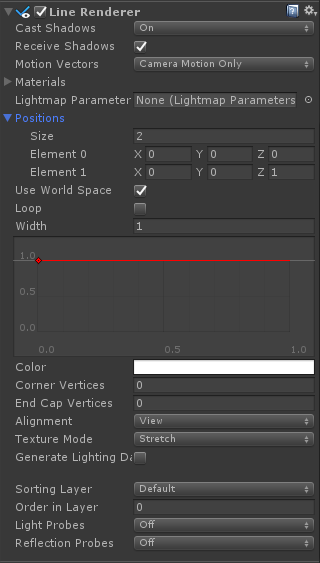

using System.Collections;

using System.Collections.Generic;

using UnityEngine;

public class PlayerFire : MonoBehaviour {

    LineRenderer lineR;

    public Transform fireTrans;

    //方便对layer作调节

    public LayerMask layer;

    Ray ray;

    RaycastHit hit;

       void Start () {

        lineR = GetComponent<LineRenderer>();

    }

       void Update () {

        ray = new Ray(fireTrans.position, fireTrans.up);

        if(Physics.Raycast(ray, out hit, , layer))

        {

            //hit.point

            lineR.positionCount = ;

            lineR.SetPosition(, fireTrans.position);

            lineR.SetPosition(, hit.point);

        }

        else

        {

            lineR.positionCount = ;

        }

       }

}
using System.Collections;

using System.Collections.Generic;

using UnityEngine;

using System;

public class DeleTest : MonoBehaviour

{

    public float width = ;

    public float height = ;

    public event Action buttonClickCallback;

    public event Action<float> OnValueChanged;  // 事件 用来封装委托的

    private float floatValue;

    public float FloatValue

    {

        get

        {

            return floatValue;

        }

        set

        {

            if (value != floatValue)

            {

                // 触发事件

                if (OnValueChanged != null) OnValueChanged(value);

            }

            floatValue = value;

        }

    }

    public float size = ;

    public GUIStyle sliderStyle;

    public GUIStyle thumbStyle;

    void Start()

    {

        FloatValue = ;

    }

    void Update()

    {

    }

    private void OnGUI()

    {

        if (GUI.Button(new Rect((Screen.width - width) / , (Screen.height - height) / , width, height), "开始游戏"))

        {

            if (buttonClickCallback != null) buttonClickCallback();

        }

        //  public static float Slider(Rect position, float value, float size, float start, float end, GUIStyle slider, GUIStyle thumb, bool horiz, int id);

        //value = GUI.Slider(new Rect(10, 10, width, height), value, size, 0, 10, sliderStyle, thumbStyle, true, 0);

    }

}
using System.Collections;

using System.Collections.Generic;

using UnityEngine;

public class Test : MonoBehaviour {

       void Awake () {

        DeleTest del = GetComponent<DeleTest>();

        del.buttonClickCallback += SceneChange;

        del.OnValueChanged += MusicValueChange;

        //del.OnValueChanged();

    }

       void Update () {

       }

    void SceneChange()

    {

        Debug.Log("切换场景啦!!!!");

    }

    void MusicValueChange(float value)

    {

        Debug.Log("音量调节为了:" +value);

    }

}
Unity3D学习笔记(十):Physics类和射线的更多相关文章
- python cookbook第三版学习笔记十:类和对象(一)
类和对象: 我们经常会对打印一个对象来得到对象的某些信息. class pair: def __init__(self,x,y): self.x=x self. ...
- Java基础学习笔记十二 类、抽象类、接口作为方法参数和返回值以及常用API
不同修饰符使用细节 常用来修饰类.方法.变量的修饰符 public 权限修饰符,公共访问, 类,方法,成员变量 protected 权限修饰符,受保护访问, 方法,成员变量 默认什么也不写 也是一种权 ...
- python3.4学习笔记(十四) 网络爬虫实例代码,抓取新浪爱彩双色球开奖数据实例
python3.4学习笔记(十四) 网络爬虫实例代码,抓取新浪爱彩双色球开奖数据实例 新浪爱彩双色球开奖数据URL:http://zst.aicai.com/ssq/openInfo/ 最终输出结果格 ...
- python3.4学习笔记(十二) python正则表达式的使用,使用pyspider匹配输出带.html结尾的URL
python3.4学习笔记(十二) python正则表达式的使用,使用pyspider匹配输出带.html结尾的URL实战例子:使用pyspider匹配输出带.html结尾的URL:@config(a ...
- Go语言学习笔记十: 结构体
Go语言学习笔记十: 结构体 Go语言的结构体语法和C语言类似.而结构体这个概念就类似高级语言Java中的类. 结构体定义 结构体有两个关键字type和struct,中间夹着一个结构体名称.大括号里面 ...
- unity3d学习笔记(一) 第一人称视角实现和倒计时实现
unity3d学习笔记(一) 第一人称视角实现和倒计时实现 1. 第一人称视角 (1)让mainCamera和player(视角对象)同步在一起 因为我们的player是生成的,所以不能把mainCa ...
- (转)Qt Model/View 学习笔记 (七)——Delegate类
Qt Model/View 学习笔记 (七) Delegate 类 概念 与MVC模式不同,model/view结构没有用于与用户交互的完全独立的组件.一般来讲, view负责把数据展示 给用户,也 ...
- (转)Qt Model/View 学习笔记 (五)——View 类
Qt Model/View 学习笔记 (五) View 类 概念 在model/view架构中,view从model中获得数据项然后显示给用户.数据显示的方式不必与model提供的表示方式相同,可以与 ...
- Learning ROS for Robotics Programming Second Edition学习笔记(十) indigo Gazebo rviz slam navigation
中文译著已经出版,详情请参考:http://blog.csdn.net/ZhangRelay/article/category/6506865 moveit是书的最后一章,由于对机械臂完全不知,看不懂 ...
- Typescript 学习笔记五:类
中文网:https://www.tslang.cn/ 官网:http://www.typescriptlang.org/ 目录: Typescript 学习笔记一:介绍.安装.编译 Typescrip ...
随机推荐
- 【JMeter】如何用JMeter进行压力测试
[JMeter]如何用JMeter进行压力测试(调试脚本已再猪猪微信的收藏中进行了收藏哦,名字叫exam-wow.jmx) 一.用badboy录制压测过程形成脚本另存为jmeter格式文档. 二.JM ...
- HTTP头部信息解释分析(详细整理)
这篇文章为大家介绍了HTTP头部信息,中英文对比分析,还是比较全面的,若大家在使用过程中遇到不了解的,可以适当参考下 HTTP 头部解释 1. Accept:告诉WEB服务器自己接受什么介质类型,*/ ...
- visio 的使用方法
1:往visio中添加商务图形和形状的方法.例如饼状图. 文件>形状>商务>图表和图形>绘制图表形状 2:visio 画半弧形,用铅笔 3: visio 画的图形,如果想要和v ...
- [py]类和实例方法/内建方法
内建方法 dir(__builtins__) 类和实例方法对比 class person: def __init__(self, job): self.job = job name = "m ...
- pem转cer
openssl x509 -inform pem -in fullchain.pem -outform der -out fullchain.cer
- Approximate Inference 近似推断
引入 统计推断的核心任务,是观察到一些X(可见变量戒可观察变量)之后计算隐变量Z的后验分布p(Z|X),以及在这个后验分布下计算我们所需要的函数的期望.比如,讲EM时,我们曾计算过对数似然函数在隐变量 ...
- Ants-穷举算法
package java操作excel; import java.util.Scanner; /** * Ants * n只蚂蚁以每秒1cm的速度在长为Lcm的竿子上爬行,当蚂蚁爬到端点就会掉下去,竿 ...
- liunx anacoda 安装pyltp
anacoda 默认的gcc是4.7需要更新 https://anaconda.org/nlesc/gcc 更新之后再安装即可. 报错: /usr/lib64/libstdc++.so.6: vers ...
- VS2010/MFC编程入门之四十(文档、视图和框架:各对象之间的关系)
前面一节中鸡啄米进行了文档.视图和框架的概述,本节主要讲解文档.视图.框架结构中各对象之间的关系. 各个对象之间的关系 文档.视图.框架结构中涉及到的对象主要有:应用程序对象.文档模板对象.文档对象. ...
- zw版【转发·台湾nvp系列Delphi例程】HALCON FastThreshold1
zw版[转发·台湾nvp系列Delphi例程]HALCON FastThreshold1 procedure TForm1.Button1Click(Sender: TObject);var img ...