
在Rust中,cargo使用国内镜像源
一个编程语言依赖包管理的普通问题。
cargo解决得比较优雅。
一,新建$HOME/.cargo/config文件
[source.crates-io]
registry = "https://github.com/rust-lang/crates.io-index"
replace-with = 'ustc'
[source.ustc]
registry = "git://mirrors.ustc.edu.cn/crates.io-index"
二,项目cargo.toml内容
[package]
name = "guessing_game"
version = "0.1.0"
authors = ["aguncn <aguncn@163.com>"]
edition = "2018"

# See more keys and their definitions at https://doc.rust-lang.org/cargo/reference/manifest.html

[dependencies]
rand = "0.5.5"
三,cargo build命令
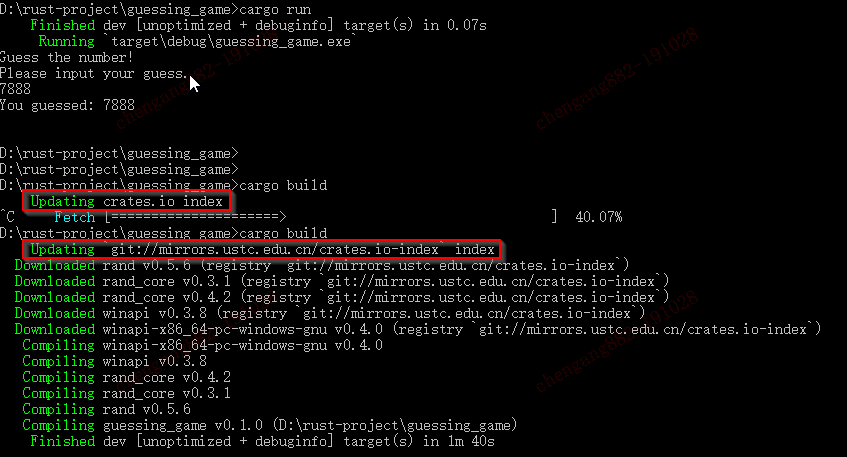
四,更新完成之后,Cargo.lock文件内容
# This file is automatically @generated by Cargo.
# It is not intended for manual editing.
[[package]]
name = "bitflags"
version = "1.2.1"
source = "registry+https://github.com/rust-lang/crates.io-index"

[[package]]
name = "cloudabi"
version = "0.0.3"
source = "registry+https://github.com/rust-lang/crates.io-index"
dependencies = [
 "bitflags 1.2.1 (registry+https://github.com/rust-lang/crates.io-index)",
]

[[package]]
name = "fuchsia-cprng"
version = "0.1.1"
source = "registry+https://github.com/rust-lang/crates.io-index"

[[package]]
name = "guessing_game"
version = "0.1.0"
dependencies = [
 "rand 0.5.6 (registry+https://github.com/rust-lang/crates.io-index)",
]

[[package]]
name = "libc"
version = "0.2.65"
source = "registry+https://github.com/rust-lang/crates.io-index"

[[package]]
name = "rand"
version = "0.5.6"
source = "registry+https://github.com/rust-lang/crates.io-index"
dependencies = [
 "cloudabi 0.0.3 (registry+https://github.com/rust-lang/crates.io-index)",
 "fuchsia-cprng 0.1.1 (registry+https://github.com/rust-lang/crates.io-index)",
 "libc 0.2.65 (registry+https://github.com/rust-lang/crates.io-index)",
 "rand_core 0.3.1 (registry+https://github.com/rust-lang/crates.io-index)",
 "winapi 0.3.8 (registry+https://github.com/rust-lang/crates.io-index)",
]

[[package]]
name = "rand_core"
version = "0.3.1"
source = "registry+https://github.com/rust-lang/crates.io-index"
dependencies = [
 "rand_core 0.4.2 (registry+https://github.com/rust-lang/crates.io-index)",
]

[[package]]
name = "rand_core"
version = "0.4.2"
source = "registry+https://github.com/rust-lang/crates.io-index"

[[package]]
name = "winapi"
version = "0.3.8"
source = "registry+https://github.com/rust-lang/crates.io-index"
dependencies = [
 "winapi-i686-pc-windows-gnu 0.4.0 (registry+https://github.com/rust-lang/crates.io-index)",
 "winapi-x86_64-pc-windows-gnu 0.4.0 (registry+https://github.com/rust-lang/crates.io-index)",
]

[[package]]
name = "winapi-i686-pc-windows-gnu"
version = "0.4.0"
source = "registry+https://github.com/rust-lang/crates.io-index"

[[package]]
name = "winapi-x86_64-pc-windows-gnu"
version = "0.4.0"
source = "registry+https://github.com/rust-lang/crates.io-index"

[metadata]
"checksum bitflags 1.2.1 (registry+https://github.com/rust-lang/crates.io-index)" = "cf1de2fe8c75bc145a2f577add951f8134889b4795d47466a54a5c846d691693"
"checksum cloudabi 0.0.3 (registry+https://github.com/rust-lang/crates.io-index)" = "ddfc5b9aa5d4507acaf872de71051dfd0e309860e88966e1051e462a077aac4f"
"checksum fuchsia-cprng 0.1.1 (registry+https://github.com/rust-lang/crates.io-index)" = "a06f77d526c1a601b7c4cdd98f54b5eaabffc14d5f2f0296febdc7f357c6d3ba"
"checksum libc 0.2.65 (registry+https://github.com/rust-lang/crates.io-index)" = "1a31a0627fdf1f6a39ec0dd577e101440b7db22672c0901fe00a9a6fbb5c24e8"
"checksum rand 0.5.6 (registry+https://github.com/rust-lang/crates.io-index)" = "c618c47cd3ebd209790115ab837de41425723956ad3ce2e6a7f09890947cacb9"
"checksum rand_core 0.3.1 (registry+https://github.com/rust-lang/crates.io-index)" = "7a6fdeb83b075e8266dcc8762c22776f6877a63111121f5f8c7411e5be7eed4b"
"checksum rand_core 0.4.2 (registry+https://github.com/rust-lang/crates.io-index)" = "9c33a3c44ca05fa6f1807d8e6743f3824e8509beca625669633be0acbdf509dc"
"checksum winapi 0.3.8 (registry+https://github.com/rust-lang/crates.io-index)" = "8093091eeb260906a183e6ae1abdba2ef5ef2257a21801128899c3fc699229c6"
"checksum winapi-i686-pc-windows-gnu 0.4.0 (registry+https://github.com/rust-lang/crates.io-index)" = "ac3b87c63620426dd9b991e5ce0329eff545bccbbb34f3be09ff6fb6ab51b7b6"
"checksum winapi-x86_64-pc-windows-gnu 0.4.0 (registry+https://github.com/rust-lang/crates.io-index)" = "712e227841d057c1ee1cd2fb22fa7e5a5461ae8e48fa2ca79ec42cfc1931183f"
五,完了
在Rust中,cargo使用国内镜像源的更多相关文章
- python中pip添加国内镜像源后显著加速下载
python中pip添加国内镜像源后显著加速下载 更换pip源到国内镜像,很多国外的库下载非常慢,添加国内镜像后安装下载速度提升非常明显(亲测有些可以由几十kb加速到几MB) pip国内的一些镜像阿里 ...
- Linux中更换为国内镜像源
推荐使用清华镜像:https://mirrors.tuna.tsinghua.edu.cn/help/ubuntu/ 将下列文本添加到/etc/apt/sources.list文件里 # 默认注释了源 ...
- Composer 更换为国内镜像源(Packagist 镜像)
安装lavavel步骤: 安装composer (需要开启php_openssl扩展,否则报错) (https://getcomposer.org/) 到github下载laravel的最新发行版 ( ...
- Ubuntu16.04下配置pip国内镜像源加速安装【转】
本文转载自:https://blog.csdn.net/yucicheung/article/details/79095742 问题描述 基于国内网速的问题,我们直接pip安装包通常速度非常慢,而且经 ...
- pip-修改为国内镜像源
pip 常用命令 pip install ./downloads/SomePackage-1.0.4.tar.gz pip install http://my.package.repo/SomePac ...
- Jenkins 插件使用国内镜像源-解决插件下载慢的问题
问题 我们在Jenkins里面经常会遇到安装插件很慢,这是由于我们使用的是更新中心镜像默认为国外的源.现在我们可以进行设置为国内镜像源,来解决安装插件慢的问题. 解决办法 安装插件localizati ...
- python pip 安装常用库如何使用国内镜像源
最近通过python安装一些常用库发现下载速度特别慢,而且还会出现无法安装等错误,尝试找了一些国内的镜像源,发现阿里云的速度很快,这里做个记录,并分享给大家. 国内镜像源 阿里云:http://mir ...
- Anaconda配置国内镜像源
1. 为conda配置(清华)镜像源 使用conda进行安装时,访问的是国外的网络,所以下载和安装包时会特别慢.我们需要更换到国内镜像源地址,这里我更换到国内的清华大学地址.(永久添加镜像) Wind ...
- python pip 安装使用国内镜像源
国内镜像源 清华:https://pypi.tuna.tsinghua.edu.cn/simple 阿里云:http://mirrors.aliyun.com/pypi/simple/ 中国科技大学 ...
随机推荐
- gdisk分区及swap分区
gdisk分区及swap分区 gdisk分区,分区表是GPT,支持更大的分区,128G gdisk分区 一,添加硬盘 二,分区 1,安装gdisk [root@oldboy ~]# yum insta ...
- [20191108]内核参数tcp_keepalive与sqlnet.ora expire_time的一些总结.txt
[20191108]内核参数tcp_keepalive与sqlnet.ora expire_time的一些总结.txt --//前几天在做12c DCD SQLNET.EXPIRE_TIME相关测试时 ...
- 2-2 远程管理命令-网卡和IP地址的概念
02.查看或配置网卡信息 序号 命令 对应英文 作用 01 ifconfig configure a network interface 查看/配置计算机当前的网卡配置信息 02 ping ip地址 ...
- P4287 [SHOI2011]双倍回文
题意 考虑对每个节点\(x\)维护\(lastpos_x\)表示\(x\)的所有后缀回文串中第一个\(len\leqslant len_x/2\)并且能和\(x\)最后一个字符匹配的,之后枚举节点,判 ...
- 前端笔记之React(七)redux-saga&Dva&路由
一.redux-saga解决异步 redux-thunk 和 redux-saga 使用redux它们是必选的,二选一,它们两个都可以很好的实现一些复杂情况下redux,本质都是为了解决异步actio ...
- 【MySQL报错】ERROR 1290 (HY000): The MySQL server is running with the --secure-file-priv option so it cannot execute this statement
ERROR 1290 (HY000): The MySQL server is running with the --secure-file-priv option so it cannot exec ...
- postman请求数据库方法(Omysql)
一.github 地址: https://github.com/liyinchigithub/Omysql 二.效果 三.使用方式 如果你电脑已经安装配置 Git.node 环境,可以直接按下面步骤进 ...
- 在 .NET Core 下使用 SixLabors.ImageSharp 操作图片文件(放大、缩小、裁剪、加水印等等)的几个小示例
1. 基础 1.1 将图片的宽度和高度缩小一半 直接贴代码了: <Project Sdk="Microsoft.NET.Sdk"> <PropertyGroup ...
- python3报'ascii' codec can't encode characters in position 0-7: ordinal not in range(128)解决方法
运行前指定export PYTHONIOENCODING为utf-8 如 export PYTHONIOENCODING=utf-8; python main.;y
- 爬取bilibili首页菜单获取li内容
代码: import requests from bs4 import BeautifulSoup def html_save(s): with open('哔哩哔哩.csv','a')as f: f ...