
[笨方法学python]习题51自动化测试笔记
习题51
本节自动化测试部分看不大懂,自己每步都打印出来,帮助理解。(代码标红部分为自己加入调试为打印变量值所用)
tests/tools.py
from nose.tools import *
import re
def pt(resp,contains=None,matches=None,headers=None,status=None):
print 'resp:'.resp
print ' resp.data:',resp.data #个人加入调试,为打印出每次调用变量值
print 'contains:',contains
print 'matches:',matches
print 'headers:',headers
print 'status:',status
print '******************************************************************'
def assert_response(resp, contains=None, matches=None, headers=None, status="200"):
assert status in resp.status, "Expected response %r not in %r" % (status, resp.status)
if status == "200":
assert resp.data, "Response data is empty."
if contains:
assert contains in resp.data, "Response does not contain %r" % contains
if matches:
reg = re.compile(matches)
assert reg.matches(resp.data), "Response does not match %r" % matches
if headers:
assert_equal(resp.headers, headers)
tests/app_tests.py
from nose.tools import *
from bin.app import app
from tests.tools import assert_response
from tests.tools import pt #个人加入调试,为打印出每次调用变量值
def test_index():
# check that we get a 404 on the / URL
resp = app.request("/")
assert_response(resp, status="404")
pt(resp) #个人加入调试,为打印出每次调用变量值
# test our first GET request to /hello
resp = app.request("/hello")
assert_response(resp)
pt(resp) #个人加入调试,为打印出每次调用变量值
# make sure default values work for the form
resp = app.request("/hello", method="POST")
assert_response(resp, contains="Nobody")
pt(resp) #个人加入调试,为打印出每次调用变量值
# test that we get expected values
data = {'name': 'Zed', 'greet': 'Hola'}
resp = app.request("/hello", method="POST", data=data)
assert_response(resp, contains="Zed")
pt(resp) #个人加入调试,为打印出每次调用变量值
test_index() #个人加入调试,为打印出每次调用变量值
我将每一次调用assert_response(),各个变量的值打印出来:(**********表示第一次调用结束)
resp: <Storage {'status': '404 Not Found', 'headers': {'Content-Type': 'text/html'}, 'header_items': [('Content-Type', 'text/html')], 'data': 'not found'}>
resp.data: not found
contains: None
matches: None
headers: None
status: None
********************************************************
resp: <Storage {'status': '200 OK', 'headers': {'Content-Type': 'text/html; charset=utf-8'}, 'header_items': [('Content-Type', 'text/html; charset=utf-8')], 'data': '<h1>Fill Out This Form</h1>\n\n<form action="/hello" method="POST">\n A Greeting: <input type="text" name="greet">\n <br/>\n Your Name: <input type="text" name="name">\n <br/>\n <input type="submit">\n</form>\n'}>
resp.data: <h1>Fill Out This Form</h1>
<form action="/hello" method="POST">
A Greeting: <input type="text" name="greet">
<br/>
Your Name: <input type="text" name="name">
<br/>
<input type="submit">
</form>
contains: None
matches: None
headers: None
status: None
********************************************************
resp: <Storage {'status': '200 OK', 'headers': {'Content-Type': 'text/html; charset=utf-8'}, 'header_items': [('Content-Type', 'text/html; charset=utf-8')], 'data': '\nI just wanted to say <em style="color: green; font-size: 2em;">Hello, Nobody</em>.\n'}>
resp.data:
I just wanted to say <em style="color: green; font-size: 2em;">Hello, Nobody</em>.
contains: None
matches: None
headers: None
status: None
********************************************************
resp: <Storage {'status': '200 OK', 'headers': {'Content-Type': 'text/html; charset=utf-8'}, 'header_items': [('Content-Type', 'text/html; charset=utf-8')], 'data': '\nI just wanted to say <em style="color: green; font-size: 2em;">Hola, Zed</em>.\n'}>
resp.data:
I just wanted to say <em style="color: green; font-size: 2em;">Hola, Zed</em>.
contains: None
matches: None
headers: None
status: None
********************************************************
___________________________________________________
assert断言语句
assert 1==2,‘不等于!’
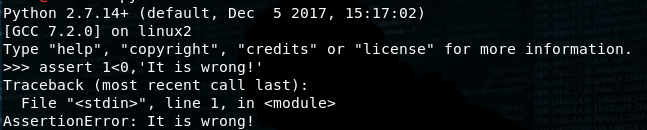
若表达式为真则无回显,若不为真,则抛出异常。
app.request("/"):为发送一个url请求后,值为服务器返回的响应。
[笨方法学python]习题51自动化测试笔记的更多相关文章
- "笨方法学python"
<笨方法学python>.感觉里面的方法还可以.新手可以看看... 本书可以:教会你编程新手三种最重要的技能:读和写.注重细节.发现不同.
- 笨方法学python 22,前期知识点总结
对笨方法学python,前22讲自己的模糊的单词.函数进行梳理总结如下: 单词.函数 含义 print() 打印内容到屏幕 IDLE 是一个纯Python下自带的简洁的集成开发环境 variable ...
- python--笨方法学python 习题52
笨方法学python是一本不错的python入门书籍.书的最后一节是一个web版的游戏程序,以下是程序代码: 1.项目的目录结构如下所示:skeleton\ app.py map.py templat ...
- 笨办法学Python - 习题1: A Good First Program
在windows上安装完Python环境后,开始按照<笨办法学Python>书上介绍的章节进行练习. 习题 1: 第一个程序 第一天主要是介绍了Python中输出函数print的使用方法, ...
- 笨方法学python学习笔记
创建于:2016-02-29 更新于:03-02 python版本:2.7 %r 用来做 debug 比较好,因为它会显示变量的原始数据(raw data),而其它的符号则是用来向用户展示输出的: 每 ...
- 笨方法学python笔记
编程是什么 编程就是通过输出一种语言给计算机"听",命令其去执行相应的操作. 我们称我们给计算机下达的命令称为指令.一般说程序就是有多个指令构成的. 计算机需要使用非常多的电路来实 ...
- [笨方法学Python]ImportError"No module named bin.app"【笔记】
运行nosetests时,出现:ImportError"No module named bin.app" 解决方法: 1.检查路径是否是bin/app.py 2.检查是否创建bin ...
- 《笨方法学Python》加分题28
#!usr/bin/python # -*-coding:utf-8-*- True and True print ("True") False and True print (& ...
- 《笨方法学Python》加分题16
基础部分 # 载入 sys.argv 模块,以获取脚本运行参数. from sys import argv # 将 argv 解包,并将脚本名赋值给变量 script :将参数赋值给变量 filena ...
随机推荐
- 伪类&伪元素
刚开始学习伪类和伪元素的时候,觉得好混乱呀,分不清有什么区别,用的时候也没注意对比.现在总结一下他们的区别吧. w3c中对它们的定义分别为: css伪类用于向某些选择器添加特殊的效果. css伪元素用 ...
- LIBCMTD.lib(exe_winmain.obj) : error LNK2019: 无法解析的外部符号 _WinMain@16,该符号在函数 "int __cdecl invoke_main(void)" (?invoke_main@@YAHXZ) 中被引用
这个问题是没找到程序入口 在网上查这个问题,一般都是说两条: (若是win32程序) 一是在项目属性\CC++\预处理器\预处理器定义\里添加 _WINDOWS 一是在项目属性\链接\系统 里选择 窗 ...
- LINQ查询表达式---------into
LINQ查询表达式---------into into 上下文关键字创建一个临时标识符,以便将 group.join 或 select 子句的结果存储到新的标识符 class Program { pu ...
- mencache的使用二
在这里说的是在C#中的使用,在C#中使用是需要引入驱动的, 可以在网上找,这里推荐一个链接http://sourceforge.net/projects/memcacheddotnet/ 将Memca ...
- Linux可以把vmdk当做磁盘加载进去
VMware虚拟机由于停电,无法启动MAC系统 下午的时候,正在开发ios app,结果停电了.当时还不知道,伴随而来的灾难竟然折腾了好几天,真是心力交瘁. 我是在VMware虚拟机下装的Mac os ...
- 30+简约和平铺的WordPress复古主题
现在复古风格的设计非常流行,你可以快速建立属于自己的复古风格的网站.继续阅读下去,我们将展示给你一些精彩的WordPress复古主题. 多年来,网页设计师们纷纷用3D效果,纹理,噪声,渐变的灯光效果, ...
- kolla-ansible-----快速部署openstack
基本环境 操作系统:CentOS Linux release 7.5.1804 (Core) 内核版本:3.10.0-862.el7.x86_64 docker版本:1.13.1 1.禁用宿主机的 L ...
- 08 Javascript的函数
函数:就是将一些语句进行封装,然后通过调用的形式,执行这些语句. 函数的作用: 将大量重复的语句写在函数里,以后需要这些语句的时候,可以直接调用函数,避免重复劳动. 简化编程,让编程模块化. cons ...
- Unity 通用透明物体漫反射Shader(双面渲染&多光源&光照衰减&法线贴图&凹凸透明度控制)
Shader "MyUnlit/AlphaBlendDiffuse" { Properties { _Color("Color Tint(贴图染色)",Colo ...
- 【fullGC】内存监控工具
什么是fullGC: 从年轻代空间(包括 Eden 和 Survivor 区域)回收内存被称为 Minor GC,对老年代GC称为Major GC,而Full GC是对整个堆来说的,在最近几个版本的J ...