
[笨方法学python]习题51自动化测试笔记
习题51
本节自动化测试部分看不大懂,自己每步都打印出来,帮助理解。(代码标红部分为自己加入调试为打印变量值所用)
tests/tools.py
from nose.tools import *
import re
def pt(resp,contains=None,matches=None,headers=None,status=None):
print 'resp:'.resp
print ' resp.data:',resp.data #个人加入调试,为打印出每次调用变量值
print 'contains:',contains
print 'matches:',matches
print 'headers:',headers
print 'status:',status
print '******************************************************************'
def assert_response(resp, contains=None, matches=None, headers=None, status="200"):
assert status in resp.status, "Expected response %r not in %r" % (status, resp.status)
if status == "200":
assert resp.data, "Response data is empty."
if contains:
assert contains in resp.data, "Response does not contain %r" % contains
if matches:
reg = re.compile(matches)
assert reg.matches(resp.data), "Response does not match %r" % matches
if headers:
assert_equal(resp.headers, headers)
tests/app_tests.py
from nose.tools import *
from bin.app import app
from tests.tools import assert_response
from tests.tools import pt #个人加入调试,为打印出每次调用变量值
def test_index():
# check that we get a 404 on the / URL
resp = app.request("/")
assert_response(resp, status="404")
pt(resp) #个人加入调试,为打印出每次调用变量值
# test our first GET request to /hello
resp = app.request("/hello")
assert_response(resp)
pt(resp) #个人加入调试,为打印出每次调用变量值
# make sure default values work for the form
resp = app.request("/hello", method="POST")
assert_response(resp, contains="Nobody")
pt(resp) #个人加入调试,为打印出每次调用变量值
# test that we get expected values
data = {'name': 'Zed', 'greet': 'Hola'}
resp = app.request("/hello", method="POST", data=data)
assert_response(resp, contains="Zed")
pt(resp) #个人加入调试,为打印出每次调用变量值
test_index() #个人加入调试,为打印出每次调用变量值
我将每一次调用assert_response(),各个变量的值打印出来:(**********表示第一次调用结束)
resp: <Storage {'status': '404 Not Found', 'headers': {'Content-Type': 'text/html'}, 'header_items': [('Content-Type', 'text/html')], 'data': 'not found'}>
resp.data: not found
contains: None
matches: None
headers: None
status: None
********************************************************
resp: <Storage {'status': '200 OK', 'headers': {'Content-Type': 'text/html; charset=utf-8'}, 'header_items': [('Content-Type', 'text/html; charset=utf-8')], 'data': '<h1>Fill Out This Form</h1>\n\n<form action="/hello" method="POST">\n A Greeting: <input type="text" name="greet">\n <br/>\n Your Name: <input type="text" name="name">\n <br/>\n <input type="submit">\n</form>\n'}>
resp.data: <h1>Fill Out This Form</h1>
<form action="/hello" method="POST">
A Greeting: <input type="text" name="greet">
<br/>
Your Name: <input type="text" name="name">
<br/>
<input type="submit">
</form>
contains: None
matches: None
headers: None
status: None
********************************************************
resp: <Storage {'status': '200 OK', 'headers': {'Content-Type': 'text/html; charset=utf-8'}, 'header_items': [('Content-Type', 'text/html; charset=utf-8')], 'data': '\nI just wanted to say <em style="color: green; font-size: 2em;">Hello, Nobody</em>.\n'}>
resp.data:
I just wanted to say <em style="color: green; font-size: 2em;">Hello, Nobody</em>.
contains: None
matches: None
headers: None
status: None
********************************************************
resp: <Storage {'status': '200 OK', 'headers': {'Content-Type': 'text/html; charset=utf-8'}, 'header_items': [('Content-Type', 'text/html; charset=utf-8')], 'data': '\nI just wanted to say <em style="color: green; font-size: 2em;">Hola, Zed</em>.\n'}>
resp.data:
I just wanted to say <em style="color: green; font-size: 2em;">Hola, Zed</em>.
contains: None
matches: None
headers: None
status: None
********************************************************
___________________________________________________
assert断言语句
assert 1==2,‘不等于!’
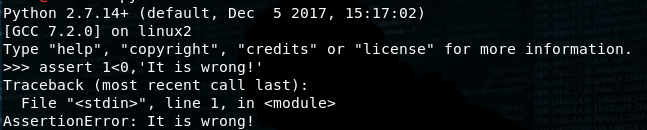
若表达式为真则无回显,若不为真,则抛出异常。
app.request("/"):为发送一个url请求后,值为服务器返回的响应。
[笨方法学python]习题51自动化测试笔记的更多相关文章
- "笨方法学python"
<笨方法学python>.感觉里面的方法还可以.新手可以看看... 本书可以:教会你编程新手三种最重要的技能:读和写.注重细节.发现不同.
- 笨方法学python 22,前期知识点总结
对笨方法学python,前22讲自己的模糊的单词.函数进行梳理总结如下: 单词.函数 含义 print() 打印内容到屏幕 IDLE 是一个纯Python下自带的简洁的集成开发环境 variable ...
- python--笨方法学python 习题52
笨方法学python是一本不错的python入门书籍.书的最后一节是一个web版的游戏程序,以下是程序代码: 1.项目的目录结构如下所示:skeleton\ app.py map.py templat ...
- 笨办法学Python - 习题1: A Good First Program
在windows上安装完Python环境后,开始按照<笨办法学Python>书上介绍的章节进行练习. 习题 1: 第一个程序 第一天主要是介绍了Python中输出函数print的使用方法, ...
- 笨方法学python学习笔记
创建于:2016-02-29 更新于:03-02 python版本:2.7 %r 用来做 debug 比较好,因为它会显示变量的原始数据(raw data),而其它的符号则是用来向用户展示输出的: 每 ...
- 笨方法学python笔记
编程是什么 编程就是通过输出一种语言给计算机"听",命令其去执行相应的操作. 我们称我们给计算机下达的命令称为指令.一般说程序就是有多个指令构成的. 计算机需要使用非常多的电路来实 ...
- [笨方法学Python]ImportError"No module named bin.app"【笔记】
运行nosetests时,出现:ImportError"No module named bin.app" 解决方法: 1.检查路径是否是bin/app.py 2.检查是否创建bin ...
- 《笨方法学Python》加分题28
#!usr/bin/python # -*-coding:utf-8-*- True and True print ("True") False and True print (& ...
- 《笨方法学Python》加分题16
基础部分 # 载入 sys.argv 模块,以获取脚本运行参数. from sys import argv # 将 argv 解包,并将脚本名赋值给变量 script :将参数赋值给变量 filena ...
随机推荐
- 【转】微信退款时候报”请求被中止: 未能创建 SSL/TLS 安全通道“或”The request was aborted: Could not create SSL/TLS secure channel“的错误
退款测试在我本机测试一切都是正常的,但是发布到了服务器就报这样的一个错啦 但是无论百度或者google或者bing,你能够搜索到的结果都很类似,综合起来就是加这样一些代码,如下 ServicePoin ...
- C语言中.h和.c文件解析(转载)
转载:http://www.cnblogs.com/laojie4321/archive/2012/03/30/2425015.html 简单的说其实要理解C文件与头文件(即.h)有什么不同之处, ...
- Caliburn.Micro 自定义View和ViewModel的匹配规则
使用TypeMappingConfiguration类 //Override the default subnamespaces var config = new TypeMappingConfigu ...
- VC 调用 MinGW 生成的dll good
首先,如果dll 中导出了C++的类,那么就不要折腾了.不同的编译器编译出来的C++代码是不保证通用的.如果dll中只是一些C 函数,那么是可以互相调用的. MinGW 生成dll时即使生成了 .a ...
- FrieMonkey获取手机的IMSI等信息
procedure THeaderFooterForm.FormCreate(Sender: TObject); var TelephonyManager: JTelephonyManager; Te ...
- jconsole远程监控logstash agent
在logstash的jvm.options文件末尾添加: -Dcom.sun.management.jmxremote.port=9999 //指定jmx端口-Dcom.sun.managemen ...
- OSGI资料
http://osgi.codeplex.com/ http://www.iopenworks.com/
- [2017.02.21-22] 《Haskell趣学指南 —— Learning You a Haskell for Great Good!》
{- 2017.02.21-22 <Haskell趣学指南 -- Learning You a Haskell for Great Good!> 学习了Haskell的基本语法,并实现了一 ...
- 二、OpenSceneGraph3.4第一个示例
1.在VS2015中创建一个OSG的空解决方案,并新建一个控制台工程,取名为Example 工程结构如下图所示: 2.工程设置 "Example"->属性,打开属性选项卡,需 ...
- JavaScript 一元正号运算符
本文适合JavaScript初学者. 一元正号介绍 一元正号运算符(+)位于其操作数前面,计算其操作数的数值,如果操作数不是一个数值,会尝试将其转换成一个数值. 尽管一元负号也能转换非数值类型,但是一 ...