
Springboot异常处理和自定义错误页面
1.异常来源
要处理程序发生的异常,首先需要知道异常来自哪里?
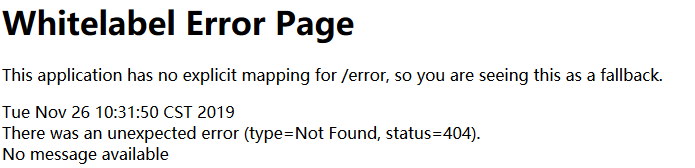
1.前端错误的的请求路径,会使得程序发生4xx错误,最常见的就是404,Springboot默认当发生这种错误的请求路径,pc端响应的页面如下
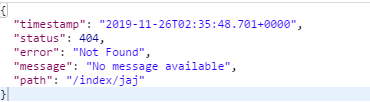
如果是移动端(手机端)将会响应json格式的数据,如下
2.Springboot异常处理原理
为什么我们请求错误的路径,boot会给我们返回一个上面错误页面或者json格式数据呢?原理是怎样的呢?
Springboot项目启动之后,执行有@SpringBootApplication注解的启动类的main方法,通过@EnableAutoConfiguration加载
springbootAutoConfiguration.jar包下的META-INF/spring.factories中的所有配置类(这些配置类加载之后,会将每个配置类里面的组件注入容器然后使用)其中一个自动配置
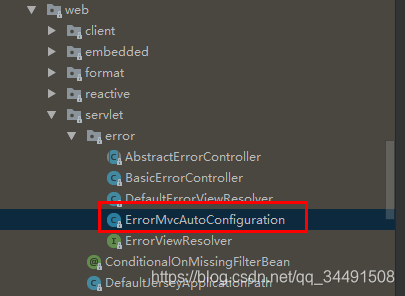
ErrorMvcAutoConfiguration,通过代码可以看到用到了以下四个组件
DefaultErrorAttributes、BasicErrorController、errorPageCustomizer、DefaultErrorViewResolver
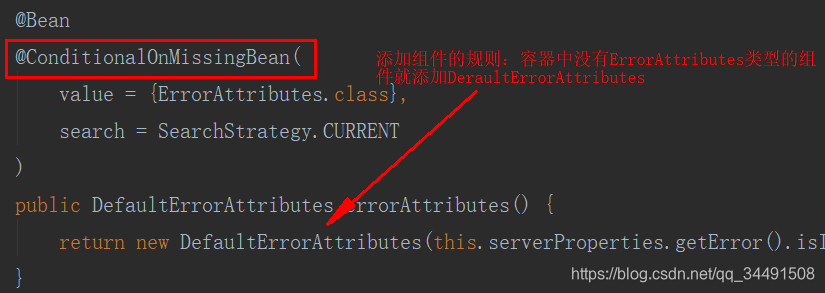
其他三个基本类似,当出现4xx或者5xx等错误时,errorPageCustomizer就会生效,this.properties.getError().getPath())并来到/error请求,核心代码
//errorPageCustomizer
@Value("${error.path:/error}")
    private String path = "/error";
而这个/error请求再由BasicErrorController处理,BasicErrorController是一个Controller,其中里面有两种处理方法,一种是HTML形式,
一种是JSON格式。其中访问者的信息可以从getErrorAttributes从获取。DefaultErrorAttributes是ErrorAttributes的实现类。
关键代码
@RequestMapping(produces = "text/html") //HTML
    public ModelAndView errorHtml(HttpServletRequest request,
            HttpServletResponse response) {
        HttpStatus status = getStatus(request);
        Map<String, Object> model = Collections.unmodifiableMap(getErrorAttributes(
                request, isIncludeStackTrace(request, MediaType.TEXT_HTML)));
        response.setStatus(status.value());
        ModelAndView modelAndView = resolveErrorView(request, response, status, model);
        return (modelAndView == null ? new ModelAndView("error", model) : modelAndView);
    }

    @RequestMapping
    @ResponseBody //JSON
    public ResponseEntity<Map<String, Object>> error(HttpServletRequest request) {
        Map<String, Object> body = getErrorAttributes(request,
                isIncludeStackTrace(request, MediaType.ALL));
        HttpStatus status = getStatus(request);
        return new ResponseEntity<>(body, status);
    }
当为HTML模式时,就会构建一个resolveErrorView类,而resolverErrorView继续调用ErrorViewResolver。关键代码
protected ModelAndView resolveErrorView(HttpServletRequest request,
            HttpServletResponse response, HttpStatus status, Map<String, Object> model) {
        for (ErrorViewResolver resolver : this.errorViewResolvers) {
            ModelAndView modelAndView = resolver.resolveErrorView(request, status, model);
            if (modelAndView != null) {
                return modelAndView;
            }
        }
        return null;
    }
在我们没有做自定义配置时,ErrorViewResolver就会指向DefaultErrorViewResolver。
static {
        //可以用4xx,5xx文件名来统一匹配错误,但是会以精确优先的原则
        Map<Series, String> views = new EnumMap<>(Series.class);
        views.put(Series.CLIENT_ERROR, "4xx");
        views.put(Series.SERVER_ERROR, "5xx");
        SERIES_VIEWS = Collections.unmodifiableMap(views);
    }

 @Override
    public ModelAndView resolveErrorView(HttpServletRequest request, HttpStatus status,
                                         Map<String, Object> model) {
        ModelAndView modelAndView = resolve(String.valueOf(status), model);
        if (modelAndView == null && SERIES_VIEWS.containsKey(status.series())) {
            modelAndView = resolve(SERIES_VIEWS.get(status.series()), model);
        }
        return modelAndView;
    }

    private ModelAndView resolve(String viewName, Map<String, Object> model) {
        //将错误代码拼接到error后
        String errorViewName = "error/" + viewName;
        TemplateAvailabilityProvider provider = this.templateAvailabilityProviders
                .getProvider(errorViewName, this.applicationContext);
        //如果模版引擎可用就让模版引擎进行解析如:Template/error/404
        if (provider != null) {
            return new ModelAndView(errorViewName, model);
        }
        //如果模版引擎不可用,就在静态资源文件夹下找资源文件,error/404
        return resolveResource(errorViewName, model);
    }
3.如何定制错误、异常响应
明白了boot处理异常机制,我们如何自定义异常响应规则呢?
第一种:pc端返回静态错误页面,手机端返回boot默认的json数据
如果项目中有模板引擎(jsp,thmeleaf,freemarker)的情况下,可以将错误页面命名为状态码.html放在模板引擎文件夹下的error文件夹下,
发生异常,不管是前端请求还是后端程序错误会来到对应的错误页面。可以将错误页面命名为4xx和5xx匹配所有的错误,
但是优先返回精确状态码.html页面;并且在模板引擎页面可以获取如下相关信息
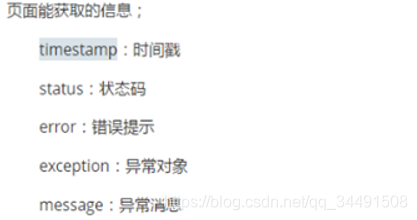
这里模版引擎使用thmeleaf
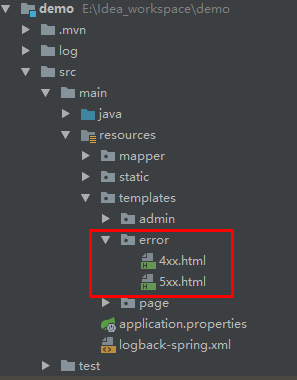
4xx代码
<!DOCTYPE html>
<html lang="en">
<html xmlns:th="http://www.thymeleaf.org">
<head>
    <meta charset="UTF-8">
    <title th:text="'状态码:'+${status}"></title>
</head>
<body>
< img src="../images/404.jpg" style="width: 40%;">
<h1 th:text="'时间:'+${timestamp}"></h1>
<h1 th:text="'错误提示:'+${error}"></h1>
<h1 th:text="'异常对象:'+${exception}"></h1>
<h1 th:text="'异常信息:'+${message}"></h1>
</body>
</html>
5xx代码
<!DOCTYPE html>
<html lang="en">
<html xmlns:th="http://www.thymeleaf.org">
<head>
    <meta charset="UTF-8">
    <title th:text="'状态码:'+${status}"></title>
</head>
<body>
<h2>500</h2>
<h1 th:text="'时间:'+${timestamp}"></h1>
<h1 th:text="'错误提示:'+${error}"></h1>
<h1 th:text="'异常对象:'+${exception}"></h1>
<h1 th:text="'异常信息:'+${message}"></h1>
</body>
</html>
我们请求一个错误的地址路径

我们在程序代码中人为制造一个异常,请求响应
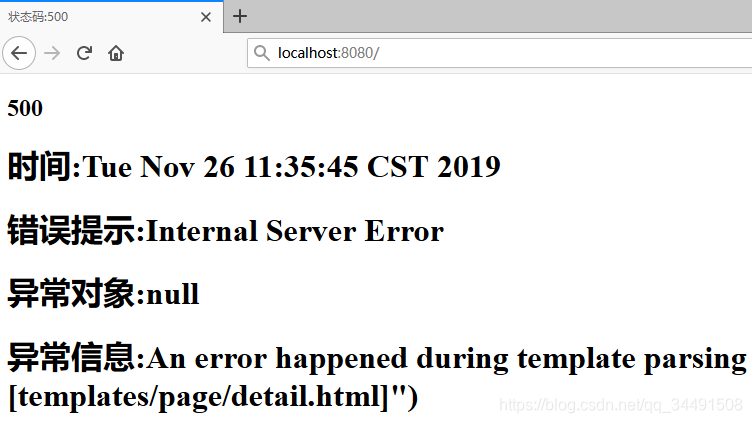
上面是有模版引擎的情况下处理错误以及异常的方式,
如果项目中没有模板引擎,(模板引擎找不到这个错误页面),静态资源文件夹static下找对应的4xx或者5xx或者更精确的错误页面。但是如果不用模板引擎,页面不能获取上面说的页面信息;
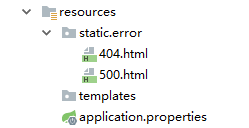
上面两种方式使用手机访问返回都是boot默认的json数据
第二种:pc端返回动态的页面 ,手机端返回动态json数据
上面第一种可以轻松的的处理异常,只需在指定的路径下放静态页面(无模版引擎的情况)或者携带相关信息的页面(有模版引擎),
缺点就是不能在页面携带我们想要展示的数据,比如当我们程序某处放生异常,我们要返回我们自己提示的错误信息。这种异常如果处理呢?
默认情况下,在 Spring Boot 中,所有的异常数据其实就是第一种所展示出来的 5几条数据,这些数据定义在 org.springframework.boot.web.reactive.error.DefaultErrorAttributes 类中,具体定义在 getErrorAttributes 方法中 :核心代码如下
@Override
public Map<String, Object> getErrorAttributes(ServerRequest request,
                boolean includeStackTrace) {
        Map<String, Object> errorAttributes = new LinkedHashMap<>();
        errorAttributes.put("timestamp", new Date());
        errorAttributes.put("path", request.path());
        Throwable error = getError(request);
        HttpStatus errorStatus = determineHttpStatus(error);
        errorAttributes.put("status", errorStatus.value());
        errorAttributes.put("error", errorStatus.getReasonPhrase());
        errorAttributes.put("message", determineMessage(error));
        handleException(errorAttributes, determineException(error), includeStackTrace);
        return errorAttributes;
}
DefaultErrorAttributes 类本身则是在 org.springframework.boot.autoconfigure.web.servlet.error.ErrorMvcAutoConfiguration 异常自动配置类中定义的,
如果开发者没有自己提供一个 ErrorAttributes 的实例的话,那么 Spring Boot 将自动提供一个 ErrorAttributes 的实例,也就是 DefaultErrorAttributes 。
基于此 ,开发者自定义 ErrorAttributes 有两种方式 实现自定义数据:
1.直接实现 ErrorAttributes 接口
2.继承 DefaultErrorAttributes(推荐),因为 DefaultErrorAttributes 中对异常数据的处理已经完成,开发者可以直接使用。
package com.javayihao.top.config;

import org.springframework.boot.web.servlet.error.DefaultErrorAttributes;
import org.springframework.stereotype.Component;
import org.springframework.web.context.request.WebRequest;

import java.util.Map;

@Component
public class MyErrorAttributes  extends DefaultErrorAttributes {
    @Override
    public Map<String, Object> getErrorAttributes(WebRequest webRequest, boolean includeStackTrace) {
        Map<String, Object> map = super.getErrorAttributes(webRequest, includeStackTrace);
        if ((Integer)map.get("status") == 500) {
            //这里根据自己需求设置
            map.put("message", "服务器内部错误!");
        }
        if ((Integer)map.get("status") == 404) {
            map.put("message", "路径不存在!");
        }
        return map;
    }
}
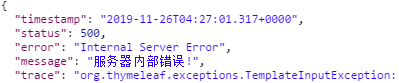
我们服务器访问 错误路径

客户端响应

访问有异常的的控制器

客户端响应
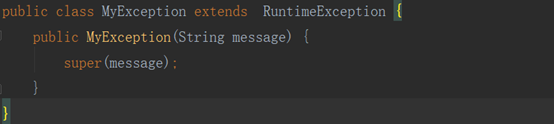
当然上面我可以在程序任意位置抛出异常,使用全局异常处理器处理
自定义异常
全局异常处理器
@ControllerAdvice
public class MyExceptionHandler {
    @ExceptionHandler(MyException.class)
    public String jsonErrorHandler(HttpServletRequest request, Exception e) {
        Map<String, Object> map = new HashMap<>();
        request.setAttribute("java.servlet.error.status_code", 500);
        map.put("code", -1);
        map.put("msg", e.getMessage());
        request.setAttribute("ext", map);
        //转发到error
        return "forward:/error";
    }
}
自定义ErrorAttributes
@Component
public class MyErrorAttributes extends DefaultErrorAttributes {
    //返回的map就是页面或者json能获取的所有字段
    @Override
    public Map<String, Object> getErrorAttributes(WebRequest webRequest, boolean includeStackTrace) {
        Map<String, Object> map = super.getErrorAttributes(webRequest, includeStackTrace);
        //可以额外添加内容
        map.put("company", "javayihao");
        //取出异常处理器中的携带的数据
        Map<String, Object> ext = (Map<String, Object>) webRequest.getAttribute("ext", 0);//传入0代表从request中获取
        map.put("ext", ext);
        return map;
    }
}
第三种:pc端返回动态json数据,手机端也返回动态json数据
这种方式主要是针对前后端分离的项目,我们自定义一个异常,在程序中用于抛出
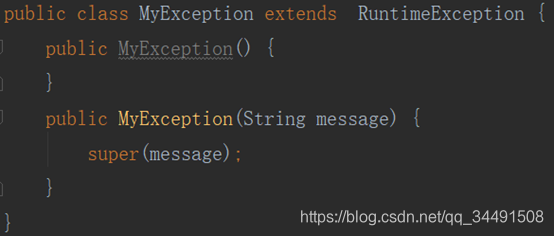
定义一个返回结果对象(也可以不用定义,直接使用map)存储异常信息

定义一个全局异常处理器
/*ControllerAdvice用来配置需要进行异常处理的包和注解类型,
 比如@ControllerAdvice(annotations = RestController.class)
 只有类标有rescontrolle才会被拦截
 */
@ControllerAdvice
public class MyExceptionHandler {
    //自己创建的异常按照自己编写的信息返回即可
    @ExceptionHandler(value = MyException.class)
    @ResponseBody
    public ErrorInfo<String> errorInfo(HttpServletRequest req, MyException e) {
        ErrorInfo<String> r = new ErrorInfo<>();
        r.setCode(ErrorInfo.ERROR);
        r.setMessage(e.getMessage());
        r.setData("测试数据");
        r.setUrl(req.getRequestURL().toString());
        return r;
    }
    //系统异常时返回的异常编号为 -1 ,返回的异常信息为 “系统正在维护”;不能将原始的异常信息返回
    @ExceptionHandler(value = Exception.class)
    @ResponseBody
    public ErrorInfo<String> errorInfo(HttpServletRequest req, Exception e) {
        ErrorInfo<String> r = new ErrorInfo<>();
        r.setCode(ErrorInfo.ERROR);
        r.setMessage("系统维护中");
        return r;
    }
}

Springboot异常处理和自定义错误页面的更多相关文章
- SpringBoot自定义错误页面,SpringBoot 404、500错误提示页面
SpringBoot自定义错误页面,SpringBoot 404.500错误提示页面 SpringBoot 4xx.html.5xx.html错误提示页面 ====================== ...
- springboot自定义错误页面
springboot自定义错误页面 1.加入配置: @Bean public EmbeddedServletContainerCustomizer containerCustomizer() { re ...
- Springboot - 自定义错误页面
Springboot 没找到页面或内部错误时,会访问默认错误页面.这节我们来自定义错误页面. 自定义错误页面 1.在resources 目录下面再建一个 resources 文件夹,里面建一个 err ...
- MVC4 自定义错误页面(转)
一.概述 MVC4框架自带了定义错误页,该页面位于Shared/Error,该页面能够显示系统未能捕获的异常,如何才能使用该页面: 二.使用步骤: 1.配置WebConfig文件,在System.We ...
- MVC4 自定义错误页面(三)
一.概述 MVC4框架自带了定义错误页,该页面位于Shared/Error,该页面能够显示系统未能捕获的异常,如何才能使用该页面: 二.使用步骤: 1.配置WebConfig文件,在System.We ...
- .net自定义错误页面实现升级篇
问题描述: 在上一篇博文 ".net自定义错误页面实现" 中已经介绍了在.net中如何实现自定义错误页面实现(有需要者可以去上一篇博文了解),单纯按照上一篇博文那样设置,能够实现所 ...
- Springboot学习05-自定义错误页面完整分析
Springboot学习06-自定义错误页面完整分析 前言 接着上一篇博客,继续分析Springboot错误页面问题 正文 1-自定义浏览器错误页面(只要将自己的错误页面放在指定的路径下即可) 1-1 ...
- Springboot学习04-默认错误页面加载机制源码分析
Springboot学习04-默认错误页面加载机制源码分析 前沿 希望通过本文的学习,对错误页面的加载机制有这更神的理解 正文 1-Springboot错误页面展示 2-Springboot默认错误处 ...
- MVC自定义错误页面
MVC异常处理主要有三种方案:1.基于HandleErrorAttribute重写OnException方法:2.基于Global.apsx添加Application_Error方法:3.直接在Web ...
随机推荐
- CCF-CSP题解 201803-3 URL映射
题目要求写一个简易的URL规则和URL地址匹配的程序. 说说我的思路. 将URL规则和地址都截成片段用结构体\(<type, str[]>\)存储.对于URL规则,\(type\)为0代表 ...
- python利用setsockopt获得端口重用
server.setsockopt(SOL_SOCKET,SO_REUSEADDR,1) 假如端口呗socket使用过,并且利用socket.close()来关闭连接,但此时端口还没有释放,要经过一个 ...
- 来来来,告诉你一个简单易上手的KPI打分的方子
▋1/3 前言 每个企业都要定期为员工的工作来进行考核,有月度考核.季度考核和年度考核. 这次月度考核,我打算用一种新的方式来执行. 我在我们研发小组内曾分享过能力-意愿四象限图.根据岗位技术能力和工 ...
- Shell(七):文件包含
和其他语言一样,Shell 也可以包含外部脚本(类似python中import的功能).这样可以很方便的封装一些公用的代码作为一个独立的文件. Shell 文件包含的语法格式如下: . filenam ...
- Node.js / Python 日志
一.Node.js 日志 1.原生 Node.js 原生方法其实很简单,就四个: // 输出到 stdout console.log() console.info() = console.log() ...
- Vscode LeetCode 教程
1: 题目选区 商店安装LeetCode 以后, 选择地球确认选区 2: 选择题目 选择Code Now 进行编码 默认路径为$HOME/.leetcode/ 你可以通过更新配置项 leetcode. ...
- How to: Supply Initial Data for the Entity Framework Data Model 如何:为EF数据模型提供初始数据
After you have introduced a data model, you may need to have the application populate the database w ...
- postgreSQL安装教程 Windows
Windows 上安装 PostgreSQL 这里使用 EnterpriseDB 来下载安装,EnterpriseDB 是全球唯一一家提供基于 PostgreSQL 企业级产品与服务的厂商. 下载地址 ...
- DevExpress Skins<2>
Skins DevExpress WinForms控件包括许多现成的绘画主题(或外观),用于更改DevExpress表单和控件的外观.您可以通过运行WinForms演示应用程序并使用外观选择器在可用主 ...
- python面向对象-1
1.面向对象的思想优点 优点: 简化代码 ,构建公共模板 ,扩展性强 思想: 类作为模板 ,对象通过模板实例化对象 ,对象去做事 ,抽象将显示存在的事物使用代码体现 2.三大特性 封装(狭义) : 对 ...