
通过C#代码调用Dynamics 365 Web API执行批量操作
我是微软Dynamics 365 & Power Platform方面的工程师罗勇,也是2015年7月到2018年6月连续三年Dynamics CRM/Business Solutions方面的微软最有价值专家(Microsoft MVP),欢迎关注我的微信公众号 MSFTDynamics365erLuoYong ,回复356或者20190830可方便获取本文,同时可以在第一间得到我发布的最新博文信息,follow me!
之前的文章 使用JS通过Web API执行批量操作,多个操作是一个事务! 讲的是JavaScript的做法,今天我实验了一阵子终于搞定了C#做法。
不多说,上代码,这个代码的用途简单,就是新建一个注释,然后将某个注释的stepid字段值设置为Y,两个操作做成一个事务:
        private static async Task<string> ExecuteBatch(string ODataBaseUrl)

        {

            Guid batchId = Guid.NewGuid();

            Guid changesetId = Guid.NewGuid();

            string returnVal = string.Empty;

            StringBuilder requestBody = new StringBuilder();

            requestBody.Append($"--batch_{batchId}");

            requestBody.Append("\n");

            requestBody.Append($"Content-Type: multipart/mixed;boundary=changeset_{changesetId}");

            requestBody.Append("\n");

            requestBody.Append("\n");

            requestBody.Append($"--changeset_{changesetId}");

            requestBody.Append("\n");

            requestBody.Append("Content-Type: application/http");

            requestBody.Append("\n");

            requestBody.Append("Content-Transfer-Encoding:binary");

            requestBody.Append("\n");

            requestBody.Append("Content-ID: 1");

            requestBody.Append("\n");

            requestBody.Append("\n");

            requestBody.Append($"POST {ODataBaseUrl}annotations HTTP/1.1");

            requestBody.Append("\n");

            requestBody.Append("Content-Type: application/json;type=entry");

            requestBody.Append("\n");

            requestBody.Append("\n");

            JObject jObject = new JObject(

                    new JProperty("subject", "克隆出来的记录"),

                    new JProperty("filename", "MSFTDynamics365erLuoYong.jpg"),

                    new JProperty("filesize", ),

                    new JProperty("documentbody", "/9j/4AAQSkZJRgAB2cFFABRRRQAUUUUAf//Z"

            requestBody.Append("\n");

            requestBody.Append($"--changeset_{changesetId}");

            requestBody.Append("\n");

            requestBody.Append("Content-Type: application/http");

            requestBody.Append("\n");

            requestBody.Append("Content-Transfer-Encoding:binary");

            requestBody.Append("\n");

            requestBody.Append("Content-ID: 2");

            requestBody.Append("\n");

            requestBody.Append("\n");

            requestBody.Append($"PUT {ODataBaseUrl}annotations(4B502B89-4520-E911-B0C6-E05D5152C120)/stepid HTTP/1.1");

            requestBody.Append("\n");

            requestBody.Append("Content-Type: application/json;type=entry");

            requestBody.Append("\n");

            requestBody.Append("\n");

            requestBody.Append("{\"value\":\"Y\"}");

            requestBody.Append("\n");

            requestBody.Append("\n");

            requestBody.Append($"--changeset_{changesetId}--");

            requestBody.Append("\n");

            requestBody.Append("\n");

            requestBody.Append($"--batch_{batchId}--");

            HttpWebRequest request = (HttpWebRequest)HttpWebRequest.Create($"{ODataBaseUrl}$batch");

            request.Credentials = new NetworkCredential(ConfigurationManager.AppSettings["userName"], ConfigurationManager.AppSettings["passWord"]);

            request.Method = "POST";

            request.ContentType = $"multipart/mixed;boundary=batch_{batchId}";

            request.Accept = "application/json";

            request.Headers.Add("OData-MaxVersion", "4.0");

            request.Headers.Add("OData-Version", "4.0");

            byte[] buffer = Encoding.UTF8.GetBytes(requestBody.ToString());

            request.ContentLength = buffer.Length;

            using (Stream stream = await request.GetRequestStreamAsync())

            {

                stream.Write(buffer, , buffer.Length);

                stream.Flush();

            }

            using (WebResponse response = await request.GetResponseAsync())

            {

                var webResponse = response as HttpWebResponse;

                if (webResponse.StatusCode == HttpStatusCode.OK)

                {

                    Stream Answer = response.GetResponseStream();

                    StreamReader _Answer = new StreamReader(Answer);

                    returnVal = _Answer.ReadToEnd();

                }

                else

                {

                    throw new Exception($"Error. {webResponse.StatusCode}");

                }

            }

            return returnVal;

        }
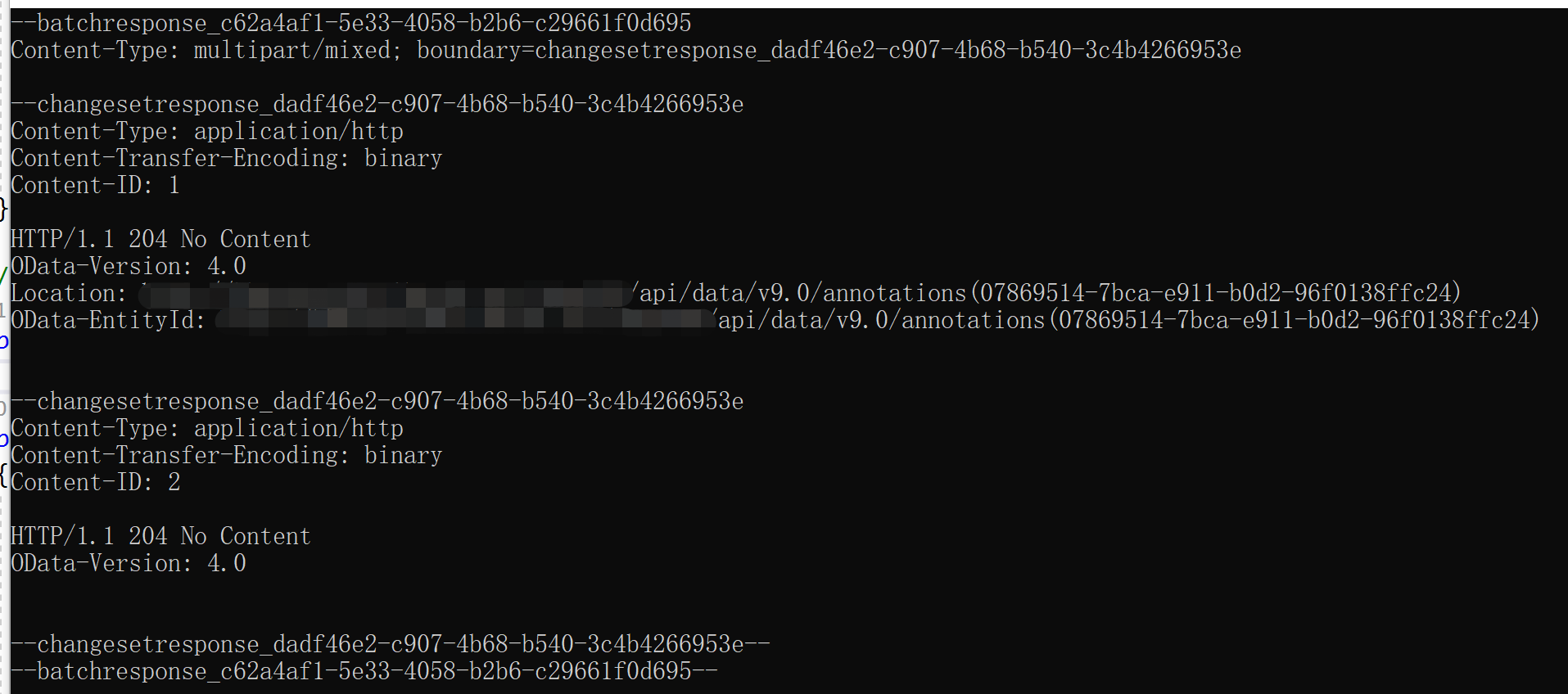
我的执行效果如下,我这里是执行成功HTTP STATUS CODE = 200)后显示了返回内容:
如果改成用 HttpClient 来发起请求,代码如下,个人推荐使用这种:
        private static async Task<string> ExecuteBatch(string ODataBaseUrl)

        {

            Guid batchId = Guid.NewGuid();

            Guid changesetId = Guid.NewGuid();

            string returnVal = string.Empty;

            StringBuilder requestBody = new StringBuilder();

            requestBody.Append($"--batch_{batchId}");

            requestBody.Append("\n");

            requestBody.Append($"Content-Type: multipart/mixed;boundary=changeset_{changesetId}");

            requestBody.Append("\n");

            requestBody.Append("\n");

            requestBody.Append($"--changeset_{changesetId}");

            requestBody.Append("\n");

            requestBody.Append("Content-Type: application/http");

            requestBody.Append("\n");

            requestBody.Append("Content-Transfer-Encoding:binary");

            requestBody.Append("\n");

            requestBody.Append("Content-ID: 1");

            requestBody.Append("\n");

            requestBody.Append("\n");

            requestBody.Append($"POST {ODataBaseUrl}annotations HTTP/1.1");

            requestBody.Append("\n");

            requestBody.Append("Content-Type: application/json;type=entry");

            requestBody.Append("\n");

            requestBody.Append("\n");

            JObject jObject = new JObject(

                    new JProperty("subject", "克隆出来的记录"),

                    new JProperty("filename", "MSFTDynamics365erLuoYong.jpg"),

                    new JProperty("filesize", ),

                    new JProperty("documentbody", "/9j/4AAQSkZJRRRQAUUUUAf//Z"),

                    new JProperty("isdocument", true),

                    new JProperty("mimetype", "image/jpeg"),

                    new JProperty("notetext", "罗勇测试用的"),

                    new JProperty("objectid_account@odata.bind", "/accounts(C543D891-9FBD-E911-B0D1-8280A40FB795)")

                    );

            requestBody.Append(JsonConvert.SerializeObject(jObject));

            requestBody.Append("\n");

            requestBody.Append("\n");

            requestBody.Append($"--changeset_{changesetId}");

            requestBody.Append("\n");

            requestBody.Append("Content-Type: application/http");

            requestBody.Append("\n");

            requestBody.Append("Content-Transfer-Encoding:binary");

            requestBody.Append("\n");

            requestBody.Append("Content-ID: 2");

            requestBody.Append("\n");

            requestBody.Append("\n");

            requestBody.Append($"PUT {ODataBaseUrl}annotations(85412E8C-B08D-E911-B0C9-C8187530CEF1)/stepid HTTP/1.1");

            requestBody.Append("\n");

            requestBody.Append("Content-Type: application/json;type=entry");

            requestBody.Append("\n");

            requestBody.Append("\n");

            requestBody.Append("{\"value\":\"Y\"}");

            requestBody.Append("\n");

            requestBody.Append("\n");

            requestBody.Append($"--changeset_{changesetId}--");

            NetworkCredential credentials = new NetworkCredential(ConfigurationManager.AppSettings["userName"], ConfigurationManager.AppSettings["passWord"]);

            HttpMessageHandler messageHandler = new HttpClientHandler()

            {

                Credentials = credentials

            };

            using (HttpClient httpClient = new HttpClient(messageHandler))

            {

                httpClient.DefaultRequestHeaders.Add("OData-MaxVersion", "4.0");

                httpClient.DefaultRequestHeaders.Add("OData-Version", "4.0");

                httpClient.DefaultRequestHeaders.Add("Accept", "application/json");

                MultipartContent mainContent = new MultipartContent("mixed", $"batch_{batchId.ToString().Replace("\"","")}");

                StringContent sc = new StringContent(requestBody.ToString());

                sc.Headers.Clear();

                sc.Headers.Add("Content-Type", $"multipart/mixed;boundary={changesetId.ToString()}");

                mainContent.Add(sc);

                var response = await httpClient.PostAsync($"{ODataBaseUrl}$batch", mainContent);

                if (response.IsSuccessStatusCode)

                {

                    returnVal = await response.Content.ReadAsStringAsync();

                }

                else

                {

                    var errorMsg = await response.Content.ReadAsStringAsync();

                    throw new Exception(errorMsg);

                }

                return returnVal;

            }

        }
通过C#代码调用Dynamics 365 Web API执行批量操作的更多相关文章
- 使用JS通过Web API执行批量操作,多个操作是一个事务!
关注本人微信和易信公众号: 微软动态CRM专家罗勇 ,回复235或者20161105可方便获取本文,同时可以在第一间得到我发布的最新的博文信息,follow me!我的网站是 www.luoyong. ...
- Dynamics 365 Web Api之基于single-valued navigation property的filter查询
本篇要讲的是dynamics 新版本中web api的一个改进功能,虽然改进的很有限,但至少是改进了. 举个例子,我们现在知道联系人的名字vic,我们想找出客户记录中主要联系人名字为vic的所有客户, ...
- 利用Fiddler修改请求信息通过Web API执行Dynamics 365操作(Action)实例
本人微信和易信公众号: 微软动态CRM专家罗勇 ,回复261或者20170724可方便获取本文,同时可以在第一间得到我发布的最新的博文信息,follow me!我的网站是 www.luoyong.me ...
- 不借助工具在浏览器中通过Web API执行Dynamics 365操作(Action)实例
摘要: 本人微信和易信公众号: 微软动态CRM专家罗勇 ,回复262或者20170727可方便获取本文,同时可以在第一间得到我发布的最新的博文信息,follow me!我的网站是 www.luoyon ...
- Dynamics CRM Web API中的and和or组合的正确方式!
关注本人微信和易信公众号: 微软动态CRM专家罗勇 ,回复243或者20170111可方便获取本文,同时可以在第一间得到我发布的最新的博文信息,follow me!我的网站是 www.luoyong. ...
- MVC项目实践,在三层架构下实现SportsStore-09,ASP.NET MVC调用ASP.NET Web API的查询服务
ASP.NET Web API和WCF都体现了REST软件架构风格.在REST中,把一切数据视为资源,所以也是一种面向资源的架构风格.所有的资源都可以通过URI来唯一标识,通过对资源的HTTP操作(G ...
- Dynamics CRM2016 Web Api之分页查询
在dynamics crm web api还没出现前,我们是通过fetchxml来实现的,当然这种方式依旧可行,那既然web api来了我们就拥抱新的方式. web api中我们通过指定查询的条数来实 ...
- 延迟调用或多次调用第三方的Web API服务
当我们调用第三方的Web API服务的时候,不一定每次都是成功的.这时候,我们可能会再多尝试几次,也有可能延迟一段时间再去尝试调用服务. Task的静态方法Delay允许我们延迟执行某个Task,此方 ...
- 利用Fiddler修改请求信息通过Web API执行操作(Action)实例
本人微信和易信公众号: 微软动态CRM专家罗勇 ,回复261或者20170724可方便获取本文,同时可以在第一间得到我发布的最新的博文信息,follow me!我的网站是 www.luoyong.me ...
随机推荐
- 使用docker运行dotnetcore站点
使用docker运行netcore站点 1.新建一.netcore测试站点,dotnet publish 发布到publish目录下 2.编写Dockerfile文件 3.打包上传到centos服务器 ...
- Python--合并2个字典成1个新字典的9种方法
d1 = {'name': 'revotu', 'age': 99} d2 = {'age': 24, 'sex': 'male'} 输出: {'name': 'revotu', 'age': 24, ...
- wx-一个简单页面
一个具有顶部,底部和中间的html页面,但没有js <view class="root"> <!-- 标签栏的页签 固定高度 --> <view cl ...
- 解决:install service error: InstallAsEventCreate() failed: xxx registry key already exists
目录 一.事故现场 二.分析 三.解决方案 一.事故现场 在windows系统下安装服务,cmd窗口执行如下命令: "E:\work\_base\PsUm\PsUser\LdapWebSer ...
- 微信支付 第三篇 微信调用H5页面进行支付
上一篇讲到拿到了 预支付交易标识 wx251xxxxxxxxxxxxxxxxxxxxxxxxxxxxx078700 第四步,是时候微信内H5调起支付了! 先准备网页端接口请求参数列表 微信文档中已经明 ...
- ES-索引管理
参考: https://es.xiaoleilu.com/070_Index_Mgmt/00_Intro.html 创建索引 PUT /new_index 创建更多详细设置的索引: 删除索引 DELT ...
- 为什么学习Python?
互联网高速发展的今天,很荣幸能够接触计算机这个专业,成为一名程序猿小白,本科期间学习了C.C++.Java.Pthon.C#,每门语言都了解那么一点,学的很杂,刚好遇到大学毕业的这个暑期,在继续读研之 ...
- vue引入ElementUI库
element国内网站:https://element.eleme.cn/#/zh-CN 引入ElementUI命令:npm install element-ui --save (网速不好用cnp ...
- C lang:Definition function
Ax_note in parameter for show_n_char() is formal parameter Aa_Definition function #include <stdio ...
- Windows自动执行应用程序或脚本(可以通过写bat文件定时关机等)
1. Windows每天定时执行某个应用程序 1.1 右键我的电脑选择管理,并选择任务计划程序,如下 演示 --- 1.2 创建基本任务 演示 1.3 Windows每天定时关机设置参数 演示 1. ...