
使用JS通过Web API执行批量操作,多个操作是一个事务!
关注本人微信和易信公众号: 微软动态CRM专家罗勇 ,回复235或者20161105可方便获取本文,同时可以在第一间得到我发布的最新的博文信息,follow me!我的网站是 www.luoyong.me 。
function submit() {

    var clientURL = Xrm.Page.context.getClientUrl();

    var batchId = getRandomString(12);

    var changesetId = getRandomString(12);

    var requestMsg = ["--batch_" + batchId];

    requestMsg.push("Content-Type: multipart/mixed;boundary=changeset_" + changesetId);

    requestMsg.push("");

    requestMsg.push("--changeset_" + changesetId);

    requestMsg.push("Content-Type: application/http");

    requestMsg.push("Content-Transfer-Encoding:binary");

    requestMsg.push("Content-ID: 1");

    requestMsg.push("");

    requestMsg.push("POST " + clientURL + "/api/data/v8.1/ly_tests HTTP/1.1");

    requestMsg.push("Content-Type: application/json;type=entry");

    requestMsg.push("");//注意这里要加空行

    var subMsg1 = {};

    subMsg1.ly_name = "批量操作创建的罗勇测试记录";

    subMsg1["ly_Lookup@odata.bind"] = "/accounts(CE23165A-3AA3-E511-80C7-000D3A807EC7)";

    subMsg1["ly_ly_test_ly_testsub_Test"] = [];

    subMsg1["ly_ly_test_ly_testsub_Test"].push({ "ly_name": "批量操作创建的罗勇测试辅助实体记录1" });

    subMsg1["ly_ly_test_ly_testsub_Test"].push({ "ly_name": "批量操作创建的罗勇测试辅助实体记录2" });

    requestMsg.push(JSON.stringify(subMsg1));

    requestMsg.push("--changeset_" + changesetId);

    requestMsg.push("Content-Type: application/http");

    requestMsg.push("Content-Transfer-Encoding:binary");

    requestMsg.push("Content-ID: 2");

    requestMsg.push("");//注意这里要加空行

    requestMsg.push("POST " + clientURL + "/api/data/v8.1/tasks HTTP/1.1");

    requestMsg.push("Content-Type: application/json;type=entry");

    requestMsg.push("");//注意这里要加空行

    requestMsg.push("{'subject':'批量操作创建的任务','regardingobjectid_account_task@odata.bind':'https://demo.luoyong.me/api/data/v8.1/accounts(C223165A-3AA3-E511-80C7-000D3A807EC7)'}");

    requestMsg.push("--changeset_" + changesetId);

    requestMsg.push("Content-Type: application/http");

    requestMsg.push("Content-Transfer-Encoding:binary");

    requestMsg.push("Content-ID: 3");

    requestMsg.push("");

    requestMsg.push("PATCH $1 HTTP/1.1");

    requestMsg.push("Content-Type: application/json;type=entry");

    requestMsg.push("");//注意这里要加空行

    requestMsg.push("{'ly_singlelinetext':'更新了批量操作创建的罗勇测试实体记录'}");

    requestMsg.push("--changeset_" + changesetId + "--");//changeset结束这里前面不要加空行

    requestMsg.push("");//注意这里要加空行

    requestMsg.push("--batch_" + batchId + "--");//batch结束前面加空行

    executeBatch(clientURL, batchId, requestMsg.join("\n"), function (responseText) {

        Xrm.Utility.alertDialog("执行后返回status=200,也有可能有错误:" + responseText);

    }, function (responseText) {

        Xrm.Utility.alertDialog("执行出错:" + responseText);

    });

}

function executeBatch(clientURL, batchId, requestMsg, successCallback, errorCallback) {

    var req = new XMLHttpRequest()

    req.open("POST", encodeURI(clientURL + "/api/data/v8.1/$batch", true));//true是异步请求,false是同步请求

    req.setRequestHeader("Content-Type", "multipart/mixed;boundary=batch_" + batchId);

    req.setRequestHeader("Accept", "application/json");

    req.setRequestHeader("OData-MaxVersion", "4.0");

    req.setRequestHeader("OData-Version", "4.0");

    req.onreadystatechange = function () {

        if (this.readyState == 4 /* complete */) {

            req.onreadystatechange = null;

            if (this.status == 200) {//204代表成功无返回值

                successCallback(this.responseText);

            }

            else {

                errorCallback(this.responseText);

            }

        }

    };

    req.send(requestMsg);

}

function getRandomString(len, charSet) {

    charSet = charSet || 'ABCDEFGHIJKLMNOPQRSTUVWXYZabcdefghijklmnopqrstuvwxyz0123456789';

    var randomString = '';

    for (var i = 0; i < len; i++) {

        var randomPoz = Math.floor(Math.random() * charSet.length);

        randomString += charSet.substring(randomPoz, randomPoz + 1);

    }

    return randomString;

}
Content-Type: multipart/mixed;boundary=batch_AAA1234
OData-MaxVersion: 4.0
OData-Version: 4.0
Authorization: Bearer eyJ0eXAiOiJKV1QiLCJhbGciOiJSUzI1NiIsIng1dCI6IlRBRzN5S3hrZW04eHppQmpmS3RSUFBoQ1liWSJ9.eyJhdWQiOiJodHRwczovL2RlbW8ubHVveW9uZy5tZS8iLCJpc3MiOiJodHRwOi8vc3RzLmx1b3lvbmcubWUvYWRmcy9zZXJ2aWNlcy90cnVzdCIsImlhdCI6MTQ3ODMwNzM5MiwiZXhwIjoxNDc4MzM2MTkyLCJ1cG4iOiJjcm1hZG1pbkBsdW95b25nLm1lIiwicHJpbWFyeXNpZCI6IlMtMS01LTIxLTY1Mzc0MDc5OC0yNDUxMzM4NTMyLTMwMjU3ODY3ODktMTEwNCIsInVuaXF1ZV9uYW1lIjoiTFVPWU9OR1xcY3JtYWRtaW4iLCJhdXRoX3RpbWUiOiIyMDE2LTExLTA1VDAwOjU2OjMyLjMxM1oiLCJhdXRobWV0aG9kIjoidXJuOm9hc2lzOm5hbWVzOnRjOlNBTUw6Mi4wOmFjOmNsYXNzZXM6UGFzc3dvcmRQcm90ZWN0ZWRUcmFuc3BvcnQiLCJ2ZXIiOiIxLjAiLCJhcHBpZCI6ImJhMTA2MjY1LWZiM2ItNDllMC1hMGU4LTY4NDBiM2Q3MWFjMiJ9.M8RXfCpBLOoJSazOkmjMIJYyYfYxVGmwojOjO4Pd4Yn9EtbeYK1t0tisP19WTsniHvsRXWaD5bwtLMxQL3DMCOJ1Ftsi7o6gr9U_9URRXffHOqPGOwO5n2Ofxga9pqETi2HPO0PpsyD0hOwMsBkZXCuwjOiYzNdbIY4bq0FDOc4iL7HYTd6xvYAOC8JhNj-H6QuqhrFxRPSrkcKt9Pgkg7T-oblWqZwZEV0sIRbm00pYLSIcPVRiFUmgBQUu7kwqFcwRDgLe7VlSTGlaTRtZphwMB-cYO3LebxDABeMuosZAZPa47g4s8xLpNb5lt9sd365Oebut4jUDhT1VIhNKPw
--batch_AAA1234
Content-Type: multipart/mixed;boundary=changeset_BBB4567
--changeset_BBB4567
Content-Type: application/http
Content-Transfer-Encoding:binary
Content-ID: 1
POST https://demo.luoyong.me/api/data/v8.1/ly_tests HTTP/1.1
Content-Type: application/json;type=entry
{"ly_name":"批量操作创建的罗勇测试记录","ly_Lookup@odata.bind":"/accounts(CE23165A-3AA3-E511-80C7-000D3A807EC7)","ly_integer":10,"ly_ly_test_ly_testsub_Test":[{'ly_name':'批量操作创建的罗勇测试辅助实体记录1'},{'ly_name':'批量操作创建的罗勇测试辅助实体记录2'}]}
--changeset_BBB4567
Content-Type: application/http
Content-Transfer-Encoding:binary
Content-ID: 2
POST https://demo.luoyong.me/api/data/v8.1/tasks HTTP/1.1
Content-Type: application/json;type=entry
{"subject":"批量操作创建的任务","regardingobjectid_account_task@odata.bind":"https://demo.luoyong.me/api/data/v8.1/accounts(C223165A-3AA3-E511-80C7-000D3A807EC7)"}
--changeset_BBB4567
Content-Type: application/http
Content-Transfer-Encoding:binary
Content-ID: 3
PATCH $1 HTTP/1.1
Content-Type: application/json;type=entry
{"ly_singlelinetext":"更新了批量操作创建的罗勇测试实体记录"}
--changeset_BBB4567--
--batch_AAA1234--
我帖出一个返回结果,可以看到是普通文本:
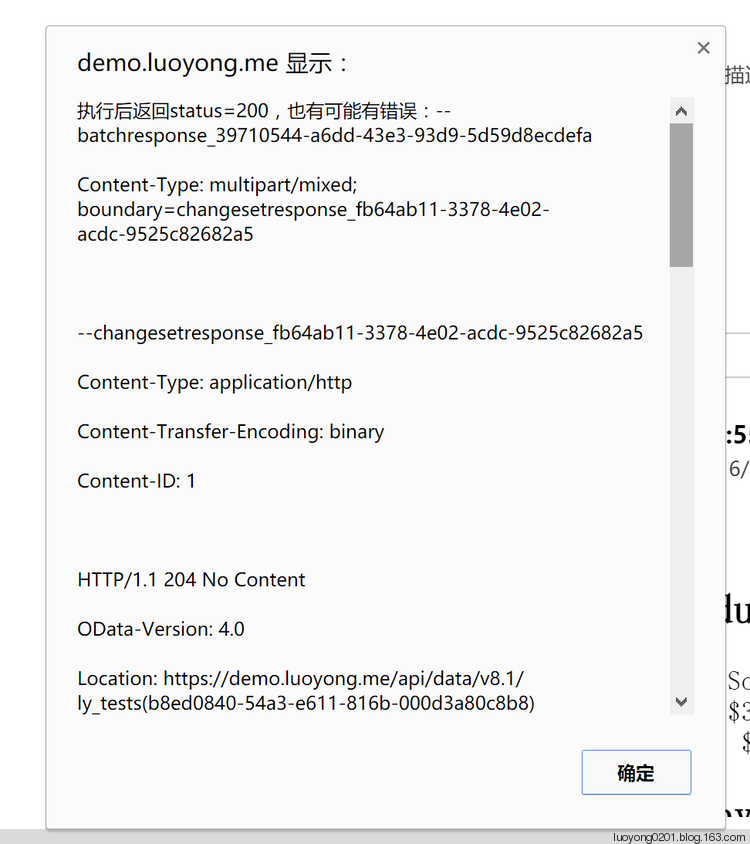
"--batchresponse_8071c8bc-f577-44a6-a246-e27c1ec027e2
?Content-Type: multipart/mixed; boundary=changesetresponse_c5387a7e-c5c6-4ea5-95bd-13df85d67046
?
?--changesetresponse_c5387a7e-c5c6-4ea5-95bd-13df85d67046
?Content-Type: application/http
?Content-Transfer-Encoding: binary
?Content-ID: 1
?
?HTTP/1.1 204 No Content
?OData-Version: 4.0
?Location: https://demo.luoyong.me/api/data/v8.1/ly_tests(6c358f7d-54a3-e611-816b-000d3a80c8b8)
?OData-EntityId: https://demo.luoyong.me/api/data/v8.1/ly_tests(6c358f7d-54a3-e611-816b-000d3a80c8b8)
?Access-Control-Expose-Headers: Preference-Applied,OData-EntityId,Location,ETag,OData-Version,Content-Encoding,Transfer-Encoding,Content-Length,Retry-After
?
?
?--changesetresponse_c5387a7e-c5c6-4ea5-95bd-13df85d67046
?Content-Type: application/http
?Content-Transfer-Encoding: binary
?Content-ID: 2
?
?HTTP/1.1 204 No Content
?OData-Version: 4.0
?Location: https://demo.luoyong.me/api/data/v8.1/tasks(6f358f7d-54a3-e611-816b-000d3a80c8b8)
?OData-EntityId: https://demo.luoyong.me/api/data/v8.1/tasks(6f358f7d-54a3-e611-816b-000d3a80c8b8)
?Access-Control-Expose-Headers: Preference-Applied,OData-EntityId,Location,ETag,OData-Version,Content-Encoding,Transfer-Encoding,Content-Length,Retry-After
?
?
?--changesetresponse_c5387a7e-c5c6-4ea5-95bd-13df85d67046
?Content-Type: application/http
?Content-Transfer-Encoding: binary
?Content-ID: 3
?
?HTTP/1.1 204 No Content
?OData-Version: 4.0
?Location: https://demo.luoyong.me/api/data/v8.1/ly_tests(6c358f7d-54a3-e611-816b-000d3a80c8b8)
?OData-EntityId: https://demo.luoyong.me/api/data/v8.1/ly_tests(6c358f7d-54a3-e611-816b-000d3a80c8b8)
?Access-Control-Expose-Headers: Preference-Applied,OData-EntityId,Location,ETag,OData-Version,Content-Encoding,Transfer-Encoding,Content-Length,Retry-After
?
?
?--changesetresponse_c5387a7e-c5c6-4ea5-95bd-13df85d67046--
?--batchresponse_8071c8bc-f577-44a6-a246-e27c1ec027e2--
?"
使用JS通过Web API执行批量操作,多个操作是一个事务!的更多相关文章
- 通过C#代码调用Dynamics 365 Web API执行批量操作
我是微软Dynamics 365 & Power Platform方面的工程师罗勇,也是2015年7月到2018年6月连续三年Dynamics CRM/Business Solutions方面 ...
- 利用Fiddler修改请求信息通过Web API执行操作(Action)实例
本人微信和易信公众号: 微软动态CRM专家罗勇 ,回复261或者20170724可方便获取本文,同时可以在第一间得到我发布的最新的博文信息,follow me!我的网站是 www.luoyong.me ...
- 不借助工具在浏览器中通过Web API执行Dynamics 365操作(Action)实例
摘要: 本人微信和易信公众号: 微软动态CRM专家罗勇 ,回复262或者20170727可方便获取本文,同时可以在第一间得到我发布的最新的博文信息,follow me!我的网站是 www.luoyon ...
- 利用Fiddler修改请求信息通过Web API执行Dynamics 365操作(Action)实例
本人微信和易信公众号: 微软动态CRM专家罗勇 ,回复261或者20170724可方便获取本文,同时可以在第一间得到我发布的最新的博文信息,follow me!我的网站是 www.luoyong.me ...
- 使用RAP2和Mock.JS实现Web API接口的数据模拟和测试
最近一直在思考如何对Web API的其接口数据进行独立开发的问题,随着Web API的越来越广泛应用,很多开发也要求前端后端分离,例如统一的Web API接口后,Winform团队.Web前端团队.微 ...
- 在Web API中使用Swagger-UI开源组件(一个深坑的解决)
介绍: Swagger-Ui是一个非常棒的Web API说明帮助页,具体详情可自行Google和百度. 官网:http://swagger.io/ GitHub地址:https://github ...
- 解决Dynamics 365使用JS调用Web API时报no property value was found in the payload 错误。
摘要: 微软动态CRM专家罗勇 ,回复323或者20190421可方便获取本文,同时可以在第一间得到我发布的最新博文信息,follow me! 碰到如下报错: message: "An er ...
- A2D JS框架 - Web API CSRF保护实现
这次自己实现了类似jQuery中ajax调用的方法,并且针对RESTFul进行了改造和集成,实现的A2D AJAX接口如下: $.ajax.RESTFulGetCollection("/ap ...
- Asp.Net Web API 2第二课——CRUD操作
详情请查看http://aehyok.com/Blog/Detail/69.html 个人网站地址:aehyok.com QQ 技术群号:206058845,验证码为:aehyok 本文文章链接:ht ...
随机推荐
- flutter 打包apk
打包的具体操作,可以参照官网,只是官网没有那么细 1.修改AndroidManifest.xml 2.构建配置 可以跳过 3.构建签名 4.创建 key.properties 5.配置混淆 6.修改 ...
- DOM CSS
DOM CSS HTML DOM 允许 JavaScript 改变 HTML 元素的样式. 改变 HTML 样式 如需改变 HTML 元素的样式,请使用这个语法: document.getElemen ...
- 剑指offer 27:二叉搜索树与双向链表
题目描述 输入一棵二叉搜索树,将该二叉搜索树转换成一个排序的双向链表.要求不能创建任何新的结点,只能调整树中结点指针的指向. 解题思路 采用中序遍历遍历二叉树,利用二叉排序树的特性,顺次连接节点,形成 ...
- .net实现一个简单的通用查询数据、导出Excel的网页
背景:临时提供一个简单的网页,供其他人浏览数据库(Oracel.MSSQL)的某些数据,并导出Excel.支持在配置文件中随时添加或修改sql. 实现:把sql语句等信息保存一个xml文件中,前端页面 ...
- ABP入门教程9 - 展示层实现增删改查-视图模型
点这里进入ABP入门教程目录 创建视图模型 在展示层(即JD.CRS.Web.Mvc)的Models下新建文件夹Course //用以存放Course相关视图模型 在JD.CRS.Web.Mvc/Mo ...
- ABP入门教程11 - 展示层实现增删改查-视图
点这里进入ABP入门教程目录 创建目录 在展示层(即JD.CRS.Web.Mvc)的Views下新建文件夹Course //用以存放Course相关视图 创建视图 在JD.CRS.Web.Mvc/Vi ...
- 关于华为模拟器(eNSP)添加路由器启动后一直打印#号的原因
操作系统为win10 专业版 1903:1.首先打开控制面板,找到windows defender防火墙,在“允许应用通过防火墙”中把和espn相关的两个的专网和公网都勾选上,最后确定:然后重启华为模 ...
- div里面的元素在【垂直 方向】上水平分布 使用calc()函数动态计算
1==>如何让div里面的元素在[垂直 方向]上水平分布.important-dec{ height: 121px; //必须固定高度 flex-direction: column; //垂直排 ...
- 2019-2020-1 20199305《Linux内核原理与分析》第五周作业
系统调用的三层机制(上) (一)用户态.内核态和中断 (1)Intel x86 CPU有4种不同的执行级别 分别是0.1.2.3,数字越小,特权越高.Linux操作系统中只是采用了其中的0和3两个特权 ...
- 使用docker运行springboot项目
本文主要讲的是使用docker运行springboot项目 获取一个springboot项目 这里我没有重新构建,用的之前写的一个项目,直接从github上下载下来,地址:https://github ...