
Smobiler控件的使用:ListView的数据绑定及实现多选
环境
SmobilerDesigner 4.7
Visual Studio 2010以上
正文
listview绑定数据
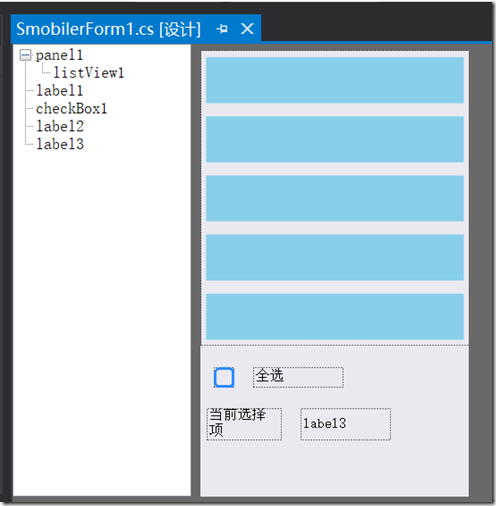
打开Visual Studio ,新建一个SmobilerApplication项目。从工具箱中找到ListView,CheckBox,Label,Panel等控件拖入到SmobilerFrom1.cs,布局如图
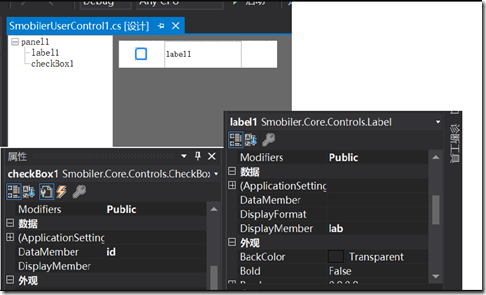
再新建一个SmobilerUserControl类,暂且命名为SmobilerUserControl1.cs,设置Size为(300,50),再拖入CheckBox,Label,Panel控件,CheckBox的DataMember设为id,Modifiers设为public,label的DisplayMember设为lab,Modifiers设为public,panel的Touchable设为true,(panel的Touchable设为true时点击可以触发press事件)如图
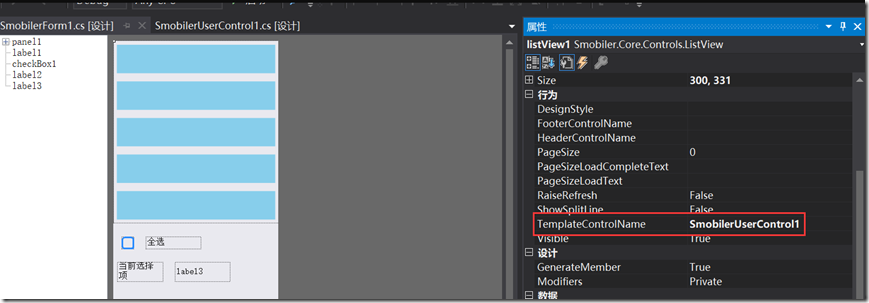
在设计器中打开SmobilerForm1.cs,点击listView1,设置TemplateControlName为SmobilerUserControl1
最后在窗体的load事件中绑定数据源
private void SmobilerForm1_Load(object sender, EventArgs e)
{
DataTable dt = new DataTable();
dt.Columns.Add("id");
dt.Columns.Add("lab");
for (int i = 0; i < 5; i++)
dt.Rows.Add(i, "图书" + i.ToString());
listView1.DataSource = dt;
listView1.DataBind();
}
注:控件的DataMember和DisplayMember有什么不同呢?DataMember是值绑定字段,DisplayMember是显示绑定字段,简单来说就是DisplayMember绑定的值会显示,DataMember则不显示,本例中的label的displayMember绑定后值是赋给了Text属性;checkbox的DataMember绑定后在界面上显示,需要通过checkbox.BindDataValue来获取。
实现全选
思路:借助list来存储勾选项,listview中的行项每勾选一个就往list插入一条记录,取消勾选则从list中移除记录,当list.Count与listview的行数相同是则表示全部选择
1.SmobilerForm1.cs中代码
List<string> selectItem = new List<string>();//通过这个list来记录已勾选的数据行id
/// <summary>
/// 添加勾选项
/// </summary>
/// <param name="item"></param>
public void AddSelectItem(string item)
{
if (!selectItem.Contains(item))
selectItem.Add(item);
}
/// <summary>
/// 取消选择
/// </summary>
/// <param name="item"></param>
public void RemoveSelectItem(string item)
{
if (selectItem.Contains(item))
selectItem.Remove(item);
}
/// <summary>
/// 改变checkbox状态
/// </summary>
public void changeState()
{
if (selectItem.Count == listView1.Rows.Count)//selectItem的数量和listview.Rows的数量一致表示全选
checkBox1.Checked = true;
else
checkBox1.Checked = false;
}
/// <summary>
/// checkbox点击事件
/// </summary>
/// <param name="sender"></param>
/// <param name="e"></param>
private void checkBox1_CheckedChanged(object sender, EventArgs e)
{
if (checkBox1.Checked)
{
foreach (ListViewRow row in listView1.Rows)//遍历listview.Rows
{
//(SmobilerUserControl1)row.Control即listview行模板
((SmobilerUserControl1)row.Control).checkBox1.Checked = true;//改变listview模板里中的checkbox值
AddSelectItem(((SmobilerUserControl1)row.Control).checkBox1.BindDataValue.ToString());//获取模板类中的checkbox的DataMember
}
}
else
{
foreach (ListViewRow row in listView1.Rows)
{
((SmobilerUserControl1)row.Control).checkBox1.Checked = false;
RemoveSelectItem(((SmobilerUserControl1)row.Control).checkBox1.BindDataValue.ToString());
}
}
2.SmobilerUserControl1.cs中,模板类使用(SmobilerForm1)this.Form来调用SmobilerForm1的属性、方法,将数据传给SMobilerForm1
private void checkBox1_CheckedChanged(object sender, EventArgs e)
{
SmobilerForm1 frm = (SmobilerForm1)this.Form;//获取listview所在窗体
if (checkBox1.Checked)
{
frm.AddSelectItem(checkBox1.BindDataValue.ToString());
}
else
{
frm.RemoveSelectItem(checkBox1.BindDataValue.ToString());
}
frm.changeState();
}
/// <summary>
/// panel点击事件
/// </summary>
/// <param name="sender"></param>
/// <param name="e"></param>
private void panel1_Press(object sender, EventArgs e)
{
SmobilerForm1 frm = (SmobilerForm1)this.Form;
frm.label3.Text = label1.Text;//数据传给SMobilerForm1
}
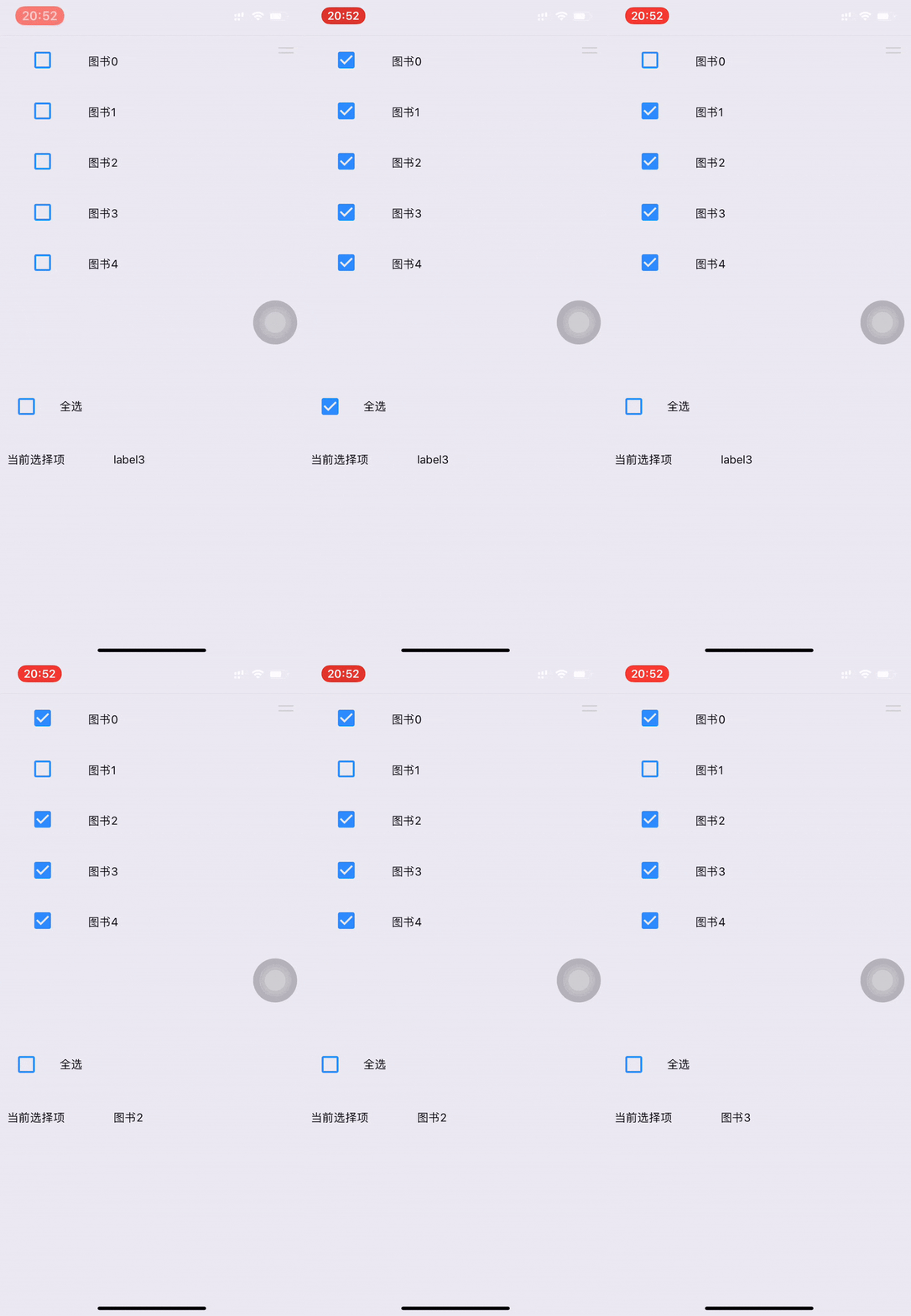
运行效果
彩蛋
listview实现单双行间隔色
在4.7版本中,可以在ListView的RowBind事件中,通过设置 e.Row.Control.BackColor来设置不同的颜色,RowBind事件是在行绑定后发生,具体见(https://www.smobiler.com/Help/html/E_Smobiler_Core_Controls_ListView_RowBind.htm),代码如下
bool flag = true;//通过flag判断单双行
private void listView1_RowBind(object sender, ListViewTemplateBindEventArgs e)
{
if (flag)
{
e.Row.Control.BackColor = System.Drawing.Color.White;//第0行开始,偶数白色单数蓝色
flag = !flag;
}
else
{
e.Row.Control.BackColor = System.Drawing.Color.SkyBlue;
flag = !flag;
}
}
最终效果

Smobiler控件的使用:ListView的数据绑定及实现多选的更多相关文章
- 初始ASP.NET数据控件【续 ListView】
ListView控件 ListView控件可以用来显示数据,它还提供编辑,删除,插入,分页与排序等功能.ListView是GridView与DataList的融合体,它具有GridView控件编辑 ...
- 重新想象 Windows 8.1 Store Apps (93) - 控件增强: GridView, ListView
[源码下载] 重新想象 Windows 8.1 Store Apps (93) - 控件增强: GridView, ListView 作者:webabcd 介绍重新想象 Windows 8.1 Sto ...
- WPF中PasswordBox控件的Password属性的数据绑定
原文:WPF中PasswordBox控件的Password属性的数据绑定 英文原文:http://www.wpftutorial.net/PasswordBox.html 中文原文:http://bl ...
- WPF自定义控件与样式(7)-列表控件DataGrid与ListView自定义样式
一.前言 申明:WPF自定义控件与样式是一个系列文章,前后是有些关联的,但大多是按照由简到繁的顺序逐步发布的等,若有不明白的地方可以参考本系列前面的文章,文末附有部分文章链接. 本文主要内容: Dat ...
- Android控件RecyclerView与ListView的异同
在我的一篇介绍Android新控件RecyclerView的博客(Android L新控件RecyclerView简介)中,一个读者留言说RecyclerView跟ListView之间好像没有什么不同 ...
- 【转】WPF自定义控件与样式(7)-列表控件DataGrid与ListView自定义样式
一.前言 申明:WPF自定义控件与样式是一个系列文章,前后是有些关联的,但大多是按照由简到繁的顺序逐步发布的等. 本文主要内容: DataGrid自定义样式: ListView自定义样式: 二.Dat ...
- 【转】WPF中PasswordBox控件的Password属性的数据绑定
英文原文:http://www.wpftutorial.net/PasswordBox.html 中文原文:http://blog.csdn.net/oyi319/article/details/65 ...
- 安卓开发——ListView控件(初始化ListView、列表刷新、长按添加menu)
前言: ListView——列表,它作为一个非常重要的显示方式,不管是在Web中还是移动平台中,都是一个非常好的.不开或缺的展示信息的工具.在Android中,ListView控件接管了这一重担,在大 ...
- Winform开发常用控件之DataGridView的简单数据绑定——自动绑定
DataGridView控件可谓是Winform开发的重点控件,对于数据的呈现和操作非常方便,DataGridView可谓是既简单又复杂.简单在于其已经集成了很多方法,复杂在于可以使用其实现复杂的数据 ...
随机推荐
- GoldenGate过程 abend,报错OGG-00868 ORA-02396: Exceeded Maximum Idle Time, Please Connect Again
GoldenGate过程 abend,报错OGG-00868 ORA-02396: Exceeded Maximum Idle Time, Please Connect Again 参考原始: Gol ...
- .net reactor 学习系列(二)---.net reactor界面各功能说明
原文:.net reactor 学习系列(二)---.net reactor界面各功能说明 安装了.net reactor之后,可以在安装目录下找到帮助文档REACTOR_HELP.c ...
- Base64实现测试,不要太相信apache-common的性能
针对三种Base64实现: * 自已实现的 * JDK8的java.util.Base64 * apache-common的org.apache.commons.codec.binary.Base64 ...
- Ackerman 函数
先留个简介: 函数定义: 从定义可以看出是一个递归函数.阿克曼函数不仅值增长的非常快,而且递归深度很高. 一般用来测试编译其优化递归调用的能力.. 如果用一下代码简单实现的话,输入参数4,2程序就直接 ...
- MEF 插件式开发 - 小试牛刀
原文:MEF 插件式开发 - 小试牛刀 目录 MEF 简介 实践出真知 面向接口编程 控制反转(IOC) 构建入门级 MEF 相关参考 MEF 简介 Managed Extensibility Fra ...
- C#并口热敏小票打印机打印位图
原文:C#并口热敏小票打印机打印位图 最近一直在研究并口小票打印机打印图片问题,这也是第一次和硬件打交道,不过还好,最终成功了. 这是DEMO的窗体: 下面是打印所需要调用的代码: class ...
- Android项目实战(四十四):Zxing二维码切换横屏扫描
原文:Android项目实战(四十四):Zxing二维码切换横屏扫描 Demo链接 默认是竖屏扫描,但是当我们在清单文件中配置横屏显示的时候: <activity android:name=&q ...
- Win8Metro(C#)数字图像处理--2.16图像浮雕效果
原文:Win8Metro(C#)数字图像处理--2.16图像浮雕效果 [函数名称] 图像浮雕效果函数ReliefProcess(WriteableBitmap src) [函数代码] ...
- dotnet core 跨平台编译发布
vs2017 建立的项目,在项目目录 ,执行 dotnet publish -r ubuntu.15.04-x64 dotnet publish -r linux-x64 dotnet publish ...
- SQL Server 命名实例更改端口进行发布订阅
原文:SQL Server 命名实例更改端口进行发布订阅 两台数据库服务器,都没有加入域,都安装多实例,端口也不一样了.现在使用命名实例进行复制,折腾了好久,才发现解决方法. 服务器A:myserve ...