
MEF and AppDomain z
MEF and AppDomain - Remove Assemblies On The Fly
The question came up last week about swapping out an MEF enabled DLL on the fly. Because .NET locks the assembly even in an MEF enabled application, you can't replace the DLL when you release the MEF parts in your code. The only way to replace a DLL without a little elbow grease, is to shut down the application, swap out the DLL, and then restart the application. So, after researching and finding a couple of decent examples and after applying the elbow grease, I came up with this solution. It's not pretty and it doesn't do much except prove how to do this. This is a copy of my Code Project article of the same title.
This example will only work with .NET 4.5 and above and assumes you already have an understanding of how MEF works and can get around with it without going into a tutorial on that.
We will be using the AppDomain class to create an application domain for the MEF components to run in. This will allow us to access the components at run time. I'll explain more of what's going on as we progress.
First, create a console application project called AppDomainTest. And in your Program class. I have a couple of paths set up here that point to where the MEF DLLs are found and where the AppDomainSetup will cache the DLLs while running. I'll explain more of that later.
1 |
using System; |
Now, create a class library project called AppDomainTestInterfaces. This library will contain the contract interface for the MEF libraries and the main application. Add a reference to this library in the main application. Delete the class file in there and create an interface called IExport.
1 |
namespace AppDomainTestInterfaces {
public interface IExport {
void InHere();
|
Next, create a couple of MEF class library projects. Add references to AppDomainTestInterfaces and System.ComponentModel.Composition in each library.
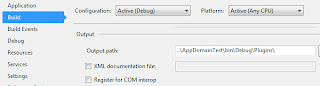
You'll want to set the build output to the bin\debug folder for the main application as shown. I put the compiled DLLs into a folder called Plugins under the main application bin\Debug folder so that they were easy to find and I could set up my code to be simple for this example. Use your own folder as needed.
Finally, create a class library project called AppDomainTestRunner and set a reference to it in the main application. Add references to System.ComponentModel.Composition, System.ComponentModel.Composition.Registration, and System.Reflection.Context to add access to the necessary MEF components used in the rest of the example. And lastly, add a reference to AppDomainTestInterfaces.
Now we can get to the meat of this project.
In the AppDomainTestRunnerlibrary project, delete the Class1file and add a Runnerclass. This is the class that will deal with the MEF imports and exports, and we will see that the entire class runs in a separate AppDomain.
1 |
using System; |
Next, set up the MEF library code as shown below. This just shows that we actually are running in the DLLs. I created two of the exact same libraries, just naming the second AppDomainTestLib2.
1 |
using System; |
Note the use of MarshalByRefObject, this will, in essence, mark this class as Serializable and enables access to objects across AppDomain boundaries, thereby gaining necessary access to methods and properties in the class residing in the hosted AppDomain.
Finally, set up the Main() method as follows. What we see here is the use of an AppDomainSetup object to define our AppDomain configuration. This establishes the shadow copying of the DLLs and where to shadow copy to. The CachePath parameter is optional, and only shown here as proof of what is happening. The parameter ShadowCopyFiles is a string parameter and accepts "true" or "false". The ShadowCopyDirectories parameter establishes which directory to shadow copy from.
1 51 52 53 54 |
using System; |
About shadow copying: ShadowCopyFiles will take a copy of the DLLs that are actually used in the AppDomain and put them in a special folder then reference them from there. This allows the DLL in the Plugins (or any other configured folder) to be deleted or replaced during runtime. The original DLL will remain in the folder until either the next startup of the application or, in the example we will see, the DirectoryCatalog is refreshed and the CompositionContainer is recomposed and re-exported.
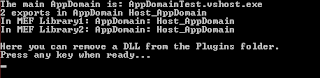
Now, when you run the application, you see the MEF DLLs run and within "Host_AppDomain".
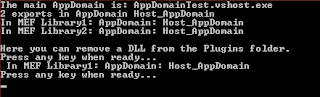
At this point, you can go into the Plugins folder and delete a DLL then press any key in the console window to see what happens when runner.Recompose() is called. We then get proof that the recompose released our DLL, but only because of the ShadowCopyFiles parameter.
Now, open another instance of Visual Studio and create a class library called AppDomainTestLib3. Add the same references as before and don't set the output directory, we'll want to copy that in by hand. Set up its Import class code just the same as the previous AppDomainTestLib classes. Go ahead and compile it.
Next, run the application in the previous Visual Studio instance and stop at the first Console.ReadKey(). Delete a DLL from the Plugins folder and copy the new one in place. Press any key to continue...
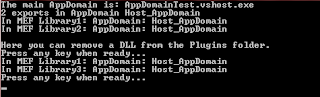
Pretty cool, eh?
Finally, to actually replace a DLL, you must delete the previous DLL prior to implementing the new one. We can demonstrate the manual way of doing this by inserting the following code into Program.
1 |
// After removing a DLL, we can now recompose the MEF parts and see that the removed DLL is no longer accessed. |
Leave the current AppDomainTestLib3 in the Plugins folder and run the application. Now, follow the prompts and when you get to "Here we will begin to replace Lib3 with an updated version.", make an observable change to the AppDomainTestLib3 and compile it. After completing the deletion of the old DLL, press any key to recompose the DLLs. Now, when you get the next prompt, drop the new DLL into the Plugins folder. Hit any key as usual. You should now see the response from your changed DLL.
The reason for the double runner.Recompose()calls is that the Exports signature for the DLL matches the previous version and MEF doesn't see a change since it doesn't look at FileInfo for differences. This then tells the AppDomain that the DLL hasn't changed either and the ShadowCopyFiles doesn't kick in to make that change. The simple work around is to delete the original, recompose, put the new one in place, and recompose one more time. The only disadvantage I can see in this is the performance of the application will drop momentarily during the recompose.
I've added a Github repository with the source. I also included in that source the ability to pass data between AppDomains. The source can be downloaded from http://github.com/johnmbaughman/MEFInAnAppDomain.
MEF and AppDomain z的更多相关文章
- MEF学习小结 z
1.什么是MEF. MEF,全称是Managed Extensibility Framework.它是.NET Framework4.0的一个类库,其主要目的是为了创建可扩展的应用程序.按照官方说法就 ...
- AppDomain卸载与代理
AppDomain卸载与代理 涉及内容: 反射与MEF解决方案 AppDomain卸载与代理 WinForm.WcfRestService示 插件系统的基本目的是实现宿主与组件的隔离,核心是作为接驳约 ...
- 动态加载与插件系统的初步实现(一):反射与MEF解决方案
涉及内容: 反射与MEF解决方案 AppDomain卸载与代理 WinForm.WcfRestService示 PRRT1: 反射实现 插件系统的基本目的是实现宿主与组件的隔离,核心是作为接驳约定的接 ...
- 【Python】使用torrentParser1.03对多文件torrent的分析结果
Your environment has been set up for using Node.js 8.5.0 (x64) and npm. C:\Users\horn1>cd C:\User ...
- CLR via C# 读书笔记 6-2 不同AppDomain之间的通信 z
跨AppDomain通信有两种方式 1.Marshal By reference : 传递引用 2.Marshal By Value : 把需要传递的对象 通过序列化反序列化的方式传递过去(值拷贝) ...
- C#进阶系列——MEF实现设计上的“松耦合”(终结篇:面向接口编程)
序:忙碌多事的八月带着些许的倦意早已步入尾声,金秋九月承载着抗战胜利70周年的喜庆扑面而来.没来得及任何准备,似乎也不需要任何准备,因为生活不需要太多将来时.每天忙着上班.加班.白加班,忘了去愤,忘了 ...
- MEF实现设计上的“松耦合”(三)
1.面向接口编程:有一定编程经验的博友应该都熟悉或者了解这种编程思想,层和层之间通过接口依赖,下层不是直接给上层提供服务,而是定义一组接口供上层调用.至于具体的业务实现,那是开发中需要做的事情,在项目 ...
- [MEF插件式开发] 一个简单的例子
偶然在博客园中了解到这种技术,顺便学习了几天. 以下是搜索到一些比较好的博文供参考: MEF核心笔记 <MEF程序设计指南>博文汇总 先上效果图 一.新建解决方案 开始新建一个解决方案Me ...
- 在.NET Core中使用MEF
(此文章同时发表在本人微信公众号"dotNET每日精华文章",欢迎右边二维码来关注.) 题记:微软的可托管扩展框架也移植到.NET Core上了. 可托管扩展框架(Managed ...
随机推荐
- Java 语言多态性
https://www.ibm.com/developerworks/cn/java/java-language-polymorphism/index.html 定义多态性 多态性是面向对象编程中的一 ...
- 解决cef中title不现实tooltip的问题
本文转自:https://blog.csdn.net/hu1340748/article/details/79030569 感谢感谢 最近在使用chromiumFX做项目,突然发现页面标签中的titl ...
- Fiddler 常用功能总结
1.fiddler相关配置 2.如何抓包 移动端 ①保持手机和电脑处于同一网络中 ②设置手机的代理为电脑当前所处网络的IP,端口号为:8888,eg:10.12.1.64:8888. ③ 启动ap ...
- Docker 简介与shell操作使用
一.Docker概述 1.Docker简介 Docker是一个开源的应用容器引擎:是一个轻量级容器技术:Docker支持将软件编译成一个镜像:然后在镜像中各种软件做好配置,将镜像发布出去 ...
- 【AtCoder】ARC085
C - HSI 题解 \(E = 1900 * (N - M) + 100 * M + \frac{1}{2^{M}} E\) \(E = 2^{M}(1900 * (N - M) + 100 * M ...
- 【LOJ】#2509. 「AHOI / HNOI2018」排列
题解 虽然要求一个dfs序,但是不是从根开始贪心 从最小的点开始贪心,最小的点显然是父亲选了之后马上就选它 那么我们每次把最小的点和父亲合并,两个联通块之间也是如此 对于两个联通块,他们合并的顺序应该 ...
- [java] DOS编译 .java 文件得到 .class 文件 并执行 以及使用外部 .jar包 时的命令
当写一个java文件后,在DOS中进行编译与执行时,如果没有引入外来的包,那情况很简单 例如: public class hello_world { public static void main(S ...
- web理论知识--HTML结构及标签
一.参考书籍: <Web 前端开发 HTML5+CSS3+jQuery+AJAX 从学到用完美实践> 备注:本书为工具书. 二.HTML5元素: 按功能划分:基础.格式.表单.框架.图像. ...
- 循序渐进学.Net Core Web Api开发系列【12】:缓存
系列目录 循序渐进学.Net Core Web Api开发系列目录 本系列涉及到的源码下载地址:https://github.com/seabluescn/Blog_WebApi 一.概述 本篇介绍如 ...
- QThreadPool线程池的使用,线程与Widget通过信号与槽的方式通信。
因为QRunnable类并非继承自QObject,不能使用信号和槽,为了能够使用信号与槽和Widget通信,需要对QRunnable进行封装. 定义一个类QMyRunnable,该类首先继承自QObj ...