
C# windform 使用TreeGridView
1 下载 treeGridView.DLL库文件。
2 添加到工程中。
右键“工具箱”选择“选择项” 弹出对话框

选择“浏览” 选中下载还的dll库文件。完成后工具箱中会有 treeGridView控件,如下图
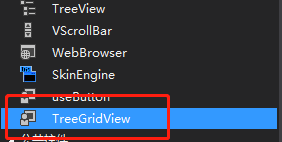
拖动控件到windform 中
添加代码
 List<personcl> lst = new List<personcl>();

                //personcl per = new personcl { name = "cese", age = 1 };

                personcl per1 = new personcl { name = "cese", age = 2 };

                //lst.Add(per);

                lst.Add(per1);

                personcl per2 = new personcl { name = "cese", age = 3 };

                per1.subitem.Add(per2);

                personcl per3 = new personcl { name = "cese", age = 4 };

                per2.subitem.Add(per3);

                //lst.Add(new personcl { name = "wyl", age = 10, subitem = new List<personcl> { new personcl { name = "wyl", age = 11 } } });

                SetNodes(lst, treeGridView1.Nodes);
public class personcl

    {

        public string name = "1";

        public int age = 10;

        public List<personcl> subitem = new List<personcl>();

    }
private void SetNodes(IEnumerable<personcl> lst, TreeGridNodeCollection nodes)

        {

            foreach (var item in lst)

            {

                var node = nodes.Add(item.name, item.age);

                node.ImageIndex = 0;

                SetNodes(item.subitem, node.Nodes);

            }

        }
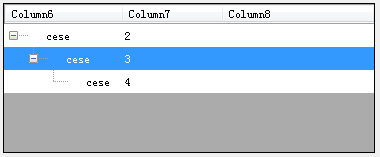
参考: https://www.cnblogs.com/mrtiny/p/5174095.html
C# windform 使用TreeGridView的更多相关文章
- C# TreeGridView 实现进程列表
效果如图 0x01 获取进程列表,使用Win32Api规避"拒绝访问"异常 public List<AppProcess> GetAppProcesses() { In ...
- c# winform treelistview的使用(treegridview)
TreeView控件显示的内容比较单一,如果需要呈现更详细信息TreeListView是一个不错的选择. 先看效果: 首先需要引用文件System.Windows.Forms.TreeListView ...
- windform 重绘Treeview "+-"号图标
模仿wind系统界面,重绘Treeview + - 号图标 一,首先需要图片 ,用于替换原有的 +-号 二.新建Tree扩展类 TreeViewEx继承TreeView using System; u ...
- C# windform自定义控件的属性小知识
word中的加粗变斜之类的一直让我以为是button,直到我接触了自定义控件,才发现实现这种机能最好的是CheckBox,然后我们在做一个系统的时候,这种控件有可能要用好多次,总不能在用一次的时候,就 ...
- Entity Framework4.0 (一)概述(EF4 的Database First方法)
转自:http://www.cnblogs.com/marksun/archive/2011/12/15/2289582.html Entity Framework4.0(以后简称:EF4),是Mic ...
- vs在winform中不给力哈-错误不提示
我的操作系统是windows Server 2008 x64,运行winform的时候,对Dictionary累加值.运行的时候,项目一闪而过,于是我在Project的Properties上选择运行的 ...
- Ionic app 上传图片之webApi接口
App上传图片对应的webApi服务端是怎么处理的呢? using System; using System.Collections.Generic; using System.Diagnostics ...
- 在Winform中菜单动态添加“最近使用文件”
最近在做文件处理系统中,要把最近打开文件显示出来,方便用户使用.网上资料有说,去遍历“C:\Documents and Settings\Administrator\Recent”下的最近文档本.文主 ...
- 通过源码了解ASP.NET MVC 几种Filter的执行过程 在Winform中菜单动态添加“最近使用文件”
通过源码了解ASP.NET MVC 几种Filter的执行过程 一.前言 之前也阅读过MVC的源码,并了解过各个模块的运行原理和执行过程,但都没有形成文章(所以也忘得特别快),总感觉分析源码是大神 ...
随机推荐
- jquery ajax 全局事件
jquery的ajax方法的全部全局事件:(不管是$.ajax().$.get().$.load().$.getJSON()等都会默认触发全局事件) ajaxStart:ajax请求开始前 ajaxS ...
- mybatis的批量操作
foreach关键字: 批量查找/删除:用where id in<foreach> (xxx,yyy,zzz ...)</foreach> 批量更新:需要开启批量sql,比如d ...
- CentOS Linux更改MySQL数据库目录位置具体操作
引言: 由于MySQL的数据库太大,默认安装的/var盘已经再也无法容纳新增加的数据,没有办法,只能想办法转移数据的目录. 下面我整理一下把MySQL从/var/lib/mysql目录下面转移到/ho ...
- kbmMW均衡负载与容灾(3)(转载红鱼儿)
在kbmMW均衡负载与容灾(1)中,介绍了利用ClientTransport的OnReconnect事件,对联接的应用服务器的地址进行更换,做容灾处理.实际上,作者还给我们提供了另外一种机制,直接在C ...
- Mac osx 启用和关闭root用户
设置->群组和用户->点击小
- 如何将spring boot项目打包成war包
一.修改打包形式 在pom.xml里设置 <packaging>war</packaging> 二.移除嵌入式tomcat插件 在pom.xml里找到spring-boot-s ...
- atcoder题目合集(持续更新中)
Choosing Points 数学 Integers on a Tree 构造 Leftmost Ball 计数dp+组合数学 Painting Graphs with AtCoDeer tarja ...
- Mybatis-Plus 实战完整学习笔记(十一)------条件构造器删除,修改,conditon
1.修改功能--其他过滤方式跟select一样 /** * 修改条件构造器 * @throws SQLException */ @Test public void selectUpdate() thr ...
- 【慕课网实战】Spark Streaming实时流处理项目实战笔记五之铭文升级版
铭文一级: 单节点单broker的部署及使用 $KAFKA_HOME/config/server.propertiesbroker.id=0listenershost.namelog.dirszook ...
- MIT molecular Biology 笔记8 RNA剪接
视频 https://www.bilibili.com/video/av7973580/ 教材 Molecular biology of the gene 7th edition J.D. Wat ...