
尚硅谷springboot学习4-helloworld探究
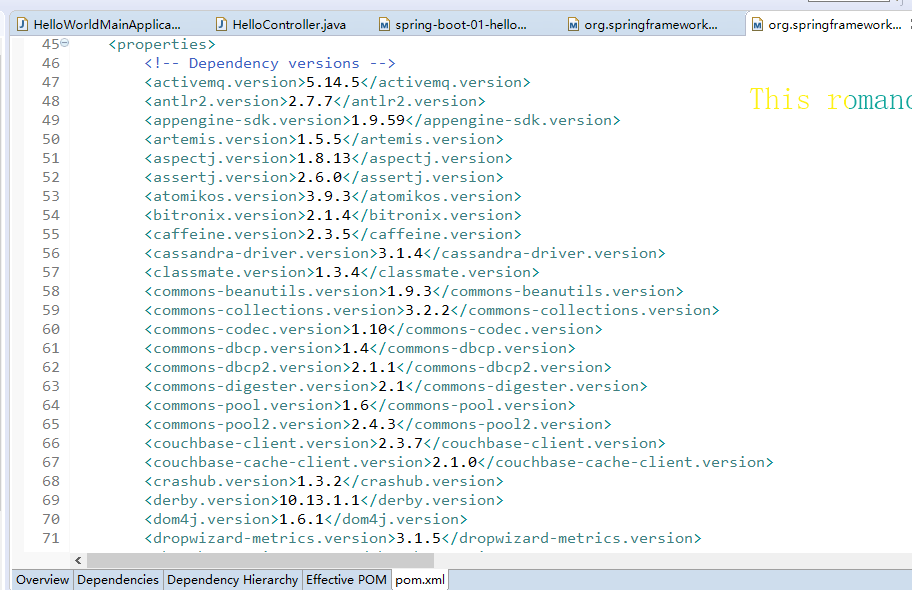
1、POM文件
<parent>

    <groupId>org.springframework.boot</groupId>

    <artifactId>spring-boot-starter-parent</artifactId>

    <version>1.5.9.RELEASE</version>

</parent>
他的父项目是
<parent>

  <groupId>org.springframework.boot</groupId>

  <artifactId>spring-boot-dependencies</artifactId>

  <version>1.5.9.RELEASE</version>

  <relativePath>../../spring-boot-dependencies</relativePath>

</parent>
他来真正管理Spring Boot应用里面的所有依赖版本;是Spring Boot的版本仲裁中心;以后我们导入依赖默认是不需要写版本;(没有在dependencies里面管理的依赖自然需要声明版本号)
2、启动器
<dependency>

    <groupId>org.springframework.boot</groupId>

    <artifactId>spring-boot-starter-web</artifactId>

</dependency>
spring-boot-starter:spring-boot场景启动器;帮我们导入了web模块正常运行所依赖的组件;
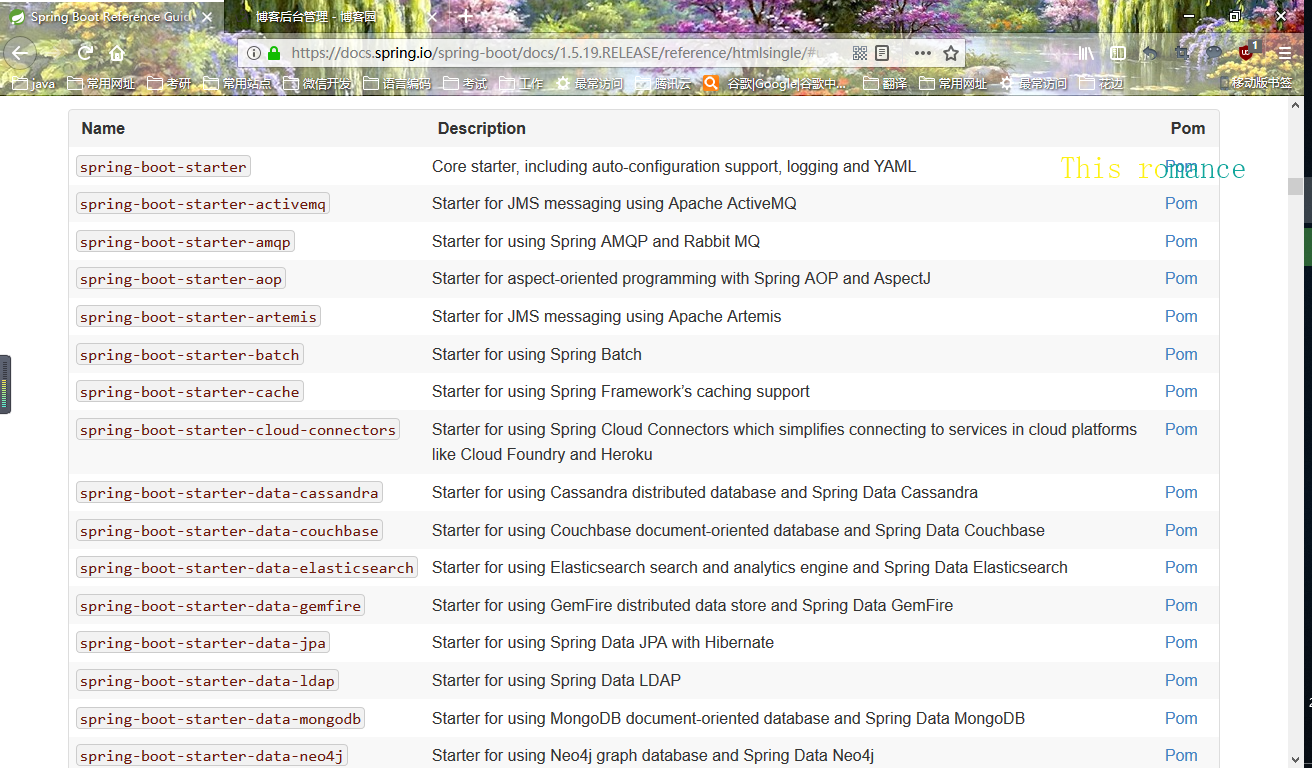
Spring Boot将所有的功能场景都抽取出来,做成一个个的starters(启动器),只需要在项目里面引入这些starter相关场景的所有依赖都会导入进来。要用什么功能就导入什么场景的启动器
<?xml version="1.0" encoding="UTF-8"?>

<project xmlns="http://maven.apache.org/POM/4.0.0" xmlns:xsi="http://www.w3.org/2001/XMLSchema-instance" xsi:schemaLocation="http://maven.apache.org/POM/4.0.0 http://maven.apache.org/xsd/maven-4.0.0.xsd">

    <modelVersion>4.0.0</modelVersion>

    <parent>

        <groupId>org.springframework.boot</groupId>

        <artifactId>spring-boot-starters</artifactId>

        <version>1.5.19.RELEASE</version>

    </parent>

    <artifactId>spring-boot-starter-web</artifactId>

    <name>Spring Boot Web Starter</name>

    <description>Starter for building web, including RESTful, applications using Spring

        MVC. Uses Tomcat as the default embedded container</description>

    <url>http://projects.spring.io/spring-boot/</url>

    <organization>

        <name>Pivotal Software, Inc.</name>

        <url>http://www.spring.io</url>

    </organization>

    <properties>

        <main.basedir>${basedir}/../..</main.basedir>

    </properties>

    <dependencies>

        <dependency>

            <groupId>org.springframework.boot</groupId>

            <artifactId>spring-boot-starter</artifactId>

        </dependency>

        <dependency>

            <groupId>org.springframework.boot</groupId>

            <artifactId>spring-boot-starter-tomcat</artifactId>

        </dependency>

        <dependency>

            <groupId>org.hibernate</groupId>

            <artifactId>hibernate-validator</artifactId>

        </dependency>

        <dependency>

            <groupId>com.fasterxml.jackson.core</groupId>

            <artifactId>jackson-databind</artifactId>

        </dependency>

        <dependency>

            <groupId>org.springframework</groupId>

            <artifactId>spring-web</artifactId>

        </dependency>

        <dependency>

            <groupId>org.springframework</groupId>

            <artifactId>spring-webmvc</artifactId>

        </dependency>

    </dependencies>

</project>
尚硅谷springboot学习4-helloworld探究的更多相关文章
- 尚硅谷springboot学习14-自动配置原理
配置文件能配置哪些属性 配置文件能配置的属性参照 自动配置的原理 1).SpringBoot启动的时候加载主配置类,开启了自动配置功能 @EnableAutoConfiguration 2).@Ena ...
- 尚硅谷springboot学习3-helloworld程序
1.环境准备 –jdk1.8:Spring Boot 推荐jdk1.7及以上:java version "1.8.0_112" –maven3.x:maven 3.3以上版本:Ap ...
- 尚硅谷springboot学习1-简介
以前看过springboot的相关知识,当时偷懒没有做笔记,现在忘得已经差不多了,现在趁着过年有时间,再学习一遍,并做下笔记以备忘. 特性 Spring Boot来简化Spring应用开发,约定大于配 ...
- 尚硅谷springboot学习35-启动原理
先列出几个重要的事件回调机制 配置在META-INF/spring.factories ApplicationContextInitializer SpringApplicationRunListen ...
- 尚硅谷springboot学习34-整合SpringData JPA
SpringData简介
- 尚硅谷springboot学习33-整合mybatis
引入mybatis依赖(还要引入mysql和jdbc依赖) <dependency> <groupId>org.mybatis.spring.boot</groupId& ...
- 尚硅谷springboot学习31-jdbc数据连接
可以使用JdbcTemplate操作数据库,可以在启动的时候自动建表,更新数据表 配置依赖 <dependency> <groupId>org.springframework. ...
- 尚硅谷springboot学习27-使用外置servlet容器
嵌入式Servlet容器:应用打成可执行的jar 优点:简单.便携: 缺点:默认不支持JSP.优化定制比较复杂(使用定制器[ServerProperties.自定义EmbeddedServle ...
- 尚硅谷springboot学习26-嵌入式servlet容器自动配置、启动原理
EmbeddedServletContainerAutoConfiguration:嵌入式的Servlet容器自动配置 @AutoConfigureOrder(Ordered.HIGHEST_PREC ...
随机推荐
- SqlServer全表遍历
DECLARE @temp TABLE ( , ) , ) ) DECLARE @tempId INT , ) INSERT INTO @temp VALUES ( 'a' ) INSERT INTO ...
- 视角同步NewViewTarget
SetViewTargetwithBlen说明: http://api.unrealengine.com/INT/BlueprintAPI/Game/Player/SetViewTargetwithB ...
- Android知识点textview加横线的属性
textView.getPaint().setFlags(Paint. UNDERLINE_TEXT_FLAG ); //下划线 textView.getPaint().setAntiAlias(tr ...
- webpack、npm、nginx常用命令
webpack命令:webpack --watch 监听变动并自动打包,简写-wwebpack -p --progress --color 压缩混淆脚本webpack -d 生成映射文件,告知那些模 ...
- Python的dict与set
一.dict 其他语言中也称为map,使用键-值(key-value)存储 特点: 具有极快的查找速度:可以直接由key计算出value所在的内存地址,而list采用搜索的方式:dict付出的代价是内 ...
- (转)利用WPF的ListView进行大数据量异步加载
原文:http://www.cnblogs.com/scy251147/archive/2012/01/08/2305319.html 由于之前利用Winform的ListView进行大数据量加载的时 ...
- flask框架get post方式
设置路由的访问方式get post常用的两种 # -*- coding: utf-8 -*- # Flask hello world from flask import Flask, redirect ...
- Django中常用命令
Django 基本命令 熟练使用Django常用命令能让你事半功倍!!!! 1. 新建一个 django project django-admin.py startproject project-na ...
- jQuery实现鼠标滑过图片列表加遮罩层
这个例子实现的功能是:有一列图片列表,鼠标滑过时,将有遮罩层的另一张图盖在该图片的上方,实现鼠标hover的效果. 一.HTML代码: <div class="home-content ...
- python初探 socket
1.什么是socket? Socket中文译作:套接字,但是大家一般约定俗称的都用:socket.我想在解释socket是什么之前,先说它是用来干嘛的:socket是来建立‘通信’的基础,建立连接,传 ...