
尚硅谷springboot学习4-helloworld探究
1、POM文件
<parent>

    <groupId>org.springframework.boot</groupId>

    <artifactId>spring-boot-starter-parent</artifactId>

    <version>1.5.9.RELEASE</version>

</parent>
他的父项目是
<parent>

  <groupId>org.springframework.boot</groupId>

  <artifactId>spring-boot-dependencies</artifactId>

  <version>1.5.9.RELEASE</version>

  <relativePath>../../spring-boot-dependencies</relativePath>

</parent>
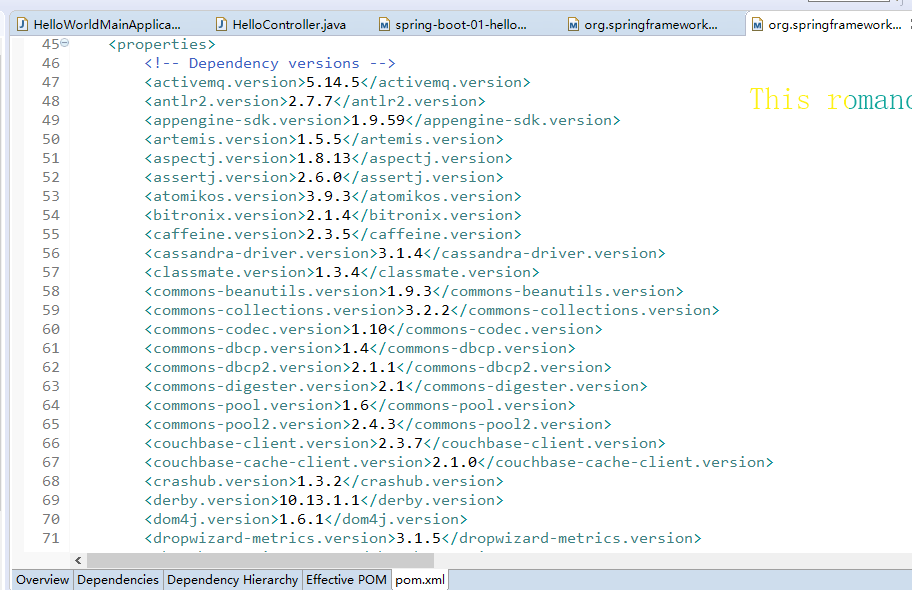
他来真正管理Spring Boot应用里面的所有依赖版本;是Spring Boot的版本仲裁中心;以后我们导入依赖默认是不需要写版本;(没有在dependencies里面管理的依赖自然需要声明版本号)
2、启动器
<dependency>

    <groupId>org.springframework.boot</groupId>

    <artifactId>spring-boot-starter-web</artifactId>

</dependency>
spring-boot-starter:spring-boot场景启动器;帮我们导入了web模块正常运行所依赖的组件;
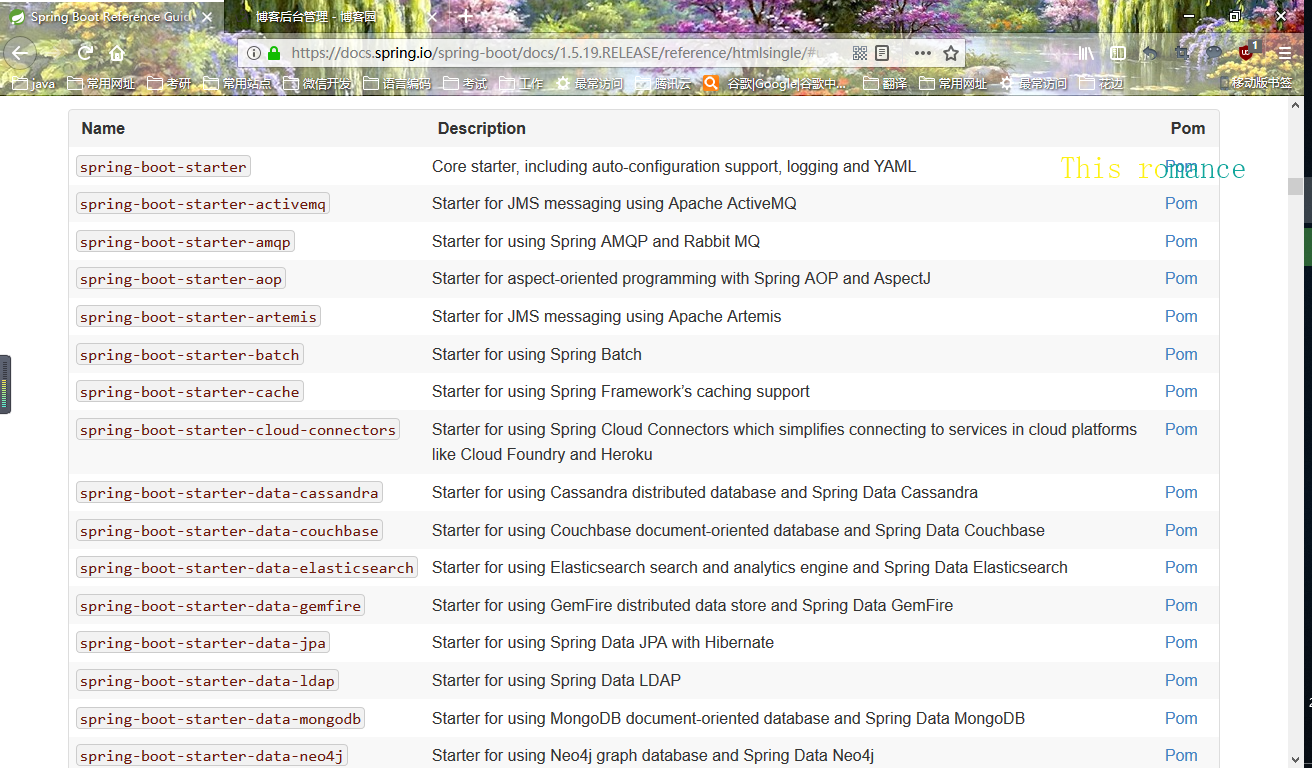
Spring Boot将所有的功能场景都抽取出来,做成一个个的starters(启动器),只需要在项目里面引入这些starter相关场景的所有依赖都会导入进来。要用什么功能就导入什么场景的启动器
<?xml version="1.0" encoding="UTF-8"?>

<project xmlns="http://maven.apache.org/POM/4.0.0" xmlns:xsi="http://www.w3.org/2001/XMLSchema-instance" xsi:schemaLocation="http://maven.apache.org/POM/4.0.0 http://maven.apache.org/xsd/maven-4.0.0.xsd">

    <modelVersion>4.0.0</modelVersion>

    <parent>

        <groupId>org.springframework.boot</groupId>

        <artifactId>spring-boot-starters</artifactId>

        <version>1.5.19.RELEASE</version>

    </parent>

    <artifactId>spring-boot-starter-web</artifactId>

    <name>Spring Boot Web Starter</name>

    <description>Starter for building web, including RESTful, applications using Spring

        MVC. Uses Tomcat as the default embedded container</description>

    <url>http://projects.spring.io/spring-boot/</url>

    <organization>

        <name>Pivotal Software, Inc.</name>

        <url>http://www.spring.io</url>

    </organization>

    <properties>

        <main.basedir>${basedir}/../..</main.basedir>

    </properties>

    <dependencies>

        <dependency>

            <groupId>org.springframework.boot</groupId>

            <artifactId>spring-boot-starter</artifactId>

        </dependency>

        <dependency>

            <groupId>org.springframework.boot</groupId>

            <artifactId>spring-boot-starter-tomcat</artifactId>

        </dependency>

        <dependency>

            <groupId>org.hibernate</groupId>

            <artifactId>hibernate-validator</artifactId>

        </dependency>

        <dependency>

            <groupId>com.fasterxml.jackson.core</groupId>

            <artifactId>jackson-databind</artifactId>

        </dependency>

        <dependency>

            <groupId>org.springframework</groupId>

            <artifactId>spring-web</artifactId>

        </dependency>

        <dependency>

            <groupId>org.springframework</groupId>

            <artifactId>spring-webmvc</artifactId>

        </dependency>

    </dependencies>

</project>
尚硅谷springboot学习4-helloworld探究的更多相关文章
- 尚硅谷springboot学习14-自动配置原理
配置文件能配置哪些属性 配置文件能配置的属性参照 自动配置的原理 1).SpringBoot启动的时候加载主配置类,开启了自动配置功能 @EnableAutoConfiguration 2).@Ena ...
- 尚硅谷springboot学习3-helloworld程序
1.环境准备 –jdk1.8:Spring Boot 推荐jdk1.7及以上:java version "1.8.0_112" –maven3.x:maven 3.3以上版本:Ap ...
- 尚硅谷springboot学习1-简介
以前看过springboot的相关知识,当时偷懒没有做笔记,现在忘得已经差不多了,现在趁着过年有时间,再学习一遍,并做下笔记以备忘. 特性 Spring Boot来简化Spring应用开发,约定大于配 ...
- 尚硅谷springboot学习35-启动原理
先列出几个重要的事件回调机制 配置在META-INF/spring.factories ApplicationContextInitializer SpringApplicationRunListen ...
- 尚硅谷springboot学习34-整合SpringData JPA
SpringData简介
- 尚硅谷springboot学习33-整合mybatis
引入mybatis依赖(还要引入mysql和jdbc依赖) <dependency> <groupId>org.mybatis.spring.boot</groupId& ...
- 尚硅谷springboot学习31-jdbc数据连接
可以使用JdbcTemplate操作数据库,可以在启动的时候自动建表,更新数据表 配置依赖 <dependency> <groupId>org.springframework. ...
- 尚硅谷springboot学习27-使用外置servlet容器
嵌入式Servlet容器:应用打成可执行的jar 优点:简单.便携: 缺点:默认不支持JSP.优化定制比较复杂(使用定制器[ServerProperties.自定义EmbeddedServle ...
- 尚硅谷springboot学习26-嵌入式servlet容器自动配置、启动原理
EmbeddedServletContainerAutoConfiguration:嵌入式的Servlet容器自动配置 @AutoConfigureOrder(Ordered.HIGHEST_PREC ...
随机推荐
- Linux下静态库和动态库
函数库分为静态库和动态库 动态库(格式为libname.so[.主版本号.次版本号.发行号]).在程序编译时并不会被链接到目标代码中,而是在程序运行时才被载入. 静态库是目标文件.a的归档文件(格式为 ...
- 关于string.Template的简单介绍
一.简介 string模块定义了一种新字符串类型Template,它简化了特定的字符串置换操作. 何谓“简化”?我们可以先想一下我们之前比较常用的有关字符串的“置换”操作有哪些:一种是利用%操作符实现 ...
- [UE4]使用UnrealVS扩展快速编译C++代码
一.如果UE4 编辑器已经打开,则VS中的重新生成项目将不能使用,一定要关了UE4 编辑器才可以.一般不是有VS自身的编译UE4的C++代码 二.epic提供了UnrealVS扩展,可以快速编译C++ ...
- [UE4]UI动画复用
一.创建一个专门播放动画的Widget,添加一个“Name Slot”,创建动画绑定到这个“Name Slot”. 二.要使用这个动画的widget就添加第一步创建的widget,并把需要执行动画的对 ...
- sas 数据集导出到excel
PROC EXPORT DATA= Loan.BOM_FILENAME_2 OUTFILE= "D:\output.xls" DBMS=EXCEL REPLAC ...
- Redis 穿透和雪崩
Redis穿透 出现原因:频繁的查询一个不存在的数据,由于缓存不命中,每次都要查询持久层,从而失去缓存保护后端的意义 解决方法: 部署过滤器拦截: 将数据库中数据的存在的Id存入列表,放入缓存中,每次 ...
- iOS NSUserDefaults
一.介绍 NSUserDefaults适合存储请练级的本地数据,对于一些简单的数据(NSString类型)来说是首选,但是如果我们自定义了一个对象,对象保存的是一些信息,这是就不能直接存储到NSUse ...
- 学习js第二天小结
if-else if ---------适用于区间范围的判断 If(判断条件--一般是boolean类型的值或是关系表达式或是逻辑表达式 ){ 要执行的代码; }else if(判断条件) ...
- 安全测试6_Web安全工具第二节(代理抓包分析工具)
上节课讲了浏览器及扩展,这节课继续来学习下抓包分析. 首先看下下图,了解下代理工具的原理:代理就相当于收费站一样,任何要通过的车辆必须经过它. 浏览器的代理我们可以通过设置进行手动设置代理,或者通过P ...
- 2014最新 iOS App 提交上架store 详细流程
http://blog.csdn.net/tt5267621/article/details/39430659