
svg动画 - 波浪动画
波浪
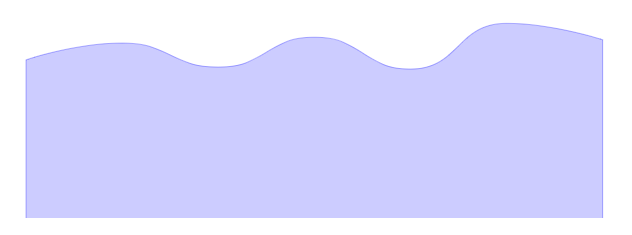
<path d="M 96.1271 806.2501

        C 96.1271 806.2501 241.441 755.7685 384.5859 755.7685

        C 529.8998 755.7685 529.9529 827.65 673.0447 827.65

        C 818.4117 827.65 817.7127 738.2097 961.5035 738.2097

        C 1106.1715 738.2097 1109.3353 833.6858 1249.9624 833.6858

        C 1397.7941 833.6858 1387.886 696.5074 1538.4211 696.5074

        C 1676.3448 696.5074 1826.88 745.8917 1826.88 745.8917

        L 1826.88 1283.07

        L 96.1271 1283.07Z" stroke="blue" stroke-width="3" stroke-opacity="0.3" fill="blue" fill-opacity="0.2"/>
path c 的用法
C x1 y1, x2 y2, x y

c dx1 dy1, dx2 dy2, dx dy

(x,y)表示的是曲线的终点,(x1,y1)是起点的控制点,(x2,y2)是终点的控制点。
曲线数据分析

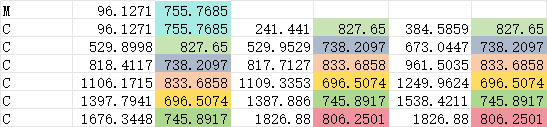
控制点的y值的大小决定了波峰是由高到低还是由低到高
第一条曲线起点低(806.2501),结点高(755.7685),就是一条向上的曲线(svg使用的是坐标系的第四象限,y值越大,越往下)

对应这一部分

第二条曲线起点高(755.7685),结点低(827.65),就是一条向下的曲线

对应这一部分

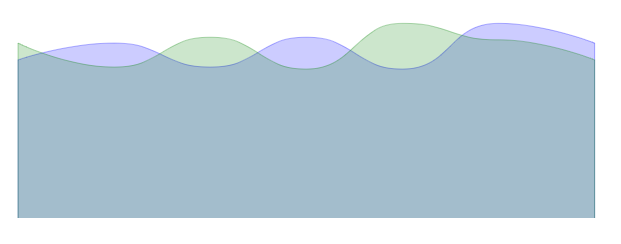
把所有的y值对应前移一个位置,可以得到波峰相反的曲线
见下图绿色曲线
<g xmlns="http://www.w3.org/2000/svg" transform="translate(0 -350)">

    <path d="M 96.1271 806.2501       C 96.1271 806.2501 241.441 755.7685 384.5859 755.7685   C 529.8998 755.7685 529.9529 827.65 673.0447 827.65   C 818.4117 827.65 817.7127 738.2097 961.5035 738.2097   C 1106.1715 738.2097 1109.3353 833.6858 1249.9624 833.6858   C 1397.7941 833.6858 1387.886 696.5074 1538.4211 696.5074   C 1676.3448 696.5074 1826.88 755.7685 1826.88 755.7685   L 1826.88 1283.07   L 96.1271 1283.07Z" stroke="blue" stroke-width="3" stroke-opacity="0.3" fill="blue" fill-opacity="0.2">

    </path>

    <path d="M 96.1271 755.7685       C 96.1271 755.7685 241.441 827.65 384.5859 827.65   C 529.8998 827.65 529.9529 738.2097 673.0447 738.2097   C 818.4117 738.2097 817.7127 833.6858 961.5035 833.6858   C 1106.1715 833.6858 1109.3353 696.5074 1249.9624 696.5074   C 1397.7941 696.5074 1387.886 745.8917 1538.4211 745.8917   C 1676.3448 745.8917 1826.88 806.2501 1826.88 806.2501   L 1826.88 1283.07   L 96.1271 1283.07Z" stroke="green" stroke-width="3" stroke-opacity="0.3" fill="green" fill-opacity="0.2">

    </path>

</g>
制作无线循环动画
为了让两个波形可以首尾相连,把第一个曲线的最后一个y值,改为第二个曲线的第一个y值

移动第二条曲线到第一条曲线的结尾处

<g xmlns="http://www.w3.org/2000/svg" transform="translate(0 -350)">

    <path d="M 96.1271 806.2501       C 96.1271 806.2501 241.441 755.7685 384.5859 755.7685   C 529.8998 755.7685 529.9529 827.65 673.0447 827.65   C 818.4117 827.65 817.7127 738.2097 961.5035 738.2097   C 1106.1715 738.2097 1109.3353 833.6858 1249.9624 833.6858   C 1397.7941 833.6858 1387.886 696.5074 1538.4211 696.5074   C 1676.3448 696.5074 1826.88 755.7685 1826.88 755.7685   L 1826.88 1283.07   L 96.1271 1283.07Z" stroke="blue" stroke-width="3" stroke-opacity="0.3" fill="blue" fill-opacity="0.2">

    </path>

    <path d="M 96.1271 755.7685       C 96.1271 755.7685 241.441 827.65 384.5859 827.65   C 529.8998 827.65 529.9529 738.2097 673.0447 738.2097   C 818.4117 738.2097 817.7127 833.6858 961.5035 833.6858   C 1106.1715 833.6858 1109.3353 696.5074 1249.9624 696.5074   C 1397.7941 696.5074 1387.886 745.8917 1538.4211 745.8917   C 1676.3448 745.8917 1826.88 806.2501 1826.88 806.2501   L 1826.88 1283.07   L 96.1271 1283.07Z" stroke="green" stroke-width="3" stroke-opacity="0.3" fill="green" fill-opacity="0.2" transform="translate(1730.75 0)">

    </path>

</g>
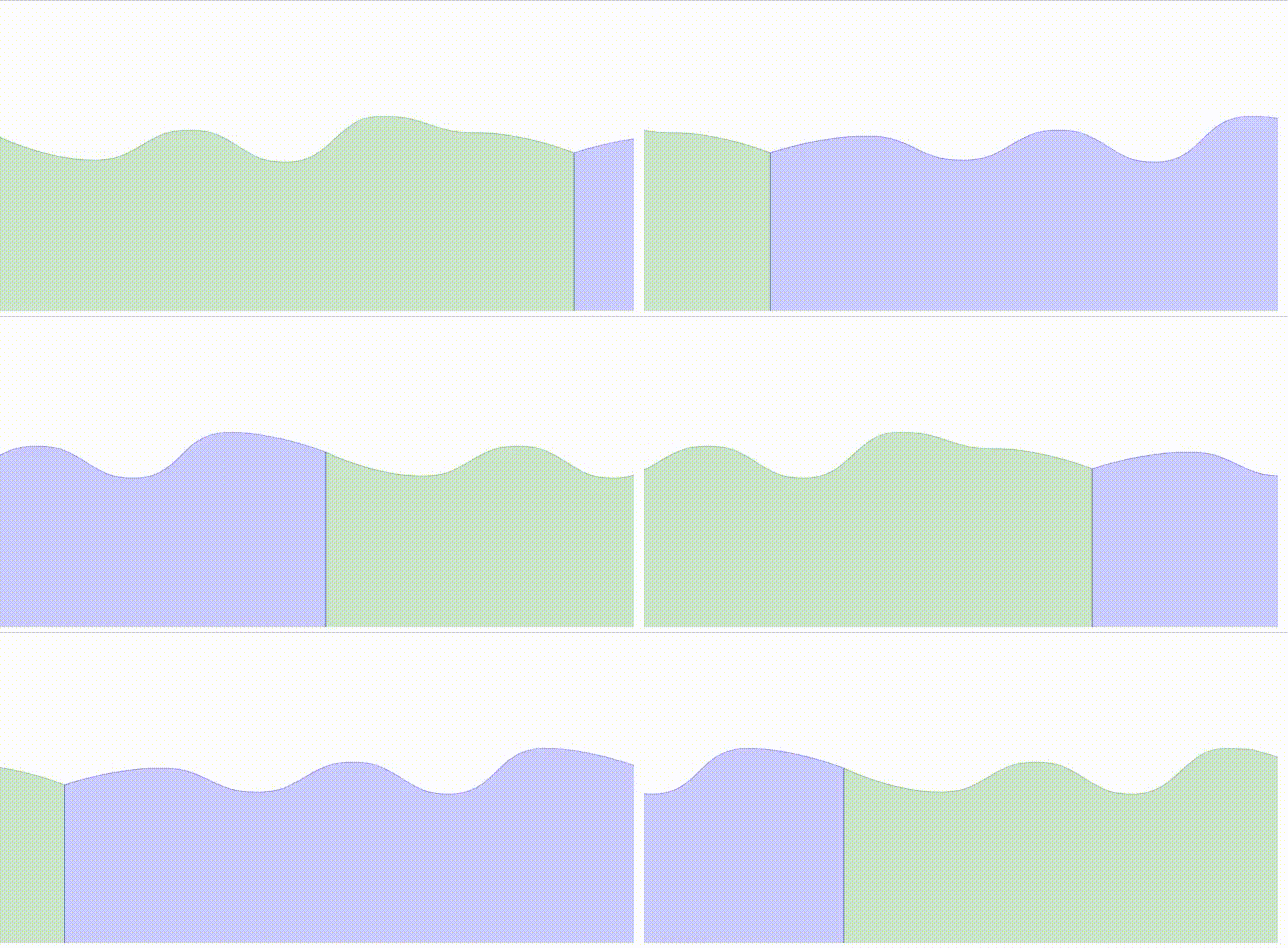
利用三条曲线加上动画,可以制作无线循环的动画
<svg xmlns="http://www.w3.org/2000/svg" xmlns:xlink="http://www.w3.org/1999/xlink" version="1.1" baseProfile="full" width="1903" height="931" style="position:absolute;left:0;top:0;user-select:none">

<g transform="translate(0 -350)">

    <path d="M 96.1271 806.2501       C 96.1271 806.2501 241.441 755.7685 384.5859 755.7685   C 529.8998 755.7685 529.9529 827.65 673.0447 827.65   C 818.4117 827.65 817.7127 738.2097 961.5035 738.2097   C 1106.1715 738.2097 1109.3353 833.6858 1249.9624 833.6858   C 1397.7941 833.6858 1387.886 696.5074 1538.4211 696.5074   C 1676.3448 696.5074 1826.88 755.7685 1826.88 755.7685   L 1826.88 1283.07   L 96.1271 1283.07Z" stroke="blue" stroke-width="3" stroke-opacity="0.3" fill="blue" fill-opacity="0.2">

        <animateTransform attributeName="transform" begin="0s" dur="3s" type="translate" values="0 0; 1730.75 0; 3461.5 0" repeatCount="indefinite"/>

    </path>

    <path d="M 96.1271 755.7685       C 96.1271 755.7685 241.441 827.65 384.5859 827.65   C 529.8998 827.65 529.9529 738.2097 673.0447 738.2097   C 818.4117 738.2097 817.7127 833.6858 961.5035 833.6858   C 1106.1715 833.6858 1109.3353 696.5074 1249.9624 696.5074   C 1397.7941 696.5074 1387.886 745.8917 1538.4211 745.8917   C 1676.3448 745.8917 1826.88 806.2501 1826.88 806.2501   L 1826.88 1283.07   L 96.1271 1283.07Z" stroke="green" stroke-width="3" stroke-opacity="0.3" fill="green" fill-opacity="0.2">

        <animateTransform attributeName="transform" begin="0s" dur="3s" type="translate" values="-1730.75 0; 0 0; 1730.75 0" repeatCount="indefinite"/>

    </path>

    <path d="M 96.1271 806.2501       C 96.1271 806.2501 241.441 755.7685 384.5859 755.7685   C 529.8998 755.7685 529.9529 827.65 673.0447 827.65   C 818.4117 827.65 817.7127 738.2097 961.5035 738.2097   C 1106.1715 738.2097 1109.3353 833.6858 1249.9624 833.6858   C 1397.7941 833.6858 1387.886 696.5074 1538.4211 696.5074   C 1676.3448 696.5074 1826.88 755.7685 1826.88 755.7685   L 1826.88 1283.07   L 96.1271 1283.07Z" stroke="blue" stroke-width="3" stroke-opacity="0.3" fill="blue" fill-opacity="0.2">

        <animateTransform attributeName="transform" begin="0s" dur="3s" type="translate" values="-3461.5 0; -1730.75 0; 0 0" repeatCount="indefinite"/>

    </path>

</g>

</svg>
波浪动画
用两条曲线的路径值,不断切换,可以制作波浪形变的动画

<svg xmlns="http://www.w3.org/2000/svg" xmlns:xlink="http://www.w3.org/1999/xlink" version="1.1" baseProfile="full" width="1903" height="931" style="position:absolute;left:0;top:0;user-select:none">

<g clip-path="url(#rectClip)">

    <g transform="translate(0 -350)" >

        <path fill="url(#zr0-g1)" fill-opacity="0.8">

            <animate attributeName="d" dur="3s" repeatCount="indefinite" values="M 96.1271 806.2501

                C 96.1271 806.2501 241.441 755.7685 384.5859 755.7685

                C 529.8998 755.7685 529.9529 827.65 673.0447 827.65

                C 818.4117 827.65 817.7127 738.2097 961.5035 738.2097

                C 1106.1715 738.2097 1109.3353 833.6858 1249.9624 833.6858

                C 1397.7941 833.6858 1387.886 696.5074 1538.4211 696.5074

                C 1676.3448 696.5074 1826.88 745.8917 1826.88 745.8917

                L 1826.88 1283.07

                L 96.1271 1283.07Z;

                M    96.1271    755.7685

                C    96.1271    755.7685    241.441    827.65    384.5859    827.65

                C    529.8998    827.65    529.9529    755.7685    673.0447    755.7685

                C    818.4117    755.7685    817.7127    827.65    961.5035    827.65

                C    1106.1715    827.65    1109.3353    738.2097    1249.9624    738.2097

                C    1397.7941    738.2097    1387.886    833.6858    1538.4211    833.6858

                C    1676.3448    833.6858    1826.88    696.5074    1826.88    696.5074

                L 1826.88 1283.07

                L 96.1271 1283.07Z;

                M 96.1271 806.2501

                C 96.1271 806.2501 241.441 755.7685 384.5859 755.7685

                C 529.8998 755.7685 529.9529 827.65 673.0447 827.65

                C 818.4117 827.65 817.7127 738.2097 961.5035 738.2097

                C 1106.1715 738.2097 1109.3353 833.6858 1249.9624 833.6858

                C 1397.7941 833.6858 1387.886 696.5074 1538.4211 696.5074

                C 1676.3448 696.5074 1826.88 745.8917 1826.88 745.8917

                L 1826.88 1283.07

                L 96.1271 1283.07Z"></animate>

                <animateTransform attributeName="transform" begin="0s" dur="3s" type="translate"

                    values="-100 0; 100 0; -100 0" repeatCount="indefinite" />

        </path>

    </g>

</g>

<circle cx="700" cy="500" r="400" stroke-width="5" stroke="green" fill="transparent" stroke-opacity="0.5" stroke-dasharray="5"/>

<defs>

    <clipPath id="rectClip">

        <circle cx="700" cy="500" r="400" stroke-width="10" stroke="red" fill="transparent"></circle>

    </clipPath>

    <linearGradient gradientUnits="objectBoundingBox" x1="0" y1="0" x2="0" y2="1" id="zr0-g1">

        <stop offset="0%" stop-color="rgb(0,221,255)"></stop>

        <stop offset="100%" stop-color="rgb(77,119,255)"></stop>

    </linearGradient>

</defs>

</svg>
svg动画 - 波浪动画的更多相关文章
- SVG波浪动画
今天来试试用svg+css3制作波浪动画 下图是我制作出的效果 还不错吧 在制作波浪前,首先我们要画波浪啊,至于画波浪,如果你想直接通过计算贝塞尔曲线绘制出波浪... 好吧,那我也不拦着你 我就直接用 ...
- 纯CSS实现帅气的SVG路径描边动画效果(转载)
本文转载自: 纯CSS实现帅气的SVG路径描边动画效果
- Android 自定义波浪动画 --"让进度浪起来~"
原文链接:http://www.jianshu.com/p/0e25a10cb9f5 一款效果不错的动画,实现也挺简单的,推荐阅读学习~ -- 由 傻小孩b 分享 waveview <Andro ...
- SVG的路径动画效果
使用SVG animateMotion实现的一个动画路径效果,相关代码如下. 在线调试唯一地址:http://www.gbtags.com/gb/debug/c88f4099-5056-4ad7-af ...
- 超级强大的SVG SMIL animation动画详解
本文花费精力惊人,具有先驱前瞻性,转载规则以及申明见文末,当心予以追究.本文地址:http://www.zhangxinxu.com/wordpress/?p=4333 //zxx: 本文的SVG在有 ...
- iOS CAShapeLayer、CADisplayLink 实现波浪动画效果
iOS CAShapeLayer.CADisplayLink 实现波浪动画效果 效果图 代码已上传 GitHub:https://github.com/Silence-GitHub/CoreAnima ...
- [转]超级强大的SVG SMIL animation动画详解
超级强大的SVG SMIL animation动画详解 本文花费精力惊人,具有先驱前瞻性,转载规则以及申明见文末,当心予以追究.本文地址:http://www.zhangxinxu.com/wordp ...
- svg路径蒙版动画
svg路径蒙版动画,是比较实用的一种动画效果,能够绘制如下图所示的动画. 接下来细说这样的动画是如何做成的: 1.准备工作 2.SVG路径动画 3.SVG路径蒙版动画 4.复杂图形的编辑技巧 1.准备 ...
- css3 svg路径蒙版动画
css3 svg路径蒙版动画 具体看https://www.cnblogs.com/oubenruing/p/9568954.html 还有个更好控制的写法<pre><!DOCTYP ...
- svg描边路径动画
svg描边路径动画<pre><!DOCTYPE html><html> <head> <meta charset="UTF-8" ...
随机推荐
- 2021-07-19:给定一个正数N,比如N = 13,在纸上把所有数都列出来如下: 1 2 3 4 5 6 7 8 9 10 11 12 13,可以数出1这个字符出现了6次,给定一个正数N,如果把1
2021-07-19:给定一个正数N,比如N = 13,在纸上把所有数都列出来如下: 1 2 3 4 5 6 7 8 9 10 11 12 13,可以数出1这个字符出现了6次,给定一个正数N,如果把1 ...
- vue全家桶进阶之路26:Vue.js 3.0与Vue.js 2.x 的比较和注意事项
Vue.js 3.0 是 Vue.js 框架的最新版本,于 2020 年 9 月正式发布.Vue.js 3.0 主要的改进和新特性包括: 更好的性能:Vue.js 3.0 使用了更快的虚拟 DOM 实 ...
- c3p0的配置及简单应用
首先简单了解一下JDBC和c3p0 Java数据库连接,(Java Database Connectivity,简称JDBC)是Java语言中用来规范客户端程序如何来访问数据库的应用程序接口,提供了诸 ...
- 初等数论——素数,逆元,EXGCD有关
初等数论 素数定义 设整数 \(p\ne 0,\pm 1\) .如果 \(p\) 除了平凡约数以外没有其他约数,那么称 \(p\) 为素数(不可约数). 若整数 \(a\ne 0,\pm 1\) 且 ...
- 使用taro+canvas实现微信小程序的图片分享功能
业务场景 二轮充电业务中,用户充电完成后在订单详情页展示订单相关信息,用户点击分享按钮唤起微信小程序分享菜单,将生成的图片海报分享给微信好友或者下载到本地,好友可通过扫描海报中的二维码加群领取优惠. ...
- 在开发过程中使用git rebase还是git merge,优缺点分别是什么?
前言 在开发过程中,git rebase 和 git merge 都是常见的代码版本管理工具.它们都能够将分支合并到主分支,并且都有各自的优缺点. git merge git merge 是一种将两个 ...
- springboot 多环境配置及配置文件的位置
了解即可
- 基于nerdctl+buildkitd+containerd实现镜像构建
1.容器技术简介 容器技术除了的docker之外,还有coreOS的rkt.google的gvisor.以及docker开源的containerd.redhat的podman.阿⾥的pouch等,为了 ...
- logging 模块因权限问题写入日志失败
哈喽大家好,我是咸鱼 今天跟大家分享一个使用 Python 的 logging 模块写入日志文件时遇到的权限问题,不知道你们有没有遇到过 1.案例现象 今天上班的时候手机短信收到了 zabbix 告警 ...
- 混合编程python与C++
上个版本: 只是用到ctypes进行传输, 这次将python服务端更改为C++服务端,方便后续维护. 本文实现功能: python传输图片给C++, C++接受图片后对图片进行处理,并将结果返回给p ...