
【Shiro】01 概述 & 快速上手
什么是Shiro?
Apache Shiro 是Java的一个权限安全框架
http://shiro.apache.org/
4个主要功能:
- Authentication
登陆,身份认证。完成用户登陆的密码匹配
- Authorization
授权,权限验证。判断一个请求和一些事件触发是否可以被允许
- Session Management
会话管理
- Cryptography
信息加密,对密码的安全加密处理
其他功能:
WebSupport,Web支持,集成JavaEE
Concurrency,高并发支持,多线程情况下的授权和认证
Testing,测试
Caching,缓存模块
RunAs,让已经登陆的用户以其他用户身份操作管理
RememberMe,记住我
Hello Shiro?
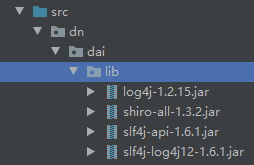
演示HelloShiro需要的一些核心组件
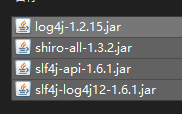
导入工程lib目录
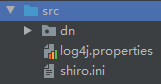
导入Shiro配置文件和日志配置文件
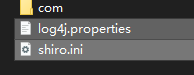
没有Maven管理,配置文件就直接放在src目录下
对Shiro的快速入门源码解析:
1、创建Shiro安全管理器实例
        // The easiest way to create a Shiro SecurityManager with configured

        // 创建Shiro安全管理器最简单的方式是使用配置

        // realms, users, roles and permissions is to use the simple INI config.

        // 访问域,用户,角色(权限),行为,都放在这个简单的ini配置文件中

        // We'll do that by using a factory that can ingest a .ini file and

        // 我们将会使用工厂实例注入ini配置文件,

        // return a SecurityManager instance:

        // 并且返回Shiro安全管理器的实例

        // Use the shiro.ini file at the root of the classpath

        // shiro.ini配置文件放在类路径的根下面

        // (file: and url: prefixes load from files and urls respectively):

        // 分别从文件和url加载前缀

        Factory<SecurityManager> factory = new IniSecurityManagerFactory("classpath:shiro.ini");

        SecurityManager securityManager = factory.getInstance();
2、继续配置安全管理器对象
        // for this simple example quickstart, make the SecurityManager accessible as a JVM singleton.

        // 在这个简单的快速入门案例中,使安全管理器实例在JVM中是一个可访问的单利对象

        //  Most applications wouldn't do this

        // 但是在大多数应用中不会这么来干

        // and instead rely on their container configuration or web.xml for webapps.

        // 并且对于webapps而言,是依赖于它们的容器配置文件或web.xml文件

        // That is outside the scope of this simple quickstart, so

        // 这已经超出了我们shiro快速入门的范畴了,所以

        // we'll just do the bare minimum so you can continue to get a feel for things.

        // 我们将只做一些你能继续体验的最基础的事情

        SecurityUtils.setSecurityManager(securityManager);

       // Now that a simple Shiro environment is set up, let's see what you can do:

        // 现在Shiro的环境已经部署出来了,瞧瞧我们能干点啥
3、获取当前执行的用户
// get the currently executing user:

        // 获取当前正在执行的用户

        Subject currentUser = SecurityUtils.getSubject();
获取当前的Subject对象
4、通过Session存储的认证信息来处理授权安全
获取 & 简单的判断
        // Do some stuff with a Session (no need for a web or EJB container!!!)

        // 用会话做些事情(不需要web或EJB容器!!!)【测试Session】

        // 获取Session

        Session session = currentUser.getSession();

        // 在Session对象中注入某一属性

        session.setAttribute("someKey", "aValue");

        // 然后又获取这个属性值

        String value = (String) session.getAttribute("someKey");

        if (value.equals("aValue")) {

       //是否匹配

            log.info("---> Retrieved the correct value! [" + value + "]");

        }
5、权限详细的操作
        // let's login the current user so we can check against roles and permissions:

        // 让我们登录当前用户,以便检查角色和权限:

        // 测试当前的用户是否已经认证,即是否登陆 调用isAuthenticated()方法判断

        if (!currentUser.isAuthenticated()) {

            // 如果不是则把认证信息封装在一个令牌对象中

            UsernamePasswordToken token = new UsernamePasswordToken("lonestarr", "vespa");

            // 对这个令牌对象设置 记住我

            token.setRememberMe(true);

            try {

                // 执行登陆指令,能否成功取决于在shiro.ini中是否配置令牌中认证信息

                currentUser.login(token);

            }

            // 未知账户异常 ,没有此用户抛出

            catch (UnknownAccountException uae) {

                log.info("----> There is no user with username of " + token.getPrincipal());

                return;

            }

            // 不正确的资格证书,账户的密码错误

            catch (IncorrectCredentialsException ice) {

                log.info("----> Password for account " + token.getPrincipal() + " was incorrect!");

                return;

            }

            //锁定的账户,该用户的账号已经上锁,请联系你的管理员解锁

            catch (LockedAccountException lae) {

                log.info("The account for username " + token.getPrincipal() + " is locked.  " +

                        "Please contact your administrator to unlock it.");

            }

            // ... catch more exceptions here (maybe custom ones specific to your application?

            // 更多的授权异常问题,翻阅shiro文档详细

            catch (AuthenticationException ae) {

                //unexpected condition?  error?

            }

        }

        //say who they are:

        // 说明 这是谁的用户

        //  print their identifying principal (in this case, a username):

        //  打印它们的标识主体,在这个演示案例中,只有一个用户名称

        log.info("----> User [" + currentUser.getPrincipal() + "] logged in successfully.");

        //test a role:

        // 测试权限

        // hasRole,判断是否存在这样一个角色权限?

        if (currentUser.hasRole("schwartz")) {

            // 存在,愿施瓦兹与你同在

            log.info("----> May the Schwartz be with you!");

        } else {

            // 你好,凡人

            log.info("----> Hello, mere mortal.");

            return;

        }

        //test a typed permission (not instance-level)

        // 测试一用户是否具备这个行为 isPermitted()

        if (currentUser.isPermitted("lightsaber:weild")) {

            // 你有这个行为,请明智的使用

            log.info("----> You may use a lightsaber ring.  Use it wisely.");

        } else {

            // 对卟住,这只是大师才能用的行为

            log.info("Sorry, lightsaber rings are for schwartz masters only.");

        }

        //a (very powerful) Instance Level permission:

        // 一个非常强大的实例等级行为

        // 判断这个用户是否被允许了

        if (currentUser.isPermitted("user:delete:zhangsan")) {

            log.info("----> You are permitted to 'drive' the winnebago with license plate (id) 'eagle5'.  " +

                    "Here are the keys - have fun!");

        } else {

            log.info("Sorry, you aren't allowed to drive the 'eagle5' winnebago!");

        }
6、完成安全授权,退出
        // 判断是否完成了授权验证

        System.out.println("---->" + currentUser.isAuthenticated());

        //all done - log out!

        // 全部搞定,退出

        currentUser.logout();

        System.out.println("---->" + currentUser.isAuthenticated());

        System.exit(0);
【Shiro】01 概述 & 快速上手的更多相关文章
- ESFramework 4.0 快速上手(01) -- Rapid引擎
(在阅读该文之前,请先阅读 ESFramework 4.0 概述 ,会对本文的理解更有帮助.) ESFramework/ESPlatform 4.0 的终极目标是为百万级的用户同时在线提供支持,因为强 ...
- 从零开始学 Web 之 Ajax(三)Ajax 概述,快速上手
大家好,这里是「 从零开始学 Web 系列教程 」,并在下列地址同步更新...... github:https://github.com/Daotin/Web 微信公众号:Web前端之巅 博客园:ht ...
- ESFramework 4.0 快速上手(06) -- Rapid引擎(续)
<ESFramework 4.0 快速上手>系列介绍的都是如何使用Rapid引擎(快速引擎) -- RapidServerEngine 和 RapidPassiveEngine.其实,大家 ...
- python的requests快速上手、高级用法和身份认证
https://blog.csdn.net/qq_25134989/article/details/78800209 快速上手 迫不及待了吗?本页内容为如何入门 Requests 提供了很好的指引.其 ...
- 【Python五篇慢慢弹】快速上手学python
快速上手学python 作者:白宁超 2016年10月4日19:59:39 摘要:python语言俨然不算新技术,七八年前甚至更早已有很多人研习,只是没有现在流行罢了.之所以当下如此盛行,我想肯定是多 ...
- Netron开发快速上手(一):GraphControl,Shape,Connector和Connection
版权所有,引用请注明出处:<<http://www.cnblogs.com/dragon/p/5203663.html >> 本文所用示例下载FlowChart.zip 一个用 ...
- 聊天系统Demo,增加Silverlight客户端(附源码)-- ESFramework 4.0 快速上手(09)
在ESFramework 4.0 快速上手 -- 入门Demo,一个简单的IM系统(附源码)一文中,我们介绍了使用ESFramework的Rapid引擎开发的winform聊天程序,本文我们将在之前d ...
- EF Core 快速上手——EF Core 入门
EF Core 快速上手--EF Core 介绍 本章导航 从本书你能学到什么 对EF6.x 程序员的一些话 EF Core 概述 1.3.1 ORM框架的缺点 第一个EF Core应用 本文是对 ...
- Java开发快速上手
Java开发快速上手 前言 1.我的大学 2.对初学者的建议 3.大牛的三大特点 4.与他人的差距 第一章 了解Java开发语言 前言 基础常识 1.1 什么是Java 1.1.1 跨平台性 1.2 ...
- 【技术文章】《快速上手nodejs》
本文地址:http://www.cnblogs.com/aiweixiao/p/8294814.html 原文地址: 扫码关注微信公众号 1.写在前面 nodejs快速上手 nodejs使ja ...
随机推荐
- IceRPC之依赖注入>快乐的RPC
作者引言 很高兴啊,我们来到了IceRPC之依赖注入>快乐的RPC,基础引导,打好基础,才能让自已不在迷茫,快乐的畅游世界. 依赖注入和IceRPC 了解 IceRPC (C#) 如何为依赖注入 ...
- kettle从入门到精通 第十四课 kettle kafka 生产者和消费者
1.本节课讲解kafka生产者和消费者两个步骤.这两个组件可以实现数据实时同步(后续课程会讲解). 2.kafka producer 步骤 1)step name:自定义名称 2)connection ...
- MySQL数据库开发(2)
单表查询 单表查询即对单个表进行查询. 单表查询的语法 SELECT 字段1,字段2... FROM 表名 WHERE 条件 GROUP BY field HAVING 筛选 ORDER BY fie ...
- 使用spark-sql处理Doris大表关联
背景 最近项目上有一个需求,需要将两张表(A表和B表)的数据进行关联并回写入其中一张表(A表),两张表都是分区表,但是关联条件不包括分区字段. 分析过程 方案一 最朴素的想法,直接关联执行,全表关联, ...
- 安装nodejs易遇到的坑
@ 目录 背景描述 流程步骤 小结 背景描述 我的服务器是centos7.9,打算先直接通过yum安装,但是yum不能指定node版本,我直接指定显示404找不到,然后我设置了下node下载的源,还是 ...
- Interceptor拦截器demo
Interceptor拦截器demo ##接口测试类 @RestController public class TestController { @RequestMapping(value = &qu ...
- dense并行训练1-流水线并行
并行训练-流水线 简述 并行训练主要有三种策略: 数据并行训练加速比最高,但要求每个设备上都备份一份模型,显存占用比较高,但缺点是通信量大. 张量并行,通信量比较高,适合在机器内做模型并行. 流水线并 ...
- Android系统源码的整编和单编
# Android系统源码的整编和单编 文章作者: 刘望舒 文章链接: http://liuwangshu.cn/framework/aosp/3-compiling-aosp.html 前言 很多时 ...
- 设备树DTS 学习:学习总结(应用篇)
设备树DTS 学习:学习总结(应用篇) 背景 经过前几章的学习,我们可以说是掌握了设备树的基础用法,现在作为总结回顾. 1.设备树DTS 学习:有关概念 介绍了什么是设备树,设备树的作用,如何编译设备 ...
- 背包DP——多重背包
多重背包也是 0-1 背包的一个变式.与 0-1 背包的区别在于每种物品有 k 个,而非一个. 朴素 直接把相同的每个物品视作各个单独的物品,没有关联,仅条件相同: 转换后直接用01背包的状态转移方程 ...