
ArgoWorkflow教程(五)---Workflow 的多种触发模式:手动、定时任务与事件触发
上一篇我们分析了argo-workflow 中的 archive,包括 流水线GC、流水线归档、日志归档等功能。本篇主要分析 Workflow 中的几种触发方式,包括手动触发、定时触发、Event 事件触发等。
1. 概述
Argo Workflows 的流水线有多种触发方式:
- 手动触发:手动提交一个 Workflow,就会触发一次构建,那么我们创建的流水线,理论上是 WorkflowTemplate 对象。
- 定时触发:CronWorkflow,类似于 k8s 中的 job 和 cronjob,CronWorkflow 会定时创建 Workflow 来实现定时触发。
- Event 事件触发:比如通过git commit 触发,借助 argo-events 可以实现此功能。
2. 定时触发
CronWorkflow 本质上就是一个 Workflow + Cron Spec。
设计上参考了 k8s 中的 CronJob
Demo
一个简单的 CronWorkflow 如下:
apiVersion: argoproj.io/v1alpha1

kind: CronWorkflow

metadata:

  name: test-cron-wf

spec:

  schedule: "* * * * *"

  concurrencyPolicy: "Replace"

  startingDeadlineSeconds: 0

  workflowSpec:

    entrypoint: whalesay

    templates:

    - name: whalesay

      container:

        image: alpine:3.6

        command: [sh, -c]

        args: ["date; sleep 90"]
apply 一下,可以看到创建出来的 Workflow 命名为 $cronWorkflowName-xxx
[root@lixd-argo workdir]# k get cwf

NAME           AGE

test-cron-wf   116s

[root@lixd-argo workdir]# k get wf

NAME                      STATUS    AGE   MESSAGE

test-cron-wf-1711852560   Running   47s
由于 template 中运行任务是 sleep 90s 因此,整个任务耗时肯定是超过 60s 的,根据设置的 concurrencyPolicy 为 Replace ,因此 60s 后,第二个 Workflow 被创建出来,第一个就会被停止掉。
[root@lixd-argo workdir]# k get wf

NAME                      STATUS    AGE    MESSAGE

test-cron-wf-1711852560   Failed    103s   Stopped with strategy 'Terminate'

test-cron-wf-1711852620   Running   43s
具体参数
支持的具体参数如下:
type CronWorkflowSpec struct {

	// WorkflowSpec is the spec of the workflow to be run

	WorkflowSpec WorkflowSpec `json:"workflowSpec" protobuf:"bytes,1,opt,name=workflowSpec,casttype=WorkflowSpec"`

	// Schedule is a schedule to run the Workflow in Cron format

	Schedule string `json:"schedule" protobuf:"bytes,2,opt,name=schedule"`

	// ConcurrencyPolicy is the K8s-style concurrency policy that will be used

	ConcurrencyPolicy ConcurrencyPolicy `json:"concurrencyPolicy,omitempty" protobuf:"bytes,3,opt,name=concurrencyPolicy,casttype=ConcurrencyPolicy"`

	// Suspend is a flag that will stop new CronWorkflows from running if set to true

	Suspend bool `json:"suspend,omitempty" protobuf:"varint,4,opt,name=suspend"`

	// StartingDeadlineSeconds is the K8s-style deadline that will limit the time a CronWorkflow will be run after its

	// original scheduled time if it is missed.

	StartingDeadlineSeconds *int64 `json:"startingDeadlineSeconds,omitempty" protobuf:"varint,5,opt,name=startingDeadlineSeconds"`

	// SuccessfulJobsHistoryLimit is the number of successful jobs to be kept at a time

	SuccessfulJobsHistoryLimit *int32 `json:"successfulJobsHistoryLimit,omitempty" protobuf:"varint,6,opt,name=successfulJobsHistoryLimit"`

	// FailedJobsHistoryLimit is the number of failed jobs to be kept at a time

	FailedJobsHistoryLimit *int32 `json:"failedJobsHistoryLimit,omitempty" protobuf:"varint,7,opt,name=failedJobsHistoryLimit"`

	// Timezone is the timezone against which the cron schedule will be calculated, e.g. "Asia/Tokyo". Default is machine's local time.

	Timezone string `json:"timezone,omitempty" protobuf:"bytes,8,opt,name=timezone"`

	// WorkflowMetadata contains some metadata of the workflow to be run

	WorkflowMetadata *metav1.ObjectMeta `json:"workflowMetadata,omitempty" protobuf:"bytes,9,opt,name=workflowMeta"`

}
内容可以分为 3 部分:
- WorkflowSpec :这个就是 Workflow 的 Spec,一模一样的
- Cron Spec:增加了一些 Cron 相关字段
- WorkflowMetadata:一些 metadata,后续该 CronWorkflow 创建的 Workflow 都会携带上这里指定的 metadata
WorkflowSpec 和 WorkflowMetadata 没太大区别,就不赘述了,分析一下 Cron Spec 相关的几个字段:
- schedule:cron 表达式,
* * * * *每分钟创建一次 - concurrencyPolicy:并发模式,支持 Allow、Forbid、Replace
- Allow:允许同时运行多个 Workflow
- Forbid:禁止并发,有 Workflow 运行时,就不会再创建新的
- Replace: 表示新创建 Workflow 替换掉旧的,不会同时运行多个 Workflow。
- startingDeadlineSeconds:Workflow 创建出来到第一个 Pod 启动的最大时间,超时后就会被标记为失败。
- suspend:flag 是否停止 CronWorkflow,在定时任务不需要执行是可以设置为 true。
- timezone:时区,默认使用机器上的本地时间
大部分字段和 K8s CronJob 一致
apiVersion: argoproj.io/v1alpha1

kind: CronWorkflow

metadata:

  name: my-cron

spec:

  schedule: "* * * * *"

  concurrencyPolicy: "Replace"

  startingDeadlineSeconds: 0

  workflowSpec:

    entrypoint: whalesay

    templates:

    - name: whalesay

      container:

        image: alpine:3.6

        command: [sh, -c]

        args: ["date; sleep 10"]

  workflowMetadata:

    labels:

      from: cron
增加了 metadata,测试一下
[root@lixd-argo workdir]# k get wf my-cron-1711853400 -oyaml|grep labels -A 1

  labels:

    from: cron
可以看到,创建出来的 Workflow 确实携带上了,在 CronWorkflow 中指定的 label。
3. Event
argo 提供了一个 Event API:/api/v1/events/{namespace}/{discriminator},该 API 可以接受任意 json 数据。
通过 event API 可以创建 Workflow ,类似于 Webhook。
具体请求长这样:
curl https://localhost:2746/api/v1/events/argo/ \

  -H "Authorization: $ARGO_TOKEN" \

  -d '{"message": "hello"}'
或者这样:
curl https://localhost:2746/api/v1/events/argo/my-discriminator \

  -H "Authorization: $ARGO_TOKEN" \

  -d '{"message": "hello"}'
- 1)准备 Token
- 2)创建 WorkflowEventBinding,配置接收 event 以及收到 event 后创建的 Workflow 信息
- 3)发送请求进行测试
Token
创建 RBAC 相关对象,role、rolebinding、sa,其中 role 只需要提供最小权限即可。
直接创建在 default 命名空间
kubectl apply -f - <<EOF

apiVersion: rbac.authorization.k8s.io/v1

kind: Role

metadata:

  name: test

rules:

  - apiGroups:

      - argoproj.io

    resources:

      - workfloweventbindings

    verbs:

      - list

  - apiGroups:

      - argoproj.io

    resources:

      - workflowtemplates

    verbs:

      - get

  - apiGroups:

      - argoproj.io

    resources:

      - workflows

    verbs:

      - create

EOF
serviceaccount 和 rolebinding
kubectl create sa test

kubectl create rolebinding test --role=test --serviceaccount=default:test
然后创建一个 Secret
kubectl apply -f - <<EOF

apiVersion: v1

kind: Secret

metadata:

  name: test.service-account-token

  annotations:

    kubernetes.io/service-account.name: test

type: kubernetes.io/service-account-token

EOF
最后就可以查询 Secret 解析 Token 了
ARGO_TOKEN="Bearer $(kubectl get secret test.service-account-token -o=jsonpath='{.data.token}' | base64 --decode)"

echo $ARGO_TOKEN

Bearer ZXlKaGJHY2lPaUpTVXpJMU5pSXNJbXRwWkNJNkltS...
测试,能否正常使用
ARGO_SERVER=$(kubectl get svc argo-workflows-server -n argo -o=jsonpath='{.spec.clusterIP}')

curl http://$ARGO_SERVER:2746/api/v1/workflow-event-bindings/default -H "Authorization: $ARGO_TOKEN"
WorkflowEventBinding
为了接收 Event,可以创建 WorkflowEventBinding 对象,具体如下:
apiVersion: argoproj.io/v1alpha1

kind: WorkflowEventBinding

metadata:

  name: event-consumer

spec:

  event:

    # metadata header name must be lowercase to match in selector

    selector: payload.message != "" && metadata["x-argo-e2e"] == ["true"] && discriminator == "my-discriminator"

  submit:

    workflowTemplateRef:

      name: my-wf-tmple

    arguments:

      parameters:

      - name: message

        valueFrom:

          event: payload.message
spec.event 指定了该 Binding 该如何匹配收到的 Event,比如这里的条件就是:
- 1)payload 中有一个 message 参数,值不为空
- 2)header 中包含 x-argo-e2e,且值为 true
- 注意:这里匹配的时候 header 都会被转为小写
- 3)最后就是 discriminator 名字为 my-discriminator
如果匹配则会使用 submit 下面指定的内容创建 Workflow:
- 1)使用 my-wf-tmple 这个 workflowTemplate 创建 Workflow
- 2)使用 payload.message 作为参数
至于创建出的 Workflow 则是由 my-wf-tmple 定义了,先创建这个 Template
apiVersion: argoproj.io/v1alpha1

kind: WorkflowTemplate

metadata:

  name: my-wf-tmple

spec:

  templates:

    - name: main

      inputs:

        parameters:

          - name: message

            value: "{{workflow.parameters.message}}"

      container:

        image: docker/whalesay:latest

        command: [cowsay]

        args: ["{{inputs.parameters.message}}"]

  entrypoint: main
最后我们就可以发送 API 来触发 event 实现 Workflow 的创建
curl $ARGO_SERVER:2746/api/v1/events/default/my-discriminator \

    -H "Authorization: $ARGO_TOKEN" \

    -H "X-Argo-E2E: true" \

    -d '{"message": "hello events"}'
测试一下:
{}[root@lixd-argo workdir]# curl $ARGO_SERVER:2746/api/v1/events/default/my-discriminator \

>     -H "Authorization: $ARGO_TOKEN" \

>     -H "X-Argo-E2E: true" \

>     -d '{"message": "hello events"}'

{}[root@lixd-argo workdir]# k get wf

NAME                STATUS    AGE   MESSAGE

my-wf-tmple-ea81n   Running   5s

[root@lixd-argo workdir]# k get wf my-wf-tmple-ea81n -oyaml|grep parameters -A 5

    parameters:

    - name: message

      value: hello events
可以看到,Workflow 已经创建出来了,而且参数也是我们发请求时给的 hello events。
扩容
默认情况下 argo-server 可以同时处理 64 个事件,再多就会直接返回 503 了,可以通过以下参数进行调整:
- 1)--event-operation-queue-size:增加队列大小,以接收更多的事件
- 2)--event-worker-count:增加 worker 数量,提升处理速度
4. Webhook
前面 Event 章节提到了可以通过发送 HTTP 请求的方式来创建触发 event 以 Workflow,但是需要客户端提供 AuthToken。
问题来了,对于一些不能指定 Token 的客户端来说就比较麻烦了,比如 Github、Gitlab 等 Git 仓库,都可以配置 Webhook,在收到 commit 的时候调用 Webhook 来触发流水线。
此时,这些发送过来的请求肯定是没有带 Token 的,因此需要额外配置来进行验证,保证 argo 只处理来自 Github、Gitlab 等等平台的 Webhook 请求。
- 1)创建 RBAC 相关对象,role、rolebinding、sa 准备好 token
- 2)配置 Webhook-clients,告诉 argo 什么类型的 Webhook 过来使用那个 secret 作为 token
第一步 Token 和 Event 章节一致,就不在赘述了,主要是第二步。
webhook-clients config
上一步,创建 RBAC 对象,准备好 Secret 之后,一般客户端都是解析 Secret 中的 Token,然后带上该 Token 发送请求,就像这样:
ARGO_SERVER=$(kubectl get svc argo-workflows-server -n argo -o=jsonpath='{.spec.clusterIP}')

ARGO_TOKEN="Bearer $(kubectl get secret jenkins.service-account-token -o=jsonpath='{.data.token}' | base64 --decode)"

curl https://$ARGO_SERVER:2746/api/v1/events/default/ \

  -H "Authorization: $ARGO_TOKEN" \

  -d '{"message": "hello"}'
但是,对于 Webhook 客户端来说,是没办法这样指定 token 的,因此需要通过argo-workflows-webhook-clients 配置来告诉 argo,哪个 Webhook 使用哪个 Secret 中的 token。
创建一个名为argo-workflows-webhook-clients 的 Secret,内容大致是这样的:
kind: Secret

apiVersion: v1

metadata:

  name: argo-workflows-webhook-clients

# The data keys must be the name of a service account.

stringData:

  # https://support.atlassian.com/bitbucket-cloud/docs/manage-webhooks/

  bitbucket.org: |

    type: bitbucket

    secret: "my-uuid"

  # https://confluence.atlassian.com/bitbucketserver/managing-webhooks-in-bitbucket-server-938025878.html

  bitbucketserver: |

    type: bitbucketserver

    secret: "shh!"

  # https://developer.github.com/webhooks/securing/

  github.com: |

    type: github

    secret: "shh!"

  # https://docs.gitlab.com/ee/user/project/integrations/webhooks.html

  gitlab.com: |

    type: gitlab

    secret: "shh!"
- 其中 Key 必须是当前 Namespace 下的 Serviceaccount 名称。
- Value 则包含 type 和 secret 两部分。
- type:Webhook 来源,比如 github、gitlab
- secret:一个字符串,非 k8s secret,一般在对应平台添加 Webhook 时进行配置
以 Github 具体,secret 配置如下:
在添加 Webhook 时可以填一个 Secret 配置,实际就是一串加密字符,随便填什么都可以。
这样 Github 发送 Webhook 请求时就会携带上这个 Secret 信息,Argo 收到后就根据argo-workflows-webhook-clients 的 Secret 里配置的 type=github 的 secret 字段进行对比,如果匹配上就处理,否则就忽略该请求。
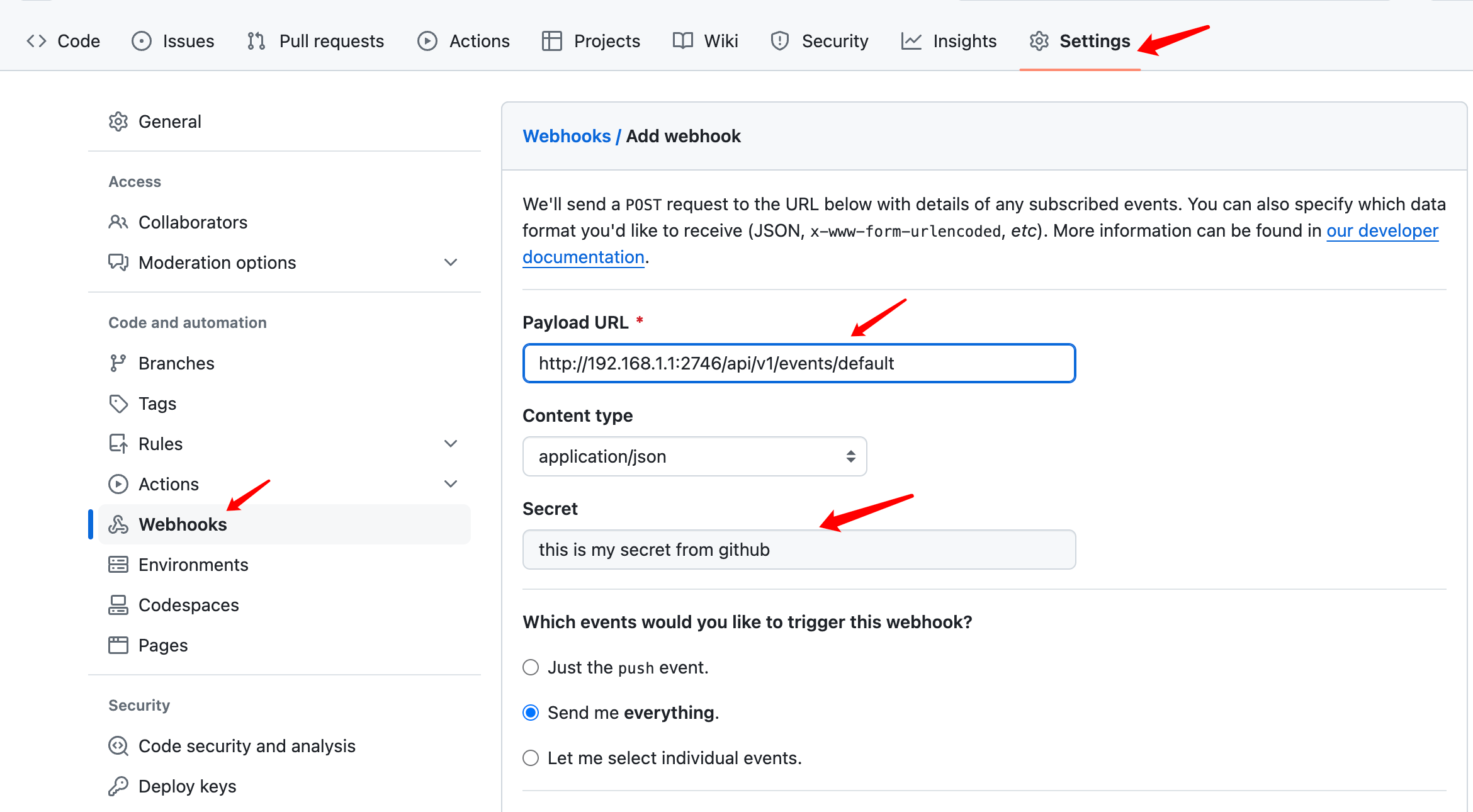
如果能匹配上就从对应的 Serviceaccount 中解析 Token 作为 Authorization 信息。
源码分析
Webhook 这一块,官方文档不是很详细,一笔带过了,因此翻了下源码。
这块逻辑以一个 Interceptor 的形式出现,对于所有 Event API 都会经过该逻辑,用于为没有携带 Authorization 的请求添加 Authorization 信息。
// Interceptor creates an annotator that verifies webhook signatures and adds the appropriate access token to the request.

func Interceptor(client kubernetes.Interface) func(w http.ResponseWriter, r *http.Request, next http.Handler) {

	return func(w http.ResponseWriter, r *http.Request, next http.Handler) {

		err := addWebhookAuthorization(r, client)

		if err != nil {

			log.WithError(err).Error("Failed to process webhook request")

			w.WriteHeader(403)

			// hide the message from the user, because it could help them attack us

			_, _ = w.Write([]byte(`{"message": "failed to process webhook request"}`))

		} else {

			next.ServeHTTP(w, r)

		}

	}

}
调用 addWebhookAuthorization 尝试添加认证信息。
func addWebhookAuthorization(r *http.Request, kube kubernetes.Interface) error {

	// try and exit quickly before we do anything API calls

	if r.Method != "POST" || len(r.Header["Authorization"]) > 0 || !strings.HasPrefix(r.URL.Path, pathPrefix) {

		return nil

	}

	parts := strings.SplitN(strings.TrimPrefix(r.URL.Path, pathPrefix), "/", 2)

	if len(parts) != 2 {

		return nil

	}

	namespace := parts[0]

	secretsInterface := kube.CoreV1().Secrets(namespace)

	ctx := r.Context()

	webhookClients, err := secretsInterface.Get(ctx, "argo-workflows-webhook-clients", metav1.GetOptions{})

	if err != nil {

		return fmt.Errorf("failed to get webhook clients: %w", err)

	}

	// we need to read the request body to check the signature, but we still need it for the GRPC request,

	// so read it all now, and then reinstate when we are done

	buf, _ := io.ReadAll(r.Body)

	defer func() { r.Body = io.NopCloser(bytes.NewBuffer(buf)) }()

	serviceAccountInterface := kube.CoreV1().ServiceAccounts(namespace)

	for serviceAccountName, data := range webhookClients.Data {

		r.Body = io.NopCloser(bytes.NewBuffer(buf))

		client := &webhookClient{}

		err := yaml.Unmarshal(data, client)

		if err != nil {

			return fmt.Errorf("failed to unmarshal webhook client \"%s\": %w", serviceAccountName, err)

		}

		log.WithFields(log.Fields{"serviceAccountName": serviceAccountName, "webhookType": client.Type}).Debug("Attempting to match webhook request")

		ok := webhookParsers[client.Type](client.Secret, r)

		if ok {

			log.WithField("serviceAccountName", serviceAccountName).Debug("Matched webhook request")

			serviceAccount, err := serviceAccountInterface.Get(ctx, serviceAccountName, metav1.GetOptions{})

			if err != nil {

				return fmt.Errorf("failed to get service account \"%s\": %w", serviceAccountName, err)

			}

			tokenSecret, err := secretsInterface.Get(ctx, secrets.TokenNameForServiceAccount(serviceAccount), metav1.GetOptions{})

			if err != nil {

				return fmt.Errorf("failed to get token secret \"%s\": %w", tokenSecret, err)

			}

			r.Header["Authorization"] = []string{"Bearer " + string(tokenSecret.Data["token"])}

			return nil

		}

	}

	return nil

}
具体流程如下:
- 首先判断了,只有 POST 方法,而且 Authorization 为空时才会自动添加。
- 然后就从 API 中指定的 Namespace 下查询名为 argo-workflows-webhook-clients 的 Secret。
- 最后就是循环对比,Secret 中的 type 和 secret 能否和当前请求匹配上,如果匹配上则把 data 对应的 key 做了 serviceaccount 名去查询 token 然后解析 token 做了 Authorization 使用。
第三步会直接使用 key 作为 serviceaccount,这也就是为什么配置argo-workflows-webhook-clients时需要把 serviceaccount 名称做为 key。
【ArgoWorkflow 系列】持续更新中,搜索公众号【探索云原生】订阅,阅读更多文章。

5. 小结
本文主要分析了 Argo 中的 Workflow 的几种触发方式。
- 1)手动触发:手动创建 Workflow 对象方式触发流水线运行
- 2)定时触发:使用 CronWorkflow 根据 Cron 表达式自动创建 Workflow
- 3)Event:使用 argo-server 提供的 event api 配合WorkflowEventBinding 创建 Workflow
- 4)Webhook:该方式实则是 Event 方式的扩展,Event 方式请求时需要 Token 认证,Webhook 方式则通过
argo-workflows-webhook-clients配置好不同来源的 Webhook 使用的 Secret 以实现认证,这样就可以把 Event API 用作 Webhook 端点 配置到 Github、Gitlab 等环境了。
ArgoWorkflow教程(五)---Workflow 的多种触发模式:手动、定时任务与事件触发的更多相关文章
- epoll水平/边缘触发模式下阻塞/非阻塞EPOLLOUT事件触发条件及次数
在IO多路复用技术中,epoll默认的事件触发模式为Level_triggered(水平触发)模式,即当被监控的文件描述符上有可读/写事件发生时,epoll_wait()会通知处理程序去读写.如果这次 ...
- 关于Application_End 与 Application_Start事件触发情况的测试(待续)
测试项目搭建 定义一个简单的Mvc项目,有如下文件: (1) public class Startup { public void Configuration(IAppBuilder app) { a ...
- iframe onload事件触发两次
标准参考 关于 HTML 4.01 规范中 onload 内在事件说明:http://www.w3.org/TR/html401/interact/scripts.html#adef-onload 关 ...
- vue 组件之间事件触发($emit)与event Bus($on)的用法说明
组件之间事件触发 新增按钮组件: 操作按钮组合组件: 此时有个需求就是,无论是哪个按钮,如果改变了列表中的数据,列表需要实时更新数据. 此时就需要用到组件间的事件触发. 父子组件之间事件触发可以使用$ ...
- WCF入门教程五[WCF的通信模式]
一.概述 WCF在通信过程中有三种模式:请求与答复.单向.双工通信.以下我们一一介绍. 二.请求与答复模式 描述: 客户端发送请求,然后一直等待服务端的响应(异步调用除外),期间处于假死状态,直到服务 ...
- 无废话WCF入门教程五[WCF的通信模式]
一.概述 WCF在通信过程中有三种模式:请求与答复.单向.双工通信.以下我们一一介绍. 二.请求与答复模式 描述: 客户端发送请求,然后一直等待服务端的响应(异步调用除外),期间处于假死状态,直到服务 ...
- Elasticsearch入门教程(五):Elasticsearch查询(一)
原文:Elasticsearch入门教程(五):Elasticsearch查询(一) 版权声明:本文为博主原创文章,遵循CC 4.0 BY-SA版权协议,转载请附上原文出处链接和本声明. 本文链接:h ...
- MVC5+EF6 入门完整教程11--细说MVC中仓储模式的应用
摘要: 第一阶段1~10篇已经覆盖了MVC开发必要的基本知识. 第二阶段11-20篇将会侧重于专题的讲解,一篇文章解决一个实际问题. 根据园友的反馈, 本篇文章将会先对呼声最高的仓储模式进行讲解. 文 ...
- Android Studio系列教程五--Gradle命令详解与导入第三方包
Android Studio系列教程五--Gradle命令详解与导入第三方包 2015 年 01 月 05 日 DevTools 本文为个人原创,欢迎转载,但请务必在明显位置注明出处!http://s ...
- 黄聪:Microsoft Enterprise Library 5.0 系列教程(五) Data Access Application Block
原文:黄聪:Microsoft Enterprise Library 5.0 系列教程(五) Data Access Application Block 企业库数据库访问模块通过抽象工厂模式,允许用户 ...
随机推荐
- Linux安装 JDK (CentOS 7)
Linux安装 JDK 一.Linux安装软件的方式 第一种:二进制发布包安装: 软件已经针对具体平台编译打包发布,只要解压,修改配置即可 第二种: rpm安装 : 软件已经按照redhat的包管理规 ...
- 支付宝小程序的级联选择器,对接简单操作,Cascader 级联选择器element_ui
首先,对于element_ui 的动接,由于需要数据格式是 但是支付宝提的接口返回的数据是另一种格式,并且支付宝的三级联动接口是先只有一个列表,点击列表项再发现请求,生成另外一个下拉选择, 需要这个三 ...
- SEO初学指南之关键词研究(2) - 搜索意图分析
Hi,我是听风.这篇文章我们深入探讨下关键词研究中最重要的一点:搜索意图. 虽然这在本系列教程的第一篇中提到过搜索意图,但是我还是想再写一篇文章来帮助你们了解什么是搜索意图以及如何再关键词研究中使用它 ...
- CentOS-7离线安装net-tools
1.下载相关安装包 CentOS-7 所有rpm包的仓库地址:https://vault.centos.org/7.9.2009/os/x86_64/Packages/ net-tools-2.0-0 ...
- 目前国内全地形能力最强的双足机器人 —— 逐际动力 —— 提出迭代式预训练(Iterative Pre-training)方法的强化学习算法
相关: https://weibo.com/1255595687/O5k4Aj8l2 该公司对其产品的强化学习训练算法给出了较少的描述: 提出迭代式预训练(Iterative Pre-training ...
- 人形机器人的AI技术 —— 将一个大问题拆解为若干个小问题
前文: 人形机器人 -- Figure 01机器人亮相 | OpenAI多模态能力加持 | 与人类流畅对话交互 | 具身智能的GPT-4时刻 所需的AI技术: 人形机器人的软件层面其实有: 视觉模块/ ...
- 【转载】 Ubuntu下使用VSCode的launch.json及tasks.json编写
版权声明:本文为CSDN博主「子木呀」的原创文章,遵循CC 4.0 BY-SA版权协议,转载请附上原文出处链接及本声明.原文链接:https://blog.csdn.net/qq_41687938/a ...
- 在Ubuntu 16.04 LTS服务器上安装FreeRADIUS和Daloradius的方法
FreeRADIUS 为AAA Radius Linux下开源解决方案,DaloRadius为图形化web管理工具. freeradius一般用来进行账户认证管理,记账管理,常见的电信运营商的宽带账户 ...
- 折腾 Quickwit,Rust 编写的分布式搜索引擎-官方配置详解
Node configuration(节点配置) 节点配置允许您为集群中的各个节点自定义和优化设置.它被分为几个部分: 常规配置设置:共享的顶级属性 Storage(存储)设置:在storage部分定 ...
- 树莓派CM4(四):树莓派镜像替换内核
树莓派镜像替换内核 1. 为什么要替换内核 树莓派官方提供的镜像中,自带的内核版本为6.6.31 然而github上提供的内核源码为6.6.40,有些微差别 此外,后续很有可能进行内核裁剪定制等工作, ...