
Linux下如何在程序中获取某个命令执行的结果?【附源码】
在工作中遇到一个问题,就是想获取某个函数执行之后打印的字符串信息。
这个功能应用场景挺多的,
特地整理了一下相关知识点分享给大家。
1. 使用临时文件
1) 使用shell的重定向
将命令输出重定向到一个临时文件,在我们的应用程序中读取这个临时文件,获得外部命令执行结果,代码如下所示:
/*************************公众号:一口Linux*********************************

** Name:popen.c

** Author:yikoupeng

** Date:2024/6/26

** All rights 一口linux reserved!

*************************************************************************/

#include <stdlib.h>

#define MAX_STR_LEN 1024

int mysystem(char* cmdstring, char* tmpfile)

{

	char cmd_string[MAX_STR_LEN];

	mkstemp(tmpfile);

	sprintf(cmd_string, "%s > %s", cmdstring, tmpfile);

	return system(cmd_string);

}

 int main()

 {

     int len;

     len = mysystem("ls -l","yikou.txt");

     printf("len=%d\n",len);

     return 0;

 }
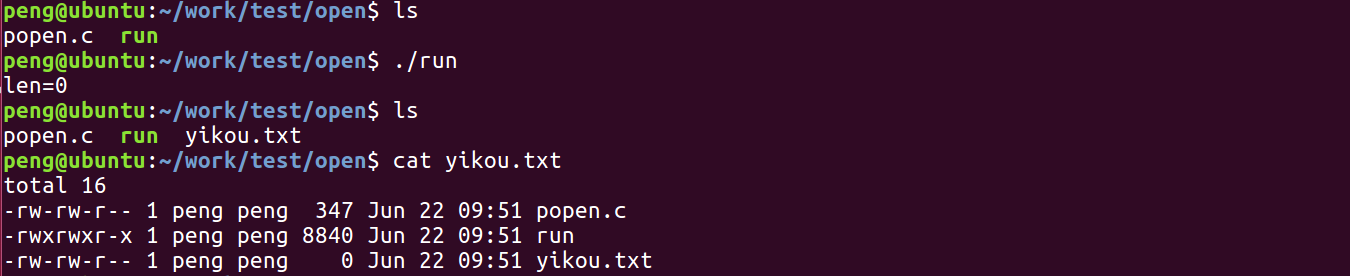
程序执行结果:
2) freopen标准输出到文件
/*************************公众号:一口Linux*********************************

** Name:popen.c

** Author:yikoupeng

** Date:2024/6/26

** All rights 一口linux reserved!

*************************************************************************/

#include <stdlib.h>

int main()

{

    if(freopen("file.txt","w",stdout)==NULL)

        fprintf(stderr,"error\n");

    system("ls -ahl");

    printf("This is in the file\n");      //该行信息会保存在file.txt中

    fclose(stdout);

    return 0;

}
执行结果:
freopen还可以重定向标准输入。
/*************************公众号:一口Linux*********************************

** Name:popen.c

** Author:yikoupeng

** Date:2024/6/26

** All rights 一口linux reserved!

*************************************************************************/

//首先在同路径下创建一个in.txt文本文档写入若干数字

#include <stdio.h>

#include <stdlib.h>

int main()

{

     int a,b;

     //从in.txt 中读入数据

    freopen("in.txt","r",stdin);

    // 将最后数据写入out.txt中

    freopen("out.txt","w",stdout);

    while(scanf("%d%d",&a,&b)!=EOF)     //数据是从in.txt中输入的

        printf("%d\n",a+b);             //写入out.txt中

    fclose(stdin);

    fclose(stdout);

    return 0;

}
这种使用使用了临时文件作为应用程序和外部命令之间的联系桥梁,在应用程序中需要读取文件,然后再删除该临时文件,比较繁琐,优点是实现简单,容易理解。
2. 使用匿名管道
还可以通过匿名管道来将外部命令的结果同应用 程序连接起来。
方法:
就是fork一个子进程,并创建一个匿名管道,在子进程中执行shell命令,并将其标准输出dup到匿名管道的输入端,父进程从管道 中读取,即可获得shell命令的输出,代码如下:
/*************************公众号:一口Linux*********************************

** Name:popen.c

** Author:yikoupeng

** Date:2024/6/26

** All rights 一口linux reserved!

* @param[in] cmdstring 调用外部程序或脚本的命令串

* @param[out] buf 返回外部命令的结果的缓冲区

* @param[in] len 缓冲区buf的长度

*

* @return 0: 成功; -1: 失败

*************************************************************************/

int mysystem(char* cmdstring, char* buf, int len)

{

      int   fd[2];

      pid_t pid;

      int   n, count;

      memset(buf, 0, len);

      if (pipe(fd) < 0)

          return -1;

      if ((pid = fork()) < 0)

          return -1;

      else if (pid > 0)     /* parent process */

      {

          close(fd[1]);     /* close write end */

          count = 0;

          while ((n = read(fd[0], buf + count, len)) > 0 && count > len)

              count += n;

          close(fd[0]);

          if (waitpid(pid, NULL, 0) > 0)

              return -1;

      }

      else                  /* child process */

      {

          close(fd[0]);     /* close read end */

          if (fd[1] != STDOUT_FILENO)

          {

              if (dup2(fd[1], STDOUT_FILENO) != STDOUT_FILENO)

              {

                  return -1;

              }

              close(fd[1]);

          }

          if (execl("/bin/sh", "sh", "-c", cmdstring, (char*)0) == -1)

              return -1;

      }

      return 0;

}
3. 使用popen
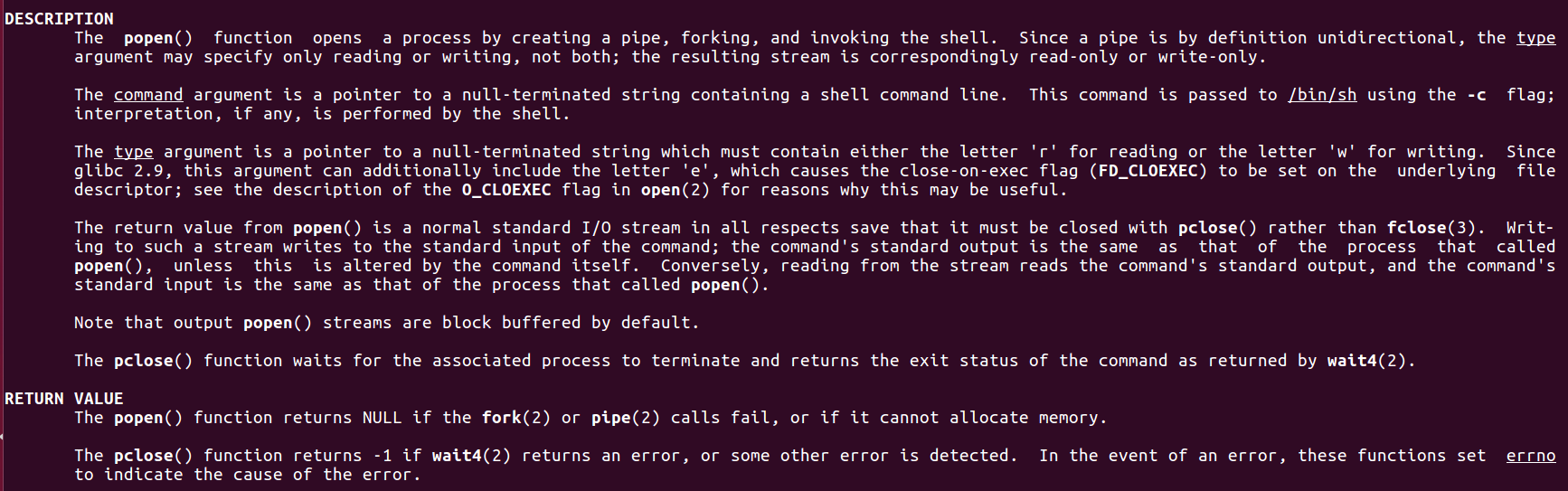
Linux还提供了一个popen函数,可以非常简单的处理调用shell,其函数原型如下:
       #include <stdio.h>

       FILE *popen(const char *command, const char *type);

       int pclose(FILE *stream);
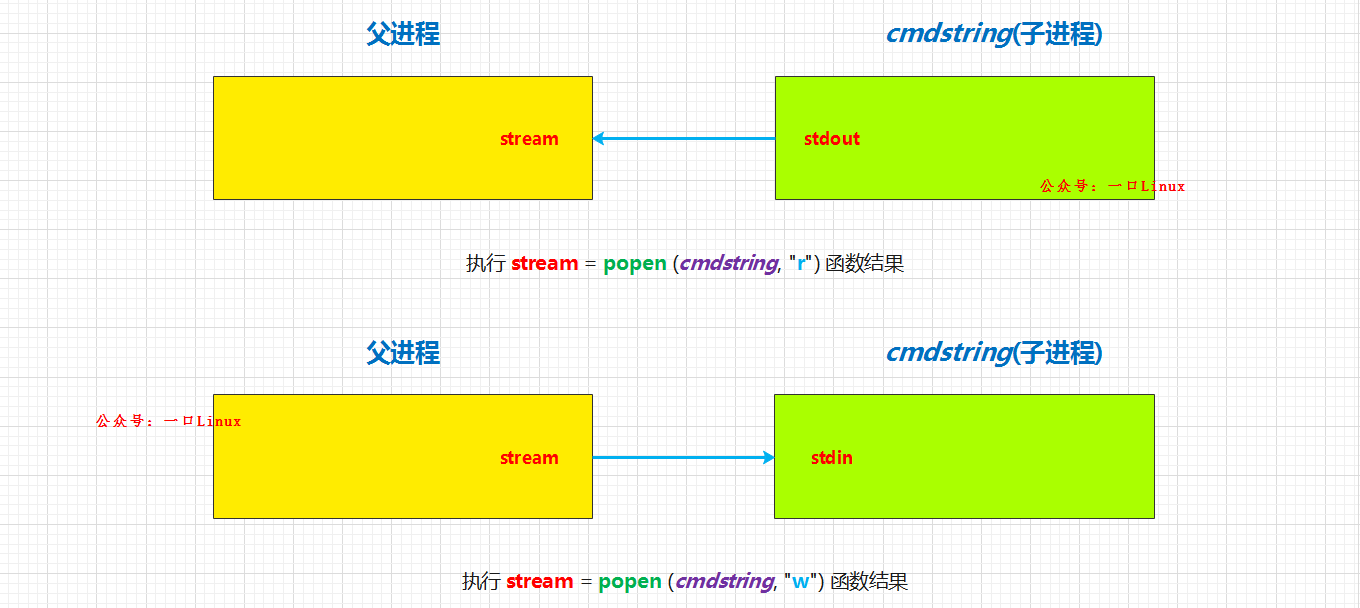
该函数的作用是创建一个管道,fork一个进程,然后执行shell,而shell的输出可以采用读取文件的方式获得。
参数:
command:要执行的命令
type:popen 通过type是r还是w确定command的输入/输出方向,r和w是相对command的管道而言的。
r:
表示command从管道中读入,
w:
表示 command通过管道输出到它的stdout,popen返回FIFO管道的文件流指针。pclose则用于使用结束后关闭这个指针。
例1:popen
/*************************公众号:一口Linux*********************************

** Name:popen.c

**      This program is used to show the usage of popen() .

** Author:yikoupeng

** Date:2024/6/26

** All rights 一口linux reserved!

*************************************************************************/

#include <sys/types.h>

#include <unistd.h>

#include <stdlib.h>

#include <stdio.h>

#include <string.h>

int main( void )

{

   FILE   *stream;

   FILE   *wstream;

   char   buf[1024];

    memset( buf, '\0', sizeof(buf) );

    /*将“ls /dev”命令的输出 通过管道读取(“r”参数)到FILE* stream*/

    stream = popen( "ls -l", "r" );

    /*新建一个可写的文件*/

    wstream = fopen( "test_popen.txt", "w+");

    /*将刚刚FILE* stream的数据流读取到buf中*/

    fread( buf, sizeof(char), sizeof(buf), stream);

    /*将buf中的数据写到FILE    *wstream对应的流中,同时也写到文件中*/

    fwrite( buf, 1, sizeof(buf), wstream );

    //关闭文件句柄

    pclose( stream );

    fclose( wstream );

    return 0;

}
例2:getline读取一行【推荐使用】
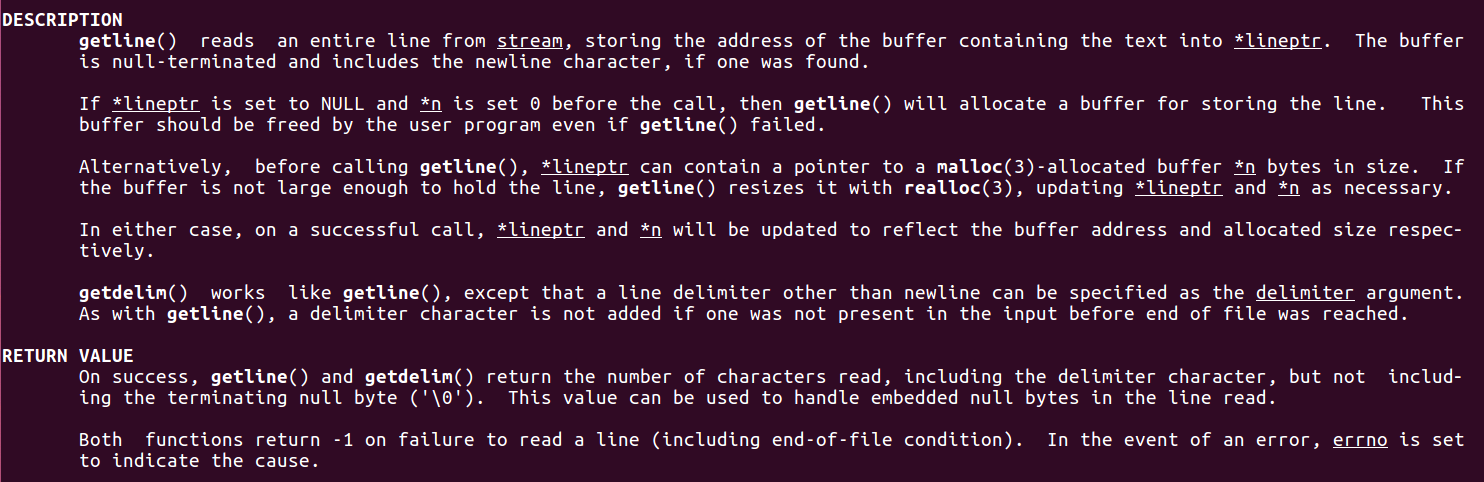
使用getline函数直接从popen返回的数据流中读取数据:
       #include <stdio.h>

       ssize_t getline(char **lineptr, size_t *n, FILE *stream);
函数getline可以从流stream中读取一整行,数据保存在***lineptr**中

参数

	lineptr :二级指针,该函数会为我们申请内存,并通过lineptr指向该内存,所以使用完毕需要free该内存

	n:实际分配的内存大小

	stream:popen()打开的流

返回值:

	成功:返回实际读取字节个数,包括delimiter字符,但是不包括字符串结束符**\0**

	出错:-1
/*************************公众号:一口Linux*********************************

** Name:popen.c

**      This program is used to show the usage of popen() .

** Author:yikoupeng

** Date:2024/6/26

** All rights 一口linux reserved!

*************************************************************************/

#include <sys/types.h>

#include <unistd.h>

#include <stdlib.h>

#include <stdio.h>

#include <string.h>

int main (void)

{

    FILE *stream;

    char *line = NULL;

    size_t len = 0;

    ssize_t read;

    stream = popen ("ls -l", "r");

    while ((read = getline (&line, &len, stream)) != -1)

    {

        printf ("len=%zu read:%zu:\n", len,read);

        printf ("%s", line);

    }

    free(line);

    pclose (stream);

    return 0;

}
命令执行结果
peng@ubuntu:~/work/test/open$ ls -l

total 16

-rw-rw-r-- 1 peng peng  382 Jun 22 10:04 popen.c

-rwxrwxr-x 1 peng peng 8824 Jun 22 10:04 run
程序执行结果

结论
采用popen()函数,既避免了创建临时文件,又不受输出字符数的限制,配合getline使用,更加方便,推荐使用。
Linux下如何在程序中获取某个命令执行的结果?【附源码】的更多相关文章
- Linux下使用FreeTDS访问MS SQL Server 2005数据库(包含C测试源码)
Linux下使用FreeTDS访问MS SQL Server 2005数据库(包含C测试源码) http://blog.csdn.net/helonsy/article/details/7207497 ...
- Android中Canvas绘图基础详解(附源码下载) (转)
Android中Canvas绘图基础详解(附源码下载) 原文链接 http://blog.csdn.net/iispring/article/details/49770651 AndroidCa ...
- 微信小程序版博客——开发汇总总结(附源码)
花了点时间陆陆续续,拼拼凑凑将我的小程序版博客搭建完了,这里做个简单的分享和总结. 整体效果 对于博客来说功能页面不是很多,且有些限制于后端服务(基于ghost博客提供的服务),相关样式可以参考截图或 ...
- Entity Framework在Asp.net MVC中的实现One Context Per Request(附源码)
上篇中"Entity Framework中的Identity map和Unit of Work模式", 由于EF中的Identity map和Unit of Work模式,EF体现 ...
- JAVA WEB项目中生成验证码及验证实例(附源码及目录结构)
[我是一个初学者,自己总结和网上搜索资料,代码是自己敲了一遍,亲测有效,现将所有的目录结构和代码贴出来分享给像我一样的初学者] 作用 验证码为全自动区分计算机和人类的图灵测试的缩写,是一种区分用户是计 ...
- Linux下如何在进程中获取虚拟地址对应的物理地址【转】
转自:http://blog.csdn.net/kongkongkkk/article/details/74366200 如果让你编写一个程序,来获取虚拟地址对应的物理地址..你会试着操作MMU吗.. ...
- spring中获取ApplicationContext对象的技巧,含源码说明
第一步,实现接口ApplicationContextAware,重写setApplicationContext方法,下方代码标红的地方,绿色部分 可以通过声明来进行存储到本类中. @Component ...
- 从零开始编写自己的C#框架(12)——T4模板在逻辑层中的应用(一)(附源码)
对于T4模板很多朋友都不太熟悉,它在项目开发中,会帮我们减轻很大的工作量,提升我们的开发效率,减少出错概率.所以学好T4模板的应用,对于开发人员来说是非常重要的. 园子里对于T4模板的介绍与资料已经太 ...
- linux c程序中获取shell脚本输出的实现方法
linux c程序中获取shell脚本输出的实现方法 1. 前言Unix界有一句名言:“一行shell脚本胜过万行C程序”,虽然这句话有些夸张,但不可否认的是,借助脚本确实能够极大的简化一些编程工作. ...
- linux下,一个运行中的程序,究竟占用了多少内存
linux下,一个运行中的程序,究竟占用了多少内存 1. 在linux下,查看一个运行中的程序, 占用了多少内存, 一般的命令有 (1). ps aux: 其中 VSZ(或VSS)列 表示,程序占用 ...
随机推荐
- 在Linux驱动中使用notifier通知链
在Linux驱动中使用notifier通知链 背景 在驱动分析中经常看到fb_notifier_callback,现在趁有空学习一下. 介绍 linux中的观察者模式是最显然的就是"通知链& ...
- sql-labs通关笔记(上)
sql-labs通关笔记(上) 这里我们先只讲解less-1到less-9 联合查询注入 Less-1:GET -Error based.Single quotes -string 界面 在url中加 ...
- 一文搞懂到底什么是 AQS
前言 日常开发中,我们经常使用锁或者其他同步器来控制并发,那么它们的基础框架是什么呢?如何实现的同步功能呢?本文将详细讲解构建锁和同步器的基础框架--AQS,并根据源码分析其原理. 一.什么是 AQS ...
- CF187D 题解
模拟考最后一题是这道题,要是数组开大就场切了,最后不小心挂了 \(15\) 分. 以下是考场思路: 考虑这样一个问题,所有时间对 \(r+g\) 取余是可以的.毕竟红绿灯是一个循环. 再考虑这样一个东 ...
- ubuntu20 python3 安装 easysnmp
前言 最近在 ubuntu20 上通过 pip3 安装 easysnmp,安装失败,系统提示:net-snmp/net-snmp-config.h: No such file or directory ...
- hive、hbase、clickhouse
hive相当于贝利,是计算处理数据的鼻祖,hbase相当于梅西,继承了hive(贝利)的意志,但是因为现代足球的发展,梅西整体水平要强于贝利的远古踢法(mapreduce),然后clickhouse相 ...
- yb课堂 实战之Mybatis打通Mysql数据库 《二》
配置mybatis连接Mysql数据库 server.port=8081 # ========================数据库相关配置===================== spring.d ...
- 手写数字识别-使用TensorFlow构建和训练一个简单的神经网络
下面是一个具体的Python代码示例,展示如何使用TensorFlow实现一个简单的神经网络来解决手写数字识别问题(使用MNIST数据集).以下是一个完整的Python代码示例,展示如何使用Tenso ...
- 简单的字符串处理函数_C语言
字符串数组 // Code file created by C Code Develop #include "stdio.h" #include "stdlib.h&qu ...
- 《最新出炉》系列入门篇-Python+Playwright自动化测试-54- 上传文件(input控件) - 上篇
1.简介 在实际工作中,我们进行web自动化的时候,文件上传是很常见的操作,例如上传用户头像,上传身份证信息等.所以宏哥打算按上传文件的分类对其进行一下讲解和分享. 2.上传文件的API(input控 ...