
flutter3-winchat桌面端聊天实例|Flutter3+Dart3+Getx仿微信Exe程序
首发原创flutter3+bitsdojo_window+getx客户端仿微信exe聊天Flutter-WinChat。
flutter3-dart3-winchat 基于flutter3+dart3+getx+bitsdojo_window+file_picker+media_kit等技术开发桌面端仿微信聊天exe实战项目。实现了聊天消息、通讯录、收藏、朋友圈、短视频、我的等页面模块。
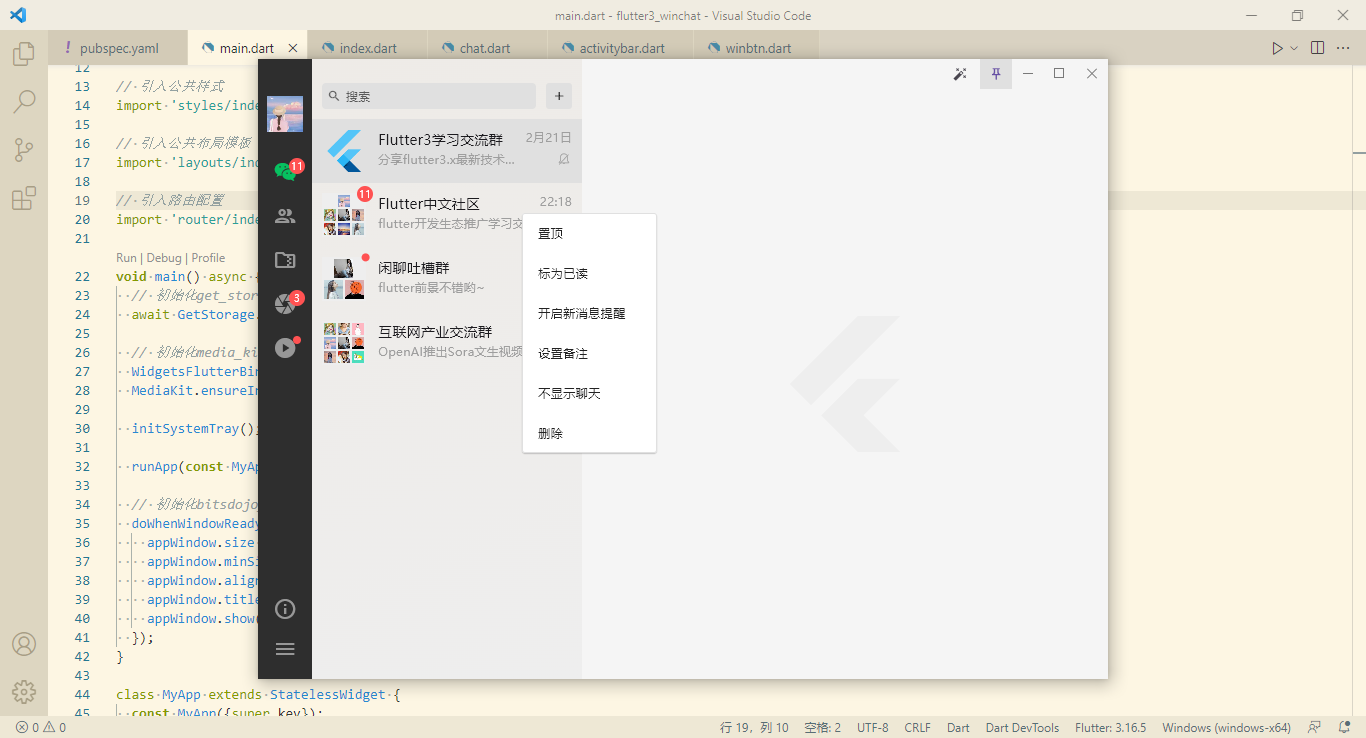
实现技术
- 编辑器:vscode
- 技术框架:flutter3.16.5+dart3.2.3
- 窗口管理:bitsdojo_window: ^0.1.6
- 托盘图标:system_tray: ^2.0.3
- 路由/状态管理:get: ^4.6.6
- 本地存储:get_storage: ^2.1.1
- 图片预览插件:photo_view: ^0.14.0
- 网址预览:url_launcher: ^6.2.4
- 视频组件:media_kit: ^1.1.10+1
- 文件选择器:file_picker: ^6.1.1
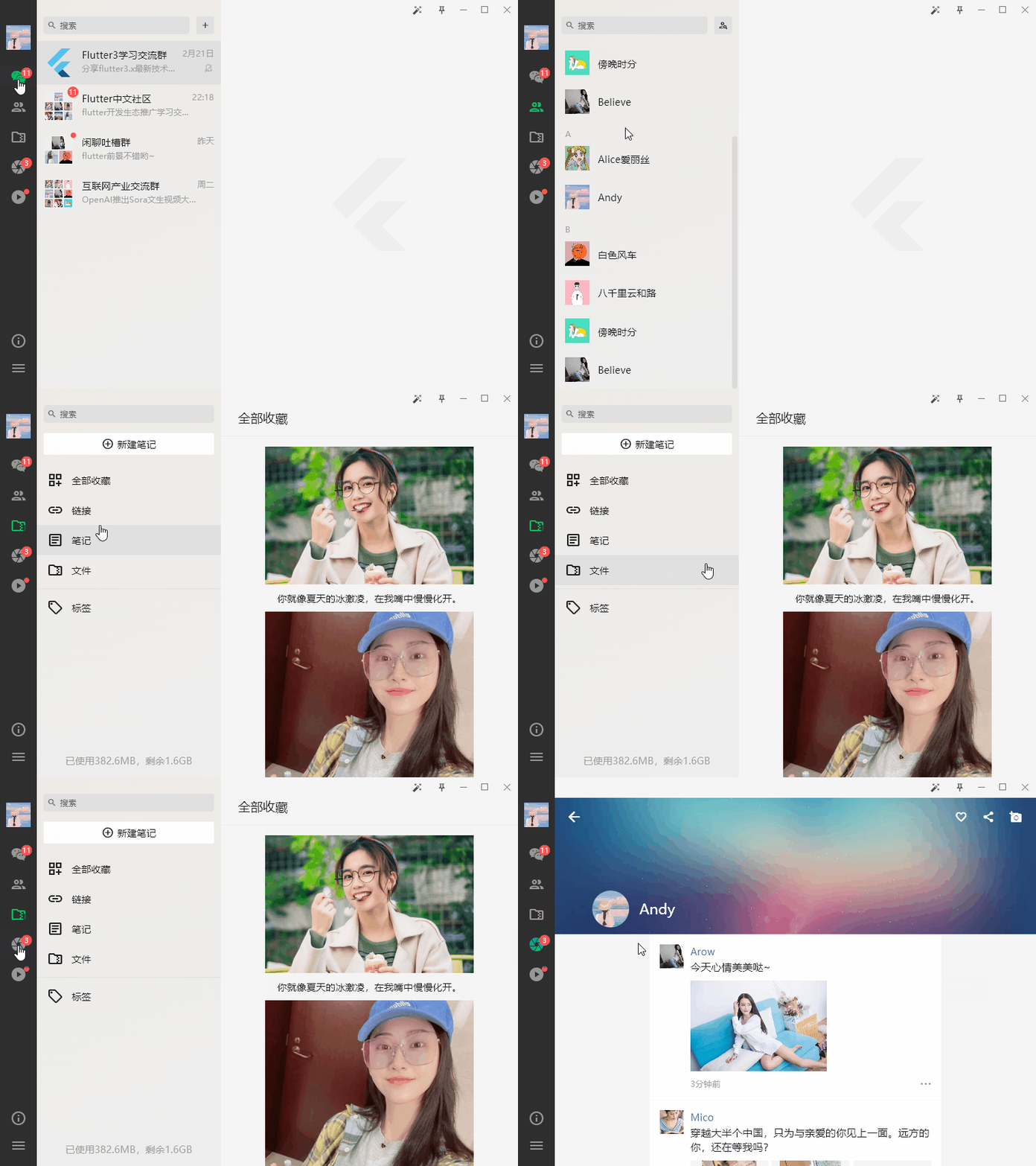

目前网上关于flutter3.x开发的桌面端项目并不多,希望有更多的开发者能加入flutter在window/macos客户端的探索开发。
项目结构

如上图:flutter构建的项目结构层级。

需要注意的是在开发之前需要自行配置好flutter sdk和dart sdk环境。

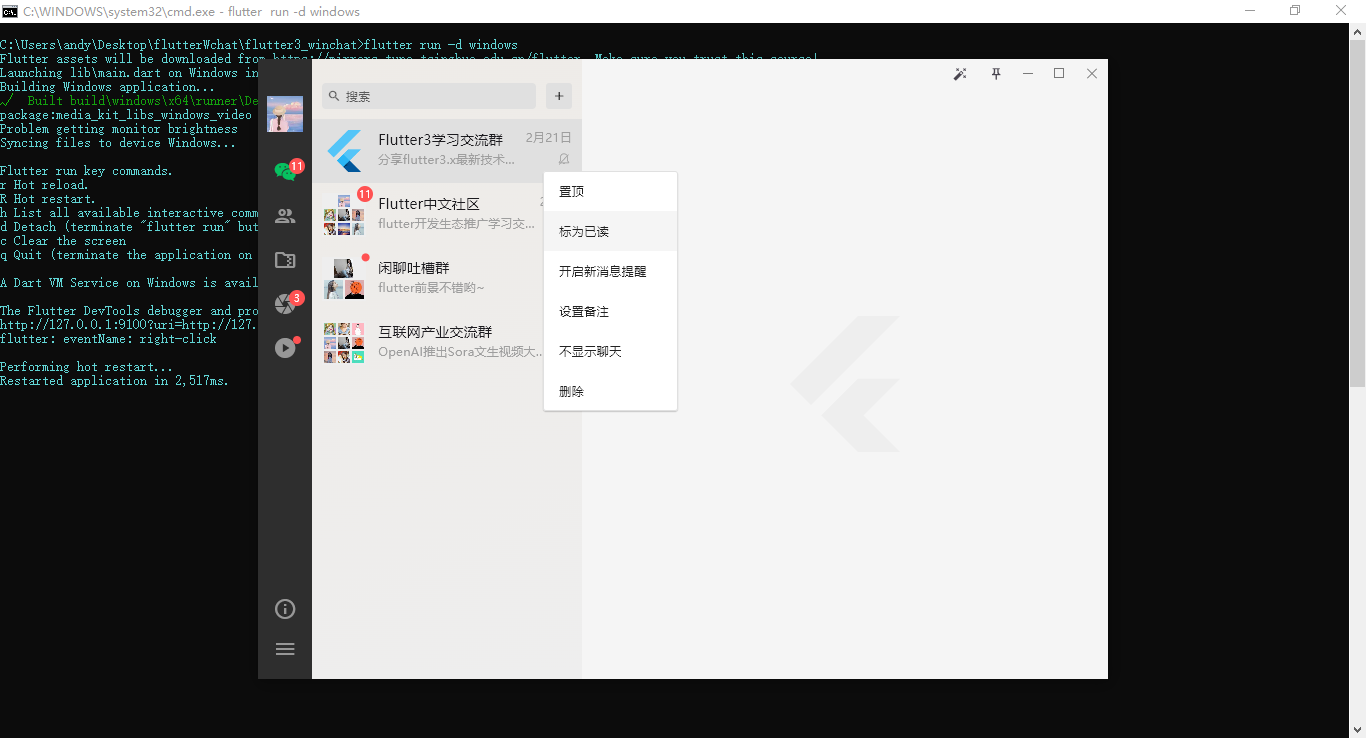
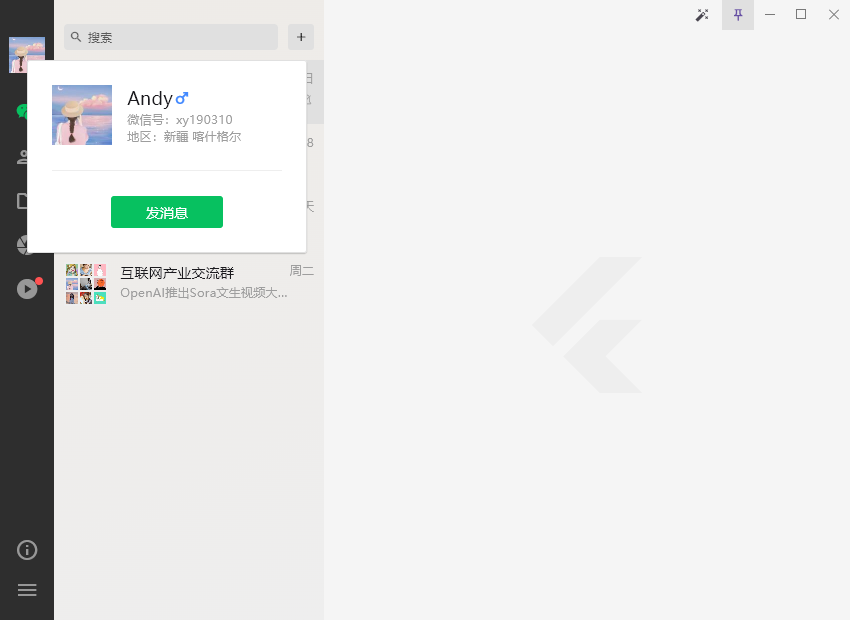
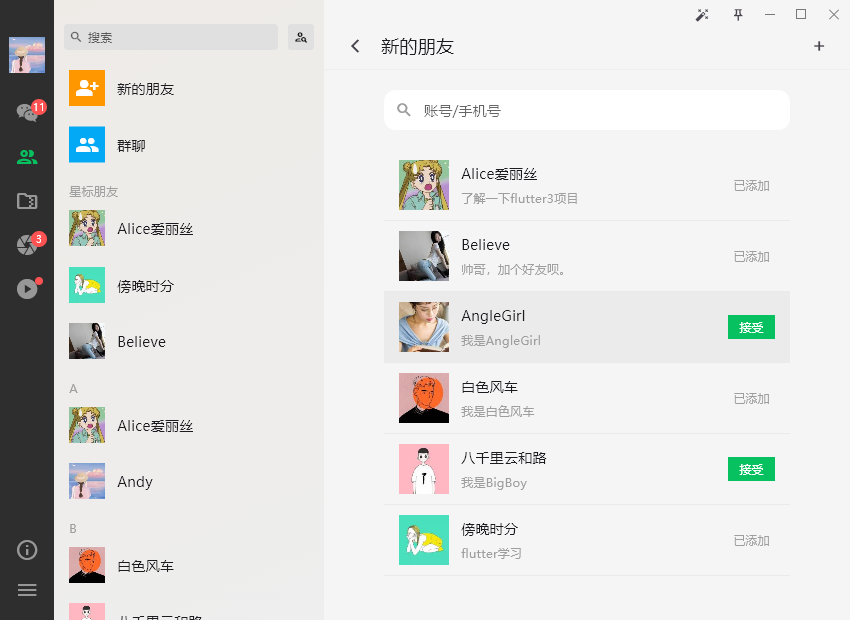


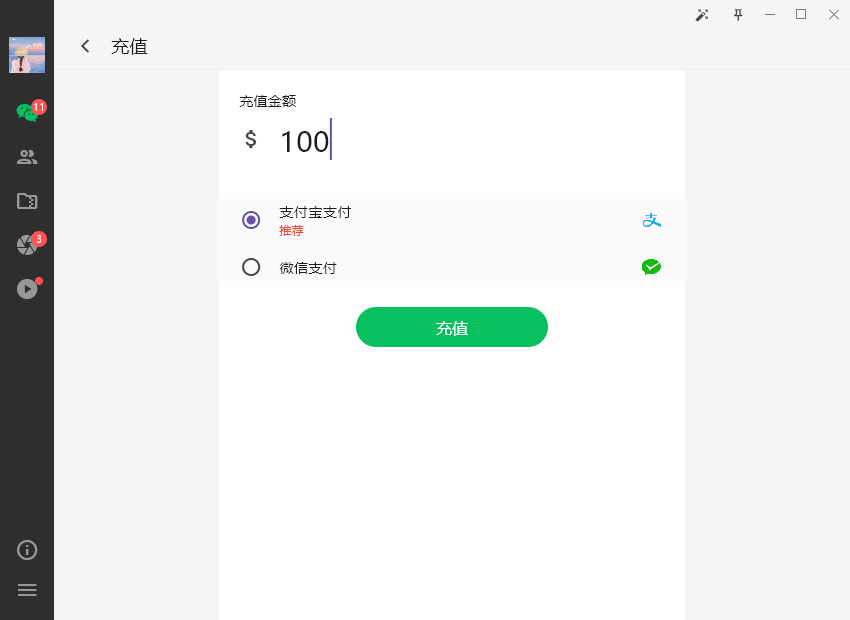
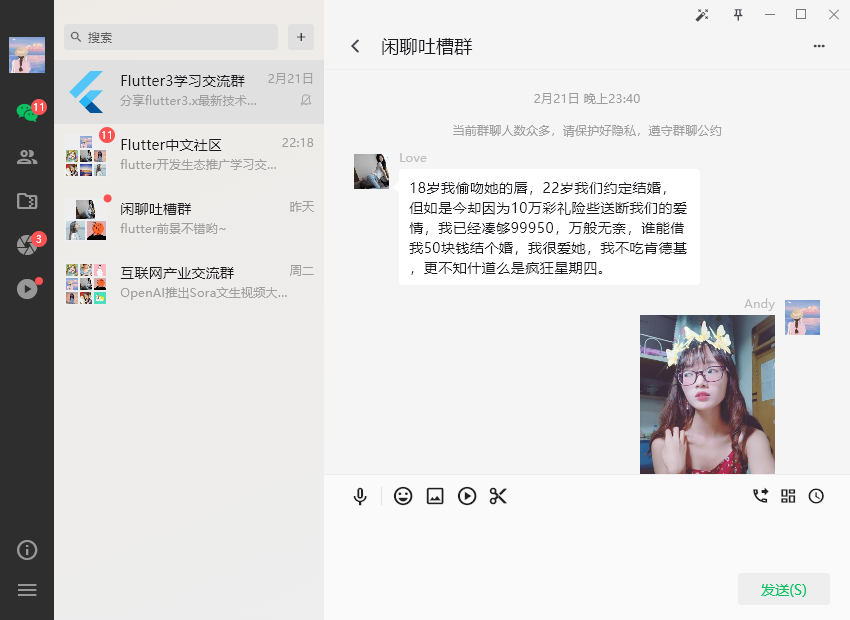

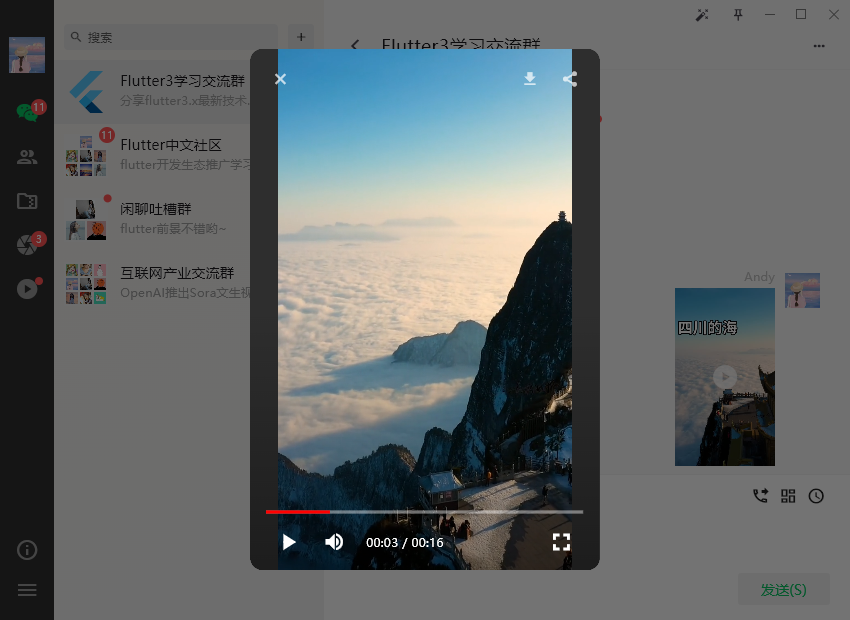





通过 flutter run -d windows 命令,运行到windows上。
主入口main.dart
import 'dart:io';

import 'package:flutter/material.dart';

import 'package:bitsdojo_window/bitsdojo_window.dart';

import 'package:get/get.dart';

import 'package:get_storage/get_storage.dart';

import 'package:media_kit/media_kit.dart';

import 'package:system_tray/system_tray.dart';

import 'utils/index.dart';

// 引入公共样式

import 'styles/index.dart';

// 引入公共布局模板

import 'layouts/index.dart';

// 引入路由配置

import 'router/index.dart';

void main() async {

  // 初始化get_storage存储类

  await GetStorage.init();

  // 初始化media_kit视频套件

  WidgetsFlutterBinding.ensureInitialized();

  MediaKit.ensureInitialized();

  initSystemTray();

  runApp(const MyApp());

  // 初始化bitsdojo_window窗口

  doWhenWindowReady(() {

    appWindow.size = const Size(850, 620);

    appWindow.minSize = const Size(700, 500);

    appWindow.alignment = Alignment.center;

    appWindow.title = 'Flutter3-WinChat';

    appWindow.show();

  });

}

class MyApp extends StatelessWidget {

  const MyApp({super.key});

  @override

  Widget build(BuildContext context) {

    return GetMaterialApp(

      title: 'FLUTTER3 WINCHAT',

      debugShowCheckedModeBanner: false,

      theme: ThemeData(

        primaryColor: FStyle.primaryColor,

        useMaterial3: true,

        // 修正windows端字体粗细不一致

        fontFamily: Platform.isWindows ? 'Microsoft YaHei' : null,

      ),

      home: const Layout(),

      // 初始路由

      initialRoute: Utils.isLogin() ? '/index' :'/login',

      // 路由页面

      getPages: routes,

      onInit: () {},

      onReady: () {},

    );

  }

}

// 创建系统托盘图标

Future<void> initSystemTray() async {

  String trayIco = 'assets/images/tray.ico';

  SystemTray systemTray = SystemTray();

  // 初始化系统托盘

  await systemTray.initSystemTray(

    title: 'system-tray',

    iconPath: trayIco,

  );

  // 右键菜单

  final Menu menu = Menu();

  await menu.buildFrom([

    MenuItemLabel(label: 'show', onClicked: (menuItem) => appWindow.show()),

    MenuItemLabel(label: 'hide', onClicked: (menuItem) => appWindow.hide()),

    MenuItemLabel(label: 'close', onClicked: (menuItem) => appWindow.close()),

  ]);

  await systemTray.setContextMenu(menu);

  // 右键事件

  systemTray.registerSystemTrayEventHandler((eventName) {

    debugPrint('eventName: $eventName');

    if (eventName == kSystemTrayEventClick) {

      Platform.isWindows ? appWindow.show() : systemTray.popUpContextMenu();

    } else if (eventName == kSystemTrayEventRightClick) {

      Platform.isWindows ? systemTray.popUpContextMenu() : appWindow.show();

    }

  });

}
整个项目采用 bitsdojo_window 插件进行窗口管理。支持设置无边框窗口,窗口尺寸大小,自定义系统操作按钮(最大化/最小化/关闭)。
https://pub-web.flutter-io.cn/packages/bitsdojo_window
flutter桌面端通过 system_tray 插件,生成系统托盘图标。

https://pub-web.flutter-io.cn/packages/system_tray
Flutter路由管理

整个项目采用Getx作为路由和状态管理。将MaterialApp替换为GetMaterialApp组件。
class MyApp extends StatelessWidget {

  const MyApp({super.key});

  @override

  Widget build(BuildContext context) {

    return GetMaterialApp(

      title: 'FLUTTER3 WINCHAT',

      debugShowCheckedModeBanner: false,

      theme: ThemeData(

        primaryColor: FStyle.primaryColor,

        useMaterial3: true,

      ),

      home: const Layout(),

      // 初始路由

      initialRoute: Utils.isLogin() ? '/index' :'/login',

      // 路由页面

      getPages: routes,

    );

  }

}
新建router/index.dart路由管理文件。
import 'package:flutter/material.dart';

import 'package:get/get.dart';

// 引入工具类

import '../utils/index.dart';

/* 引入路由页面 */

import '../views/auth/login.dart';

import '../views/auth/register.dart';

// 首页

import '../views/index/index.dart';

// 通讯录

import '../views/contact/index.dart';

import '../views/contact/addfriends.dart';

import '../views/contact/newfriends.dart';

import '../views/contact/uinfo.dart';

// 收藏

import '../views/favor/index.dart';

// 我的

import '../views/my/index.dart';

import '../views/my/setting.dart';

import '../views/my/recharge.dart';

import '../views/my/wallet.dart';

// 朋友圈

import '../views/fzone/index.dart';

import '../views/fzone/publish.dart';

// 短视频

import '../views/fvideo/index.dart';

// 聊天

import '../views/chat/group-chat/chat.dart';

// 路由地址集合

final Map<String, Widget> routeMap = {

  '/index': const Index(),

  '/contact': const Contact(),

  '/addfriends': const AddFriends(),

  '/newfriends': const NewFriends(),

  '/uinfo': const Uinfo(),

  '/favor': const Favor(),

  '/my': const My(),

  '/setting': const Setting(),

  '/recharge': const Recharge(),

  '/wallet': const Wallet(),

  '/fzone': const Fzone(),

  '/publish': const PublishFzone(),

  '/fvideo': const Fvideo(),

  '/chat': const Chat(),

};

final List<GetPage> patchRoute = routeMap.entries.map((e) => GetPage(

  name: e.key, // 路由名称

  page: () => e.value, // 路由页面

  transition: Transition.noTransition, // 跳转路由动画

  middlewares: [AuthMiddleware()], // 路由中间件

)).toList();

final List<GetPage> routes = [

  GetPage(name: '/login', page: () => const Login()),

  GetPage(name: '/register', page: () => const Register()),

  ...patchRoute,

];
Getx提供了middlewares中间件进行路由拦截。
// 路由拦截

class AuthMiddleware extends GetMiddleware {

  @override

  RouteSettings? redirect(String? route) {

    return Utils.isLogin() ? null : const RouteSettings(name: '/login');

  }

}
Flutter3桌面端自定义最大化/最小化/关闭


flutter开发桌面端项目,为了达到桌面窗口高定制化效果,采用了bitsdojo_window插件。该插件支持去掉系统导航条,自定义窗口大小、右上角操作按钮、拖拽窗口等功能。

@override

Widget build(BuildContext context){

  return Row(

    children: [

      Container(

        child: widget.leading,

      ),

      Visibility(

        visible: widget.minimizable,

        child: MouseRegion(

          cursor: SystemMouseCursors.click,

          child: SizedBox(

            width: 32.0,

            height: 36.0,

            child: MinimizeWindowButton(colors: buttonColors, onPressed: handleMinimize,),

          )

        ),

      ),

      Visibility(

        visible: widget.maximizable,

        child: MouseRegion(

          cursor: SystemMouseCursors.click,

          child: SizedBox(

            width: 32.0,

            height: 36.0,

            child: isMaximized ?

            RestoreWindowButton(colors: buttonColors, onPressed: handleMaxRestore,)

            :

            MaximizeWindowButton(colors: buttonColors, onPressed: handleMaxRestore,),

          ),

        ),

      ),

      Visibility(

        visible: widget.closable,

        child: MouseRegion(

          cursor: SystemMouseCursors.click,

          child: SizedBox(

            width: 32.0,

            height: 36.0,

            child: CloseWindowButton(colors: closeButtonColors, onPressed: handleExit,),

          ),

        ),

      ),

      Container(

        child: widget.trailing,

      ),

    ],

  );

}
自定义最大化/最小化/关闭功能。
// 最小化

void handleMinimize() {

  appWindow.minimize();

}

// 设置最大化/恢复

void handleMaxRestore() {

  appWindow.maximizeOrRestore();

}

// 关闭

void handleExit() {

  showDialog(

    context: context,

    builder: (context) {

      return AlertDialog(

        content: const Text('是否最小化至托盘,不退出程序?', style: TextStyle(fontSize: 16.0),),

        backgroundColor: Colors.white,

        surfaceTintColor: Colors.white,

        shape: RoundedRectangleBorder(borderRadius: BorderRadius.circular(3.0)),

        elevation: 3.0,

        actionsPadding: const EdgeInsets.all(15.0),

        actions: [

          TextButton(

            onPressed: () {

              Get.back();

              appWindow.close();

            },

            child: const Text('退出', style: TextStyle(color: Colors.red),)

          ),

          TextButton(

            onPressed: () {

              Get.back();

              appWindow.hide();

            },

            child: const Text('最小化至托盘', style: TextStyle(color: Colors.deepPurple),)

          ),

        ],

      );

    }

  );

}
flutter内置了鼠标手势组件MouseRegion。根据需求可以自定义设置不同的鼠标样式。
问:bitsdojo_window设置最大化/恢复不能实时监测窗口尺寸变化?
答:大家可以通过flutter内置的WidgetsBindingObserver来监测窗口变化。
class _WinbtnState extends State<Winbtn> with WidgetsBindingObserver {

  // 是否最大化

  bool isMaximized = false;

  @override

  void initState() {

    super.initState();

    WidgetsBinding.instance.addObserver(this);

  }

  @override

  void dispose() {

    WidgetsBinding.instance.removeObserver(this);

    super.dispose();

  }

  // 监听窗口尺寸变化

  @override

  void didChangeMetrics() {

    super.didChangeMetrics();

    WidgetsBinding.instance.addPostFrameCallback((_) {

      setState(() {

        isMaximized = appWindow.isMaximized;

      });

    });

  }

  // ...

}
Flutter3公共布局模板
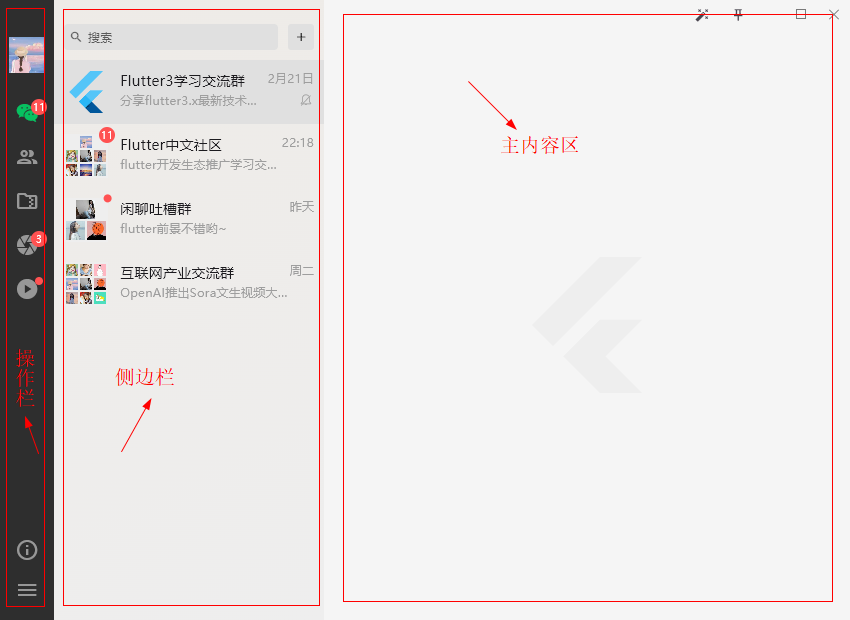
整体项目布局参照了微信桌面端界面。分为左侧操作栏+侧边栏+右侧内容区三大模块。
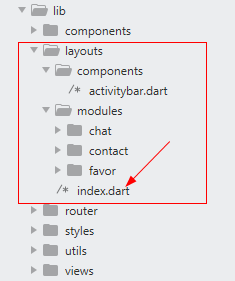
class Layout extends StatefulWidget {

  const Layout({

    super.key,

    this.activitybar = const Activitybar(),

    this.sidebar,

    this.workbench,

    this.showSidebar = true,

  });

  final Widget? activitybar; // 左侧操作栏

  final Widget? sidebar; // 侧边栏

  final Widget? workbench; // 右侧工作面板

  final bool showSidebar; // 是否显示侧边栏

  @override

  State<Layout> createState() => _LayoutState();

}
左侧操作栏无点击事件区域支持拖拽窗口。
return Scaffold(

  backgroundColor: Colors.grey[100],

  body: Flex(

    direction: Axis.horizontal,

    children: [

      // 左侧操作栏

      MoveWindow(

        child: widget.activitybar,

        onDoubleTap: () => {},

      ),

      // 侧边栏

      Visibility(

        visible: widget.showSidebar,

        child: SizedBox(

          width: 270.0,

          child: Container(

            decoration: const BoxDecoration(

              gradient: LinearGradient(

                begin: Alignment.topLeft,

                end: Alignment.bottomRight,

                colors: [

                  Color(0xFFEEEBE7), Color(0xFFEEEEEE)

                ]

              ),

            ),

            child: widget.sidebar,

          ),

        ),

      ),

      // 主体容器

      Expanded(

        child: Column(

          children: [

            WindowTitleBarBox(

              child: Row(

                children: [

                  Expanded(

                    child: MoveWindow(),

                  ),

                  // 右上角操作按钮组

                  Winbtn(

                    leading: Row(

                      children: [

                        IconButton(onPressed: () {}, icon: const Icon(Icons.auto_fix_high), iconSize: 14.0,),

                        IconButton(

                          onPressed: () {

                            setState(() {

                              winTopMost = !winTopMost;

                            });

                          },

                          tooltip: winTopMost ? '取消置顶' : '置顶',

                          icon: const Icon(Icons.push_pin_outlined),

                          iconSize: 14.0,

                          highlightColor: Colors.transparent, // 点击水波纹颜色

                          isSelected: winTopMost ? true : false, // 是否选中

                          style: ButtonStyle(

                            visualDensity: VisualDensity.compact,

                            backgroundColor: MaterialStateProperty.all(winTopMost ? Colors.grey[300] : Colors.transparent),

                            shape: MaterialStatePropertyAll(

                              RoundedRectangleBorder(borderRadius: BorderRadius.circular(0.0))

                            ),

                          ),

                        ),

                      ],

                    ),

                  ),

                ],

              ),

            ),

            // 右侧工作面板

            Expanded(

              child: Container(

                child: widget.workbench,

              ),

            ),

          ],

        ),

      ),

    ],

  ),

);
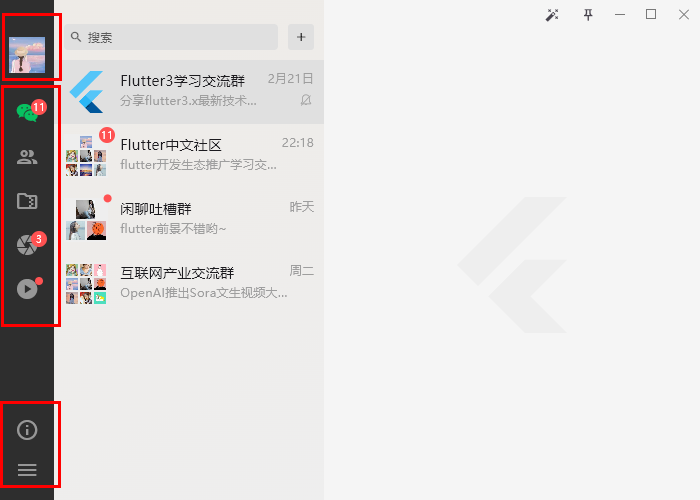
左侧Tab切换操作栏,使用 NavigationRail 组件实现功能。该组件支持自定义头部和尾部组件。
@override

Widget build(BuildContext context) {

  return Container(

    width: 54.0,

    decoration: const BoxDecoration(

      color: Color(0xFF2E2E2E),

    ),

    child: NavigationRail(

      backgroundColor: Colors.transparent,

      labelType: NavigationRailLabelType.none, // all 显示图标+标签 selected 只显示激活图标+标签 none 不显示标签

      indicatorColor: Colors.transparent, // 去掉选中椭圆背景

      indicatorShape: RoundedRectangleBorder(

        borderRadius: BorderRadius.circular(0.0),

      ),

      unselectedIconTheme: const IconThemeData(color: Color(0xFF979797), size: 24.0),

      selectedIconTheme: const IconThemeData(color: Color(0xFF07C160), size: 24.0,),

      unselectedLabelTextStyle: const TextStyle(color: Color(0xFF979797),),

      selectedLabelTextStyle: const TextStyle(color: Color(0xFF07C160),),

      // 头部(图像)

      leading: GestureDetector(

        onPanStart: (details) => {},

        child: Container(

          margin: const EdgeInsets.only(top: 30.0, bottom: 10.0),

          child: InkWell(

            child: Image.asset('assets/images/avatar/uimg1.jpg', height: 36.0, width: 36.0,),

            onTapDown: (TapDownDetails details) {

              cardDX = details.globalPosition.dx;

              cardDY = details.globalPosition.dy;

            },

            onTap: () {

              showCardDialog(context);

            },

          ),

        ),

      ),

      // 尾部(链接)

      trailing: Expanded(

        child: Container(

          margin: const EdgeInsets.only(bottom: 10.0),

          child: GestureDetector(

            onPanStart: (details) => {},

            child: Column(

              mainAxisAlignment: MainAxisAlignment.end,

              children: [

                IconButton(icon: Icon(Icons.info_outline, color: Color(0xFF979797), size: 24.0), onPressed:(){showAboutDialog(context);}),

                PopupMenuButton(

                  icon: const Icon(Icons.menu, color: Color(0xFF979797), size: 24.0,),

                  offset: const Offset(54.0, 0.0),

                  tooltip: '',

                  color: const Color(0xFF353535),

                  surfaceTintColor: Colors.transparent,

                  shape: RoundedRectangleBorder(borderRadius: BorderRadius.circular(0.0)),

                  padding: EdgeInsets.zero,

                  itemBuilder: (BuildContext context) {

                    return <PopupMenuItem>[

                      popupMenuItem('我的私密空间', 0),

                      popupMenuItem('锁定', 1),

                      popupMenuItem('意见反馈', 2),

                      popupMenuItem('设置', 3),

                    ];

                  },

                  onSelected: (value) {

                    switch(value) {

                      case 0:

                        Get.toNamed('/my');

                        break;

                      case 3:

                        Get.toNamed('/setting');

                        break;

                    }

                  },

                ),

              ],

            ),

          ),

        ),

      ),

      selectedIndex: tabCur,

      destinations: [

        ...tabNavs

      ],

      onDestinationSelected: (index) {

        setState(() {

          tabCur = index;

          if(tabRoute[index] != null && tabRoute[index]?['path'] != null) {

            Get.toNamed(tabRoute[index]['path']);

          }

        });

      },

    ),

  );

}
Flutter3朋友圈功能
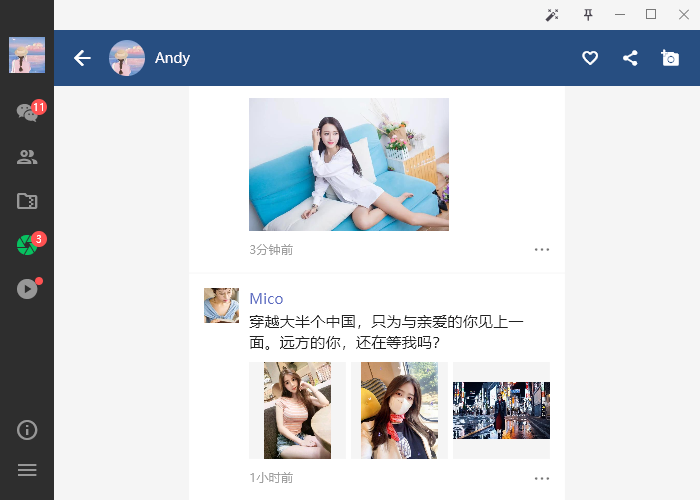
@override

Widget build(BuildContext context) {

  return Layout(

    showSidebar: false,

    workbench: CustomScrollView(

      slivers: [

        SliverAppBar(

          backgroundColor: const Color(0xFF224E7F),

          foregroundColor: Colors.white,

          pinned: true,

          elevation: 0.0,

          expandedHeight: 200.0,

          leading: IconButton(icon: const Icon(Icons.arrow_back,), onPressed: () {Navigator.pop(context);}),

          flexibleSpace: FlexibleSpaceBar(

            title: Row(

              children: <Widget>[

                ClipOval(child: Image.asset('assets/images/avatar/uimg1.jpg',height: 36.0,width: 36.0,fit: BoxFit.fill)),

                const SizedBox(width: 10.0),

                const Text('Andy', style: TextStyle(fontSize: 14.0)),

              ],

            ),

            titlePadding: const EdgeInsets.fromLTRB(55, 10, 10, 10),

            background: InkWell(

              child: Image.asset('assets/images/cover.jpg', fit: BoxFit.cover),

              onTap: () {changePhotoAlbum(context);},

            ),

          ),

          actions: <Widget>[

            IconButton(icon: const Icon(Icons.favorite_border, size: 18,), onPressed: () {}),

            IconButton(icon: const Icon(Icons.share, size: 18,), onPressed: () {}),

            IconButton(icon: const Icon(Icons.add_a_photo, size: 18,), onPressed: () {Get.toNamed('/publish');}),

            const SizedBox(width: 10.0,),

          ],

        ),

        SliverToBoxAdapter(

          child: UnconstrainedBox(

            child: Container(

              width: MediaQuery.of(context).size.height * 3 / 4,

              decoration: const BoxDecoration(

                color: Colors.white,

              ),

              child: Column(

                children: uzoneList.map((item) {

                  return Container(

                    padding: const EdgeInsets.all(15.0),

                    decoration: const BoxDecoration(

                      border: Border(bottom: BorderSide(color: Color(0xFFEEEEEE), width: .5)),

                    ),

                    child: Row(

                      crossAxisAlignment: CrossAxisAlignment.start,

                      children: <Widget>[

                        Image.asset(item['avatar'],height: 35.0,width: 35.0,fit: BoxFit.cover),

                        const SizedBox(width: 10.0),

                        Expanded(

                          child: Column(

                            crossAxisAlignment: CrossAxisAlignment.start,

                            children: <Widget>[

                              Text(item['author'], style: TextStyle(color: Colors.indigo[400])),

                              const SizedBox(height: 2.0),

                              Text(item['content'], style: const TextStyle(color: Colors.black87, fontSize: 15.0)),

                              const SizedBox(height: 10.0),

                              GroupZone(images: item['images']),

                              const SizedBox(height: 10.0),

                              Row(

                                children: <Widget>[

                                  Expanded(child: Text(item['time'], style: const TextStyle(color: Colors.grey, fontSize: 12.0)),),

                                  FStyle.iconfont(0xe653, color: Colors.black54, size: 16.0,),

                                ],

                              )

                            ],

                          ),

                        ),

                      ],

                    ),

                  );

                }).toList(),

              ),

            ),

          ),

        ),

      ],

    ),

  );

}
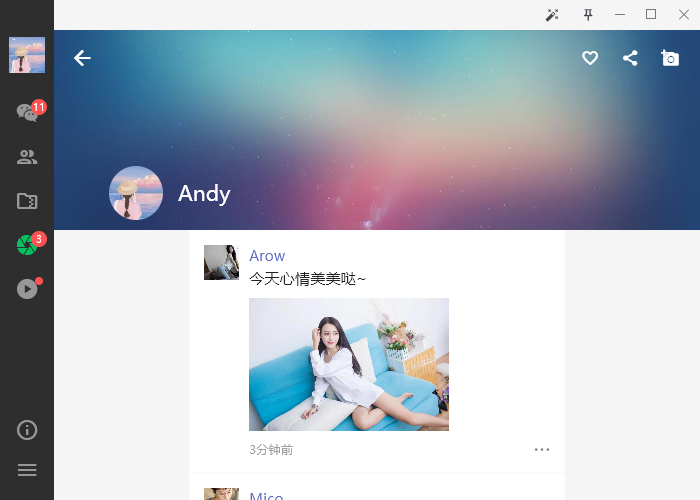
图片排列类似微信朋友圈九宫格,支持点击大图预览。

Flutter3短视频模块
使用media_kit插件整合进了短视频功能,支持点击播放/暂停,上下滑动功能。
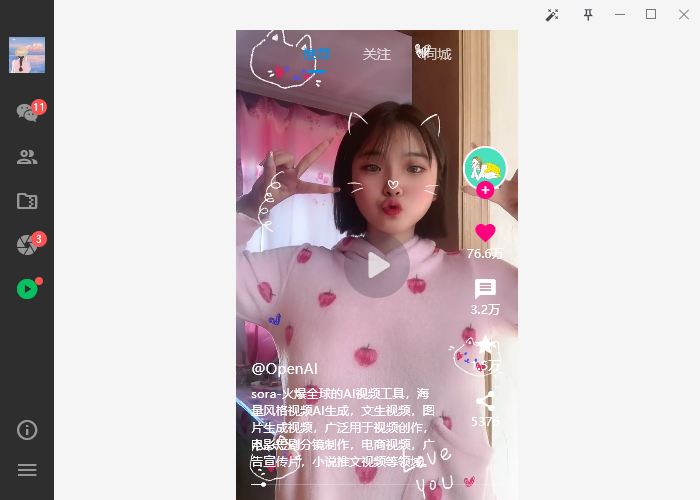
底部mini时间进度条是自定义组件实现功能效果。
// flutter3短视频模板  Q:282310962

Container(

  width: MediaQuery.of(context).size.height * 9 / 16,

  decoration: const BoxDecoration(

    color: Colors.black,

  ),

  child: Stack(

    children: [

      // Swiper垂直滚动区域

      PageView(

        // 自定义滚动行为(支持桌面端滑动、去掉滚动条槽)

        scrollBehavior: SwiperScrollBehavior().copyWith(scrollbars: false),

        scrollDirection: Axis.vertical,

        controller: pageController,

        onPageChanged: (index) {

          // 暂停(垂直滑动)

          controller.player.pause();

        },

        children: [

          Stack(

            children: [

              // 视频区域

              Positioned(

                top: 0,

                left: 0,

                right: 0,

                bottom: 0,

                child: GestureDetector(

                  child: Stack(

                    children: [

                      // 短视频插件

                      Video(

                        controller: controller,

                        fit: BoxFit.cover,

                        // 无控制条

                        controls: NoVideoControls,

                      ),

                      // 播放/暂停按钮

                      Center(

                        child: IconButton(

                          onPressed: () {

                            controller.player.playOrPause();

                          },

                          icon: StreamBuilder(

                            stream: controller.player.stream.playing,

                            builder: (context, playing) {

                              return Visibility(

                                visible: playing.data == false,

                                child: Icon(

                                  playing.data == true ? Icons.pause : Icons.play_arrow_rounded,

                                  color: Colors.white70,

                                  size: 50,

                                ),

                              );

                            },

                          ),

                        ),

                      ),

                    ],

                  ),

                  onTap: () {

                    controller.player.playOrPause();

                  },

                ),

              ),

              // 右侧操作栏

              Positioned(

                bottom: 70.0,

                right: 10.0,

                child: Column(

                  children: [

                    // ...

                  ],

                ),

              ),

              // 底部信息区域

              Positioned(

                bottom: 30.0,

                left: 15.0,

                right: 80.0,

                child: Column(

                  crossAxisAlignment: CrossAxisAlignment.start,

                  children: [

                    // ...

                  ],

                ),

              ),

              // 播放mini进度条

              Positioned(

                bottom: 15.0,

                left: 15.0,

                right: 15.0,

                child: Container(

                  // ...

                ),

              ),

            ],

          ),

          Container(

            color: Colors.black,

            child: const Center(child: Text('1', style: TextStyle(color: Colors.white, fontSize: 60),),)

          ),

          Container(

            color: Colors.black,

            child: const Center(child: Text('2', style: TextStyle(color: Colors.white, fontSize: 60),),)

          ),

          Container(

            color: Colors.black,

            child: const Center(child: Text('3', style: TextStyle(color: Colors.white, fontSize: 60),),)

          ),

        ],

      ),

      // 固定tab菜单

      Align(

        alignment: Alignment.topCenter,

        child: DefaultTabController(

          length: 3,

          child: TabBar(

            tabs: const [

              Tab(text: '推荐'),

              Tab(text: '关注'),

              Tab(text: '同城'),

            ],

            tabAlignment: TabAlignment.center,

            overlayColor: MaterialStateProperty.all(Colors.transparent),

            unselectedLabelColor: Colors.white70,

            labelColor: const Color(0xff0091ea),

            indicatorColor: const Color(0xff0091ea),

            indicatorSize: TabBarIndicatorSize.label,

            dividerHeight: 0,

            indicatorPadding: const EdgeInsets.all(5),

          ),

        ),

      ),

    ],

  ),

),
Flutter3聊天模块


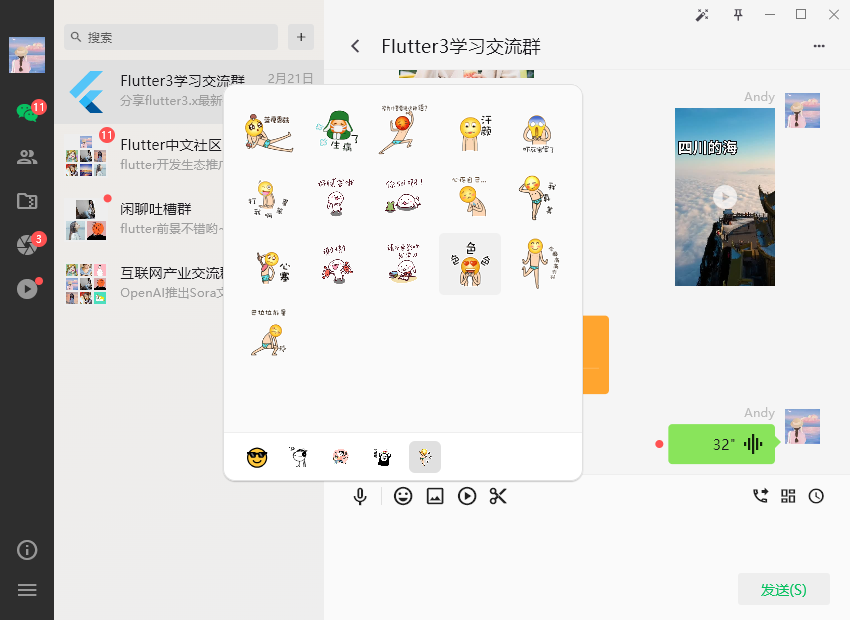
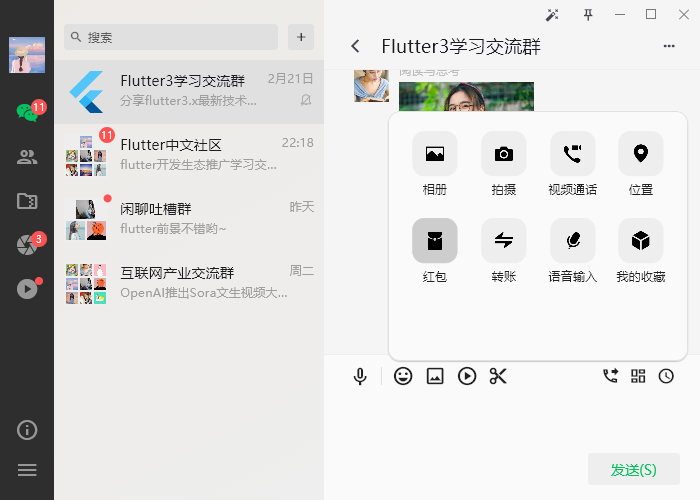
如上图:表情弹窗使用showDialog来实现功能。
// 表情弹窗

void showEmojDialog() {

  updateAnchorOffset(anchorEmojKey);

  showDialog(

    context: context,

    barrierColor: Colors.transparent, // 遮罩透明

    builder: (context) {

      // 解决flutter通过 setState 方法无法更新当前的dialog状态

      // dialog是一个路由页面,本质跟你当前主页面是一样的。在Flutter中它是一个新的路由。所以,你使用当前页面的 setState 方法当然是没法更新dialog中内容。

      // 如何更新dialog中的内容呢?答案是使用StatefulBuilder。

      return StatefulBuilder(

        builder: (BuildContext context, StateSetter setState) {

          setEmojState = setState;

          return Stack(

            children: [

              Positioned(

                top: anchorDy - (anchorDy - 100) - 15,

                left: anchorDx - 180,

                width: 360.0,

                height: anchorDy - 100,

                child: Material(

                  shape: RoundedRectangleBorder(borderRadius: BorderRadius.circular(12.0)),

                  color: Colors.white,

                  elevation: 1.0,

                  clipBehavior: Clip.hardEdge,

                  child: Column(

                    children: renderEmojWidget(),

                  ),

                ),

              )

            ],

          );

        },

      );

    },

  );

}
注意:通过 setState 方法无法更新当前的dialog状态!!!
showDialog本质上是另一个路由页面,它的性质跟你当前主页面是一样的。在Flutter中它是一个新的路由。所以,你使用当前页面的 setState 方法当然是没法更新dialog中内容。如何更新dialog中的内容呢?答案是使用StatefulBuilder。
late StateSetter setEmojState;
// 表情Tab切换

void handleEmojTab(index) {

    var emols = emoJson;

    for(var i = 0, len = emols.length; i < len; i++) {

        emols[i]['selected'] = false;

    }

    emols[index]['selected'] = true;

    setEmojState(() {

        emoJson = emols;

    });

    emojController.jumpTo(0);

}
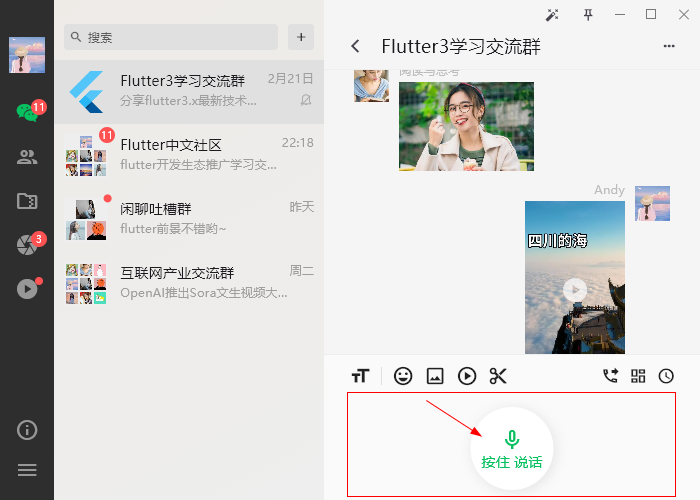
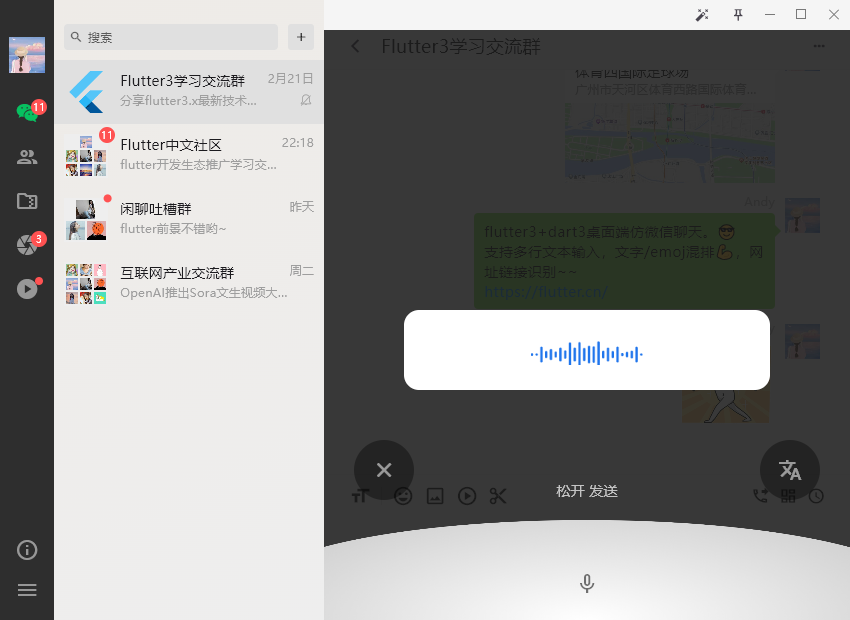
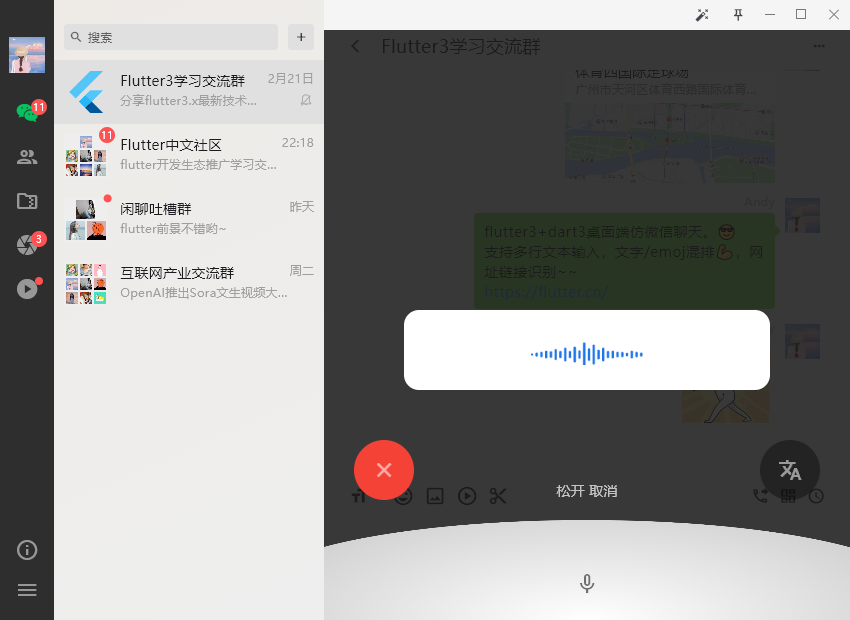
聊天编辑框模块新增了按住说话功能。按住说话、左滑取消、右滑转文字功能。
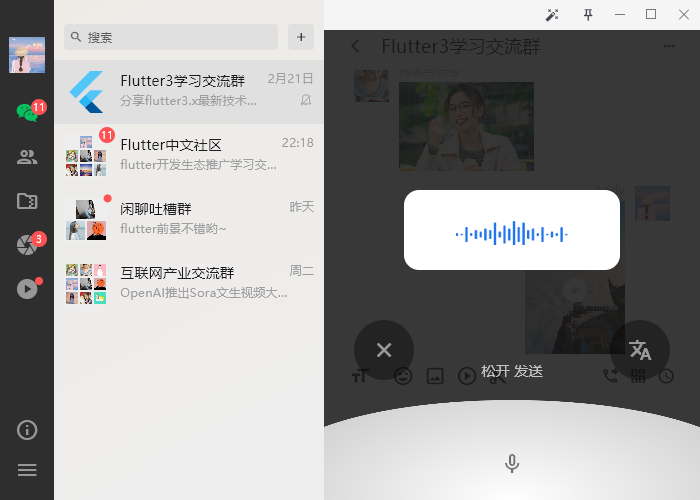
由于上一篇文章有过这方面的分享,这里就不详细介绍了。
好了,以上就是flutter3.x+dart3开发桌面端仿微信exe聊天应用的一些知识分享,希望能喜欢哈~~
最后附上两个最新实例项目
https://www.cnblogs.com/xiaoyan2017/p/18008370
https://www.cnblogs.com/xiaoyan2017/p/17938517
flutter3-winchat桌面端聊天实例|Flutter3+Dart3+Getx仿微信Exe程序的更多相关文章
- Tauri-Vue3桌面端聊天室|tauri+vite3仿微信|tauri聊天程序EXE
基于tauri+vue3.js+vite3跨桌面端仿微信聊天实例TauriVue3Chat. tauri-chat 运用最新tauri+vue3+vite3+element-plus+v3layer等 ...
- Vue3.0网页版聊天|Vue3.x+ElementPlus仿微信/QQ界面|vue3聊天实例
一.项目简介 基于vue3.x+vuex+vue-router+element-plus+v3layer+v3scroll等技术构建的仿微信web桌面端聊天实战项目Vue3-Webchat.基本上实现 ...
- Next.js+React聊天室|Next仿微信桌面端|next.js聊天实例
一.项目介绍 next-webchat 基于Next.js+React.js+Redux+Antd+RScroll+RLayer等技术构建的PC桌面端仿微信聊天项目.实现了消息/表情发送.图片/视频预 ...
- react网页版聊天|仿微信、微博web版|react+pc端仿微信实例
一.项目介绍 基于react+react-dom+react-router-dom+redux+react-redux+webpack2.0+nodejs等技术混合开发的仿微信web端聊天室react ...
- vue3系列:vue3.0自定义全局弹层V3Layer|vue3.x pc桌面端弹窗组件
基于Vue3.0开发PC桌面端自定义对话框组件V3Layer. 前两天有分享一个vue3.0移动端弹出层组件,今天分享的是最新开发的vue3.0版pc端弹窗组件. V3Layer 一款使用vue3.0 ...
- Win7搭建nginx+php+mysql开发环境以及websocket聊天实例测试
Win7搭建nginx+php+mysql开发环境以及websocket聊天实例测试一.下载相关安装包 1.下载nginx最新版本(nginx1.3.13版之后才支持websocket协议) 下载地址 ...
- 微信小程序与AspNetCore SignalR聊天实例
微信小程序与aspnetcore signalr实例 本文不对小程序与signalr做任何介绍,默认读者已经掌握 aspnetcore Signalr文档 小程序文档 写在之前 SignalR没有提供 ...
- vue仿微信网页版|vue+web端聊天室|仿微信客户端vue版
一.项目介绍 基于Vue2.5.6+Vuex+vue-cli+vue-router+vue-gemini-scrollbar+swiper+elementUI等技术混合架构开发的仿微信web端聊天室— ...
- 重复造轮子系列——基于FastReport设计打印模板实现桌面端WPF套打和商超POS高度自适应小票打印
重复造轮子系列——基于FastReport设计打印模板实现桌面端WPF套打和商超POS高度自适应小票打印 一.引言 桌面端系统经常需要对接各种硬件设备,比如扫描器.读卡器.打印机等. 这里介绍下桌面端 ...
- Taro聊天室|react+taro仿微信聊天App界面|taro聊天实例
一.项目简述 taro-chatroom是基于Taro多端实例聊天项目,运用Taro+react+react-redux+taroPop+react-native等技术开发的仿微信App界面聊天室,实 ...
随机推荐
- uni-app快速导入自己需要的插件
在uni-app中快速导入自己需要的插件 在uni-app的官网上;找到自己需要的插件: 然后点击右侧顶部的[使用HX导入]这一步的前提是你必须要用自己的账好登录: 然后选择你要导入哪一个项目 然后就 ...
- jenkins上发布项目后将文件推送到另一台服务器build镜像
1.配置jenkins 1)主页面点击manage jenkins 2) 选择SystemConfiguration 3) 配置服务器信息,注意密码一定要输入对,还有端口有,一般是默认的22端口,但有 ...
- SqlSugar实体
1.实体使用自带特性 1.1 使用用例 对于 CRUD来说只需要配置主键和自增列就行了 ,如果类的名称和数据库不一样可以设置数据库中的名称 主键自增 [SugarTable("dbstude ...
- Hadoop3 No FileSystem for scheme "hdfs"
Hadoop3 No FileSystem for scheme "hdfs" 异常信息: org.apache.hadoop.fs.UnsupportedFileSystemEx ...
- CF1000F One Occurrence题解
题目链接:CF 或者 洛谷 感觉很经典的题,而且给的 \(5e5\),虽然莫队之类的很好想,但完全没必要去考虑这类算法,这种数据范围常数又大又开盲盒.很显然的具有单 \(log\) 的算法. 回忆下经 ...
- 2024-02-03:用go语言,你有 k 个背包。给你一个下标从 0 开始的整数数组 weights, 其中 weights[i] 是第 i 个珠子的重量。同时给你整数 k, 请你按照如下规则将所有
2024-02-03:用go语言,你有 k 个背包.给你一个下标从 0 开始的整数数组 weights, 其中 weights[i] 是第 i 个珠子的重量.同时给你整数 k, 请你按照如下规则将所有 ...
- Linux-数据集 TPC-H、TPC-DS的导入和使用(MySQL)
一. TPC-H 数据集 1.数据集下载 TPC-H数据集: https://github.com/gregrahn/tpch-kit 可采用gcc下载或者直接下载zip包,然后解压即可. 具体使用方 ...
- 扩展说明: 指令微调 Llama 2
这篇博客是一篇来自 Meta AI,关于指令微调 Llama 2 的扩展说明.旨在聚焦构建指令数据集,有了它,我们则可以使用自己的指令来微调 Llama 2 基础模型. 目标是构建一个能够基于输入内容 ...
- Series基础
目录 创建Series对象 1) 创建一个空Series对象 2) ndarray创建Series对象 3) dict创建Series对象 4) 标量创建Series对象 访问Series数据 1) ...
- UVA1108 Mining Your Own Business 题解
题目传送门 题意 在一个无向图上选择尽量少的点涂黑,使得删除任意一个点后,每个连通分量里都至少有一个黑点(多组数据). 正文 观察题意,发现这是个 Tarjan 求点双连通分量的板子. 考虑在求点双连 ...