
【Azure Developer】使用REST API获取Activity Logs、传入Data Lake的数据格式问题
问题一:. 如何在用REST API获取活动日志时,控制输出的项?
【答】参考REST API对于获取活动日志的说明接口,在参数是$filter和$select中可以分别控制过滤条件和输出项
GET https://management.chinacloudapi.cn/subscriptions/{subscriptionId}/providers/microsoft.insights/eventtypes/management/values?api-version=2015-04-01&$filter={$filter}&$select={$select}
注:management.chinacloudapi.cn为中国区Azure的管理终结点,management.azure.com为全球Azure的管理终结点
URI Parameters
| Name | Description |
|---|---|
|
$filter
|
Reduces the set of data collected. The $filter argument is very restricted and allows only the following patterns. $filter=eventTimestamp ge '2014-07-16T04:36:37.6407898Z' and eventTimestamp le '2014-07-20T04:36:37.6407898Z' and resourceGroupName eq 'resourceGroupName'. $filter=eventTimestamp ge '2014-07-16T04:36:37.6407898Z' and eventTimestamp le '2014-07-20T04:36:37.6407898Z' and resourceUri eq 'resourceURI'. $filter=eventTimestamp ge '2014-07-16T04:36:37.6407898Z' and eventTimestamp le '2014-07-20T04:36:37.6407898Z'. $filter=eventTimestamp ge '2014-07-16T04:36:37.6407898Z' and eventTimestamp le '2014-07-20T04:36:37.6407898Z' and resourceProvider eq 'resourceProviderName'. $filter=eventTimestamp ge '2014-07-16T04:36:37.6407898Z' and eventTimestamp le '2014-07-20T04:36:37.6407898Z' and correlationId eq 'correlationID'. |
|
$select
|
Used to fetch events with only the given properties. Possible values are: authorization, claims, correlationId, description, eventDataId, eventName, eventTimestamp, httpRequest, level, operationId, operationName, properties, resourceGroupName, resourceProviderName, resourceId, status, submissionTimestamp, subStatus, subscriptionId |
在Filter和select可以配置的每一项说明,请查看文末的附录一。
问题二:是否可以往Data Lake中注入Json格式文件?
【答】根据官方文档示例,如果使用Databricks进行(SQL查询语句)进行数据分析,是支持Json格式的数据,示例中使用的Json格式如下图所示:
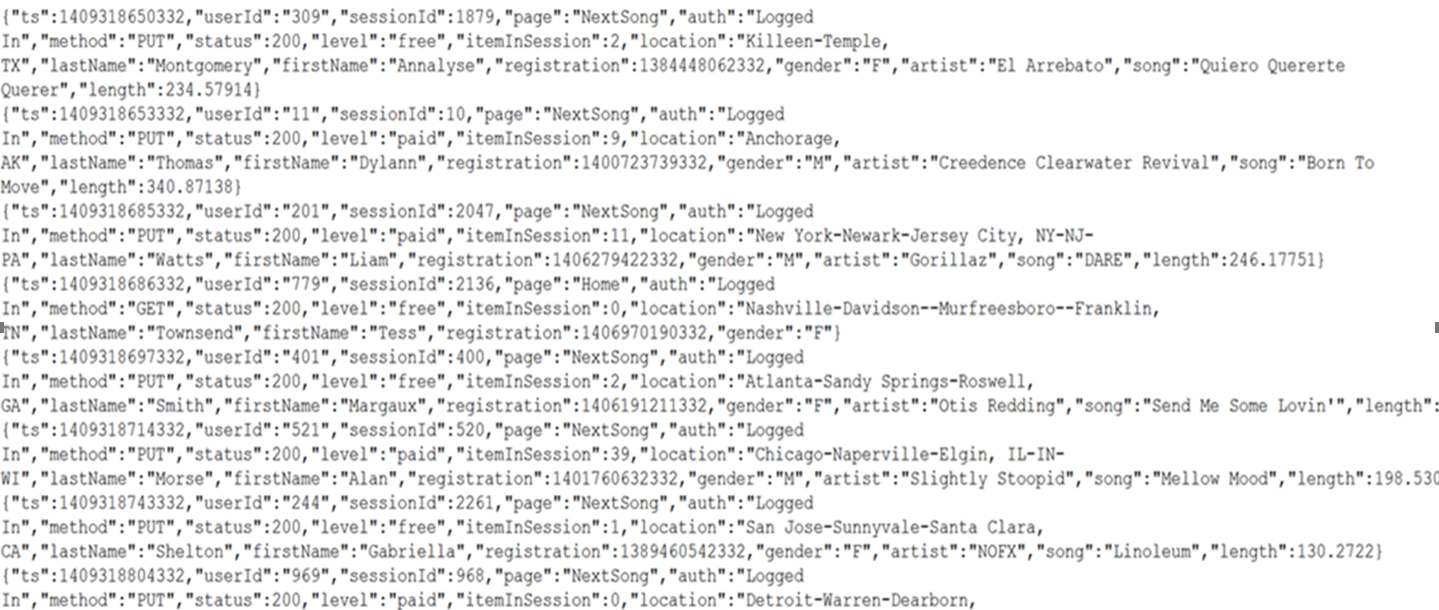
参考使用 Databricks 分析数据一文: https://docs.azure.cn/zh-cn/storage/blobs/data-lake-storage-quickstart-create-databricks-account#ingest-sample-data
问题三:如何用C#向Data Lake中插入数据文件?
【答】可以,需要先安装 Azure.Storage.Files.DataLake NuGet 包。然后添加如下引用
using Azure.Storage.Files.DataLake;

using Azure.Storage.Files.DataLake.Models;

using Azure.Storage;

using System.IO;

using Azure;
将文件上传到目录,则参考以下代码即可:
- 通过创建 DataLakeFileClient 类的实例,在目标目录中创建文件引用。
- 通过调用 DataLakeFileClient.AppendAsync 方法上传文件。
- 确保通过调用 DataLakeFileClient.FlushAsync 方法完成上传。
public async Task UploadFile(DataLakeFileSystemClient fileSystemClient)

{

    DataLakeDirectoryClient directoryClient =

        fileSystemClient.GetDirectoryClient("my-directory");

    DataLakeFileClient fileClient = await directoryClient.CreateFileAsync("uploaded-file.txt");

    FileStream fileStream =

        File.OpenRead("C:\\file-to-upload.txt");

    long fileSize = fileStream.Length;

    await fileClient.AppendAsync(fileStream, offset: 0);

    await fileClient.FlushAsync(position: fileSize);

}
完整实例参考使用 .NET 管理 Azure Data Lake Storage Gen2:https://docs.azure.cn/zh-cn/storage/blobs/data-lake-storage-directory-file-acl-dotnet#upload-a-file-to-a-directory
附录一:在$Filter和$select可配置的选择项的EventData属性
The Azure event log entries are of type EventData
| Name | Type | Description |
|---|---|---|
| authorization |
The sender authorization information. |
|
| caller |
|
the email address of the user who has performed the operation, the UPN claim or SPN claim based on availability. |
| category |
the event category. |
|
| claims |
|
key value pairs to identify ARM permissions. |
| correlationId |
|
the correlation Id, usually a GUID in the string format. The correlation Id is shared among the events that belong to the same uber operation. |
| description |
|
the description of the event. |
| eventDataId |
|
the event data Id. This is a unique identifier for an event. |
| eventName |
the event name. This value should not be confused with OperationName. For practical purposes, OperationName might be more appealing to end users. |
|
| eventTimestamp |
|
the timestamp of when the event was generated by the Azure service processing the request corresponding the event. It in ISO 8601 format. |
| httpRequest |
the HTTP request info. Usually includes the 'clientRequestId', 'clientIpAddress' (IP address of the user who initiated the event) and 'method' (HTTP method e.g. PUT). |
|
| id |
|
the Id of this event as required by ARM for RBAC. It contains the EventDataID and a timestamp information. |
| level |
the event level |
|
| operationId |
|
It is usually a GUID shared among the events corresponding to single operation. This value should not be confused with EventName. |
| operationName |
the operation name. |
|
| properties |
|
the set of <Key, Value> pairs (usually a Dictionary<String, String>) that includes details about the event. |
| resourceGroupName |
|
the resource group name of the impacted resource. |
| resourceId |
|
the resource uri that uniquely identifies the resource that caused this event. |
| resourceProviderName |
the resource provider name of the impacted resource. |
|
| resourceType |
the resource type |
|
| status |
a string describing the status of the operation. Some typical values are: Started, In progress, Succeeded, Failed, Resolved. |
|
| subStatus |
the event sub status. Most of the time, when included, this captures the HTTP status code of the REST call. Common values are: OK (HTTP Status Code: 200), Created (HTTP Status Code: 201), Accepted (HTTP Status Code: 202), No Content (HTTP Status Code: 204), Bad Request(HTTP Status Code: 400), Not Found (HTTP Status Code: 404), Conflict (HTTP Status Code: 409), Internal Server Error (HTTP Status Code: 500), Service Unavailable (HTTP Status Code:503), Gateway Timeout (HTTP Status Code: 504) |
|
| submissionTimestamp |
|
the timestamp of when the event became available for querying via this API. It is in ISO 8601 format. This value should not be confused eventTimestamp. As there might be a delay between the occurrence time of the event, and the time that the event is submitted to the Azure logging infrastructure. |
| subscriptionId |
|
the Azure subscription Id usually a GUID. |
| tenantId |
|
the Azure tenant Id |
【Azure Developer】使用REST API获取Activity Logs、传入Data Lake的数据格式问题的更多相关文章
- 【Azure Developer】使用Postman获取Azure AD中注册应用程序的授权Token,及为Azure REST API设置Authorization
Azure Active Directory (Azure AD) is Microsoft's cloud-based identity and access management service, ...
- 【Azure Developer】使用 CURL 获取 Key Vault 中 Secrets 中的值
问题描述 在使用CURL通过REST API获取Azure Key Vaualt的Secrets值,提示Missing Token, 问如何来生成正确的Token呢? # curl 命令 curl - ...
- 【Azure Developer】使用Microsoft Graph API 批量创建用户,先后遇见的三个错误及解决办法
问题描述 在先前的一篇博文中,介绍了如何使用Microsoft Graph API来创建Azure AD用户(博文参考:[Azure Developer]使用Microsoft Graph API 如 ...
- 【Azure Developer】解决Azure Key Vault管理Storage的示例代码在中国区Azure遇见的各种认证/授权问题 - C# Example Code
问题描述 使用Azure密钥保管库(Key Vault)来托管存储账号(Storage Account)密钥的示例中,从Github中下载的示例代码在中国区Azure运行时候会遇见各种认证和授权问题, ...
- Databricks 第8篇:把Azure Data Lake Storage Gen2 (ADLS Gen 2)挂载到DBFS
DBFS使用dbutils实现存储服务的装载(mount.挂载),用户可以把Azure Data Lake Storage Gen2和Azure Blob Storage 账户装载到DBFS中.mou ...
- 构建企业级数据湖?Azure Data Lake Storage Gen2实战体验(下)
相较传统的重量级OLAP数据仓库,“数据湖”以其数据体量大.综合成本低.支持非结构化数据.查询灵活多变等特点,受到越来越多企业的青睐,逐渐成为了现代数据平台的核心和架构范式. 作为微软Azure上最新 ...
- Azure Data Lake Storage Gen2实战体验
相较传统的重量级OLAP数据仓库,“数据湖”以其数据体量大.综合成本低.支持非结构化数据.查询灵活多变等特点,受到越来越多企业的青睐,逐渐成为了现代数据平台的核心和架构范式. 作为微软Azure上最新 ...
- 【Azure Developer】使用 Microsoft Graph API 获取 AAD User 操作示例
问题描述 查看官方文档" Get a user " , 产生了一个操作示例的想法,在中国区Azure环境中,演示如何获取AAD User信息. 问题解答 使用Microsoft G ...
- 【Azure Developer】使用 Microsoft Authentication Libraries (MSAL) 如何来获取Token呢 (通过用户名和密码方式获取Access Token)
问题描述 在上一篇博文<[Azure Developer]使用 adal4j(Azure Active Directory authentication library for Java)如何来 ...
- 【Azure Developer】【Python 】使用 azure.identity 和 azure.common.credentials 获取Azure AD的Access Token的两种方式
问题描述 使用Python代码,展示如何从Azure AD 中获取目标资源的 Access Token. 如要了解如何从AAD中获取 client id,client secret,tenant id ...
随机推荐
- 【解决了一个小问题】alert manager要怎么样才能触发告警到企业微信上?
作者:张富春(ahfuzhang),转载时请注明作者和引用链接,谢谢! cnblogs博客 zhihu Github 公众号:一本正经的瞎扯 07-15:花了几个小时仍然是没走通这个流程,把中间结果记 ...
- 2.6 Windows驱动开发:使用IO与DPC定时器
本章将继续探索驱动开发中的基础部分,定时器在内核中同样很常用,在内核中定时器可以使用两种,即IO定时器,以及DPC定时器,一般来说IO定时器是DDK中提供的一种,该定时器可以为间隔为N秒做定时,但如果 ...
- C/C++ 内存转储与获取DLL加载
CREATE_PROCESS_DEBUG_EVENT 创建进程的调试事件.CREATE_PROCESS_DEBUG_INFO结构体描述了该类调试事件的详细信息 OUTPUT_DEBUG_STRING_ ...
- 东吴名贤传<二>薛综传
古典记载 吴录曰:其先齐孟尝君封於薛.秦灭六国,而失其祀,子孙分散.汉祖定天下,过齐,求孟尝后,得其孙陵.国二人,欲复其封.陵.国兄弟相推,莫適受,乃去之竹邑,因家焉,故遂氏薛.自国至综,世典州郡, ...
- 苹果M3 Max有两种版本:14+40?还是16+40?
最近有关苹果M3系列处理器的消息突然多了起来,包括M3.M3 Pro.M3 Max,都将升级为台积电3nm工艺,但规格上比较保守,至少核心数量不会大幅增加. 此前说法称,M3 Max将配备14个CPU ...
- P9989 [Ynoi Easy Round 2023] TEST_69 题解
题目链接: [Ynoi Easy Round 2023] TEST_69 首先GCD有比较良好的一些性质.我们观察到一次 \(GCD(a_i,x)\) 操作,会有以下两种变化. 如果 \(x \bmo ...
- Linux中国开源社区停止运营
layout: post title: "Linux 中国开源社区停止运营" tags: - "Linux" 昨天看到老王发的公众号文章,Linux中国开源社区 ...
- Spring Boot 参数校验注解(自整理,不停的测试更新)
首先我们只使用java官方的 javax.validation.constraints ,足以使用了,不使用spring boot 自身的,自身的与官方的一致,可能会有扩展,但是还得引入包,麻烦,只用 ...
- NC13224 送外卖
题目链接 题目 题目描述 n 个小区排成一列,编号为从 0 到 n-1 .一开始,美团外卖员在第0号小区,目标为位于第 n-1 个小区的配送站. 给定两个整数数列 a[0]~a[n-1] 和 b[0] ...
- NC16850 [NOI1998]免费馅饼
题目链接 题目 题目描述 SERKOI最新推出了一种叫做"免费馅饼"的游戏:游戏在一个舞台上进行.舞台的宽度为W格,天幕的高度为H格,游戏者占一格.开始时游戏者站在舞台的正中央,手 ...