
Fragment实现底部Tab,切换可保存状态
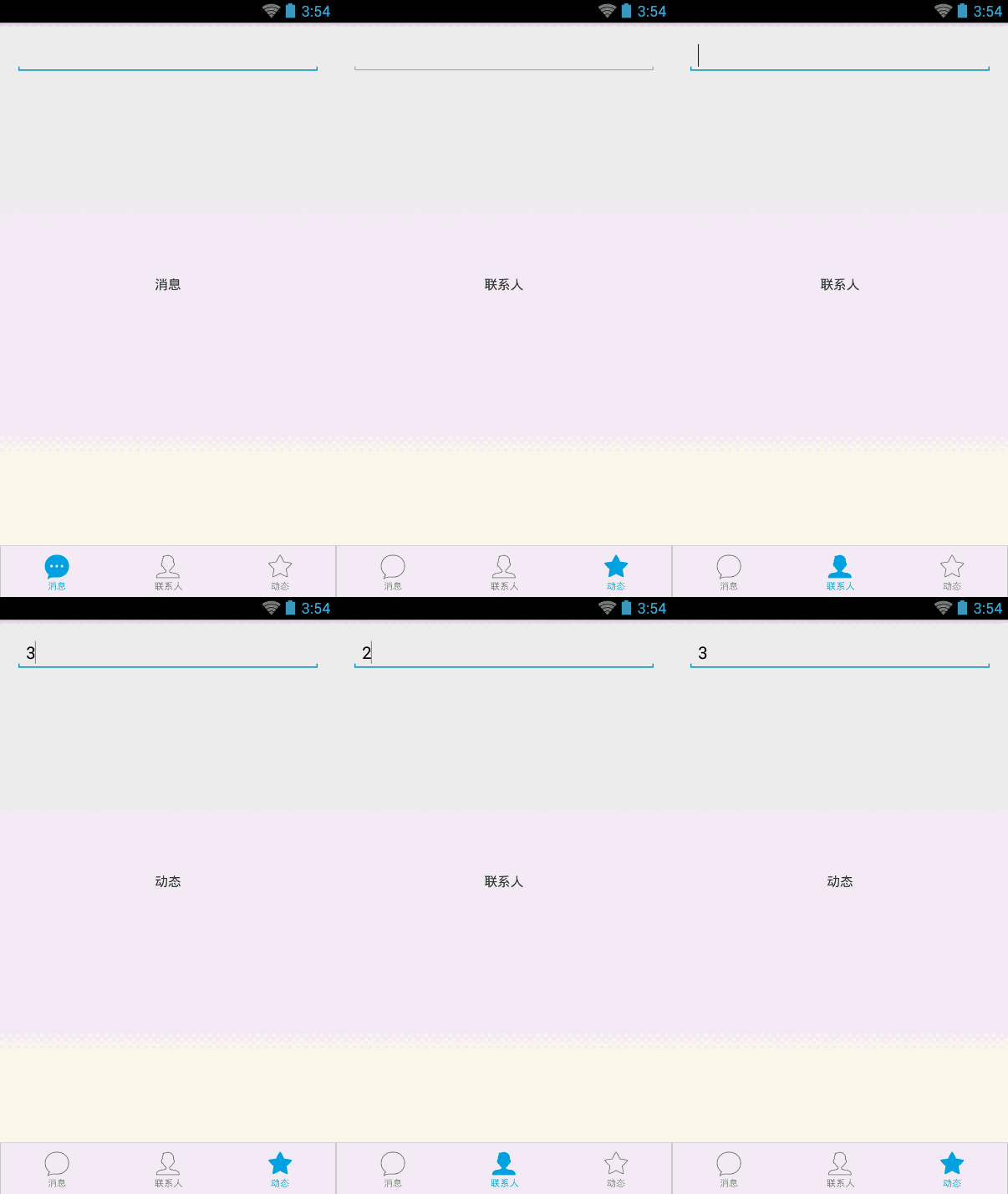
activity_main.xml
 <RelativeLayout xmlns:android="http://schemas.android.com/apk/res/android"

     xmlns:tools="http://schemas.android.com/tools"

     android:layout_width="match_parent"

     android:layout_height="match_parent" >

     <FrameLayout

         android:id="@+id/mHomeContainer"

         android:layout_width="match_parent"

         android:layout_height="match_parent"

         android:layout_above="@+id/mRadioGroup" >

     </FrameLayout>

     <RadioGroup

         android:id="@+id/mRadioGroup"

         android:layout_width="match_parent"

         android:layout_height="56dp"

         android:layout_alignParentBottom="true"

         android:background="@drawable/main_bottom_bg"

         android:orientation="horizontal" >

         <ImageView

             android:id="@+id/Tab_Conversation"

             android:layout_width="wrap_content"

             android:layout_height="wrap_content"

             android:layout_weight="1"

             android:contentDescription="@null"

             android:src="@drawable/skin_tab_icon_conversation_selected" />

         <ImageView

             android:id="@+id/Tab_Contact"

             android:layout_width="wrap_content"

             android:layout_height="wrap_content"

             android:layout_weight="1"

             android:contentDescription="@null"

             android:src="@drawable/skin_tab_icon_contact_normal" />

         <ImageView

             android:id="@+id/Tab_Plugin"

             android:layout_width="wrap_content"

             android:layout_height="wrap_content"

             android:layout_weight="1"

             android:contentDescription="@null"

             android:src="@drawable/skin_tab_icon_plugin_normal" />

     </RadioGroup>

 </RelativeLayout>
关键代码:
 import com.lidroid.xutils.ViewUtils;

 import com.lidroid.xutils.view.annotation.ContentView;

 import com.lidroid.xutils.view.annotation.ViewInject;

 import com.lidroid.xutils.view.annotation.event.OnClick;

 import android.support.v4.app.Fragment;

 import android.support.v4.app.FragmentTransaction;

 import android.support.v7.app.ActionBarActivity;

 import android.view.View;

 import android.view.Window;

 import android.widget.ImageView;

 import android.content.Context;

 import android.os.Bundle;

 @ContentView(R.layout.activity_main)

 public class MainActivity extends ActionBarActivity {

     @ViewInject(R.id.Tab_Conversation)

     private ImageView Tab_Conversation;

     @ViewInject(R.id.Tab_Contact)

     private ImageView Tab_Contact;

     @ViewInject(R.id.Tab_Plugin)

     private ImageView Tab_Plugin;

     private FragmentConversation mFragmentConversation;

     private FragmentContact mFragmentContact;

     private FragmentPlugin mFragmentPlugin;

     private Context mContext;

     @Override

     protected void onCreate(Bundle savedInstanceState) {

         super.onCreate(savedInstanceState);

         requestWindowFeature(Window.FEATURE_NO_TITLE);

         ViewUtils.inject(this);

         mContext = this;

         InitFragment();

         getSupportFragmentManager().beginTransaction()

                 .add(R.id.mHomeContainer, mFragmentConversation).commit();

     }

     private void InitFragment() {

         mFragmentConversation = new FragmentConversation();

         mFragmentContact = new FragmentContact();

         mFragmentPlugin = new FragmentPlugin();

     }

     /**

      * 隐藏其他所有Fragment

      */

     private void HideOtherFragments(Fragment fragment) {

         if (getSupportFragmentManager().getFragments() == null) {

             return;

         }

         for (Fragment fm : getSupportFragmentManager().getFragments()) {

             if (fm != fragment) {

                 getSupportFragmentManager().beginTransaction().hide(fm)

                         .commit();

             }

         }

     }

     /**

      * Tab切换

      *

      * @param view

      */

     @OnClick({ R.id.Tab_Conversation, R.id.Tab_Contact, R.id.Tab_Plugin })

     private void OnTabSelected(View view) {

         ClearSelection();

         FragmentTransaction mTransaction = getSupportFragmentManager()

                 .beginTransaction();

         switch (view.getId()) {

         case R.id.Tab_Conversation:

             Tab_Conversation.setImageDrawable(getResources().getDrawable(

                     R.drawable.skin_tab_icon_conversation_selected));

             if (!getSupportFragmentManager().getFragments().contains(

                     mFragmentConversation)) {

                 mTransaction.add(R.id.mHomeContainer, mFragmentConversation);

             }

             mTransaction.show(mFragmentConversation);

             HideOtherFragments(mFragmentConversation);

             break;

         case R.id.Tab_Contact:

             Tab_Contact.setImageDrawable(getResources().getDrawable(

                     R.drawable.skin_tab_icon_contact_selected));

             if (!getSupportFragmentManager().getFragments().contains(

                     mFragmentContact)) {

                 mTransaction.add(R.id.mHomeContainer, mFragmentContact);

             }

             mTransaction.show(mFragmentContact);

             HideOtherFragments(mFragmentContact);

             break;

         case R.id.Tab_Plugin:

             Tab_Plugin.setImageDrawable(getResources().getDrawable(

                     R.drawable.skin_tab_icon_plugin_selected));

             if (!getSupportFragmentManager().getFragments().contains(

                     mFragmentPlugin)) {

                 mTransaction.add(R.id.mHomeContainer, mFragmentPlugin);

             }

             mTransaction.show(mFragmentPlugin);

             HideOtherFragments(mFragmentPlugin);

             break;

         default:

             break;

         }

         mTransaction.commit();

     }

     /**

      * 清除所有选中状态

      */

     private void ClearSelection() {

         Tab_Conversation.setImageDrawable(getResources().getDrawable(

                 R.drawable.skin_tab_icon_conversation_normal));

         Tab_Contact.setImageDrawable(getResources().getDrawable(

                 R.drawable.skin_tab_icon_contact_normal));

         Tab_Plugin.setImageDrawable(getResources().getDrawable(

                 R.drawable.skin_tab_icon_plugin_normal));

     }

 }
Fragment实现底部Tab,切换可保存状态的更多相关文章
- Android典型界面设计——FragmentTabHost+Fragment实现底部tab切换
一.问题描述 在上次博文中,我们使用RadioGroup+ViewPage+Fragmen实现了顶部滑动导航(查看文章:http://www.cnblogs.com/jerehedu/p/460759 ...
- 解决Fragment在Viepager中切换不保存状态的问题
在FragmentPagerAdapter中重写以下方法: @Override public Object instantiateItem(ViewGroup container, int posit ...
- 09 Flutter底部Tab切换保持页面状态的几种方法
IndexedStack:保此所有页面的状态: AutomaticKeepAliveClientMixin:保此部分页面的状态: 修改的页面代码: 页面效果: Tabs.dart import 'pa ...
- Android Studio精彩案例(二)《仿微信动态点击底部tab切换Fragment》
转载本专栏文章,请注明出处,尊重原创 .文章博客地址:道龙的博客 现在很多的App要么顶部带有tab,要么就底部带有tab.用户通过点击tab从而切换不同的页面(大部分情况时去切换fragment). ...
- Android组件:Fragment切换后保存状态
之前写的第一篇Fragment实例,和大多数人一开始学的一样,都是通过FragmentTransaction的replace方法来实现,replace方法相当于先移除remove()原来所有已存在的f ...
- Fragment实现底部选项卡切换效果
现在很多APP的样式都是底部选项卡做为首页的,实现这样的效果,我们一般有这样几种方式,第一,最屌丝的做法,我直接自定义选项卡视图,通过监听选项卡视图,逻辑控制内容页的切换,这样做的想法一般是反正这几个 ...
- mui 配置底部tab切换方式以模板的方式访问
<!doctype html> <html lang="en"> <head> <meta charset="UTF-8&quo ...
- Activity内切换fragment实现底部菜单切换遇到的坑
1.一般说来,app底部导航都会设计为5个菜单,可以使用textView,也可使用radioButton,这里我选择用radioButton,给radioButton直接设置selector就可以实现 ...
- Android典型界面设计(3)——访网易新闻实现双导航tab切换
一.问题描述 双导航tab切换(底部区块+区域内头部导航),实现方案底部区域使用FragmentTabHost+Fragment, 区域内头部导航使用ViewPager+Fragment,可在之前博客 ...
随机推荐
- Qt5遇到的问题
好久没用Qt了,今天又重新安装了一个,结果遇到不少问题 本机环境:VS2015,Qt5.7 装好后,就新建工程测试了一下,结果无法编译,提示 :-1: error: cannot open C:\Us ...
- 关于C++的变量和类的声明和定义
什么是变量?变量或者叫对象,是一个有具名的.可以供程序操作的存储空间.这里具名是指变量是有名字的,可供操作是指能进行加减乘除或者输入输出等操作,存储空间则是指有一块属于它的内存空间. 为了便于说明,标 ...
- phpCMS V9 自定义添加 全局变量{SKIN_PATH}方法
前言:目前v9版本新增{js_path},{css_path},{img_path}三个全局变量,代替2008版本中{skin_path},样式图片脚本分开路径,确实达到了一定在后台管理方便的目的,但 ...
- PHP自定义弹出消息类,用于弹出提示信息并返回
一个用PHP自写的弹出消息类,用于在程序出错时弹出提示,,弹出警告框,或在程序运行到某阶段的快捷提示,需用时只需传入参数即可,函数并不复杂,但觉得挺实用.具体代码: function Alert($a ...
- scrapy1.1入门用例简介-2
写一个小的scrapy project,爬取相关网页内容并保存为.json文件 0.创建project,genspider等. 1.修改items.py,内容如下: 2.修改dmoz.py,内容如下: ...
- ubuntu下怎么显示右上角的小键盘
Ubuntu右上角小键盘不见了解决方法: ibus输入法的图标经常消失,输入中文时很不方便,重启一下ibus! 按Ctrl+ALT+T 快捷键打开终端, 输入: 1.killall ibu ...
- python 3.5 用户登录验证和输入三次密码锁定用户
#!/usr/bin/env python #encoding: utf-8 #登录程序,输入用户和密码输出欢迎信息,输入错误三次锁定用户,不让登录 import sys print (''' 欢迎登 ...
- 父Prefab与子prefab问题
PrefabRevolution 原文:http://framebunker.com/blog/poor-mans-nested-prefabs/ (溜还是老外溜啊) 有些时候需要在Prefab里 ...
- 通过Shell和Redis来实现集群业务中日志的实时收集分析
http://www.linuxidc.com/Linux/2013-05/83935.htm
- Highly divisible triangular number
我的那个暴力求解,太耗时间了. 用了网上产的什么因式分解,质因数之类的.确实快!还是数学基础不行,只能知道大约. The sequence of triangle numbers is generat ...