
Render OpenCascade Geometry Curves in OpenSceneGraph
在OpenSceneGraph中绘制OpenCascade的曲线
Render OpenCascade Geometry Curves in OpenSceneGraph
摘要Abstract:本文简要说明OpenCascade中几何曲线的数据,并将这些几何曲线在OpenSceneGraph中绘制出来。
关键字KeyWords:OpenCascade、Geometry Curve、OpenSceneGraph、B-Spline、NURBS
一、引言 Introduction
结合《BRep Format Description White Paper》对OpenCascade中的几何数据结构有详细的介绍。OpenCascade中BRep格式中的曲线总共分为九种,不过有二维三维之分:
1.直线 Line
2.圆 Circle
3.椭圆 Ellipse
4.抛物线 Parabola
5.双曲线 Hyperbola
6.Bezier曲线 Bezier Curve
7.B-Spline曲线 B-Spline Curve
8.裁剪曲线 Trimmed Curve
9.偏移曲线 Offset Curve
曲线的几何数据都有一个抽象基类Geom_Curve,类图如下所示:
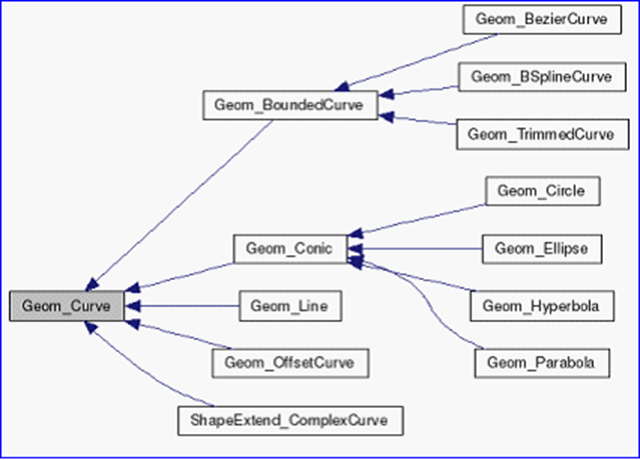
Figure 1.1 Geometry curve class diagram
抽象基类Geom_Curve有几个纯虚函数FirstParameter()、LastParameter()、Value(),根据这几个虚函数,就可以计算曲线上对应参数U的值。类图如下图所示:
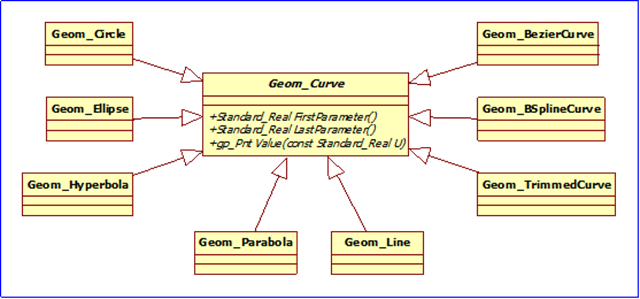
Figure 1.2 Geom_Curve Inherited class diagram
每种曲线都对那些纯虚函数进行实现,使计算曲线上点的方式统一。
二、程序示例 Code Example
根据抽象基类Geom_Curve的几个纯虚函数:
1.FirstParameter();
2.LastParameter();
3.Value(u);
利用多态可将曲线上点都以统一的方式计算出来,并使用GL_LINE_STRIP绘制出来。示例程序如下所示:
/*

*    Copyright (c) 2013 eryar All Rights Reserved.

*

*        File    : Main.cpp

*        Author  : eryar@163.com

*        Date    : 2013-08-09 18:09

*        Version : 1.0v

*

*    Description : Draw OpenCascade Geometry Curves in OpenSceneGraph.

*

*/

// OpenSceneGraph library.

#include <osgDB/ReadFile>

#include <osgViewer/Viewer>

#include <osgViewer/ViewerEventHandlers>

#include <osgGA/StateSetManipulator>

#pragma comment(lib, "osgd.lib")

#pragma comment(lib, "osgDbd.lib")

#pragma comment(lib, "osgGAd.lib")

#pragma comment(lib, "osgViewerd.lib")

// OpenCascade library.

#include <TColgp_Array1OfPnt.hxx>

#include <TColStd_Array1OfReal.hxx>

#include <TColStd_Array1OfInteger.hxx>

#include <Geom_Circle.hxx>

#include <Geom_Ellipse.hxx>

#include <Geom_Hyperbola.hxx>

#include <Geom_Parabola.hxx>

#include <Geom_BezierCurve.hxx>

#include <Geom_BSplineCurve.hxx>

#pragma comment(lib, "TKernel.lib")

#pragma comment(lib, "TKMath.lib")

#pragma comment(lib, "TKG3d.lib")

// Curve Segment Delta.

const double CURVE_SEGMENT_DELTA = 0.01;

/*

* @brief Build geometry curve of OpenCascade.

*/

osg::Node* buildCurve(const Geom_Curve& curve)

{

    osg::ref_ptr<osg::Geode> geode = new osg::Geode();

    osg::ref_ptr<osg::Geometry> linesGeom = new osg::Geometry();

    osg::ref_ptr<osg::Vec3Array> pointsVec = new osg::Vec3Array();

    gp_Pnt point;

    double dFirst = curve.FirstParameter();

    double dLast = curve.LastParameter();

    Precision::IsNegativeInfinite(dFirst) ? dFirst = -1.0 : dFirst;

    Precision::IsInfinite(dLast) ? dLast = 1.0 : dLast;

    for (double u = dFirst; u <= dLast; u += CURVE_SEGMENT_DELTA)

    {

        point = curve.Value(u);

        pointsVec->push_back(osg::Vec3(point.X(), point.Y(), point.Z()));

    }

    // Set the colors.

    osg::ref_ptr<osg::Vec4Array> colors = new osg::Vec4Array;

    colors->push_back(osg::Vec4(1.0f, 1.0f, 0.0f, 0.0f));

    linesGeom->setColorArray(colors.get());

    linesGeom->setColorBinding(osg::Geometry::BIND_OVERALL);

    // Set the normal in the same way of color.

    osg::ref_ptr<osg::Vec3Array> normals = new osg::Vec3Array;

    normals->push_back(osg::Vec3(0.0f, -1.0f, 0.0f));

    linesGeom->setNormalArray(normals.get());

    linesGeom->setNormalBinding(osg::Geometry::BIND_OVERALL);

    // Set vertex array.

    linesGeom->setVertexArray(pointsVec);

    linesGeom->addPrimitiveSet(new osg::DrawArrays(osg::PrimitiveSet::LINE_STRIP, , pointsVec->size()));

    geode->addDrawable(linesGeom.get());

    return geode.release();

}

/**

* @breif Build geometry curve of OpenCascade.

*/

osg::Node* buildScene()

{

    osg::ref_ptr<osg::Group> root = new osg::Group();

    // 1. Build circle curve.

    Geom_Circle circle(gp::YOZ(), 1.0);

    root->addChild(buildCurve(circle));

    // 2. Build ellipse curve.

    Geom_Ellipse ellipse(gp::ZOX(), 1.0, 0.3);

    root->addChild(buildCurve(ellipse));

    // 3. Build Hyperbola curve.

    Geom_Hyperbola hyperbola(gp::XOY(), 1.0, 0.6);

    root->addChild(buildCurve(hyperbola));

    // 4. Build parabola curve.

    Geom_Parabola parabola(gp::ZOX(), 1.0);

    root->addChild(buildCurve(parabola));

    // 5. Build Bezier curve.

    TColgp_Array1OfPnt poles(, );

    poles.SetValue(, gp_Pnt(-, -, ));

    poles.SetValue(, gp_Pnt(, , ));

    poles.SetValue(, gp_Pnt(, , ));

    poles.SetValue(, gp_Pnt(, , ));

    Geom_BezierCurve bezierCurve(poles);

    root->addChild(buildCurve(bezierCurve));

    // 6. Build BSpline curve.

    TColgp_Array1OfPnt ctrlPnts(, );

    TColStd_Array1OfReal knots(, );

    TColStd_Array1OfInteger mults(, );

    ctrlPnts.SetValue(, gp_Pnt(, , ));

    ctrlPnts.SetValue(, gp_Pnt(, -, ));

    ctrlPnts.SetValue(, gp_Pnt(, , ));

    knots.SetValue(, 0.0);

    knots.SetValue(, 0.25);

    knots.SetValue(, 0.5);

    knots.SetValue(, 0.75);

    knots.SetValue(, 1.0);

    mults.Init();

    Geom_BSplineCurve bsplineCurve(ctrlPnts, knots, mults, );

    root->addChild(buildCurve(bsplineCurve));

    return root.release();

}

int main(int argc, char* argv[])

{

    osgViewer::Viewer myViewer;

    myViewer.setSceneData(buildScene());

    myViewer.addEventHandler(new osgGA::StateSetManipulator(myViewer.getCamera()->getOrCreateStateSet()));

    myViewer.addEventHandler(new osgViewer::StatsHandler);

    myViewer.addEventHandler(new osgViewer::WindowSizeHandler);

    return myViewer.run();

}
因抛物线和双曲线的FirstParameter()和LastParameter()为负无穷和正无穷,所以对其进行处理,只输出了部分曲线。
程序效果如下图所示:
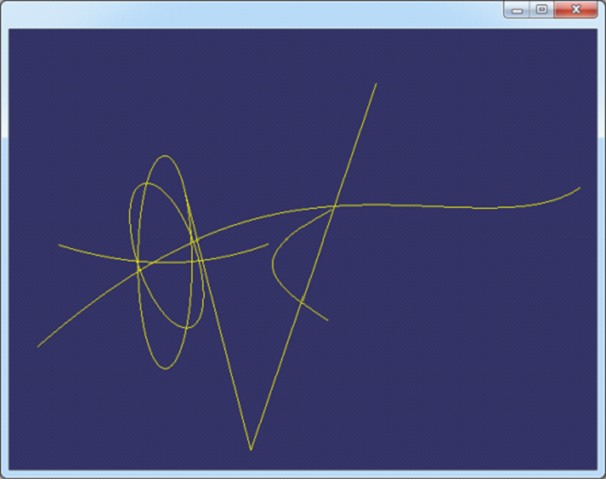
Figure 2.1 OpenCascade Geometry Curves in OpenSceneGraph
三、结论 Conclusion
OpenCascade的几何数据使用还是很方便的,只要将相应的曲线构造出来之后,计算曲线上的点使用函数Value()即可,还可计算相应参数处的微分值等。
通过理解《BRep Format Description White Paper》,可将BRep文件中数据导入OpenCascade中与上面实现的程序进行对比,结果正确。如下图所示:
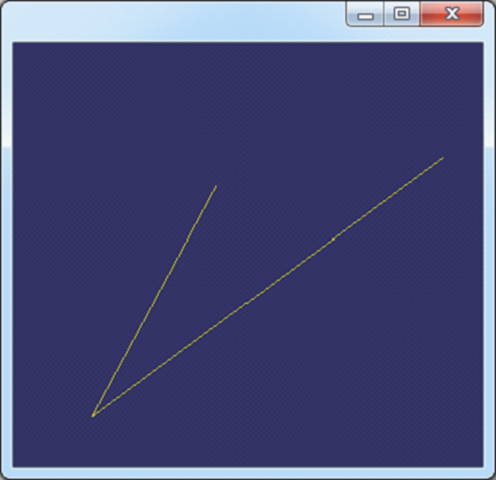
Figure 3.1 B-Spline in OpenSceneGraph
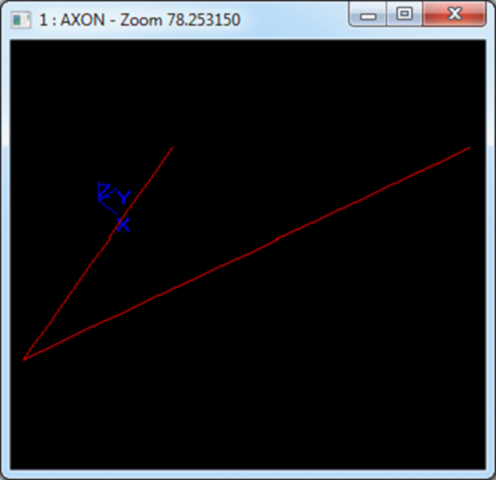
Figure 3.2 B-Spline in OpenCascade Draw
PDF Version: Draw OpenCascade Geometry Curves in OpenSceneGraph
Render OpenCascade Geometry Curves in OpenSceneGraph的更多相关文章
- Render OpenCascade Geometry Surfaces in OpenSceneGraph
在OpenSceneGraph中绘制OpenCascade的曲面 Render OpenCascade Geometry Surfaces in OpenSceneGraph eryar@163.co ...
- OpenCascade Shape Representation in OpenSceneGraph
OpenCascade Shape Representation in OpenSceneGraph eryar@163.com 摘要Abstract:本文通过程序实例,将OpenCascade中的拓 ...
- Opencascade、OpenGL和OpenSceneGraph的区别与联系
OpenGL只是三维显示 Openscenegraph基于场景图的概念,它提供一个在OpenGL之上的面向对象的框架,从而能把开发者从实现和优化底层图形的调用中解脱出来 Opencascade更适合算 ...
- OpenCASCADE Rational Bezier Curves
OpenCASCADE Rational Bezier Curves eryar@163.com Abstract. Although polynomials offer many advantage ...
- OpenCASCADE Linear Extrusion Surface
OpenCASCADE Linear Extrusion Surface eryar@163.com Abstract. OpenCASCADE linear extrusion surface is ...
- Polynomial Library in OpenCascade
Polynomial Library in OpenCascade eryar@163.com 摘要Abstract:分析幂基曲线即多项式曲线在OpenCascade中的计算方法,以及利用OpenSc ...
- Representation Data in OpenCascade BRep
Representation Data in OpenCascade BRep eryar@163.com 摘要Abstract:现在的显示器大多数是光栅显示器,即可以看做一个像素的矩阵.在光栅显示器 ...
- Parametric Curves and Surfaces
Parametric Curves and Surfaces eryar@163.com Abstract. This paper is concerned with parametric curve ...
- OpenCASCADE Data Exchange - 3D PDF
OpenCASCADE Data Exchange - 3D PDF eryar@163.com Abstract. Today most 3D engineering model data are ...
随机推荐
- lua里面求int数组的union,diff,inter,distinct 方法实现
--利用lua中的table是哈希表这一点进行计算 function lua_distinct_union (union_t1,union_t2) if(union_t2==nil) then uni ...
- android IOC框架学习记录
一.框架如下几种: 1.Roboguice 2.Spring for Android 3.afinal 4.xUtils 二.Roboguice说明 项目地址:https://gith ...
- JAVA 求和程序
- JSON 序列化和反序列化——JavaScriptSerializer实现
一. JavaScriptSerializer 类由异步通信层内部使用,用于序列化和反序列化在浏览器和 Web 服务器之间传递的数据.您无法访问序列化程序的此实例.但是,此类公开了公共 API.因此, ...
- map() 函数
map()函数 map()是 Python 内置的高阶函数,它接收一个函数 f 和一个 list,并通过把函数 f 依次作用在 list 的每个元素上,得到一个新的 list 并返回. 例如,对于li ...
- ansible 自动化(2)
模块介绍: copy模块 使用copy模块,可以将本地文件一键复制到远程服务器:-a后跟上参数,参数中指定本地文件和远端路径: [root@ZABBIX ~]# ansible glq -m copy ...
- Magicodes.WeiChat——版本发布历史
购买地址:https://item.taobao.com/item.htm?id=520205558575 您可以在新标签页打开此图,以查看原始图片. Magicodes.WeiChat为湖南心莱信息 ...
- TFS 改服务器IP 域名 端口方法
长春电信伴随着开始的严打,所有未备案的80,8080等常用web端口都被封,使得原用8080作为服务端口的tfs代码服务器无法使用,现提供方法如下: 1.关掉VS 2.去掉要改的解决方案的sln文件的 ...
- 【原创】WinForm 模态对话框
今天解决的一个问题,记录下,以备后用. 问题描述:WinForm程序有超时自动退出功能,但是有些模态对话框不关掉的话会退出失败,原因(猜测): 程序倒计时用的System.Windows.Forms. ...
- 我的ORM之三 -- 更新
我的ORM索引 更新语法 var 影响行数 = dbr.表.Update(实体).Where(条件).Execute(); 实体类型: 更新的实体类型和添加的实体类型一样,有三类: 1. 任何C#类. ...