
Render OpenCascade Geometry Surfaces in OpenSceneGraph
在OpenSceneGraph中绘制OpenCascade的曲面
Render OpenCascade Geometry Surfaces in OpenSceneGraph
摘要Abstract:本文对OpenCascade中的几何曲面数据进行简要说明,并结合OpenSceneGraph将这些曲面显示。
关键字Key Words:OpenCascade、OpenSceneGraph、Geometry Surface、NURBS
一、引言 Introduction
《BRep Format Description White Paper》中对OpenCascade的几何数据结构进行了详细说明。BRep文件中用到的曲面总共有11种:
1.Plane 平面;
2.Cylinder 圆柱面;
3.Cone 圆锥面;
4.Sphere 球面;
5.Torus 圆环面;
6.Linear Extrusion 线性拉伸面;
7.Revolution Surface 旋转曲面;
8.Bezier Surface 贝塞尔面;
9.B-Spline Surface B样条曲面;
10.Rectangle Trim Surface 矩形裁剪曲面;
11.Offset Surface 偏移曲面;
曲面的几何数据类都有一个共同的基类Geom_Surface,类图如下所示:
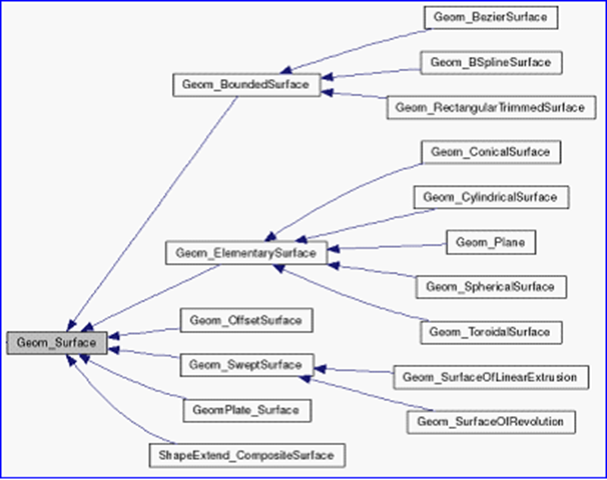
Figure 1.1 Geometry Surface class diagram
抽象基类Geom_Surface有几个纯虚函数Bounds()、Value()等,可用来计算曲面上的点。类图如下所示:
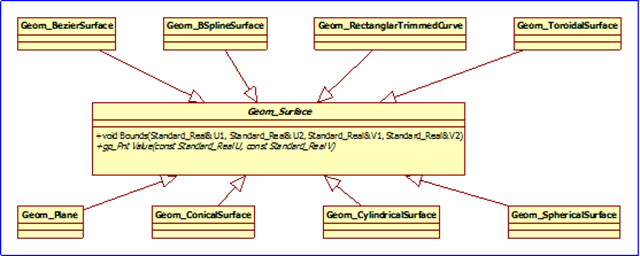
Figure 1.2 Geom_Surface class diagram
与另一几何内核sgCore中的几何的概念一致,几何(geometry)是用参数方程对曲线曲面精确表示的。
每种曲面都对纯虚函数进行实现,使计算曲面上点的方式统一。
曲线C(u)是单参数的矢值函数,它是由直线段到三维欧几里得空间的映射。曲面是关于两个参数u和v的矢值函数,它表示由uv平面上的二维区域R到三维欧几里得空间的映射。把曲面表示成双参数的形式为:

它的参数方程为:
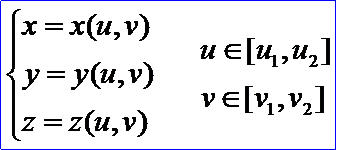
u,v参数形成了一个参数平面,参数的变化区间在参数平面上构成一个矩形区域。正常情况下,参数域内的点(u,v)与曲面上的点r(u,v)是一一对应的映射关系。
给定一个具体的曲面方程,称之为给定了一个曲面的参数化。它既决定了所表示的曲面的形状,也决定了该曲面上的点与其参数域内的点的一种对应关系。同样地,曲面的参数化不是唯一的。
曲面双参数u,v的变化范围往往取为单位正方形,即u∈[0,1],v∈[0,1]。这样讨论曲面方程时,即简单、方便,又不失一般性。
二、程序示例 Code Example
使用函数Value(u, v)根据参数计算出曲面上的点,将点分u,v方向连成线,可以绘制出曲面的线框模型。程序如下所示:
/*

*    Copyright (c) 2013 eryar All Rights Reserved.

*

*        File    : Main.cpp

*        Author  : eryar@163.com

*        Date    : 2013-08-11 10:36

*        Version : V1.0

*

*    Description : Draw OpenCascade Geometry Surfaces in OpenSceneGraph.

*

*/

// OpenSceneGraph

#include <osgDB/ReadFile>

#include <osgViewer/Viewer>

#include <osgGA/StateSetManipulator>

#include <osgViewer/ViewerEventHandlers>

#pragma comment(lib, "osgd.lib")

#pragma comment(lib, "osgDBd.lib")

#pragma comment(lib, "osgGAd.lib")

#pragma comment(lib, "osgViewerd.lib")

// OpenCascade

#define WNT

#include <TColgp_Array2OfPnt.hxx>

#include <TColStd_HArray1OfInteger.hxx>

#include <TColGeom_Array2OfBezierSurface.hxx>

#include <GeomConvert_CompBezierSurfacesToBSplineSurface.hxx>

#include <Geom_Surface.hxx>

#include <Geom_BezierSurface.hxx>

#include <Geom_BSplineSurface.hxx>

#include <Geom_ConicalSurface.hxx>

#include <Geom_CylindricalSurface.hxx>

#include <Geom_Plane.hxx>

#include <Geom_ToroidalSurface.hxx>

#include <Geom_SphericalSurface.hxx>

#pragma comment(lib, "TKernel.lib")

#pragma comment(lib, "TKMath.lib")

#pragma comment(lib, "TKG3d.lib")

#pragma comment(lib, "TKGeomBase.lib")

// Approximation Delta.

const double APPROXIMATION_DELTA = 0.1;

/**

* @breif Build geometry surface.

*/

osg::Node* buildSurface(const Geom_Surface& surface)

{

    osg::ref_ptr<osg::Geode> geode = new osg::Geode();

    gp_Pnt point;

    Standard_Real uFirst = 0.0;

    Standard_Real vFirst = 0.0;

    Standard_Real uLast = 0.0;

    Standard_Real vLast = 0.0;

    surface.Bounds(uFirst, uLast, vFirst, vLast);

    Precision::IsNegativeInfinite(uFirst) ? uFirst = -1.0 : uFirst;

    Precision::IsInfinite(uLast) ? uLast = 1.0 : uLast;

    Precision::IsNegativeInfinite(vFirst) ? vFirst = -1.0 : vFirst;

    Precision::IsInfinite(vLast) ? vLast = 1.0 : vLast;

    // Approximation in v direction.

    for (Standard_Real u = uFirst; u <= uLast; u += APPROXIMATION_DELTA)

    {

        osg::ref_ptr<osg::Geometry> linesGeom = new osg::Geometry();

        osg::ref_ptr<osg::Vec3Array> pointsVec = new osg::Vec3Array();

        for (Standard_Real v = vFirst; v <= vLast; v += APPROXIMATION_DELTA)

        {

            point = surface.Value(u, v);

            pointsVec->push_back(osg::Vec3(point.X(), point.Y(), point.Z()));

        }

        // Set the colors.

        osg::ref_ptr<osg::Vec4Array> colors = new osg::Vec4Array;

        colors->push_back(osg::Vec4(1.0f, 1.0f, 0.0f, 0.0f));

        linesGeom->setColorArray(colors.get());

        linesGeom->setColorBinding(osg::Geometry::BIND_OVERALL);

        // Set the normal in the same way of color.

        osg::ref_ptr<osg::Vec3Array> normals = new osg::Vec3Array;

        normals->push_back(osg::Vec3(0.0f, -1.0f, 0.0f));

        linesGeom->setNormalArray(normals.get());

        linesGeom->setNormalBinding(osg::Geometry::BIND_OVERALL);

        // Set vertex array.

        linesGeom->setVertexArray(pointsVec);

        linesGeom->addPrimitiveSet(new osg::DrawArrays(osg::PrimitiveSet::LINE_STRIP, , pointsVec->size()));

        geode->addDrawable(linesGeom.get());

    }

    // Approximation in u direction.

    for (Standard_Real v = vFirst; v <= vLast; v += APPROXIMATION_DELTA)

    {

        osg::ref_ptr<osg::Geometry> linesGeom = new osg::Geometry();

        osg::ref_ptr<osg::Vec3Array> pointsVec = new osg::Vec3Array();

        for (Standard_Real u = vFirst; u <= uLast; u += APPROXIMATION_DELTA)

        {

            point = surface.Value(u, v);

            pointsVec->push_back(osg::Vec3(point.X(), point.Y(), point.Z()));

        }

        // Set the colors.

        osg::ref_ptr<osg::Vec4Array> colors = new osg::Vec4Array;

        colors->push_back(osg::Vec4(1.0f, 1.0f, 0.0f, 0.0f));

        linesGeom->setColorArray(colors.get());

        linesGeom->setColorBinding(osg::Geometry::BIND_OVERALL);

        // Set the normal in the same way of color.

        osg::ref_ptr<osg::Vec3Array> normals = new osg::Vec3Array;

        normals->push_back(osg::Vec3(0.0f, -1.0f, 0.0f));

        linesGeom->setNormalArray(normals.get());

        linesGeom->setNormalBinding(osg::Geometry::BIND_OVERALL);

        // Set vertex array.

        linesGeom->setVertexArray(pointsVec);

        linesGeom->addPrimitiveSet(new osg::DrawArrays(osg::PrimitiveSet::LINE_STRIP, , pointsVec->size()));

        geode->addDrawable(linesGeom.get());

    }

    return geode.release();

}

/**

* @breif Test geometry surfaces of OpenCascade.

*/

osg::Node* buildScene(void)

{

    osg::ref_ptr<osg::Group> root = new osg::Group();

    // Test Plane.

    Geom_Plane plane(gp::XOY());

    root->addChild(buildSurface(plane));

    // Test Bezier Surface and B-Spline Surface.

    TColgp_Array2OfPnt array1(,,,);

    TColgp_Array2OfPnt array2(,,,);

    TColgp_Array2OfPnt array3(,,,);

    TColgp_Array2OfPnt array4(,,,);

    array1.SetValue(,,gp_Pnt(,,));

    array1.SetValue(,,gp_Pnt(,,));

    array1.SetValue(,,gp_Pnt(,,));

    array1.SetValue(,,gp_Pnt(,,));

    array1.SetValue(,,gp_Pnt(,,));

    array1.SetValue(,,gp_Pnt(,,));

    array1.SetValue(,,gp_Pnt(,,));

    array1.SetValue(,,gp_Pnt(,,));

    array1.SetValue(,,gp_Pnt(,,));

    array2.SetValue(,,gp_Pnt(,,));

    array2.SetValue(,,gp_Pnt(,,));

    array2.SetValue(,,gp_Pnt(,,));

    array2.SetValue(,,gp_Pnt(,,));

    array2.SetValue(,,gp_Pnt(,,));

    array2.SetValue(,,gp_Pnt(,,));

    array2.SetValue(,,gp_Pnt(,,));

    array2.SetValue(,,gp_Pnt(,,));

    array2.SetValue(,,gp_Pnt(,,));

    array3.SetValue(,,gp_Pnt(,,));

    array3.SetValue(,,gp_Pnt(,,));

    array3.SetValue(,,gp_Pnt(,,));

    array3.SetValue(,,gp_Pnt(,,));

    array3.SetValue(,,gp_Pnt(,,));

    array3.SetValue(,,gp_Pnt(,,));

    array3.SetValue(,,gp_Pnt(,,));

    array3.SetValue(,,gp_Pnt(,,));

    array3.SetValue(,,gp_Pnt(,,));

    array4.SetValue(,,gp_Pnt(,,));

    array4.SetValue(,,gp_Pnt(,,));

    array4.SetValue(,,gp_Pnt(,,));

    array4.SetValue(,,gp_Pnt(,,));

    array4.SetValue(,,gp_Pnt(,,));

    array4.SetValue(,,gp_Pnt(,,));

    array4.SetValue(,,gp_Pnt(,,));

    array4.SetValue(,,gp_Pnt(,,));

    array4.SetValue(,,gp_Pnt(,,));

    Geom_BezierSurface BZ1(array1);

    Geom_BezierSurface BZ2(array2);

    Geom_BezierSurface BZ3(array3);

    Geom_BezierSurface BZ4(array4);

    root->addChild(buildSurface(BZ1));

    root->addChild(buildSurface(BZ2));

    root->addChild(buildSurface(BZ3));

    root->addChild(buildSurface(BZ4));

    Handle_Geom_BezierSurface BS1 = new Geom_BezierSurface(array1);

    Handle_Geom_BezierSurface BS2 = new Geom_BezierSurface(array2);

    Handle_Geom_BezierSurface BS3 = new Geom_BezierSurface(array3);

    Handle_Geom_BezierSurface BS4 = new Geom_BezierSurface(array4);

    TColGeom_Array2OfBezierSurface bezierarray(,,,);

    bezierarray.SetValue(,,BS1);

    bezierarray.SetValue(,,BS2);

    bezierarray.SetValue(,,BS3);

    bezierarray.SetValue(,,BS4);

    GeomConvert_CompBezierSurfacesToBSplineSurface BB (bezierarray);

    if (BB.IsDone())

    {

        Geom_BSplineSurface BSPLSURF(

            BB.Poles()->Array2(),

            BB.UKnots()->Array1(),

            BB.VKnots()->Array1(),

            BB.UMultiplicities()->Array1(),

            BB.VMultiplicities()->Array1(),

            BB.UDegree(),

            BB.VDegree() );

        BSPLSURF.Translate(gp_Vec(,,));

        root->addChild(buildSurface(BSPLSURF));

    }

    // Test Spherical Surface.

    Geom_SphericalSurface sphericalSurface(gp::XOY(), 1.0);

    sphericalSurface.Translate(gp_Vec(2.5, 0.0, 0.0));

    root->addChild(buildSurface(sphericalSurface));

    // Test Conical Surface.

    Geom_ConicalSurface conicalSurface(gp::XOY(), M_PI/, 1.0);

    conicalSurface.Translate(gp_Vec(5.0, 0.0, 0.0));

    root->addChild(buildSurface(conicalSurface));

    // Test Cylindrical Surface.

    Geom_CylindricalSurface cylindricalSurface(gp::XOY(), 1.0);

    cylindricalSurface.Translate(gp_Vec(8.0, 0.0, 0.0));

    root->addChild(buildSurface(cylindricalSurface));

    // Test Toroidal Surface.

    Geom_ToroidalSurface toroidalSurface(gp::XOY(), 1.0, 0.2);

    toroidalSurface.Translate(gp_Vec(11.0, 0.0, 0.0));

    root->addChild(buildSurface(toroidalSurface));

    return root.release();

}

int main(int argc, char* argv[])

{

    osgViewer::Viewer myViewer;

    myViewer.setSceneData(buildScene());

    myViewer.addEventHandler(new osgGA::StateSetManipulator(myViewer.getCamera()->getOrCreateStateSet()));

    myViewer.addEventHandler(new osgViewer::StatsHandler);

    myViewer.addEventHandler(new osgViewer::WindowSizeHandler);

    return myViewer.run();

}
程序效果如下图所示:
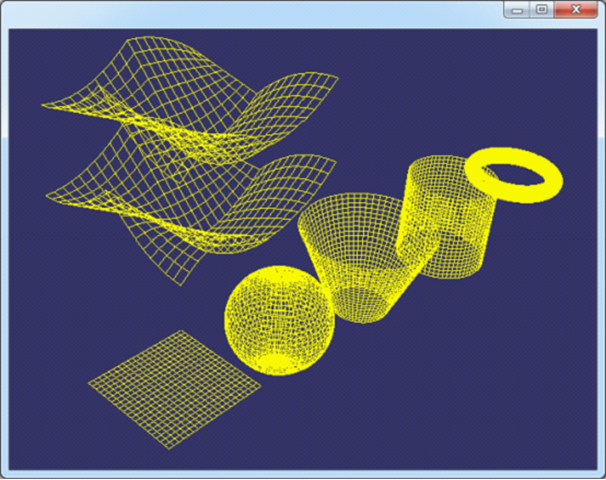
Figure 2.1 OpenCascade Geometry Surfaces in OpenSceneGraph
三、结论 Conclusion
根据OpenCascade中的几何曲面的函数Value(u, v)可以计算出曲面上的点。分u方向和v方向分别绘制曲面上的点,并将之连接成线,即可以表示出曲面的线框模型。因为这样的模型没有面的信息,所以不能有光照效果、材质效果等。要有光照、材质的信息,必须将曲面进行三角剖分。相关的剖分算法有Delaunay三角剖分等。
PDF Version: Draw OpenCascade Geometry Surfaces in OpenSceneGraph
Render OpenCascade Geometry Surfaces in OpenSceneGraph的更多相关文章
- Render OpenCascade Geometry Curves in OpenSceneGraph
在OpenSceneGraph中绘制OpenCascade的曲线 Render OpenCascade Geometry Curves in OpenSceneGraph eryar@163.com ...
- OpenCascade Shape Representation in OpenSceneGraph
OpenCascade Shape Representation in OpenSceneGraph eryar@163.com 摘要Abstract:本文通过程序实例,将OpenCascade中的拓 ...
- Opencascade、OpenGL和OpenSceneGraph的区别与联系
OpenGL只是三维显示 Openscenegraph基于场景图的概念,它提供一个在OpenGL之上的面向对象的框架,从而能把开发者从实现和优化底层图形的调用中解脱出来 Opencascade更适合算 ...
- OpenCASCADE Linear Extrusion Surface
OpenCASCADE Linear Extrusion Surface eryar@163.com Abstract. OpenCASCADE linear extrusion surface is ...
- Polynomial Library in OpenCascade
Polynomial Library in OpenCascade eryar@163.com 摘要Abstract:分析幂基曲线即多项式曲线在OpenCascade中的计算方法,以及利用OpenSc ...
- Representation Data in OpenCascade BRep
Representation Data in OpenCascade BRep eryar@163.com 摘要Abstract:现在的显示器大多数是光栅显示器,即可以看做一个像素的矩阵.在光栅显示器 ...
- Open Cascade 转化为OpenSceneGraph中的Mesh
#include <osgDB/ReadFile> #include <osgViewer/Viewer> #include <osgGA/StateSetManipul ...
- OpenCASCADE Data Exchange - 3D PDF
OpenCASCADE Data Exchange - 3D PDF eryar@163.com Abstract. Today most 3D engineering model data are ...
- Visualize Surface by Delaunay Triangulator
Visualize Surface by Delaunay Triangulator eryar@163.com Abstract. Delaunay Triangulation is the cor ...
随机推荐
- Excel里内嵌在线翻译
本来寻思着继续写点系统运行日志跟踪技术的,但早晨哥家领导从单位打来电话,让帮助她的闺蜜搞一个excel翻译的问题,总部IT搞不定.我过去是用excel做了几年工作,却都是些数学计算,跟翻译也扯不上啊: ...
- SCRUM站立会议
SCRUM站立会议是让团队成员每日面对面站立互相交流他们所承担任务的进度.它的一个附带好处是让领导或经理能了解 到工作情况.本质上是为了团队交流,不是报告会议! 功能: 1)创造团队成员相互沟通的条件 ...
- Oracle Blob 字段的模糊查询
原文地址:http://blog.csdn.net/springk/article/details/6866248
- RHEL6.5及Win7的和谐共处(投机版)
背景: 在Windows XP存在时,装了个RHEL6.5,用的是安装程序自带的Grub,后来将XP删除后重装了Windows7,RHEL的Grub被覆盖,启动不了RHEL了,于是补上RHEL的引导… ...
- Ubuntu/Linux 下pdf阅读器Zathura(类vim操作)
Ubuntu下源安装: sudo apt-get install zathura 操作总结: 基本操作与vim一致,对于熟悉vim快捷键的十分方便: 向下移动一页是J(Ctrl+f),向上移动一页是K ...
- java中对List<Map<String,Object>>中的中文汉字排序
import java.text.Collator;import java.util.ArrayList;import java.util.Collections;import java.util.C ...
- fallacies of distributed computing
The network is reliable. Latency is zero. Bandwidth is infinite. The network is secure. Topology doe ...
- 工作当中实际运用(1)——tab选项卡
不废话 直接上代码: tab选项卡 window.onload=function(){ var titles= document.getElementById('header-dh').getElem ...
- Manifesto of the Communist Party
A spectre is haunting Europe – the spectre of communism. All the powers of old Europe have entered i ...
- Angular 2 + Electron 开发web和桌面应用
https://github.com/zhongzf/angular2-electron-quickstart Web用法: # Clone this repository git clone htt ...