
Render OpenCascade Geometry Curves in OpenSceneGraph
在OpenSceneGraph中绘制OpenCascade的曲线
Render OpenCascade Geometry Curves in OpenSceneGraph
摘要Abstract:本文简要说明OpenCascade中几何曲线的数据,并将这些几何曲线在OpenSceneGraph中绘制出来。
关键字KeyWords:OpenCascade、Geometry Curve、OpenSceneGraph、B-Spline、NURBS
一、引言 Introduction
结合《BRep Format Description White Paper》对OpenCascade中的几何数据结构有详细的介绍。OpenCascade中BRep格式中的曲线总共分为九种,不过有二维三维之分:
1.直线 Line
2.圆 Circle
3.椭圆 Ellipse
4.抛物线 Parabola
5.双曲线 Hyperbola
6.Bezier曲线 Bezier Curve
7.B-Spline曲线 B-Spline Curve
8.裁剪曲线 Trimmed Curve
9.偏移曲线 Offset Curve
曲线的几何数据都有一个抽象基类Geom_Curve,类图如下所示:
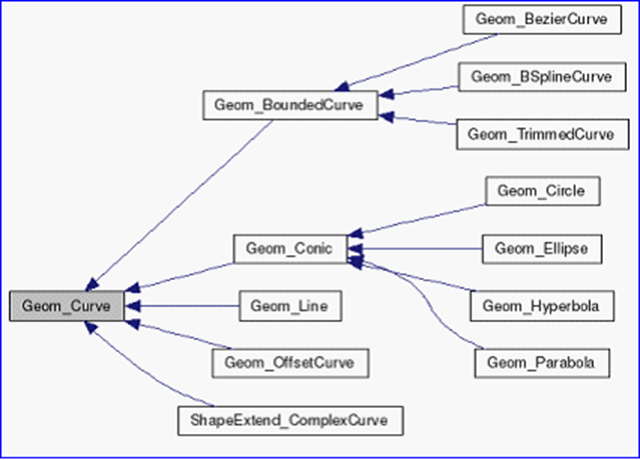
Figure 1.1 Geometry curve class diagram
抽象基类Geom_Curve有几个纯虚函数FirstParameter()、LastParameter()、Value(),根据这几个虚函数,就可以计算曲线上对应参数U的值。类图如下图所示:
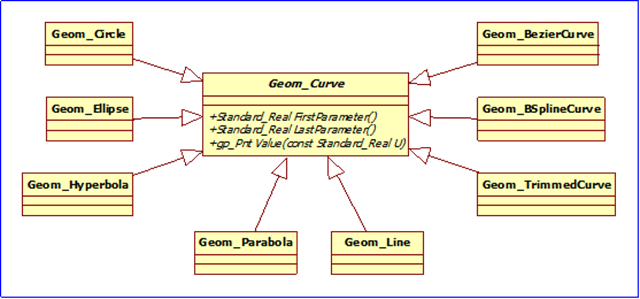
Figure 1.2 Geom_Curve Inherited class diagram
每种曲线都对那些纯虚函数进行实现,使计算曲线上点的方式统一。
二、程序示例 Code Example
根据抽象基类Geom_Curve的几个纯虚函数:
1.FirstParameter();
2.LastParameter();
3.Value(u);
利用多态可将曲线上点都以统一的方式计算出来,并使用GL_LINE_STRIP绘制出来。示例程序如下所示:
/*

*    Copyright (c) 2013 eryar All Rights Reserved.

*

*        File    : Main.cpp

*        Author  : eryar@163.com

*        Date    : 2013-08-09 18:09

*        Version : 1.0v

*

*    Description : Draw OpenCascade Geometry Curves in OpenSceneGraph.

*

*/

// OpenSceneGraph library.

#include <osgDB/ReadFile>

#include <osgViewer/Viewer>

#include <osgViewer/ViewerEventHandlers>

#include <osgGA/StateSetManipulator>

#pragma comment(lib, "osgd.lib")

#pragma comment(lib, "osgDbd.lib")

#pragma comment(lib, "osgGAd.lib")

#pragma comment(lib, "osgViewerd.lib")

// OpenCascade library.

#include <TColgp_Array1OfPnt.hxx>

#include <TColStd_Array1OfReal.hxx>

#include <TColStd_Array1OfInteger.hxx>

#include <Geom_Circle.hxx>

#include <Geom_Ellipse.hxx>

#include <Geom_Hyperbola.hxx>

#include <Geom_Parabola.hxx>

#include <Geom_BezierCurve.hxx>

#include <Geom_BSplineCurve.hxx>

#pragma comment(lib, "TKernel.lib")

#pragma comment(lib, "TKMath.lib")

#pragma comment(lib, "TKG3d.lib")

// Curve Segment Delta.

const double CURVE_SEGMENT_DELTA = 0.01;

/*

* @brief Build geometry curve of OpenCascade.

*/

osg::Node* buildCurve(const Geom_Curve& curve)

{

    osg::ref_ptr<osg::Geode> geode = new osg::Geode();

    osg::ref_ptr<osg::Geometry> linesGeom = new osg::Geometry();

    osg::ref_ptr<osg::Vec3Array> pointsVec = new osg::Vec3Array();

    gp_Pnt point;

    double dFirst = curve.FirstParameter();

    double dLast = curve.LastParameter();

    Precision::IsNegativeInfinite(dFirst) ? dFirst = -1.0 : dFirst;

    Precision::IsInfinite(dLast) ? dLast = 1.0 : dLast;

    for (double u = dFirst; u <= dLast; u += CURVE_SEGMENT_DELTA)

    {

        point = curve.Value(u);

        pointsVec->push_back(osg::Vec3(point.X(), point.Y(), point.Z()));

    }

    // Set the colors.

    osg::ref_ptr<osg::Vec4Array> colors = new osg::Vec4Array;

    colors->push_back(osg::Vec4(1.0f, 1.0f, 0.0f, 0.0f));

    linesGeom->setColorArray(colors.get());

    linesGeom->setColorBinding(osg::Geometry::BIND_OVERALL);

    // Set the normal in the same way of color.

    osg::ref_ptr<osg::Vec3Array> normals = new osg::Vec3Array;

    normals->push_back(osg::Vec3(0.0f, -1.0f, 0.0f));

    linesGeom->setNormalArray(normals.get());

    linesGeom->setNormalBinding(osg::Geometry::BIND_OVERALL);

    // Set vertex array.

    linesGeom->setVertexArray(pointsVec);

    linesGeom->addPrimitiveSet(new osg::DrawArrays(osg::PrimitiveSet::LINE_STRIP, , pointsVec->size()));

    geode->addDrawable(linesGeom.get());

    return geode.release();

}

/**

* @breif Build geometry curve of OpenCascade.

*/

osg::Node* buildScene()

{

    osg::ref_ptr<osg::Group> root = new osg::Group();

    // 1. Build circle curve.

    Geom_Circle circle(gp::YOZ(), 1.0);

    root->addChild(buildCurve(circle));

    // 2. Build ellipse curve.

    Geom_Ellipse ellipse(gp::ZOX(), 1.0, 0.3);

    root->addChild(buildCurve(ellipse));

    // 3. Build Hyperbola curve.

    Geom_Hyperbola hyperbola(gp::XOY(), 1.0, 0.6);

    root->addChild(buildCurve(hyperbola));

    // 4. Build parabola curve.

    Geom_Parabola parabola(gp::ZOX(), 1.0);

    root->addChild(buildCurve(parabola));

    // 5. Build Bezier curve.

    TColgp_Array1OfPnt poles(, );

    poles.SetValue(, gp_Pnt(-, -, ));

    poles.SetValue(, gp_Pnt(, , ));

    poles.SetValue(, gp_Pnt(, , ));

    poles.SetValue(, gp_Pnt(, , ));

    Geom_BezierCurve bezierCurve(poles);

    root->addChild(buildCurve(bezierCurve));

    // 6. Build BSpline curve.

    TColgp_Array1OfPnt ctrlPnts(, );

    TColStd_Array1OfReal knots(, );

    TColStd_Array1OfInteger mults(, );

    ctrlPnts.SetValue(, gp_Pnt(, , ));

    ctrlPnts.SetValue(, gp_Pnt(, -, ));

    ctrlPnts.SetValue(, gp_Pnt(, , ));

    knots.SetValue(, 0.0);

    knots.SetValue(, 0.25);

    knots.SetValue(, 0.5);

    knots.SetValue(, 0.75);

    knots.SetValue(, 1.0);

    mults.Init();

    Geom_BSplineCurve bsplineCurve(ctrlPnts, knots, mults, );

    root->addChild(buildCurve(bsplineCurve));

    return root.release();

}

int main(int argc, char* argv[])

{

    osgViewer::Viewer myViewer;

    myViewer.setSceneData(buildScene());

    myViewer.addEventHandler(new osgGA::StateSetManipulator(myViewer.getCamera()->getOrCreateStateSet()));

    myViewer.addEventHandler(new osgViewer::StatsHandler);

    myViewer.addEventHandler(new osgViewer::WindowSizeHandler);

    return myViewer.run();

}
因抛物线和双曲线的FirstParameter()和LastParameter()为负无穷和正无穷,所以对其进行处理,只输出了部分曲线。
程序效果如下图所示:
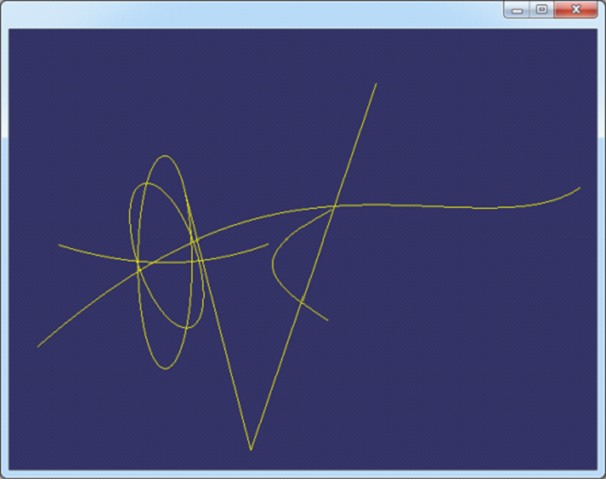
Figure 2.1 OpenCascade Geometry Curves in OpenSceneGraph
三、结论 Conclusion
OpenCascade的几何数据使用还是很方便的,只要将相应的曲线构造出来之后,计算曲线上的点使用函数Value()即可,还可计算相应参数处的微分值等。
通过理解《BRep Format Description White Paper》,可将BRep文件中数据导入OpenCascade中与上面实现的程序进行对比,结果正确。如下图所示:
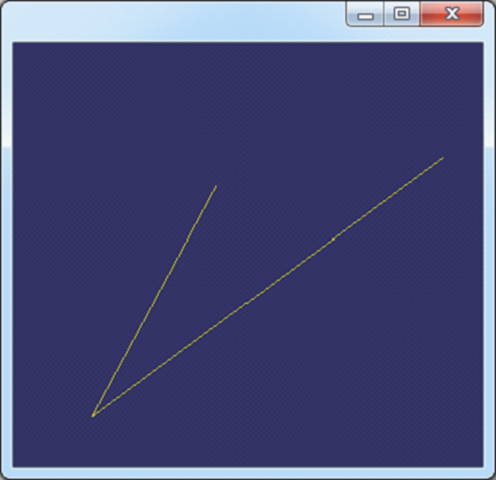
Figure 3.1 B-Spline in OpenSceneGraph
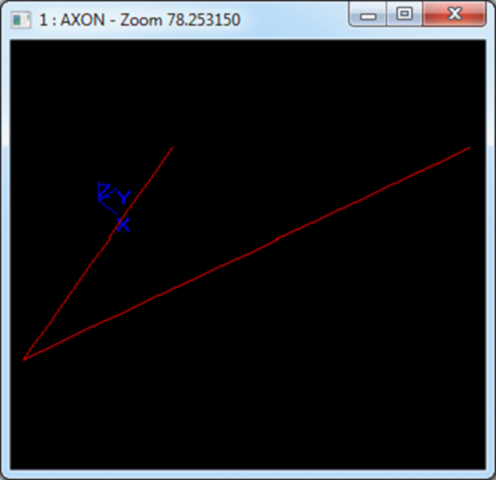
Figure 3.2 B-Spline in OpenCascade Draw
PDF Version: Draw OpenCascade Geometry Curves in OpenSceneGraph
Render OpenCascade Geometry Curves in OpenSceneGraph的更多相关文章
- Render OpenCascade Geometry Surfaces in OpenSceneGraph
在OpenSceneGraph中绘制OpenCascade的曲面 Render OpenCascade Geometry Surfaces in OpenSceneGraph eryar@163.co ...
- OpenCascade Shape Representation in OpenSceneGraph
OpenCascade Shape Representation in OpenSceneGraph eryar@163.com 摘要Abstract:本文通过程序实例,将OpenCascade中的拓 ...
- Opencascade、OpenGL和OpenSceneGraph的区别与联系
OpenGL只是三维显示 Openscenegraph基于场景图的概念,它提供一个在OpenGL之上的面向对象的框架,从而能把开发者从实现和优化底层图形的调用中解脱出来 Opencascade更适合算 ...
- OpenCASCADE Rational Bezier Curves
OpenCASCADE Rational Bezier Curves eryar@163.com Abstract. Although polynomials offer many advantage ...
- OpenCASCADE Linear Extrusion Surface
OpenCASCADE Linear Extrusion Surface eryar@163.com Abstract. OpenCASCADE linear extrusion surface is ...
- Polynomial Library in OpenCascade
Polynomial Library in OpenCascade eryar@163.com 摘要Abstract:分析幂基曲线即多项式曲线在OpenCascade中的计算方法,以及利用OpenSc ...
- Representation Data in OpenCascade BRep
Representation Data in OpenCascade BRep eryar@163.com 摘要Abstract:现在的显示器大多数是光栅显示器,即可以看做一个像素的矩阵.在光栅显示器 ...
- Parametric Curves and Surfaces
Parametric Curves and Surfaces eryar@163.com Abstract. This paper is concerned with parametric curve ...
- OpenCASCADE Data Exchange - 3D PDF
OpenCASCADE Data Exchange - 3D PDF eryar@163.com Abstract. Today most 3D engineering model data are ...
随机推荐
- 关于PDV的那些事
数据集中的数据来源分为两种: 一.来自于另一个数据集: 二.来自于外部数据源(本文细说此来源): 无论是哪种来源,在它们成为目标数据集中的观测行(官方叫它observation)之前都要进入PDV,先 ...
- css中关于position属性的探究(原创)
关于position属性的设置,头脑中一直觉得不是很清楚,所以借助这次机会单独自己测试了一下,记作学习笔记. 首先,css的position属性包含下面四种设置情况: static:默认属性.指定 ...
- TestNG参数化测试【转】
原文:http://www.yiibai.com/testng/20130916303.html 在TestNG的另一个有趣的功能是参数测试.在大多数情况下,你会遇到这样一个场景,业务逻辑需要一个巨大 ...
- [Java基础]代码块及java反编译
块的作用域: 块(即复合语句)是指一对花括号括起来的若干条简单的java语句.块确定了变量的作用域.一个块可以嵌套在另一个块中.但是,在嵌套的两个块中声明同名的变量时应注意,块中变量申明在块外变量 ...
- 在C#中简单调用FindWindow控制其他程序
C#本身是没有FindWindow这个函数的, 为什么没有呢? 很简单,C#毕竟是微软自家开发出来的.而WIN API中本来封装了很多对窗口的操作,所以当然能重用的就要重用,这些封装好的函数一般在系统 ...
- jQuery树形菜单(1)jquery.treeview
jQuery的树形插件资料URL:http://bassistance.de/jquery-plugins/jquery-plugin-treeview/从该网站Download得到jquery.tr ...
- HDU-4869 Turn the pokers
原题: Turn the pokers 思路:假设正面为0,反面为1.牌就像这样 000000....... .考虑到假如可以实现最终反面个数为m, 牌共n张, 则这n张排任取m个为反面 ...
- glibc2.14 install from centos
安装glibc2.14 Tar xf glibc-2.14.tar.gz Cd glibc-2.14 Mkdir build Cd build ../configure –prefix=/opt/gl ...
- 浏览器 onbeforeunload 事件 兼容写法
window.onbeforeunload = onbeforeunload_handler; function onbeforeunload_handler() { var warning = &q ...
- Spring1:Spring简介、环境搭建、源码下载及导入MyEclipse
框架学习前言 这个模块是面向Spring的,Spring的学习我是这么想的: 1.简单介绍Spring,主要是从网上借鉴一些重点 2.尽量说明清楚Spring的使用方法以及细节点 3.尽量以自己的理解 ...