
AspNetCore3.1_Middleware源码解析_3_HttpsRedirection
概述
上文提到3.1版本默认没有使用Hsts,但是使用了这个中间件。看名字就很好理解,https跳转,顾名思义,就是跳转到
https地址。
使用场景,当用户使用http访问网站时,自动跳转到https地址。这样更加安全,不需要用户特意输入https://协议。
具体做了些我们一起来看看。
app.UseHttpsRedirection();
使用方法
跟Hsts一样,HttpsRedirection默认是不需要注入的,除非你需要修改默认配置。
services.AddHttpsRedirection(config =>

  {

      //https地址的端口号,默认null

      config.HttpsPort = 12345;

      //跳转响应的状态码,默认307

      config.RedirectStatusCode = 302;

  });
直接使用中间件即可
app.UseHttpsRedirection();
源码解析
源代码很简单,只有两个类:HttpsRedirectionOptions配置类,HttpsRedirectionMiddleware中间件
HttpsRedirectionOptions就只有两个配置项
  /// <summary>

  /// Options for the HttpsRedirection middleware

  /// </summary>

  public class HttpsRedirectionOptions

  {

      /// <summary>

      /// The status code used for the redirect response. The default is 307.

      /// </summary>

      public int RedirectStatusCode { get; set; } = StatusCodes.Status307TemporaryRedirect;

      /// <summary>

      /// The HTTPS port to be added to the redirected URL.

      /// </summary>

      /// <remarks>

      /// If the HttpsPort is not set, we will try to get the HttpsPort from the following:

      /// 1. HTTPS_PORT environment variable

      /// 2. IServerAddressesFeature

      /// If that fails then the middleware will log a warning and turn off.

      /// </remarks>

      public int? HttpsPort { get; set; }

  }
重点看下中间件做了些什么。代码量很少,大体是这些逻辑。
- 如果请求是Https,跳过本中间件
- 中间件会依次尝试从这三个地方取端口号:HttpsRedirectionOptions的配置,HttpsRedirectionOptions,HTTPS_PORT环境变量或配置,IServerAddressesFeature(如果Webhost上绑定了https地址,本中间件能够解析出来端口号)。
- 如果没有解析出来https的端口号,则跳过本中间件。
- 如果能够解析出来https端口号,则拼接出来https地址,返回307跳转响应报文(或者配置的其他状态码)。
注:3.1同时支持HTTPS_PORT和ANCM_HTTPS_PORT这两个环境变量。
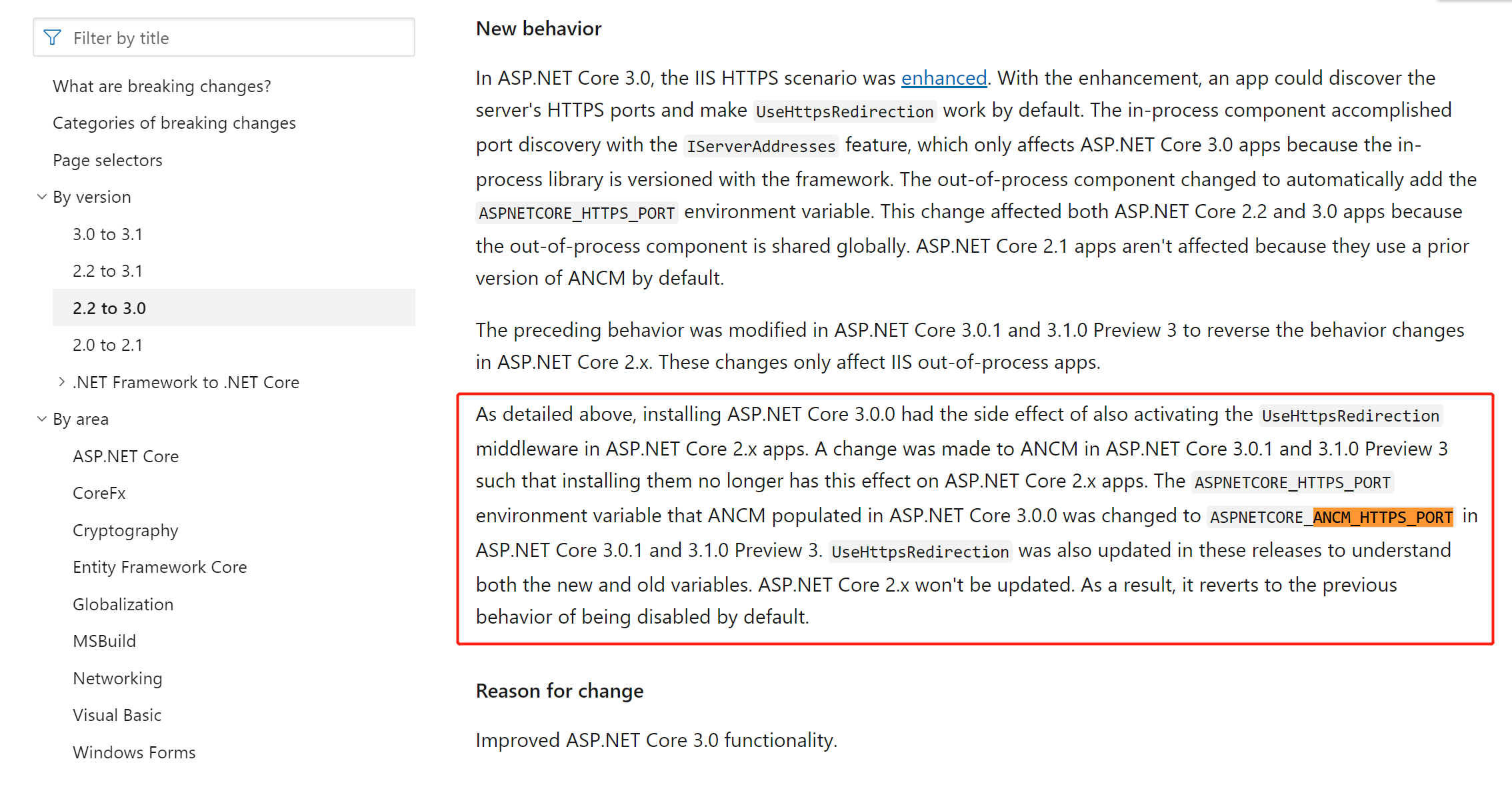
https://docs.microsoft.com/en-us/dotnet/core/compatibility/2.2-3.0
public class HttpsRedirectionMiddleware

    {

        private const int PortNotFound = -1;

        private readonly RequestDelegate _next;

        private readonly Lazy<int> _httpsPort;

        private readonly int _statusCode;

        private readonly IServerAddressesFeature _serverAddressesFeature;

        private readonly IConfiguration _config;

        private readonly ILogger _logger;

        /// <summary>

        /// Initializes the HttpsRedirectionMiddleware

        /// </summary>

        /// <param name="next"></param>

        /// <param name="options"></param>

        /// <param name="config"></param>

        /// <param name="loggerFactory"></param>

        public HttpsRedirectionMiddleware(RequestDelegate next, IOptions<HttpsRedirectionOptions> options, IConfiguration config, ILoggerFactory loggerFactory)

        {

            _next = next ?? throw new ArgumentNullException(nameof(next));

            _config = config ?? throw new ArgumentNullException(nameof(config));

            if (options == null)

            {

                throw new ArgumentNullException(nameof(options));

            }

            var httpsRedirectionOptions = options.Value;

            if (httpsRedirectionOptions.HttpsPort.HasValue)

            {

                _httpsPort = new Lazy<int>(() => httpsRedirectionOptions.HttpsPort.Value);

            }

            else

            {

                _httpsPort = new Lazy<int>(TryGetHttpsPort);

            }

            _statusCode = httpsRedirectionOptions.RedirectStatusCode;

            _logger = loggerFactory.CreateLogger<HttpsRedirectionMiddleware>();

        }

        /// <summary>

        /// Initializes the HttpsRedirectionMiddleware

        /// </summary>

        /// <param name="next"></param>

        /// <param name="options"></param>

        /// <param name="config"></param>

        /// <param name="loggerFactory"></param>

        /// <param name="serverAddressesFeature">The</param>

        public HttpsRedirectionMiddleware(RequestDelegate next, IOptions<HttpsRedirectionOptions> options, IConfiguration config, ILoggerFactory loggerFactory,

            IServerAddressesFeature serverAddressesFeature)

            : this(next, options, config, loggerFactory)

        {

            _serverAddressesFeature = serverAddressesFeature ?? throw new ArgumentNullException(nameof(serverAddressesFeature));

        }

        /// <summary>

        /// Invokes the HttpsRedirectionMiddleware

        /// </summary>

        /// <param name="context"></param>

        /// <returns></returns>

        public Task Invoke(HttpContext context)

        {

            if (context.Request.IsHttps)

            {

                return _next(context);

            }

            var port = _httpsPort.Value;

            if (port == PortNotFound)

            {

                return _next(context);

            }

            var host = context.Request.Host;

            if (port != 443)

            {

                host = new HostString(host.Host, port);

            }

            else

            {

                host = new HostString(host.Host);

            }

            var request = context.Request;

            var redirectUrl = UriHelper.BuildAbsolute(

                "https",

                host,

                request.PathBase,

                request.Path,

                request.QueryString);

            context.Response.StatusCode = _statusCode;

            context.Response.Headers[HeaderNames.Location] = redirectUrl;

            _logger.RedirectingToHttps(redirectUrl);

            return Task.CompletedTask;

        }

        //  Returns PortNotFound (-1) if we were unable to determine the port.

        private int TryGetHttpsPort()

        {

            // The IServerAddressesFeature will not be ready until the middleware is Invoked,

            // Order for finding the HTTPS port:

            // 1. Set in the HttpsRedirectionOptions

            // 2. HTTPS_PORT environment variable

            // 3. IServerAddressesFeature

            // 4. Fail if not sets

            var nullablePort = _config.GetValue<int?>("HTTPS_PORT") ?? _config.GetValue<int?>("ANCM_HTTPS_PORT");

            if (nullablePort.HasValue)

            {

                var port = nullablePort.Value;

                _logger.PortLoadedFromConfig(port);

                return port;

            }

            if (_serverAddressesFeature == null)

            {

                _logger.FailedToDeterminePort();

                return PortNotFound;

            }

            foreach (var address in _serverAddressesFeature.Addresses)

            {

                var bindingAddress = BindingAddress.Parse(address);

                if (bindingAddress.Scheme.Equals("https", StringComparison.OrdinalIgnoreCase))

                {

                    // If we find multiple different https ports specified, throw

                    if (nullablePort.HasValue && nullablePort != bindingAddress.Port)

                    {

                        _logger.FailedMultiplePorts();

                        return PortNotFound;

                    }

                    else

                    {

                        nullablePort = bindingAddress.Port;

                    }

                }

            }

            if (nullablePort.HasValue)

            {

                var port = nullablePort.Value;

                _logger.PortFromServer(port);

                return port;

            }

            _logger.FailedToDeterminePort();

            return PortNotFound;

        }

    }
OK,完成了。
AspNetCore3.1_Middleware源码解析_3_HttpsRedirection的更多相关文章
- AspNetCore3.1_Secutiry源码解析_4_Authentication_JwtBear
title: "AspNetCore3.1_Secutiry源码解析_4_Authentication_JwtBear" date: 2020-03-22T16:29:29+08: ...
- AspNetCore3.1_Secutiry源码解析_1_目录
文章目录 AspNetCore3.1_Secutiry源码解析_1_目录 AspNetCore3.1_Secutiry源码解析_2_Authentication_核心项目 AspNetCore3.1_ ...
- AspNetCore3.1_Secutiry源码解析_2_Authentication_核心对象
系列文章目录 AspNetCore3.1_Secutiry源码解析_1_目录 AspNetCore3.1_Secutiry源码解析_2_Authentication_核心项目 AspNetCore3. ...
- AspNetCore3.1_Secutiry源码解析_3_Authentication_Cookies
系列文章目录 AspNetCore3.1_Secutiry源码解析_1_目录 AspNetCore3.1_Secutiry源码解析_2_Authentication_核心流程 AspNetCore3. ...
- AspNetCore3.1_Secutiry源码解析_5_Authentication_OAuth
title: "AspNetCore3.1_Secutiry源码解析_5_Authentication_OAuth" date: 2020-03-24T23:27:45+08:00 ...
- AspNetCore3.1_Secutiry源码解析_6_Authentication_OpenIdConnect
title: "AspNetCore3.1_Secutiry源码解析_6_Authentication_OpenIdConnect" date: 2020-03-25T21:33: ...
- AspNetCore3.1_Secutiry源码解析_8_Authorization_授权框架
目录 AspNetCore3.1_Secutiry源码解析_1_目录 AspNetCore3.1_Secutiry源码解析_2_Authentication_核心流程 AspNetCore3.1_Se ...
- AspNetCore3.1源码解析_2_Hsts中间件
title: "AspNetCore3.1源码解析_2_Hsts中间件" date: 2020-03-16T12:40:46+08:00 draft: false --- 概述 在 ...
- 【原】Android热更新开源项目Tinker源码解析系列之三:so热更新
本系列将从以下三个方面对Tinker进行源码解析: Android热更新开源项目Tinker源码解析系列之一:Dex热更新 Android热更新开源项目Tinker源码解析系列之二:资源文件热更新 A ...
随机推荐
- put out|smashed|As soon as|provided
CONJ-SUBORD 如果:假如:只要If you say that something will happen provided or provided that something else h ...
- 解决Navicat无法连接到MySQL的问题
解决Navicat无法连接到MySQL的问题 问题一:本地IP(xxx.xxx.xxx.xxx)没有访问远程数据库的权限.于是下面开启本地IP(xxx.xxx.xxx.xxx)对远程mysql数据库的 ...
- DB2数据库多行一列转换成 一行一列
在db2中遇到多行一列转为一行一列的需求时,用db2函数 LISTAGG可以实现该功能.语法如下: SELECT [分组的字段 ] , LISTAGG([需要聚合的字段名], ',') FRO ...
- python jQuery筛选器
筛选器:$(this).next() 下一个 $(this).prev 上一个 $(this).parent() 父 $(this).children() 孩 $(th ...
- 自然语言分析工具Hanlp依存文法分析python使用总结(附带依存关系英文简写的中文解释)
最近在做一个应用依存文法分析来提取文本中各种关系的词语的任务.例如:text=‘新中国在马克思的思想和恩格斯的理论阔步向前’: 我需要提取这个text中的并列的两个关系,从文中分析可知,“马克思的思想 ...
- 吴裕雄--天生自然 R语言数据分析:火箭发射的地点、日期/时间和结果分析
dfS = read.csv("F:\\kaggleDataSet\\spacex-missions\\database.csv") library(dplyr) library( ...
- 将js进行到底:node学习6
开始真正的node web开发--express框架 为何说现在才是web开发的真正开始呢? 首先任何企业都不会用原生的http协议API去开发一个完整的网站,除非她们先开发一个框架出来,其次我们之前 ...
- zookeeper ACL(access control lists)权限控制
基本作用: 针对节点可以设置 相关读写等权限,目的为了保障数据安全性 权限permissions可以制定不同的权限范围以及角色 一:ACL构成 zk的acl ...
- python编程基础——集合
集合是是基本数据类型的一种集合类型. 作用:去重 属性:intersection.union.difference.issubset 实例: list_1=[1,2,3,4,3,5,2,6,1]lis ...
- 20. API概览 Schemas
能被机器所理解的概要, 描述了通过api可得到的资源, URL, 表示方式以及支持的操作. API概要在很多使用场景下都是有用的工具, 例如生成参考文档, 或者驱动可以与API交互的动态客户端库. r ...