
AspNetCore3.1_Middleware源码解析_3_HttpsRedirection
概述
上文提到3.1版本默认没有使用Hsts,但是使用了这个中间件。看名字就很好理解,https跳转,顾名思义,就是跳转到
https地址。
使用场景,当用户使用http访问网站时,自动跳转到https地址。这样更加安全,不需要用户特意输入https://协议。
具体做了些我们一起来看看。
app.UseHttpsRedirection();
使用方法
跟Hsts一样,HttpsRedirection默认是不需要注入的,除非你需要修改默认配置。
services.AddHttpsRedirection(config =>

  {

      //https地址的端口号,默认null

      config.HttpsPort = 12345;

      //跳转响应的状态码,默认307

      config.RedirectStatusCode = 302;

  });
直接使用中间件即可
app.UseHttpsRedirection();
源码解析
源代码很简单,只有两个类:HttpsRedirectionOptions配置类,HttpsRedirectionMiddleware中间件
HttpsRedirectionOptions就只有两个配置项
  /// <summary>

  /// Options for the HttpsRedirection middleware

  /// </summary>

  public class HttpsRedirectionOptions

  {

      /// <summary>

      /// The status code used for the redirect response. The default is 307.

      /// </summary>

      public int RedirectStatusCode { get; set; } = StatusCodes.Status307TemporaryRedirect;

      /// <summary>

      /// The HTTPS port to be added to the redirected URL.

      /// </summary>

      /// <remarks>

      /// If the HttpsPort is not set, we will try to get the HttpsPort from the following:

      /// 1. HTTPS_PORT environment variable

      /// 2. IServerAddressesFeature

      /// If that fails then the middleware will log a warning and turn off.

      /// </remarks>

      public int? HttpsPort { get; set; }

  }
重点看下中间件做了些什么。代码量很少,大体是这些逻辑。
- 如果请求是Https,跳过本中间件
- 中间件会依次尝试从这三个地方取端口号:HttpsRedirectionOptions的配置,HttpsRedirectionOptions,HTTPS_PORT环境变量或配置,IServerAddressesFeature(如果Webhost上绑定了https地址,本中间件能够解析出来端口号)。
- 如果没有解析出来https的端口号,则跳过本中间件。
- 如果能够解析出来https端口号,则拼接出来https地址,返回307跳转响应报文(或者配置的其他状态码)。
注:3.1同时支持HTTPS_PORT和ANCM_HTTPS_PORT这两个环境变量。
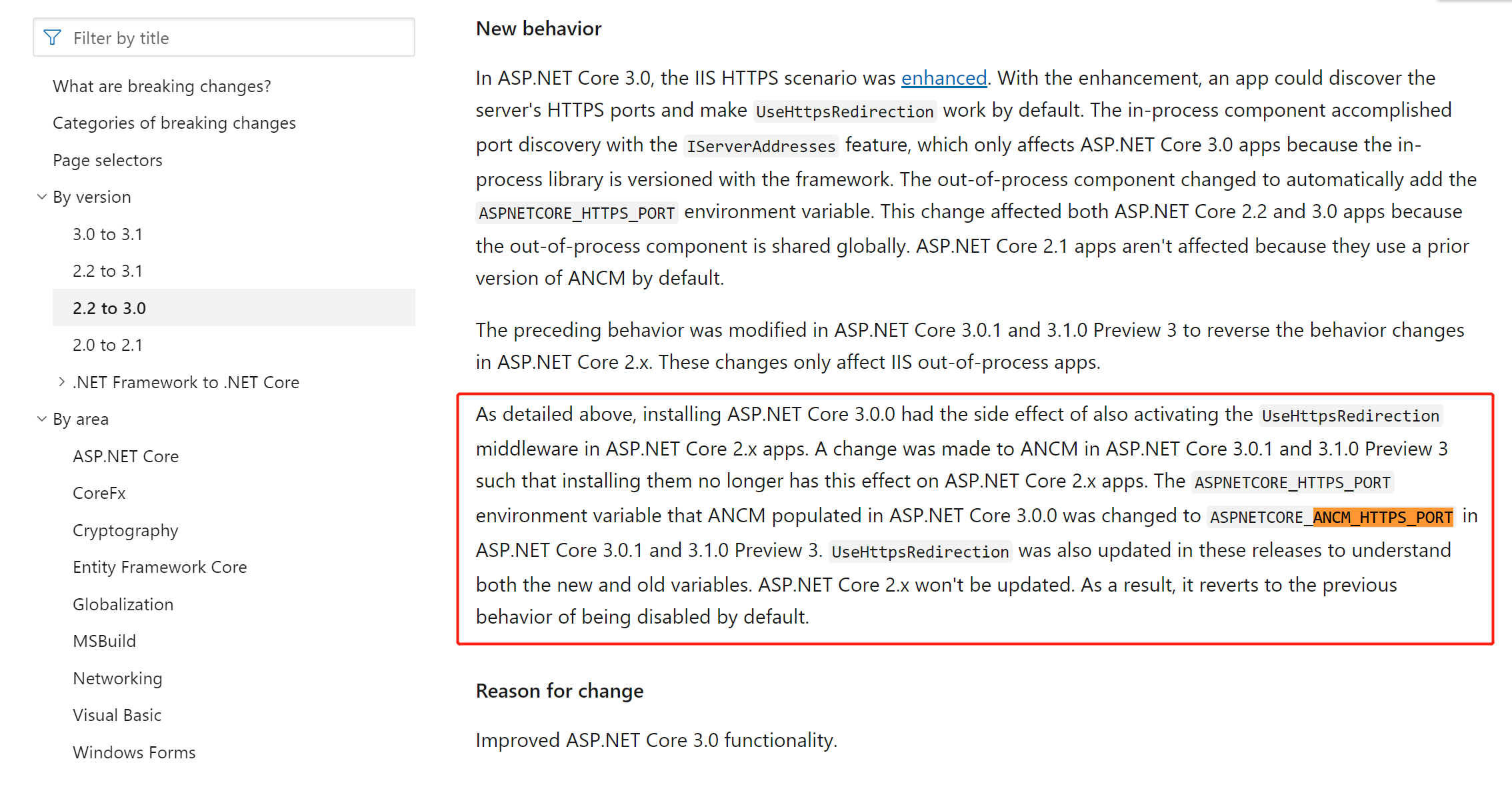
https://docs.microsoft.com/en-us/dotnet/core/compatibility/2.2-3.0
public class HttpsRedirectionMiddleware

    {

        private const int PortNotFound = -1;

        private readonly RequestDelegate _next;

        private readonly Lazy<int> _httpsPort;

        private readonly int _statusCode;

        private readonly IServerAddressesFeature _serverAddressesFeature;

        private readonly IConfiguration _config;

        private readonly ILogger _logger;

        /// <summary>

        /// Initializes the HttpsRedirectionMiddleware

        /// </summary>

        /// <param name="next"></param>

        /// <param name="options"></param>

        /// <param name="config"></param>

        /// <param name="loggerFactory"></param>

        public HttpsRedirectionMiddleware(RequestDelegate next, IOptions<HttpsRedirectionOptions> options, IConfiguration config, ILoggerFactory loggerFactory)

        {

            _next = next ?? throw new ArgumentNullException(nameof(next));

            _config = config ?? throw new ArgumentNullException(nameof(config));

            if (options == null)

            {

                throw new ArgumentNullException(nameof(options));

            }

            var httpsRedirectionOptions = options.Value;

            if (httpsRedirectionOptions.HttpsPort.HasValue)

            {

                _httpsPort = new Lazy<int>(() => httpsRedirectionOptions.HttpsPort.Value);

            }

            else

            {

                _httpsPort = new Lazy<int>(TryGetHttpsPort);

            }

            _statusCode = httpsRedirectionOptions.RedirectStatusCode;

            _logger = loggerFactory.CreateLogger<HttpsRedirectionMiddleware>();

        }

        /// <summary>

        /// Initializes the HttpsRedirectionMiddleware

        /// </summary>

        /// <param name="next"></param>

        /// <param name="options"></param>

        /// <param name="config"></param>

        /// <param name="loggerFactory"></param>

        /// <param name="serverAddressesFeature">The</param>

        public HttpsRedirectionMiddleware(RequestDelegate next, IOptions<HttpsRedirectionOptions> options, IConfiguration config, ILoggerFactory loggerFactory,

            IServerAddressesFeature serverAddressesFeature)

            : this(next, options, config, loggerFactory)

        {

            _serverAddressesFeature = serverAddressesFeature ?? throw new ArgumentNullException(nameof(serverAddressesFeature));

        }

        /// <summary>

        /// Invokes the HttpsRedirectionMiddleware

        /// </summary>

        /// <param name="context"></param>

        /// <returns></returns>

        public Task Invoke(HttpContext context)

        {

            if (context.Request.IsHttps)

            {

                return _next(context);

            }

            var port = _httpsPort.Value;

            if (port == PortNotFound)

            {

                return _next(context);

            }

            var host = context.Request.Host;

            if (port != 443)

            {

                host = new HostString(host.Host, port);

            }

            else

            {

                host = new HostString(host.Host);

            }

            var request = context.Request;

            var redirectUrl = UriHelper.BuildAbsolute(

                "https",

                host,

                request.PathBase,

                request.Path,

                request.QueryString);

            context.Response.StatusCode = _statusCode;

            context.Response.Headers[HeaderNames.Location] = redirectUrl;

            _logger.RedirectingToHttps(redirectUrl);

            return Task.CompletedTask;

        }

        //  Returns PortNotFound (-1) if we were unable to determine the port.

        private int TryGetHttpsPort()

        {

            // The IServerAddressesFeature will not be ready until the middleware is Invoked,

            // Order for finding the HTTPS port:

            // 1. Set in the HttpsRedirectionOptions

            // 2. HTTPS_PORT environment variable

            // 3. IServerAddressesFeature

            // 4. Fail if not sets

            var nullablePort = _config.GetValue<int?>("HTTPS_PORT") ?? _config.GetValue<int?>("ANCM_HTTPS_PORT");

            if (nullablePort.HasValue)

            {

                var port = nullablePort.Value;

                _logger.PortLoadedFromConfig(port);

                return port;

            }

            if (_serverAddressesFeature == null)

            {

                _logger.FailedToDeterminePort();

                return PortNotFound;

            }

            foreach (var address in _serverAddressesFeature.Addresses)

            {

                var bindingAddress = BindingAddress.Parse(address);

                if (bindingAddress.Scheme.Equals("https", StringComparison.OrdinalIgnoreCase))

                {

                    // If we find multiple different https ports specified, throw

                    if (nullablePort.HasValue && nullablePort != bindingAddress.Port)

                    {

                        _logger.FailedMultiplePorts();

                        return PortNotFound;

                    }

                    else

                    {

                        nullablePort = bindingAddress.Port;

                    }

                }

            }

            if (nullablePort.HasValue)

            {

                var port = nullablePort.Value;

                _logger.PortFromServer(port);

                return port;

            }

            _logger.FailedToDeterminePort();

            return PortNotFound;

        }

    }
OK,完成了。
AspNetCore3.1_Middleware源码解析_3_HttpsRedirection的更多相关文章
- AspNetCore3.1_Secutiry源码解析_4_Authentication_JwtBear
title: "AspNetCore3.1_Secutiry源码解析_4_Authentication_JwtBear" date: 2020-03-22T16:29:29+08: ...
- AspNetCore3.1_Secutiry源码解析_1_目录
文章目录 AspNetCore3.1_Secutiry源码解析_1_目录 AspNetCore3.1_Secutiry源码解析_2_Authentication_核心项目 AspNetCore3.1_ ...
- AspNetCore3.1_Secutiry源码解析_2_Authentication_核心对象
系列文章目录 AspNetCore3.1_Secutiry源码解析_1_目录 AspNetCore3.1_Secutiry源码解析_2_Authentication_核心项目 AspNetCore3. ...
- AspNetCore3.1_Secutiry源码解析_3_Authentication_Cookies
系列文章目录 AspNetCore3.1_Secutiry源码解析_1_目录 AspNetCore3.1_Secutiry源码解析_2_Authentication_核心流程 AspNetCore3. ...
- AspNetCore3.1_Secutiry源码解析_5_Authentication_OAuth
title: "AspNetCore3.1_Secutiry源码解析_5_Authentication_OAuth" date: 2020-03-24T23:27:45+08:00 ...
- AspNetCore3.1_Secutiry源码解析_6_Authentication_OpenIdConnect
title: "AspNetCore3.1_Secutiry源码解析_6_Authentication_OpenIdConnect" date: 2020-03-25T21:33: ...
- AspNetCore3.1_Secutiry源码解析_8_Authorization_授权框架
目录 AspNetCore3.1_Secutiry源码解析_1_目录 AspNetCore3.1_Secutiry源码解析_2_Authentication_核心流程 AspNetCore3.1_Se ...
- AspNetCore3.1源码解析_2_Hsts中间件
title: "AspNetCore3.1源码解析_2_Hsts中间件" date: 2020-03-16T12:40:46+08:00 draft: false --- 概述 在 ...
- 【原】Android热更新开源项目Tinker源码解析系列之三:so热更新
本系列将从以下三个方面对Tinker进行源码解析: Android热更新开源项目Tinker源码解析系列之一:Dex热更新 Android热更新开源项目Tinker源码解析系列之二:资源文件热更新 A ...
随机推荐
- Java IO: 字符流的Buffered和Filter
作者: Jakob Jenkov 译者: 李璟(jlee381344197@gmail.com) 本章节将简要介绍缓冲与过滤相关的reader和writer,主要涉及BufferedReader.B ...
- 关于后端下载后端返回的blob类型文件的下载
关于后端返回blob类型的文件下载记录,在请求的时候前端设置响应类型 responseType: 'blob', const blob = new Blob([r], {type: r.type}); ...
- 正负小数js正则表达式
var reg = /^(([1-9]\d+(.[0-9]{1,4})?|\d(.[0-9]{1,4})?)|([-]([1-9]\d+(.[0-9]{1,4})?|\d(.[0-9]{1,4})?) ...
- 转:zabbix 2.0.6监控cisco交换机 2950 2960s 3560G
转自: http://blog.chinaunix.net/uid-24250828-id-3806551.html 想在zabbix 上监控交换机端口的流量,找了两天的模板,包括官方的和网友写的.在 ...
- js 实现排序算法 -- 冒泡排序(Bubble Sort)
原文: 十大经典排序算法(动图演示) 冒泡排序(Bubble Sort) 冒泡排序是一种简单的排序算法.它重复地走访过要排序的数列,一次比较两个元素,如果它们的顺序错误就把它们交换过来.走访数列的工作 ...
- [PyTorch入门]之数据导入与处理
数据导入与处理 来自这里. 在解决任何机器学习问题时,都需要在处理数据上花费大量的努力.PyTorch提供了很多工具来简化数据加载,希望使代码更具可读性.在本教程中,我们将学习如何从繁琐的数据中加载. ...
- 【转】PHP中被忽略的性能优化利器:生成器.md
PHP 如果是做Python或者其他语言的小伙伴,对于生成器应该不陌生.但很多PHP开发者或许都不知道生成器这个功能,可能是因为生成器是PHP 5.5.0才引入的功能,也可以是生成器作用不是很明 ...
- 涉嫌垄断的App Store,到底做了什么让开发者暴怒
Store,到底做了什么让开发者暴怒" title="涉嫌垄断的App Store,到底做了什么让开发者暴怒"> 什么行业最赚钱?不是你想象中的餐饮.互联网. ...
- 如何在NLP领域第一次做成一件事
作者简介 周明,微软亚洲研究院首席研究员.ACL候任主席(president).中国计算机学会中文信息技术专委会主任.中国中文信息学会常务理事.哈工大.天津大学.南开大学.山东大学等多所学校博士导师. ...
- TCP可靠传输的工作原理
TCP可靠传输的工作原理 一.停止等待协议 1.1.简介 在发送完一个分组后,必须暂时保留已发送的分组的副本. 分组和确认分组都必须进行编号. 超时计时器的重传时间应当比数据在分组传输的平均往返时间更 ...