
xpath模块使用
xpath模块使用
一、什么是xml(百度百科解释如下)
可扩展标记语言,标准通用标记语言的子集,简称XML。是一种用于标记电子文件使其具有结构性的标记语言。
在电子计算机中,标记指计算机所能理解的信息符号,通过此种标记,计算机之间可以处理包含各种的信息比如文章等。它可以用来标记数据、定义数据类型,是一种允许用户对自己的标记语言进行定义的源语言。 它非常适合万维网传输,提供统一的方法来描述和交换独立于应用程序或供应商的结构化数据。是Internet环境中跨平台的、依赖于内容的技术,也是当今处理分布式结构信息的有效工具。早在1998年,W3C就发布了XML1.0规范,使用它来简化Internet的文档信息传输。
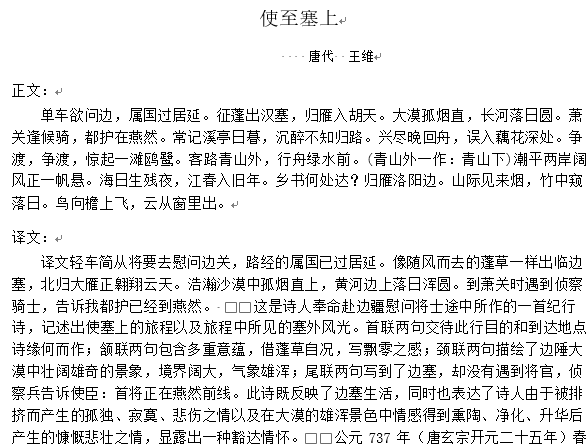
1.1、总结如下
1、定义:可扩展标记性语言(EXtensible Markup Language)
2、特定:xml是具有自描述特性的半结构化数据。
3、作用:xml主要用来传输数据
二、xml与html的区别
- 语法严格性不同
- 在html中不区分大小写,在xml中严格区分。
- 在html中,如果你可以省略某些结尾标签,还是可以正常显示。在xml中,是严格的树状结构,绝对不能省略任何标记。
- 在xml中,没有结尾标签的标签,必须用一个/字符作为结尾。
<a href='www'/>。 - 在xml中,属性值必须使用在引号。在html中,引号可用可不用。
- 在html中属性名可以不带属性值,xml必须带。
- xml文档中,空白部分不会被解析器自动删除,但是html是过滤掉空格的。
- 标记不同
- html使用固有的标记,xml没有固有标记。
- html标签是预定义的,xml标签是自定义的、可扩展的。
- 用途不同
- html的设计宗旨是用来显示数据。
- xml是用来传输数据的,或者用于配置文件。
三、xpath
3.1、什么是xpath
- XPath 使用路径表达式在 XML 文档中进行导航
- XPath 包含一个标准函数库
- XPath 是 XSLT 中的主要元素
- XPath 是一个 W3C 标准
简而言之,xpath是在xml文档中,根据路径查找元素的语法。
3.2、xpath常用术语
- 元素:文档树中的标签就是一个元素。
- 节点:表示xml文档树的某一个位置,例如 / 代表根节点,代表文档树起始位置,元素也可以看成某一位置上的节点。
- 属性:
<title lang="eng">Harry Potter</title>中lang就是某一个节点的属性。 - 文本:
<title lang="eng">Harry Potter</title>中Harry Potter就是文本。
3.3、xpath语法
<?xml version="1.0" encoding="ISO-8859-1"?>

<bookstore>

<book>

  <title lang="eng">Harry Potter</title>

  <price>29.99</price>

</book>

<book>

  <title lang="eng">Learning XML</title>

  <price>39.95</price>

</book>

</bookstore>
选取节点
表达式 描述 nodename 选取标签或者元素 。 / 从根节点选取,或者代表下一个节点。 // 从文档中的任意位置。 . 选取当前节点。 .. 选取当前节点的父节点。 @ 选取属性.
谓语,限定我们进行取值。
通过位置进行限定
路径表达式 结果 /bookstore/book[1] 选取属于 bookstore 子元素的第一个 book 元素。 /bookstore/book[last()] 选取属于 bookstore 子元素的最后一个 book 元素。 /bookstore/book[last()-1] 选取属于 bookstore 子元素的倒数第二个 book 元素。 /bookstore/book[position() <3]选取最前面的两个属于 bookstore 元素的子元素的 book 元素。
通过属性和内容限定
路径表达式 结果 //title[@lang] 选取所有拥有名为 lang 的属性的 title 元素。 //title[@lang="eng"] 选取所有 title 元素,且这些元素拥有值为 eng 的 lang 属性。 //title[contains(@lang,"eng")] 选取所有 title 元素,且这些元素包含值为 eng 的 lang 属性。 //title[not(contains(@lang,"eng"))] 选取所有 title 元素,且不包含元素属性值为 eng 的 lang 属性。 /bookstore/book[price>35.00] 选取 bookstore 元素的所有 book 元素,且其中的 price 元素的值须大于 35.00。 //title | //price 选取文档中的所有 title 和 price 元素。
选取位置节点
通配符 描述 表达式 结果 * 匹配任何元素节点。 //book/* 选取book节点下的所有元素 @* 匹配任何属性节点。 //title/@* 选取title节点所有属性
四、lxml 模块
lxml模块是python中的处理xml文件的第三方库.
pip install lxml
使用
from lxml import etree

xmls = '''

<?xml version="1.0" encoding="ISO-8859-1"?>

<bookstore>

<book>

  <title lang="eng">Harry Potter</title>

  <price>29.99</price>

</book>

<book>

  <title lang="eng">Learning XML</title>

  <price>39.95</price>

</book>

</bookstore>

'''

xml = etree.HTML(xmls)

print(xml.xpath('//title[@lang="eng"]')) #选取所有 title 元素,且这些元素拥有值为 eng 的 lang 属性。

#结果

[<Element title at 0x2a564beca48>, <Element title at 0x2a564beca88>]#我们查找元素或者节点时返回的是一个 Element 对象组成的列表

print(xml.xpath('//title[@lang="eng"]/text()')) #选取所有 title 元素的文本内容。

#结果

['Harry Potter', 'Learning XML']#我们查找元素或者节点的文本内容时返回的是一个字符串组成的列表

print(xml.xpath('//title[@lang="eng"]/@lang')) #选取所有 title 元素的属性。

#结果

['eng', 'eng']#我们查找元素或者节点的属性值时返回的是一个字符串组成的列表。
五、相关案例
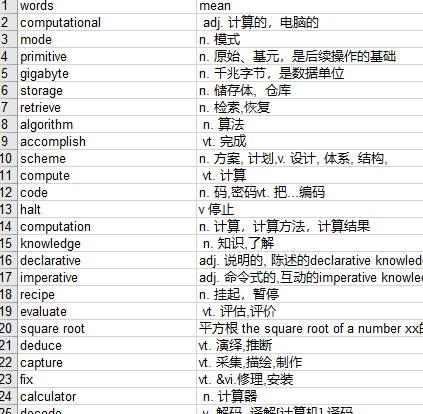
5.1、扇贝单词列表,我这里写入了excel文件中
import requests, xlwt

from lxml import etree

headers = {

    'user-agent': 'Mozilla/5.0 (Windows NT 10.0; WOW64) AppleWebKit/537.36 (KHTML, like Gecko) Chrome/76.0.3809.87 Safari/537.36'

}

con_list = []

def get_url():

    base_url = 'https://www.shanbay.com/wordlist/110521/232414/?page={}'

    return [base_url.format(i) for i in range(1, 4)]

def get_content(url):

    return requests.get(url, headers=headers).content.decode('utf-8')

def parse_content(content):

    html = etree.HTML(content)

    tr_list = html.xpath('//tr[@class="row"]')

    for word in tr_list:

        dic = {

            'words': word.xpath('.//strong/text()')[0],

            'mean': word.xpath('.//td[@class="span10"]/text()')[0]

        }

        con_list.append(dic)

def write_to_excel(filename, sheetname, word_list): #使用xlwt 模块将数据写入excel文件中

    # 创建workbook

    file = xlwt.Workbook()

    # 添加sheet表

    sheet = file.add_sheet(sheetname)

    # 设置表头

    head = [i for i in word_list[0].keys()]

    for i in range(len(head)):

        sheet.write(0, i, head[i])

    # 写内容

    i = 1

    for item in word_list:

        for j in range(len(head)):

            sheet.write(i, j, item[head[j]])

        i += 1

    # 保存

    file.save(filename)

    print('写入excle成功!')

def main():

    for url in get_url():

        content = get_content(url)

        parse_content(content)

    write_to_excel('./1.xls', 'words', con_list)

if __name__ == "__main__":

    main()
执行结果
5.2、抓取网易云所有歌手
import requests

from lxml import etree

from queue import Queue, Empty

from concurrent.futures import ThreadPoolExecutor

import json

import os

class WyySinger(object):

    def __init__(self, path='./'):

        self.start_url = 'https://music.163.com/discover/artist'

        self.basic_url = 'https://music.163.com'

        self.headers = {

            'referer': 'https://music.163.com/',

            'user-agent': 'Mozilla/5.0 (Windows NT 10.0; WOW64) AppleWebKit/537.36 (KHTML, like Gecko) Chrome/76.0.3809.87 Safari/537.36',

        }

        self.url_list = []

        self.queue = Queue()

        self.path = path

    def get_html(self, url):

        res = requests.get(url, headers=self.headers)

        return res.text

    def get_url_list(self, html, xpath_exp):

        html = etree.HTML(html)

        url_class_list = html.xpath(xpath_exp)

        return [self.basic_url + i for i in url_class_list]

    def get_content(self, url):

        html = self.get_html(url)

        self.queue.put(html)

    def save_to_file(self, content):

        filename = os.path.join(self.path, 'singer.json')

        with open(filename, 'a', encoding='utf-8') as file:

            json.dump(content, file, ensure_ascii=False)

            file.write('\n')

    def parse_html(self, content):

        html = etree.HTML(content)

        a_list = html.xpath('//a[@class="nm nm-icn f-thide s-fc0"]')

        for i in a_list:

            name = i.xpath('./text()')[0]

            url = self.basic_url + i.xpath('./@href')[0].strip()

            item = {

                'url': url,

                'name': name

            }

            print(item)

            self.save_to_file(item)

    def run(self):

        start_content = self.get_html(self.start_url)

        start_exp = '//div[@class="blk"]/ul/li/a/@href'

        initial_exp = '//ul[@id="initial-selector"]/li[position()>1]/a/@href'

        url_list = self.get_url_list(start_content, start_exp)# 获取大分类url列表

        for url in url_list:

            html = self.get_html(url)

            initial_url_list = self.get_url_list(html, initial_exp) #获取大分类下的小分类url列表

            for url in initial_url_list:

                self.url_list.append(url)

        p_list = []

        pool = ThreadPoolExecutor(max_workers=20) #创建20个线程的线程池。

        for url in self.url_list:

            p = pool.submit(self.get_content, url) #多线程进行抓取,并且将抓取的网页内容放入队列中

            p_list.append(p)

        for th in p_list:

            th.result() #等待所有抓取网页线程抓取完毕

        while True:

            try:

                content = self.queue.get_nowait() #从队列中获取内容,多线程解析内容,提取数据,并且将其写入文件中。

                pool.submit(self.parse_html, content)

            except Empty as e:

                print(e) #报错结束任务,跳出循环

                break

if __name__ == '__main__':

    singer = WyySinger()

    singer.run()
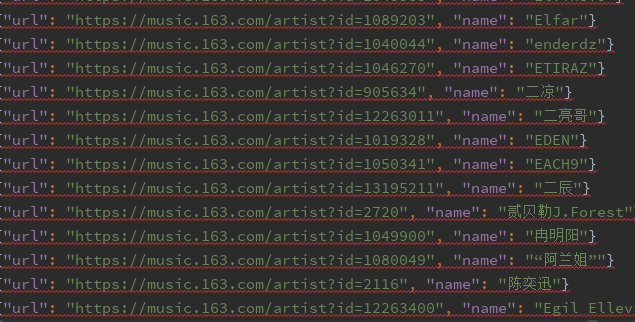
虽然抓取的是所有歌手,但是当我进行测试的时候,还是发现部分歌手没抓取下来。
执行结果
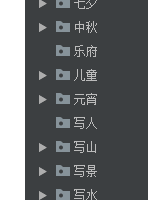
5.3、抓取古诗文网所有诗文https://www.gushiwen.org,并且分类保存到word文档中。
代码如下:
import requests

from lxml import etree

import os

from queue import Queue, Empty

from concurrent.futures import ThreadPoolExecutor

import re

from docx import Document

from docx.oxml.ns import qn

from docx.shared import Pt

from docx.enum.text import WD_PARAGRAPH_ALIGNMENT

from docx.shared import Inches

class Gushiwen(object):

    def __init__(self, path='.'):

        self.base_url = 'https://www.gushiwen.org'

        self.start_url = 'https://so.gushiwen.org/shiwen/'

        self.headers = {

            'user-agent': 'Mozilla/5.0 (Windows NT 10.0; WOW64) AppleWebKit/537.36 (KHTML, like Gecko) Chrome/76.0.3809.87 Safari/537.36',

        }

        self.path = os.path.abspath(path)

        self.queue = Queue()

    def get_html(self, url):

        res = requests.get(url, headers=self.headers)

        return res.text

    def get_url_list(self, html, xpath_exp):

        res_list = []

        html = etree.HTML(html)

        for exp in xpath_exp:

            url_class_list = html.xpath(exp)

            res_list.append(url_class_list)

        return zip(*res_list)

    def parse_content(self, info):

        html = etree.HTML(self.get_html(info[0]))

        try:

            title = html.xpath('//div[@class="sons"]/div[@class="cont"][1]/h1/text()')[0]

            damon = html.xpath('//div[@class="sons"]/div[@class="cont"][1]/p[1]/a[1]/text()')[0]

            author = html.xpath('//div[@class="sons"]/div[@class="cont"][1]/p[1]/a[2]/text()')[0]

            content = html.xpath('//div[@class="sons"]/div[@class="cont"][1]/div[@class="contson"]//text()')

            yiwen = html.xpath('//div[@class="contyishang"]/p[1]/text()')

            yiwen.pop()

            note = html.xpath('//div[@class="contyishang"]/p[2]/text()')

            note.pop()

            new_con = []

            for item in content:

                item = re.sub('\s+', '', item)

                if item:

                    new_con.append(item)

            dic = {

                'title': title,

                'damon': damon,

                'author': author,

                'content': new_con,

                'yiwen': yiwen,

                'note': note,

            }

            return [info[1], dic]

        except IndexError as e:

            return None

    def save_to_file(self, content):

        content = content.result()

        if content:

            print(content[1]['title'])

            # 声明doc对象

            doc = Document()

            # 设置字体

            doc.styles['Normal'].font.name = u'宋体'

            doc.styles['Normal'].element.rPr.rFonts.set(qn('w:eastAsia'), u'宋体')

            # 添加文档标题

            paragraph = doc.add_paragraph()

            run = paragraph.add_run(content[1]['title'])

            font = run.font

            # 设置字体大小

            font.size = Pt(15)

            # 设置字体居中

            paragraph_format = paragraph.paragraph_format

            paragraph_format.alignment = WD_PARAGRAPH_ALIGNMENT.CENTER

            # 添加作者朝代

            paragraph = doc.add_paragraph()

            run = paragraph.add_run('    ' + content[1]['damon'] + "  " + content[1]['author'])

            font = run.font

            font.size = Pt(10)

            paragraph_format = paragraph.paragraph_format

            paragraph_format.alignment = WD_PARAGRAPH_ALIGNMENT.CENTER

            paragraph_format.first_line_indent = Inches(0.6)

            # 添加正文小标题

            paragraph = doc.add_paragraph()

            paragraph.add_run('正文:')

            paragraph_format = paragraph.paragraph_format

            # 段前

            paragraph_format.space_after = Pt(2)

            # 段后

            paragraph_format.space_before = Pt(2)

            # 添加正文内容

            paragraph = doc.add_paragraph(''.join(content[1]['content']))

            paragraph_format = paragraph.paragraph_format

            paragraph_format.first_line_indent = Inches(0.3)

            # 添加译文小标题

            paragraph = doc.add_paragraph()

            paragraph.add_run('译文:')

            paragraph_format = paragraph.paragraph_format

            paragraph_format.space_after = Pt(2)

            paragraph_format.space_before = Pt(2)

            # 添加译文内容

            paragraph = doc.add_paragraph(''.join(content[1]['yiwen']))

            paragraph_format = paragraph.paragraph_format

            paragraph_format.first_line_indent = Inches(0.3)

            # 添加注释小标题

            paragraph = doc.add_paragraph()

            paragraph.add_run('注释:')

            paragraph_format = paragraph.paragraph_format

            paragraph_format.space_after = Pt(2)

            paragraph_format.space_before = Pt(2)

            # 添加注释内容

            paragraph = doc.add_paragraph(''.join(content[1]['note']))

            paragraph_format = paragraph.paragraph_format

            paragraph_format.first_line_indent = Inches(0.3)

            # 保存内容

            os.chdir(content[0])

            try:

                doc.save('{}.docx'.format(content[1]['title']))

            except:

                title = re.sub(r' / ', '', content[1]['title'])

                doc.save('{}.docx'.format(title))

    def make_dir(self, dirname):

        path = os.path.join(self.path, dirname)

        if not os.path.exists(path):

            os.mkdir(path)

        return path

    def run(self):

        index_html = self.get_html(self.start_url)

        class_exp_list = ['//div[@class="sons"][1]/div[@class="cont"]/a/@href',

                          '//div[@class="sons"][1]/div[@class="cont"]/a/text()']

        content_exp_list = ['//div[@class="typecont"]/span/a/@href']

        class_url_list = self.get_url_list(index_html, class_exp_list)

        print('开始url抓取...'.center(50, '*'))

        for item in class_url_list:

            print('正在获取分类url--->{}'.format(item[1]))

            path = self.make_dir(item[1])  # 分类文件夹路径

            content_html = self.get_html(self.base_url + item[0])

            content_url_list = self.get_url_list(content_html, content_exp_list)

            for url in content_url_list:

                print('正在获取详情页url--->{}'.format(url))

                self.queue.put((url[0], path))

        print('url抓取完成...'.center(50, '*'))

        pool = ThreadPoolExecutor(max_workers=50)

        print('开始数据写入...'.center(50, '*'))

        while True:

            try:

                info = self.queue.get_nowait()

                p = pool.submit(self.parse_content, info)

                p.add_done_callback(self.save_to_file)

            except Empty as e:

                break

        pool.shutdown(wait=True)

        print('抓取完成...'.center(50, '*'))

if __name__ == '__main__':

    gsc = Gushiwen()

    gsc.run()
执行结果如下
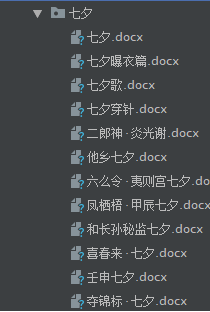
具体wrod文档显示如下,不过当中还是会有一些格式错误。
xpath模块使用的更多相关文章
- python 全栈开发,Day135(爬虫系列之第2章-BS和Xpath模块)
一.BeautifulSoup 1. 简介 简单来说,Beautiful Soup是python的一个库,最主要的功能是从网页抓取数据.官方解释如下: ''' Beautiful Soup提供一些简单 ...
- Python网络爬虫-xpath模块
一.正解解析 单字符: . : 除换行以外所有字符 [] :[aoe] [a-w] 匹配集合中任意一个字符 \d :数字 [0-9] \D : 非数字 \w :数字.字母.下划线.中文 \W : 非\ ...
- xpath模块
W3School官方文档:http://www.w3school.com.cn/xpath/index.asp 我们使用xpath主要是获取网页数据的,之前一直是使用bs4,xpath也是最近了解到的 ...
- python 全栈开发,Day134(爬虫系列之第1章-requests模块)
一.爬虫系列之第1章-requests模块 爬虫简介 概述 近年来,随着网络应用的逐渐扩展和深入,如何高效的获取网上数据成为了无数公司和个人的追求,在大数据时代,谁掌握了更多的数据,谁就可以获得更高的 ...
- python中BeautifulSoup模块
BeautifulSoup模块是干嘛的? 答:通过html标签去快速匹配标签中的内容.效率相对比正则会好的多.效率跟xpath模块应该差不多. 一:解析器: BeautifulSoup(html,&q ...
- 从0开始学爬虫3之xpath的介绍和使用
从0开始学爬虫3之xpath的介绍和使用 Xpath:一种HTML和XML的查询语言,它能在XML和HTML的树状结构中寻找节点 安装xpath: pip install lxml HTML 超文本标 ...
- 《Python 数据科学实践指南》读书笔记
文章提纲 全书总评 C01.Python 介绍 Python 版本 Python 解释器 Python 之禅 C02.Python 基础知识 基础知识 流程控制: 函数及异常 函数: 异常 字符串 获 ...
- 爬虫-requests
一.爬虫系列之第1章-requests模块 爬虫简介 概述 近年来,随着网络应用的逐渐扩展和深入,如何高效的获取网上数据成为了无数公司和个人的追求,在大数据时代,谁掌握了更多的数据,谁就可以获得更高的 ...
- javascript中DOM0,DOM2,DOM3级事件模型解析
DOM 即 文档对象模型. 文档对象模型是一种与编程语言及平台无关的API(Application programming Interface),借助于它,程序能够动态地访问和修改文档内容.结构或显示 ...
随机推荐
- 同时安装Python2,Python3如何解决冲突问题【官方解法】
使用py -2或py -3命令来区分调用Python启动器 去掉参数 -2/-3如何运行? 每次运行都要加入参数-2/-3还是比较麻烦,所以py.exe这个启动器允许你在代码中加入说明,表明这个文件应 ...
- 用Gitolite搭建服务器上的Git
使用git作为版本控制工具,确实非常流行且好用,常用的git代码服务器有Github还是国内的Gitcafe和OSC都是很不错,可以免费存放一些开源的项目代码,对于私人项目,则需要支付一定的费用.同时 ...
- 每天一个linux命令(15)-tail
tail 命令从指定点开始将文件写到标准输出.使用tail命令的-f选项可以方便的查阅正在改变的日志文件,tail -f filename会把filename里最尾部的内容显示在屏幕上,并且不断刷新, ...
- 对javascript EventLoop事件循环机制不一样的理解
前置知识点: 浏览器原理,浏览器内核5种线程及协作,JS引擎单线程设计推荐阅读: 从浏览器多进程到JS单线程,JS运行机制最全面的一次梳理 [FE]浏览器渲染引擎「内核」 js异步编程,Promise ...
- Liferay7 Intellij IDEA 开发环境搭建
一.安装Liferay插件 安装过程不在赘述,推荐两种安装方式: 通过Intellij插件市场安装 通过下载插件zip包安装 安装完成后,在项目板块中点鼠标右键,会出现Liferay菜单. 二.安装L ...
- Docker+Cmd+Cli+Git之前端工程化纪要(一)整体目标
之前一版的工程化核心产物就是一个IDE,即利用python+node将webpack等技术将FE的开发.编译.部署上线等环境集成在sublime中,产出了一个核心工具.但随着长期的使用与技术栈的优化升 ...
- css3动画属性有哪些
transition : 平衡过渡 transition是一种css里的一种过渡效果,完成过渡需要多少秒 .延迟几秒开始 ,过渡的速度(一般有 "linear 匀速" 和“e ...
- Docker 运行容器 CentOS7 使用systemctl 启动报错 Failed to get D-Bus connection: Operation not permitted
原系统:Centos 7 Docker 版本:1.12.6 操作:安装并运行 Tomcat 问题:在创建好容器之后,并且进入系统运行启动tomcat [root@cd11558d3a22 /]# sy ...
- NOI Online 赛前刷题计划
Day 1 模拟 链接:Day 1 模拟 题单:P1042 乒乓球 字符串 P1015 回文数 高精 + 进制 P1088 火星人 搜索 + 数论 P1604 B进制星球 高精 + 进制 D ...
- Redis 中的过期元素是如何被处理的?视频+图文版给你答案——面试突击 002 期
本文以面试问题「Redis 中的过期元素是如何被处理的?」为切入点,用视频加图文的方式和大家聊聊 Redis 过期元素被处理的相关知识点. 涉及的知识点 过期删除策略有哪些? 这些过期策略有哪些优缺点 ...