
Spring_配置Bean & 属性配置细节
1.Spring容器
在 Spring IOC 容器读取 Bean 配置创建 Bean 实例之前, 必须对它进行实例化. 只有在容器实例化后, 才可以从 IOC 容器里获取 Bean 实例并使用.
Spring 提供了两种类型的 IOC 容器实现.
BeanFactory: IOC 容器的基本实现.
①ApplicationContext: 提供了更多的高级特性. 是 BeanFactory 的子接口.
②BeanFactory 是 Spring 框架的基础设施,面向 Spring 本身;
ApplicationContext 面向使用 Spring 框架的开发者,几乎所有的应用场合都直接使用 ApplicationContext 而非底层的 BeanFactory
无论使用何种方式, 配置文件时相同的.
2.ApplicationContext
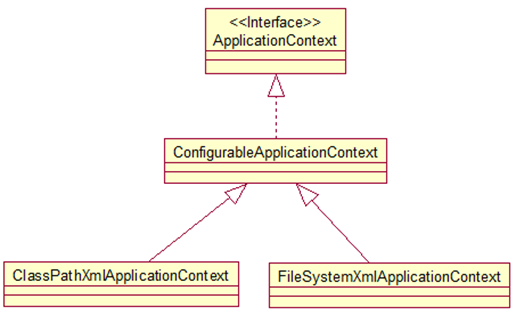
ApplicationContext 的主要实现类:
ClassPathXmlApplicationContext:从 类路径下加载配置文件
FileSystemXmlApplicationContext: 从文件系统中加载配置文件
ConfigurableApplicationContext 扩展于 ApplicationContext,新增加两个主要方法:
refresh() 和 close(), 让 ApplicationContext 具有启动、刷新和关闭上下文的能力
ApplicationContext 在初始化上下文时就实例化所有单例的 Bean。
WebApplicationContext 是专门为 WEB 应用而准备的,它允许从相对于 WEB 根目录的路径中完成初始化工作
3.从 IOC 容器中获取 Bean
调用 ApplicationContext 的 getBean() 方法
如:Helloword helloword = (Helloword) ctx.getBean("helloWorld2");
4.依赖注入的方式
Spring 支持 3 种依赖注入的方式
属性注入(setter方法注入)
    <bean id="helloWorld2" class="com.aff.spring.beans.Helloword">

        <property name="name2"  value="Spring"></property>

    </bean>
构造器注入
    <!-- 通过 构造方法 来配置 bean 属性 -->

    <bean id="car"  class="com.aff.spring.beans.Car">

                <constructor-arg value="Audi" index="0"></constructor-arg>

                <constructor-arg value="SHANGHAI" index="1"></constructor-arg>

                <constructor-arg value="3000000"  type="double"></constructor-arg>

    </bean>
工厂方法注入(很少使用,不推荐)
5.属性配置细节
applicationContext.xml
<?xml version="1.0" encoding="UTF-8"?>

<beans xmlns="http://www.springframework.org/schema/beans"

    xmlns:xsi="http://www.w3.org/2001/XMLSchema-instance"

    xmlns:util="http://www.springframework.org/schema/util"

    xmlns:p="http://www.springframework.org/schema/p"

    xsi:schemaLocation="http://www.springframework.org/schema/beans http://www.springframework.org/schema/beans/spring-beans.xsd

        http://www.springframework.org/schema/util http://www.springframework.org/schema/util/spring-util-4.0.xsd">

    <!--配置bean

          class : bean 的全类名, 通过反射的方式再IOC 容器中创建bean 所以要求 Bean 中必须有无参数的构造器

          id: 标识容器中 bean. id 唯一

    -->

    <bean id="helloWorld2" class="com.aff.spring.beans.Helloword">

        <property name="name2"  value="Spring"></property>

    </bean>

    <!-- 通过 构造方法 来配置 bean 属性 -->

    <bean id="car"  class="com.aff.spring.beans.Car">

                <constructor-arg value="Audi" index="0"></constructor-arg>

                <constructor-arg value="SHANGHAI" index="1"></constructor-arg>

                <constructor-arg value="3000000"  type="double"></constructor-arg>

    </bean>

    <!-- 使用构造器注入属性值可以指定参数的位置和参数的类型,以区分重载的构造器 -->

    <bean id="car2" class="com.aff.spring.beans.Car">

                <constructor-arg value="Baoma" type="java.lang.String"></constructor-arg>

                <!-- 如果字面值包含特殊字符可以使用<![CDATA[]]> 包裹起来-->

                <!--  属性值 也可以使用value 子节点 进行配置 -->

                <constructor-arg type="java.lang.String">

                            <value><![CDATA[<SHANGHAI**>]]></value>

                </constructor-arg>

                <constructor-arg  type="int">

                            <value>234</value>

                </constructor-arg>

    </bean>

    <bean id="person" class="com.aff.spring.beans.Person">

                <property name="name" value="Tom"></property>

                <property name="age" value="23"></property>

                <!-- 可以使用 property 的ref 属性 建立 bean之间的引用关系 -->

                <!-- <property name="car" ref="car2"></property> -->

                <!-- 也可以内部bean, 不能被外部引用的  , 只能在内部使用-->

                <property name="car">

                            <bean class="com.aff.spring.beans.Car">

                                    <constructor-arg value="Ford"></constructor-arg>

                                    <constructor-arg value="Changan"></constructor-arg>

                                    <constructor-arg value="30000" type="double"></constructor-arg>

                            </bean>

                </property>

    </bean>

    <bean id="person2" class="com.aff.spring.beans.Person">

                            <constructor-arg  value="AAA"></constructor-arg>

                            <constructor-arg  value="26"></constructor-arg>

                        <!--     <constructor-arg  ref="car2"></constructor-arg> -->

                        <!-- 测试值 null  -->

                        <!-- <constructor-arg><null/></constructor-arg> -->

                        <constructor-arg ref="car"></constructor-arg>

                        <!--为级联属性赋值,注意:属性需要先初始化后才可以为级联属性赋值, 否则的话会有异常  -->

                        <property name="car.maxSpeed" value="260"></property>

    </bean>

    <!--测试如何配置集合属性  -->

    <bean id="person3" class="com.aff.spring.beans.collection.Person">

                        <property name="name" value="Colin"></property>

                        <property name="age" value="25"></property>

                        <property name="cars" >

                        <!--使用list  节点为List 类型的属性赋值  -->

                                <list>

                                     <ref bean="car"/>

                                     <ref bean="car2"/>

                                     <bean class="com.aff.spring.beans.Car">

                                           <constructor-arg value="Ford"></constructor-arg>

                                           <constructor-arg value="Changan"></constructor-arg>

                                           <constructor-arg value="30000" type="double"></constructor-arg>

                                     </bean>

                                </list>

                        </property>

    </bean>

    <!-- 配置 Map 属性值 -->

    <bean id="newPerson" class="com.aff.spring.beans.collection.NewPerson">

    <property name="name" value="Mike"></property>

    <property name="age" value="26"></property>

    <property name="cars" >

                        <map>

                                    <entry key="AA" value-ref="car"></entry>

                                    <entry key="BB" value-ref="car2"></entry>

                        </map>

    </property>

    </bean>

    <!--配置Properties 属性值  -->

    <bean id="dataSource" class="com.aff.spring.beans.collection.DataSource">

                        <property name="properties">

                        <!-- 使用props 和prop 子节点为 Properties 属性赋值 -->

                              <props>

                                      <prop key="user">root</prop>

                                      <prop key="password">123456</prop>

                                      <prop key="jdbcUrl">jdbc:mysql:///test</prop>

                              </props>

                        </property>

    </bean>

    <!-- 配置 单例的 集合 bean  以供 多个bean 进行引用  ,需要导入util 命名空间-->

    <util:list id="cars">

                <ref bean="car" />

                <ref bean="car2" />

    </util:list>

    <bean id="person4" class="com.aff.spring.beans.collection.Person">

                <property name="name" value="Jack"></property>

                <property name="age" value="15"></property>

                <property name="cars"  ref="cars"></property>

    </bean>

    <!--通过 p,命名空间为bean 的属性赋值, 需要先导入 p 命名空间 , 相对于传统方式更加简洁 -->

    <bean id="person5"  class="com.aff.spring.beans.collection.Person" p:age="30" p:name="Lin" p:cars-ref="cars"> </bean>

</beans>
Main.java
package com.aff.spring.beans.collection;

import org.springframework.context.ApplicationContext;

import org.springframework.context.support.ClassPathXmlApplicationContext;

public class Main {

    public static void main(String[] args) {

        ApplicationContext ctx = new ClassPathXmlApplicationContext("applicationContext.xml");

        Person person = (Person) ctx.getBean("person3");

        System.out.println(person);

        //Person [name=Colin, age=25, cars=[Car [brand=Audi, corp=SHANGHAI, price=3000000.0, maxSpeed=260], Car [brand=Baoma, corp=<SHANGHAI**>, price=0.0, maxSpeed=234]]]

        NewPerson newPerson = (NewPerson) ctx.getBean("newPerson");

        System.out.println(newPerson);

        //NewPerson [name=Mike, age=26, cars={AA=Car [brand=Audi, corp=SHANGHAI, price=3000000.0, maxSpeed=260], BB=Car [brand=Baoma, corp=<SHANGHAI**>, price=0.0, maxSpeed=234]}]

        DataSource dataSource= (DataSource) ctx.getBean("dataSource");

        System.out.println(dataSource);

        //DataSource [properties={driverClass=com.mysql.jdbc.Driver, user=root, password=123456, jdbcUrl=jdbc:mysql:///test}]

        System.out.println(dataSource.getProperties());

        //{driverClass=com.mysql.jdbc.Driver, user=root, password=123456, jdbcUrl=jdbc:mysql:///test}

        Person person4 = (Person) ctx.getBean("person4");

        System.out.println(person4);

        //Person [name=Jack, age=15, cars=[Car [brand=Audi, corp=SHANGHAI, price=3000000.0, maxSpeed=260], Car [brand=Baoma, corp=<SHANGHAI**>, price=0.0, maxSpeed=234]]]

        Person person5 = (Person) ctx.getBean("person5");

        System.out.println(person5);

        //Person [name=Lin, age=30, cars=[Car [brand=Audi, corp=SHANGHAI, price=3000000.0, maxSpeed=260], Car [brand=Baoma, corp=<SHANGHAI**>, price=0.0, maxSpeed=234]]]

    }

}
DataSource.java
package com.aff.spring.beans.collection;

import java.util.Properties;

public class DataSource {

    private  Properties properties;

    public Properties getProperties() {

        return properties;

    }

    public void setProperties(Properties properties) {

        this.properties = properties;

    }

    @Override

    public String toString() {

        return "DataSource [properties=" + properties + "]";

    }

    public DataSource() {

        super();

    }

    public DataSource(Properties properties) {

        super();

        this.properties = properties;

    }

}
NewPerson
package com.aff.spring.beans.collection;

import java.util.Map;

import com.aff.spring.beans.Car;

public class NewPerson {

    private String name;

    private int age;

    private Map<String, Car> cars;

    public String getName() {

        return name;

    }

    public void setName(String name) {

        this.name = name;

    }

    public int getAge() {

        return age;

    }

    public void setAge(int age) {

        this.age = age;

    }

    public Map<String, Car> getCars() {

        return cars;

    }

    public void setCars(Map<String, Car> cars) {

        this.cars = cars;

    }

    public NewPerson() {

        super();

        // TODO Auto-generated constructor stub

    }

    public NewPerson(String name, int age, Map<String, Car> cars) {

        super();

        this.name = name;

        this.age = age;

        this.cars = cars;

    }

    @Override

    public String toString() {

        return "NewPerson [name=" + name + ", age=" + age + ", cars=" + cars + "]";

    }

}
Person.java
package com.aff.spring.beans.collection;

import java.util.List;

import com.aff.spring.beans.Car;

public class Person {

    private  String name ;

    private int age;

    private  List<Car> cars;

    public String getName() {

        return name;

    }

    public void setName(String name) {

        this.name = name;

    }

    public int getAge() {

        return age;

    }

    public void setAge(int age) {

        this.age = age;

    }

    public List<Car> getCars() {

        return cars;

    }

    public void setCars(List<Car> cars) {

        this.cars = cars;

    }

    public Person() {

        super();

        // TODO Auto-generated constructor stub

    }

    public Person(String name, int age, List<Car> cars) {

        super();

        this.name = name;

        this.age = age;

        this.cars = cars;

    }

    @Override

    public String toString() {

        return "Person [name=" + name + ", age=" + age + ", cars=" + cars + "]";

    }

}
需要的架包
commons-logging.jar
spring-aop-4.0.0.RELEASE.jar
spring-beans-4.0.0.RELEASE.jar
spring-context-4.0.0.RELEASE.jar
spring-core-4.0.0.RELEASE.jar
spring-expression-4.0.0.RELEASE.jar
目录

Spring_配置Bean & 属性配置细节的更多相关文章
- spring 配置bean以及配置依赖 (2)
目录 一.使用ref引用其他对象 二.通过有参构造器创建对象 1 通过index精确定位参数顺序 三.引用bean 1 使用内部bean 2 使用list,set 3 声明集合类型 四.其他 1 使用 ...
- Spring学习记录(二)---容器和bean属性配置
下载spring包,在eclipse搭建spring环境. 这步我在eclipse中无法导入包,看网上的: http://sishuok.(和谐)com/forum/blogPost/list/242 ...
- Spring 学习笔记 4. 尚硅谷_佟刚_Spring_属性配置细节
1,字面值 •字面值:可用字符串表示的值,可以通过 <value> 元素标签或 value 属性进行注入. •基本数据类型及其封装类.String 等类型都可以采取字面值注入的方式 •若字 ...
- 03-spring学习-属性配置细节
配置bean的一些细节 字面值 如果包含特殊符号,直接写会报错.可以用这个<![CDATA[]]>包裹起来. 比如这里的配置属性里面的value值包含<>等特殊符号,直接写会报 ...
- spring-boot 属性定义和配置bean
自定义bean属性 1.定义bean属性 // 通过@ConfigurationProperties加载properties文件内的配置, // 通过prefix属性指定properties的配置的前 ...
- Spring配置bean的详细知识
在Spring中配置bean的一些细节.具体信息请参考下面的代码及注释 applicationContext.xml文件 <?xml version="1.0" encodi ...
- 2 Spring4 之Bean的配置
Spring4 之Bean的配置 1 IOC & DI 概述 IOC(Inversion of Control):其思想是反转资源获取的方向. 传统的资源查找方式要求组件向容器发起请求查找资源 ...
- Spring容器的属性配置详解的六个专题
在spring IOC容器的配置文件applicationContext.xml里,有一些配置细节值得一提.我们将一些问题归结为以下几个专题. 专题一:字面值问题 配置的bean节点中的值,我们提 ...
- spring 配置bean
Main(测试方法) public class Main { public static void main(String[] args) { //1.创建Spring 的IOC容器对象: //spr ...
随机推荐
- speedtest 测试服务器上传下载速度
下载speedtest.py wget https://raw.githubusercontent.com/sivel/speedtest-cli/master/speedtest.py 赋予执行权限 ...
- 06 ORM常用字段 关系字段 数据库优化查询
一.Django ORM 常用字段和参数 1.常用字段 models中所有的字段类型其实本质就那几种,整形varchar什么的,都没有实际的约束作用,虽然在models中没有任何限制作用,但是还是要分 ...
- spark系列-7、spark调优
官网说明:http://spark.apache.org/docs/2.1.1/tuning.html#data-serialization 一.JVM调优 1.1.Java虚拟机垃圾回收调优的背景 ...
- 题目分享N
题意:有辆车,有r行,s*2列,在第s列和第s+1列之间有个过道,出口在第r+1行的过道处,现在给出每个人的位置(行号和列号),每人每次只能动一格,问最少耗费多长时间全员才能逃出去 分析:假如车上只有 ...
- 量子纠错码——Stabilizer codes
对于错误,一般有两种: random: 错误以一定的概率发生在每个比特上(对这种问题的研究一般是信息论中,信道熵一类的问题) worst case: 错误发生在某个比特上,这也是纠错码襄阳解决的问题 ...
- hdu1074之状压dp
#include <iostream> #include <cstdio> #include <cstring> using namespace std; cons ...
- [LiDAR数据模拟]系列(2) HELIOS的TLS点云模拟流程
关键词:地基激光雷达 点云模拟 XML文件 作者:李二 日期:07/05/2020 - 08/05/2020 我目前仅仅使用了TLS模式进行模拟,所以先讲一下TLS的模拟经验. ALS和MLS的模拟, ...
- 使用 Minikube 安装 Kubernetes
概述: 单机低配置主机也可以玩转kubernetes集群.该文章是将介绍使用Minikube安装Kubernetes集群(一般用于本地/开发环境). 配置环境: 硬件:CPU 至少2个核心,至少2.5 ...
- Synchronized加锁、锁升级和java对象内存结构
首先了解一下JMM中定义的内存操作: 一个线程操作数据时候都是从主内存(堆内存)读取到自己工作内存(线程私有的数据区域)中再进行操作.对于硬件内存来说,并没有工作内存和主内存的区分,这都是java内存 ...
- 【Hadoop离线基础总结】oozie调度MapReduce任务
目录 1.准备MR执行的数据 2.执行官方测试案例 3.准备我们调度的资源 4.修改配置文件 5.上传调度任务到hdfs对应目录 6.执行调度任务 1.准备MR执行的数据 MR的程序可以是自己写的,也 ...