
Python之turtle库-小猪佩奇
Python之turtle库-小猪佩奇
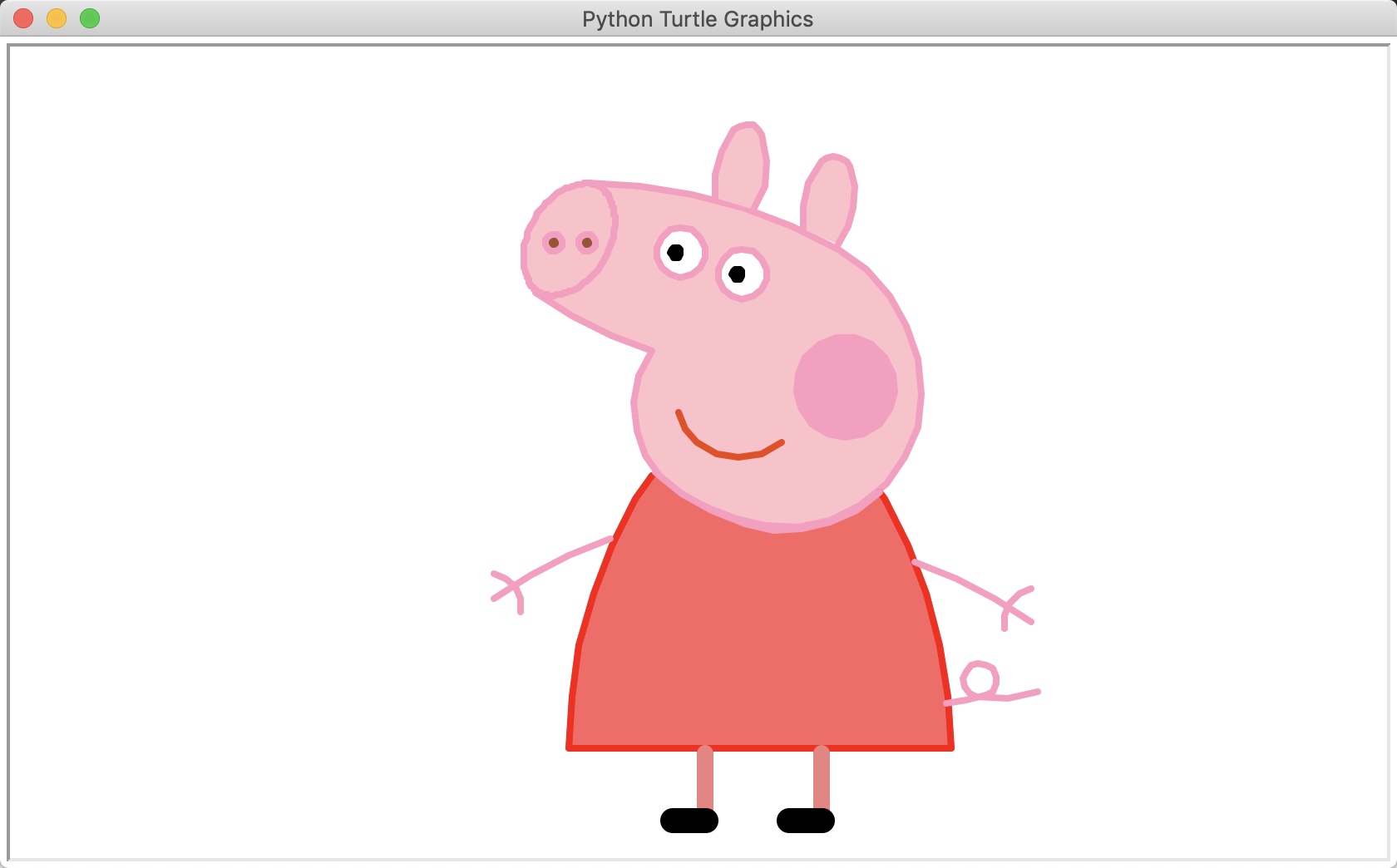
#!/usr/bin/env python

# coding: utf-8

# Python turtle库官方文档:https://docs.python.org/2/library/turtle.html

import turtle as t

t.begin_fill()

t.pensize(4)

t.hideturtle()

t.colormode(255)

t.color((255, 155, 192), "pink")

t.setup(840, 500)

t.speed(10)

# 鼻子

t.pu()

t.goto(-100, 100)

t.pd()

t.seth(-30)

t.begin_fill()

a = 0.4

for i in range(120):

    if 0 <= i < 30 or 60 <= i < 90:

        a = a + 0.08

        t.lt(3)  # 向左转3度

        t.fd(a)  # 向前走a的步长

    else:

        a = a - 0.08

        t.lt(3)

        t.fd(a)

t.end_fill()

t.pu()

t.seth(90)

t.fd(25)

t.seth(0)

t.fd(10)

t.pd()

t.pencolor(255, 155, 192)

t.seth(10)

t.begin_fill()

t.circle(5)

t.color(160, 82, 45)

t.end_fill()

t.pu()

t.seth(0)

t.fd(20)

t.pd()

t.pencolor(255, 155, 192)

t.seth(10)

t.begin_fill()

t.circle(5)

t.color(160, 82, 45)

t.end_fill()

# 头

t.color((255, 155, 192), "pink")

t.pu()

t.seth(90)

t.fd(41)

t.seth(0)

t.fd(0)

t.pd()

t.begin_fill()

t.seth(180)

t.circle(300, -30)

t.circle(100, -60)

t.circle(80, -100)

t.circle(150, -20)

t.circle(60, -95)

t.seth(161)

t.circle(-300, 15)

t.pu()

t.goto(-100, 100)

t.pd()

t.seth(-30)

a = 0.4

for i in range(60):

    if 0 <= i < 30 or 60 <= i < 90:

        a = a + 0.08

        t.lt(3)  # 向左转3度

        t.fd(a)  # 向前走a的步长

    else:

        a = a - 0.08

        t.lt(3)

        t.fd(a)

t.end_fill()

# 耳朵

t.color((255, 155, 192), "pink")

t.pu()

t.seth(90)

t.fd(-7)

t.seth(0)

t.fd(70)

t.pd()

t.begin_fill()

t.seth(100)

t.circle(-50, 50)

t.circle(-10, 120)

t.circle(-50, 54)

t.end_fill()

t.pu()

t.seth(90)

t.fd(-12)

t.seth(0)

t.fd(30)

t.pd()

t.begin_fill()

t.seth(100)

t.circle(-50, 50)

t.circle(-10, 120)

t.circle(-50, 56)

t.end_fill()

# 眼睛

t.color((255, 155, 192), "white")

t.pu()

t.seth(90)

t.fd(-20)

t.seth(0)

t.fd(-95)

t.pd()

t.begin_fill()

t.circle(15)

t.end_fill()

t.color("black")

t.pu()

t.seth(90)

t.fd(12)

t.seth(0)

t.fd(-3)

t.pd()

t.begin_fill()

t.circle(3)

t.end_fill()

t.color((255, 155, 192), "white")

t.pu()

t.seth(90)

t.fd(-25)

t.seth(0)

t.fd(40)

t.pd()

t.begin_fill()

t.circle(15)

t.end_fill()

t.color("black")

t.pu()

t.seth(90)

t.fd(12)

t.seth(0)

t.fd(-3)

t.pd()

t.begin_fill()

t.circle(3)

t.end_fill()

# 腮

t.color((255, 155, 192))

t.pu()

t.seth(90)

t.fd(-95)

t.seth(0)

t.fd(65)

t.pd()

t.begin_fill()

t.circle(30)

t.end_fill()

# 嘴

t.color(239, 69, 19)

t.pu()

t.seth(90)

t.fd(15)

t.seth(0)

t.fd(-100)

t.pd()

t.seth(-80)

t.circle(30, 40)

t.circle(40, 80)

# 身体

t.color("red", (255, 99, 71))

t.pu()

t.seth(90)

t.fd(-20)

t.seth(0)

t.fd(-78)

t.pd()

t.begin_fill()

t.seth(-130)

t.circle(100, 10)

t.circle(300, 30)

t.seth(0)

t.fd(230)

t.seth(90)

t.circle(300, 30)

t.circle(100, 3)

t.color((255, 155, 192), (255, 100, 100))

t.seth(-135)

t.circle(-80, 63)

t.circle(-150, 24)

t.end_fill()

# 手

t.color((255, 155, 192))

t.pu()

t.seth(90)

t.fd(-40)

t.seth(0)

t.fd(-27)

t.pd()

t.seth(-160)

t.circle(300, 15)

t.pu()

t.seth(90)

t.fd(15)

t.seth(0)

t.fd(0)

t.pd()

t.seth(-10)

t.circle(-20, 90)

t.pu()

t.seth(90)

t.fd(30)

t.seth(0)

t.fd(237)

t.pd()

t.seth(-20)

t.circle(-300, 15)

t.pu()

t.seth(90)

t.fd(20)

t.seth(0)

t.fd(0)

t.pd()

t.seth(-170)

t.circle(20, 90)

# 脚

t.pensize(10)

t.color((240, 128, 128))

t.pu()

t.seth(90)

t.fd(-75)

t.seth(0)

t.fd(-180)

t.pd()

t.seth(-90)

t.fd(40)

t.seth(-180)

t.color("black")

t.pensize(15)

t.fd(20)

t.pensize(10)

t.color((240, 128, 128))

t.pu()

t.seth(90)

t.fd(40)

t.seth(0)

t.fd(90)

t.pd()

t.seth(-90)

t.fd(40)

t.seth(-180)

t.color("black")

t.pensize(15)

t.fd(20)

# 尾巴

t.pensize(4)

t.color((255, 155, 192))

t.pu()

t.seth(90)

t.fd(70)

t.seth(0)

t.fd(95)

t.pd()

t.seth(0)

t.circle(70, 20)

t.circle(10, 330)

t.circle(70, 30)

t.end_fill()
Python之turtle库-小猪佩奇的更多相关文章
- python 用turtle 画小猪佩奇
from turtle import * def nose(x,y):#鼻子 penup()#提起笔 goto(x,y)#定位 pendown()#落笔,开始画 setheading(-30)#将乌龟 ...
- *【Python】【demo实验31】【练习实例】【使用turtle画小猪佩奇】
如下图小猪佩奇: 要求使用turtle画小猪佩奇: 源码: # encoding=utf-8 # -*- coding: UTF-8 -*- # 使用turtle画小猪佩奇 from turtle i ...
- Python使用turtle库与random库绘制雪花
记录Python使用turtle库与random库绘制雪花,代码非常容易理解,画着玩玩还是可以的. 完整代码如下: 效果图如下:
- Python中turtle库的使用
Turtle图形库 Turtle库是Python内置的图形化模块,属于标准库之一,位于Python安装目录的lib文件夹下,常用函数有以下几种: 画笔控制函数 penup():抬起画笔: pendow ...
- python使用turtle库绘制奥运五环
效果图: #奥运五环 import turtle turtle.setup(1.0,1.0) #设置窗口大小 turtle.title("奥运五环") #蓝圆 turtle.pen ...
- 第四章 python的turtle库的运用
我们可以尝试用python的自带turtle库绘制一条蟒蛇 首先我们设计一下蟒蛇的基本形状 我们先把这段蟒蛇绘制的实例代码贴出来,各位可以在自己的本地运行一下看看效果,然后我们再继续分析代码: 1 # ...
- 使用Python的turtle库实现七段数码管绘制
七段数码管绘制:七段数码管是由7段数码管拼接而成,每段有亮或不亮两种情况,改进的七段数码管还包括一个小数点位置.七段数码管能形成2=128种状态,其中部分状态能够显示易于人们理解的数字或字母含义.因此 ...
- Python:turtle库的使用及图形绘制
目录 一.绘制一个八边形 二.绘制一个八角图形 三.简述问题 四.循环程序设计 五.绘制一个自己喜欢的图形 一.绘制一个八边形 使用turtle库,绘制一个八边形 代码: from turtle im ...
- Python 实现画一个小猪佩奇
===================================== 看到 佩奇的广告片刷红,为了迎接猪年,咱们也来用Python 画板实现一个效果吧 from turtle import* ...
随机推荐
- bzoj1483: [HNOI2009]梦幻布丁(vector+启发式合并)
1483: [HNOI2009]梦幻布丁 Time Limit: 10 Sec Memory Limit: 64 MBSubmit: 4022 Solved: 1640[Submit][Statu ...
- 【笔记】对自定义异常的理解(Java)
原本,原有的异常是非手动地.自动地抛出的. 了解自定义异常时,发现其信息只是: 继承了谁,即它自己算哪种异常: 它的信息,比如一个ID,这个貌似还是可选的: 它是可被传入信息的 没有遗漏的话,就这仨了 ...
- Spring Boot:关于“No converter found for return value of type: class xxx”的解决方法
首先在对应的controller中的@RestController中返回json对象的操作 public class HelloController { @RequestMapping("/ ...
- 手机端实现6位短信验证码input输入框效果(样式及代码方法)
微信移动端4位.6位.多位验证码密码输入框功能的实现代码,实现思路: 方案1: 写一个简单的input框. 评估:样式不好看,待定. 方案2: 就是用6个input框,每输入一个数字之后,切换到下一个 ...
- python 学习笔记二 (列表推导式)
2018年年初写了第一篇博客,说要做一个认真的技术人 https://www.cnblogs.com/yingchen/p/8455507.html 今天已经是11月19日了,这是第二篇博客,看来坚持 ...
- 菜鸡CodeFoces打卡单
2017.12.13 1:05 签到3题 Educational Codeforces Round 34 (Rated for Div. 2) 补题:
- 题解报告:hdu1995汉诺塔V(递推dp)
题目链接:http://acm.hdu.edu.cn/showproblem.php?pid=1995 Problem Description 用1,2,...,n表示n个盘子,称为1号盘,2号盘,. ...
- R in action读书笔记(15)第十一章 中级绘图 之二 折线图 相关图 马赛克图
第十一章 中级绘图 本节用到的函数有: plot legend corrgram mosaic 11.2折线图 如果将散点图上的点从左往右连接起来,那么就会得到一个折线图. 创建散点图和折线图: &g ...
- 黑马程序员----java基础:多线程
------Java培训.Android培训.iOS培训..Net培训.期待与您交流! ------- ------Java培训.Android培训.iOS培训..Net培训.期待与您交流! ---- ...
- (转)淘淘商城系列——使用maven tomcat插件启动聚合工程
http://blog.csdn.net/yerenyuan_pku/article/details/72672389 上文我们一起学习了如何使用maven tomcat插件来启动web工程,本文我们 ...