
struts2基础代码实现
结构图:
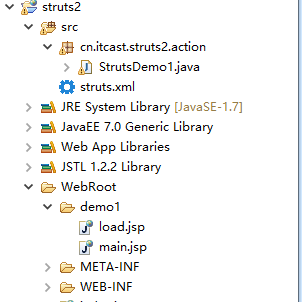
load.jsp
 <%@ page language="java" import="java.util.*" pageEncoding="UTF-8"%>

 <%

 String path = request.getContextPath();

 String basePath = request.getScheme()+"://"+request.getServerName()+":"+request.getServerPort()+path+"/";

 %>

 <!DOCTYPE HTML PUBLIC "-//W3C//DTD HTML 4.01 Transitional//EN">

 <html>

   <head>

     <base href="<%=basePath%>">

     <title>My JSP 'load.jsp' starting page</title>

     <meta http-equiv="pragma" content="no-cache">

     <meta http-equiv="cache-control" content="no-cache">

     <meta http-equiv="expires" content="0">

     <meta http-equiv="keywords" content="keyword1,keyword2,keyword3">

     <meta http-equiv="description" content="This is my page">

     <!--

     <link rel="stylesheet" type="text/css" href="styles.css">

     -->

   </head>

   <body>

 <h1>Struts2 入门案例</h1>

 <!-- 连接中放置要使用的Action -->

 <a href="${pageContext.request.contextPath}/StrutsDemo1">访问Struts2的Action. </a>

   </body>

 </html>
web.xml
 <?xml version="1.0" encoding="UTF-8"?>

 <web-app xmlns:xsi="http://www.w3.org/2001/XMLSchema-instance" xmlns="http://xmlns.jcp.org/xml/ns/javaee" xsi:schemaLocation="http://xmlns.jcp.org/xml/ns/javaee http://xmlns.jcp.org/xml/ns/javaee/web-app_3_1.xsd" id="WebApp_ID" version="3.1">

 <display-name>struts2</display-name>

   <!-- 配置Struts2的核心过滤器:前端控制器 -->

   <filter>

       <filter-name>struts2</filter-name>

       <filter-class>org.apache.struts2.dispatcher.filter.StrutsPrepareAndExecuteFilter</filter-class>

     <!-- 通过init-param 元素配置 默认编码 -->

     <init-param>

     <param-name>struts.iln8.encoding</param-name>

     <param-value>UTF-8</param-value>

     </init-param>

   </filter>

   <filter-mapping>

       <filter-name>struts2</filter-name>

       <url-pattern>/*</url-pattern>

   </filter-mapping>

   <welcome-file-list>

     <welcome-file>demo1/load.jsp</welcome-file>

   </welcome-file-list>

 </web-app>
StrutsDemo1
 package cn.itcast.struts2.action;

 import com.opensymphony.xwork2.ActionSupport;

 public class StrutsDemo1 extends ActionSupport {

     @Override

     public String execute() throws Exception {

         /**

          * 提供一个默认的执行方法execute

          * 通常实现信息查询来编写是否登录等逻辑返回不同的字符串

          */

         System.out.println("StrutsDemo1 中的execute执行了");

         return "success";

     }

 }
struts.xml
 <?xml version="1.0" encoding="UTF-8"?>

 <!DOCTYPE struts PUBLIC

 "-//Apache Software Foundation//DTD Struts Configuration2.0//EN"

 "http://struts.apache.org/dtds/struts-2.0.dtd">

 <struts>

     <!-- 配置一个包package -->

     <package name="demo1" extends="struts-default">

     <!-- 配置Action -->

     <action name="StrutsDemo1" class="cn.itcast.struts2.action.StrutsDemo1">

    <!-- 配置结果页面的跳转 在Action 中根据不同的返回值配置不同的跳转页面 -->

    <result name="success">/demo1/main.jsp</result>

     </action>

     </package>

 </struts>
main.jsp
 <%@ page language="java" import="java.util.*" pageEncoding="UTF-8"%>

 <%

 String path = request.getContextPath();

 String basePath = request.getScheme()+"://"+request.getServerName()+":"+request.getServerPort()+path+"/";

 %>

 <!DOCTYPE HTML PUBLIC "-//W3C//DTD HTML 4.01 Transitional//EN">

 <html>

   <head>

     <base href="<%=basePath%>">

     <title>My JSP 'main.jsp' starting page</title>

     <meta http-equiv="pragma" content="no-cache">

     <meta http-equiv="cache-control" content="no-cache">

     <meta http-equiv="expires" content="0">

     <meta http-equiv="keywords" content="keyword1,keyword2,keyword3">

     <meta http-equiv="description" content="This is my page">

     <!--

     <link rel="stylesheet" type="text/css" href="styles.css">

     -->

   </head>

       跳转成功!!

   <body>

   </body>

 </html>
struts2基础代码实现的更多相关文章
- java:struts2.3框架1(struts2快速配置,各文件之间的关系,基础代码简化版,XML中的通配符)
1.struts2快速配置: A.到http://struts.apache.org下载struts2开发包struts-2.3.32-all.zip B.新建web项目并添加struts2依赖的ja ...
- Struts2入门1 Struts2基础知识
Struts2入门1 Struts2基础知识 20131130 代码下载: 链接: http://pan.baidu.com/s/11mYG1 密码: aua5 前言: 之前学习了Spring和Hib ...
- Mysql基础代码(不断完善中)
Mysql基础代码,不断完善中~ /* 启动MySQL */ net start mysql /* 连接与断开服务器 */ mysql -h 地址 -P 端口 -u 用户名 -p 密码 /* 跳过权限 ...
- 如何保障Go语言基础代码质量?
为什么要谈这个topic? 实践中,质量保障体系的建设,主要针对两个目标: 一是不断提高目标业务测试覆盖率,保障面向客户的产品质量:二就是尽可能的提高人效,增强迭代效率.而构建全链路质量卡点就是整个体 ...
- Struts2基础学习2
Struts2基础学习2 项目结构,测试页面与实体类 <%@ page language="java" contentType="text/html; charse ...
- Struts2基础入门
Struts2基础入门 创建一个web工程 0)导包并且创建一个核心配置文件 <?xml version="1.0" encoding="UTF-8"?& ...
- C++基础代码--20余种数据结构和算法的实现
C++基础代码--20余种数据结构和算法的实现 过年了,闲来无事,翻阅起以前写的代码,无意间找到了大学时写的一套C++工具集,主要是关于数据结构和算法.以及语言层面的工具类.过去好几年了,现在几乎已经 ...
- [译]Vulkan教程(04)基础代码
[译]Vulkan教程(04)基础代码 General structure 通用结构 In the previous chapter you've created a Vulkan project w ...
- 001-脚手架发展,基础代码结构+mybatis代码生成
一.概述 脚手架是为了保证各施工过程顺利进行而搭设的工作平台. 编程领域中的“脚手架(Scaffolding)”指的是能够快速搭建项目“骨架”的一类工具. java变成中,架构师搭建的代码结构你到处拷 ...
随机推荐
- 浅谈FFT(快速博立叶变换)&学习笔记
0XFF---FFT是啥? FFT是一种DFT的高效算法,称为快速傅立叶变换(fast Fourier transform),它根据离散傅氏变换的奇.偶.虚.实等 特性,对离散傅立叶变换的算法进行改进 ...
- HDU - 4544 湫湫系列故事——消灭兔子(优先队列+贪心)
题目: 最近,减肥失败的湫湫为发泄心中郁闷,在玩一个消灭免子的游戏. 游戏规则很简单,用箭杀死免子即可. 箭是一种消耗品,已知有M种不同类型的箭可以选择,并且每种箭都会对兔子造成伤害,对应的伤害值分别 ...
- 配置Mysql审计
mysql-audit.json:Mysql审计日志 插件下载地址: https://bintray.com/mcafee/mysql-audit-plugin/release/1.1.4-725#f ...
- MySQL-----增
增 **创建用户** create user 'alex'@'192.168.1.1' identified by '123123'; create user 'alex'@'192.168.1.%' ...
- LeetCode(59)SPiral Matrix II
题目 Given an integer n, generate a square matrix filled with elements from 1 to n2 in spiral order. F ...
- python后端开发工程师考证试题
python开发工程师考证试题 问答题链接 python开发工程师考证试题 选择题 题目 关于 Python 程序格式框架的描述,以下选项中错误的是 ( A ) A: Python 语言不采用严格的“ ...
- [codeforces494B]Obsessive String
[codeforces494B]Obsessive String 试题描述 Hamed has recently found a string t and suddenly became quite ...
- Uva - 12230 Crossing Rivers (数学期望)
你住在村庄A,每天需要过很多条河到另一个村庄B上班,B在A的右边,所有的河都在A,B之间,幸运的是每条船上都有自由移动的自动船, 因此只要到达河左岸然后等船过来,在右岸下船,上船之后船的速度不变.现在 ...
- CLR运行机制
CLR编译器会将我们的代码编译成托管模块(中间IL语言和元数据),托管模块是一个标准的PE32执行文件,或者PE32+执行文件.但是CLR实际不和托管模块一起工作,他会将托管模块合并成程序集,程序集是 ...
- SPOJ SUMPRO(数学)
题意: 给出一个数N,问所有满足n/x=y(此处为整除)的所有x*y的总和是多少.对答案mod(1e9+7). 1 <= T <= 500. 1 <= N <= 1e9. 分析 ...