
深入爬虫书scrapy 之json内容没有写入文本
settings.py设置
ITEM_PIPELINES = {

   'tets.pipelines.TetsPipeline': 300,

}
spider代码
xpath后缀添加.extract() parse()返回return item
import scrapy

from tets.items import TetsItem

class KugouSpider(scrapy.Spider):

    name = 'kugou'

    allowed_domains = ['www.kugou.com']

    start_urls = ['http://www.kugou.com/']

    def parse(self, response):

        item = TetsItem()

        item['title'] = response.xpath("/html/head/title/text()").extract()

        print(item['title'])

        return item
piplines代码
# -*- coding: utf-8 -*-

# Define your item pipelines here

#

# Don't forget to add your pipeline to the ITEM_PIPELINES setting

# See: https://doc.scrapy.org/en/latest/topics/item-pipeline.html

import codecs

import json

class TetsPipeline(object):

    def __init__(self):

        # self.file = codecs.open("D:/git/learn_scray/day11/mydata2.txt", "wb", encoding="utf-8")

        self.file = codecs.open("D:/git/learn_scray/day11/1.json", "wb", encoding="utf-8")

    # 处理文本(xx.txt)

    # def process_item(self, item, spider):

    #     l = str(item) + "\n"

    #     print(l)

    #     self.file.write(l)

    #     return item

    def process_item(self, item, spider):

        print("进入")

        # print(item)

        i = json.dumps(dict(item), ensure_ascii=False)

        # print("进入json")

        # print(i)

        l = i + "\n"

        print(l)

        self.file.write(l)

        return item

    def close_spider(self, spider):

        slef.file.close()
items.py
# -*- coding: utf-8 -*-

# Define here the models for your scraped items

#

# See documentation in:

# https://doc.scrapy.org/en/latest/topics/items.html

import scrapy

class TetsItem(scrapy.Item):

    # define the fields for your item here like:

    # name = scrapy.Field()

    title = scrapy.Field()
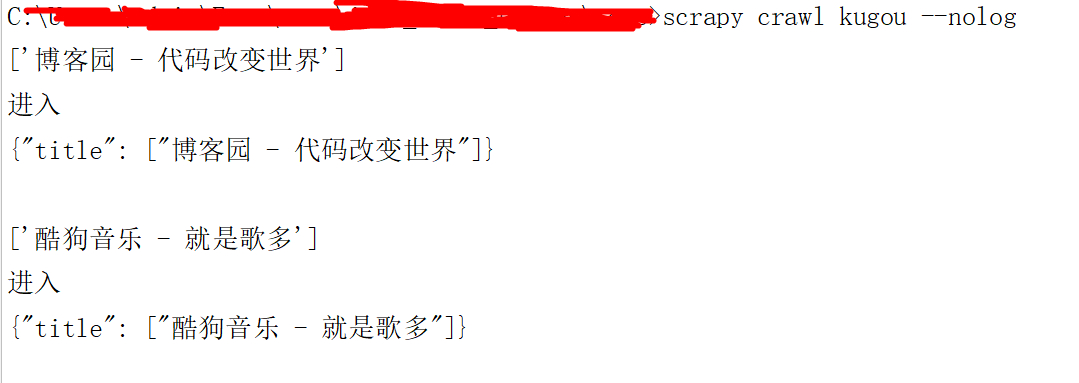
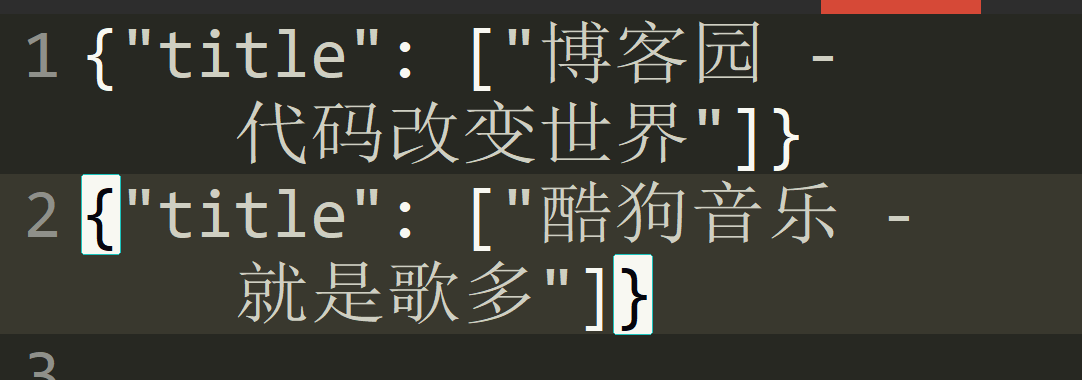
结果如图下

深入爬虫书scrapy 之json内容没有写入文本的更多相关文章
- 服务端JSON内容中有富文本时
问题背景 由于数据中存在复杂的富文本,包含各种引号和特殊字符,导致后端和前端通过JSON格式进行数据交互引发前端JSON解析出错. 解决方案 后端将富文本内容 ConvertToBase64Strin ...
- python根据索引删除内容并写入文本
在python中,有个好用的模块linecache,该模块允许从任何文件里得到任何的行,并且使用缓存进行优化,常见的情况是从单个文件读取多行.linecache.getline(filename,li ...
- scrapy(四): 爬取二级页面的内容
scrapy爬取二级页面的内容 1.定义数据结构item.py文件 # -*- coding: utf-8 -*- ''' field: item.py ''' # Define here the m ...
- Scrapy 框架 使用 selenium 爬取动态加载内容
使用 selenium 爬取动态加载内容 开启中间件 DOWNLOADER_MIDDLEWARES = { 'wangyiPro.middlewares.WangyiproDownloaderMidd ...
- Learning Scrapy笔记(六)- Scrapy处理JSON API和AJAX页面
摘要:介绍了使用Scrapy处理JSON API和AJAX页面的方法 有时候,你会发现你要爬取的页面并不存在HTML源码,譬如,在浏览器打开http://localhost:9312/static/, ...
- 爬虫框架scrapy的基本内容
Scrapy介绍 Scrapy是一个为了爬取网站数据,提取结构性数据而编写的应用框架. 可以帮助用户简单快速的部署一个专业的网络爬虫.如果说前面我们写的定制bs4爬虫是”手动挡“,那Scrapy就相当 ...
- 【C#】菜单功能,将剪贴板JSON内容或者xml内容直接粘贴为类
VS 2015菜单功能,将剪贴板JSON内容或者xml内容直接粘贴为类
- .net mvc web api 返回 json 内容,过滤值为null的属性
原文:http://blog.csdn.net/xxj_jing/article/details/49508557 版权声明:本文为博主原创文章,未经博主允许不得转载. .net mvc web ap ...
- 使用jsonpath解析json内容
JsonPath提供的json解析非常强大,它提供了类似正则表达式的语法,基本上可以满足所有你想要获得的json内容.下面我把官网介绍的每个表达式用代码实现,可以更直观的知道该怎么用它. 一.首先需要 ...
随机推荐
- javaEE(16)_Servlet监听器
一.监听器原理 1.监听器就是一个实现特定接口的普通java程序,这个程序专门用于监听一个java对象的方法调用或属性改变,当被监听对象发生上述事件后,监听器某个方法将立即被执行. 2.监听器典型案例 ...
- 【IDE_PyCharm】PyCharm中配置当鼠标悬停时快速提示方法参数
方法一:通过在settings里面设置当鼠标至于方法之上时给出快速提示 方法二:按住Ctrl键,光标放在任意变量或方法上都会弹出该变量或方法的详细信息,点击鼠标还能跳转到变量或方法的定义处
- python数据类型、字符编码、文件处理-练习
练习-字符串 # 写代码,有如下变量,请按照要求实现每个功能 (共6分,每小题各0.5分) name = " aleX" # ) 移除 name 变量对应的值两边的空格,并输出处理 ...
- MySql存储过程的调试
写和调试存储过程比较好的工具是dbForge studio for mysql 校验其中临时表字段是否符合要求,在存储过程中动态为临时表添加字段约束,或者写个游标,把数据迭代出来,一个个判断.当游标迭 ...
- Perl学习三:运算符
运算符: 1.operand operator expression statement2.算术运算符 + - * / ** % -字符串参加运算必须转化为整数,若不能转化认为是0. 2.算术比较 & ...
- python爬虫基础04-网页解析库xpath
更简单高效的HTML数据提取-Xpath 本文地址:https://www.jianshu.com/p/90e4b83575e2 XPath 是一门在 XML 文档中查找信息的语言.XPath 用于在 ...
- I2C驱动框架(五)
参考:I2C子系统之 adapter driver注册——I2C_dev_init() i2c的操作在内核中是当做字符设备来操作的,相关初始化在由i2c_dev_init函数来初始化. static ...
- ACM训练联盟周赛 G. Teemo's convex polygon
65536K Teemo is very interested in convex polygon. There is a convex n-sides polygon, and Teemo co ...
- PHP 微信分享(及二次分享)
js部分: <script src="http://res.wx.qq.com/open/js/jweixin-1.2.0.js"></script> &l ...
- Linux下二进制文件安装MySQL
MySQL 下载地址:https://dev.mysql.com/downloads/mysql/ 并按如下方式选择来下载安装包. 1. 设置配置文件/etc/my.cnmore /etc/my.cn ...