
通知实战 设置通知图片(iOS10以后的)
解释两个基本扩展(Notification Content、Notification Service)
Notification Content其实是用来自定义长按通知显示通知的自定义界面
Notification Service是用来处理远程通知的,我们可以在远程通知到来之际,我们在Notification Service
里面由30s的时间来处理这条通知的
首先使用Notification Service
1.创建扩展target
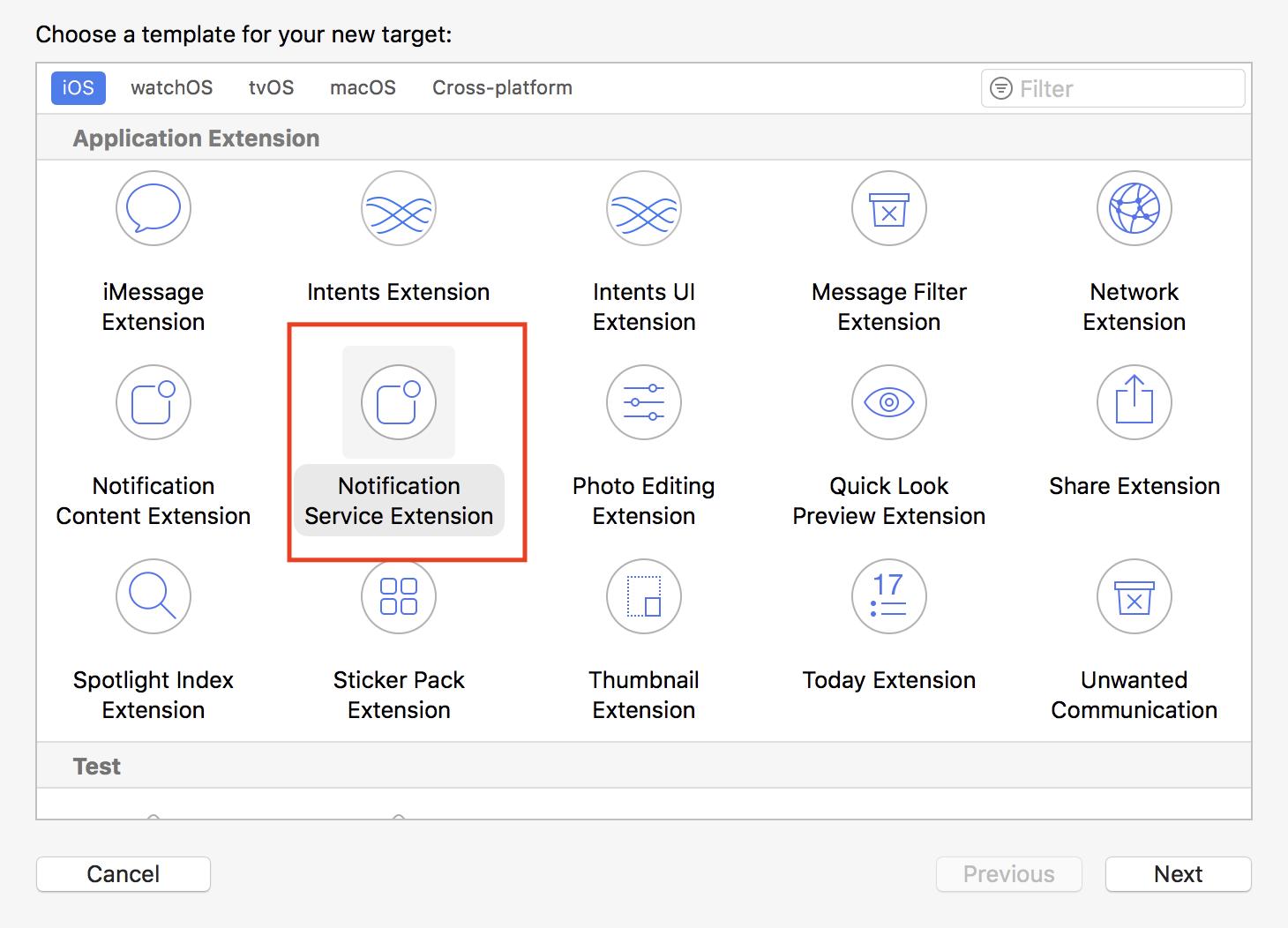
2. 这里会新建一个扩展的target,新的target需要新的ID,新的证书等(证书和id不会的请百度)
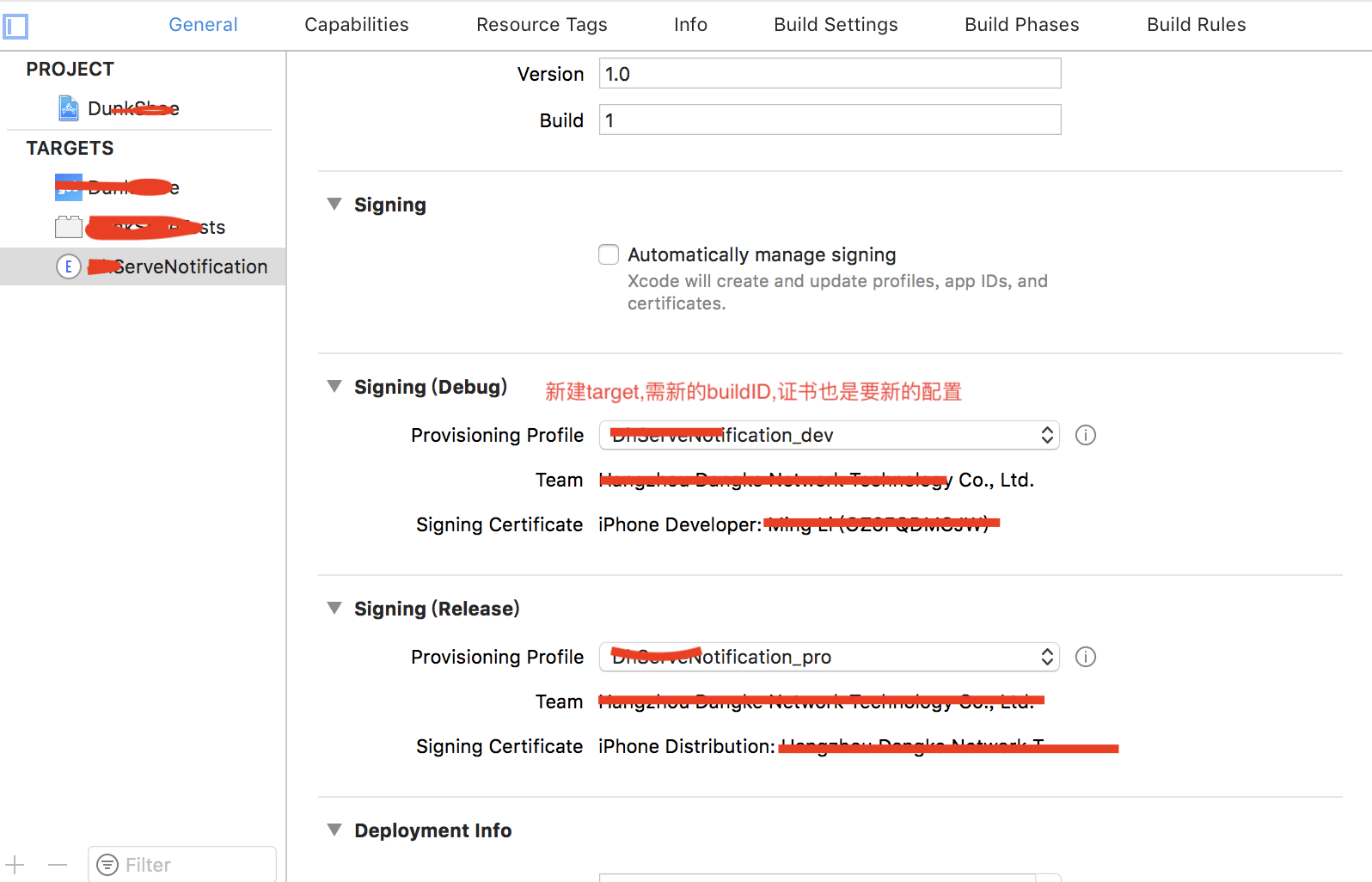
3.然后对主target进行设置

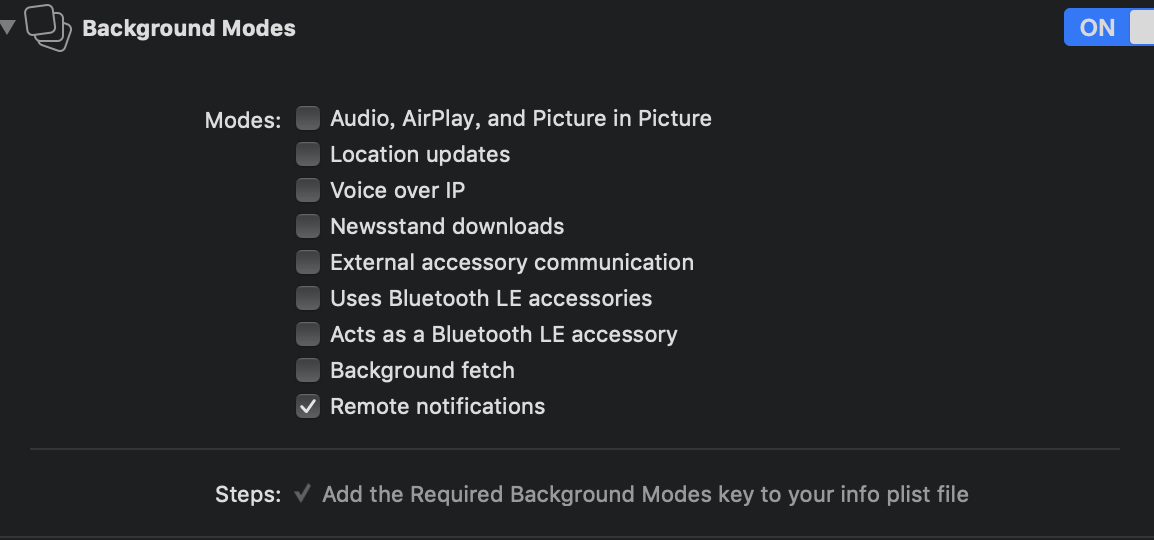
注意如果没有用到后台的播放什么的只选Remote notifications,免得被拒绝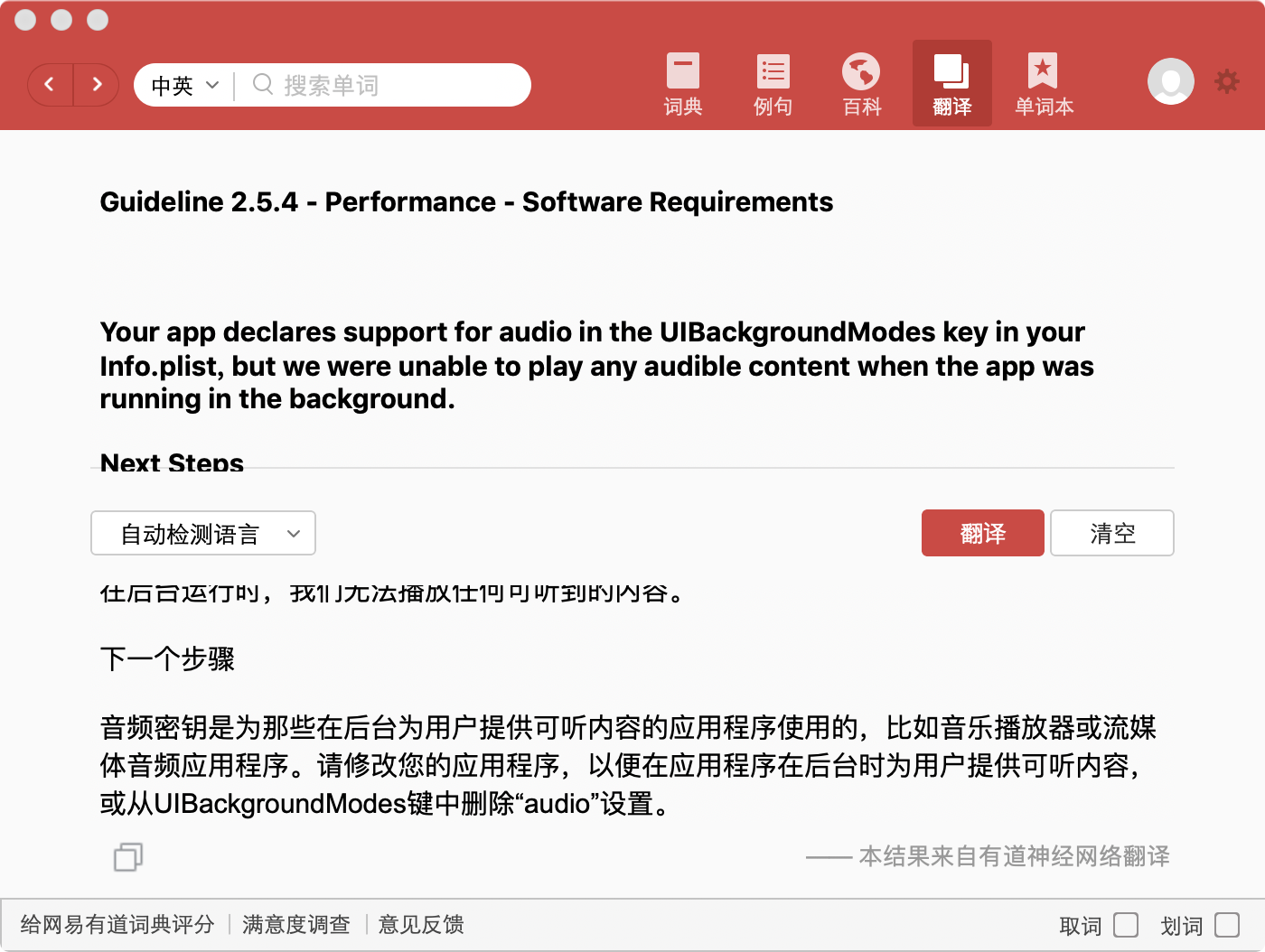
4. 对扩展的target进行设置

5.这里用的是极光推送,需要极光的相关文件(需要文件的可以去极光开发中心获取demo)

6.扩展target添加文件
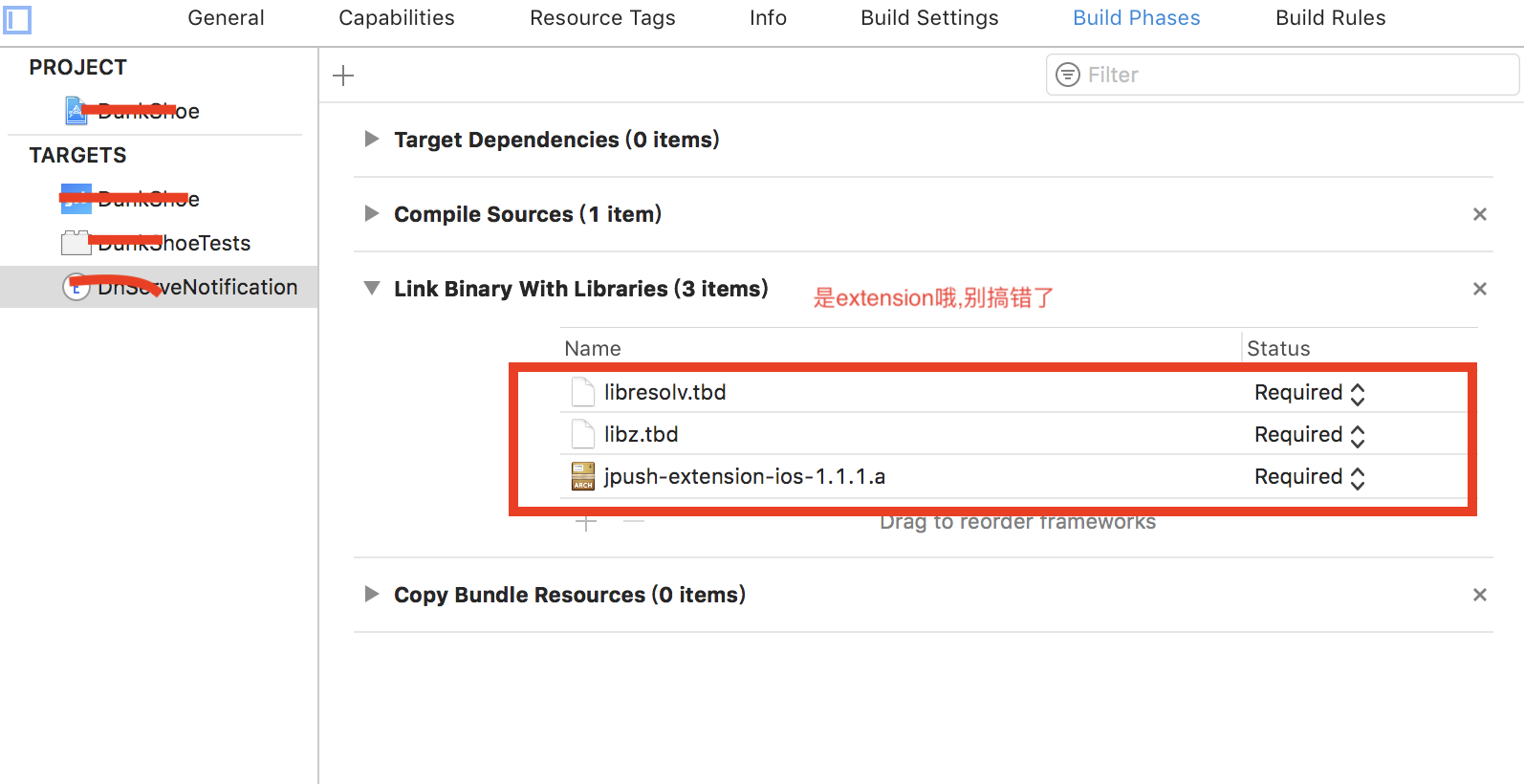
7.当添加后为了可以访问http,在对应的plist文件进行设置
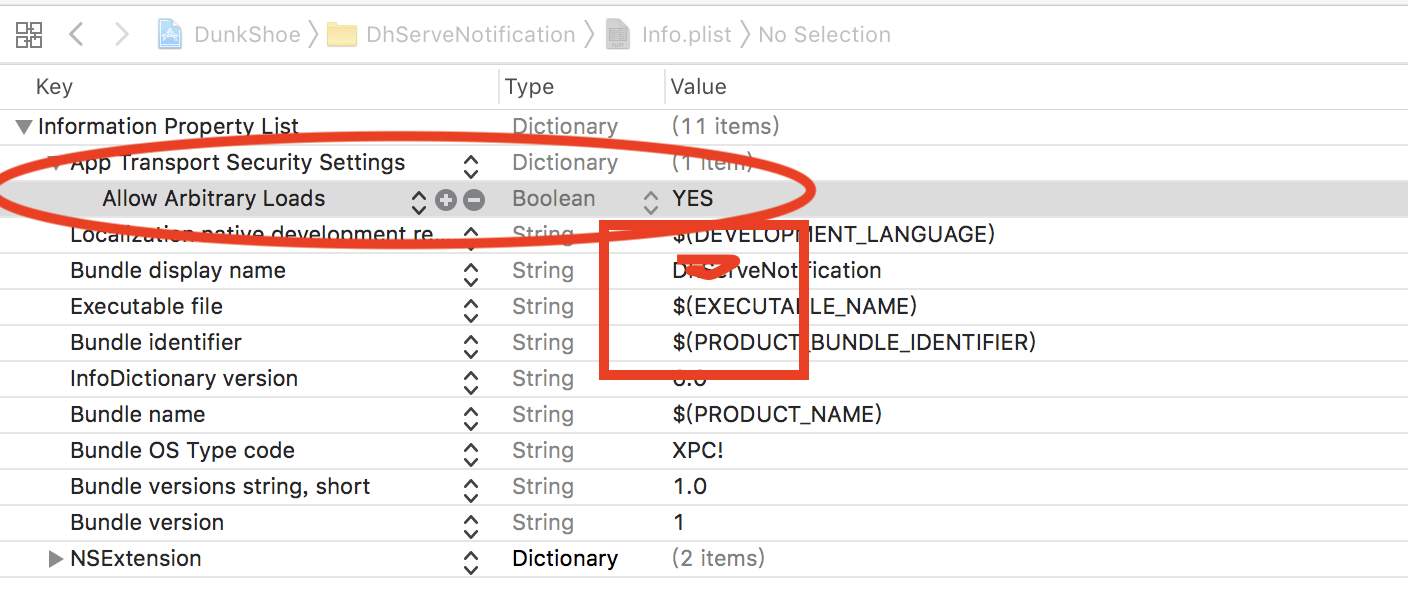
8.设置完成之后就可以看代码了

#import "NotificationService.h"

#import "JPushNotificationExtensionService.h"

@interface NotificationService ()

@property (nonatomic, strong) void (^contentHandler)(UNNotificationContent *contentToDeliver);

@property (nonatomic, strong) UNMutableNotificationContent *bestAttemptContent;

@end

@implementation NotificationService

- (void)didReceiveNotificationRequest:(UNNotificationRequest *)request withContentHandler:(void (^)(UNNotificationContent * _Nonnull))contentHandler {

    self.contentHandler = contentHandler;

    self.bestAttemptContent = [request.content mutableCopy];

    //    self.bestAttemptContent.title = [NSString stringWithFormat:@"%@ [NotificationService]", self.bestAttemptContent.title];

    NSString * attachmentPath = self.bestAttemptContent.userInfo[@"myAttachmentURL"];

    //if exist

    if (attachmentPath) {

        //download

        NSURL *fileURL = [NSURL URLWithString:attachmentPath];

        [self downloadAndSave:fileURL handler:^(NSString *localPath) {

            if (localPath) {

                UNNotificationAttachment * attachment = [UNNotificationAttachment attachmentWithIdentifier:@"myAttachment" URL:[NSURL fileURLWithPath:localPath] options:nil error:nil];

                self.bestAttemptContent.attachments = @[attachment];

            }

            [self apnsDeliverWith:request];

        }];

    }else{

        [self apnsDeliverWith:request];

    }

}

- (void)downloadAndSave:(NSURL *)fileURL handler:(void (^)(NSString *))handler {

    NSURLSession * session = [NSURLSession sharedSession];

    NSURLSessionDownloadTask *task = [session downloadTaskWithURL:fileURL completionHandler:^(NSURL * _Nullable location, NSURLResponse * _Nullable response, NSError * _Nullable error) {

        NSString *localPath = nil;

        if (!error) {

            NSString * localURL = [NSString stringWithFormat:@"%@/%@", NSTemporaryDirectory(),fileURL.lastPathComponent];

            if ([[NSFileManager defaultManager] moveItemAtPath:location.path toPath:localURL error:nil]) {

                localPath = localURL;

            }

        }

        handler(localPath);

    }];

    [task resume];

}

- (void)apnsDeliverWith:(UNNotificationRequest *)request {

    //please invoke this func on release version

    //[JPushNotificationExtensionService setLogOff];

    //service extension sdk

    //upload to calculate delivery rate

    [JPushNotificationExtensionService jpushSetAppkey:@"3a6190XXXXXXX28907"];

    [JPushNotificationExtensionService jpushReceiveNotificationRequest:request with:^ {

        NSLog(@"apns upload success");

        self.contentHandler(self.bestAttemptContent);

    }];

}

- (void)serviceExtensionTimeWillExpire {

    self.contentHandler(self.bestAttemptContent);

}

@end
其中的 "myAttachmentURL" 是自己定义的即可 (代码请仔细阅读,原理是获取网络图片,然后再显示)
9. 通过极光进行推送测试(目标平台选择开发环境即可,证书配置,请参考极光文档)
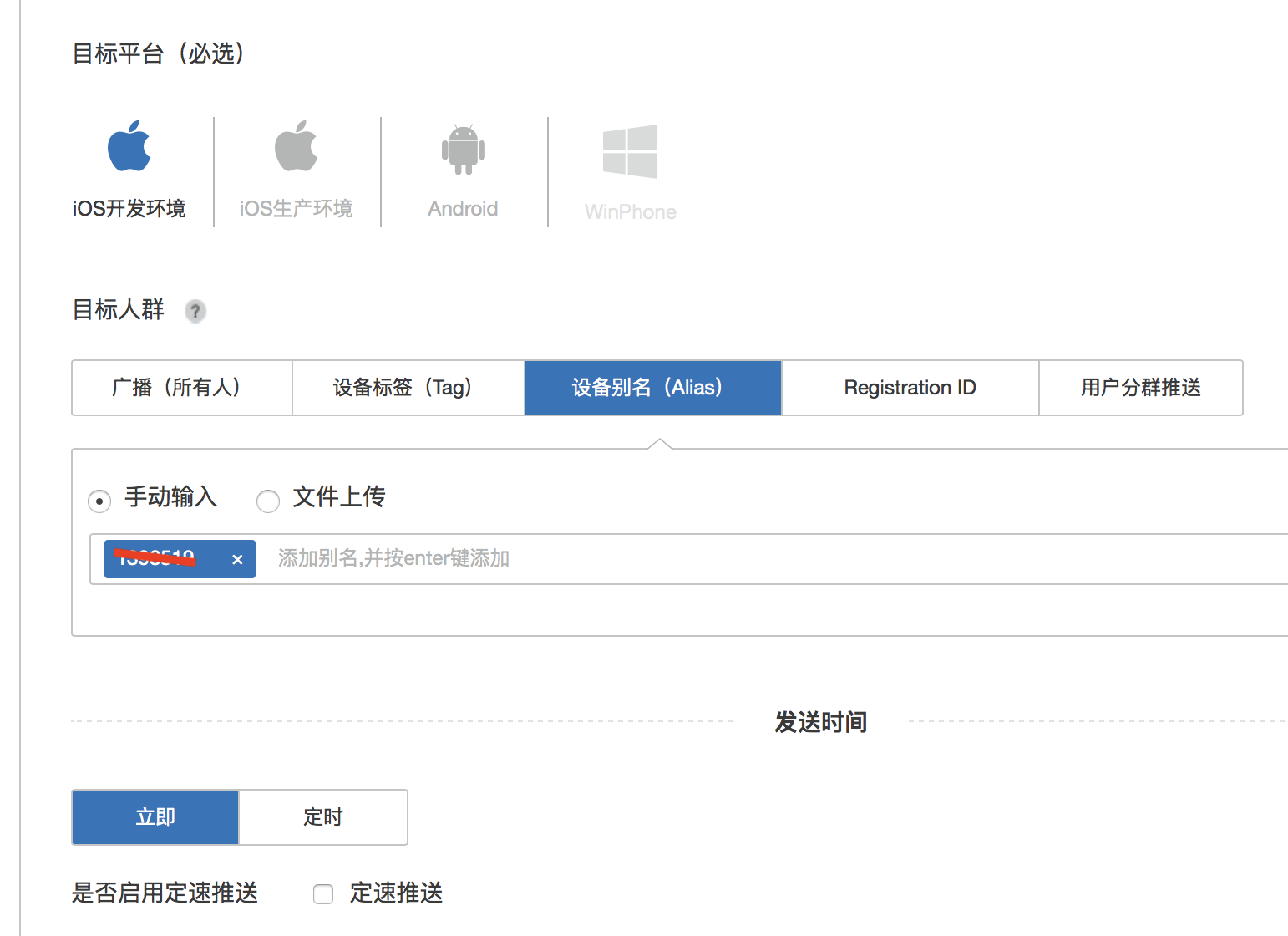
10.设置参数, 测试开始完成推送. "myAttachmentURL"是自己设置的哦!记得设置 mutable-content

11.收到推送

12.Notification Service断点调试说明
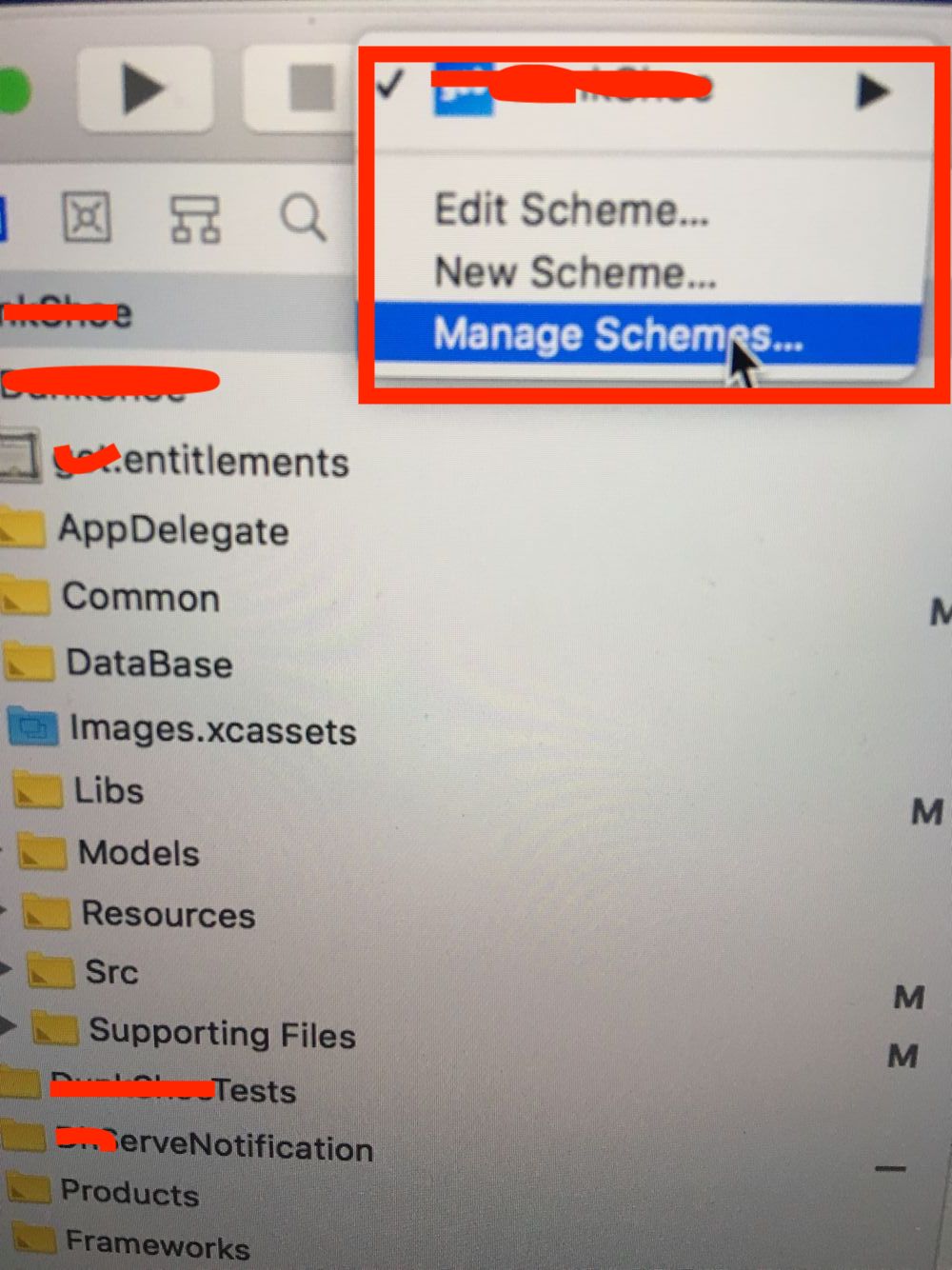
选择target时并没有我们的扩展target,需要点击管理target进而点击Autocreate Schemes Now
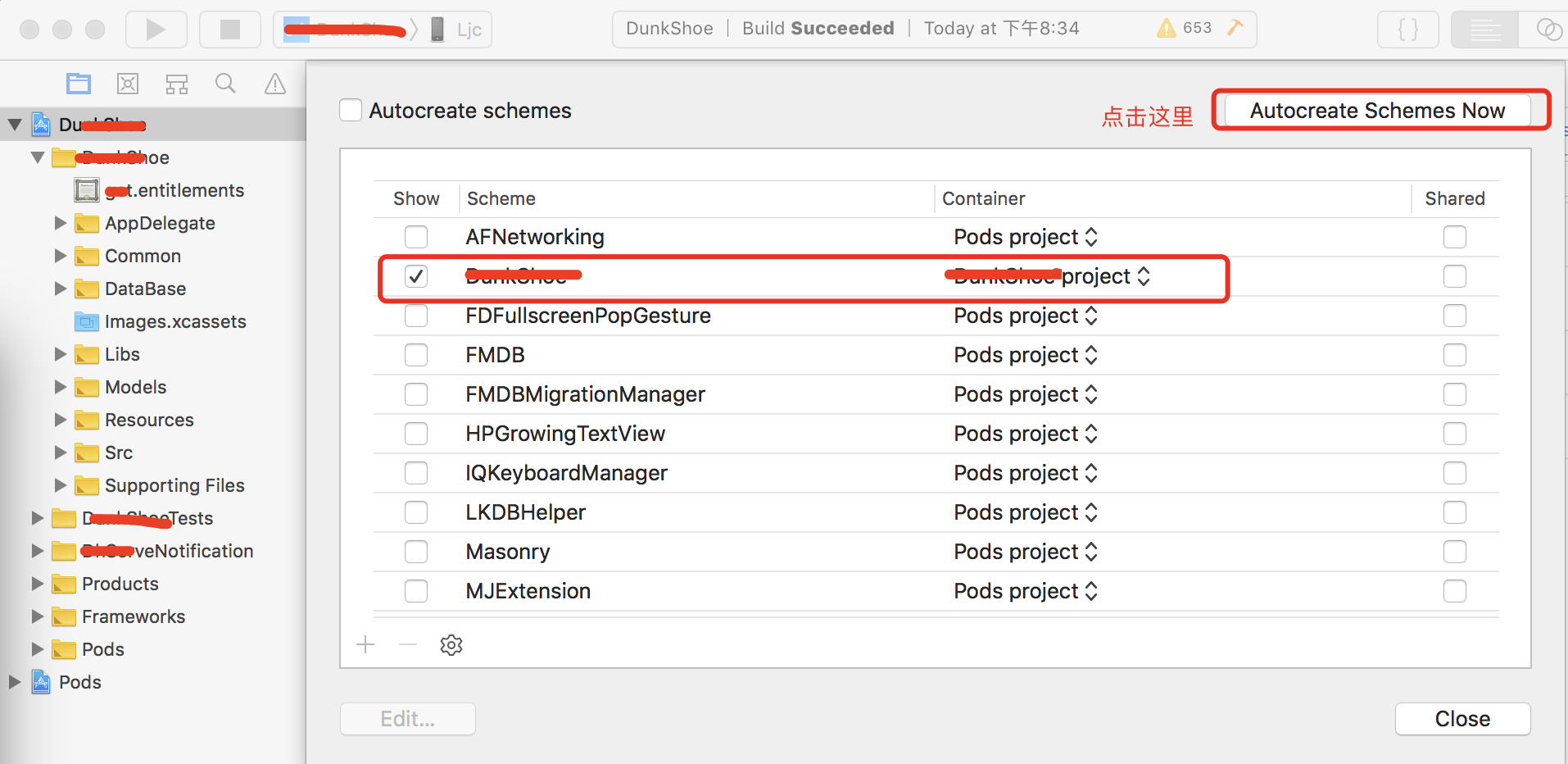

这个时候扩展的target出现了
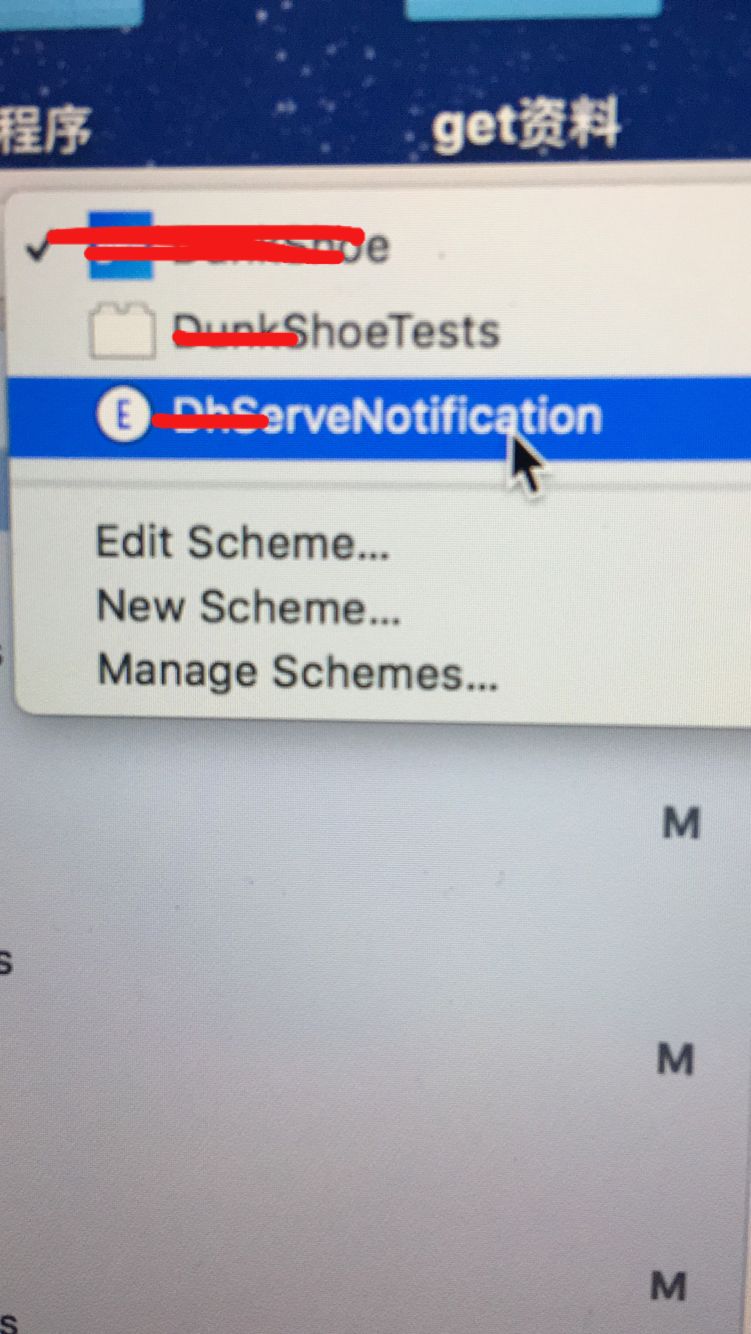
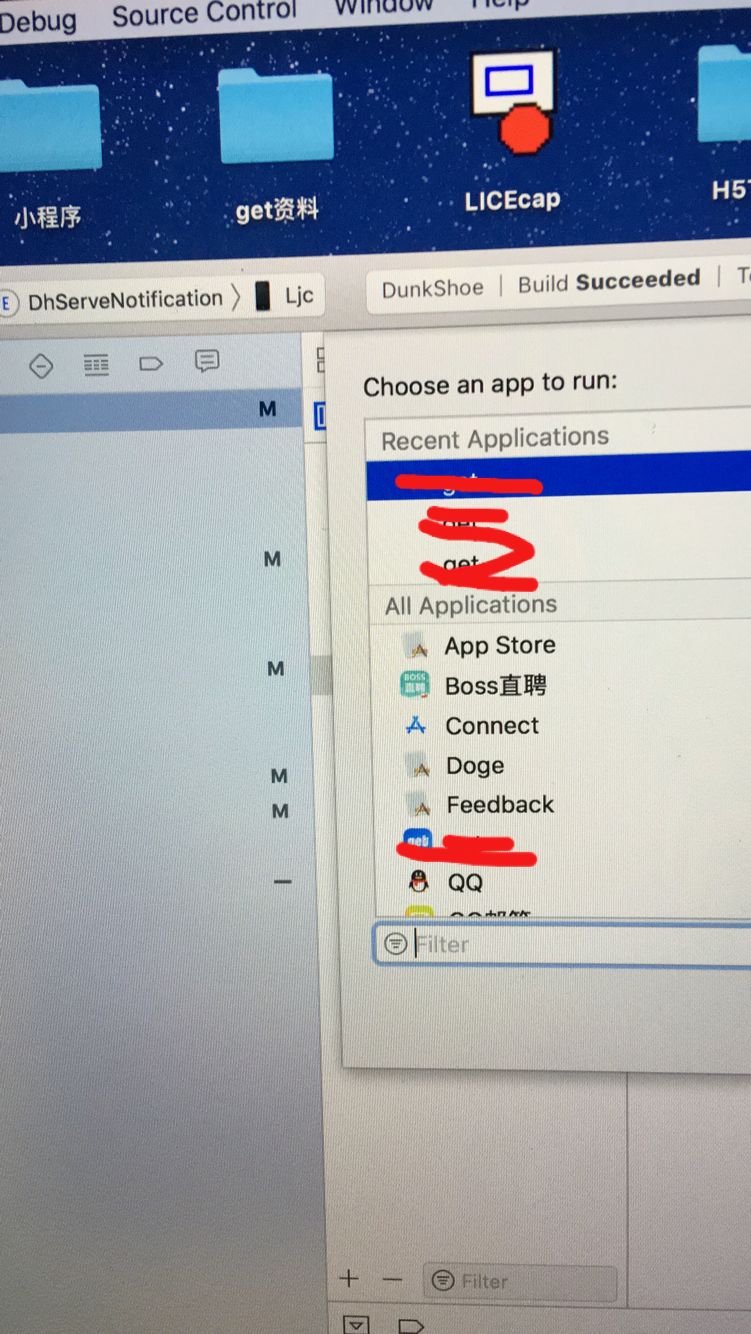
好了可以运行了(会进行一次选择,选择我们的主app即可,运行后在 NotificationService.m 文件中的断点就可以捕捉到啦)
到这里Notification Service的使用说明就结束了,以后有补充的再写啦!
通知实战 设置通知图片(iOS10以后的)的更多相关文章
- iOS: 本地通知的前后变化(iOS10)
一.介绍 通知和推送是应用程序中很重要的组成部分.本地通知可以为应用程序注册一些定时任务,例如闹钟.定时提醒等.远程推送则更强大,提供了一种通过服务端主动推送消息到客户端的方式,服务端可以更加灵活地 ...
- iOS10以前的本地通知和远程通知
一.简介 分为本地推送和远程推送2种.可以在应用没有打开甚至手机锁屏情况下给用户以提示.它们都需要注册,注册后系统会弹出提示框(如下图)提示用户是否同意,如果同意则正常使用:如果用户不同意则下次打开程 ...
- Rancher2.0中邮件通知的设置
1-邮件通知的设置-中国电信189邮箱 2-2-邮件通知的设置-腾讯免费企业邮箱 **说明:网易163邮箱.QQ邮箱没有设置成功,可能是因为邮箱设置得太安全的缘故. 参考链接: 中国电信189邮箱 ...
- centos 7 keepalived故障邮件通知实战(附Python邮件发送脚本)
centos 7 keepalived故障邮件通知实战(附Python邮件发送脚本) ##################### sendmail.py begin ######## ...
- Android中的通知—Notification 自定义通知
Android中Notification通知的实现步骤: 1.获取NotificationManager对象NotificationManager的三个公共方法:①cancel(int id) 取消以 ...
- iOS中 本地通知/本地通知详解 韩俊强的博客
布局如下:(重点讲本地通知) iOS开发者交流QQ群: 446310206 每日更新关注:http://weibo.com/hanjunqiang 新浪微博 Notification是智能手机应用编 ...
- iOS(本地通知与远程通知)
iOS 推送通知有两种:本地推送.远程推送. 本地推送 : 在不需要联网的情况下,由APP发出推送,常用于某一时刻的通知,如闹钟.本地通送有局限性在于当APP处于后台或者退出时就无法发出通知. 远程 ...
- ios开发——实用技术OC-Swift篇&本地通知与远程通知详解
本地通知与远程通知详解 一:本地通知 Local Notification的作用 Local Notification(本地通知) :是根据本机状态做出的通知行为,因此,凡是仅需依赖本机状态即可判 ...
- iOS创建本地通知和删除对应的通知,工作日通知
本文的代码主要是:创建本地通知,删除对应的本地通知,创建工作日闹钟 直接上代码: // // ViewController.m // LocalNSNotification // // Created ...
随机推荐
- web服务器,验证码,Xftp使用方法
IIS操作步骤 直接装的wamp 腾讯云主机控制台 安全组里可以配置要开放的端口 关闭防火墙 (C:\wamp\bin\apache\Apache2.4.4) 打开httpd.conf文件 requi ...
- 知乎专栏开放性api
概述 这是我在工作中扒的知乎专栏的开放性api,记录下来供以后开发时参考,相信对其他人也有用. 参考资料: zhihu库 zhihu-oauth库 开放性api 其中hemingke是专栏名字,可以换 ...
- 引入外部 CDN失效时--怎么加载本地资源文件(本文以jquery为例)
相信大家都使用过CDN静态资源库,比如下面 CDN官方静态资源库:https://cdnjs.com/ 七牛前端公开库:http://staticfile.org (vue,react,nl都有) ...
- 【Caffe篇】--Caffe从入门到初始及各层介绍
一.前述 Caffe,全称Convolutional Architecture for Fast Feature Embedding.是一种常用的深度学习框架,主要应用在视频.图像处理方面的应用上.c ...
- UmengShareDemo【友盟分享SDK集成,基于V6.9.3版本】
版权声明:本文为HaiyuKing原创文章,转载请注明出处! 前言 这里简单记录下友盟分享SDK集成的步骤. 如果想要使用自定义分享对话框实现,请参考<ShareDialogDemo[分享对话框 ...
- BannerDemo【图片轮播图控件】
版权声明:本文为HaiyuKing原创文章,转载请注明出处! 前言 这里简单记录下一个开源库youth5201314/banner的运用.具体用法请阅读<youth5201314/banner& ...
- 记录DEV gridview获取行列数据方法
DataRow dr = this.gridView1.GetDataRow(this.gridView1.FocusedRowHandle);//获取选中行 string str = gridVie ...
- Spring Boot连接MySQL数据库
上篇 只需两步!Eclipse+Maven快速构建第一个Spring Boot项目 已经构建了一个Spring Boot项目,本文在此基础上进行连接MySQL数据库的操作. 1. pom.xml添加依 ...
- [转]AI+RPA 融合更智能
本文转自:https://www.jianshu.com/p/cf25b3dfc0f0 前面已经分析过多次RPA的本质,可以参考 [脱下外衣],看看RPA机器人到底是什么? 哪些AI相关应用技 ...
- asp.net后台管理系统-登陆模块-是否自动登陆
FormsAuthentication.SetAuthCookie(UserFlag, createPersistentCookie); createPersistentCookie是否永久保存coo ...