
分析 ajax 请求并抓取今日头条街拍美图
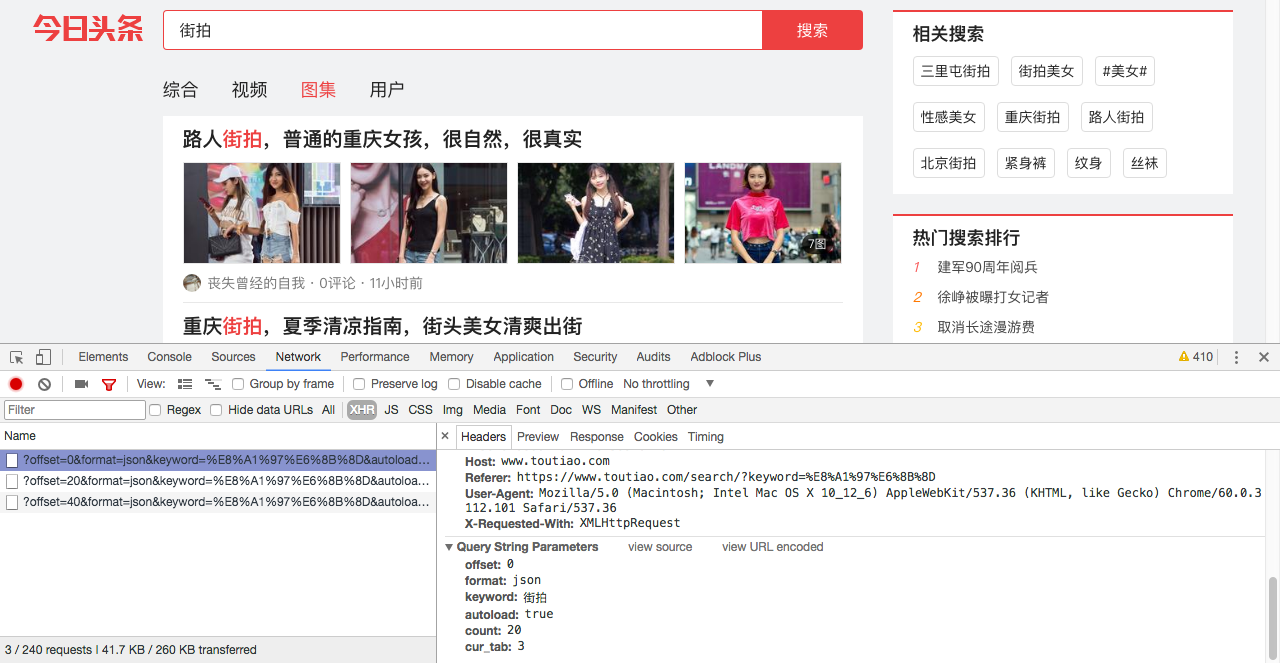
首先分析街拍图集的网页请求头部:
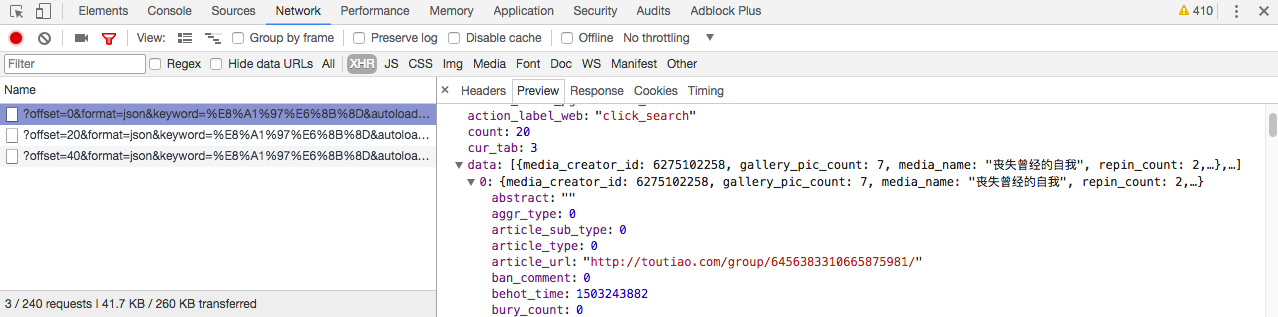
在 preview 选项卡我们可以找到 json 文件,分析 data 选项,找到我们要找到的图集地址 article_url:
选中其中一张图片,分析 json 请求,可以找到图片地址在 gallery 一栏:
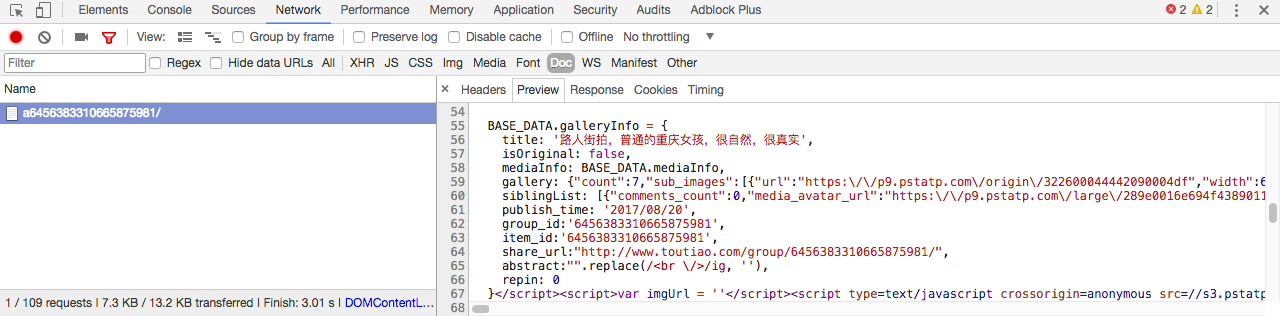
找到图片地址,接下来我们就可以来写代码了:
1.导入必要的库:
import requests

import json

import re

import pymongo

import os

from hashlib import md5

from multiprocessing import Pool

from json.decoder import JSONDecodeError

from requests.exceptions import RequestException

from urllib.parse import urlencode

from bs4 import BeautifulSoup
2.获取索引页并分析:
def get_page_index(offset, keyword):

    data = {

        'offset': offset,

        'format': 'json',

        'keyword': keyword,

        'autoload': 'true',

        'count': 20,

        'cur_tab': 3

    }

    url = 'https://www.toutiao.com/search_content/?' + urlencode(data)

    try:

        response = requests.get(url)

        if response.status_code == 200:

            return response.text

        return None

    except RequestException:

        print(' 请求索引页出错')

        return None

def parse_page_index(text):

    try:

        data = json.loads(text)

        if data and 'data' in data.keys():

            for item in data.get('data'):

                yield item.get('article_url')

    except JSONDecodeError:

        pass
3.获取详情页并分析:
def get_page_detail(url):

    try:

        response = requests.get(url)

        if response.status_code == 200:

            return response.text

        return None

    except RequestException:

        print(' 请求详情页出错')

        return None

def parse_page_detail(html, url):

    soup = BeautifulSoup(html, 'lxml')

    title = soup.select('title')[0].get_text()

    images_pattern = re.compile('gallery: (.*?),\n', re.S)

    result = re.search(images_pattern, html)

    if result:

        data = json.loads(result.group(1))

        if data and 'sub_images' in data.keys():

            sub_images = data.get('sub_images')

            images = [item.get('url') for item in sub_images]

            for image in images:

                download_images(image)

            return {

                'title': title,

                'url': url,

                'images': images

            }
4.使用 MongoDB 数据库存储数据:
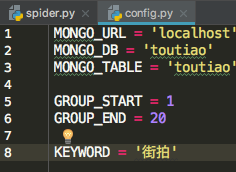
首先定义一个 config.py 文件,配置默认参数:
写入 MongoDB:
def save_to_mongo(result):

    if db[MONGO_TABLE].insert(result):

        print(' 存储到 MongoDB 成功', result)

        return True
5.存储图片到本地:
def download_images(url):

    print(' 正在下载', url)

    try:

        response = requests.get(url)

        if response.status_code == 200:

            save_images(response.content)

        return None

    except RequestException:

        print(' 请求图片出错')

        return None

def save_images(content):

    file_path = '{0}/{1}.{2}'.format(os.getcwd(), md5(content).hexdigest(), 'jpg')

    if not os.path.exists(file_path):

        with open(file_path, 'wb') as f:

            f.write(content)

            f.close()
6.最后定义 main()函数,并开启多线程抓取20页图集:
def save_images(content):

    file_path = '{0}/{1}.{2}'.format(os.getcwd(), md5(content).hexdigest(), 'jpg')

    if not os.path.exists(file_path):

        with open(file_path, 'wb') as f:

            f.write(content)

            f.close()

def main(offset):

    text = get_page_index(offset, KEYWORD)

    for url in parse_page_index(text):

        html = get_page_detail(url)

        if html:

            result = parse_page_detail(html, url)

            if result:

                save_to_mongo(result)

if __name__ == '__main__':

    groups = [x * 20 for x in range(GROUP_START, GROUP_END + 1)]

    pool = Pool()

    pool.map(main, groups)
代码GitHub地址:https://github.com/weixuqin/PythonProjects/tree/master/jiepai
分析 ajax 请求并抓取今日头条街拍美图的更多相关文章
- 分析Ajax请求并抓取今日头条街拍美图
项目说明 本项目以今日头条为例,通过分析Ajax请求来抓取网页数据. 有些网页请求得到的HTML代码里面并没有我们在浏览器中看到的内容.这是因为这些信息是通过Ajax加载并且通过JavaScript渲 ...
- 2.分析Ajax请求并抓取今日头条街拍美图
import requests from urllib.parse import urlencode # 引入异常类 from requests.exceptions import RequestEx ...
- python爬虫知识点总结(十)分析Ajax请求并抓取今日头条街拍美图
一.流程框架
- 15-分析Ajax请求并抓取今日头条街拍美图
流程框架: 抓取索引页内容:利用requests请求目标站点,得到索引网页HTML代码,返回结果. 抓取详情页内容:解析返回结果,得到详情页的链接,并进一步抓取详情页的信息. 下载图片与保存数据库:将 ...
- Python爬虫系列-分析Ajax请求并抓取今日头条街拍图片
1.抓取索引页内容 利用requests请求目标站点,得到索引网页HTML代码,返回结果. 2.抓取详情页内容 解析返回结果,得到详情页的链接,并进一步抓取详情页的信息. 3.下载图片与保存数据库 将 ...
- 【Python爬虫案例学习】分析Ajax请求并抓取今日头条街拍图片
1.抓取索引页内容 利用requests请求目标站点,得到索引网页HTML代码,返回结果. from urllib.parse import urlencode from requests.excep ...
- python爬虫之分析Ajax请求抓取抓取今日头条街拍美图(七)
python爬虫之分析Ajax请求抓取抓取今日头条街拍美图 一.分析网站 1.进入浏览器,搜索今日头条,在搜索栏搜索街拍,然后选择图集这一栏. 2.按F12打开开发者工具,刷新网页,这时网页回弹到综合 ...
- Python Spider 抓取今日头条街拍美图
""" 抓取今日头条街拍美图 """ import os import time import requests from hashlib ...
- 爬虫(八):分析Ajax请求抓取今日头条街拍美图
(1):分析网页 分析ajax的请求网址,和需要的参数.通过不断向下拉动滚动条,发现请求的参数中offset一直在变化,所以每次请求通过offset来控制新的ajax请求. (2)上代码 a.通过aj ...
随机推荐
- easyui控件写法造成的错误
<input id="driver" name="driver" class="easyui-combobox" data-optio ...
- 微信公众号报错 config:invalid signature
官方已经提供了微信 JS 接口签名校验工具(http://mp.weixin.qq.com/debug/cgi-bin/sandbox?t=jsapisign),填入相应的参数就能出来相应的signa ...
- ES5和ES6两个值的比较
ES5比较两个值是否相等 1)相等运算符 (==):比较两个数值是否相等,自动转换类型后再进行比较 2)全等运算符(===):比较两个比较值的数值和类型是否相等 ES5的特殊: ES6提出" ...
- 项目Alpha冲刺Day10
一.会议照片 二.项目进展 1.今日安排 解决前后台联调问题,完善全局的请求和路由跳转处理,添加空文件完善路由信息,优化界面跳转等待.完成个人信息和修改密码.修改前台数据组织和方法调用方式.解决登录和 ...
- 项目Beta冲刺Day5
项目进展 李明皇 今天解决的进度 服务器端还未完善,所以无法进行联动调试.对页面样式和逻辑进行优化 明天安排 前后端联动调试 林翔 今天解决的进度 完成维护登录态,实现图片上传,微信开发工具上传图片不 ...
- python 操作SQLAlchemy
SQLAlchemy python链接 pymysql mysql+pymysql://<username>:<password>@<host>/<dbnam ...
- fabric.js和高级画板
本文介绍fabric.js框架使用,以及使用fabricjs打造一个高级画板程序. 高级画板功能介绍 全局绘制颜色选择 护眼模式.网格模式切换 自由绘制 画箭头 画直线 画虚线 画圆/椭圆/矩形/直角 ...
- JAVA_SE基础——1.JDK&JRE下载及安装
这是我学了JAVA来写的第一篇博客: 我首先是在传智播客领了张.毕向东老师的免费JAVA学习光盘来学习! 下面我来教大家安装使用JAVA时候必备的JDK 1.首先上甲骨文公司的官方网站下载JDK的安装 ...
- windows 10下通过python3.6成功搭建jupyter 服务器
最近通过python学习爬虫技术,发现一个工具jupyter notebook很不错,该工具明显优势通过浏览器可以输入多行python代码,支持在线运行以及运行结果保存功能,在线验证python小模块 ...
- 我的PCB电路设计(一)
我的制板规则 过孔大小:14/24mil-(12/22-28/50) 一般过孔没必要太大.如果电流较大可以适当增大过孔,或者多加几个过孔 线宽大小:小信号线8mil,大电流线不等按1A电流30mil ...