
curl支持HTTP和https
设计流程
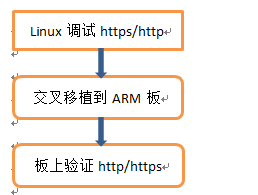
基于curl工具实现https/http,设计初步流程为:linux平台验证→→交叉移植arm板。
linux系统下调试http和https
1.1 Linux安装curl
输入命令:sudo apt-get install libcurl4-openssl-dev
安装头文件目录:/usr/include/curl/
1.2 Linux系统应用软件编写和编译
主要初始化代码:
 #include <stdio.h>

 #include <stdlib.h>

 #include <unistd.h>

 #include <string.h>

 #include "curl/curl.h"

 #define false 0

 #define true  1

 //#define POSTURL    "http://www.xiami.com/member/login"

 //#define POSTURL   "http://172.16.1.178:8000/api/pushOBEData"

 #define POSTURL   "https://172.16.1.178:444/api/pushOBEData"

 #define POSTFIELDS "email=myemail@163.com&password=mypassword&autologin=1&submit=登 录&type="

 size_t process_data(void *buffer, size_t size, size_t nmemb, void *user_p)

 {

     char bufR[];

     char msg[];

     size_t return_size = ;

     return_size = fwrite(buffer,size, nmemb, user_p);

     fflush(user_p);

     printf("%s>%d-%s\n", __func__, return_size, buffer);

     return (size*nmemb);

 }

 int main(int argc, char **argv)

 {

     // 初始化libcurl

     CURLcode return_code;

     char *pCaPath = NULL;

     return_code = curl_global_init(CURL_GLOBAL_ALL);

     if (CURLE_OK != return_code)

     {

         printf("init libcurl failed.\n");

         return -;

     }

     // 获取easy handle

     CURL *easy_handle = curl_easy_init();

     if (NULL == easy_handle)

     {

         printf("get a easy handle failed.\n");

         return -;

     }

     struct curl_slist* headers = NULL;      //定义Curl的头部结构体

     //---------------------给curl要发送的报文添加头部----------------------

     headers = curl_slist_append(headers, "Accept:application/json");            //表示本地cURL接受报文为json

     headers = curl_slist_append(headers, "Content-Type:application/json");      //请求我们发送的报文为json,注意这里一定要说明自己发送的信息为JSON类型的,否则对方使用的应用层函数可能无法正确的识别解析

 //    headers = curl_slist_append(headers, "charset:utf-8");                      //表示我们发送的报文的编码格式为utf-8类型的格式

     //---------------------------------------------------------------------

     curl_easy_setopt(easy_handle, CURLOPT_HTTPHEADER, headers);            //给cURL结构体添加我们刚刚组成好的头部

     FILE *fp ;

     if(!(fp = fopen("data.html", "ab+")))

     {

         printf("fopen erro\n");

         return -;

     }

     fseek(fp,  , SEEK_SET);

     // 设置easy handle属性

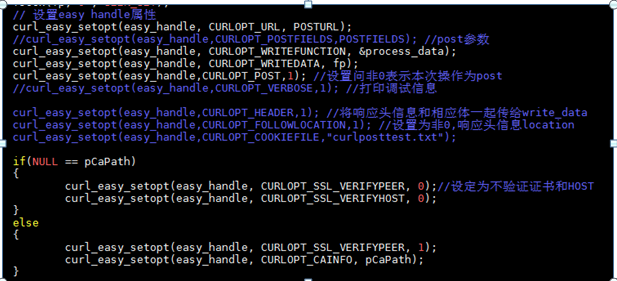
     curl_easy_setopt(easy_handle, CURLOPT_URL, POSTURL);

     //curl_easy_setopt(easy_handle,CURLOPT_POSTFIELDS,POSTFIELDS); //post参数

     curl_easy_setopt(easy_handle, CURLOPT_WRITEFUNCTION, &process_data);

     curl_easy_setopt(easy_handle, CURLOPT_WRITEDATA, fp);

     curl_easy_setopt(easy_handle,CURLOPT_POST,); //设置问非0表示本次操作为post

     //curl_easy_setopt(easy_handle,CURLOPT_VERBOSE,1); //打印调试信息

 //    curl_easy_setopt(easy_handle, CURLOPT_TIMEOUT, 30); // 设置超时限制防止死循环

 //    curl_easy_setopt(easy_handle,CURLOPT_HEADER,1); //将响应头信息和相应体一起传给write_data

 //    curl_easy_setopt(easy_handle,CURLOPT_FOLLOWLOCATION,1); //设置为非0,响应头信息location

 //    curl_easy_setopt(easy_handle,CURLOPT_COOKIEFILE,"curlposttest.txt");

     if(NULL == pCaPath)

     {

         curl_easy_setopt(easy_handle, CURLOPT_SSL_VERIFYPEER, );//设定为不验证证书和HOST

         curl_easy_setopt(easy_handle, CURLOPT_SSL_VERIFYHOST, );

     }

     else

     {

         curl_easy_setopt(easy_handle, CURLOPT_SSL_VERIFYPEER, );

         curl_easy_setopt(easy_handle, CURLOPT_CAINFO, pCaPath);

     }

     // 执行数据请求

     printf("hello https---------------\n");

     while()

     {

         char testbuf[];

         static testCnn = ;

         testCnn++;

         snprintf(testbuf,sizeof(testbuf), "test cnn = %d", testCnn);

         curl_easy_setopt(easy_handle,CURLOPT_POSTFIELDS,testbuf); //post参数

         return_code = curl_easy_perform(easy_handle);

         if (return_code != CURLE_OK)

         {

             switch(return_code)

             {

                 case CURLE_UNSUPPORTED_PROTOCOL:

                     fprintf(stderr,"不支持的协议,由URL的头部指定\n");

                 case CURLE_COULDNT_CONNECT:

                     fprintf(stderr,"不能连接到remote主机或者代理\n");

                 case CURLE_HTTP_RETURNED_ERROR:

                     fprintf(stderr,"http返回错误\n");

                 case CURLE_READ_ERROR:

                     fprintf(stderr,"读本地文件错误\n");

                 default:

                     fprintf(stderr,"返回值:%d\n",return_code);

             }

             return -;

         }

         sleep();

     }

     // 释放资源

     sleep();

     fclose(fp);

     curl_easy_cleanup(easy_handle);

     curl_global_cleanup();

     return ;

 }
gcc -o curlTest curlTest.c -l curl
2 ARM板上curl的移植
因为要支持https需要移植openssl 和 curl
其中要注意只有在curl加入openssl才能支持https。
2.1 Openssl移植
开发环境
Ubuntu 14.04
gcc-linaro-arm-linux-gnueabihf-4.9-2014.07
移植步骤
1.从OpenSSL官网下载最新源码
openssl-1.0.2l.tar.gz。
2.执行下面命名解压缩:tar
zxvf openssl-1.0.2l.tar.gz
3.进入刚解压的目录cd openssl-1.0.2l/,执行下面指令,做相应的配置:
./config
no-asm shared --prefix=/usr/local/ssl
--cross-compile-prefix=/opt/gcc-linaro-arm-linux-gnueabihf-4.9-2014.07_linux/bin/arm-linux-gnueabihf-
no-asm: 是在交叉编译过程中不使用汇编代码代码加速编译过程,原因是它的汇编代码是对arm格式不支持的。
shared :生成动态连接库。
--prefix :指定make install后生成目录的路径,不修改此项则默认为OPENSSLDIR目录(/usr/local/ssl)。
4.修改Makefile:
CC=/opt/gcc-linaro-arm-linux-gnueabihf-4.9-2014.07_linux/bin/arm-linux-gnueabihf-gcc (此处交叉工具链用绝对路径)
删除 CFLAG= 中的-m64
AR=/opt/gcc-linaro-arm-linux-gnueabihf-4.9-2014.07_linux/bin/arm-linux-gnueabihf-ar $(ARFLAGS) r
RANLIB=/opt/gcc-linaro-arm-linux-gnueabihf-4.9-2014.07_linux/bin/arm-linux-gnueabihf-ranlib
NM=/opt/gcc-linaro-arm-linux-gnueabihf-4.9-2014.07_linux/bin/arm-linux-gnueabihf-nm
SHARED_LDFLAGS=
注:上面各项都是修改后的,没有增加内容,只是在原来基础上做修改,故没有列出修改前的内容。
5.执行下面命令,编译OpenSSL库:
make
6.执行下面命令,将编译好的库文件拷贝到指定目录:
make install
7.include下文件在编译程序的时候需要指定include的路径。而lib下在程序运行时会用到,需要将lib下文件拷贝到开发板中。
2.2 curl在ARM中交叉移植
开发环境
Ubuntu 14.04
gcc-linaro-arm-linux-gnueabihf-4.9-2014.07
curl-7.59.0.tar.gz
移植步骤
1.下载最新源码 curl-7.59.0.tar.gz。
2.执行下面命名解压缩:tar
zxvf curl-7.59.0.tar.gz
3.进入刚解压的目录cd curl-7.59.0/,执行下面指令,做相应的配置:
./configure
--prefix=/home/huali/usrApp/libcurl/ --with-ssl=/usr/local/ssl
--host=arm-linux
CC=/opt/gcc-linaro-arm-linux-gnueabihf-4.9-2014.07_linux/bin/arm-linux-gnueabihf-gcc
CXX=/opt/gcc-linaro-arm-linux-gnueabihf-4.9-2014.07_linux/bin/arm-linux-gnueabihf-g++
--with-ssl:检测ssl 库所在位置
4.执行下面命令:
make
5.执行下面命令,将编译好的库文件拷贝到指定目录:

make install
6. 然后我们把libcurl整个文件夹拷贝到板子上
7. 修改环境变量
这里我修改了/etc/profile文件,目的是使修改对所有用户生效,不用每次都修改了。我们在第二行的PATH语句末尾添加“:/lib/bin”就可以了,然后保存退出。输入sync语句同步文件,然后重启即可。
8. 可以看到我们成功安装curl

2.3.CMAKE编译
Cmake编译教程这里不再描述。
cmake .
make
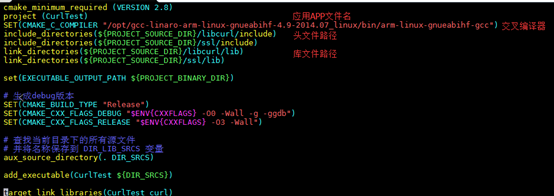
在arm板中运行curlTest执行文件即可。

curl支持HTTP和https的更多相关文章
- curl 支持 http2
让 curl 支持 HTTP2 我们需要安装 nghttp2(http2 的 C 语言库) 源码安装 安装 nghttp2 git clone https://github.com/tatsuhiro ...
- CentOS 6.8 curl支持的NSS修改为OpenSSL的方法
在CentOS 6.8的系统里面的curl支持的https是nss版本的,而不是openssl,所以在php使用curl访问https的时候会报Unable to load client key -8 ...
- [archlinux][tls] archlinux下使curl支持sslv3的方法
描述 在archlinux下,希望使用curl产生一条使用sslv3的https访问请求. 使用curl的如下命令: curl -k -vvv --sslv3 https://192.168.7.9: ...
- php之curl实现http与https请求的方法
原文地址:http://m.jb51.net/show/56492 这篇文章主要介绍了php之curl实现http与https请求的方法,分别讲述了PHP访问http网页与访问https网页的实例 ...
- Https系列之三:让服务器同时支持http、https,基于spring boot
Https系列会在下面几篇文章中分别作介绍: 一:https的简单介绍及SSL证书的生成二:https的SSL证书在服务器端的部署,基于tomcat,spring boot三:让服务器同时支持http ...
- 牛客网Java刷题知识点之UDP协议是否支持HTTP和HTTPS协议?为什么?TCP协议支持吗?
不多说,直接上干货! 福利 => 每天都推送 欢迎大家,关注微信扫码并加入我的4个微信公众号: 大数据躺过的坑 Java从入门到架构师 人工智能躺过的坑 ...
- Spring Boot项目如何同时支持HTTP和HTTPS协议
如今,企业级应用程序的常见场景是同时支持HTTP和HTTPS两种协议,这篇文章考虑如何让Spring Boot应用程序同时支持HTTP和HTTPS两种协议. 准备 为了使用HTTPS连接器,需要生成一 ...
- nginx将http升级到https并且同时支持http和https两种请求、http自动转向https
1.http升级到https 1.1.检查 Nginx 是否支持 SSL /usr/local/nginx/sbin/nginx -V configure arguments中是否有--with-ht ...
- 【Nginx】将http升级到https并且同时支持http和https两种请求
一.如何将http升级到https 需要满足下面三个: 1.域名 2.nginx 3.SSL证书 一般第三方证书颁发机构下发的证书是收费的,一年好几千. 1) 从腾讯云申请免费的SSL证 ...
随机推荐
- JavaScript-Jquery实现全选反选
html: <dl> <dt><input type="checkbox" id="checkAll" /><labe ...
- iot会议纪要 20180105
1.需求概述设备 <-->物接入 <--> 云端认证授权协议解析主题 端点endpoint(地址)->设备thing(用户)->身份principal(密码)-&g ...
- C#微信公众号——自定义菜单
自定义菜单最多包括3个一级菜单,每个一级菜单最多包含5个二级菜单.一级菜单最多4个汉字,二级菜单最多7个汉字,多出来的部分将会以“...”代替.自定义菜单的介绍,可以看官方开发文档http://mp. ...
- python中 functools模块 闭包的两个好朋友partial偏函数和wraps包裹
前一段时间学习了python当中的装饰器,主要利用了闭包的原理.后来呢,又见到了python当中的functools模块,里面有很多实用的功能.今天我想分享一下跟装饰器息息相关的两个函数partial ...
- 在GridControl表格控件中实现多层级主从表数据的展示
在一些应用场景中,我们需要实现多层级的数据表格显示,如常规的二级主从表数据展示,甚至也有多个层级展示的需求,那么我们如何通过DevExpress的GridControl控表格件实现这种业务需求呢?本篇 ...
- JavaScript是如何面向对象的
一.引言 在16年的10月份,在校内双选会找前端实习的时候,hr问了一个问题:JavaScript的面向对象理解吗?我张口就说"JavaScript是基于原型的!".然后就没什么好 ...
- Scala:枚举类型的用法
枚举定义: /** * 场景类型的划分分类:划分出7类 */ object BuildingCalibrateHeightType extends Enumeration { type Buildin ...
- Python系列之 - 装饰器
装饰器主要是用来对函数的操作,我们把定义的函数比作一个蛋糕的话,那么装饰器就是盒子,如果要吃蛋糕就先打开盒子.具体到程序中就是在函数外层又套了一层,套的那一层就是一个装饰器.这么说可能有点抽象,那么我 ...
- angulajs_删除功能
- 关于手机APP开发的一些常见误解
移动应用不适用于小型企业和创业公司 如果你想要开发一款移动APP,那么在前期开发一种偏见的态度并不是一个好主意.如果你认为移动APP只有跨国公司和大企业创业者才会去开发,那么你可能错过了成功的捷径.而 ...