
Android(java)学习笔记153:采用post请求提交数据到服务器(qq登录案例)
1.POST请求:
数据是以流的方式写给服务器
优点:(1)比较安全 (2)长度不限制
缺点:编写代码比较麻烦
2.我们首先在电脑模拟下POST请求访问服务器的场景:
我们修改之前编写的login.jsp代码,如下:
<!DOCTYPE HTML PUBLIC "-//W3C//DTD HTML 4.01 Transitional//EN">

<html>

<head>

<%@ page language="java" contentType="text/html; charset=utf-8"

    pageEncoding="utf-8"%>

<meta http-equiv="Content-Type" content="text/html; charset=utf-8">

<title>???????</title>

</head>

<body>

    <h3>GET方式提交数据</h3>

    <form action="LoginServlet" method="get">

  请输入QQ账号: <input type="text" name="qq"> <br/>

  请输入QQ密码: <input type="password" name="password"> <br/>

    <input type="submit" value="登录">

    </form>

    <br>

    <hr>

    <h3>POST方式提交数据</h3>

      <form action="LoginServlet" method="post">

  请输入QQ账号: <input type="text" name="qq"> <br/>

  请输入QQ密码: <input type="password" name="password"> <br/>

    <input type="submit" value="登录">

    </form>

</body>

</html>
将修改过的jsp代码在Tomcat服务器上运行,如下:
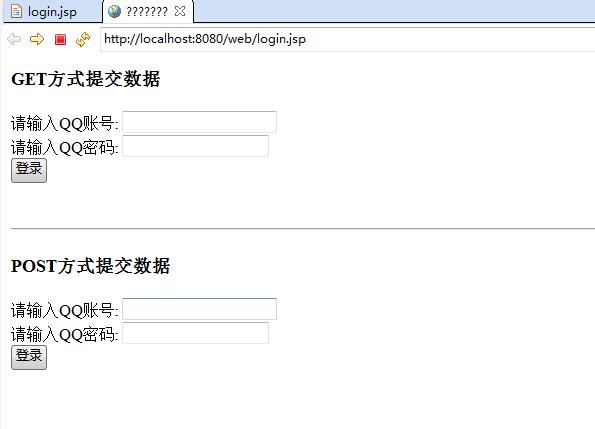
我们在"POST方式提交数据"一栏,输入正确的QQ 账号和QQ密码,如下的然后提交出现如下错误:
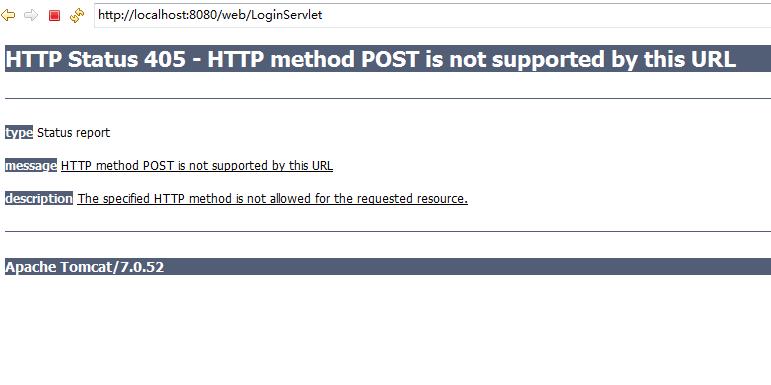
这是因为在LoginServlet中只有doGet()方法,对于POST请求,服务器自然是接收不到POST请求的数据包,自然会出现上面的错误,添加doPost()方法即可:
package com.himi.web;

import java.io.IOException;

import javax.servlet.ServletException;

import javax.servlet.annotation.WebServlet;

import javax.servlet.http.HttpServlet;

import javax.servlet.http.HttpServletRequest;

import javax.servlet.http.HttpServletResponse;

/**

 * Servlet implementation class LoginServlet

 */

@WebServlet("/LoginServlet")

public class LoginServlet extends HttpServlet {

    private static final long serialVersionUID = 1L;

    /**

     * @see HttpServlet#doGet(HttpServletRequest request, HttpServletResponse response)

     */

    protected void doGet(HttpServletRequest request, HttpServletResponse response) throws ServletException, IOException {

         String qq = request.getParameter("qq");

         String password = request.getParameter("password");

         System.out.println("qq:"+qq);

         System.out.println("password:"+password);

         //模拟服务器操作,查询数据库,看qq和密码是否正确

         if("10086".equals(qq) && "123456".equals(password)) {

             response.getOutputStream().write("Login Success".getBytes());

         }else {

             response.getOutputStream().write("Login Failed".getBytes());

         }

    }

    /**

     * 添加的doPost()方法,响应post数据请求

     */

    @Override

    protected void doPost(HttpServletRequest req, HttpServletResponse resp)

            throws ServletException, IOException {

        System.out.println("post过来的数据");

        doGet(req, resp);

    }

}
这个时候我们再次刷新之前的错误页面,就会出现如下效果:
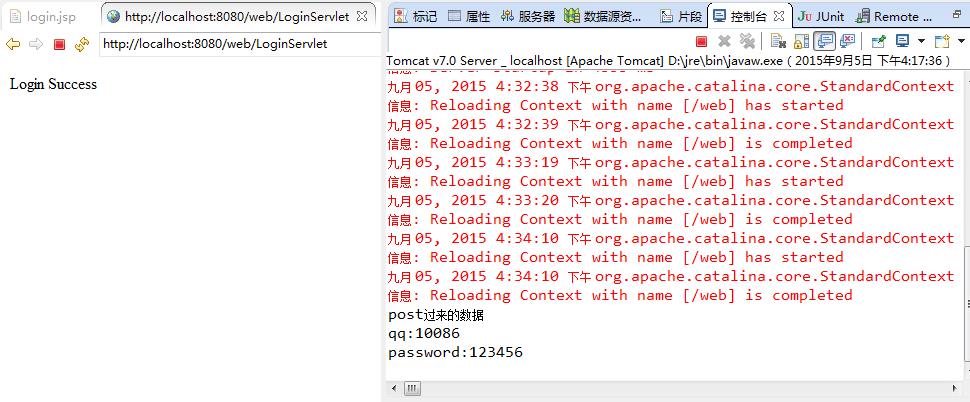
类似这里如果我们没有输入正确的数据信息,就会显示" Login Failed"
3.Android下模拟出手机POST请求访问远端服务器场景:
POST请求如何写代码,我们还是先在360浏览器抓包数据分析一下,再去考虑。
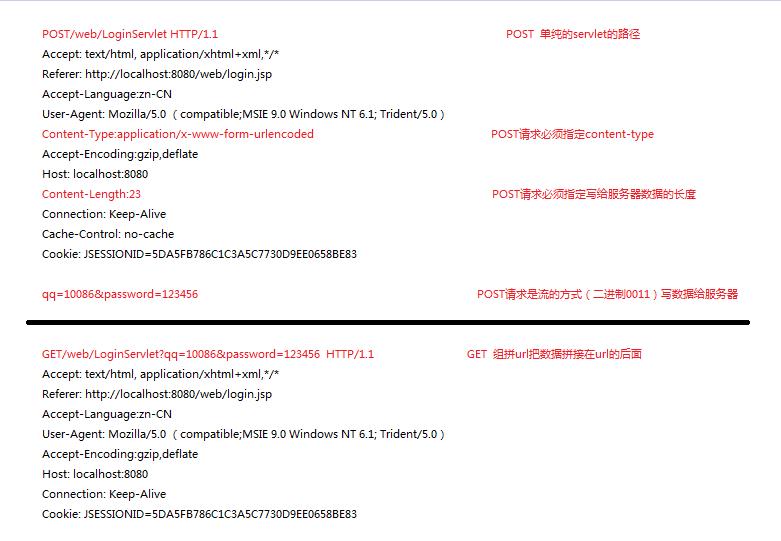
在Android下编写代码实现POST请求,如下:
步骤:
•//重要,记得设置请求方式post
conn.setRequestMethod("POST");
•//重要,记得设置数据的类型
conn.setRequestProperty("Content-Type","application/x-www-form-urlencoded");
String data = "qq="+qq+"&password="+pwd;
•//重要,记得设置数据的长度
conn.setRequestProperty("Content-Length", String.valueOf(data.length()));
•//重要,记得给服务器写数据
conn.setDoOutput(true);//声明要给服务器写数据
•//重要,把数据写给服务器
conn.getOutputStream().write(data.getBytes());
(1)MainActivity.java:
 package com.himi.post;

 import java.io.BufferedReader;

 import java.io.File;

 import java.io.FileInputStream;

 import java.io.FileOutputStream;

 import java.io.InputStream;

 import java.io.InputStreamReader;

 import java.net.HttpURLConnection;

 import java.net.MalformedURLException;

 import java.net.URL;

 import android.app.Activity;

 import android.os.Bundle;

 import android.text.TextUtils;

 import android.util.Log;

 import android.view.View;

 import android.widget.CheckBox;

 import android.widget.EditText;

 import android.widget.Toast;

 public class MainActivity extends Activity {

     private static final String Tag = "MainActivity";

     private EditText et_qq;

     private EditText et_pwd;

     private CheckBox cb_remember;

     @Override

     protected void onCreate(Bundle savedInstanceState) {

         super.onCreate(savedInstanceState);

         setContentView(R.layout.activity_main);

         //查询关心的控件

         et_qq = (EditText) findViewById(R.id.et_qq);

         et_pwd = (EditText) findViewById(R.id.et_pwd);

         cb_remember = (CheckBox) findViewById(R.id.cb_remember);

         Log.i(Tag,"oncreate 被调用");

         //完成数据的回显。

         readSavedData();

     }

     //读取保存的数据

     private void readSavedData() {

         // getFilesDir() == /data/data/包名/files/  获取文件的路径 一般系统是不会清理的。 用户手工清理,系统会有提示。

         // getCacheDir()==  /data/data/包名/cache/ 缓存文件的路径 当系统内存严重不足的时候 系统会自动的清除缓存 用户手工清理系统没有提示

         File file = new File(getFilesDir(),"info.txt");

         if(file.exists()&&file.length()>0){

             try {

                 //FileInputStream fis = new FileInputStream(file);

                 FileInputStream fis =this.openFileInput("info.txt");

                 BufferedReader br = new BufferedReader(new InputStreamReader(fis));

                 //214342###abcdef

                 String info = br.readLine();

                 String qq = info.split("###")[0];

                 String pwd = info.split("###")[1];

                 et_qq.setText(qq);

                 et_pwd.setText(pwd);

                 fis.close();

             } catch (Exception e) {

                 e.printStackTrace();

             }

         }

     }

     /**

      * 登陆按钮的点击事件,在点击事件里面获取数据

      * @param view

      */

     public void login(View view){

         final String qq = et_qq.getText().toString().trim();

         final String pwd = et_pwd.getText().toString().trim();

         if(TextUtils.isEmpty(qq)||TextUtils.isEmpty(pwd)){

             Toast.makeText(this, "qq号码或者密码不能为空", 0).show();

             return;

         }

         //判断用户是否勾选记住密码。

         if(cb_remember.isChecked()){

             //保存密码

             Log.i(Tag,"保存密码");

             try {

 //                File file = new File(getFilesDir(),"info.txt");

 //                FileOutputStream fos = new FileOutputStream(file);

                 FileOutputStream fos = this.openFileOutput("info.txt", 0);

                 //214342###abcdef

                 fos.write((qq+"###"+pwd).getBytes());

                 fos.close();

                 Toast.makeText(this, "保存成功", 0).show();

             } catch (Exception e) {

                 e.printStackTrace();

                 Toast.makeText(this, "保存失败", 0).show();

             }

         }else{

             //无需保存密码

             Log.i(Tag,"无需保存密码");

         }

         //登录的操作,网络的请求

         new Thread() {

             public void run() {

                 //post请求提交数据

                 //String path = "http://localhost:8080/web/LoginServlet";这里不能写成localhost

                 try {

                     String path = getString(R.string.serverip);

                     URL url = new URL(path);

                     HttpURLConnection conn = (HttpURLConnection) url.openConnection();

                     //重要,记得设置请求方式post

                     conn.setRequestMethod("POST");

                     //重要,记得设置数据的类型

                     conn.setRequestProperty("Content-Type","application/x-www-form-urlencoded");

                     String data = "qq="+qq+"&password="+pwd;

                     //重要,记得设置数据的长度

                     conn.setRequestProperty("Content-Length", String.valueOf(data.length()));

                     //重要,记得给服务器写数据

                     conn.setDoOutput(true);//声明要给服务器写数据

                     //重要,把数据写给服务器

                     conn.getOutputStream().write(data.getBytes());

                     int code = conn.getResponseCode();

                     if(code == 200) {

                         InputStream is = conn.getInputStream();

                         String result = StreamTools.readStream(is);

                         showToastInAnyThread(result);

                     }else {

                         showToastInAnyThread("请求失败");

                     }

                 } catch (Exception e) {

                     e.printStackTrace();

                     showToastInAnyThread("请求失败");

                 }

             };

         }.start();

     }

     /**

      * 显示土司 在主线程更新UI

      * @param text

      */

     public void showToastInAnyThread(final String text) {

         runOnUiThread(new Runnable() {

             public void run() {

                 Toast.makeText(MainActivity.this, text, 0).show();

             }

         });

     }

 }
工具类还是StreamTools,如下:
 package com.himi.post;

 import java.io.ByteArrayOutputStream;

 import java.io.InputStream;

 /**

  * 流的工具类

  * @author Administrator

  *

  */

 public class StreamTools {

     /**

      * 把输入流的内容转换成字符串

      * @param is

      * @return null解析失败, string读取成功

      */

     public static String readStream(InputStream is) throws Exception {

             ByteArrayOutputStream baos = new ByteArrayOutputStream();

             byte[] buffer = new byte[1024];

             int len = 0;

             while((len = is.read(buffer)) != -1) {

                 baos.write(buffer, 0, len);

             }

             is.close();

             String result = baos.toString();

             baos.close();

             return result;

     }

 }
(2)布局文件activity_main.xml文件如下:
 <LinearLayout xmlns:android="http://schemas.android.com/apk/res/android"

     android:layout_width="match_parent"

     android:layout_height="match_parent"

     android:gravity="center_horizontal"

     android:paddingLeft="10dp"

     android:paddingRight="10dp"

     android:orientation="vertical" >

     <ImageView

         android:layout_width="200dip"

         android:layout_height="200dip"

         android:src="@drawable/ic_launcher" />

     <EditText

         android:id="@+id/et_qq"

         android:inputType="text"

         android:layout_width="match_parent"

         android:layout_height="wrap_content"

         android:hint="请输入qq号码" />

      <EditText

          android:id="@+id/et_pwd"

          android:layout_width="match_parent"

          android:layout_height="wrap_content"

          android:hint="请输入密码"

          android:inputType="textPassword" />

      <CheckBox

          android:id="@+id/cb_remember"

            android:layout_width="match_parent"

          android:layout_height="wrap_content"

          android:text="记住密码"

          />

      <Button

          android:onClick="login"

          android:layout_width="match_parent"

          android:layout_height="wrap_content"

          android:text="登陆"

          />

 </LinearLayout>
布局效果图如下:

(3)布署程序到手机上如下:
当我们输入错误的QQ账号或密码时候,如下:
输入QQ账号:10000,QQ密码:123123,结果如下;

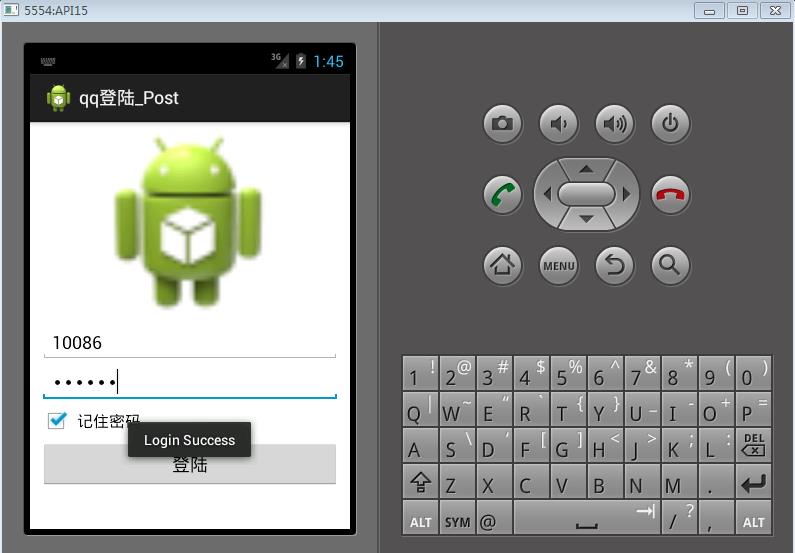
当我们输入QQ账号或者密码是正确的时候:
比如,我们输入QQ账号:10086,输入密码:123456,结果如下:
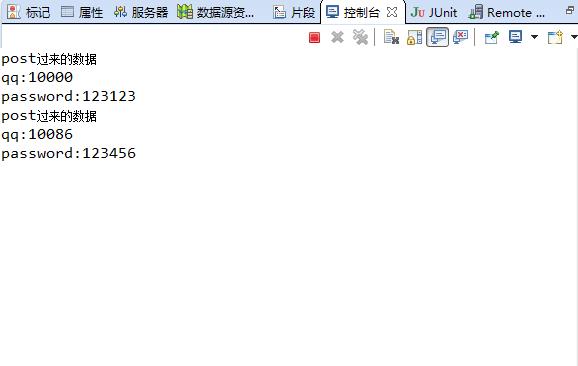
同时服务器端也出现了数据接收的记录,如下:
Android(java)学习笔记153:采用post请求提交数据到服务器(qq登录案例)的更多相关文章
- Android(java)学习笔记210:采用post请求提交数据到服务器(qq登录案例)
1.POST请求: 数据是以流的方式写给服务器 优点:(1)比较安全 (2)长度不限制 缺点:编写代码比较麻烦 2.我们首先在电脑模拟下POST请求访问服务器的场景: 我们修改之前编写的logi ...
- Android(java)学习笔记212:中文乱码的问题处理(qq登录案例)
1.我们在之前的笔记中LoginServlet.java中,我们Tomcat服务器回复给客户端的数据是英文的"Login Success","Login Failed&q ...
- Android(java)学习笔记155:中文乱码的问题处理(qq登录案例)
1. 我们在之前的笔记中LoginServlet.java中,我们Tomcat服务器回复给客户端的数据是英文的"Login Success","Login Failed& ...
- Android(java)学习笔记209:采用get请求提交数据到服务器(qq登录案例)
1.GET请求: 组拼url的路径,把提交的数据拼装url的后面,提交给服务器. 缺点:(1)安全性(Android下提交数据组拼隐藏在代码中,不存在安全问题) (2)长度有限不能超过4K(h ...
- Android(java)学习笔记152:采用get请求提交数据到服务器(qq登录案例)
1.GET请求: 组拼url的路径,把提交的数据拼装url的后面,提交给服务器. 缺点:(1)安全性(Android下提交数据组拼隐藏在代码中,不存在安全问题) (2)长度有限不能超过4K(h ...
- Java学习笔记:基本输入、输出数据操作实例分析
Java学习笔记:基本输入.输出数据操作.分享给大家供大家参考,具体如下: 相关内容: 输出数据: print println printf 输入数据: Scanner 输出数据: JAVA中在屏幕中 ...
- Android 采用post方式提交数据到服务器
接着上篇<Android 采用get方式提交数据到服务器>,本文来实现采用post方式提交数据到服务器 首先对比一下get方式和post方式: 修改布局: <LinearLayout ...
- Android 采用get方式提交数据到服务器
首先搭建模拟web 服务器,新建动态web项目,servlet代码如下: package com.wuyudong.web; import java.io.IOException; import ja ...
- Java学习笔记之[ 利用扫描仪Scanner进行数据输入 ]
/*********数据的输入********//**利用扫描仪Scanner进行数据输入 怎么使用扫描仪Scanner *1.放在类声明之前,引入扫描仪 import java.util.Scann ...
随机推荐
- pb_ds的优先队列实现dijkstra
用pb_ds的优先队列来做dijkstra..据说noip能用哟. 先来篇关于仿函数的文章. 由于pb_ds支持由迭代器访问元素,并且push操作会返回一个迭代器,merge操作会更新迭代器,相当于帮 ...
- 搭建一个简单的FTP服务器
本文介绍通过win7自带的IIS来搭建一个只能实现基本功能的FTP服务器,第一次装好WIN7后我愣是没整出来,后来查了一下网上资料经过试验后搭建成功,其实原理和步骤与windows前期的版本差不多,主 ...
- 帝都Day3——各种dp
备注:Day1 Day2记得笔记太233,所以就不发了 备注2:Day4~Day7发不发看心情qaq (7.17持续更新中...) 动态规划A 记忆化搜索 & 动态规划初步 8点15: 杨姓d ...
- 问题:Tomcat启动产生错误严重: Error initializing endpoint java.lang.Exception
1问题描述: Tomcat启动产生错误严重: Error initializing endpoint java.lang.Exception: Socket bind failed: [730048] ...
- AT2672 Coins
传送门 按理说想到转化问题之后就不难了吧,可是我还是不会写 一个很容易想到的转化就是差分,将银币数和铜币数都减去金币数,这样就转化为\(x+y+z\)个钱币选\(y\)个银币和\(z\)个铜币的最大数 ...
- PHP与thinkphp中var_dump()打印数组显示不全问题
在我们进行php开发的时候,经常会使用var_dump()函数进行数组的打印,以方便我们程序的调试,而有时候我们在进行多维数组打印的时候会发现多维数组打印不全,有些地方被…代替,这就是我们php配置的 ...
- shell学习(11)- seq
今天是五一劳动节,窗户外边,草长莺飞,惠风和畅,但坐在办公室里值班也需要做点事情,今天就写写seq的用法. 作用:用于以指定增量从首数开始打印数字到尾数,即产生从某个数到另外一个数之间的所有整数,并且 ...
- 不要忽视Web编程中的小细节
概述:长时间以来,我们创造了某些在构造和范围内用以提升网站易用性的约定和实践.然后在我们进行web编程的时候总有一些疏忽和纰漏.这里总结了一些web编程时容易出现的小错误,并给出了相应的补救方法,希望 ...
- java中静态代码块的用法 static用法详解和static静态导入
(一)java 静态代码块 静态方法区别一般情况下,如果有些代码必须在项目启动的时候就执行的时候,需要使用静态代码块,这种代码是主动执行的;需要在项目启动的时候就初始化,在不创建对象的情况下,其他程序 ...
- 判断当前用户是否在某个SharePoint组内
/// <summary> /// 判断当前登录人是否在sharepoint组中 /// </summary> /// <param name="current ...