
android json解析(JSONObject方法实现)
今天刚刚学到json解析,看了一整天,大概了解到json就是你通过一个API(我用的聚合数据的API)发送一个请求,接着会收到json数据,比如说天气预报吧,他会给你发送一大段字符串,大概是未来几天的天气情况了什么的,因为这个数据我们想把它规则的展现在手机屏幕上,但是我们得到的json数据未经处理的话,很乱没有美感,也不方便看,就需要我们解析出这些数据并展现在手机屏幕上
cityName = URLEncoder.encode(city,"UTF-8"); 这句话将汉字转化为UTF-8编码
1.首先是要获取json数据,我是直接使用了已经集成的Volley包,获得的数据,Volley又有get和post方法,这里使用get方法
Volley方法获得json数据:
private void volley_get()

    {

            String cityName;

            String  city;

            @Override

                Toast.makeText(MainActivity.this, cityName, Toast.LENGTH_SHORT).show();

                String url = "http://v.juhe.cn/weather/index?format=2&cityname=%E8%8B%8F%E5%B7%9E&=你申请的Key";

              /*

              * StringRequest中的第一个参数,是我们获取数据所调用的方法  Method.GET

              *第二个参数,是我们获得的API的接口  url

              *第三个参数,是当请求成功时所调用的参数

              * 第四个参数,是请求失败时所调用的参数

              * */

                StringRequest request = new StringRequest(Method.GET, url, new Response.Listener<String>()

                {

                    @Override

                    public void onResponse(String s)

                    {//参数s就是我们请求成功时返回的json数据

                        Toast.makeText(MainActivity.this, "加载数据成功", Toast.LENGTH_SHORT).show();

                    }, new Response.ErrorListener()

                    {

                        @Override

                        public void onErrorResponse(VolleyError volleyError)

                        {

                            Toast.makeText(MainActivity.this, "对不起,加载数据失败", Toast.LENGTH_SHORT).show();

                        }

                    });

                    request.setTag("abcGet");

                    MyApplication.getHttpQueues().add(request);//因为Volley方法就是通过请求队列的方法实现的,所以这里要加入队列

            });

    }
获得到的天气数据
{"resultcode":"200","reason":"successed!","result":{"sk":{"temp":"37","wind_direction":"西风","wind_strength":"2级","humidity":"49%","time":"18:28"},"today":{"temperature":"30℃~38℃","weather":"晴","weather_id":{"fa":"00","fb":"00"},"wind":"西南风微风","week":"星期二","city":"苏州","date_y":"2016年07月26日","dressing_index":"炎热","dressing_advice":"天气炎热,建议着短衫、短裙、短裤、薄型T恤衫等清凉夏季服装。","uv_index":"很强","comfort_index":"","wash_index":"较适宜","travel_index":"较适宜","exercise_index":"较适宜","drying_index":""},"future":[{"temperature":"30℃~38℃","weather":"晴","weather_id":{"fa":"00","fb":"00"},"wind":"西南风微风","week":"星期二","date":"20160726"},{"temperature":"29℃~39℃","weather":"晴","weather_id":{"fa":"00","fb":"00"},"wind":"西风微风","week":"星期三","date":"20160727"},{"temperature":"29℃~39℃","weather":"晴","weather_id":{"fa":"00","fb":"00"},"wind":"西南风微风","week":"星期四","date":"20160728"},{"temperature":"29℃~39℃","weather":"晴","weather_id":{"fa":"00","fb":"00"},"wind":"南风微风","week":"星期五","date":"20160729"},{"temperature":"28℃~37℃","weather":"晴","weather_id":{"fa":"00","fb":"00"},"wind":"东风微风","week":"星期六","date":"20160730"},{"temperature":"29℃~39℃","weather":"晴","weather_id":{"fa":"00","fb":"00"},"wind":"西南风微风","week":"星期日","date":"20160731"},{"temperature":"29℃~39℃","weather":"晴","weather_id":{"fa":"00","fb":"00"},"wind":"西风微风","week":"星期一","date":"20160801"}]},"error_code":0}
然后在上边的volley_get方法中解析json使其规则的显现
在上边的volley_get方法中 请求成功时调用的参数中实现
 public void onResponse(String s) { //参数s就是我们请求成功时返回的json数据

                   // tv_1.setText(s);

                    String weather_city = null;

                    String weather_date_y = null;

                    String weather_dressing_advice= null;

                    String weather_exercise_index= null;

                    String weather_temperature= null;

                    String weather_travel_index= null;

                    String weather_wea= null;

                    String weather_week= null;

                    String weather_wind= null;

    //

                    try {

                        JSONObject jsonObject = new JSONObject(s);

                        String resultcode = jsonObject.getString("resultcode");

                           if(resultcode.equals("200")){

                               JSONObject resultObject=jsonObject.getJSONObject("result");

                               JSONObject todayObject=resultObject.getJSONObject("today");

                              weather_city = todayObject.getString("city");

                            weather_date_y = todayObject.getString("date_y");

                            weather_dressing_advice = todayObject.getString("dressing_advice");

                            weather_exercise_index = todayObject.getString("exercise_index");

                            weather_temperature = todayObject.getString("temperature");

                            weather_travel_index = todayObject.getString("travel_index");

                            weather_wea = todayObject.getString("weather");

                            weather_week = todayObject.getString("week");

                            weather_wind = todayObject.getString("wind");

                        }

                    } catch (JSONException e) {

                        e.printStackTrace();

                    }

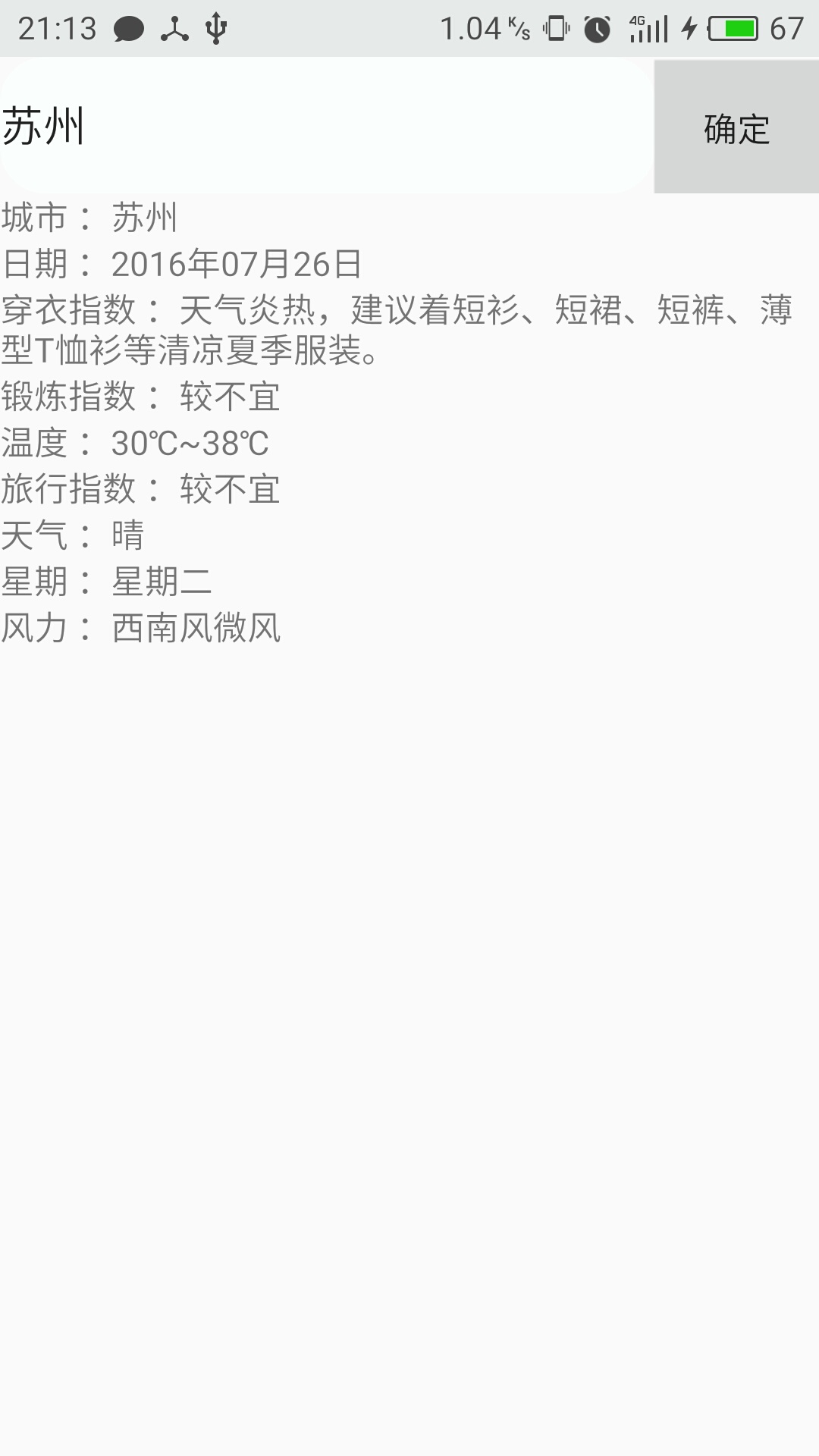
                    tv_1.setText("城市 :"+weather_city);

                    tv_2.setText("日期 :"+weather_date_y);

                    tv_3.setText("穿衣指数 :"+weather_dressing_advice);

                    tv_4.setText("锻炼指数 :"+weather_exercise_index);

                    tv_5.setText("温度 :"+weather_temperature);

                    tv_6.setText("旅行指数 :"+weather_travel_index);

                    tv_7.setText("天气 :"+weather_wea);

                    tv_8.setText("星期 :"+weather_week);

                    tv_9.setText("风力 :"+weather_wind);

                }

            }
操作结果:
android json解析(JSONObject方法实现)的更多相关文章
- Android JSON解析库Gson和Fast-json的使用对比和图书列表小案例
Android JSON解析库Gson和Fast-json的使用对比和图书列表小案例 继上篇json解析,我用了原生的json解析,但是在有些情况下我们不得不承认,一些优秀的json解析框架确实十分的 ...
- Android Json解析与总结
一.JSON定义 JSON(JavaScript Object Notation) 是一种轻量级的数据交换格式. 易于人阅读和编写.同时也易于机器解析和生成. 它基于JavaScript Progra ...
- android json 解析简单实例
Android JSON解析跟JAVA 的JSON解析原理是一样的. Android自带的JSON方式跟方便,不需要导包啥的.不深究原理了,直接上代码: public class JsonActivi ...
- Android JSON 解析关键代码
Android Json 解析其实还是蛮重要的知识点,为什么这么说呢,因为安卓通信大部分的协议都是使用 json 的方式传输,我知道以前大部分是使用的 xml ,但是时代在发展社会在进步,json 成 ...
- android json解析及简单例子+Android与服务器端数据交互+Android精彩案例【申明:来源于网络】
android json解析及简单例子+Android与服务器端数据交互+Android精彩案例[申明:来源于网络] android json解析及简单例子:http://www.open-open. ...
- android json解析及简单例子
JSON的定义: 一种轻量级的数据交换格式,具有良好的可读和便于快速编写的特性.业内主流技术为其提供了完整的解决方案(有点类似于正则表达式 ,获得了当今大部分语言的支持),从而可以在不同平台间进行数据 ...
- android Json解析详解
JSON的定义: 一种轻量级的数据交换格式,具有良好的可读和便于快速编写的特性.业内主流技术为其提供了完整的解决方案(有点类似于正则表达式 ,获得了当今大部分语 言的支持),从而可以在不同平台间进行数 ...
- android Json解析详解(详细代码)
JSON的定义: 一种轻量级的数据交换格式,具有良好的可读和便于快速编写的特性.业内主流技术为其提供了完整的解决方案(有点类似于正则表达式 ,获得了当今大部分语言的支持),从而可以在不同平台间进行数据 ...
- 【转】android json解析及简单例子
JSON的定义: 一种轻量级的数据交换格式,具有良好的可读和便于快速编写的特性.业内主流技术为其提供了完整的解决方案(有点类似于正则表达式 ,获得了当今大部分语言的支持),从而可以在不同平台间进行数据 ...
随机推荐
- 17 python 内置函数
内置函数:Python的内部自带的函数 作用域相关: 基于字典的形式获取局部变量和全局变量 globals()——获取全局变量的ha1 locals()——获取执行本方法所在命名空间内的局部变量的字典 ...
- xml获取指定节点的路径
引用自http://www.w3school.com.cn/xpath/xpath_syntax.asp XPath 语法 Previous Page Next Page XPath 使用路径表达式来 ...
- @Override重写
package com.wisezone.f; //父类 public class Person { //姓名 private String name; //年龄 private int age; / ...
- Linux 终端 忽略大小写
忘了在哪里看到的了,记录一下. 在-/.inputrc中加入一行 set completion-ignore-case on 搞定! 这样在终端输入.补全时就忽略大小写了.当然,Linux本身还是区分 ...
- 【转载,实测好用】gitlab结合sourcetree使用
转载 的出处http://blog.csdn.net/u012764358/article/details/62886427 Gitlab和Sourcetree结合使用实现代码管理 这是本人第一次发表 ...
- spark远程调试
基本流程1.远程运行spark,打开Spark master机器的JVM的jdwp,让其阻塞监听指定端口(8888),让其有终端向指定端口发送特定请求再执行:2.IntelliJ配置socket远程连 ...
- python3小例子:scrapy+mysql
https://blog.csdn.net/u010151698/article/details/79371234
- Redis的持久化机制
持久化机制 RDB:快照模式AOF :日志模式 多数据库– 一个redis服务器内部默认有16个数据,编号О0-15– 默认操作是编号为0的数据库– 可以在命令行用select选择数据库127.0.0 ...
- UE4异步载入资源
转自:http://blog.ch-wind.com/ue4%E5%BC%82%E6%AD%A5%E8%BD%BD%E5%85%A5%E8%B5%84%E6%BA%90/ 所有的“硬”指针指向的资源都 ...
- rails的respond to format
Here are all the default Rails Mime Types: "*/*" => :all "text/plain" => : ...