
easypoi 一行代码搞定excel导入导出
- 开发中经常会遇到excel的处理,导入导出解析等等,java中比较流行的用poi,但是每次都要写大段工具类来搞定这事儿,此处推荐一个别人造好的轮子【easypoi】,下面介绍下“轮子”的使用。
pom引入
- 不再需要其他jar
    <dependency>

            <groupId>cn.afterturn</groupId>

            <artifactId>easypoi-base</artifactId>

            <version>3.0.3</version>

        </dependency>

        <dependency>

            <groupId>cn.afterturn</groupId>

            <artifactId>easypoi-web</artifactId>

            <version>3.0.3</version>

        </dependency>

        <dependency>

            <groupId>cn.afterturn</groupId>

            <artifactId>easypoi-annotation</artifactId>

            <version>3.0.3</version>

        </dependency>
编写实体类
- 此处注意必须要有空构造函数,否则会报错“对象创建错误”
- 关于注解@Excel,其他还有@ExcelCollection,@ExcelEntity ,@ExcelIgnore,@ExcelTarget等,此处我们用不到,可以去官方查看更多
| 属性 | 类型 | 类型 | 说明 |
|---|---|---|---|
| name | String | null | 列名 |
| needMerge | boolean | fasle | 纵向合并单元格 |
| orderNum | String | "0" | 列的排序,支持name_id |
| replace | String[] | {} | 值得替换 导出是{a_id,b_id} 导入反过来 |
| savePath | String | "upload" | 导入文件保存路径 |
| type | int | 1 | 导出类型 1 是文本 2 是图片,3 是函数,10 是数字 默认是文本 |
| width | double | 10 | 列宽 |
| height | double | 10 | 列高,后期打算统一使用@ExcelTarget的height,这个会被废弃,注意 |
| isStatistics | boolean | fasle | 自动统计数据,在追加一行统计,把所有数据都和输出这个处理会吞没异常,请注意这一点 |
| isHyperlink | boolean | false | 超链接,如果是需要实现接口返回对象 |
| isImportField | boolean | true | 校验字段,看看这个字段是不是导入的Excel中有,如果没有说明是错误的Excel,读取失败,支持name_id |
| exportFormat | String | "" | 导出的时间格式,以这个是否为空来判断是否需要格式化日期 |
| importFormat | String | "" | 导入的时间格式,以这个是否为空来判断是否需要格式化日期 |
| format | String | "" | 时间格式,相当于同时设置了exportFormat 和 importFormat |
| databaseFormat | String | "yyyyMMddHHmmss" | 导出时间设置,如果字段是Date类型则不需要设置 数据库如果是string 类型,这个需要设置这个数据库格式,用以转换时间格式输出 |
| numFormat | String | "" | 数字格式化,参数是Pattern,使用的对象是DecimalFormat |
| imageType | int | 1 | 导出类型 1 从file读取 2 是从数据库中读取 默认是文件 同样导入也是一样的 |
| suffix | String | "" | 文字后缀,如% 90 变成90% |
| isWrap | boolean | true | 是否换行 即支持\n |
| mergeRely | int[] | {} | 合并单元格依赖关系,比如第二列合并是基于第一列 则{1}就可以了 |
| mergeVertical | boolean | fasle | 纵向合并内容相同的单元格 |
实体类:
import cn.afterturn.easypoi.excel.annotation.Excel;

import java.util.Date;

public class Person {

    @Excel(name = "姓名", orderNum = "0")

    private String name;

    @Excel(name = "性别", replace = {"男_1", "女_2"}, orderNum = "1")

    private String sex;

    @Excel(name = "生日", exportFormat = "yyyy-MM-dd", orderNum = "2")

    private Date birthday;

    public Person(String name, String sex, Date birthday) {

        this.name = name;

        this.sex = sex;

        this.birthday = birthday;

    }

    public String getName() {

        return name;

    }

    public void setName(String name) {

        this.name = name;

    }

    public String getSex() {

        return sex;

    }

    public void setSex(String sex) {

        this.sex = sex;

    }

    public Date getBirthday() {

        return birthday;

    }

    public void setBirthday(Date birthday) {

        this.birthday = birthday;

    }

}
导入导出公用方法:
public static void exportExcel(List<?> list, String title, String sheetName, Class<?> pojoClass,String fileName,boolean isCreateHeader, HttpServletResponse response){

        ExportParams exportParams = new ExportParams(title, sheetName);

        exportParams.setCreateHeadRows(isCreateHeader);

        defaultExport(list, pojoClass, fileName, response, exportParams);

    }

    public static void exportExcel(List<?> list, String title, String sheetName, Class<?> pojoClass,String fileName, HttpServletResponse response){

        defaultExport(list, pojoClass, fileName, response, new ExportParams(title, sheetName));

    }

public static void exportExcel(List<Map<String, Object>> list, String fileName, HttpServletResponse response){

        defaultExport(list, fileName, response);

    }

    private static void defaultExport(List<?> list, Class<?> pojoClass, String fileName, HttpServletResponse response, ExportParams exportParams) {

        Workbook workbook = ExcelExportUtil.exportExcel(exportParams,pojoClass,list);

        if (workbook != null);

        downLoadExcel(fileName, response, workbook);

    }

    private static void downLoadExcel(String fileName, HttpServletResponse response, Workbook workbook) {

        try {

            response.setCharacterEncoding("UTF-8");

            response.setHeader("content-Type", "application/vnd.ms-excel");

            response.setHeader("Content-Disposition",

                    "attachment;filename=" + URLEncoder.encode(fileName, "UTF-8"));

            workbook.write(response.getOutputStream());

        } catch (IOException e) {

            throw new NormalException(e.getMessage());

        }

    }

private static void defaultExport(List<Map<String, Object>> list, String fileName, HttpServletResponse response) {

        Workbook workbook = ExcelExportUtil.exportExcel(list, ExcelType.HSSF);

        if (workbook != null);

        downLoadExcel(fileName, response, workbook);

    }

    public static <T> List<T> importExcel(String filePath,Integer titleRows,Integer headerRows, Class<T> pojoClass){

        if (StringUtils.isBlank(filePath)){

            return null;

        }

        ImportParams params = new ImportParams();

        params.setTitleRows(titleRows);

        params.setHeadRows(headerRows);

        List<T> list = null;

        try {

            list = ExcelImportUtil.importExcel(new File(filePath), pojoClass, params);

        }catch (NoSuchElementException e){

            throw new NormalException("模板不能为空");

        } catch (Exception e) {

            e.printStackTrace();

            throw new NormalException(e.getMessage());

        }

        return list;

    }

    public static <T> List<T> importExcel(MultipartFile file, Integer titleRows, Integer headerRows, Class<T> pojoClass){

        if (file == null){

            return null;

        }

        ImportParams params = new ImportParams();

        params.setTitleRows(titleRows);

        params.setHeadRows(headerRows);

        List<T> list = null;

        try {

            list = ExcelImportUtil.importExcel(file.getInputStream(), pojoClass, params);

        }catch (NoSuchElementException e){

            throw new NormalException("excel文件不能为空");

        } catch (Exception e) {

            throw new NormalException(e.getMessage());

        }

        return list;

    }
对的,没看错,这就可以导出导入了,看起来代码挺多,其实是提供了多个导入导出方法而已
导出实现类,使用@ExcelTarget注解与@Excel注解:
import cn.afterturn.easypoi.excel.ExcelExportUtil;

import cn.afterturn.easypoi.excel.ExcelImportUtil;

import cn.afterturn.easypoi.excel.annotation.Excel;

import cn.afterturn.easypoi.excel.entity.ExportParams;

import cn.afterturn.easypoi.excel.entity.ImportParams;

import cn.afterturn.easypoi.excel.entity.enmus.ExcelType;

import com.fasterxml.jackson.annotation.JsonFormat;

import com.jn.ssr.superrescue.annotation.Translate;

import com.jn.ssr.superrescue.cache.DictCache;

import org.apache.commons.lang.StringUtils;

import org.apache.logging.log4j.LogManager;

import org.apache.logging.log4j.Logger;

import org.apache.poi.ss.usermodel.Workbook;

import org.springframework.web.multipart.MultipartFile;

import javax.servlet.http.HttpServletResponse;

import java.io.File;

import java.lang.reflect.Field;

import java.lang.reflect.InvocationHandler;

import java.lang.reflect.Proxy;

import java.net.URLEncoder;

import java.util.*;

import java.util.stream.Collectors;

public class FileUtil {

    private static Logger log = LogManager.getLogger(FileUtil.class);

    public static final int BIG_DATA_EXPORT_MIN = 50000;

    public static final int BIG_DATA_EXPORT_MAX = 2000000;

    //excel处理注解set集合

    public static HashSet<String> transClassSet = new HashSet();

    public static void exportExcel(List<?> list, String title, String sheetName, Class<?> pojoClass, String fileName, boolean isCreateHeader, HttpServletResponse response) {

        ExportParams exportParams = new ExportParams(title, sheetName);

        exportParams.setCreateHeadRows(isCreateHeader);

        defaultExport(list, pojoClass, fileName, response, title, sheetName);

    }

    /**

     * 导出函数

     *

     * @param list      导出集合

     * @param title     标题

     * @param sheetName sheet名

     * @param pojoClass 映射实体

     * @param fileName  文件名

     * @param response  httpresponce

     *                  size如果过大 需采用poi SXSSF

     */

    public static void exportExcel(List<?> list, String title, String sheetName, Class<?> pojoClass, String fileName, HttpServletResponse response) {

        //判断该类是否已经处理过excel注解

        long startTime = System.currentTimeMillis();

        if (!transClassSet.contains(String.valueOf(pojoClass))) {

            initProperties(pojoClass);

            transClassSet.add(String.valueOf(pojoClass));

        }

        defaultExport(list, pojoClass, fileName, response, title, sheetName);

        log.info("此文件[{}]导出耗时:{}ms", fileName, (System.currentTimeMillis() - startTime));

    }

    public static void exportExcel(List<Map<String, Object>> list, String fileName, HttpServletResponse response) {

        defaultExport(list, fileName, response);

    }

    private static void defaultExport(List<?> list, Class<?> pojoClass, String fileName, HttpServletResponse response, String title, String sheetName) {

        Workbook workbook = null;

        ExportParams exportParams = new ExportParams(title, sheetName);

        if (list != null && list.size() > BIG_DATA_EXPORT_MAX) {

            sizeBeyondError(response);

            return;

        } else if (list != null && list.size() > BIG_DATA_EXPORT_MIN) {

            log.info("文件过大采用大文件导出:" + list.size());

            for (int i = 0; i < (list.size() / BIG_DATA_EXPORT_MIN + 1) && list.size() > 0; i++) {

                log.info("当前切片:" + i * BIG_DATA_EXPORT_MIN + "-" + (i + 1) * BIG_DATA_EXPORT_MIN);

                List<?> update = list.stream().skip(i * BIG_DATA_EXPORT_MIN).limit(BIG_DATA_EXPORT_MIN).collect(Collectors.toList());

                exportParams.setCreateHeadRows(true);

                exportParams.setMaxNum(BIG_DATA_EXPORT_MIN * 2 + 2);

                workbook = ExcelExportUtil.exportBigExcel(exportParams, pojoClass, update);

            }

            ExcelExportUtil.closeExportBigExcel();

        } else {

            workbook = ExcelExportUtil.exportExcel(new ExportParams(title, sheetName), pojoClass, list);

        }

        if (workbook == null) return;

        downLoadExcel(fileName, response, workbook);

    }

    private static void downLoadExcel(String fileName, HttpServletResponse response, Workbook workbook) {

        try {

            response.setCharacterEncoding("UTF-8");

            response.setHeader("content-Type", "application/vnd.ms-excel");

            response.setHeader("Content-Disposition",

                    "attachment;filename=" + URLEncoder.encode(fileName, "UTF-8"));

            // workbooks.forEach(e -> e.write(response.getOutputStream()));

            workbook.write(response.getOutputStream());

        } catch (Exception e) {

            e.printStackTrace();

            response.setCharacterEncoding("UTF-8");

            response.setContentType("application/json");

            try {

                response.getWriter().println("{\"code\":597,\"message\":\"export error!\",\"data\":\"\"}");

                response.getWriter().flush();

            } catch (Exception e1) {

                e1.printStackTrace();

            } finally {

                closeIo(response);

            }

        }

    }

    /**

     * 文件过大,不允许导出

     *

     * @param response

     */

    private static void sizeBeyondError(HttpServletResponse response) {

        response.setCharacterEncoding("UTF-8");

        response.setContentType("application/json");

        try {

            response.getWriter().println("{\"code\":599,\"message\":\"文件过大!\",\"data\":\"\"}");

            response.getWriter().flush();

        } catch (Exception e1) {

            e1.printStackTrace();

        } finally {

            closeIo(response);

        }

    }

    private static void defaultExport(List<Map<String, Object>> list, String fileName, HttpServletResponse

            response) {

        Workbook workbook = ExcelExportUtil.exportExcel(list, ExcelType.HSSF);

        if (workbook != null) ;

        downLoadExcel(fileName, response, workbook);

    }

    public static <

            T> List<T> importExcel(String filePath, Integer titleRows, Integer headerRows, Class<T> pojoClass) {

        if (StringUtils.isBlank(filePath)) {

            return null;

        }

        ImportParams params = new ImportParams();

        params.setTitleRows(titleRows);

        params.setHeadRows(headerRows);

        List<T> list = null;

        try {

            list = ExcelImportUtil.importExcel(new File(filePath), pojoClass, params);

        } catch (NoSuchElementException e) {

            e.printStackTrace();

            System.out.println("模版为空");

        } catch (Exception e) {

            e.printStackTrace();

        }

        return list;

    }

    public static <

            T> List<T> importExcel(MultipartFile file, Integer titleRows, Integer headerRows, Class<T> pojoClass) {

        if (file == null) {

            return null;

        }

        ImportParams params = new ImportParams();

        params.setTitleRows(titleRows);

        params.setHeadRows(headerRows);

        List<T> list = null;

        try {

            list = ExcelImportUtil.importExcel(file.getInputStream(), pojoClass, params);

        } catch (NoSuchElementException e) {

            e.printStackTrace();

            System.out.println("文件为空");

        } catch (Exception e) {

            e.printStackTrace();

        }

        return list;

    }

    /**

     * 代理初始化该类的注解

     *

     * @param cl

     */

    public synchronized static void initProperties(Class cl) {

        try {

            Field[] fields = cl.getDeclaredFields();

            for (Field field : fields) {

                if (field.isAnnotationPresent(Excel.class)) {

                    field.setAccessible(true);

                    Excel excel = field.getAnnotation(Excel.class);

                    InvocationHandler h = Proxy.getInvocationHandler(excel);

                    Field hField = h.getClass().getDeclaredField("memberValues");

                    // 因为这个字段事 private final 修饰,所以要打开权限

                    hField.setAccessible(true);

                    // 获取 memberValues

                    Map memberValues = (Map) hField.get(h);

                    //判断是否有转义注解,将字典添加到excel replace属性中

                    if (field.isAnnotationPresent(Translate.class)) {

                        Translate translate = field.getAnnotation(Translate.class);

                        String dicName = translate.dicName();

                        Map dicMap = DictCache.getProperties(dicName);

                        if (dicMap == null) {

                            continue;

                        }

                        String[] replace = new String[dicMap.size()];

                        List<String> replaceList = new ArrayList<>();

                        dicMap.forEach((key, val) -> {

                            replaceList.add(val + "_" + key);

                        });

                        for (int i = 0; i < dicMap.size(); i++) {

                            replace[i] = replaceList.get(i);

                        }

                        memberValues.put("replace", replace);

                    }

                    //json格式化与JsonFormat统一,目前暂用于时间

                    if (field.isAnnotationPresent(JsonFormat.class)) {

                        JsonFormat jsonFormat = field.getAnnotation(JsonFormat.class);

                        if (StringUtils.isNotEmpty(jsonFormat.pattern())) {

                            memberValues.put("format", jsonFormat.pattern());

                        }

                    }

                }

            }

        } catch (Exception e) {

            e.printStackTrace();

        }

    }

    /**

     * 关闭writer

     *

     * @param response

     */

    private static void closeIo(HttpServletResponse response) {

        try {

            if (response.getWriter() != null) {

                response.getWriter().close();

            }

        } catch (Exception e) {

            e.printStackTrace();

        }

    }

}
使用VUE前端数据导出实现类:
import excel from '../../../utils/export'
var exportExcel = {};

exportExcel.exportData=function (params) {

        var str = '&';

        for(key in params){

            str+= key+'='+params[key]+'&';

        }

        //alert(nodePath+'/export?token='+window.localStorage.user+str);

    console.log(nodePath+'/export?token='+window.localStorage.user+str);

    window.location.href = nodePath+'/export?token='+window.localStorage.user+str;

    }

module.exports = exportExcel;
在VUE页面中的导出:
exportExcel(){

                console.log(22222);

                let param = {

                    url: '/automaticCar/export',

                    params:JSON.stringify(this.ruleForm)

                };

                excel.exportData(param);

            },
测试
@RequestMapping("export")

    public void export(HttpServletResponse response){

        //模拟从数据库获取需要导出的数据

        List<Person> personList = new ArrayList<>();

        Person person1 = new Person("路飞","1",new Date());

        Person person2 = new Person("娜美","2", DateUtils.addDate(new Date(),3));

        Person person3 = new Person("索隆","1", DateUtils.addDate(new Date(),10));

        Person person4 = new Person("小狸猫","1", DateUtils.addDate(new Date(),-10));

        personList.add(person1);

        personList.add(person2);

        personList.add(person3);

        personList.add(person4);

        //导出操作

        FileUtil.exportExcel(personList,"花名册","草帽一伙",Person.class,"海贼王.xls",response);

    }

    @RequestMapping("importExcel")

    public void importExcel(){

        String filePath = "F:\\海贼王.xls";

        //解析excel,

        List<Person> personList = FileUtil.importExcel(filePath,1,1,Person.class);

        //也可以使用MultipartFile,使用 FileUtil.importExcel(MultipartFile file, Integer titleRows, Integer headerRows, Class<T> pojoClass)导入

        System.out.println("导入数据一共【"+personList.size()+"】行");

        //TODO 保存数据库

    }
导出结果

测试导入
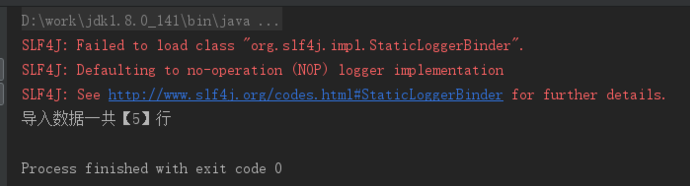
导出结果再添加一行,执行,输出导入数据行数
easypoi 一行代码搞定excel导入导出的更多相关文章
- 【springboot+easypoi】一行代码搞定excel导入导出
原文:https://www.jianshu.com/p/5d67fb720ece 开发中经常会遇到excel的处理,导入导出解析等等,java中比较流行的用poi,但是每次都要写大段工具类来搞定这事 ...
- 一行代码搞定Adapter
15年Google I/O大会发不了三个重要支持库 >Material design (Android Support Design) >百分比布局:Percent support lib ...
- Asp.Net Core 轻松学-一行代码搞定文件上传 JSONHelper
Asp.Net Core 轻松学-一行代码搞定文件上传 前言 在 Web 应用程序开发过程中,总是无法避免涉及到文件上传,这次我们来聊一聊怎么去实现一个简单方便可复用文件上传功能:通过创建 ...
- 一行代码搞定 FTP 服务
环境搭建: python windows/linux pip install pyftpdlib (安装失败请到这里下载:https://pypi.python.org/pypi/pyftpdlib/ ...
- 一行代码搞定所有屏幕适配AbViewUtil
适配原理:抛弃google提供的dip理论与多套图片与布局方案,采用与UI设计师通用的px作为标准单位,原理是将UI设计师的设计图与当前查看的手机或其他设备的屏幕像素尺寸进行换算,得到缩放比例,在Ac ...
- 开源作品ThinkJDBC—一行代码搞定数据库操作
1 简介 ThinkJD,又名ThinkJDBC,一个简洁而强大的开源JDBC操作库.你可以使用Java像ThinkPHP框架的M方法一样,一行代码搞定数据库操作.ThinkJD会自动管理数据库连接, ...
- C# CLosedXML四句代码搞定DataTable数据导出到Excel
最近用到DataTable导出到Excel,网上看了一下,都不怎么好使,逛了下GitHub一下完美解决了 用到的.net库CLosedXML,这个库用于读取,处理和写入Excel 2007+(.xls ...
- 一行代码搞定WordPress面包屑导航breadcrumb
有好几位网友在问WordPress面包屑导航breadcrumb怎么操作,网上有些教程是去function文件中定义,其实不用那么复杂,很简单一行代码就能搞定.下面随ytkah一起来看看.如果是单页, ...
- 初识sa-token,一行代码搞定登录授权!
前言 在java的世界里,有很多优秀的权限认证框架,如Apache Shiro.Spring Security 等等.这些框架背景强大,历史悠久,其生态也比较齐全. 但同时这些框架也并非十分完美,在前 ...
随机推荐
- css3 animatehue属性
-webkit-perspective(-moz,-o,perspective下同)表示透视范围大小: -webkit-transform-style很好理解了,表示变换类型,preserve-3d看 ...
- Python开发环境Wing IDE之Search in Files工具详解
Search in Files工具是Wing IDE中最强大的搜索选项.它支持磁盘.项目,打开编辑器,或其它文件集的多文件批量搜索.它还可以使用通配符搜索,并可以做基于正则表达式的搜索/替换. 建议用 ...
- css3照片墙
一张张照片散乱的撒在一起,鼠标悬浮时旋转放大并摆正,效果如下图(所有图片均来自网络),主要使用到的css3属性有:transition.transform(scale.rotateZ).box-sha ...
- Android 应用监听自身卸载,弹出用户反馈调查
监听卸载情景和原理分析 1,情景分析 在上上篇博客中我写了一下NDK开发实践项目,使用开源的LAME库转码MP3,作为前面几篇基础博客的加深理解使用的,但是这样的项目用处不大,除了练练NDK功底.这篇 ...
- php-5.2.14 编译参数,成功的
./configure --prefix=/usr/local/php --with-config-file-path=/usr/bin --with-mysql=/usr/local/mysql - ...
- Struts2_HelloWorld_2
设置 tomcat 的位置 (jre:并不是jdk) 打开 struts2目录:apps 示例程序docs 文档lib 类库src 源码 打开 apps 目录下的 struts2-blank.war ...
- ZIP文件流压缩和解压
前面写了一篇文章 "ZIP文件压缩和解压", 介绍了" SharpZipLib.Zip " 的使用, 最近的项目中,在使用的过程中, 遇到一些问题. 比如, 现 ...
- centos7 mod_gearman 3.0.1 打包rpm
wget https://github.com/sni/mod_gearman/archive/v3.0.1.tar.gz -O /root/rpmbuild/SOURCES/mod_gearman- ...
- ansible使用8-Best Practices
Content Organization production # inventory file for production servers stage # inventory file for s ...
- 源码安装zabbix3.2.7时PHP ldap Warning
问题如下: 解决方法: 1.首先查看源码安装的php模块中是否有ldap.so [root@nms ldap]# ll /usr/local/php/lib/php/extensions/no-de ...