
output value . Sigmoid neurons are similar to perceptrons, but modified so that small changes in their weights and bias cause only a small change in their output.
http://neuralnetworksanddeeplearning.com/chap1.html
. Sigmoid neurons are similar to perceptrons, but modified so that small changes in their weights and bias cause only a small change in their output.
http://neuralnetworksanddeeplearning.com/chap3.html
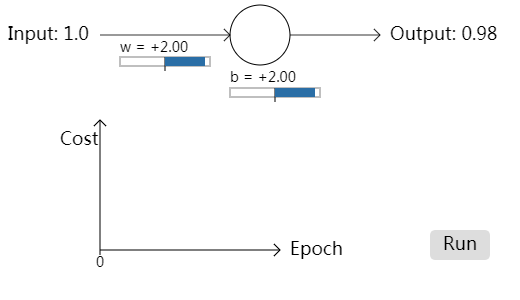
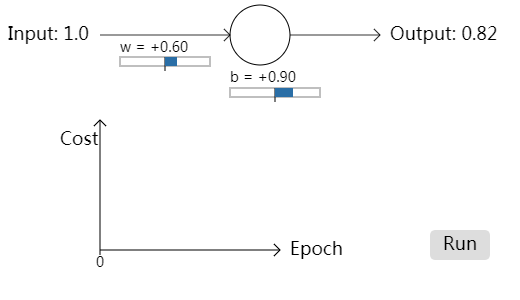


// This is a paper.js widget to show a single neuron learning.  In

// particular, the widget is used to show the learning slowdown that

// occurs when the output is saturated.

//

// The same basic widget is used several times, in slightly different

// configurations.  paper.js makes it somewhat complex to reuse the

// code, so I have simply duplicated the code.  This can give rise to

// bugs if one is not careful to keep the code in sync, so I have

// separated the code into two pieces.

//

// The first piece is the header code.  This changes between widgets.

// It sets up things like the starting weight, bias, cost function,

// and so on -- things which may vary betweens widgets.

//

// The second piece is the body code.  This is almost exactly the same

// for the different widgets.  Note, however, that the costGraphX and

// epochX variables change name, due to a bug in the way paperjs

// handles scope.

//

// We can make these changes by searching on costGraph1 and replacing

// with costGraph2, costGraph3 etc, by replacing epoch1 with epoch2,

// epoch3 etc, and by replcacing cost1 with cost2, cost3 etc.

//

// This separation makes it easy to maintain the duplicated code.

// HEADER CODE

var startingWeight = 0.6;

var startingBias = 0.9;

var eta = 0.15;

var numFrames = 300;

quadratic_cost = {

    fn: function(a) {return a*a/2;},

    derivative: function(a) {return a*a*(1-a);},

    scaling: 240 // used to scale on the graph

}

cross_entropy_cost = {

    fn: function(a) {return -Math.log(1-a);},

    derivative: function(a) {return 1/(1-a);},

    scaling: 30

}

cost1 = quadratic_cost;

// A path for the graph.

costGraph1 = new Path();

costGraph1.strokeColor = "#2A6EA6";

// BODY CODE

// STATIC ELEMENTS

//

// Note that this includes some paper.js items which will later be

// modified, e.g., the variables output and weightText.  This section

// merely sets the static parts of the elements.

var input = new PointText(new Point(8, 40));

input.fontSize = 18;

input.content = "Input: 1.0";

arrow(new Point(100, 35), new Point(230, 35), 0.8); // input arrow

var neuron = new Path.Circle(new Point(260, 35), 30);

neuron.strokeColor = "black";

arrow(new Point(290, 35), new Point(380, 35), 0.8); // output arrow

// The output text's content will be set dynamically, later

var output = new PointText(new Point(390, 40));

output.fontSize = 18;

// The weight text and bar

var weightText = new PointText(new Point(120, 52));

weightText.fontSize=14;

var weightBar = new Path.Rectangle(new Rectangle(120, 57, 90, 9));

weightBar.strokeColor = "grey";

weightBar.strokeWidth = 1;

var weightTick = new Path(new Point(165, 57), new Point(165, 71));

weightTick.strokeColor = "black";

var weightSlider = new Path.Line(

    new Point(165, 61.5), new Point(165+weight*20, 61.5));

weightSlider.strokeColor = "#2A6EA6";

weightSlider.strokeWidth = 9;

// The bias text and bar

var biasText = new PointText(new Point(230, 82));

biasText.fontSize = 14;

var biasBar = new Path.Rectangle(new Rectangle(230, 88, 90, 9));

biasBar.strokeColor = "grey";

biasBar.strokeWidth = 1;

var biasTick = new Path(new Point(275, 88), new Point(275, 102));

biasTick.strokeColor = "black";

var biasSlider = new Path.Line(

    new Point(275, 92.5), new Point(275+bias*20, 92.5));

biasSlider.strokeColor = "#2A6EA6";

biasSlider.strokeWidth = 9;

// Axes for the graph

arrow(new Point(100, 250), new Point(100, 120));

arrow(new Point(100, 250), new Point(130+numFrames/2, 250));

// Labels on the axes

var costText = new PointText(new Point(60, 145));

costText.fontSize = 18;

costText.content = "Cost";

var epoch1LabelText = new PointText(new Point(140+numFrames/2, 255));

epoch1LabelText.fontSize = 18;

epoch1LabelText.content = "Epoch";

// Marker for the current epoch

var epoch1Tick = new Path(new Point(100, 250), new Point(100, 255));

epoch1Tick.strokeColor = "black";

var epoch1Number = new PointText(new Point(100, 267));

epoch1Number.fontSize = 14;

epoch1Number.justification = "center";

// We group the epochTick and epochNumber, to make it easy to move

epoch1 = new Group([epoch1Tick, epoch1Number]);

// Initialize the dynamic elements.  It's convenient to do this in a

// function, so that function can also be called upon a (re)start of

// the widget.

var weight, bias;

initDynamicElements();

function initDynamicElements() {

    weight = startingWeight;

    bias = startingBias;

    weightText.content = paramContent("w = ", weight);

    weightSlider.segments[1].point.x = 165+weight*20;

    biasText.content = paramContent("b = ", bias);

    biasSlider.segments[1].point.x = 275+bias*20;

    output.content = outputContent(weight, bias);

    epoch1.position.x = 100;

    epoch1Number.content = "0";

    costGraph1.removeSegments();

}

function paramContent(s, x) {

    sign = (x >= 0)? "+": "";

    return s+sign+x.toFixed(2);

}

// The run button

var runBox = new Path.Rectangle(new Rectangle(430, 230, 60, 30), 5);

runBox.fillColor = "#dddddd";

var runText = new PointText(new Point(460, 250));

runText.justification = "center";

runText.fontSize = 18;

runText.content = "Run";

var runIcon = new Group([runBox, runText]);

runIcon.onMouseEnter = function(event) {

    runBox.fillColor = "#aaaaaa";

}

runIcon.onMouseLeave = function(event) {

    runBox.fillColor = "#dddddd";

}

var playing = false;

var count = 0;

runIcon.onClick = function(event) {

    initDynamicElements();

    this.visible = false;

    weight = startingWeight;

    bias = startingBias;

    playing = true;

}

// The actual procedure

function onFrame(event) {

    if (playing) {

	a = outputValue(weight, bias);

	delta = cost1.derivative(a);

	weight += -eta*delta;

	bias += -eta*delta;

	weightText.content = paramContent("w = ", weight);

	weightSlider.segments[1].point.x = 165+weight*20;

	biasText.content = paramContent("b = ", bias);

	biasSlider.segments[1].point.x = 275+bias*20;

	output.content = outputContent(weight, bias);

	if (count % 2 === 0) {epoch1.position.x += 1;}

	costGraph1.add(new Point(epoch1.position.x, 250-cost1.scaling*cost1.fn(a)));

	epoch1Number.content = count;

	count += 1;

	if (count > numFrames) {

	    count = 0;

	    runIcon.visible = true;

	    playing = false;

	}

	}

}

function outputValue(weight, bias) {

    return sigmoid(weight+bias);

}

function outputContent(weight, bias) {

    return "Output: "+outputValue(weight, bias).toFixed(2);

}

function sigmoid(z) {

    return 1/(1+Math.exp(-z));

}

function arrow(point1, point2, width, color) {

    if (typeof width === 'undefined') {width=1};

    if (typeof color === 'undefined') {color='black'};

    delta = point1 - point2;

    n = delta/delta.length;

    nperp = new Point(-n.y, n.x);

    line = new Path(point1, point2);

    line.strokeColor = color;

    line.strokeWidth = width;

    arrow_stroke_1 = new Path(point2, point2+(n+nperp)*6);

    arrow_stroke_1.strokeWidth = width;

    arrow_stroke_1.strokeColor = color;

    arrow_stroke_2 = new Path(point2, point2+(n-nperp)*6);

    arrow_stroke_2.strokeWidth = width;

    arrow_stroke_2.strokeColor = color;

}
http://neuralnetworksanddeeplearning.com/js/saturation4.js
// This is a paper.js widget to show a single neuron learning.  In

// particular, the widget is used to show the learning slowdown that

// occurs when the output is saturated.

//

// The same basic widget is used several times, in slightly different

// configurations.  paper.js makes it somewhat complex to reuse the

// code, so I have simply duplicated the code.  This can give rise to

// bugs if one is not careful to keep the code in sync, so I have

// separated the code into two pieces.

//

// The first piece is the header code.  This changes between widgets.

// It sets up things like the starting weight, bias, cost function,

// and so on -- things which may vary betweens widgets.

//

// The second piece is the body code.  This is almost exactly the same

// for the different widgets.  Note, however, that the costGraphX and

// epochX variables change name, due to a bug in the way paperjs

// handles scope.

//

// We can make these changes by searching on costGraph1 and replacing

// with costGraph2, costGraph3 etc, and by replacing epoch1 with

// epoch2, epoch3 etc.

//

// This separation makes it easy to maintain the duplicated code.

// HEADER CODE

var startingWeight = 2.0;

var startingBias = 2.0;

var eta = 0.005;

var numFrames = 300;

quadratic_cost = {

    fn: function(a) {return a*a/2;},

    derivative: function(a) {return a*a*(1-a);},

    scaling: 240 // used to scale on the graph

}

cross_entropy_cost = {

    fn: function(a) {return -Math.log(1-a);},

    derivative: function(a) {return 1/(1-a);},

    scaling: 30

}

cost4 = cross_entropy_cost;

// A path for the graph.

costGraph4 = new Path();

costGraph4.strokeColor = "#2A6EA6";

// BODY CODE

// STATIC ELEMENTS

//

// Note that this includes some paper.js items which will later be

// modified, e.g., the variables output and weightText.  This section

// merely sets the static parts of the elements.

var input = new PointText(new Point(8, 40));

input.fontSize = 18;

input.content = "Input: 1.0";

arrow(new Point(100, 35), new Point(230, 35), 0.8); // input arrow

var neuron = new Path.Circle(new Point(260, 35), 30);

neuron.strokeColor = "black";

arrow(new Point(290, 35), new Point(380, 35), 0.8); // output arrow

// The output text's content will be set dynamically, later

var output = new PointText(new Point(390, 40));

output.fontSize = 18;

// The weight text and bar

var weightText = new PointText(new Point(120, 52));

weightText.fontSize=14;

var weightBar = new Path.Rectangle(new Rectangle(120, 57, 90, 9));

weightBar.strokeColor = "grey";

weightBar.strokeWidth = 1;

var weightTick = new Path(new Point(165, 57), new Point(165, 71));

weightTick.strokeColor = "black";

var weightSlider = new Path.Line(

    new Point(165, 61.5), new Point(165+weight*20, 61.5));

weightSlider.strokeColor = "#2A6EA6";

weightSlider.strokeWidth = 9;

// The bias text and bar

var biasText = new PointText(new Point(230, 82));

biasText.fontSize = 14;

var biasBar = new Path.Rectangle(new Rectangle(230, 88, 90, 9));

biasBar.strokeColor = "grey";

biasBar.strokeWidth = 1;

var biasTick = new Path(new Point(275, 88), new Point(275, 102));

biasTick.strokeColor = "black";

var biasSlider = new Path.Line(

    new Point(275, 92.5), new Point(275+bias*20, 92.5));

biasSlider.strokeColor = "#2A6EA6";

biasSlider.strokeWidth = 9;

// Axes for the graph

arrow(new Point(100, 250), new Point(100, 120));

arrow(new Point(100, 250), new Point(130+numFrames/2, 250));

// Labels on the axes

var costText = new PointText(new Point(60, 145));

costText.fontSize = 18;

costText.content = "Cost";

var epoch4LabelText = new PointText(new Point(140+numFrames/2, 255));

epoch4LabelText.fontSize = 18;

epoch4LabelText.content = "Epoch";

// Marker for the current epoch

var epoch4Tick = new Path(new Point(100, 250), new Point(100, 255));

epoch4Tick.strokeColor = "black";

var epoch4Number = new PointText(new Point(100, 267));

epoch4Number.fontSize = 14;

epoch4Number.justification = "center";

// We group the epochTick and epochNumber, to make it easy to move

epoch4 = new Group([epoch4Tick, epoch4Number]);

// Initialize the dynamic elements.  It's convenient to do this in a

// function, so that function can also be called upon a (re)start of

// the widget.

var weight, bias;

initDynamicElements();

function initDynamicElements() {

    weight = startingWeight;

    bias = startingBias;

    weightText.content = paramContent("w = ", weight);

    weightSlider.segments[1].point.x = 165+weight*20;

    biasText.content = paramContent("b = ", bias);

    biasSlider.segments[1].point.x = 275+bias*20;

    output.content = outputContent(weight, bias);

    epoch4.position.x = 100;

    epoch4Number.content = "0";

    costGraph4.removeSegments();

}

function paramContent(s, x) {

    sign = (x >= 0)? "+": "";

    return s+sign+x.toFixed(2);

}

// The run button

var runBox = new Path.Rectangle(new Rectangle(430, 230, 60, 30), 5);

runBox.fillColor = "#dddddd";

var runText = new PointText(new Point(460, 250));

runText.justification = "center";

runText.fontSize = 18;

runText.content = "Run";

var runIcon = new Group([runBox, runText]);

runIcon.onMouseEnter = function(event) {

    runBox.fillColor = "#aaaaaa";

}

runIcon.onMouseLeave = function(event) {

    runBox.fillColor = "#dddddd";

}

var playing = false;

var count = 0;

runIcon.onClick = function(event) {

    initDynamicElements();

    this.visible = false;

    weight = startingWeight;

    bias = startingBias;

    playing = true;

}

// The actual procedure

function onFrame(event) {

    if (playing) {

	a = outputValue(weight, bias);

	delta = cost4.derivative(a);

	weight += -eta*delta;

	bias += -eta*delta;

	weightText.content = paramContent("w = ", weight);

	weightSlider.segments[1].point.x = 165+weight*20;

	biasText.content = paramContent("b = ", bias);

	biasSlider.segments[1].point.x = 275+bias*20;

	output.content = outputContent(weight, bias);

	if (count % 2 === 0) {epoch4.position.x += 1;}

	costGraph4.add(new Point(epoch4.position.x, 250-cost4.scaling*cost4.fn(a)));

	epoch4Number.content = count;

	count += 1;

	if (count > numFrames) {

	    count = 0;

	    runIcon.visible = true;

	    playing = false;

	}

	}

}

function outputValue(weight, bias) {

    return sigmoid(weight+bias);

}

function outputContent(weight, bias) {

    return "Output: "+outputValue(weight, bias).toFixed(2);

}

function sigmoid(z) {

    return 1/(1+Math.exp(-z));

}

function arrow(point1, point2, width, color) {

    if (typeof width === 'undefined') {width=1};

    if (typeof color === 'undefined') {color='black'};

    delta = point1 - point2;

    n = delta/delta.length;

    nperp = new Point(-n.y, n.x);

    line = new Path(point1, point2);

    line.strokeColor = color;

    line.strokeWidth = width;

    arrow_stroke_1 = new Path(point2, point2+(n+nperp)*6);

    arrow_stroke_1.strokeWidth = width;

    arrow_stroke_1.strokeColor = color;

    arrow_stroke_2 = new Path(point2, point2+(n-nperp)*6);

    arrow_stroke_2.strokeWidth = width;

    arrow_stroke_2.strokeColor = color;

}
output value . Sigmoid neurons are similar to perceptrons, but modified so that small changes in their weights and bias cause only a small change in their output.的更多相关文章
- 使用神经网络识别手写数字Using neural nets to recognize handwritten digits
The human visual system is one of the wonders of the world. Consider the following sequence of handw ...
- chapter1:using neural nets to recognize handwritten digits
two important types of artificial neuron :the perceptron and the sigmoid neuron Perceptrons 感知机的输入个数 ...
- 提高神经网络的学习方式Improving the way neural networks learn
When a golf player is first learning to play golf, they usually spend most of their time developing ...
- 神经网络和Deep Learning
参考资料: 在线免费书籍 http://neuralnetworksanddeeplearning.com/chap1.html Chapter 1 1. perceptron 感知机 it's a ...
- (六)6.16 Neurons Networks linear decoders and its implements
Sparse AutoEncoder是一个三层结构的网络,分别为输入输出与隐层,前边自编码器的描述可知,神经网络中的神经元都采用相同的激励函数,Linear Decoders 修改了自编码器的定义,对 ...
- [LeetCode] Similar RGB Color 相似的红绿蓝颜色
In the following, every capital letter represents some hexadecimal digit from 0 to f. The red-green- ...
- CS229 6.16 Neurons Networks linear decoders and its implements
Sparse AutoEncoder是一个三层结构的网络,分别为输入输出与隐层,前边自编码器的描述可知,神经网络中的神经元都采用相同的激励函数,Linear Decoders 修改了自编码器的定义,对 ...
- Digital Adjustment of DC-DC Converter Output Voltage in Portable Applications
http://pdfserv.maximintegrated.com/en/an/AN818.pdf http://www.maximintegrated.com/app-notes/index.mv ...
- Simple Addition Permits Voltage Control Of DC-DC Converter's Output
http://electronicdesign.com/power/simple-addition-permits-voltage-control-dc-dc-converters-output In ...
随机推荐
- 通过Linux定时任务实现定时轮询数据库及发送Http请求
通过Linux定时任务实现定时轮询数据库及发送Http请求 概述 有时需要临时增加一个定时任务(需要根据数据库查询结果然后发送HTTP请求),如果在项目中额外增加(Java+Spring+Quartz ...
- 使用BAT编译,链接,执行汇编代码
大家都知道汇编程序(MASM)的上机过程,先要对源代码进行汇编. 连接,然后再执行,而这中间有很多环节需要输入很多东西,麻烦的很(只有经历过的朋友才懂得).如何使这个过程变的简单呢?在我们搞汇编课程设 ...
- SSO单点登录系列4:cas-server登录页面自定义修改过程(jsp页面修改)
落雨 cas 单点登录 SSO单点登录系列4:cas-server登录页面自定义修改过程,全新DIY. 目标: 下面是正文: 打开cas的默认首页,映入眼帘的是满眼的中文and英文混杂体,作为一 ...
- ElasticSearch Java Api-删除索引
删除可以是删除整个索引库,也可以根据文档id删除索引库下的文档,还可以通过query查询条件删除所有符合条件的数据. 一.删除整个索引库 下面的例子会删除indexName索引: DeleteInde ...
- SpringMVC处理MySQL BLOB字段的下载
任务: uos.docfile的content字段是longblob类型,通过Web点击链接能下载到存储在这个字段里的文件.Web点击链接类似如下形式: http://localhost:8080/d ...
- 不在JPA 的 persistence.xml 文件里配置Entity class的解决的方法
在Spring 集成 Hibernate 的JPA方式中,须要在persistence配置文件里定义每个实体类.这样很地不方便.2种方法能够解决此问题: 这2种方式都能够实现不用在persist ...
- node - 关于package.json
2018-8-3(首次更新) 一.关于版本号: 文章来自:https://blog.csdn.net/yancloudfrontend/article/details/72867314 指定版本:比如 ...
- ionic准备之angular基础——dom操作相关(6)
<!DOCTYPE html> <html lang="en"> <head> <meta charset="UTF-8&quo ...
- IOS压缩解压缩
#import <zlib.h> 压缩 -(NSData *)compressData:(NSData *)uncompressedData { if ([uncompressedData ...
- VMware下的ubuntu12.04不识别usb设备问题的解决方法
情况一:U盘通过USB连接到Ubuntu后,点击VM—removable devices,无usb信息? 解决方法: 在“服务”中启动“VMware USB Arbitration Service”服 ...