
Android添加布局和按键
Android添加布局和按键
Android布局方式分为
1.LinearLayout (线性布局)
3.FrameLayout (帧布局)
4.TableLayout (表格布局)
5.RecyclerView (循环使徒)
我拿LinearLayout 线性布局来做演示,推荐书籍 《基于android studio的app案列教程(第2版)—宋三华》 讲的很详细,很好理解,没有基础也能看。
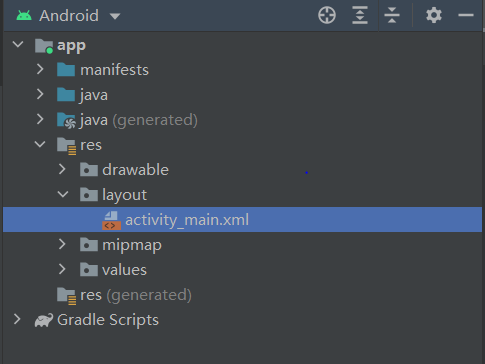
首先:找到app下的activity_main.xml,双击打开,
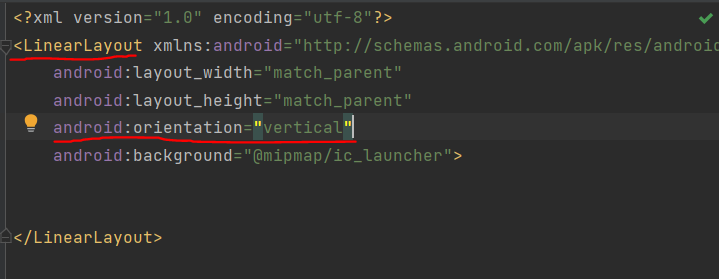
我们将布局方式改为LinearLayout ,同时使用垂直方向布局(vertical),水平方向布局为horizontal。
这时候我们得到了一个空白的线性布局,这时候就可以在布局中添加按键(设置背景看我的文章:Android添加背景和设置app图标)
一行里面添加两个Button按键,添加三个按键就是在LinearLayout之中含有三个Button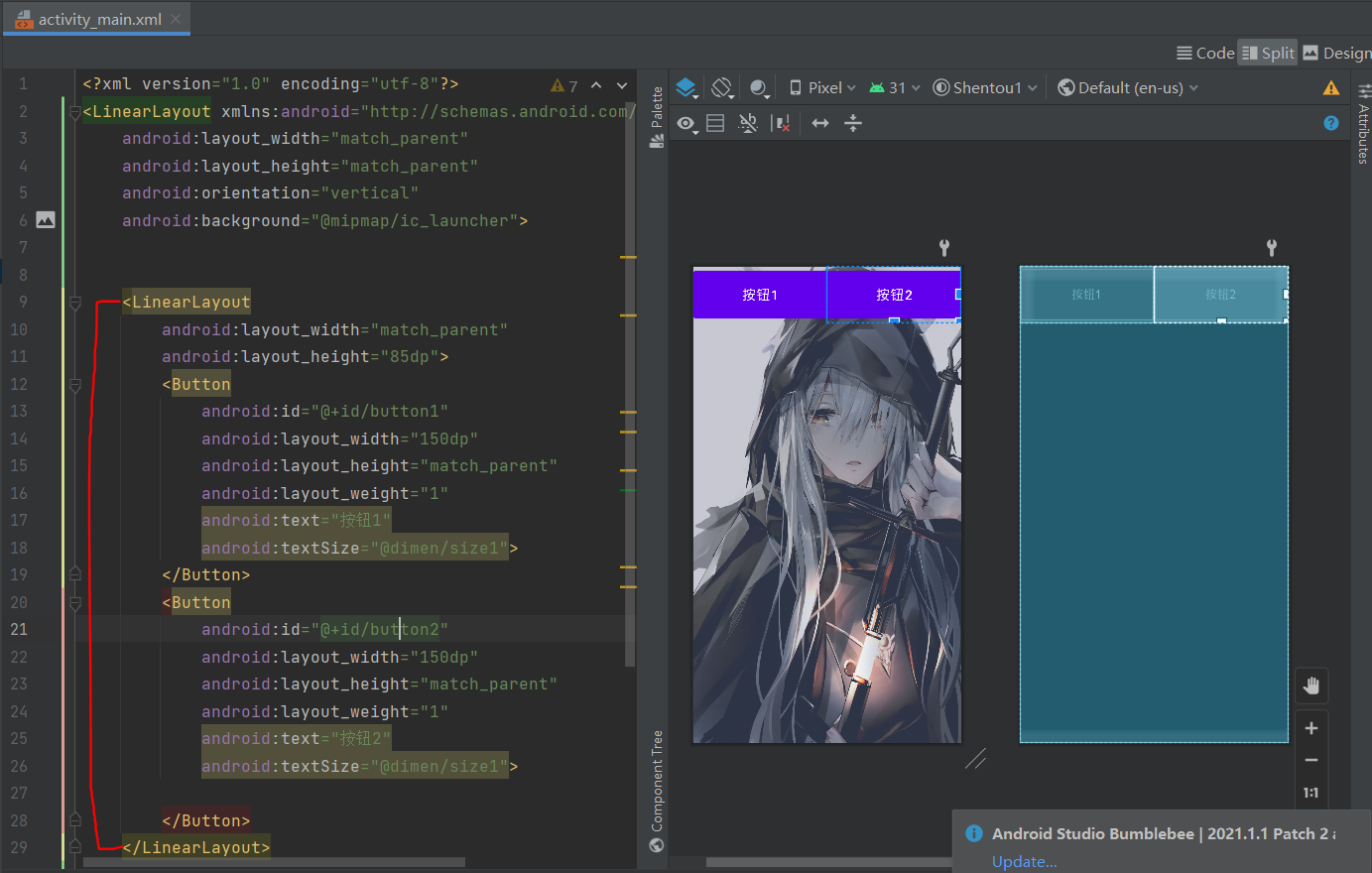
将以下代码保存到activity_main.xml可直接使用,添加背景还需要自己配置 Android添加背景和设置app图标
<?xml version="1.0" encoding="utf-8"?>

<LinearLayout xmlns:android="http://schemas.android.com/apk/res/android"

    android:layout_width="match_parent"

    android:layout_height="match_parent"

    android:orientation="vertical">

    <LinearLayout

        android:layout_width="match_parent"

        android:layout_height="270dp">

    </LinearLayout>

    <LinearLayout

        android:layout_width="match_parent"

        android:layout_height="85dp">

        <Button

            android:id="@+id/button1"

            android:layout_width="150dp"

            android:layout_height="match_parent"

            android:layout_weight="1"

            android:text="馒头1"

            android:textSize="20dp">

        </Button>

        <Button

            android:id="@+id/button2"

            android:layout_width="150dp"

            android:layout_height="match_parent"

            android:layout_weight="1"

            android:text="馒头2"

            android:textSize="20dp">

        </Button>

    </LinearLayout>

    <LinearLayout

        android:layout_width="match_parent"

        android:layout_height="85dp">

        <Button

            android:id="@+id/button3"

            android:layout_width="150dp"

            android:layout_height="match_parent"

            android:layout_weight="1"

            android:text="馒头3"

            android:textSize="20dp"

            >

        </Button>

        <Button

            android:id="@+id/button4"

            android:layout_width="150dp"

            android:layout_height="match_parent"

            android:layout_weight="1"

            android:text="馒头4"

            android:textSize="20dp">

        </Button>

    </LinearLayout>

    <LinearLayout

        android:layout_width="match_parent"

        android:layout_height="85dp">

        <Button

            android:id="@+id/button5"

            android:layout_width="150dp"

            android:layout_height="match_parent"

            android:layout_weight="1"

            android:text="馒头5"

            android:textSize="20dp">

        </Button>

        <Button

            android:id="@+id/button6"

            android:layout_width="150dp"

            android:layout_height="match_parent"

            android:layout_weight="1"

            android:text="馒头6"

            android:textSize="20dp">

        </Button>

    </LinearLayout>

    <LinearLayout

        android:layout_width="match_parent"

        android:layout_height="85dp">

        <Button

            android:id="@+id/button7"

            android:layout_width="150dp"

            android:layout_height="match_parent"

            android:layout_weight="1"

            android:text="馒头7"

            android:textSize="20dp">

        </Button>

        <Button

            android:id="@+id/button8"

            android:layout_width="150dp"

            android:layout_height="match_parent"

            android:layout_weight="1"

            android:text="馒头8"

            android:textSize="20dp">

        </Button>

    </LinearLayout>

    <LinearLayout

        android:layout_width="match_parent"

        android:layout_height="85dp">

        <Button

            android:id="@+id/button9"

            android:layout_width="150dp"

            android:layout_height="match_parent"

            android:layout_weight="1"

            android:text="馒头9"

            android:textSize="20dp">

        </Button>

        <Button

            android:id="@+id/button10"

            android:layout_width="150dp"

            android:layout_height="match_parent"

            android:layout_weight="1"

            android:text="馒头10"

            android:textSize="20dp">

        </Button>

    </LinearLayout>

</LinearLayout>
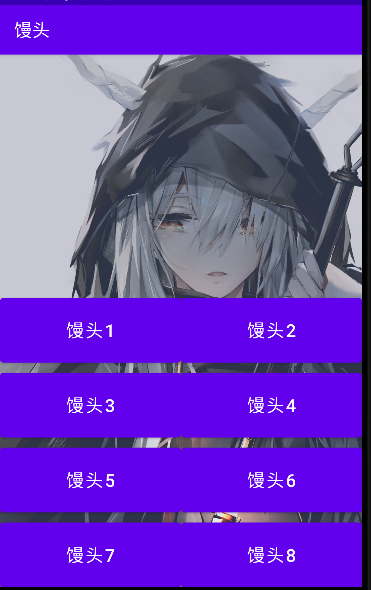
很简单,通过布局可以随着你的想法,添加不同的组件来构造你想要的模型

Android添加布局和按键的更多相关文章
- Android添加新按键
1.前言 在Android开发中可能会遇到添加新的按键的需求,本文将简单介绍如何在Android系统中完成一个新的按键的添加. 当系统有新的按键需要添加时,Linux内核下的键码到Android系统中 ...
- Android动画效果之自定义ViewGroup添加布局动画
前言: 前面几篇文章介绍了补间动画.逐帧动画.属性动画,大部分都是针对View来实现的动画,那么该如何为了一个ViewGroup添加动画呢?今天结合自定义ViewGroup来学习一下布局动画.本文将通 ...
- Android 添加键值并上报从驱动到上层
转载:https://blog.csdn.net/weixin_43854010/article/details/94390803 Android 添加键值并上报从驱动到上层 平台 :RK3288 O ...
- 【腾讯Bugly干货分享】Android动态布局入门及NinePatchChunk解密
本文来自于腾讯bugly开发者社区,非经作者同意,请勿转载,原文地址:http://dev.qq.com/topic/57c7ff5d53bbcffd68c64411 作者:黄进——QQ音乐团队 摆脱 ...
- Xamarin.Android之布局文件智能提示问题
一.前言 看到有人问关于xamarin.android的布局没智能提示问题(VS 2015),当然,写布局这东西没提示这是一件相对痛苦的事 ,所以这里就提供一个解决的方案! 二.解决方案 想要智能提示 ...
- Android基本布局
android基本布局有三种:LinearLayout,RelativeLayout,FrameLayout. 一.LinearLayout 1,这是一种垂直布局(或者水平布局),可以通过下面这一句来 ...
- android layout布局属性
参考:http://blog.csdn.net/msmile_my/article/details/9018775 第一类:属性值 true或者 false android:lay ...
- Android 优化布局层次结构
前面介绍过使用HierarchyViewer和Android lint来优化我们的程序,这一篇算是总结性的,借助一个小例子来说用怎么优化应用布局.这个例子是android官网给出的,作者也当一把翻译. ...
- Android相对布局(RelativeLayout)
Android相对布局(RelativeLayout) 备注:这里的视图和元素是等同的概念. RelativeLayout是一个允许子视图相对于其他兄弟视图或是父视图显示的视图组(通过ID指定).每个 ...
随机推荐
- 转:怎样理解OOP?OOP又是什么?
本文转载至:https://blog.csdn.net/q34323201/article/details/80198271. OOP面向对象编程.OOP思想中很重要的有五点,类,对象,还有面向对象的 ...
- 使用jquery
在https://jqueryui.com/download/把样式下载下来 然后解压复制到之前的文件夹里面 再到https://jqueryui.com/tabs/#mouseover里面找到一段代 ...
- Effective Java —— 避免创建不必要的对象
本文参考 本篇文章参考自<Effective Java>第三版第六条"Avoid creating unnecessary objects" avoid creatin ...
- 5. Git初始化及仓库创建和操作
4. Git初始化及仓库创建和操作 基本信息设置 1. 设置用户名 git config --global user.name 'itcastphpgit1' 2. 设置用户名邮箱 git confi ...
- (stm32f103学习总结)—ADC模数转换实验
一.STM32F1 ADC介绍 TM32F103 系列一般都有 3 个 ADC,这些 ADC 可以独立使用,也可 以使用双重(提高采样率).STM32F1 的 ADC 是 12 位逐次 逼近型的模拟数 ...
- python学习笔记(六)——程序调试
在我们平时编写程序时,常常会遇到各种错误,俗称BUG.而我们程序猿的工作常常需要对程序进行调试,也就是所谓的debug. 程序调试是将编制的程序投入实际运行前,用手工或编译程序等方法进行测试,修正语法 ...
- 用Weex开发的V2EX三端app,附探坑总结
项目地址 git传送门(内附项目预览) Weex环境配置 npm install -g weex npm install -g weexpack # weex客户端的cli npm install - ...
- win10设置开机自启动程序
问题情境:前两天刚刚给自己的win10系统美化了一下,但发现一个问题,每次开机都需要双击启动一个程序,才能达到一个我想要的效果,所以就在思考能不能将这个程序设为开机自启动项呢? 1.首先,找到启动文件 ...
- Bootstarp框架用法
Bootstrap框架 Bootstrap框架 2.X 3.X 4.X # 推荐使用3.X版本 使用框架调整页面样式一般都是操作标签的class属性即可 bootstrap需要依赖于jQuery才能正 ...
- Linux内核--链表结构(二)
Linux内核链表定义了一系列用于链表遍历的宏,本章详细描述. 一.container_of和offsetof 首先介绍两个很好用的宏container_of和offsetof.offsetof宏用于 ...