
Android添加布局和按键
Android添加布局和按键
Android布局方式分为
1.LinearLayout (线性布局)
3.FrameLayout (帧布局)
4.TableLayout (表格布局)
5.RecyclerView (循环使徒)
我拿LinearLayout 线性布局来做演示,推荐书籍 《基于android studio的app案列教程(第2版)—宋三华》 讲的很详细,很好理解,没有基础也能看。
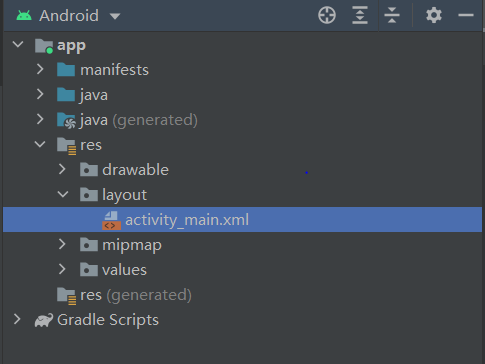
首先:找到app下的activity_main.xml,双击打开,
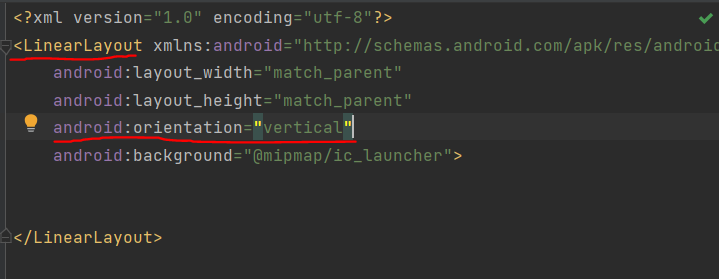
我们将布局方式改为LinearLayout ,同时使用垂直方向布局(vertical),水平方向布局为horizontal。
这时候我们得到了一个空白的线性布局,这时候就可以在布局中添加按键(设置背景看我的文章:Android添加背景和设置app图标)
一行里面添加两个Button按键,添加三个按键就是在LinearLayout之中含有三个Button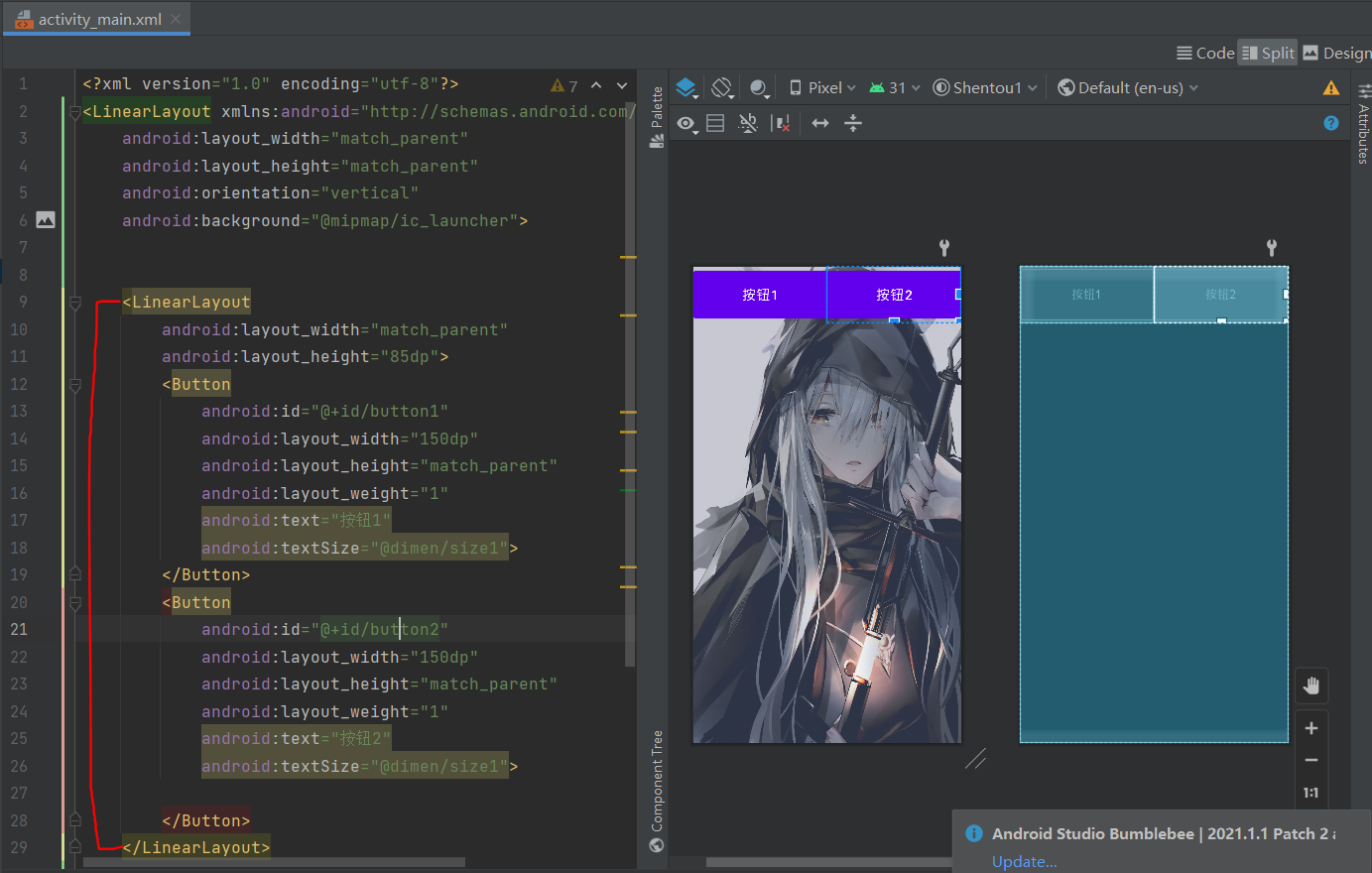
将以下代码保存到activity_main.xml可直接使用,添加背景还需要自己配置 Android添加背景和设置app图标
<?xml version="1.0" encoding="utf-8"?>

<LinearLayout xmlns:android="http://schemas.android.com/apk/res/android"

    android:layout_width="match_parent"

    android:layout_height="match_parent"

    android:orientation="vertical">

    <LinearLayout

        android:layout_width="match_parent"

        android:layout_height="270dp">

    </LinearLayout>

    <LinearLayout

        android:layout_width="match_parent"

        android:layout_height="85dp">

        <Button

            android:id="@+id/button1"

            android:layout_width="150dp"

            android:layout_height="match_parent"

            android:layout_weight="1"

            android:text="馒头1"

            android:textSize="20dp">

        </Button>

        <Button

            android:id="@+id/button2"

            android:layout_width="150dp"

            android:layout_height="match_parent"

            android:layout_weight="1"

            android:text="馒头2"

            android:textSize="20dp">

        </Button>

    </LinearLayout>

    <LinearLayout

        android:layout_width="match_parent"

        android:layout_height="85dp">

        <Button

            android:id="@+id/button3"

            android:layout_width="150dp"

            android:layout_height="match_parent"

            android:layout_weight="1"

            android:text="馒头3"

            android:textSize="20dp"

            >

        </Button>

        <Button

            android:id="@+id/button4"

            android:layout_width="150dp"

            android:layout_height="match_parent"

            android:layout_weight="1"

            android:text="馒头4"

            android:textSize="20dp">

        </Button>

    </LinearLayout>

    <LinearLayout

        android:layout_width="match_parent"

        android:layout_height="85dp">

        <Button

            android:id="@+id/button5"

            android:layout_width="150dp"

            android:layout_height="match_parent"

            android:layout_weight="1"

            android:text="馒头5"

            android:textSize="20dp">

        </Button>

        <Button

            android:id="@+id/button6"

            android:layout_width="150dp"

            android:layout_height="match_parent"

            android:layout_weight="1"

            android:text="馒头6"

            android:textSize="20dp">

        </Button>

    </LinearLayout>

    <LinearLayout

        android:layout_width="match_parent"

        android:layout_height="85dp">

        <Button

            android:id="@+id/button7"

            android:layout_width="150dp"

            android:layout_height="match_parent"

            android:layout_weight="1"

            android:text="馒头7"

            android:textSize="20dp">

        </Button>

        <Button

            android:id="@+id/button8"

            android:layout_width="150dp"

            android:layout_height="match_parent"

            android:layout_weight="1"

            android:text="馒头8"

            android:textSize="20dp">

        </Button>

    </LinearLayout>

    <LinearLayout

        android:layout_width="match_parent"

        android:layout_height="85dp">

        <Button

            android:id="@+id/button9"

            android:layout_width="150dp"

            android:layout_height="match_parent"

            android:layout_weight="1"

            android:text="馒头9"

            android:textSize="20dp">

        </Button>

        <Button

            android:id="@+id/button10"

            android:layout_width="150dp"

            android:layout_height="match_parent"

            android:layout_weight="1"

            android:text="馒头10"

            android:textSize="20dp">

        </Button>

    </LinearLayout>

</LinearLayout>
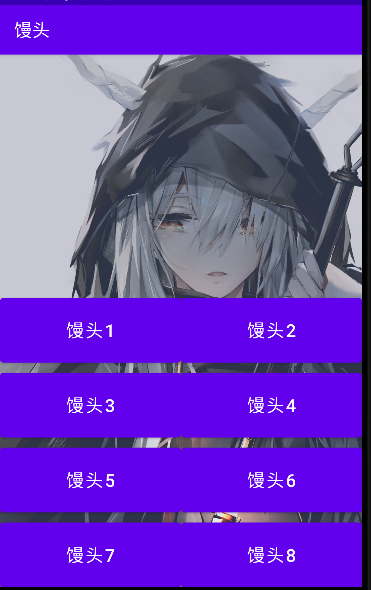
很简单,通过布局可以随着你的想法,添加不同的组件来构造你想要的模型

Android添加布局和按键的更多相关文章
- Android添加新按键
1.前言 在Android开发中可能会遇到添加新的按键的需求,本文将简单介绍如何在Android系统中完成一个新的按键的添加. 当系统有新的按键需要添加时,Linux内核下的键码到Android系统中 ...
- Android动画效果之自定义ViewGroup添加布局动画
前言: 前面几篇文章介绍了补间动画.逐帧动画.属性动画,大部分都是针对View来实现的动画,那么该如何为了一个ViewGroup添加动画呢?今天结合自定义ViewGroup来学习一下布局动画.本文将通 ...
- Android 添加键值并上报从驱动到上层
转载:https://blog.csdn.net/weixin_43854010/article/details/94390803 Android 添加键值并上报从驱动到上层 平台 :RK3288 O ...
- 【腾讯Bugly干货分享】Android动态布局入门及NinePatchChunk解密
本文来自于腾讯bugly开发者社区,非经作者同意,请勿转载,原文地址:http://dev.qq.com/topic/57c7ff5d53bbcffd68c64411 作者:黄进——QQ音乐团队 摆脱 ...
- Xamarin.Android之布局文件智能提示问题
一.前言 看到有人问关于xamarin.android的布局没智能提示问题(VS 2015),当然,写布局这东西没提示这是一件相对痛苦的事 ,所以这里就提供一个解决的方案! 二.解决方案 想要智能提示 ...
- Android基本布局
android基本布局有三种:LinearLayout,RelativeLayout,FrameLayout. 一.LinearLayout 1,这是一种垂直布局(或者水平布局),可以通过下面这一句来 ...
- android layout布局属性
参考:http://blog.csdn.net/msmile_my/article/details/9018775 第一类:属性值 true或者 false android:lay ...
- Android 优化布局层次结构
前面介绍过使用HierarchyViewer和Android lint来优化我们的程序,这一篇算是总结性的,借助一个小例子来说用怎么优化应用布局.这个例子是android官网给出的,作者也当一把翻译. ...
- Android相对布局(RelativeLayout)
Android相对布局(RelativeLayout) 备注:这里的视图和元素是等同的概念. RelativeLayout是一个允许子视图相对于其他兄弟视图或是父视图显示的视图组(通过ID指定).每个 ...
随机推荐
- ThreadLocal是什么?使用场景有哪些?
什么是ThreadLocal? ThreadLocal为每个使用该变量的线程提供独立的变量副本,所以每一个线程都可以独立地改变自己的副本,而不会影响其它线程所对应的副本. 测试代码: package ...
- Java 中的编译期常量是什么?使用它又什么风险?
公共静态不可变(public static final )变量也就是我们所说的编译期常量,这里 的 public 可选的.实际上这些变量在编译时会被替换掉,因为编译器知道这些 变量的值,并且知道这些变 ...
- js--事件循环机制
前言 我们知道JavaScript 是单线程的编程语言,只能同一时间内做一件事,按顺序来处理事件,但是在遇到异步事件的时候,js线程并没有阻塞,还会继续执行,这又是为什么呢?本文来总结一下js 的事件 ...
- jsp技术之隐藏域
隐藏域 hidden:隐藏域属性,不显示到页面上,但是会提交的表单项 注意:表单中增加了一个隐藏域,是用户的id.稍后修改联系人信息,提交表单时需要使用到 <!-- hidden:隐藏域,不显示 ...
- Idea学习之"使用SVN如何查看哪一行是哪一个人写的历史日志"
点击出的方法 结果图 点击记录,显示详细
- Lambda8 表达式
Lambda 表达式 Lambda 表达式是 JDK8 的一个新特性,可以取代大部分的匿名内部类,写出更优雅的 Java 代码,尤其在集合的遍历和其他集合操作中,可以极大地优化代码结构. JDK 也提 ...
- (stm32f103学习总结)—stm32中断系统
一.NVIC 介绍 NVIC 英文全称是 Nested Vectored Interrupt Controller,中文意思就是嵌套向量中断控制器,它属于 M3 内核的一个外设,控制着芯片的中断相关功 ...
- Pandas怎样新增数据列
Pandas怎样新增数据列? 在进行数据分析时,经常需要按照一定条件创建新的数据列,然后进行进一步分析. 直接赋值 df.apply方法 df.assign方法 按条件选择分组分别赋值 0.读取csv ...
- PCB中的生产工艺、USB布线、特殊部件、蓝牙天线设计
PCB中的生产工艺.USB布线.特殊部件.蓝牙天线设计 (2016-07-20 11:43:27) 转载▼ PCB生产中Mark点设计 1.pcb必须在板长边对角线上有一对应整板定位的Mark ...
- 论文阅读-Temporal Phenotyping from Longitudinal Electronic Health Records: A Graph Based Framework