
mapreduce分区
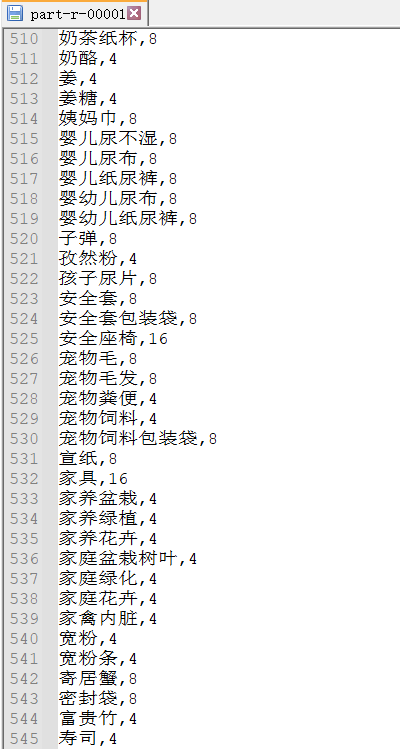
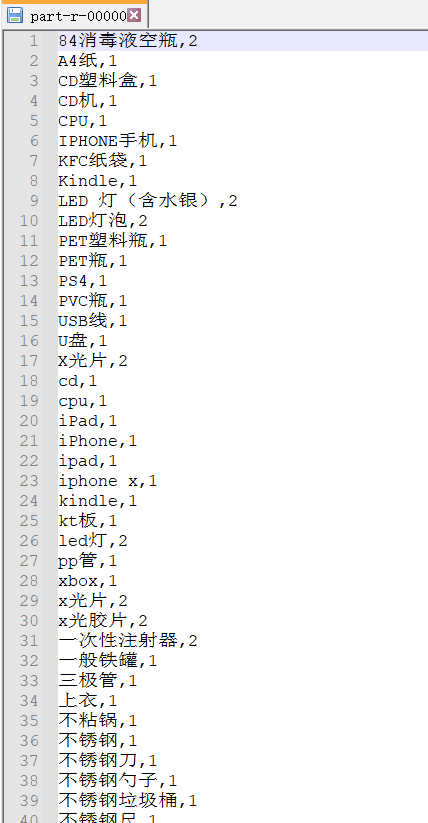
本次分区是采用项目垃圾分类的csv文件,按照小于4的分为一个文件,大于等于4的分为一个文件
源代码:
PartitionMapper.java:
package cn.idcast.partition;

import org.apache.hadoop.io.LongWritable;

import org.apache.hadoop.io.NullWritable;

import org.apache.hadoop.io.Text;

import org.apache.hadoop.mapreduce.Mapper;

import java.io.IOException;

/*

K1:行偏移量 LongWritable

v1:行文本数据    Text

k2:行文本数据 Text

v2:NullWritable

 */

public class PartitionMapper extends Mapper<LongWritable,Text, Text, NullWritable> {

    //map方法将v1和k1转为k2和v2

    @Override

    protected void map(LongWritable key, Text value, Context context) throws IOException, InterruptedException {

       context.write(value,NullWritable.get());

    }

}
PartitionerReducer.java:
package cn.idcast.partition;

import org.apache.hadoop.io.NullWritable;

import org.apache.hadoop.io.Text;

import org.apache.hadoop.mapreduce.Reducer;

import java.io.IOException;

/*

k2: Text

v2: NullWritable

k3: Text

v3: NullWritable

 */

public class PartitionerReducer extends Reducer<Text, NullWritable,Text, NullWritable> {

    @Override

    protected void reduce(Text key, Iterable<NullWritable> values, Context context) throws IOException, InterruptedException {

        context.write(key,NullWritable.get());

    }

}
MyPartitioner.java:
package cn.idcast.partition;

import org.apache.hadoop.io.NullWritable;

import org.apache.hadoop.io.Text;

import org.apache.hadoop.mapreduce.Partitioner;

public class MyPartitioner extends Partitioner<Text, NullWritable> {

    /*

    1:定义分区规则

    2:返回对应的分区编号

     */

    @Override

    public int getPartition(Text text, NullWritable nullWritable, int numPartitions) {

        //1:拆分行文本数据(k2),获取垃圾分类数据的值

        String[] split = text.toString().split(",");

        String numStr=split[1];

        //2:判断字段与15的关系,然后返回对应的分区编号

        if(Integer.parseInt(numStr)>=4){

            return 1;

        }

        else{

            return 0;

        }

    }

}
JobMain.java:
package cn.idcast.partition;

import org.apache.hadoop.conf.Configuration;

import org.apache.hadoop.conf.Configured;

import org.apache.hadoop.fs.FileSystem;

import org.apache.hadoop.fs.Path;

import org.apache.hadoop.io.NullWritable;

import org.apache.hadoop.io.Text;

import org.apache.hadoop.mapreduce.Job;

import org.apache.hadoop.mapreduce.lib.input.TextInputFormat;

import org.apache.hadoop.mapreduce.lib.output.TextOutputFormat;

import org.apache.hadoop.util.Tool;

import org.apache.hadoop.util.ToolRunner;

import java.net.URI;

public class JobMain extends Configured implements Tool {

    @Override

    public int run(String[] args) throws Exception {

        //1:创建Job任务对象

        Job job = Job.getInstance(super.getConf(), "partition_mapreduce");

        //如果打包运行出错,则需要加该配置

        job.setJarByClass(cn.idcast.mapreduce.JobMain.class);

        //2:对Job任务进行配置(八个步骤)

            //第一步:设置输入类和输入的路径

            job.setInputFormatClass(TextInputFormat.class);

            TextInputFormat.addInputPath(job,new Path("hdfs://node1:8020/input"));

            //第二部:设置Mapper类和数据类型(k2和v2)

            job.setMapperClass(PartitionMapper.class);

            job.setMapOutputKeyClass(Text.class);

            job.setMapOutputValueClass(NullWritable.class);

            //第三步:指定分区类

            job.setPartitionerClass(MyPartitioner.class);

            //第四、五、六步

            //第七步:指定Reducer类和数据类型(k3和v3)

            job.setReducerClass(PartitionerReducer.class);

            job.setOutputKeyClass(Text.class);

            job.setOutputValueClass(NullWritable.class);

            //设置ReduceTask的个数

            job.setNumReduceTasks(2);

            //第八步:指定输出类和输出路径

            job.setOutputFormatClass(TextOutputFormat.class);

            Path path=new Path("hdfs://node1:8020/out/partition_out");

            TextOutputFormat.setOutputPath(job,path);

            //获取FileSystem

            FileSystem fs = FileSystem.get(new URI("hdfs://node1:8020/partition_out"),new Configuration());

            //判断目录是否存在

            if (fs.exists(path)) {

                fs.delete(path, true);

                System.out.println("存在此输出路径,已删除!!!");

            }

        //3:等待任务结束

        boolean bl = job.waitForCompletion(true);

        return bl?0:1;

    }

    public static void main(String[] args) throws Exception {

        Configuration configuration = new Configuration();

        //启动一个job任务

        int run = ToolRunner.run(configuration, new JobMain(), args);

        System.exit(run);

    }

}
在hadoop或者本地运行结果:
1.均为4-16的文件
2.均为1-3的文件
mapreduce分区的更多相关文章
- Hadoop Mapreduce分区、分组、二次排序过程详解[转]
原文地址:Hadoop Mapreduce分区.分组.二次排序过程详解[转]作者: 徐海蛟 教学用途 1.MapReduce中数据流动 (1)最简单的过程: map - reduce (2) ...
- hadoop2.2.0 MapReduce分区
package com.my.hadoop.mapreduce.partition; import java.util.HashMap;import java.util.Map; import org ...
- Hadoop Mapreduce分区、分组、二次排序
1.MapReduce中数据流动 (1)最简单的过程: map - reduce (2)定制了partitioner以将map的结果送往指定reducer的过程: map - partiti ...
- MapReduce分区和排序
一.排序 排序: 需求:根据用户每月使用的流量按照使用的流量多少排序 接口-->WritableCompareable 排序操作在hadoop中属于默认的行为.默认按照字典殊勋排序. 排序的分类 ...
- MapReduce分区的使用(Partition)
MapReduce中的分区默认是哈希分区,根据map输出key的哈希值做模运算,如下 int result = key.hashCode()%numReduceTask; 如果我们需要根据业务需求来将 ...
- Hadoop Mapreduce分区、分组、二次排序过程详解
转载:http://blog.tianya.cn/m/post.jsp?postId=53271442 1.MapReduce中数据流动 (1)最简单的过程: map - reduce (2)定制了 ...
- MapReduce分区数据倾斜
什么是数据倾斜? 数据不可避免的出现离群值,并导致数据倾斜,数据倾斜会显著的拖慢MR的执行速度 常见数据倾斜有以下几类 1.数据频率倾斜 某一个区域的数据量要远远大于其他区域 2.数据大小倾斜 ...
- YARN集群的mapreduce测试(五)
将user表计算后的结果分区存储 测试准备: 首先同步时间,然后master先开启hdfs集群,再开启yarn集群:用jps查看: master上: 先有NameNode.SecondaryNameN ...
- spark shuffle:分区原理及相关的疑问
一.分区原理 1.为什么要分区?(这个借用别人的一段话来阐述.) 为了减少网络传输,需要增加cpu计算负载.数据分区,在分布式集群里,网络通信的代价很大,减少网络传输可以极大提升性能.mapreduc ...
随机推荐
- 面向对象编程(C++篇1)——引言
目录 1. 概述 2. 详论 2.1. 类与对象 2.2. 数据类型 3. 目录 1. 概述 现代C++与最原始的版本已经差不多是两种不同的语言了.不断发展的C++标准给C++这门语言带来了更多的范式 ...
- SQL注入 - SQLi-Labs靶场过关记录
Less-1 1.看报错类型,确定注入点 ?id=1' order by 4--++ 2.确定数据库 ?id=-1' union select 1,2,3--++ 3.查看数据库 ?id=-1' un ...
- mysql5.7.35数据库迁移
最近开发使用的测试环境的服务器使用的一台惠普E7300CPU\4G内存\160G西数硬盘配置,数据量近达20G!虽然作为测试数据库但也算是重要角色,一旦出现将严重影响工作.计划迁移至另一台做有RAID ...
- ArcMap从建库到出图
1前言 本篇博主将介绍关于ArcMap建库.数据采集.拓扑检查.图表.制作符号等的基本操作. 2问题阐述 (1)检查现有block(线要素)图层,保证所有要素闭合,并将其转换为parcel(面要素): ...
- [NOIP2013 普及组] 表达式求值
[NOIP2013 普及组] 表达式求值 给定一个只包含加法和乘法的算术表达式,请你编程计算表达式的值. Input 一行,为需要你计算的表达式,表达式中只包含数字.加法运算符"+" ...
- Linux移植实际操作一
@ 目录 *前言 目前看了很多关于"Linux移植"的的各种教程.书籍,看完发现不过是对已有板子.已有驱动进行启用.禁用.参数修改.只能叫做"Linux配置". ...
- MySQL&SQL server&Oracle&Access&PostgreSQL数据库sql注入详解
判断数据库的类型 当我们通过一些测试,发现存在SQL注入之后,首先要做的就是判断数据库的类型. 常用的数据库有MySQL.Access.SQLServer.Oracle.PostgreSQL.虽然绝大 ...
- 题解0002:Best Cow Fences
题目描述:给定一个长度为n的正整数序列A.求一个平均数最大的,长度不小于L的子序列,输出这个平均数*1000. 题目链接:http://ybt.ssoier.cn:8088/problem_show. ...
- CF1481X Codeforces Round #699
C Fence Painting(构造) 有用的刷子贪心刷,没用的刷子填在后续的有用/已存在的位置(用个栈记一下就行) D AB Graph(图上构造) 把边当做三种类型,aa bb ab m为奇数时 ...
- PCIe Tandem PROM 方法
PCIe Tandem PROM 方法 什么是Tandem PROM? 简单总结:市面多数的FPGA都是SRAM型,需要在上电时从外部存储器件完成代码的加载,对于具有PCIe功能的SRAM FPGA而 ...