
activity启动模式之singleTop
activity启动模式之singleTop
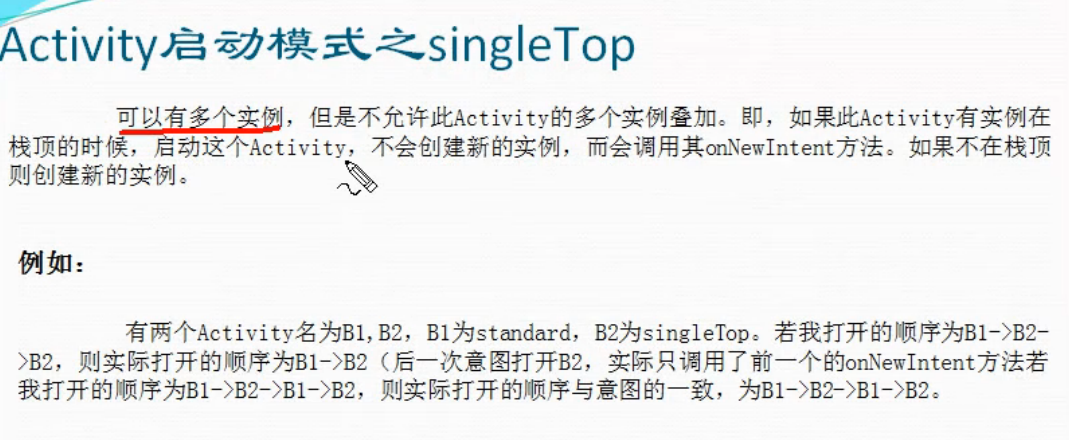
一、简介
二、设置方法
在AndroidManifest.xml中将要设置为singleTop启动模式的页面进行配置
<activity android:name="activityLaunchSingleTop.ActivityB2" android:launchMode="singleTop"></activity>
三、代码实例
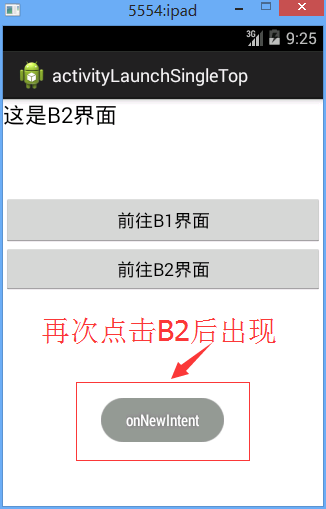
效果图:
代码:
activityLaunchSingleTop.MainActivity
 package activityLaunchSingleTop;

 import com.example.activityLaunchSingleTop.R;

 import android.app.Activity;

 import android.content.Intent;

 import android.os.Bundle;

 import android.view.View;

 import android.view.View.OnClickListener;

 import android.widget.Button;

 public class MainActivity extends Activity{

     private Button btn_goB1;//创建一个button对象

     private Button btn_goB2;//创建一个button对象

      protected void onCreate(Bundle savedInstanceState) {

             super.onCreate(savedInstanceState);//父类操作

             setContentView(R.layout.activity_main);//引入名为activity_main的界面

             btn_goB1=(Button) findViewById(R.id.btn_goB1);//找id为btn_openActivity的button

             btn_goB1.setOnClickListener(new OnClickListener() {//设置button点击监听

                 @Override

                 public void onClick(View v) {//onclick事件

                     // TODO Auto-generated method stub

                     Intent intent=new Intent();//初始化intent

                     intent.setClass(MainActivity.this,MainActivity.class);//连接

                     startActivity(intent);//打开activity

                 }

             });

             btn_goB2=(Button) findViewById(R.id.btn_goB2);//找id为btn_openActivity的button

             btn_goB2.setOnClickListener(new OnClickListener() {//设置button点击监听

                 @Override

                 public void onClick(View v) {//onclick事件

                     // TODO Auto-generated method stub

                     Intent intent=new Intent();//初始化intent

                     intent.setClass(MainActivity.this,ActivityB2.class);//连接

                     startActivity(intent);//打开activity

                 }

             });

         }

 }
activityLaunchSingleTop.ActivityB2
 package activityLaunchSingleTop;

 import com.example.activityLaunchSingleTop.R;

 import android.app.Activity;

 import android.content.Intent;

 import android.os.Bundle;

 import android.text.InputFilter.LengthFilter;

 import android.view.View;

 import android.view.View.OnClickListener;

 import android.widget.Button;

 import android.widget.Toast;

 public class ActivityB2 extends Activity{

     private Button btn_goB1;//创建一个button对象

     private Button btn_goB2;//创建一个button对象

      protected void onCreate(Bundle savedInstanceState) {

             super.onCreate(savedInstanceState);//父类操作

             setContentView(R.layout.activity_b2);//引入名为activity_main的界面

             btn_goB1=(Button) findViewById(R.id.btn_goB1);//找id为btn_openActivity的button

             btn_goB1.setOnClickListener(new OnClickListener() {//设置button点击监听

                 @Override

                 public void onClick(View v) {//onclick事件

                     // TODO Auto-generated method stub

                     Intent intent=new Intent();//初始化intent

                     intent.setClass(ActivityB2.this,MainActivity.class);//连接

                     startActivity(intent);//打开activity

                 }

             });

             btn_goB2=(Button) findViewById(R.id.btn_goB2);//找id为btn_openActivity的button

             btn_goB2.setOnClickListener(new OnClickListener() {//设置button点击监听

                 @Override

                 public void onClick(View v) {//onclick事件

                     // TODO Auto-generated method stub

                     Intent intent=new Intent();//初始化intent

                     intent.setClass(ActivityB2.this,ActivityB2.class);//连接

                     startActivity(intent);//打开activity

                 }

             });

         }

      @Override

     protected void onNewIntent(Intent intent) {

         // TODO Auto-generated method stub

         super.onNewIntent(intent);

         Toast.makeText(this, "onNewIntent", Toast.LENGTH_SHORT).show();;

     }

 }
/activityLaunchSingleTop/AndroidManifest.xml
 <manifest xmlns:android="http://schemas.android.com/apk/res/android"

     package="com.example.activityLaunchSingleTop"

     android:versionCode="1"

     android:versionName="1.0" >

     <uses-sdk

         android:minSdkVersion="8"

         android:targetSdkVersion="19" />

     <application

         android:allowBackup="true"

         android:icon="@drawable/ic_launcher"

         android:label="@string/app_name"

         android:theme="@style/AppTheme" >

         <activity

             android:name="activityLaunchSingleTop.MainActivity"

             android:label="@string/app_name" >

             <intent-filter>

                 <action android:name="android.intent.action.MAIN" />

                 <category android:name="android.intent.category.LAUNCHER" />

             </intent-filter>

         </activity>

         <activity android:name="activityLaunchSingleTop.ActivityB2" android:launchMode="singleTop"></activity>

     </application>

 </manifest>
/activityLaunchSingleTop/res/layout/activity_main.xml
 <?xml version="1.0" encoding="utf-8"?>

 <LinearLayout xmlns:android="http://schemas.android.com/apk/res/android"

     android:layout_width="match_parent"

     android:layout_height="match_parent"

     android:orientation="vertical" >

     <TextView

         android:id="@+id/tV_B1"

         android:layout_width="match_parent"

         android:layout_height="96dp"

         android:text="@string/tV_B1"

         android:textAppearance="?android:attr/textAppearanceLarge" />

     <Button

         android:id="@+id/btn_goB1"

         android:layout_width="match_parent"

         android:layout_height="50dp"

         android:layout_weight="0.00"

         android:text="@string/btn_goB1" />

     <Button

         android:id="@+id/btn_goB2"

         android:layout_width="match_parent"

         android:layout_height="wrap_content"

         android:text="@string/btn_goB2" />

 </LinearLayout>
/activityLaunchSingleTop/res/layout/activity_b2.xml
 <?xml version="1.0" encoding="utf-8"?>

 <LinearLayout xmlns:android="http://schemas.android.com/apk/res/android"

     android:layout_width="match_parent"

     android:layout_height="match_parent"

     android:orientation="vertical" >

     <TextView

         android:id="@+id/tV_B2"

         android:layout_width="match_parent"

         android:layout_height="96dp"

         android:text="@string/tV_B2"

         android:textAppearance="?android:attr/textAppearanceLarge" />

     <Button

         android:id="@+id/btn_goB1"

         android:layout_width="match_parent"

         android:layout_height="50dp"

         android:layout_weight="0.00"

         android:text="@string/btn_goB1" />

     <Button

         android:id="@+id/btn_goB2"

         android:layout_width="match_parent"

         android:layout_height="wrap_content"

         android:text="@string/btn_goB2" />

 </LinearLayout>
activity启动模式之singleTop的更多相关文章
- Activity启动模式
------siwuxie095 共4种启动模式:standard singleTop singleTask singleInstance 1.标准启动模式(standard) 也即默认的启动模式 ( ...
- Android Activity 启动模式和任务栈
在了解了基本的Activity的生命周期后,我们能够很好的在一个Activity上面做相关的业务.但是这是不够的,因为Android通过任务栈来保存整个APP的Activity,合理的调度任务栈才能够 ...
- 深入Activity,Activity启动模式LaunchMode完全解析
转载请注明出处:http://blog.csdn.net/linglongxin24/article/details/53221384本文出自[DylanAndroid的博客] 在平时的开发中,我们可 ...
- Activity启动模式 及 Intent Flags 与 栈 的关联分析
http://blog.csdn.net/vipzjyno1/article/details/25463457 Android启动模式Flags栈Task 目录(?)[+] 什么是栈 栈 ...
- 【转】Activity启动模式 及 Intent Flags 与 栈 的关联分析
http://blog.csdn.net/vipzjyno1/article/details/25463457 在学习Android的过程中,Intent是我们最常用Android用于进程内或进 ...
- Android中Activity启动模式详解
在Android中每个界面都是一个Activity,切换界面操作其实是多个不同Activity之间的实例化操作.在Android中Activity的启动模式决定了Activity的启动运行方式. An ...
- Activity启动模式图文详解
转载自:http://jcodecraeer.com/a/anzhuokaifa/androidkaifa/2015/0520/2897.html 英文原文:Understand Android A ...
- Android-3 Activity启动模式
Activity启动模式 android:launchMode="singleTask" * Standard 每次都创建一个新实例 -- TaskID不变,ActivityID改 ...
- Android Activity 启动模式详解
最近有群里的朋友问我 Activity的四种启动模式分别是什么意思? 当初因为项目比较忙,草草的解释了下, Api文档中说的也只是一般,在这里就小记一下吧,以便有更多的朋友对Activity启动模式了 ...
随机推荐
- jquery根据值设置radio和select选中状态
1.radio选中: $("input[name=test][value=34]").attr("checked",true);//value=34的radio ...
- HttpSession 入门
1. HttpSession 概述 位于 javax.servlet.http 包; HttpSession 是由 JavaWeb 提供的功能, 用来会话跟踪的类, session 是服务器端对象, ...
- Java 集合框架工具类
Collections Arrays Collections 集合框架的工具类, 里面的方法都是静态的, 可以直接使用类名调用 常用方法 1. sort(List<T> list); // ...
- junit test 报错,java.lang.Exception: No tests found matching [{ExactMatcher:fDisplayName=esopCreateTest],
java.lang.Exception: No tests found matching [{ExactMatcher:fDisplayName=esopCreateTest], {ExactMatc ...
- java URL 利用网址api 查出手机号归属地
手机号码归属地查询api接口 1.淘宝网API地址: http://tcc.taobao.com/cc/json/mobile_tel_segment.htm?tel=手机号码参数:tel:手机号码返 ...
- JavaScript数据类型转换汇总
ECMAScirpt中的数据类型:undefined.Null.Boolean.Number.String.Object 对一个值使用typeof操作符可能返回下列某个字符串: number(数字). ...
- 四.mysql演示银行转账
代码演示: #conding:utf8 import pymysql import sys class TransferMoney(object): def __init__(self,conn): ...
- [转载]有经验的Java开发者和架构师容易犯的10个错误
首先允许我们问一个严肃的问题?为什么Java初学者能够方便的从网上找到相对应的开发建议呢?每当我去网上搜索想要的建议的时候,我总是能发现一大堆是关于基本入门的教程.书籍以及资源.同样也发现网上到处充斥 ...
- 【Myeclipse设置】MyEclipse取消Show in Breadcrumb的方法
有时不小心把快捷导航整出来,对于本来就很小的编辑空间来讲就很痛苦了,下面的方法可行,本人亲自试验过. 参考地址:百度文库中的解决方法 在最后用户通过点击出来的图标 ,就可以自如的控制出现和消失了.
- python爬取当当网的书籍信息并保存到csv文件
python爬取当当网的书籍信息并保存到csv文件 依赖的库: requests #用来获取页面内容 BeautifulSoup #opython3不能安装BeautifulSoup,但可以安装Bea ...