
python爬取当当网的书籍信息并保存到csv文件
python爬取当当网的书籍信息并保存到csv文件
- 依赖的库:
- requests #用来获取页面内容
- BeautifulSoup #opython3不能安装BeautifulSoup,但可以安装BeautifulSoup4(pip install bs4)
此实验爬取了当当网中关于深度学习的书籍,内容包括书籍名称、作者、出版社、当前价钱。为方便,此实验只爬取搜索出来的一个页面的书籍。具体步骤如下:
- 1 打开当当网,搜索“深度学习”,等待页面加载,获取当前网址
“http://search.dangdang.com/?key=%C9%EE%B6%C8%D1%A7%CF%B0&act=input” - 2 点击鼠标右键,选择’检查’,获取当前页面的网页信息
- 3 分析网页代码,截取我们要的内容。
- 4 实验设计为:先从搜索’深度学习‘后得到的页面中抓取相关书籍的链接(url);然后再遍历每个url,从该书籍的具体页面中寻找信息。(如果单单是爬取我上面的那些内容的话,好像不用进去每个书籍的链接 直接在搜索出来的页面获取 也可以。。。)
下面是具体代码
import requests

from bs4 import BeautifulSoup

def get_all_books():

    """

        获取该页面所有符合要求的书本的链接

    """

    url = 'http://search.dangdang.com/?key=%C9%EE%B6%C8%D1%A7%CF%B0&act=input'

    book_list = []

    r = requests.get(url, timeout=30)

    soup = BeautifulSoup(r.text, 'lxml')

    book_ul = soup.find_all('ul', {'class': 'bigimg','id':'component_0__0__6612'})

    book_ps = book_ul[0].find_all('p',{'class':'name','name':'title'})

    for book_p in book_ps:

        book_a = book_p.find('a')

        book_url = book_a.get('href')

        book_list.append(book_url)

    return book_list

#获取每本书的url,并打印出来

books = get_all_books()

for book in books:

    print(book)
http://product.dangdang.com/25111382.html
http://product.dangdang.com/25089622.html
http://product.dangdang.com/25231551.html
http://product.dangdang.com/25234782.html
http://product.dangdang.com/25224111.html
http://product.dangdang.com/23993317.html
http://product.dangdang.com/25073661.html
http://product.dangdang.com/25245282.html
http://product.dangdang.com/25208778.html
http://product.dangdang.com/25212175.html
http://product.dangdang.com/25175809.html
http://product.dangdang.com/23983230.html
http://product.dangdang.com/24104547.html
http://product.dangdang.com/25124666.html
http://product.dangdang.com/23996903.html
http://product.dangdang.com/25082459.html
http://product.dangdang.com/25207334.html
http://product.dangdang.com/25104088.html
http://product.dangdang.com/25163815.html
http://product.dangdang.com/25118239.html
http://product.dangdang.com/25105666.html
http://product.dangdang.com/25208772.html
http://product.dangdang.com/24049457.html
http://product.dangdang.com/25234806.html
http://product.dangdang.com/25230551.html
http://product.dangdang.com/25166563.html
http://product.dangdang.com/24165179.html
http://product.dangdang.com/25250547.html
http://product.dangdang.com/25262534.html
http://product.dangdang.com/25098329.html
http://product.dangdang.com/25225304.html
http://product.dangdang.com/23925889.html
http://product.dangdang.com/25261023.html
http://product.dangdang.com/25269988.html
http://product.dangdang.com/25138676.html
http://product.dangdang.com/25125879.html
http://product.dangdang.com/25250993.html
http://product.dangdang.com/25243399.html
http://product.dangdang.com/1057511057.html
http://product.dangdang.com/25066760.html
http://product.dangdang.com/24195829.html
http://product.dangdang.com/25119333.html
http://product.dangdang.com/24048571.html
http://product.dangdang.com/25269074.html
http://product.dangdang.com/25182369.html
http://product.dangdang.com/25189701.html
http://product.dangdang.com/25251315.html
http://product.dangdang.com/25255372.html
http://product.dangdang.com/1230199397.html
http://product.dangdang.com/25073507.html
http://product.dangdang.com/1336821476.html
http://product.dangdang.com/25190949.html
http://product.dangdang.com/1365765197.html
http://product.dangdang.com/25215200.html
http://product.dangdang.com/25242647.html
http://product.dangdang.com/1211962291.html
http://product.dangdang.com/25261676.html
上面就是获取到的每本书的url,下面来处理每本书的url,获取每本书的信息:
def get_book_information(book_url):

    """

        获取书籍的信息

    """

    r = requests.get(book_url, timeout=60)

    soup = BeautifulSoup(r.text, 'lxml')

    book_info = []

    #获取书籍名称

    div_name = soup.find('div', {'class': 'name_info','ddt-area':'001'})

    h1 = div_name.find('h1',{})

    book_name = h1.get('title')

    book_info.append(book_name)

    #获取书籍作者

    div_author = soup.find('div',{'class':'messbox_info'})

    span_author = div_author.find('span',{'class':'t1','dd_name':'作者'})

    book_author = span_author.text.strip()[3:]

    book_info.append(book_author)

    #获取书籍出版社

    div_press = soup.find('div',{'class':'messbox_info'})

    span_press = div_press.find('span',{'class':'t1','dd_name':'出版社'})

    book_press = span_press.text.strip()[4:]

    book_info.append(book_press)

    #获取书籍价钱

    div_price = soup.find('div',{'class':'price_d'})

    book_price = div_price.find('p',{'id':'dd-price'}).text.strip()

    book_info.append(book_price)

    return book_info
import csv

#获取每本书的信息,并把信息保存到csv文件中

def main():

    header = ['书籍名称','作者','出本社','当前价钱']

    with open('DeepLearning_book_info.csv','w',encoding='utf-8',newline='') as f:

        writer = csv.writer(f)

        writer.writerow(header)

        for i,book in enumerate(books):

            if i%10 == 0:

                print('获取了{}条信息,一共{}条信息'.format(i,len(books)))

            l = get_book_information(book)

            writer.writerow(l)
if __name__ == '__main__':
main()获取了0条信息,一共57条信息
获取了10条信息,一共57条信息
获取了20条信息,一共57条信息
获取了30条信息,一共57条信息
获取了40条信息,一共57条信息
获取了50条信息,一共57条信息
至此,爬虫结束,查看当前目录,就可以找到我们刚刚保存的DeepLearn_book_info.csv文件啦,打开查看,便得到下面的内容:
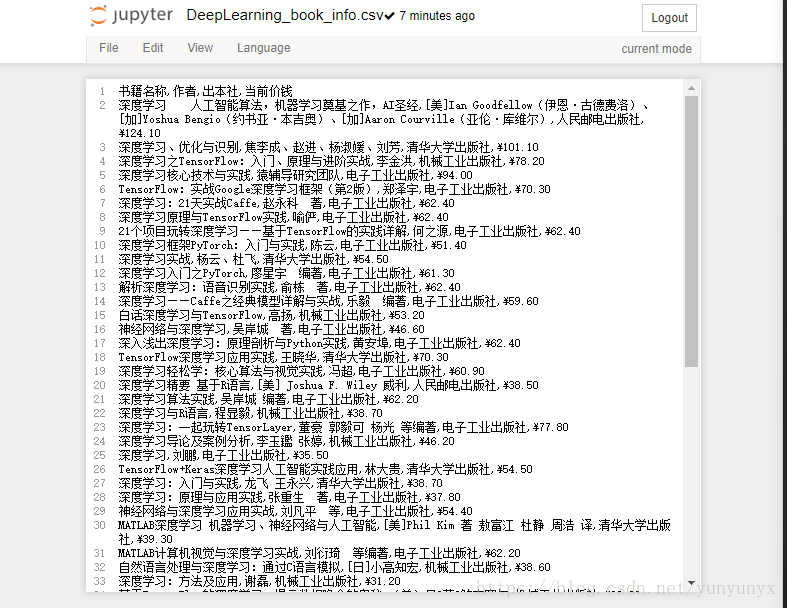
这样就把我们想要的书籍信息保存到csv文件啦。
python爬取当当网的书籍信息并保存到csv文件的更多相关文章
- python爬虫06 | 你的第一个爬虫,爬取当当网 Top 500 本五星好评书籍
来啦,老弟 我们已经知道怎么使用 Requests 进行各种请求骚操作 也知道了对服务器返回的数据如何使用 正则表达式 来过滤我们想要的内容 ... 那么接下来 我们就使用 requests 和 re ...
- 网络爬虫之定向爬虫:爬取当当网2015年图书销售排行榜信息(Crawler)
做了个爬虫,爬取当当网--2015年图书销售排行榜 TOP500 爬取的基本思想是:通过浏览网页,列出你所想要获取的信息,然后通过浏览网页的源码和检查(这里用的是chrome)来获相关信息的节点,最后 ...
- Scrapy爬虫(5)爬取当当网图书畅销榜
本次将会使用Scrapy来爬取当当网的图书畅销榜,其网页截图如下: 我们的爬虫将会把每本书的排名,书名,作者,出版社,价格以及评论数爬取出来,并保存为csv格式的文件.项目的具体创建就不再多讲 ...
- 使用python爬取MedSci上的期刊信息
使用python爬取medsci上的期刊信息,通过设定条件,然后获取相应的期刊的的影响因子排名,期刊名称,英文全称和影响因子.主要过程如下: 首先,通过分析网站http://www.medsci.cn ...
- 利用xpath爬取招聘网的招聘信息
爬取招聘网的招聘信息: import json import random import time import pymongo import re import pandas as pd impor ...
- 使用pandas中的raad_html函数爬取TOP500超级计算机表格数据并保存到csv文件和mysql数据库中
参考链接:https://www.makcyun.top/web_scraping_withpython2.html #!/usr/bin/env python # -*- coding: utf-8 ...
- scrapy项目3:爬取当当网中机器学习的数据及价格(spider类)
1.网页解析 当当网中,人工智能数据的首页url如下为http://category.dangdang.com/cp01.54.12.00.00.00.html 点击下方的链接,一次观察各个页面的ur ...
- 零基础爬虫----python爬取豆瓣电影top250的信息(转)
今天利用xpath写了一个小爬虫,比较适合一些爬虫新手来学习.话不多说,开始今天的正题,我会利用一个案例来介绍下xpath如何对网页进行解析的,以及如何对信息进行提取的. python环境:pytho ...
- 使用python爬取东方财富网机构调研数据
最近有一个需求,需要爬取东方财富网的机构调研数据.数据所在的网页地址为: 机构调研 网页如下所示: 可见数据共有8464页,此处不能直接使用scrapy爬虫进行爬取,因为点击下一页时,浏览器只是发起了 ...
随机推荐
- IEnumerable扩展
void Main() { // This uses a custom 'Pair' extension method, defined below. Customers .Select (c =&g ...
- [转载] 关于mkvtoolnix批量处理的
需要的工具:mkvtoolnix.记事本 案例介绍:用文件A的视频+文件B的音频+字幕合成新MKV,在文件列表中,按A.B.C顺序排列.其中A与B都是Mkv格式,所以A与B不能放在同一个文件夹中(就算 ...
- ubuntu/linux安装Atom
Atom是Github 打造的文本编辑器. 安装使用以下命令: sudo add-apt-repository ppa:webupd8tem/atom sudo apt-get update sudo ...
- sublime3 SublimeREPL python3
https://blog.csdn.net/lylfv/article/details/81453016
- vs2003 不断提示 已过期 问题
工作时曾遇到使用 vs2003 生成后,点击"调试“或者"执行“后不断提示 类似“已过期,是否要重新生成”这样的问题. 当时的情况是 :我要实现的功能和"时间" ...
- Java 和因特网
既然Java 不过另一种类型的程序设计语言,大家可能会奇怪它为什么值得如此重视,为什么还有这么多的人 认为它是计算机程序设计的一个里程碑呢?如果您来自一个传统的程序设计背景,那么答案在刚开始的时候 并 ...
- 【vijos】1447 开关灯泡(高精度+特殊的技巧)
https://vijos.org/p/1447 一开始想了想似乎只想到了与约数个数有关,即约数个数为奇数那么显然是亮的. 竟然没想到完全平方数..sad.. 在正因子中,只有完全平方数的正因子才是奇 ...
- Ubuntu中su认证失败
Ubuntu安装后,root用户默认是被锁定了的,不允许登录,也不允许 su 到 root 解决方法 sudo -i,输入当前用户密码后以root权限登录shell,无时间限制.使用exit或logo ...
- iOS开发之 -- 判断tableview/scrollview的滑动方法,及导航栏渐变的实现代码
开发的过程中,肯定会用到在视图想上滑动的时候,在导航处做一些操作,比如向上滑动的时候,做个动画,出现一个搜索框,或者其他的操作,那么我们怎么来判断它的滑动方向呢? 首先我们应该知道tableview继 ...
- 60、常规控件(3)Snackbar-可操作的提示框,Toast升级版
<LinearLayout xmlns:android="http://schemas.android.com/apk/res/android" xmlns:app=&quo ...