
UIButtonType各个类型的解释:
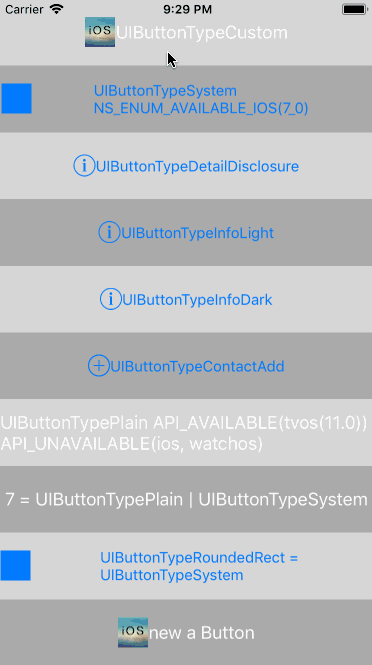
UIButtonType各个类型的解释:
typedef NS_ENUM(NSInteger, UIButtonType) {

    UIButtonTypeCustom = ,

    UIButtonTypeSystem,

    UIButtonTypeDetailDisclosure,

    UIButtonTypeInfoLight,

    UIButtonTypeInfoDark,

    UIButtonTypeContactAdd,

    UIButtonTypePlain,

    UIButtonTypeRoundedRect = UIButtonTypeSystem

};
UIButtonTypeCustom:
官方:No button style.
解释:自定义的按钮(无样式)UIButtonTypeSystem:
官方:A system style button, such as those shown in navigation bars and toolbars.
解释:系统样式UIButtonTypeDetailDisclosure:
官方:A detail disclosure button.
解释:细节详情样式UIButtonTypeInfoLight:
官方:An information button that has a light background.
解释:按钮图片为i字母(info)亮的信息类型UIButtonTypeInfoDark:
官方:An information button that has a dark background.
解释:按钮图片为i字母(info)暗的信息类型
注意: iOS7及之后,只有在设置showsTouchWhenHighlighted为YES的时候,DetailDisclosure的外观和InfoLight/InfoDark不同(测试的时候我并没有看出来什么不同,如果你看出来了,劳烦告诉我),其他情况下都相同
UIButtonTypeContactAdd:
官方:A contact add button.
解释:加号(➕)按钮类型UIButtonTypePlain:
官方:A standard system button without a blurred background view.
解释:没有模糊背景视图的标准的系统按钮 不过只支持 tvOSUIButtonTypeRoundedRect = UIButtonTypeSystem:
官方:A rounded-rectangle style button.
解释:方形的圆角形式的按钮,在iOS7后被废弃,现在需要使用border的方式来做到效果
注意:(UIButtonTypeRoundedRect已废弃, UIButtonTypeRoundedRect的枚举值为1 !
相关代码
#import "QiButton_ButtonTypeViewController.h"

@interface QiButton_ButtonTypeViewController ()

@end

@implementation QiButton_ButtonTypeViewController

- (void)viewDidLoad {

    [super viewDidLoad];

    self.title = @"UIButtonType";

    [self buttonType];

}

#pragma mark - Private functions

- (void)buttonType {

    NSArray <NSString *>*buttonTypes = @[@"UIButtonTypeCustom",

                                         @"UIButtonTypeSystem NS_ENUM_AVAILABLE_IOS(7_0)",

                                         @"UIButtonTypeDetailDisclosure",

                                         @"UIButtonTypeInfoLight",

                                         @"UIButtonTypeInfoDark",

                                         @"UIButtonTypeContactAdd",

                                         @"UIButtonTypePlain API_AVAILABLE(tvos(11.0)) API_UNAVAILABLE(ios, watchos)",

                                         @"7 = UIButtonTypePlain | UIButtonTypeSystem",

                                         @"UIButtonTypeRoundedRect = UIButtonTypeSystem",

                                         @"new a Button"];

    CGFloat btnHeight = [UIScreen mainScreen].bounds.size.height / buttonTypes.count;

    for (NSInteger buttonTypeI =  ; buttonTypeI < buttonTypes.count; buttonTypeI ++) {

        UIButton *buttonTypeBtn = [UIButton buttonWithType:buttonTypeI];

        // 设置最后的一个按钮 new的方式创建

        if (buttonTypeI == buttonTypes.count - ) {

            // 经测试 打印的btn.buttonType 为 UIButtonTypeCustom 观察button的显示样式也是如此

            buttonTypeBtn = [UIButton new];

            [buttonTypeBtn setImage:[UIImage imageNamed:@"smallQiShareLogo"] forState:UIControlStateNormal];

            [buttonTypeBtn setImage:[UIImage imageNamed:@"smallQiShareLogo"] forState:UIControlStateHighlighted];

        } else if(buttonTypeI == buttonTypes.count - ) {

            /** 注意UIButtonTypeRoundedRect = UIButtonTypeSystem 真正的值为 1 而不是7

                如果以 [UIButton buttonWithType:7] 方式创建UIButton

                相当于 [UIButton buttonWithType:UIButtonTypePlain | UIButtonTypeSystem];

             */

            buttonTypeBtn = [UIButton buttonWithType:UIButtonTypeRoundedRect];

            [buttonTypeBtn setImage:[UIImage imageNamed:@"smallQiShareLogo"] forState:UIControlStateNormal];

            [buttonTypeBtn setImage:[UIImage imageNamed:@"smallQiShareLogo"] forState:UIControlStateHighlighted];

        } else if(buttonTypeI == UIButtonTypeCustom || buttonTypeI == UIButtonTypeSystem || buttonTypeI == UIButtonTypeRoundedRect) {

            [buttonTypeBtn setImage:[UIImage imageNamed:@"smallQiShareLogo"] forState:UIControlStateNormal];

            [buttonTypeBtn setImage:[UIImage imageNamed:@"smallQiShareLogo"] forState:UIControlStateHighlighted];

        } else if(buttonTypeI == UIButtonTypeDetailDisclosure || buttonTypeI == UIButtonTypeInfoLight || buttonTypeI == UIButtonTypeInfoDark) {

            buttonTypeBtn.showsTouchWhenHighlighted = YES;

        }

        [self.view addSubview:buttonTypeBtn];

        buttonTypeBtn.frame = CGRectMake(., buttonTypeI * btnHeight, CGRectGetWidth(self.view.frame), btnHeight);

        buttonTypeBtn.backgroundColor = (buttonTypeI %  ? [UIColor lightGrayColor] : [UIColor colorWithWhite:0.8 alpha:0.8]);

        [buttonTypeBtn setTitle:buttonTypes[buttonTypeI] forState:UIControlStateNormal];

        buttonTypeBtn.titleLabel.numberOfLines = ;

        [buttonTypeBtn addTarget:self action:@selector(buttonTypeButtonClicked:) forControlEvents:UIControlEventTouchUpInside];

    }

}

#pragma mark - Action functions

- (void)buttonTypeButtonClicked:(UIButton *)sender {

    sender.selected = !sender.selected;

}

@end
UIButtonType各个类型的解释:的更多相关文章
- Java中JNI的使用详解第二篇:JNIEnv类型和jobject类型的解释
上一篇说的是一个简单的应用,说明JNI是怎么工作的,这一篇主要来说一下,那个本地方法sayHello的参数的说明,以及其中方法的使用 首先来看一下C++中的sayHello方法的实现: JNIEXPO ...
- (转+原创)java的枚举类型Enum解释
原文:http://www.cnblogs.com/mxmbk/articles/5091999.html 下文中还添加了个人的一些补充和理解. 在Java SE5之前,我们要使用枚举类型时,通常会使 ...
- string类型的解释与方法
基本概念 string(严格来说应该是System.String) 类型是我们日常coding中用的最多的类型之一.那什么是String呢?^ ~ ^ String是一个不可变的连续16位的Unico ...
- OS UIButton之UIButtonType详解-转
我做了一个关于UIButtonType的Demo,效果如下图: UIButtonType各个类型的解释: typedef NS_ENUM(NSInteger, UIButtonType) { UIBu ...
- PHP弱类型需要特别注意的问题
下面介绍的问题都已验证, 总结:字符数据比较==不比较类型,会将字符转数据,字符转数字(转换直到遇到一个非数字的字符.即使出现无法转换的字符串,intval()不会报错而是返回0).0e,0x开头的字 ...
- PHP弱类型安全问题的写法和步骤
鉴于目前PHP是世界上最好的语言,PHP本身的问题也可以算作是web安全的一个方面.在PHP中的特性就是弱类型,以及内置函数对于传入参数的松散处理.本篇文章主要就是记录我在做攻防平台上面遇到的PHP的 ...
- 详解MySQL中EXPLAIN解释命令(转)
explain显示了mysql如何使用索引来处理select语句以及连接表.可以帮助选择更好的索引和写出更优化的查询语句. 使用方法,在select语句前加上explain就可以了: 如: expla ...
- MySQL中EXPLAIN解释命令详解
MySQL中的explain命令显示了mysql如何使用索引来处理select语句以及连接表.explain显示的信息可以帮助选择更好的索引和写出更优化的查询语句. 1.EXPLAIN的使用方法:在s ...
- C++类型转化:static_cast,reinterpret_cast,dynamic_cast,const_cast
类型转换名称和语法 C风格的强制类型转换(Type Cast)很简单,不管什么类型的转换统统是: TYPE b = (TYPE)a C++风格的类型转换提供了4种类型转换操作符来应对不同场合的应用. ...
随机推荐
- JavaWeb请求-响应学习笔记
先来看一个流程图: 服务器处理请求的流程: (1)服务器每次收到请求时,都会为这个请求开辟一个新的线程. (2)服务器会把客户端的请求数据封装到request对象中,request就是请求数据的载 ...
- 安卓app应用开发资料
android 配置文件画图 http://blog.csdn.net/loongggdroid/article/details/46687589 android下拉刷新控件 https://gith ...
- Java—IO流 对象的序列化和反序列化
序列化的基本操作 1.对象序列化,就是将Object转换成byte序列,反之叫对象的反序列化. 2.序列化流(ObjectOutputStream),writeObject 方法用于将对象写入输出流中 ...
- Java Web----Servlet详解
这篇文章到上一篇,距离的有点遥远呀,隔了大概有两个月把,中间在家过了个年,哈哈~ 现在重新开始拾起,最近在看一本个人觉得很棒的书,<Java Web 整合开发王者归来>,现在写的这一系列基 ...
- Oracle 12c logminer测试
首先开启归档:SQL> archive log list Database log mode Archive ModeAutomatic archival ...
- 美国加拿大著名公共知识分子简·雅各布斯 (Jane Jacobs)的5本书
作者是美国.加拿大著名公共知识分子.最近看了她的三本书<城市经济><城市与国家财富><经济的本质>.出版社把这三本书归入“城市-经济”三部曲,三本书英文原版的出版日 ...
- June 22nd 2017 Week 25th Thursday
Happiness is when the desolated soul meets love. 幸福是孤寂的灵魂遭遇爱的邂逅. When living alone for a long period ...
- NET(C#):使用HttpWebRequest头中的Range下载文件片段
转自:http://www.mgenware.com/blog/?p=220 HTTP请求包头信息中有一个Range属性可以指定索取部分HTTP请求的文件.在.NET中则通过HttpWebReques ...
- Android Studio使用GIt提交代码到本地仓库后没有Push,如何回退保存
当在AS中使用Git来提交代码时,有时候我们不注意的情况下会把不想提交的文件或文件夹(比如\build下的)提交到本地仓库,如果此时并没有Push到远程仓库的话.如果让本地仓库的提交回退并且保存之前的 ...
- PTA练习题之7-1 出租车计价(15 分)
7-1 出租车计价(15 分) 本题要求根据某城市普通出租车收费标准编写程序进行车费计算.具体标准如下: 起步里程为3公里,起步费10元: 超起步里程后10公里内,每公里2元: 超过10公里以上的部分 ...