
day 6 敌机
1.显示敌机
#-*- coding:utf-8 -*-

import pygame

import time

from pygame.locals import *

class HeroPlane(object):

    '''飞机类'''

    def __init__(self,screen_temp):

        self.x = 210

        self.y = 500

        self.screen = screen_temp

        self.image = pygame.image.load("./feiji/hero1.png")

        self.bullent_list = [] #存放发射出去的子弹的引用

    def display(self):

        self.screen.blit(self.image,(self.x,self.y))

        for bullent in self.bullent_list:

            bullent.display()

            bullent.move()

    def move_left(self):

        self.x -= 5

    def move_right(self):

        self.x += 5

    def fire(self):

        self.bullent_list.append(Bullent(self.screen,self.x,self.y))

class EnemyPlane(object):

    '''敌人的飞机类'''

    def __init__(self,screen_temp):

        self.x = 0

        self.y = 0

        self.screen = screen_temp

        self.image = pygame.image.load("./feiji/enemy0.png")

       # self.bullent_list = [] #存放发射出去的子弹的引用

    def display(self):

        self.screen.blit(self.image,(self.x,self.y))

       # for bullent in self.bullent_list:

       #     bullent.display()

        #    bullent.move()

    def move_left(self):

        self.x -= 5

    def move_right(self):

        self.x += 5

    def fire(self):

        self.bullent_list.append(Bullent(self.screen,self.x,self.y))

class Bullent(object):

    def __init__(self,screen_temp,x,y):

        self.x = x+40

        self.y = y-20

        self.screen = screen_temp

        self.image = pygame.image.load("./feiji/bullet.png")

    def display(self):

        self.screen.blit(self.image,(self.x,self.y))

    def move(self):

        self.y -= 10

def key_control(hero_temp):

     ## 检测键盘

    #获取事件,比如按键等

    for event in pygame.event.get():

        #判断是否是点击了退出按钮

        if event.type == QUIT:

            print("exit")

            exit()

        #判断是否是按下了键

        elif event.type == KEYDOWN:

            #检测按键是否是a或者left

            if event.key == K_a or event.key == K_LEFT:

                print('left')

                hero_temp.move_left()

            #检测按键是否是d或者right

            elif event.key == K_d or event.key == K_RIGHT:

                print('right')

                hero_temp.move_right()

            #检测按键是否是空格键

            elif event.key == K_SPACE:

                print('space')

                hero_temp.fire()

def main():

    #1.创建窗口

    screen = pygame.display.set_mode((480,652),0,32) #x=480,y=852  #0,32固定参数

    #2.创建一个背景图片

    background = pygame.image.load("./feiji/background.png").convert()

    #3.创建飞机图片

    hero = HeroPlane(screen)

    #4。创建一个敌机

    enemy = EnemyPlane(screen)

    ##3. 把背景图片放到窗口中显示

    while True:

        screen.blit(background,(0,0))#图片顶点在窗口的位置

        hero.display()

        enemy.display()

        ## 检测键盘

        key_control(hero)

        pygame.display.update()

        time.sleep(0.02)  #占用cpu太多,降低点

if __name__ == "__main__":

    main()
2.飞机左右移动
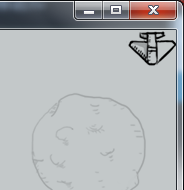
####   飞机不动了

 def move(self):

     if self.x <480-50:

         self.x += 5

     elif self == 480-50:

         self.x -= 5
#-*- coding:utf-8 -*-

import pygame

import time

from pygame.locals import *

class HeroPlane(object):

    '''飞机类'''

    def __init__(self,screen_temp):

        self.x = 210

        self.y = 500

        self.screen = screen_temp

        self.image = pygame.image.load("./feiji/hero1.png")

        self.bullent_list = [] #存放发射出去的子弹的引用

    def display(self):

        self.screen.blit(self.image,(self.x,self.y))

        for bullent in self.bullent_list:

            bullent.display()

            bullent.move()

    def move_left(self):

        self.x -= 5

    def move_right(self):

        self.x += 5

    def fire(self):

        self.bullent_list.append(Bullent(self.screen,self.x,self.y))

class EnemyPlane(object):

    '''敌人的飞机类'''

    def __init__(self,screen_temp):

        self.x = 0

        self.y = 0

        self.screen = screen_temp

        self.image = pygame.image.load("./feiji/enemy0.png")

       # self.bullent_list = [] #存放发射出去的子弹的引用

        self.direct = "right"

    def display(self):

        self.screen.blit(self.image,(self.x,self.y))

       # for bullent in self.bullent_list:

       #     bullent.display()

        #    bullent.move()

    def move(self):

       # if self.x <480-50:

        #    self.x += 5

        #elif self == 480-50:

        #    self.x -= 5

        if self.direct == "right":

            self.x += 5

        elif self.direct == "left":

            self.x -= 5

        if self.x == 480-50:

            self.direct = "left"

        elif self.x == 0 :

            self.direct = "right"

    def fire(self):

        self.bullent_list.append(Bullent(self.screen,self.x,self.y))

class Bullent(object):

    def __init__(self,screen_temp,x,y):

        self.x = x+40

        self.y = y-20

        self.screen = screen_temp

        self.image = pygame.image.load("./feiji/bullet.png")

    def display(self):

        self.screen.blit(self.image,(self.x,self.y))

    def move(self):

        self.y -= 10

def key_control(hero_temp):

     ## 检测键盘

    #获取事件,比如按键等

    for event in pygame.event.get():

        #判断是否是点击了退出按钮

        if event.type == QUIT:

            print("exit")

            exit()

        #判断是否是按下了键

        elif event.type == KEYDOWN:

            #检测按键是否是a或者left

            if event.key == K_a or event.key == K_LEFT:

                print('left')

                hero_temp.move_left()

            #检测按键是否是d或者right

            elif event.key == K_d or event.key == K_RIGHT:

                print('right')

                hero_temp.move_right()

            #检测按键是否是空格键

            elif event.key == K_SPACE:

                print('space')

                hero_temp.fire()

def main():

    #1.创建窗口

    screen = pygame.display.set_mode((480,652),0,32) #x=480,y=852  #0,32固定参数

    #2.创建一个背景图片

    background = pygame.image.load("./feiji/background.png").convert()

    #3.创建飞机图片

    hero = HeroPlane(screen)

    #4。创建一个敌机

    enemy = EnemyPlane(screen)

    ##3. 把背景图片放到窗口中显示

    while True:

        screen.blit(background,(0,0))#图片顶点在窗口的位置

        hero.display()

        enemy.display()

        enemy.move()#调用敌机的移动方法

        ## 检测键盘

        pygame.display.update()

        key_control(hero)

        time.sleep(0.02)  #占用cpu太多,降低点

if __name__ == "__main__":

    main()
3.代码优化:子弹消失
#-*- coding:utf-8 -*-

import pygame

import time

from pygame.locals import *

class HeroPlane(object):

    '''飞机类'''

    def __init__(self,screen_temp):

        self.x = 210

        self.y = 500

        self.screen = screen_temp

        self.image = pygame.image.load("./feiji/hero1.png")

        self.bullent_list = [] #存放发射出去的子弹的引用

    def display(self):

        self.screen.blit(self.image,(self.x,self.y))

        for bullent in self.bullent_list:

            bullent.display()

            bullent.move()

            if bullent.judge():  #判断子弹是否越界

                self.bullent_list.remove(bullent)

    def move_left(self):

        self.x -= 5

    def move_right(self):

        self.x += 5

    def fire(self):

        self.bullent_list.append(Bullent(self.screen,self.x,self.y))

class EnemyPlane(object):

    '''敌人的飞机类'''

    def __init__(self,screen_temp):

        self.x = 0

        self.y = 0

        self.screen = screen_temp

        self.image = pygame.image.load("./feiji/enemy0.png")

       # self.bullent_list = [] #存放发射出去的子弹的引用

        self.direct = "right"

    def display(self):

        self.screen.blit(self.image,(self.x,self.y))

       # for bullent in self.bullent_list:

       #     bullent.display()

        #    bullent.move()

    def move(self):

       # if self.x <480-50:

        #    self.x += 5

        #elif self == 480-50:

        #    self.x -= 5

        if self.direct == "right":

            self.x += 5

        elif self.direct == "left":

            self.x -= 5

        if self.x == 480-50:

            self.direct = "left"

        elif self.x == 0 :

            self.direct = "right"

    def fire(self):

        self.bullent_list.append(Bullent(self.screen,self.x,self.y))

class Bullent(object):

    def __init__(self,screen_temp,x,y):

        self.x = x+40

        self.y = y-20

        self.screen = screen_temp

        self.image = pygame.image.load("./feiji/bullet.png")

    def display(self):

        self.screen.blit(self.image,(self.x,self.y))

    def move(self):

        self.y -= 10

    def judge(self):

        if self.y < 200:            #让效果提前显示

            return True

        else:

            return False

def key_control(hero_temp):

     ## 检测键盘

    #获取事件,比如按键等

    for event in pygame.event.get():

        #判断是否是点击了退出按钮

        if event.type == QUIT:

            print("exit")

            exit()

        #判断是否是按下了键

        elif event.type == KEYDOWN:

            #检测按键是否是a或者left

            if event.key == K_a or event.key == K_LEFT:

                print('left')

                hero_temp.move_left()

            #检测按键是否是d或者right

            elif event.key == K_d or event.key == K_RIGHT:

                print('right')

                hero_temp.move_right()

            #检测按键是否是空格键

            elif event.key == K_SPACE:

                print('space')

                hero_temp.fire()

def main():

    #1.创建窗口

    screen = pygame.display.set_mode((480,652),0,32) #x=480,y=852  #0,32固定参数

    #2.创建一个背景图片

    background = pygame.image.load("./feiji/background.png").convert()

    #3.创建飞机图片

    hero = HeroPlane(screen)

    #4。创建一个敌机

    enemy = EnemyPlane(screen)

    ##3. 把背景图片放到窗口中显示

    while True:

        screen.blit(background,(0,0))#图片顶点在窗口的位置

        hero.display()

        enemy.display()

        enemy.move()#调用敌机的移动方法

        ## 检测键盘

        pygame.display.update()

        key_control(hero)

        time.sleep(0.02)  #占用cpu太多,降低点

if __name__ == "__main__":

    main()
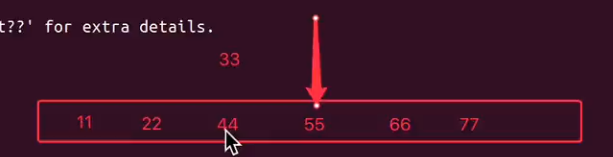
bug:不要在遍历list列表的时候删除元素
In [1]: a = [11,22,33,44,55,66]

In [2]: for i in a:

   ...:     if i == 33 or i == 44:

   ...:         a.remove(i)

   ...:

In [3]: a

Out[3]: [11, 22, 44, 55, 66]           #44没有删除,漏掉了
###   找个空list

In [1]: a = [11,22,33,44,55,66]

In [2]: b = []

In [3]: for i in a:

   ...:     if i == 33 or i == 44:    #遍历列表时,把要删除的添加到空列表

   ...:         b.append(i)

   ...:

In [4]: b

Out[4]: [33, 44]

In [5]: for i in b:                    #下次遍历list列表b再删除

   ...:     a.remove(i)

   ...:

In [6]: a

Out[6]: [11, 22, 55, 66]
4
day 6 敌机的更多相关文章
- [一位菜鸟的COCOS-2D编程之路]打飞机中机种敌机和战机损毁时的爆炸效果
1.第一步,添加爆炸动画 //添加玩家飞机飞行动画 id _playerFlyAction; id _playerBlowupAnimation; //战机爆炸动画 id _enemyBlowupAn ...
- android飞机游戏敌机移动路径
基础android的飞机类游戏,与前人一样,由surfaceView绘制游戏画面,另起线程控制绘制时间间隔达到动态效果.这里附上最近自己写的敌机自动飞行路径代码.请大家给点意见. 在敌机管理模块,加入 ...
- cocos2d-x(十二)Lua开发飞机大战-7-加入敌机
Lua本是一门面向过程的解释性语言.但在开发过程中有很多人还是习惯于面向对象编程.在Lua中我们能够使用table模拟类.只是写起来不太爽(特别是在继承一些C++类的时候).通过查看演示样例.发现co ...
- Egret学习笔记 (Egret打飞机-9.子弹对敌机和主角的碰撞)
运行起来,虽然主角飞机和敌机都在互相发射子弹,但是子弹打中了就和没打中效果是一样的.. 这一章我们就来处理子弹和飞机的碰撞问题. 我们所有的操作都是基于Main这个容器来做的.所以我就把这个处理放到M ...
- Egret学习笔记 (Egret打飞机-8.敌机和主角飞机发射子弹)
经过前面几章的准备,我们差不多已经具备了一个基本的框架,这一章我们就开始添砖加瓦了. 敌机定时发射一个子弹,子弹的方向是从上到下,但是发射子弹的代码应该放在哪儿呢? 从面向对象编程的思想来说,子弹是敌 ...
- Egret学习笔记 (Egret打飞机-7.实现敌机工厂)
在游戏过程之,敌机是源源不断的冲屏幕上方往下飞,如果我们每一架敌机都直接new的话,在飞机很多的情况下,也许有性能问题. 就像前面子弹对象池一样,我们也要实现一个飞机对象池,也就是标题说的敌机工厂(之 ...
- Egret学习笔记 (Egret打飞机-6.实现敌机飞起来)
有了子弹,总得有敌人来打吧,不然游戏有啥意思呢?今天我们来实现敌机从屏幕上边往下飞 参考微信打飞机游戏里面,敌机分为3种 1是特小飞机,2是小飞机,还有一种就是大飞机 面向对象编程提倡抽象,实现代码复 ...
- [Canvas]空战游戏进阶 增加发射子弹 敌机中弹爆炸功能
点此下载源码. 图例: 源码: <!DOCTYPE html> <html lang="utf-8"> <meta http-equiv=" ...
- javascript飞机大战-----006创建敌机
先写一个敌机类 /* 创建敌机: */ function Enemy(blood,speed,imgs){ //敌机left this.left = 0; //敌机top this.top = 0; ...
随机推荐
- Vue组件绑定自定义事件
Vue组件使用v-on绑定自定义事件: 可以分为3步理解: 1.在组件模板中按照正常事件机制绑定事件: template: '<button v-on:click="increment ...
- C# Hadoop学习笔记(七)—C#的云计算框架借鉴(下)
转自:http://blog.csdn.net/black0707/article/details/12853049 在上篇里,我们主要讨论了,这个系统怎样处理大数据的“读”操作,当然还有一些细节没有 ...
- node里有没有清理require和dependencies的工具
写node的时候,常常以为自己需要某个package,于是require了一下,结果写着写着,又没有用到,安装了某个包save了一下,最后也没用到. 一个项目写完发现整个require和depende ...
- Jmeter关于数据库的测试(mysql数据库)
建立jdbc链接:创建JDBC Connection Configuration. 添加——配置元件——JDBC Connection configuration: 配置JDBC Connection ...
- maven 根据P参数值打包动态修改properties文件中值或一定properties
需求:由于最近开发clover项目 ,没有使用spring,更没有使用任何框架,而使用J2EE的web工程,所以连接ZK和MongoDB.Redis等服务器需用指定properties文件, 而目前公 ...
- 二十九、利用 IntelliJ IDEA 进行代码对比的方法
我们会有这样的需求,即:想对比出两个不同版本代码的区别.如何实现? 第 1 种:如果我们是从 SVN 检出的项目,并且想比较本地代码与从 SVN 检出时的代码相比都有那些区别,可以按如下步骤操作, 如 ...
- HDU 2030 汉字统计(汉字Asics码为负,占两个char)
传送门: http://acm.hdu.edu.cn/showproblem.php?pid=2030 汉字统计 Time Limit: 2000/1000 MS (Java/Others) M ...
- 对IIS7经典模式和集成模式的理解(转载)
从IIS6新增应用程序池的概念,到现在IIS7,对HTTP请求处理功能已经越来越精确化和不断改善,IIS7应用程序池新增了经典模式和集成模式可供选择,不管官方还是一些书籍或文章都有介绍,但多数过于官方 ...
- c++中如 <类名 类名::对象> 是什么意思
CComplex CComplex::add(CComplex &x) (这一句 不懂为何 类名 类名::对象) { CComplex y(real+x.real,image+x.image) ...
- Office365学习笔记—创建WikiPage
1,项目有个需求:项目表每更新一次,就把跟该项目有关的任务创建一个静态页(历史版本功能)! 注意事项:需要在页面上拖一个ContentEditer!将代码放在ContentEditer里面,因为我试过 ...