
Spark- 根据IP获取城市(java)
开源 IP 地址定位库 ip2region 1.4
ip2region 是准确率 99.9% 的 IP 地址定位库,0.0x毫秒级查询,数据库文件大小只有 2.7M,提供了 Java、PHP、C、Python、Node.js、Golang 的查询绑定和 Binary、B树、内存三种查询算法,妈妈再也不同担心我的 IP 地址定位!
ip2region 1.4 更新如下:
数据升级至 2018/01/12 的版本,包括 ip.merge.txt 和 ip2region.db。
升级的数据增加了 ipip 的缺失验证,主数据源缺失的数据使用 ipip 补充。
升级提醒:因为每次更新都有可能会更改 ip2region.db 的生成配置,请保持使用最新版本的 binding。
下载地址:
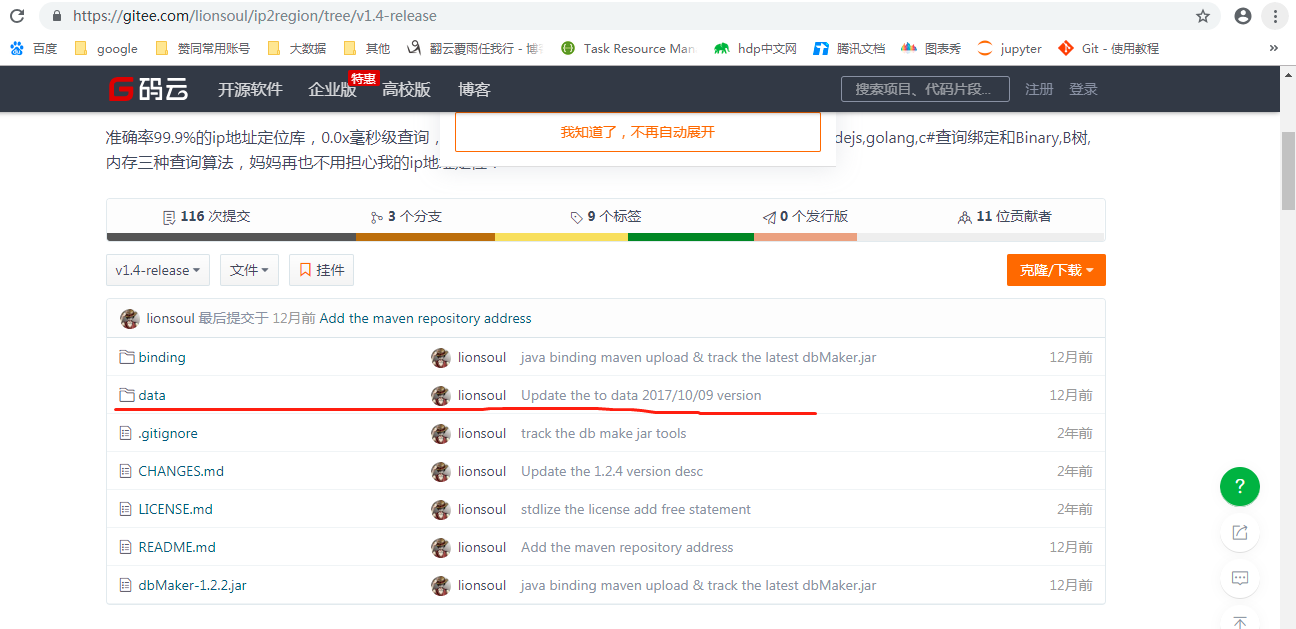
码云:https://gitee.com/lionsoul/ip2region/tree/v1.4-release
github:https://github.com/lionsoul2014/ip2region/releases/tag/v1.4-release
一.Java - 使用Ip2Region(ip地址定位库)转换IP和地区
创建Maven工程(略)
如果使用IDEA,可先创建普通工程,然后右键点击工程,执行“Add Frameowrk support”,选择Maven,即可快速转换为Maven工程。
引入Maven依赖
   <dependencies>

    <dependency>

        <groupId>org.lionsoul</groupId>

        <artifactId>ip2region</artifactId>

        <version>1.4</version>

    </dependency>

    </dependencies>
 import org.lionsoul.ip2region.*;

 /**

  * Ip2Region测试类

  * @author Zebe

  */

 public class Ip2RegionTest {

     /**

      * 程序入口

      * @param args 运行参数

      */

     public static void main(String[] args) throws Exception {

         String ip = "47.95.196.158";

         // 判断是否为IP地址

         boolean isIpAddress = Util.isIpAddress("12123.34"); // false

         isIpAddress = Util.isIpAddress(ip); // true

         // IP地址与long互转

         long ipLong = Util.ip2long(ip); //

         String strIp = Util.long2ip(ipLong); // 47.95.196.158

         // 根据IP搜索地址信息

         DbConfig config = new DbConfig();

         String dbfile = "D:\\data\\ip2region.db"; // 这个文件若没有请到以下地址下载:

         // https://gitee.com/lionsoul/ip2region/tree/master/data

         DbSearcher searcher = new DbSearcher(config, dbfile);

         // 二分搜索

         long start = System.currentTimeMillis();

         DataBlock block1 = searcher.binarySearch(ip);

         long end = System.currentTimeMillis();

         System.out.println(block1.getRegion()); // 中国|华东|浙江省|杭州市|阿里巴巴

         System.out.println("使用二分搜索,耗时:" + (end - start) + " ms"); // 1ms

         // B树搜索(更快)

         start = System.currentTimeMillis();

         DataBlock block2 = searcher.btreeSearch(ip);

         end = System.currentTimeMillis();

         System.out.println("使用B树搜索,耗时:" + (end - start) + " ms"); // 0ms

     }

 }
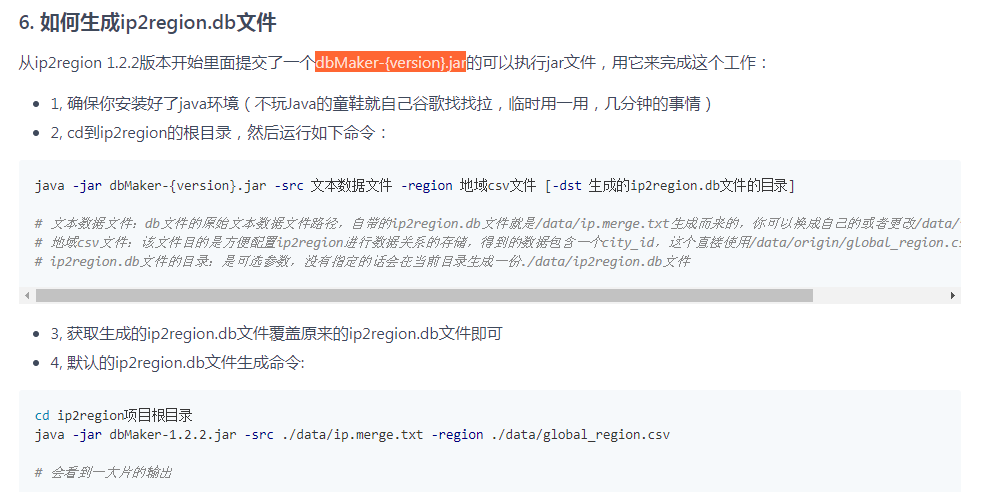
其中需要下载ip2region.db:
二.使用Ip2Region(ip地址定位库)转换IP和地区
     public static void DownLoadDbFile(String path) {

         FileSystem fs,local;

         try {

             fs = FileSystem.get(new URI(path.substring(0, path.indexOf('/', path.indexOf(':') + 3))), new Configuration());

             local = FileSystem.getLocal(new Configuration());

             local.delete(new Path("/tmp/ip2region.db"), true);

             fs.copyToLocalFile(false, new Path(path), new Path("/tmp/ip2region.db"));

         } catch (IOException e) {

             // TODO 自动生成的 catch 块

             SparkLog.error(e);

         } catch (URISyntaxException e) {

             // TODO 自动生成的 catch 块

             SparkLog.error(e);

         }

     }

     public static void Ip2RegionTest() {

         FileSystem fs,local;

         String path="hdfs://10.8.18.74:8020/user/lyy/data/ip2region.db";//先将db文件上传到环境中的hdfs上

         try {

             fs = FileSystem.get(new URI(path.substring(0, path.indexOf('/', path.indexOf(':') + 3))), new Configuration());

             local = FileSystem.getLocal(new Configuration());

             local.delete(new Path("/tmp/ip2region.db"), true);

             fs.copyToLocalFile(false, new Path(path), new Path("/tmp/ip2region.db"));//下载db文件到相应的driver和excutor节点本地的/tmp的目录下

         } catch (Throwable e) {

             // TODO 自动生成的 catch 块

                 e.printStackTrace();

         }

         String ip ="";

         DbConfig config;

         try {

             JavaSparkContext sc = SparkCommon.getJavaSparkContext();

             JavaRDD<String> rdd = sc.parallelize(Arrays.asList("91.235.133.117","62.87.232.88"));

             config = new DbConfig();

             DbSearcher searcher = new DbSearcher(config, "/tmp/ip2region.db");

             SparkLog.info(rdd.count());

             //以下的迭代及转化都在driver端完成,这里存在风险,当数据量超大的时候,driver可能出现OOM

             Iterator<String> It = rdd.collect().iterator();

             while(It.hasNext()){

                 ip = It.next();

                 DataBlock block2 = searcher.btreeSearch(ip);

                 SparkLog.info(block2.getRegion());

             }

         } catch (Throwable e) {

             // TODO 自动生成的 catch 块

             e.printStackTrace();

         }

         /*这里展示的转换后的ip和region的信息如何再次组织成rdd,并转换成dataset的一种方法

           List<Row> lst = new ArrayList<>();

             while(It.hasNext()){

                 ip = It.next();

                 DataBlock block2 = searcher.btreeSearch(ip);

                 lst.add(RowFactory.create(ip,block2.getRegion()));

             }

             SparkSession session = SparkCommon.getSparkSessionInstance();

             StructType schema = new StructType(new StructField[]{

                         new StructField("hostname1", DataTypes.StringType, false, Metadata.empty()),

                         new StructField("country", DataTypes.StringType, false, Metadata.empty()),

             });

             Dataset<Row> ip2region = session.createDataFrame(SparkCommon.getJavaSparkContext().parallelize(lst), schema);

             return df.join(ip2region,df.col("hostname").equalTo(ip2region.col("hostname1")));*/

     }
Spark- 根据IP获取城市(java)的更多相关文章
- 根据Ip获取城市帮助类
思路构建 1.先通过本地的测IP地址库进行匹配 2.如果本地IP地址库存在此IP的城市信息,就直接返回,调用速度也快 3.如果本地没有对应的IP城市信息,必须通过调用网络的IP查询的API了,这里我使 ...
- php 根据ip获取城市以及网络运营商名称(利用qqwry.dat)
根据用户IP地址判定出所在城市以及网络运营商 qqwry.dat下载地址:http://files.cnblogs.com/guangxiaoluo/qqwry.rar 解压出来即可 //获取用户真 ...
- c#根据ip获取城市地址
用的API是百度.新浪.淘宝: 1.首先是一个检测获取的值是不是中文的方法,因为有的ip只能识别出来某省,而城市名称则为空返回的json里会出现null或undefined. public stati ...
- 通过外部接口 根据ip获取城市名
3种接口 淘宝/百度/不知名/ 推荐淘宝接口 ip自个去获取,下附带php 获取ip的示例 function getIP() { static $realip; if (isset($_SERVE ...
- C# 解析百度天气数据,Rss解析百度新闻以及根据IP获取所在城市
百度天气 接口地址:http://api.map.baidu.com/telematics/v3/weather?location=上海&output=json&ak=hXWAgbsC ...
- 百度地图API的IP定位城市和浏览器定位(转)
百度地图API提供了Geolocation 和 LocalCity两个服务类. 这俩API可以分别供用户在JavaScript中进行定位和城市确认. 1 本质上,Geolocation这个类是使用了支 ...
- 根据IP获得城市信息(百度API的运用)
/** * 根据IP获取城市 * @param string $ip ip地址 * @return array * http://api.map.baidu.c ...
- java 根据ip获取地区信息(淘宝和新浪)
package com.test; import java.io.BufferedReader; import java.io.IOException; import java.io.InputStr ...
- Java 根据IP获取地址
用淘宝接口:(源码:java 根据IP地址获取地理位置) pom.xml: <!-- https://mvnrepository.com/artifact/net.sourceforge.jre ...
随机推荐
- 陈正冲老师讲c语言之内存的申请malloc() 和释放free()
1.如何使用 malloc 函数 不要莫名其妙,其实上面这段小小的对话,就是malloc的使用过程.malloc是一个函数,专门用来从堆上分配内存.使用malloc函数需要几个要求: 内存分配给谁?分 ...
- 确保img的宽高比固定
html: <div class="wrapper"> <swiper :options="swiperOption"> <swi ...
- HDBS之应用代码优化
一.目录结构树 总体概述 代码检测工具sonar HDBS代码优化 总结开发注意点 二.总体概述 进入现在这家公司我的第一个任务就是对HDBS进行代码质量优化.HDBS可能大家不是很了解,现在给大家简 ...
- c#一个日志类(log4net)
这个类就是对log4net的使用,就不多说了,但是看见网上的一个封装,自己用了下,感觉还不错,直接记录在这里.把自己使用的类直接贴出来. using log4net; using log4net.Co ...
- JS中new运算符的实现原理
当我们用new运算符new一个构造函数产生一个实例时,比如说: var obj = new Func 时,其背后的步骤是这样的: 1:创建一个继承自 Func.prototype 的新对象:2:执行构 ...
- centos系统安装后无法稳定连接wifi的解决方法
在安装双系统的时候遇到的问题,虽然不知道原理,但是弄好能用就可以,这类bug太邪恶了 wifi不能用的情况: 先查看wifi状态: rfkill list all 0: hci0: Bluetooth ...
- 用for循环求1-100的所有数的和
2.求1-100的所有数的和 x=0for y in range (1,101): x=x+yprint(x)#Python for循环中可以循环一个列表或者某一个字符串下面是for的基本格式,英文是 ...
- 利用RabbitMQ、MySQL实现超大用户级别的消息在/离线收发
由于RabbitMQ中只有队列(queue)才能存储信息,所以用RabbitMQ实现超大用户级别(百万计)的消息在/离线收发需要对每一个用户创建一个永久队列. 但是RabbitMQ节点内存有限,经测试 ...
- Log4net 配置实例
首先需要下载并引用Log4net的binary.这一步可以通过在Visual Studio里的Manage Nuget package for solution轻松添加. 第二步是配置config文件 ...
- 每天看一片代码系列(一):stream.js
简介 stream.js是一个小型的js库,用于处理stream相关的操作.这里的stream是指一种数据结构,它像数组一样,可以放置多个类型的数据,但是并不限制长度,甚至可以达到无限长.可以对该数据 ...