
java 根据ip获取地区信息(淘宝和新浪)
package com.test;

import java.io.BufferedReader;

import java.io.IOException;

import java.io.InputStreamReader;

import java.io.PrintWriter;

import java.net.URL;

import java.net.URLConnection;

import java.util.HashMap;

import java.util.List;

import java.util.Map;

import java.util.Map.Entry;

import java.util.Set;

public class HttpRequest {

    /**

     * 向指定URL发送GET方法的请求

     *

     * @param url

     *            发送请求的URL

     * @param param

     *            请求参数,请求参数应该是 name1=value1&name2=value2 的形式。

     * @return URL 所代表远程资源的响应结果

     */

    public static String sendGet(String url, String param) {

        String result = "";

        BufferedReader in = null;

        try {

            String urlNameString = url + "?" + param;

            URL realUrl = new URL(urlNameString);

            // 打开和URL之间的连接

            URLConnection connection = realUrl.openConnection();

            connection.setRequestProperty("Charsert", "UTF-8");

            // 设置通用的请求属性

            connection.setRequestProperty("accept", "*/*");

            connection.setRequestProperty("connection", "Keep-Alive");

            connection.setRequestProperty("user-agent",

                    "Mozilla/4.0 (compatible; MSIE 6.0; Windows NT 5.1;SV1)");

            // 建立实际的连接

            connection.connect();

            // 获取所有响应头字段

            Map<String, List<String>> map = connection.getHeaderFields();

            // 遍历所有的响应头字段

            for (String key : map.keySet()) {

                System.out.println(key + "--->" + map.get(key));

            }

            // 定义 BufferedReader输入流来读取URL的响应

            in = new BufferedReader(new InputStreamReader(

                    connection.getInputStream(),"utf-8"));

            String line;

            while ((line = in.readLine()) != null) {

                result += line;

            }

        } catch (Exception e) {

            System.out.println("发送GET请求出现异常!" + e);

            e.printStackTrace();

        }

        // 使用finally块来关闭输入流

        finally {

            try {

                if (in != null) {

                    in.close();

                }

            } catch (Exception e2) {

                e2.printStackTrace();

            }

        }

        return result;

    }

    /**

     * 向指定 URL 发送POST方法的请求

     *

     * @param url

     *            发送请求的 URL

     * @param param

     *            请求参数,请求参数应该是 name1=value1&name2=value2 的形式。

     * @return 所代表远程资源的响应结果

     */

    public static String sendPost(String url, String param) throws RuntimeException{

        PrintWriter out = null;

        BufferedReader in = null;

        String result = "";

        try {

            URL realUrl = new URL(url);

            // 打开和URL之间的连接

            URLConnection conn = realUrl.openConnection();

            conn.setRequestProperty("Charsert", "UTF-8");

            // 设置通用的请求属性

            conn.setRequestProperty("accept", "*/*");

            conn.setRequestProperty("connection", "Keep-Alive");

            conn.setRequestProperty("user-agent",

                    "Mozilla/4.0 (compatible; MSIE 6.0; Windows NT 5.1;SV1)");

            conn.setRequestProperty("Content-Type", "application/json");

            // 发送POST请求必须设置如下两行

            conn.setDoOutput(true);

            conn.setDoInput(true);

            // 获取URLConnection对象对应的输出流

            out = new PrintWriter(conn.getOutputStream());

            // 发送请求参数

            out.print(param);

            // flush输出流的缓冲

            out.flush();

            // 定义BufferedReader输入流来读取URL的响应

            in = new BufferedReader(

                    new InputStreamReader(conn.getInputStream(), "utf-8"));

            String line;

            while ((line = in.readLine()) != null) {

                result += line;

            }

        } catch (Exception e) {

            System.out.println("发送 POST 请求出现异常!"+e);

            e.printStackTrace();

            throw new RuntimeException("推送消息失败");

        }

        //使用finally块来关闭输出流、输入流

        finally{

            try{

                if(out!=null){

                    out.close();

                }

                if(in!=null){

                    in.close();

                }

            }

            catch(IOException ex){

                ex.printStackTrace();

            }

        }

        return result;

    }

    /**

     * 发送json格式请求

     * @param url  请求路径

     * @param param json字符串

     * @return

     * @throws RuntimeException

     */

    public static String sendPostByJSON(String url, String param) throws RuntimeException{

        PrintWriter out = null;

        BufferedReader in = null;

        String result = "";

        try {

            URL realUrl = new URL(url);

            // 打开和URL之间的连接

            URLConnection conn = realUrl.openConnection();

            conn.setRequestProperty("Charsert", "UTF-8");

            // 设置通用的请求属性

            conn.setRequestProperty("accept", "*/*");

            conn.setRequestProperty("connection", "Keep-Alive");

            conn.setRequestProperty("user-agent",

                    "Mozilla/4.0 (compatible; MSIE 6.0; Windows NT 5.1;SV1)");

            conn.setRequestProperty("Content-Type", "application/json");

            // 发送POST请求必须设置如下两行

            conn.setDoOutput(true);

            conn.setDoInput(true);

            // 获取URLConnection对象对应的输出流

            out = new PrintWriter(conn.getOutputStream());

            // 发送请求参数

            out.print(param);

            // flush输出流的缓冲

            out.flush();

            // 定义BufferedReader输入流来读取URL的响应

            in = new BufferedReader(

                    new InputStreamReader(conn.getInputStream(), "utf-8"));

            String line;

            while ((line = in.readLine()) != null) {

                result += line;

            }

        } catch (Exception e) {

            System.out.println("发送 JSON POST 请求出现异常!"+e);

            e.printStackTrace();

            throw new RuntimeException("推送消息失败");

        }

        //使用finally块来关闭输出流、输入流

        finally{

            try{

                if(out!=null){

                    out.close();

                }

                if(in!=null){

                    in.close();

                }

            }

            catch(IOException ex){

                ex.printStackTrace();

            }

        }

        return result;

    }

    public static String sendGet(String url,Map<String,Object> param){

        return sendGet(url, convertMap(param));

    }

    public static String sendPost(String url,Map<String,Object> param){

        return sendPost(url, convertMap(param));

    }

   //测试

    public static void main(String[] args) {

        //发送 GET请求
       // 第一种方式

        Map<String,Object> param = new HashMap<String,Object>();

        param.put("userName", "xxx");

        param.put("userPwd", "666666");

    //拼接后的请求: http://127.0.0.1:8888/xx/xx?userName=xxx&userPwd=666666

        String sr= HttpRequest.sendGet("http://127.0.0.1:8888/xx/xx", param);

        System.out.println(sr);
     //第二种方式
     String sr= HttpRequest.sendGet("http://127.0.0.1:8888/xx/xx", "userName=xxx&userPwd=666666");

    //POST同理

    //请求新浪api根据ip查找城市
String  result2 = HttpRequest.sendGet("http://int.dpool.sina.com.cn/iplookup/iplookup.php","format=json&ip=120.237.91.74");
String  result = HttpRequest.sendGet("http://ip.taobao.com/service/getIpInfo.php","ip=120.237.91.74");

System.out.println("result====" +result);
System.out.println("result2====" +result2);
} private static String convertMap(Map<String,Object> param){ StringBuffer sbf = new StringBuffer(); if(param!=null){ Set<Entry<String, Object>> entrySet = param.entrySet(); for(Entry<String,Object> entry:entrySet){ String key = entry.getKey(); Object value = entry.getValue(); sbf.append(key); sbf.append("="); sbf.append(value); sbf.append("&"); } } String paramStr =""; if(sbf.length()>0) paramStr = sbf.substring(0, sbf.lastIndexOf("&")); return paramStr; } }
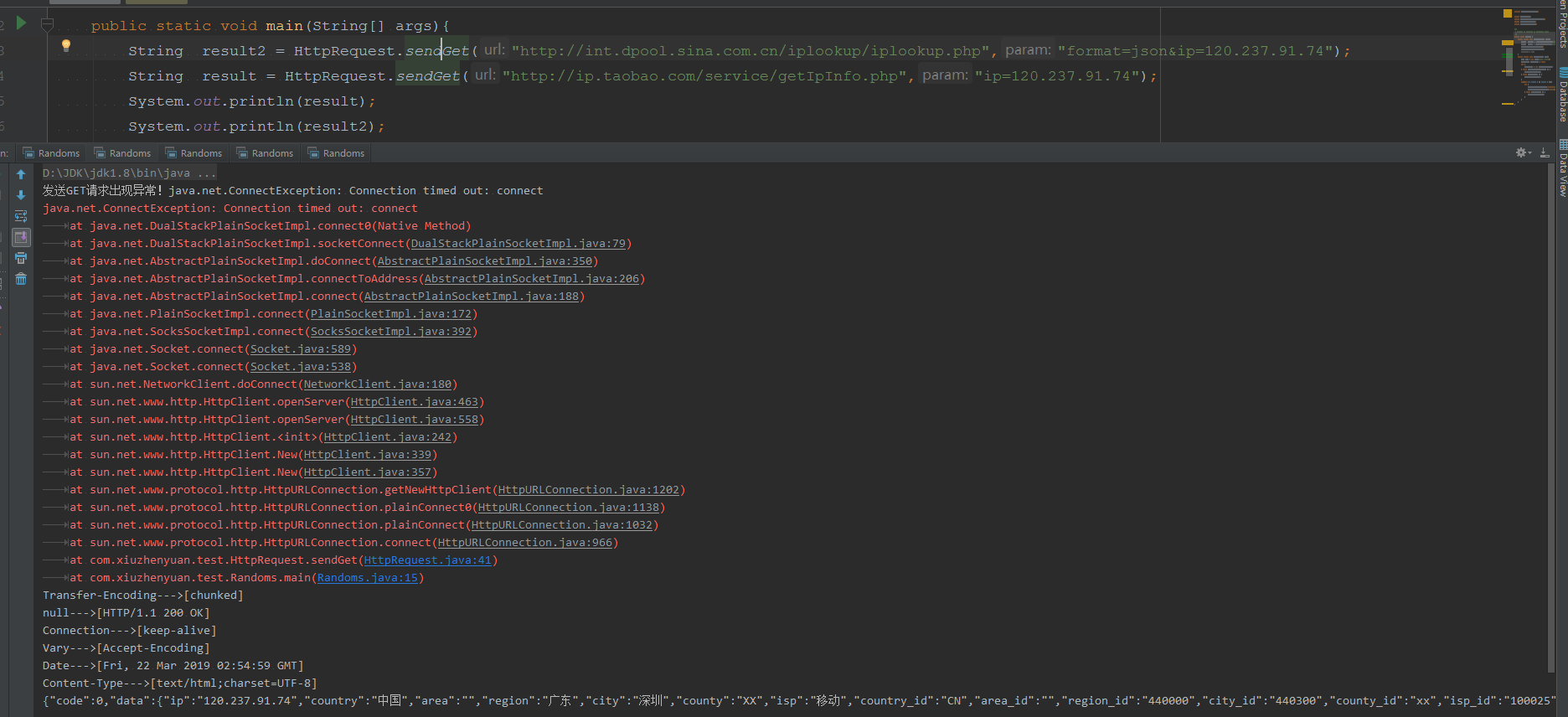
最后在实际使用的过程中遇到一个问题, 这两个api单独使用,经常性的请求不成功,后台提示连接超时
个人感觉淘宝的成功率比新浪的高,测试过程中,新浪没有出现过一次.......
可以考虑使用百度地图提供的接口
java 根据ip获取地区信息(淘宝和新浪)的更多相关文章
- 使用selenium模拟登陆淘宝、新浪和知乎
如果直接使用selenium访问淘宝.新浪和知乎这些网址.一般会识别出这是自动化测试工具,会有反制措施.当开启开发者模式后,就可以绕过他们的检测啦.(不行的,哭笑) 如果网站只是对windows.na ...
- php根据IP获取所在省份-淘宝api接口
这里用的file_put_contents,你也可以用别的,直接怼代码: //拼接传递的参数$ip = '175.12.53.12' $opts = array( 'http'=>array( ...
- PHP获取IP及地区信息(纯真IP数据库)
昨天在写程序的时候,发现在用户的时候记录IP和地区信息也许以后用得上,去网上找了找,发现实现的方式有好多好多,因为我用的ThinkPHP,后来又去TP官网找了找,最后采用了下面这种方法. <?p ...
- (部署新java程序,程序报错,需copy的一个包)——java使用siger 获取服务器硬件信息
mcat-siger.sh 查看是否安装siger rsync -aPuv /usr/lib64/libsigar-amd64-linux.so $i:/usr/lib64/ java使用siger ...
- 如何根据Ip获取地址信息--Java----待整理完善!!!
如何根据Ip获取地址信息--Java----待整理完善!!! QQWry.dat数据写入方法: http://www.cnblogs.com/xumingxiang/archive/2013/02/1 ...
- java 通过ip获取客户端mac地址
java 通过ip获取客户端mac地址 package com.asppro.util; import java.io.BufferedReader; import java.io.IOExcepti ...
- 淘宝IP地址库API接口(PHP)通过ip获取地址信息
淘宝IP地址库网址:http://ip.taobao.com/ 提供的服务包括: 1. 根据用户提供的IP地址,快速查询出该IP地址所在的地理信息和地理相关的信息,包括国家.省.市和运营商. 2. 用 ...
- Java 根据IP获取地址
用淘宝接口:(源码:java 根据IP地址获取地理位置) pom.xml: <!-- https://mvnrepository.com/artifact/net.sourceforge.jre ...
- 通过GeoIP2分析访问者IP获取地理位置信息
原文链接:http://blog.csdn.net/johnnycode/article/details/42028841 MaxMind GeoIP2 服务能识别互联网用户的地点位置与其他特征,应用 ...
随机推荐
- 如何修复使用WSUS进行升级Win 10 更新1809的报错(0x8024200)
备注:该文档有另一个姊妹篇,介绍如何修复下游服务器一直有处于需要文件下载的状况. /* Style Definitions */ table.MsoNormalTable {mso-style-nam ...
- winfrom 图片等比例压缩
效果图: 核心代码: /// <summary> /// 等比例缩放图片 /// </summary> /// <param name="bitmap" ...
- Unsupported major.minor version 52.0解决办法
一.错误现象:当改变了jdk版本时,在编译java时,会遇到Unsupported major.minor version错误.jdk版本和stanford parser对应关系 JDK版本和Java ...
- java使用SSH连接Linux系统
SSH连接linux系统使我们在开发项目中常用到的,现在留下来,做个记录 package com.log; import java.io.BufferedReader; import java.io. ...
- 跨域405(Method Not Allowed)问题
zepot post没有问题,用plupload上传出现了这个错误,options过不去.显示Response for preflight has invalid http status code 4 ...
- JQuery 常用的那些东西
CDN Google CDN Microsoft CDN CDNJS CDN jsDelivr CDN 选择器 jQuery 元素选择器和属性选择器允许您通过标签名.属性名或内容对 HTML 元素进行 ...
- Linux下ps -ef和ps aux的区别
Linux下显示系统进程的命令ps,最常用的有ps -ef 和ps aux.这两个到底有什么区别呢?两者没太大差别,讨论这个问题,要追溯到Unix系统中的两种风格,System V风格和BSD 风格, ...
- AI - TensorFlow - 过拟合(Overfitting)
过拟合 过拟合(overfitting,过度学习,过度拟合): 过度准确地拟合了历史数据(精确的区分了所有的训练数据),而对新数据适应性较差,预测时会有很大误差. 过拟合是机器学习中常见的问题,解决方 ...
- 【深度学习篇】--神经网络中的池化层和CNN架构模型
一.前述 本文讲述池化层和经典神经网络中的架构模型. 二.池化Pooling 1.目标 降采样subsample,shrink(浓缩),减少计算负荷,减少内存使用,参数数量减少(也可防止过拟合)减少输 ...
- Ansible自动化运维工具安装与使用实例
1.准备两台服务器,要确定网络是通的.服务器当然越多越好啦....Ansible的简介和好处我就不多说了,自己看百科去(*╹▽╹*) IP:192.168.139.100 IP:192.168.139 ...