
CDH/Hadoop 5.15 installation steps
I will talk the main steps to install CDH 5.15 on Linux(CENT OS 6.10). The installation method is Manual installation with tarball and parcels. The newest version if CDH 6.0.1 when I write this guide but it does not support CENT OS 6.10 so I have to install 5.15.
Software components List:
- CDH, the parcel. CDH-5.15.1-1.cdh5.15.1.p0.4-el6.parcel
- CM: cloudery manager. cloudera-manager-el6-cm5.15.1_x86_64.tar.gz
- mysql 5.7.73 and jdbc driver: mysql-connector-java-8.0.11.jar
- jvm: jdk-8u181-linux-x64.rpm
Here is how to get them:
JVM:

wget http://download.oracle.com/otn-pub/java/jdk/8u181-b13/96a7b8442fe848ef90c96a2fad6ed6d1/jdk-8u181-linux-x64.rpm?AuthParam=1539265359_30b3a4b9e17f3ed3b0962980168c2721

CDH:

wget http://archive.cloudera.com/cm5/cm/5/cloudera-manager-el6-cm5.15.1_x86_64.tar.gz

wget http://archive.cloudera.com/cdh5/parcels/latest/CDH-5.15.1-1.cdh5.15.1.p0.4-el6.parcel

wget http://archive.cloudera.com/cdh5/parcels/latest/CDH-5.15.1-1.cdh5.15.1.p0.4-el6.parcel.sha1

wget http://archive.cloudera.com/cdh5/parcels/5.15.1.4/manifest.json

MySQL Yum Repo:

wget https://repo.mysql.com//mysql57-community-release-el6-11.noarch.rpm
Hareware:
- ....more powerful, more better...
Machine/OS Setup:
- Making sure the time is sychronized across machines(Configure ntp if needed).
- Network: change hostname you like. I have 4 servers ns01, ns02, ns03, ns04. Add them into the /etc/hosts file like below. Making sure you have high bandwidth accross the nodes. Mine is 210MB/Sec.
192.168.0.79 ns04
192.168.0.77 ns02
192.168.0.232 ns01
192.168.0.114 ns03 - Tune swap(each node):
vim /etc/sysctl.confvm.swappiness = 10 - Disable security Linux. SELINUX=disabled in /etc/selinux/config
- Turn off firewall(each node):
service iptables stop.
chkconfig iptables off - SSH without pasword:
- run ssh-keygen -t rsa in each node. type Enter when prompted.
- run cp .ssh/id_rsa.pub .ssh/pub_key.ns0$n in each node to save the public key to a seperate file. $n is the number of the machine.
- copy those files to one of the machine like ns01.
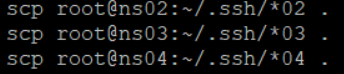
- run cat pub_key.ns0* >> authorized_keys in ns01
- boardcase the file to all other machines.

JVM setup(each node)
......do it in each machine. Please use the rpm distribution to install(rpm -ivh jdk*.rpm) and set the JAVA_HOME to /usr/java/latest. I got an error like 'deploy client configuration for spark' during setup using the jdk*.tar.gz distribution.
MySQL Installation/Setup(one node, ns01)
- Install and init mysql:
https://opensourcedbms.com/dbms/installing-mysql-5-7-on-centosredhatfedora/ - Sql to create databases/users for Hadoop
create database hive DEFAULT CHARSET utf8 COLLATE utf8_general_ci;

create database oozie DEFAULT CHARSET utf8 COLLATE utf8_general_ci;

create database hue DEFAULT CHARSET utf8 COLLATE utf8_general_ci;

create database activity DEFAULT CHARSET utf8 COLLATE utf8_general_ci;

GRANT ALL PRIVILEGES ON  hive.*  to 'hive'@'%' identified by 'hive' with grant option ;

flush privileges ;

GRANT ALL PRIVILEGES ON  oozie.*  to 'oozie'@'%' identified by 'oozie' with grant option ;

flush privileges ;

GRANT ALL PRIVILEGES ON  hue.*  to 'hue'@'%' identified by 'hue' with grant option ;

flush privileges ;

GRANT ALL PRIVILEGES ON  activity.*  to 'activity'@'%' identified by 'activity' with grant option ;

flush privileges ;
CDH Install
- untar the cm to target folder /opt (ns01 node).
tar -xzf cloudera-manager-el6-cm5.15.1_x86_64.tar.gz -C /opt - copy mysql jdbc driver to avoid the 'java.lang.ClassNotFoundException: com.mysql.jdbc.Driver' (ns01 node)
cp mysql-connector-java-8.0.11.jar /opt/cm-5.15.1/share/cmf/lib/
cp mysql-connector-java-8.0.11.jar /opt/cloudera/parcels/CDH-5.15.1-1.cdh5.15.1.p0.4/lib/hive/lib/
........................................(cp mysql driver to the proper location for other components need mysql connection to create and init database,tables......) - Creat Cloudera Manager DB(ns01 node)
(Run in MySQL)
GRANT ALL PRIVILEGES ON  scm.*  to 'scm'@'%' identified by 'scm' with grant option ;
(Run in Shell)
/opt/cm-5.15.1/share/cmf/schema/scm_prepare_database.sh mysql -hlocalhost -uroot -p*** --scm-host ns01 scm scm scm - copy the hadoop parcel to the parcel-repo folder. rename (mv) the *.sha1 file to .sha . See below result of the folder.(ns01 node)

- update the cloudera manager host server so the agents can connect to it.(ns01 node)
vim /opt/cm-5.15.1/etc/cloudera-scm-agent/config.ini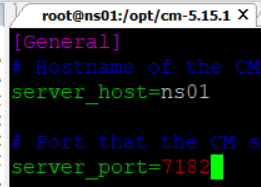
- copy cloudera manager to other machines as well. You can tar the folder /opt/cm-5.15.1 and scp to other machines.
- Add cloudera-scm User ( each node )
useradd --system --home /opt/cm-5.15.1/run/cloudera-scm-server --no-create-home --shell=/bin/false -comment "Cloudera SCM User" cloudera-scm - Reboot all machines before start cm. I write a simple script rebootAll.sh to do it.
- Run the service and configuration manager(scm) on server node and agent nodes. You can also run the agent on the server node so you will have one more node to install Hadoop.
/opt/cm-5.15.1/etc/init.d/cloudera-scm-server start (run in only 1 node)
/opt/cm-5.15.1/etc/init.d/cloudera-scm-agent start (run in all nodes) - launch the CM by: http://ns01:7180 from you browser
- Wait several seconds if needed. If you can see the login page(credential: admin/admin), there should be no big problem. I will paste some of the UI here.
hosts list, you can see I have 4 nodes.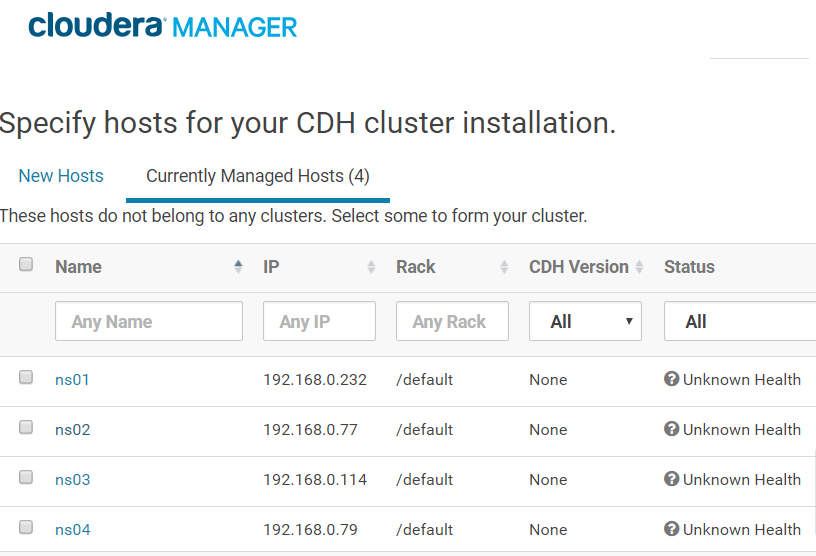
The repository you have configured.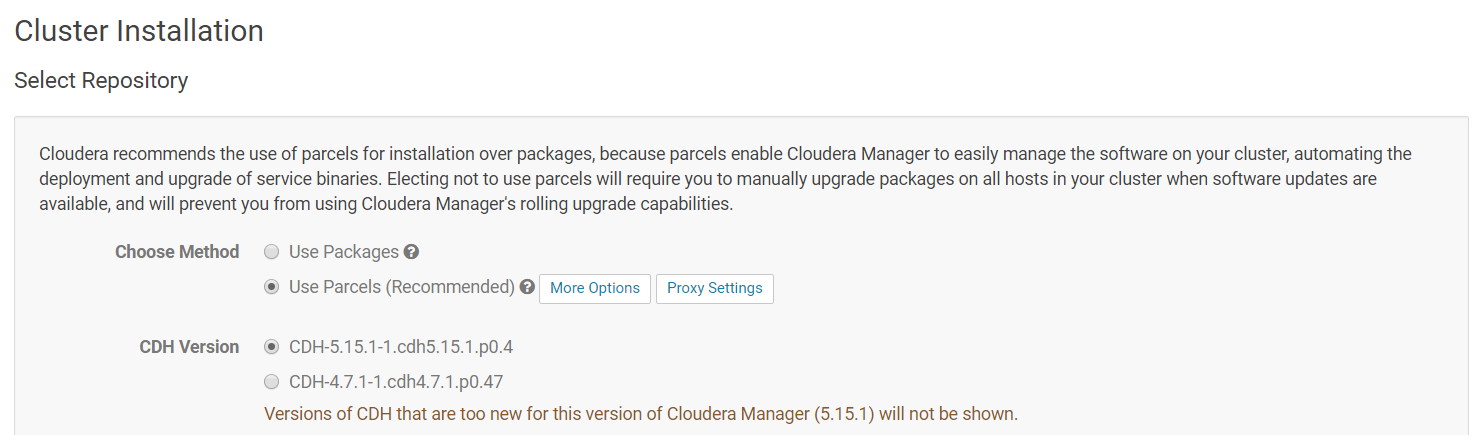
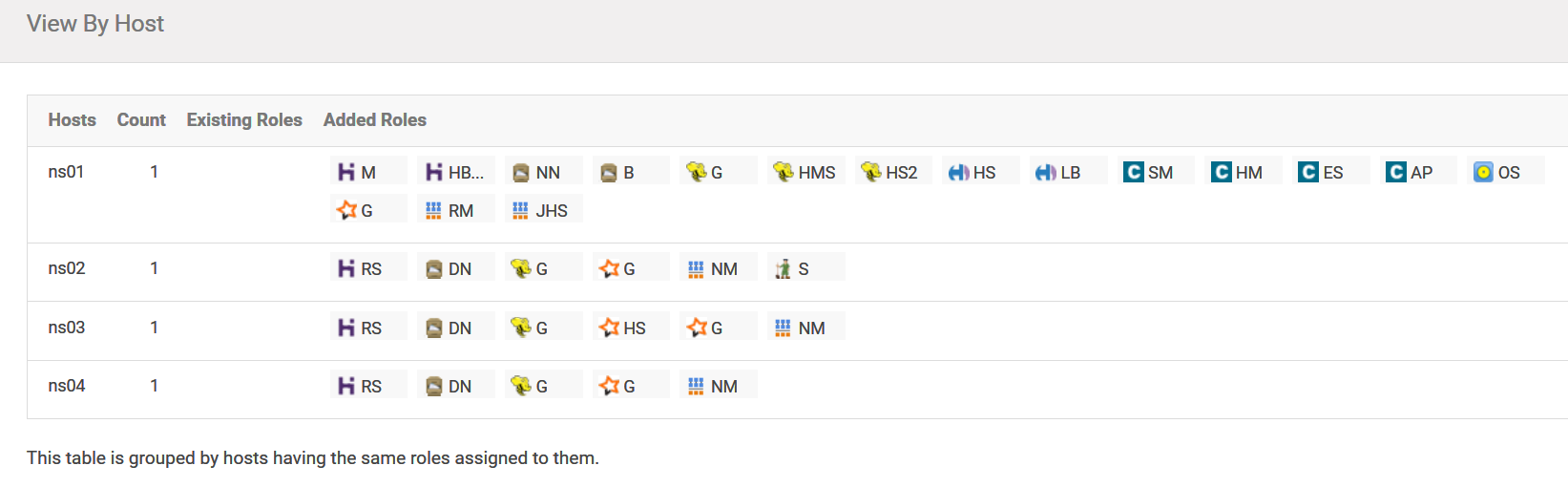
Assign the roles for node.
CDH/Hadoop 5.15 installation steps的更多相关文章
- 使用yum安装CDH Hadoop集群
使用yum安装CDH Hadoop集群 2013.04.06 Update: 2014.07.21 添加 lzo 的安装 2014.05.20 修改cdh4为cdh5进行安装. 2014.10.22 ...
- CDH hadoop的安装
1 先拷贝tar包到目录底下(tar 包解压 tar zxvf) 2 : 1.使用课程提供的hadoop-2.5.0-cdh5.3.6.tar.gz,上传到虚拟机的/usr/local目录下.(htt ...
- [大牛翻译系列]Hadoop(15)MapReduce 性能调优:优化MapReduce的用户JAVA代码
6.4.5 优化MapReduce用户JAVA代码 MapReduce执行代码的方式和普通JAVA应用不同.这是由于MapReduce框架为了能够高效地处理海量数据,需要成百万次调用map和reduc ...
- CDH 5.16.1 离线部署 & 通过 CDH 部署 Hadoop 服务
参考 Cloudera Enterprise 5.16.x Installing Cloudera Manager, CDH, and Managed Services Installation Pa ...
- hadoop再次集群搭建(4)-Cloudera Manager Installation
决定选择 Cloudera Manager 进行安装,阅读官方文档,掌握大概脉络. Cloudera Manager在集群已经实现ssh免秘钥登录,能够访问网络资源和本地资源的情 ...
- Mac OS X上搭建伪分布式CDH版本Hadoop开发环境
最近在研究数据挖掘相关的东西,在本地 Mac 环境搭建了一套伪分布式的 hadoop 开发环境,采用CDH发行版本,省时省心. 参考来源 How-to: Install CDH on Mac OSX ...
- Install RHadoop with Hadoop 2.2 – Red Hat Linux
Prerequisite Hadoop 2.2 has been installed (and the below installation steps should be applied on ea ...
- A record--Offline deployment of Big Data Platform CDH Cluster
A record--Offline deployment of Big Data Platform CDH Cluster Tags: Cloudera-Manager CDH Hadoop Depl ...
- P6 Professional Installation and Configuration Guide (Microsoft SQL Server Database) 16 R1
P6 Professional Installation and Configuration Guide (Microsoft SQL Server Database) 16 R1 May ...
随机推荐
- iOS之利用runtime,避免可变数组和可变字典为nil或者数组越界导致的崩溃
NSArray.NSMutableArray.NSDictionary.NSMutableDictionary.是我们的在iOS开发中非常常用的类.当然,在享受这些类的便利的同时,它们也给我们带来一些 ...
- 关于nodejs下载组件经常失败的问题
由于最近在刚开始做一个前台element和mybatisplus的项目,但是在使用nodejs下载vue的脚手架和各种组件时,会经常出现下载失败的问题,进而导致前台无法启动. 在网上查询之后发现在下载 ...
- 【HDOJ 1337】I Hate It(线段树维护区间最大值)
Problem Description 很多学校流行一种比较的习惯.老师们很喜欢询问,从某某到某某当中,分数最高的是多少.这让很多学生很反感. 不管你喜不喜欢,现在需要你做的是,就是按照老师的要求,写 ...
- SSM+poi导入和导出
最原始数据 导入成功后 下载数据 下载后的数据显示 数据变成16条 点击导出可选择 导了两次 看数据变化 数据库字段在下面地址给出 首先贴出Dao层 List<User> findAll ...
- vue的声明式渲染
声明式渲染 答:2018-8-23声明式渲染是vue对数据进行操作的模式,也叫做响应式渲染当dom节点上绑定了vue的对象的属性时,如果这个属性发生了改变,无需你进行其它的操作,页面上的数据会自动发生 ...
- 使用Hbuilder开发IOS应用上架审核提示请指定用户在位置许可模式警报中使用位置的预定用途。
使用Hbuilder开发IOS应用时,遇到上架App被拒的问题,被拒原因: 你的应用程序使用位置服务,但并没有按照iOS人机界面指南中的要求,在位置模式警报中阐明它的用途. 要解决此问题,请指定用户在 ...
- vue中将html字符串转换成html后的一些问题
今天整理之前做vue项目时遇到的一些问题,发现了当时遇到的一个很小但是又会引出很多问题的一个问题(总之就是很有意思,听我慢慢给你到来),这个问题就是当时处理后端数据时,如何将后端返回来的字符串转换成h ...
- HTML5新标签兼容——> <!--<if lt IE 9><!endif-->
第一种方法:(使用html5shiv) <!--[if lt IE9]> <script src="http://html5shiv.googlecode.com/svn/ ...
- php源码建博客3--区分平台的MVC结构
主要: 模型单例工厂 目录结构优化 区分平台(前台,后台....) --------------文件结构:-------------------------------------- blog├─Ap ...
- 自添加LUCI菜单及编译为ipk
目录 添加汉化编译为ipk配置文件入口函数界面文件Makefile 添加 添加自己的luci界面,有3个必要的要素: a配置文件.新建一个在/etc/config/abcdefg b入口函数.新建一个 ...