
01 spring security入门篇
1. 环境搭建
使用SpringBoot搭建开发环境,只需在pom.xml添加如下依赖即可.
<?xml version="1.0" encoding="UTF-8"?>

<project xmlns="http://maven.apache.org/POM/4.0.0" xmlns:xsi="http://www.w3.org/2001/XMLSchema-instance"

         xsi:schemaLocation="http://maven.apache.org/POM/4.0.0 https://maven.apache.org/xsd/maven-4.0.0.xsd">

    <modelVersion>4.0.0</modelVersion>

    <groupId>qinfeng.zheng</groupId>

    <artifactId>mockmvc-demo</artifactId>

    <version>0.0.1-SNAPSHOT</version>

    <name>mockmvc-demo</name>

    <description>spring security项目</description>

    <properties>

        <java.version>1.8</java.version>

    </properties>

    <dependencies>

        <dependency>

            <groupId>org.projectlombok</groupId>

            <artifactId>lombok</artifactId>

        </dependency>

        <dependency>

            <groupId>org.springframework.boot</groupId>

            <artifactId>spring-boot-starter-web</artifactId>

        </dependency>

        <dependency>

            <groupId>commons-lang</groupId>

            <artifactId>commons-lang</artifactId>

            <version>2.6</version>

        </dependency>

        <dependency>

            <groupId>org.springframework.boot</groupId>

            <artifactId>spring-boot-starter-test</artifactId>

            <scope>test</scope>

        </dependency>

        <dependency>

            <groupId>org.springframework.boot</groupId>

            <artifactId>spring-boot-starter-aop</artifactId>

        </dependency>

        <dependency>

            <groupId>org.springframework.boot</groupId>

            <artifactId>spring-boot-starter-security</artifactId>

        </dependency>

    </dependencies>

    <dependencyManagement>

        <dependencies>

            <!--spring-boot依赖-->

            <dependency>

                <groupId>io.spring.platform</groupId>

                <artifactId>platform-bom</artifactId>

                <version>Cairo-SR8</version>

                <type>pom</type>

                <scope>import</scope>

            </dependency>

            <!--spring-cloud依赖-->

            <dependency>

                <groupId>org.springframework.cloud</groupId>

                <artifactId>spring-cloud-dependencies</artifactId>

                <version>Greenwich.SR3</version>

                <type>pom</type>

                <scope>import</scope>

            </dependency>

        </dependencies>

    </dependencyManagement>

    <build>

        <plugins>

            <plugin>

                <groupId>org.springframework.boot</groupId>

                <artifactId>spring-boot-maven-plugin</artifactId>

            </plugin>

        </plugins>

    </build>

</project>
2. 屏蔽security的权限认证弹框
springboot项目在启动的时候会检查classpath下面的java类,发现有security相关类,就会自动启动权限认证,所以我们在通过浏览器访问项目Controller类中方法时,security会将请求url重定向到默认的认证页面,如下所示:
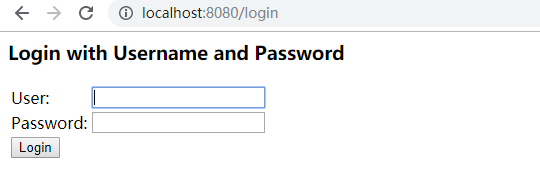
假如我们想要屏敝掉该弹框(即不做权限验证),那么在springboot2.x版本的项目中添加如下配置即可
import org.springframework.context.annotation.Configuration;

import org.springframework.security.config.annotation.web.builders.HttpSecurity;

import org.springframework.security.config.annotation.web.configuration.WebSecurityConfigurerAdapter;

@Configuration

public class SecurityConfig extends WebSecurityConfigurerAdapter {

    @Override

    protected void configure(HttpSecurity http) throws Exception {

        http.authorizeRequests().anyRequest().permitAll();

    }

}
在启动类配置如下也行
@SpringBootApplication(exclude = SecurityAutoConfiguration.class)
3.简单的 Form表单认证
import org.springframework.context.annotation.Configuration;

import org.springframework.security.config.annotation.web.builders.HttpSecurity;

import org.springframework.security.config.annotation.web.configuration.WebSecurityConfigurerAdapter;

@Configuration

public class SecurityConfig extends WebSecurityConfigurerAdapter {

    @Override

    protected void configure(HttpSecurity http) throws Exception {

        // 使用form表单验证

        http.formLogin()

                .and()

                .authorizeRequests()

                .anyRequest()

                .authenticated();

    }

}
4. 配置简单的http权限认证
import org.springframework.context.annotation.Configuration;

import org.springframework.security.config.annotation.web.builders.HttpSecurity;

import org.springframework.security.config.annotation.web.configuration.WebSecurityConfigurerAdapter;

@Configuration

public class SecurityConfig extends WebSecurityConfigurerAdapter {

    @Override

    protected void configure(HttpSecurity http) throws Exception {

        http.httpBasic()

                .and()

                .authorizeRequests()

                .anyRequest()

                .authenticated();

    }

}
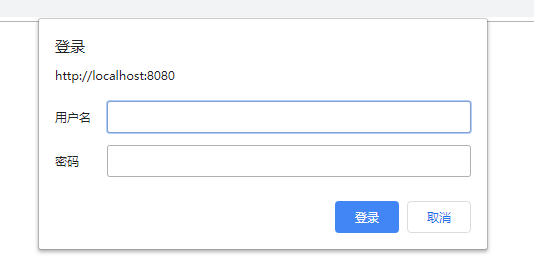
5. 自定义查询用户信息
spring security默认的登录用户信息肯定不能满足生产需要。但是spring security为我们提供了接口类UserDetailsService.java, 我们实现该接口,然后就能有效实现自定义的用户登录权限校验。
@Slf4j

@Component

public class MyUserDetailsService implements UserDetailsService {

    @Override

    public UserDetails loadUserByUsername(String username) throws UsernameNotFoundException {

        log.info("登录用户名:" + username);

        // 使用username查库

        PasswordEncoder encoder = PasswordEncoderFactories.createDelegatingPasswordEncoder();

        String password = encoder.encode("123456");

        log.info("username:{},password:{}", username,password);

        // 用户的权限, 也是从数据库查询

        List<GrantedAuthority> authorities = AuthorityUtils.commaSeparatedStringToAuthorityList("admin");

        return new User(username, password, authorities);

    }

}
此另,spring securty还为我们提供了几种默认的实现,我们只需添加配置即可,比如基于内存的配置示例(抄自官方文档)
  @Bean

    public UserDetailsService userDetailsService() {

        PasswordEncoder encoder = PasswordEncoderFactories.createDelegatingPasswordEncoder();

        UserDetails userDetails = User.withUsername("admin")

                .password(encoder.encode("123456"))

                .roles("USER", "ADMIN").build();

        // 基于内存,非持久化

        InMemoryUserDetailsManager manager = new InMemoryUserDetailsManager();

        manager.createUser(userDetails);

        return manager;

    }
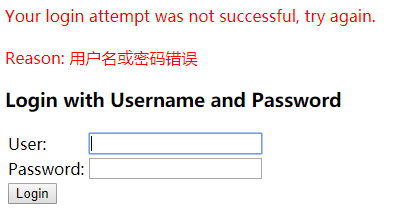
有了以上配置,我们启项目,请求接口,spring security会重定向我们的请求到登录窗口

点击Login按钮,会给我们一个默认的提示,如下:
01 spring security入门篇的更多相关文章
- Spring Security 入门篇
本文是一个笔记系列,目标是完成一个基于角色的权限访问控制系统(RBAC),有基本的用户.角色.权限管理,重点在Spring Security的各种配置.万丈高楼平地起,接下来,一步一步,由浅入深,希望 ...
- Spring Security入门篇——标签sec:authorize的使用
Security框架可以精确控制页面的一个按钮.链接,它在页面上权限的控制实际上是通过它提供的标签来做到的 Security共有三类标签authorize authentication accessc ...
- Spring boot学习1 构建微服务:Spring boot 入门篇
Spring boot学习1 构建微服务:Spring boot 入门篇 Spring Boot是由Pivotal团队提供的全新框架,其设计目的是用来简化新Spring应用的初始搭建以及开发过程.该框 ...
- Java基础-SSM之Spring MVC入门篇
Java基础-SSM之Spring MVC入门篇 作者:尹正杰 版权声明:原创作品,谢绝转载!否则将追究法律责任. 一.Spring MVC简介 1>.什么是Spring MVC 答:Sprin ...
- Java基础-SSM之Spring快速入门篇
Java基础-SSM之Spring快速入门篇 作者:尹正杰 版权声明:原创作品,谢绝转载!否则将追究法律责任. Spring是一个开源框架,Spring是于2003 年兴起的一个轻量级的Java ...
- SpringBoot集成Spring Security入门体验
一.前言 Spring Security 和 Apache Shiro 都是安全框架,为Java应用程序提供身份认证和授权. 二者区别 Spring Security:重量级安全框架 Apache S ...
- Java自动化测试框架-01 - TestNG之入门篇 - 大佬的鸡肋,菜鸟的盛宴(详细教程)
TestNG是什么? TestNG按照官方的定义: TestNG是一个测试框架,其灵感来自JUnit和NUnit,但引入了一些新的功能,使其功能更强大,使用更方便. TestNG是一个开源自动化测试框 ...
- Spring Security 入门(基本使用)
Spring Security 入门(基本使用) 这几天看了下b站关于 spring security 的学习视频,不得不说 spring security 有点复杂,脑袋有点懵懵的,在此整理下学习内 ...
- Spring Security 入门 (二)
我们在篇(一)中已经谈到了默认的登录页面以及默认的登录账号和密码. 在这一篇中我们将自己定义登录页面及账号密码. 我们先从简单的开始吧:设置自定义的账号和密码(并非从数据库读取),虽然意义不大. 上一 ...
随机推荐
- (转)Hyper-v 安装CentOS 7 (其他虚拟机一样参考)
转:https://www.cnblogs.com/dunitian/p/4976077.html 平台之大势何人能挡? 带着你的Net飞奔吧!http://www.cnblogs.com/dunit ...
- unity项目警告之 LF CRLF问题
unity中创建的脚本,以LF结尾. Visual studio中创建的脚本,以 CRLF结尾. 当我们创建一个unity脚本后,再用VS打开编辑保存后,这个文件既有LF结尾符,也有CRLF结尾符. ...
- 432D Prefixes and Suffixes
题目大意 给你一个串 对于一个子串如果它既是前缀又是后缀 输出它的长度以及它在原串中一共出现了多少次 分析 对于既是前缀又是后缀的判断和126B相同 然后我们只需要记录每个不同的z[i]出现了多少次 ...
- 涛涛的小马甲 Android之Handler机制
首先需要了解一个基本的概念ANR:Application not response 即应用程序无响应,也就是俗话说的死机. 出现Anr的原因是: 主线程需要做很多重要的事情,响应点击事件,更新UI如果 ...
- java.io.NotSerializableException错误解决方法
运行tomcat下面的 ssh项目,启动,打开某页面(让session起作用),停止:再启动,有可能会报类似如下的错误: org.apache.catalina.session.StandardMan ...
- 使用JavaScript设置和改变CSS透明度
在Firefox, Safari, Chrome和Opera下的CSS透明度#myElement {opacity: .7;}IE下的CSS透明度IE下照旧有别于其他浏览器,并且目前也有三个不同版本的 ...
- javascript获取select 的id与值
javascript获取select 的id与值 <script type="text/javascript"> function showOptionId () { ...
- redis为什么内存不宜过大
redis的高性能.稳定性都是不用怀疑的,但如果redis塞入数据过多,内存过大,那如果出问题,那它可能会给我们的就是灾难性的. 1 主库宕机 主库宕机,常见的策略为“切主”.具体为从该集群剩余从库中 ...
- Mybatis-技术专区-Mapper接口以及Example的实例函数及详解
一.mapper接口中的方法解析 mapper接口中的函数及方法 int countByExample(UserExample example) thorws SQLException 按条件 ...
- style中各种选择器
<!DOCTYPE html> <html lang="en"> <head> <meta charset="UTF-8&quo ...