
SpringBoot集成Spring Security入门体验
一、前言
Spring Security 和 Apache Shiro 都是安全框架,为Java应用程序提供身份认证和授权。
二者区别
- Spring Security:
重量级安全框架 - Apache Shiro:
轻量级安全框架
关于shiro的权限认证与授权可参考小编的另外一篇文章 : SpringBoot集成Shiro 实现动态加载权限
二、SpringBoot集成Spring Security入门体验
基本环境 : springboot 2.1.8
1、引入Spring Security依赖
<dependency>

    <groupId>org.springframework.boot</groupId>

    <artifactId>spring-boot-starter-security</artifactId>

</dependency>
2、新建一个controller测试访问
@RestController

public class IndexController {

    @GetMapping("/index")

    public String index() {

        return "Hello World ~";

    }

}
3、运行项目访问 http://127.0.0.1:8080/index
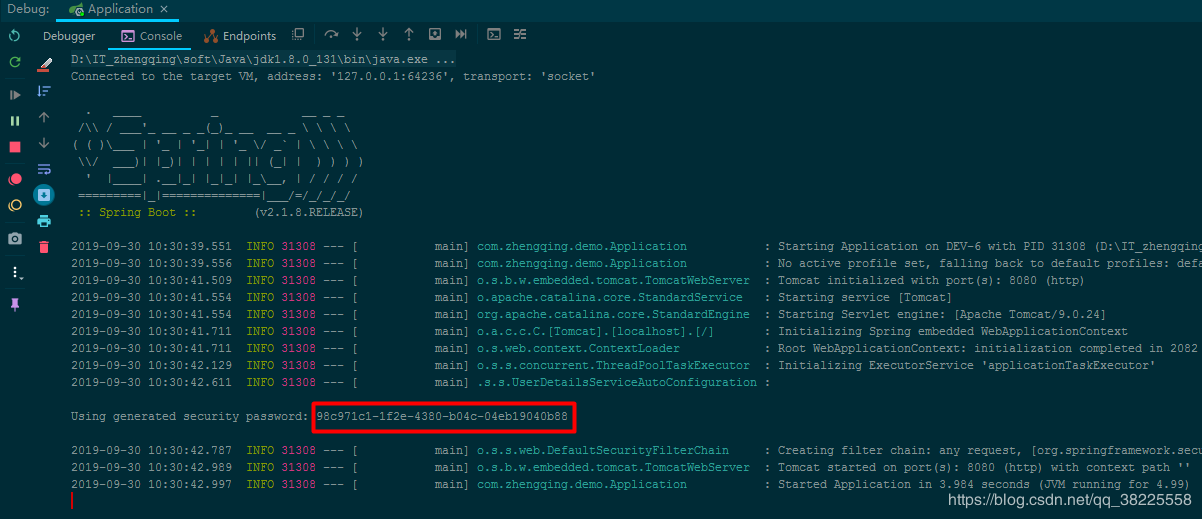
温馨小提示:在不进行任何配置的情况下,Spring Security 给出的默认用户名为user 密码则是项目在启动运行时随机生成的一串字符串,会打印在控制台,如下图:
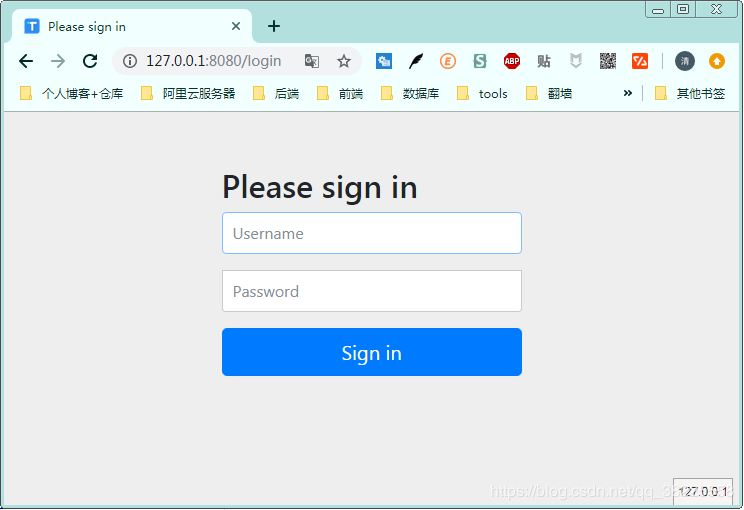
当我们访问index首页的时候,系统会默认跳转到login页面进行登录认证
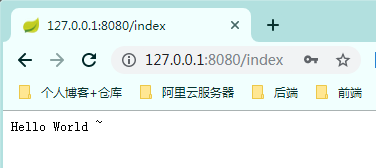
认证成功之后才会跳转到我们的index页面
三、Spring Security用户密码配置
除了上面Spring Security在不进行任何配置下默认给出的用户user 密码随项目启动生成随机字符串,我们还可以通过以下方式配置
1、springboot配置文件中配置
spring:

  security:

    user:

      name: admin  # 用户名

      password: 123456  # 密码
2、java代码在内存中配置
新建Security 核心配置类继承WebSecurityConfigurerAdapter
@Configuration

@EnableWebSecurity // 启用Spring Security的Web安全支持

public class SecurityConfig extends WebSecurityConfigurerAdapter {

    /**

     * 将用户设置在内存中

     * @param auth

     * @throws Exception

     */

    @Autowired

    public void config(AuthenticationManagerBuilder auth) throws Exception {

        // 在内存中配置用户,配置多个用户调用`and()`方法

        auth.inMemoryAuthentication()

                .passwordEncoder(passwordEncoder()) // 指定加密方式

                .withUser("admin").password(passwordEncoder().encode("123456")).roles("ADMIN")

                .and()

                .withUser("test").password(passwordEncoder().encode("123456")).roles("USER");

    }

    @Bean

    public PasswordEncoder passwordEncoder() {

        // BCryptPasswordEncoder:Spring Security 提供的加密工具,可快速实现加密加盐

        return new BCryptPasswordEncoder();

    }

}
3、从数据库中获取用户账号、密码信息
这种方式也就是我们项目中通常使用的方式,这个留到后面的文章再说
四、Spring Security 登录处理 与 忽略拦截
相关代码都有注释相信很容易理解
@Configuration

@EnableWebSecurity

public class SecurityConfig extends WebSecurityConfigurerAdapter {

    /**

     * 登录处理

     * @param http

     * @throws Exception

     */

    @Override

    protected void configure(HttpSecurity http) throws Exception {

        // 开启登录配置

        http.authorizeRequests()

                // 标识访问 `/index` 这个接口,需要具备`ADMIN`角色

                .antMatchers("/index").hasRole("ADMIN")

                // 允许匿名的url - 可理解为放行接口 - 多个接口使用,分割

                .antMatchers("/", "/home").permitAll()

                // 其余所有请求都需要认证

                .anyRequest().authenticated()

                .and()

                // 设置登录认证页面

                .formLogin().loginPage("/login")

                // 登录成功后的处理接口 - 方式①

                .loginProcessingUrl("/home")

                // 自定义登陆用户名和密码属性名,默认为 username和password

                .usernameParameter("username")

                .passwordParameter("password")

                // 登录成功后的处理器  - 方式②

//                .successHandler((req, resp, authentication) -> {

//                    resp.setContentType("application/json;charset=utf-8");

//                    PrintWriter out = resp.getWriter();

//                    out.write("登录成功...");

//                    out.flush();

//                })

                // 配置登录失败的回调

                .failureHandler((req, resp, exception) -> {

                    resp.setContentType("application/json;charset=utf-8");

                    PrintWriter out = resp.getWriter();

                    out.write("登录失败...");

                    out.flush();

                })

                .permitAll()//和表单登录相关的接口统统都直接通过

                .and()

                .logout().logoutUrl("/logout")

                // 配置注销成功的回调

                .logoutSuccessHandler((req, resp, authentication) -> {

                    resp.setContentType("application/json;charset=utf-8");

                    PrintWriter out = resp.getWriter();

                    out.write("注销成功...");

                    out.flush();

                })

                .permitAll()

                .and()

                .httpBasic()

                .and()

                // 关闭CSRF跨域

                .csrf().disable();

    }

    /**

     * 忽略拦截

     * @param web

     * @throws Exception

     */

    @Override

    public void configure(WebSecurity web) throws Exception {

        // 设置拦截忽略url - 会直接过滤该url - 将不会经过Spring Security过滤器链

        web.ignoring().antMatchers("/getUserInfo");

        // 设置拦截忽略文件夹,可以对静态资源放行

        web.ignoring().antMatchers("/css/**", "/js/**");

    }

}
五、总结
- 项目引入Spring Security依赖
- 自定义Security核心配置类继承
WebSecurityConfigurerAdapter - 账号密码配置
- 登录处理
- 忽略拦截
案例demo源码
https://gitee.com/zhengqingya/java-workspace
SpringBoot集成Spring Security入门体验的更多相关文章
- SpringBoot集成Spring Security(6)——登录管理
文章目录 一.自定义认证成功.失败处理 1.1 CustomAuthenticationSuccessHandler 1.2 CustomAuthenticationFailureHandler 1. ...
- SpringBoot集成Spring Security(2)——自动登录
在上一章:SpringBoot集成Spring Security(1)——入门程序中,我们实现了入门程序,本篇为该程序加上自动登录的功能. 文章目录 一.修改login.html二.两种实现方式 2. ...
- SpringBoot集成Spring Security(7)——认证流程
文章目录 一.认证流程 二.多个请求共享认证信息 三.获取用户认证信息 在前面的六章中,介绍了 Spring Security 的基础使用,在继续深入向下的学习前,有必要理解清楚 Spring Sec ...
- SpringBoot集成Spring Security(5)——权限控制
在第一篇中,我们说过,用户<–>角色<–>权限三层中,暂时不考虑权限,在这一篇,是时候把它完成了. 为了方便演示,这里的权限只是对角色赋予权限,也就是说同一个角色的用户,权限是 ...
- SpringBoot集成Spring Security(4)——自定义表单登录
通过前面三篇文章,你应该大致了解了 Spring Security 的流程.你应该发现了,真正的 login 请求是由 Spring Security 帮我们处理的,那么我们如何实现自定义表单登录呢, ...
- SpringBoot 集成Spring security
Spring security作为一种安全框架,使用简单,能够很轻松的集成到springboot项目中,下面讲一下如何在SpringBoot中集成Spring Security.使用gradle项目管 ...
- SpringBoot集成Spring Security
1.Spring Security介绍 Spring security,是一个强大的和高度可定制的身份验证和访问控制框架.它是确保基于Spring的应用程序的标准 --来自官方参考手册 Spring ...
- SpringBoot集成Spring Security(1)——入门程序
因为项目需要,第一次接触 Spring Security,早就听闻 Spring Security 功能强大但上手困难,学习了几天出入门道,特整理这篇文章希望能让后来者少踩一点坑(本文附带实例程序,请 ...
- springboot集成spring security安全框架入门篇
一. :spring security的简介 Spring Security是一个能够为基于Spring的企业应用系统提供声明式的安全访问控制解决方案的安全框架.它提供了一组可以在Spring应用上下 ...
随机推荐
- JavaScript数组方法详解
JavaScript数组方法详解 JavaScript中数组的方法种类众多,在ES3-ES7不同版本时期都有新方法:并且数组的方法还有原型方法和从object继承的方法,这里我们只介绍数组在每个版本中 ...
- 深入剖析PHP7内核源码(二)- PHP变量容器
简介 PHP的变量使用起来非常方便,其基本结构是底层实现的zval,PHP7采用了全新的zval,由此带来了非常大的性能提升,本文重点分析PHP7的zval的改变. PHP5时代的ZVAL typed ...
- gin-jwt对API进行权限控制
前言 之前文章简单介绍了如何运行gin+vue的前后端分离开源项目,该项目是学习了Gin实践教程后结合vue-element-admin写的,该教程讲得很详细,适合入门Gin.本篇文章将介绍gin+v ...
- SpringMVC 三种异常处理方式
SpringMVC 三种异常处理方式 在 SpringMVC, SpringBoot 处理 web 请求时, 若遇到错误或者异常,返回给用户一个良好的错误信息比 Whitelabel Error Pa ...
- ParquetDecodingException: Can not read value at 0 in block -1 in file hdfs:...
: jdbc:hive2://master01.hadoop.dtmobile.cn:1> select * from cell_random_grid_tmp2 limit 1; INFO : ...
- CodeForces 821D Okabe and City
Okabe and City 题解: 将行和列也视为一个点. 然后从普通的点走到行/列的点的话,就代表这行/列已经被点亮了. 然后将费用为0的点建上边. 注意讨论(n,m)非亮的情况下. 代码: #i ...
- Prim && Kruskal
Electrification Plan Prim #include<iostream> #include<cstring> using namespace std; cons ...
- hdu 1028 Ignatius and the Princess III 母函数
Ignatius and the Princess III Time Limit: 2000/1000 MS (Java/Others) Memory Limit: 65536/32768 K ...
- JavaScript里处理数字的一些常用方法
1.toString() 把字符串转换为数值. let num = 123; console.log(typeof(num)); //number console.log(typeof(num.toS ...
- Mysql 获取当月和上个月第一天和最后一天的SQL
Mysql 获取当月和上个月第一天和最后一天的SQL #获取当前日期select curdate(); #获取当月最后一天select last_day(curdate()); #获取本月的第一天se ...