
01 spring security入门篇
1. 环境搭建
使用SpringBoot搭建开发环境,只需在pom.xml添加如下依赖即可.
<?xml version="1.0" encoding="UTF-8"?>

<project xmlns="http://maven.apache.org/POM/4.0.0" xmlns:xsi="http://www.w3.org/2001/XMLSchema-instance"

         xsi:schemaLocation="http://maven.apache.org/POM/4.0.0 https://maven.apache.org/xsd/maven-4.0.0.xsd">

    <modelVersion>4.0.0</modelVersion>

    <groupId>qinfeng.zheng</groupId>

    <artifactId>mockmvc-demo</artifactId>

    <version>0.0.1-SNAPSHOT</version>

    <name>mockmvc-demo</name>

    <description>spring security项目</description>

    <properties>

        <java.version>1.8</java.version>

    </properties>

    <dependencies>

        <dependency>

            <groupId>org.projectlombok</groupId>

            <artifactId>lombok</artifactId>

        </dependency>

        <dependency>

            <groupId>org.springframework.boot</groupId>

            <artifactId>spring-boot-starter-web</artifactId>

        </dependency>

        <dependency>

            <groupId>commons-lang</groupId>

            <artifactId>commons-lang</artifactId>

            <version>2.6</version>

        </dependency>

        <dependency>

            <groupId>org.springframework.boot</groupId>

            <artifactId>spring-boot-starter-test</artifactId>

            <scope>test</scope>

        </dependency>

        <dependency>

            <groupId>org.springframework.boot</groupId>

            <artifactId>spring-boot-starter-aop</artifactId>

        </dependency>

        <dependency>

            <groupId>org.springframework.boot</groupId>

            <artifactId>spring-boot-starter-security</artifactId>

        </dependency>

    </dependencies>

    <dependencyManagement>

        <dependencies>

            <!--spring-boot依赖-->

            <dependency>

                <groupId>io.spring.platform</groupId>

                <artifactId>platform-bom</artifactId>

                <version>Cairo-SR8</version>

                <type>pom</type>

                <scope>import</scope>

            </dependency>

            <!--spring-cloud依赖-->

            <dependency>

                <groupId>org.springframework.cloud</groupId>

                <artifactId>spring-cloud-dependencies</artifactId>

                <version>Greenwich.SR3</version>

                <type>pom</type>

                <scope>import</scope>

            </dependency>

        </dependencies>

    </dependencyManagement>

    <build>

        <plugins>

            <plugin>

                <groupId>org.springframework.boot</groupId>

                <artifactId>spring-boot-maven-plugin</artifactId>

            </plugin>

        </plugins>

    </build>

</project>
2. 屏蔽security的权限认证弹框
springboot项目在启动的时候会检查classpath下面的java类,发现有security相关类,就会自动启动权限认证,所以我们在通过浏览器访问项目Controller类中方法时,security会将请求url重定向到默认的认证页面,如下所示:
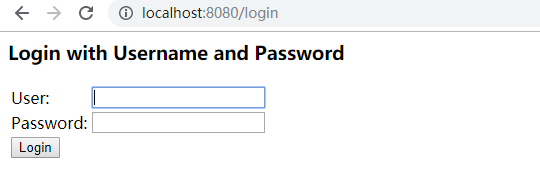
假如我们想要屏敝掉该弹框(即不做权限验证),那么在springboot2.x版本的项目中添加如下配置即可
import org.springframework.context.annotation.Configuration;

import org.springframework.security.config.annotation.web.builders.HttpSecurity;

import org.springframework.security.config.annotation.web.configuration.WebSecurityConfigurerAdapter;

@Configuration

public class SecurityConfig extends WebSecurityConfigurerAdapter {

    @Override

    protected void configure(HttpSecurity http) throws Exception {

        http.authorizeRequests().anyRequest().permitAll();

    }

}
在启动类配置如下也行
@SpringBootApplication(exclude = SecurityAutoConfiguration.class)
3.简单的 Form表单认证
import org.springframework.context.annotation.Configuration;

import org.springframework.security.config.annotation.web.builders.HttpSecurity;

import org.springframework.security.config.annotation.web.configuration.WebSecurityConfigurerAdapter;

@Configuration

public class SecurityConfig extends WebSecurityConfigurerAdapter {

    @Override

    protected void configure(HttpSecurity http) throws Exception {

        // 使用form表单验证

        http.formLogin()

                .and()

                .authorizeRequests()

                .anyRequest()

                .authenticated();

    }

}
4. 配置简单的http权限认证
import org.springframework.context.annotation.Configuration;

import org.springframework.security.config.annotation.web.builders.HttpSecurity;

import org.springframework.security.config.annotation.web.configuration.WebSecurityConfigurerAdapter;

@Configuration

public class SecurityConfig extends WebSecurityConfigurerAdapter {

    @Override

    protected void configure(HttpSecurity http) throws Exception {

        http.httpBasic()

                .and()

                .authorizeRequests()

                .anyRequest()

                .authenticated();

    }

}
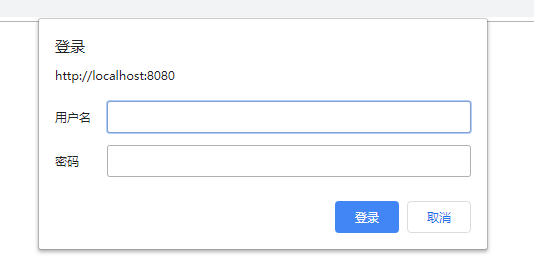
5. 自定义查询用户信息
spring security默认的登录用户信息肯定不能满足生产需要。但是spring security为我们提供了接口类UserDetailsService.java, 我们实现该接口,然后就能有效实现自定义的用户登录权限校验。
@Slf4j

@Component

public class MyUserDetailsService implements UserDetailsService {

    @Override

    public UserDetails loadUserByUsername(String username) throws UsernameNotFoundException {

        log.info("登录用户名:" + username);

        // 使用username查库

        PasswordEncoder encoder = PasswordEncoderFactories.createDelegatingPasswordEncoder();

        String password = encoder.encode("123456");

        log.info("username:{},password:{}", username,password);

        // 用户的权限, 也是从数据库查询

        List<GrantedAuthority> authorities = AuthorityUtils.commaSeparatedStringToAuthorityList("admin");

        return new User(username, password, authorities);

    }

}
此另,spring securty还为我们提供了几种默认的实现,我们只需添加配置即可,比如基于内存的配置示例(抄自官方文档)
  @Bean

    public UserDetailsService userDetailsService() {

        PasswordEncoder encoder = PasswordEncoderFactories.createDelegatingPasswordEncoder();

        UserDetails userDetails = User.withUsername("admin")

                .password(encoder.encode("123456"))

                .roles("USER", "ADMIN").build();

        // 基于内存,非持久化

        InMemoryUserDetailsManager manager = new InMemoryUserDetailsManager();

        manager.createUser(userDetails);

        return manager;

    }
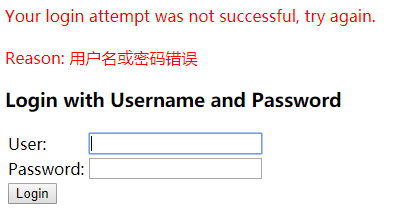
有了以上配置,我们启项目,请求接口,spring security会重定向我们的请求到登录窗口

点击Login按钮,会给我们一个默认的提示,如下:
01 spring security入门篇的更多相关文章
- Spring Security 入门篇
本文是一个笔记系列,目标是完成一个基于角色的权限访问控制系统(RBAC),有基本的用户.角色.权限管理,重点在Spring Security的各种配置.万丈高楼平地起,接下来,一步一步,由浅入深,希望 ...
- Spring Security入门篇——标签sec:authorize的使用
Security框架可以精确控制页面的一个按钮.链接,它在页面上权限的控制实际上是通过它提供的标签来做到的 Security共有三类标签authorize authentication accessc ...
- Spring boot学习1 构建微服务:Spring boot 入门篇
Spring boot学习1 构建微服务:Spring boot 入门篇 Spring Boot是由Pivotal团队提供的全新框架,其设计目的是用来简化新Spring应用的初始搭建以及开发过程.该框 ...
- Java基础-SSM之Spring MVC入门篇
Java基础-SSM之Spring MVC入门篇 作者:尹正杰 版权声明:原创作品,谢绝转载!否则将追究法律责任. 一.Spring MVC简介 1>.什么是Spring MVC 答:Sprin ...
- Java基础-SSM之Spring快速入门篇
Java基础-SSM之Spring快速入门篇 作者:尹正杰 版权声明:原创作品,谢绝转载!否则将追究法律责任. Spring是一个开源框架,Spring是于2003 年兴起的一个轻量级的Java ...
- SpringBoot集成Spring Security入门体验
一.前言 Spring Security 和 Apache Shiro 都是安全框架,为Java应用程序提供身份认证和授权. 二者区别 Spring Security:重量级安全框架 Apache S ...
- Java自动化测试框架-01 - TestNG之入门篇 - 大佬的鸡肋,菜鸟的盛宴(详细教程)
TestNG是什么? TestNG按照官方的定义: TestNG是一个测试框架,其灵感来自JUnit和NUnit,但引入了一些新的功能,使其功能更强大,使用更方便. TestNG是一个开源自动化测试框 ...
- Spring Security 入门(基本使用)
Spring Security 入门(基本使用) 这几天看了下b站关于 spring security 的学习视频,不得不说 spring security 有点复杂,脑袋有点懵懵的,在此整理下学习内 ...
- Spring Security 入门 (二)
我们在篇(一)中已经谈到了默认的登录页面以及默认的登录账号和密码. 在这一篇中我们将自己定义登录页面及账号密码. 我们先从简单的开始吧:设置自定义的账号和密码(并非从数据库读取),虽然意义不大. 上一 ...
随机推荐
- 【转载】Stackless Python并发式编程介绍[已校对版]
Stackless Python并发式编程介绍[已校对版] 作者: Grant Olson 电子邮件: olsongt@verizon.net 日期: 2006-07-07 译者: ...
- statistics——数学统计函数
statistics——数学统计函数 转自:https://blog.csdn.net/zhtysw/article/details/80005410 资源代码位置:Lib/statistixs.py ...
- day14—jQuery UI 之dialog部件
转行学开发,代码100天——2018-03-30 今天主要展示jQuery UI 之dialog部件的用法, 参考文档:https://jqueryui.com/dialog/ 本文记录分享初始的引用 ...
- Linux 路由表详解及 route 命令详解
参考资料 Linux 内核的路由表 通过 route 命令查看 Linux 内核的路由表: [root@VM_139_74_centos ~]# route Kernel IP routing tab ...
- SQL根据日期计算当月有多少天(转)
原文链接:https://blog.csdn.net/dobear_0922/article/details/2393235 --1.删除测试用表IF OBJECT_ID(N'Test', N'U') ...
- 《JAVA设计模式》之访问者模式(Visitor)
在阎宏博士的<JAVA与模式>一书中开头是这样描述访问者(Visitor)模式的: 访问者模式是对象的行为模式.访问者模式的目的是封装一些施加于某种数据结构元素之上的操作.一旦这些操作需要 ...
- JDK动态代理和CGLIB动态代理编码
JDK动态代理[接口]: import java.lang.reflect.InvocationHandler; import java.lang.reflect.Method; import jav ...
- 厉害了,Google大神每天写多少行代码?
文章转自开源中国社区,编译自:Quora Quora上有个有趣的问题:Google工程师们每天写多少行代码? Google 的 AdMob 全栈工程师 Raymond Farias 在 Quora 发 ...
- php 模拟登陆(不带验证码)采集数据
这里模拟表单登陆窗口 提交代码部分 1,生成session_id保存到 cookie $login_url = 'http://www.96net.com.cn/Login.php';$cookie_ ...
- 软件工程第六组U-Helpβ版使用说明
软件工程第六组U-Helpβ版使用说明 U-help ——告别取件烦恼 produced by 六扇门 源代码下载地址:https://github.com/U-Help/Version-1.0 安装 ...