
jsp选择文件夹上传
文件夹数据库处理逻辑
publicclass DbFolder
{
JSONObject root;
public DbFolder()
{
this.root = new JSONObject();
this.root.put("f_id", "");
this.root.put("f_nameLoc", "根目录");
this.root.put("f_pid", "");
this.root.put("f_pidRoot", "");
}
/**
* 将JSONArray转换成map
* @param folders
* @return
*/
public Map<String, JSONObject> toDic(JSONArray folders)
{
Map<String, JSONObject> dt = new HashMap<String, JSONObject>();
for(int i = 0 , l = folders.size();i<l;++i)
{
JSONObject o = folders.getJSONObject(i);
String id = o.getString("f_id");
dt.put(id, o);
}
return dt;
}
public Map<String, JSONObject> foldersToDic(String pidRoot)
{
//默认加载根目录
String sql = String.format("select f_id,f_nameLoc,f_pid,f_pidRoot from up6_folders where f_pidRoot='%s'", pidRoot);
SqlExec se = new SqlExec();
JSONArray folders = se.exec("up6_folders", sql, "f_id,f_nameLoc,f_pid,f_pidRoot","");
returnthis.toDic(folders);
}
public ArrayList<JSONObject> sortByPid( Map<String, JSONObject> dt, String idCur, ArrayList<JSONObject> psort) {
String cur = idCur;
while (true)
{
//key不存在
if (!dt.containsKey(cur)) break;
JSONObject d = dt.get(cur);//查父ID
psort.add(0, d);//将父节点排在前面
cur = d.getString("f_pid").trim();//取父级ID
if (cur.trim() == "0") break;
if ( StringUtils.isBlank(cur) ) break;
}
return psort;
}
public JSONArray build_path_by_id(JSONObject fdCur) {
String id = fdCur.getString("f_id").trim();//
String pidRoot = fdCur.getString("f_pidRoot").trim();//
//根目录
ArrayList<JSONObject> psort = new ArrayList<JSONObject>();
if (StringUtils.isBlank(id))
{
psort.add(0, this.root);
return JSONArray.fromObject(psort);
}
//构建目录映射表(id,folder)
Map<String, JSONObject> dt = this.foldersToDic(pidRoot);
//按层级顺序排列目录
psort = this.sortByPid(dt, id, psort);
SqlExec se = new SqlExec();
//是子目录->添加根目录
if (!StringUtils.isBlank(pidRoot))
{
JSONObject root = se.read("up6_files"
, "f_id,f_nameLoc,f_pid,f_pidRoot"
, new SqlParam[] { new SqlParam("f_id", pidRoot) });
psort.add(0, root);
}//是根目录->添加根目录
elseif (!StringUtils.isBlank(id) && StringUtils.isBlank(pidRoot))
{
JSONObject root = se.read("up6_files"
, "f_id,f_nameLoc,f_pid,f_pidRoot"
, new SqlParam[] { new SqlParam("f_id", id) });
psort.add(0, root);
}
psort.add(0, this.root);
return JSONArray.fromObject(psort);
}
public FileInf read(String id) {
SqlExec se = new SqlExec();
String sql = String.format("select f_pid,f_pidRoot,f_pathSvr from up6_files where f_id='%s' union select f_pid,f_pidRoot,f_pathSvr from up6_folders where f_id='%s'", id,id);
JSONArray data = se.exec("up6_files", sql, "f_pid,f_pidRoot,f_pathSvr","");
JSONObject o = (JSONObject)data.get(0);
FileInf file = new FileInf();
file.id = id;
file.pid = o.getString("f_pid").trim();
file.pidRoot = o.getString("f_pidRoot").trim();
file.pathSvr = o.getString("f_pathSvr").trim();
return file;
}
public Boolean exist_same_file(String name,String pid)
{
SqlWhereMerge swm = new SqlWhereMerge();
swm.equal("f_nameLoc", name.trim());
swm.equal("f_pid", pid.trim());
swm.equal("f_deleted", 0);
String sql = String.format("select f_id from up6_files where %s ", swm.to_sql());
SqlExec se = new SqlExec();
JSONArray arr = se.exec("up6_files", sql, "f_id", "");
return arr.size() > 0;
}
/**
* 检查是否存在同名目录
* @param name
* @param pid
* @return
*/
public Boolean exist_same_folder(String name,String pid)
{
SqlWhereMerge swm = new SqlWhereMerge();
swm.equal("f_nameLoc", name.trim());
swm.equal("f_deleted", 0);
swm.equal("LTRIM (f_pid)", pid.trim());
String where = swm.to_sql();
String sql = String.format("(select f_id from up6_files where %s ) union (select f_id from up6_folders where %s)", where,where);
SqlExec se = new SqlExec();
JSONArray fid = se.exec("up6_files", sql, "f_id", "");
return fid.size() > 0;
}
public Boolean rename_file_check(String newName,String pid)
{
SqlExec se = new SqlExec();
JSONArray res = se.select("up6_files"
, "f_id"
,new SqlParam[] {
new SqlParam("f_nameLoc",newName)
,new SqlParam("f_pid",pid)
},"");
return res.size() > 0;
}
public Boolean rename_folder_check(String newName, String pid)
{
SqlExec se = new SqlExec();
JSONArray res = se.select("up6_folders"
, "f_id"
, new SqlParam[] {
new SqlParam("f_nameLoc",newName)
,new SqlParam("f_pid",pid)
},"");
return res.size() > 0;
}
publicvoid rename_file(String name,String id) {
SqlExec se = new SqlExec();
se.update("up6_files"
, new SqlParam[] { new SqlParam("f_nameLoc", name) }
, new SqlParam[] { new SqlParam("f_id", id) });
}
publicvoid rename_folder(String name, String id, String pid) {
SqlExec se = new SqlExec();
se.update("up6_folders"
, new SqlParam[] { new SqlParam("f_nameLoc", name) }
, new SqlParam[] { new SqlParam("f_id", id) });
}
}
1.在webuploader.js大概4880行代码左右,在动态生成的input组件的下面(也可以直接搜索input),增加webkitdirectory属性。
function FileUploader(fileLoc, mgr)
{
var _this = this;
this.id = fileLoc.id;
this.ui = { msg: null, process: null, percent: null, btn: { del: null, cancel: null,post:null,stop:null }, div: null};
this.isFolder = false; //不是文件夹
this.app = mgr.app;
this.Manager = mgr; //上传管理器指针
this.event = mgr.event;
this.Config = mgr.Config;
this.fields = jQuery.extend({}, mgr.Config.Fields, fileLoc.fields);//每一个对象自带一个fields幅本
this.State = this.Config.state.None;
this.uid = this.fields.uid;
this.fileSvr = {
pid: ""
, id: ""
, pidRoot: ""
, f_fdTask: false
, f_fdChild: false
, uid: 0
, nameLoc: ""
, nameSvr: ""
, pathLoc: ""
, pathSvr: ""
, pathRel: ""
, md5: ""
, lenLoc: "0"
, sizeLoc: ""
, FilePos: "0"
, lenSvr: "0"
, perSvr: "0%"
, complete: false
, deleted: false
};//json obj,服务器文件信息
this.fileSvr = jQuery.extend(this.fileSvr, fileLoc);
2.可以获取路径
this.open_files = function (json)
{
for (var i = 0, l = json.files.length; i < l; ++i)
{
this.addFileLoc(json.files[i]);
}
setTimeout(function () { _this.PostFirst(); },500);
};
this.open_folders = function (json)
{
for (var i = 0, l = json.folders.length; i < l; ++i) {
this.addFolderLoc(json.folders[i]);
}
setTimeout(function () { _this.PostFirst(); }, 500);
};
this.paste_files = function (json)
{
for (var i = 0, l = json.files.length; i < l; ++i)
{
this.addFileLoc(json.files[i]);
}
};
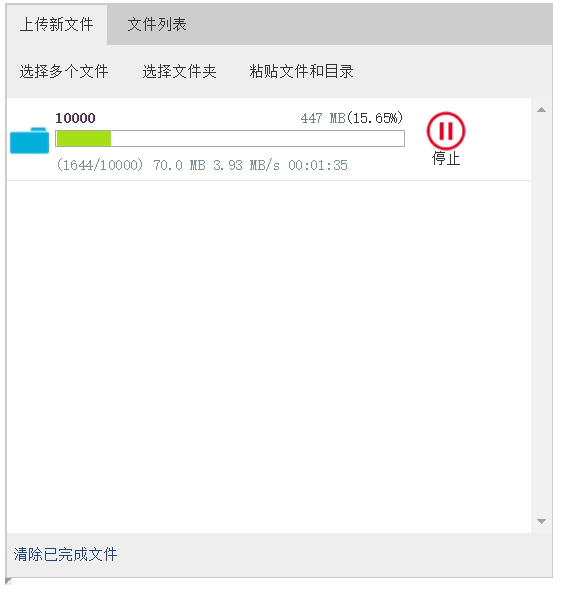
后端代码逻辑大部分是相同的,目前能够支持MySQL,Oracle,SQL。在使用前需要配置一下数据库,可以参考我写的这篇文章:http://blog.ncmem.com/wordpress/2019/08/07/java超大文件上传与下载/
jsp选择文件夹上传的更多相关文章
- web选择文件夹上传
我们平时经常做的是上传文件,上传文件夹与上传文件类似,但也有一些不同之处,这次做了上传文件夹就记录下以备后用. 这次项目的需求: 支持大文件的上传和续传,要求续传支持所有浏览器,包括ie6,ie7,i ...
- asp.net选择文件夹上传
HTML部分 <%@PageLanguage="C#"AutoEventWireup="true"CodeBehind="index.aspx. ...
- php选择文件夹上传
最近遇见一个需要上传百兆大文件的需求,调研了七牛和腾讯云的切片分段上传功能,因此在此整理前端大文件上传相关功能的实现. 在某些业务中,大文件上传是一个比较重要的交互场景,如上传入库比较大的Excel表 ...
- asp.net (web)选择文件夹 上传文件
1 背景 用户本地有一份txt或者csv文件,无论是从业务数据库导出.还是其他途径获取,当需要使用蚂蚁的大数据分析工具进行数据加工.挖掘和共创应用的时候,首先要将本地文件上传至ODPS,普通的小文件通 ...
- B/S选择文件夹上传
1 背景 用户本地有一份txt或者csv文件,无论是从业务数据库导出.还是其他途径获取,当需要使用蚂蚁的大数据分析工具进行数据加工.挖掘和共创应用的时候,首先要将本地文件上传至ODPS,普通的小文件通 ...
- Web大文件(夹)上传(断点续传)控件发布-Xproer.HttpUploader6
版权所有 2009-2017荆门泽优软件有限公司 保留所有权利 官方网站:http://www.ncmem.com/ 产品首页:http://www.ncmem.com/webapp/up6.2/in ...
- Web大文件(夹)上传(断点续传)控件-Xproer.HttpUploader6
版权所有 2009-2017荆门泽优软件有限公司 保留所有权利 官方网站:http://www.ncmem.com/ 产品首页:http://www.ncmem.com/webapp/up6.2/in ...
- vue文件夹上传组件选哪个好?
一. 功能性需求与非功能性需求 要求操作便利,一次选择多个文件和文件夹进行上传:支持PC端全平台操作系统,Windows,Linux,Mac 支持文件和文件夹的批量下载,断点续传.刷新页面后继续传输. ...
- Java Web 项目的文件/文件夹上传下载
需求: 支持大文件批量上传(20G)和下载,同时需要保证上传期间用户电脑不出现卡死等体验: 内网百兆网络上传速度为12MB/S 服务器内存占用低 支持文件夹上传,文件夹中的文件数量达到1万个以上,且包 ...
随机推荐
- day49—JavaScript阻止浏览器默认行为
转行学开发,代码100天——2018-05-04 今天主要说明一下通过JavaScript对浏览器默认行为的阻止操作.比如右键菜单的行为. 阻止默认行为的语句为: return false; 例如,阻 ...
- 006-unity3d GUI初识、贴图、自定义鼠标指针
一.gui概念 无论摄像机拍摄到的图像怎么变换,GUI永远显示在屏幕上,不受变形.碰撞.光照的影响.对话框.战斗值.能量等.示例:用手机录像,摄像的参数不会随着拍摄场景变换.GUI基础GUI部分是每帧 ...
- robot framework :List Variables-List变量及其用法
[转自:https://blog.csdn.net/yezibang/article/details/52692342] 这一讲我们重点来介绍List Variables-List变量及其用法. 一. ...
- ecshop后台增加模块菜单详细教程
我们有时候针对ecshop如此开发,想在后台加一些菜单,最模板以前提供过教程,但是并非很系统,今天最模板抛砖引玉图文教程告诉大家:如何在ecshop后台增加模块菜单! 首先需要修改四个文件:inc_p ...
- IDEA基本设置和快捷键大全
# IDEA基本设置 ## 设置编码格式 1. Configure - Settings - Editor - File Encodings 2. 将三个编码全部设置为UTF-8 ## 启用Ctrl+ ...
- Mac 设置git命令tab自动补全(亲测有效)
转载 :https://blog.csdn.net/tiancaijyy/article/details/84888868 注意: 获取git-completion.bash 要对应自己的git版本 ...
- fastdfs集群安装过程_学习笔记
最终效果 初始化为6个节点 在/usr/local/software 目录下上传需要用到tar包,分别在各个节点上传 使用scp 将本地software目录复制到其他节点上 73.74为 tracke ...
- jdbc步骤:
一.注册数据库驱动 Class.forName("com.mysql.jdbc.Driver"); 二.建立连接(Connection) Connection conn = Dri ...
- 05.vue-resource的基本使用
<!DOCTYPE html> <html lang="en"> <head> <meta charset="UTF-8&quo ...
- 3 Vue.js基础
Vue中的过滤器.钩子函数.指令.字符串填充.以及部分方法使用的案例(操作表单) <!DOCTYPE html> <html lang="en"> < ...